How to Communicate With Remote Employees: 7 Practices (2026) | The Collaborative Organization
By The Collaborative Organization Team · November 19, 2026 · Last verified November 19, 2026 · 10 min read
Communicating with remote employees means giving them the same clarity office staff get from being in the room, through written updates, regular one-on-ones and agreed response times. Remote work does not fail for lack of tools. It fails when messages go missing, decisions stay unwritten and people stop knowing where they stand.
Key takeaways
- Gallup found 48% of hybrid workers have never discussed a plan for how their team collaborates, and teams with a plan are 66% more likely to be engaged.
- Remote staff need four things: clear expectations, regular contact, a written record and equal access to decisions.
- Buffer found 62% of remote workers have teammates in several time zones, so async habits matter more than meeting hours.
- One meaningful conversation a week with each direct report is the single most useful habit a remote manager can build.
- Owl Labs found 69% of managers say hybrid and remote work made their team more productive when it is organized well.
Why remote communication fails first
Distance removes the small signals that carry most office communication. There is no hallway chat, no glance across a desk and no quick question while passing. Gallup names the result plainly: leaders and managers cite communication (48%) and collaboration (44%) as their top hybrid challenges.
The numbers show how common the gap is. Gallup’s hybrid work data puts 52% of remote-capable US employees in hybrid roles and 26% fully remote, so most teams now mix locations. Yet nearly half of hybrid workers, 48%, say their team has never discussed a plan for how to collaborate.
Loneliness adds weight to the silence. In Buffer’s 2023 survey of 3,000 remote workers, 23% named loneliness as a struggle, and 81% said they check work email outside work hours. People who feel cut off read silence as rejection, so a late reply can feel like a judgment. Clear, regular contact is the fix, not more tools.
Our guide to managing a remote team covers the wider job, from hiring to performance. This article stays narrower: it covers the communication practices themselves, the messages, meetings and norms that keep remote staff in the loop.
What remote employees need from managers
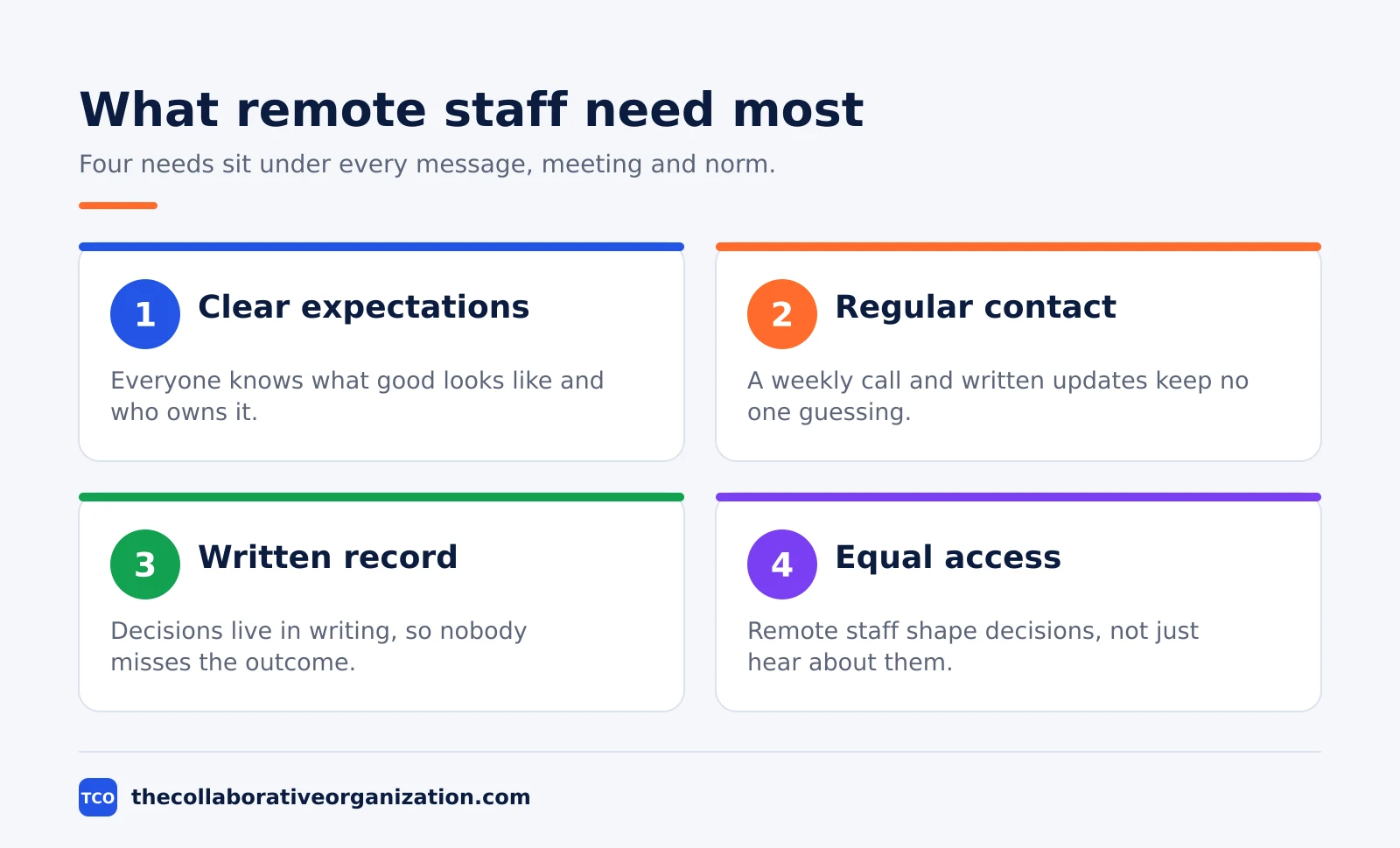
Remote employees need four things from a manager: clear expectations, regular contact, a written record and equal access to decisions. Everything in this article serves one of those four needs. When one of them is missing, remote staff fill the gap with guesswork, and guesswork is where mistakes and resentment grow.
Trust sits underneath all four needs. Only 54% of managers who supervise remote employees strongly agree they trust their teams to be productive, Gallup found, and only 57% of employees strongly agree they feel trusted. The gap is a communication problem: trust grows when expectations are clear and feedback is regular, not when managers watch the clock.
Equal access is the need managers forget first. Owl Labs found in its 2025 survey that 45% of workers list not feeling seen or heard in meetings as a remote worker among their top workplace concerns. If remote staff only hear decisions after they are made, they stop contributing to them.
Connection is the fourth need, and the data is kind to it. Buffer found that 75% of remote workers feel connected to their colleagues, even though most work across time zones. Connection needs regular, human contact, which the steps below build. Our guide on staying connected with remote coworkers covers the social side in more depth.
How to communicate with remote employees in 7 steps
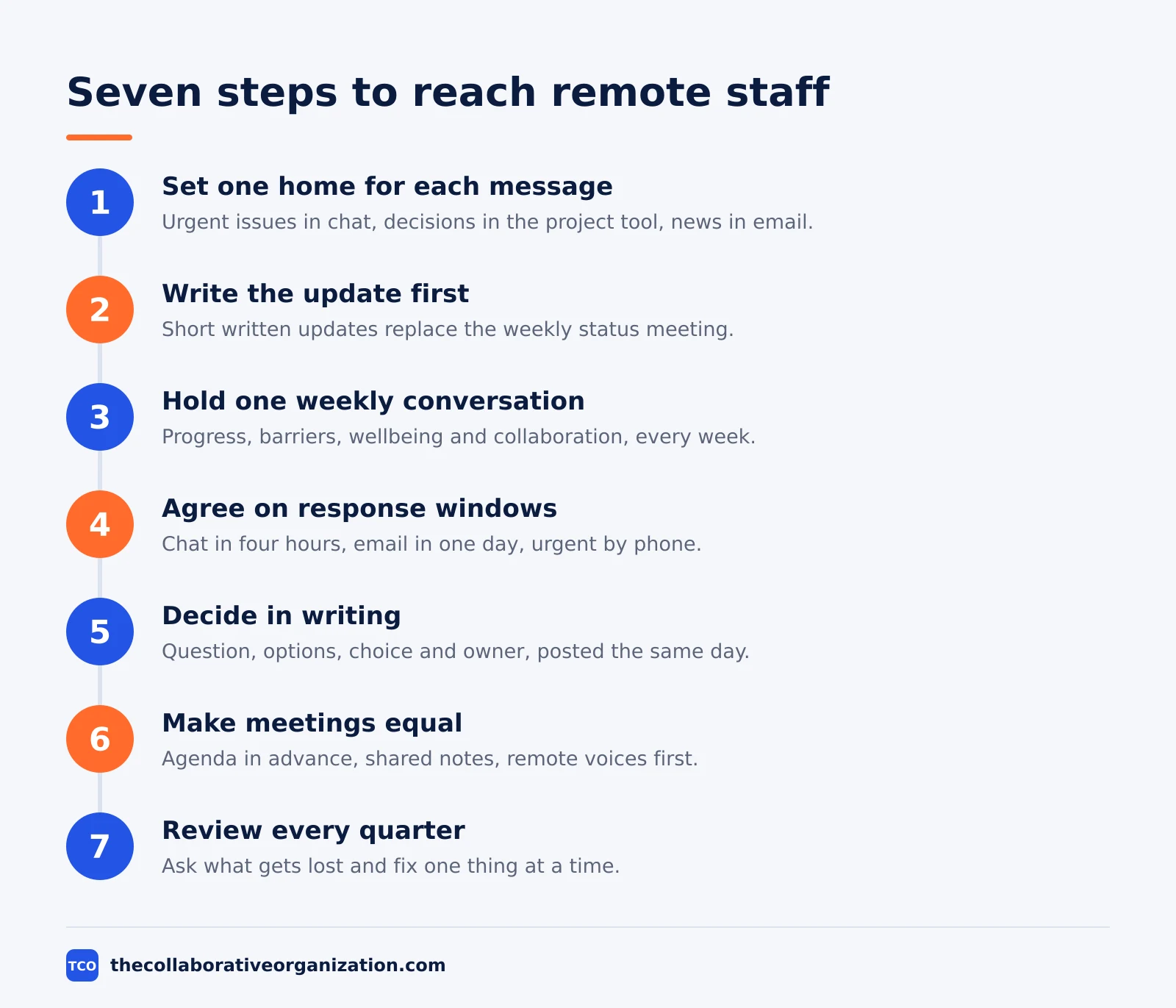
The seven steps below form a complete system, and they work in order. Start with expectations and channels, then add the weekly rhythm, then fix the two problems that sink remote teams: time zones and silence.
Step 1: Set one home for each type of message
Decide where each kind of message lives: urgent issues in chat, decisions in the project tool, announcements in email, and social talk in a separate channel. When a message can live anywhere, people check everywhere and still miss it. Write the map down and pin it where new hires see it.
Step 2: Write the update before you call the meeting
Replace the weekly status meeting with a short written update from each person: what shipped, what is stuck, and what is needed next. People read it in their own time, and the live meeting shrinks to decisions only. Buffer found that 75% of remote workers spend 1 to 10 hours a week in meetings, so every meeting you cut returns real hours.
Step 3: Hold one meaningful conversation a week
Gallup recommends one meaningful conversation per week with each direct report, covering progress, barriers, wellbeing and collaboration. Put it on the calendar as a recurring slot and keep it even in busy weeks. Remote staff who hear from their manager weekly stop guessing where they stand.
Step 4: Agree on response windows, not instant replies
Set a reply window for each channel: chat within four working hours, email within one working day, and urgent issues by phone or a marked urgent message. The window must respect time zones, so publish working hours in each person’s profile. Our time zone guide shows how to set overlap hours across zones.
Step 5: Decide in writing, then tell everyone
Write each decision down with the question, the options, the choice and the owner, and post it where the team can find it. Remote staff who miss the meeting still need the outcome, and a written record stops the same decision being re-argued. If a decision changes, post the change in the same place.
Step 6: Make remote voices equal in live meetings
Send the agenda and the reading in advance, run the meeting from a shared document, and ask remote participants for input before the room decides. Rotate who speaks first so the same voices do not always lead. A meeting where remote staff only listen is a broadcast, not a conversation.
Step 7: Review the system every quarter
Ask the team four questions each quarter: which messages get lost, which meetings waste time, which decisions surprise people, and what should change. Change one thing at a time and tell the team what changed. A communication system that never gets reviewed slowly stops matching how the team works.
A weekly communication rhythm that works
A fixed weekly rhythm beats a pile of ad-hoc messages. When everyone knows what arrives on which day, remote staff stop checking every channel every hour. The table below is a starting pattern for a team of 10 to 20 people; shrink it for smaller teams.
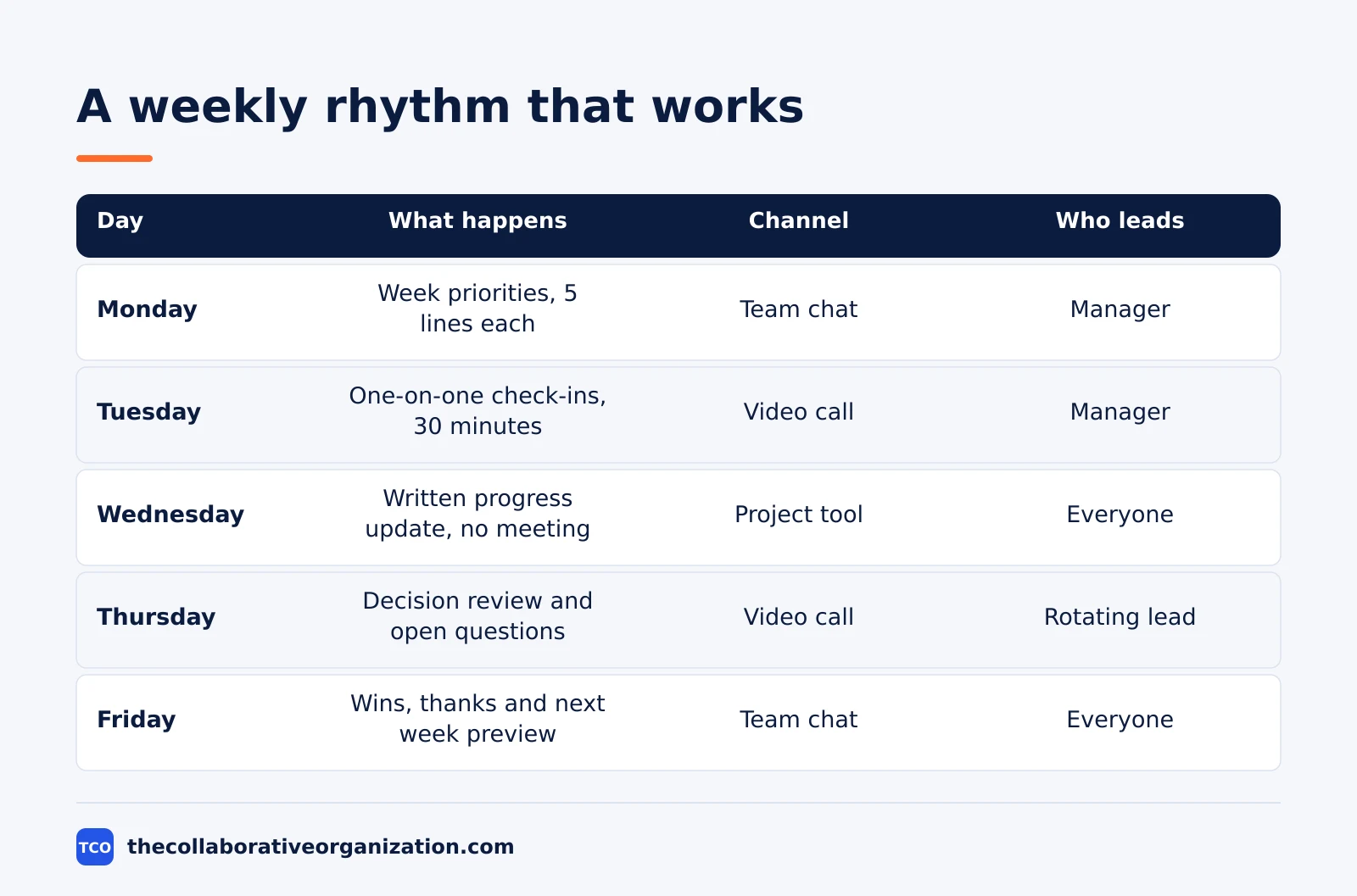
| Day | What happens | Channel | Who leads |
|---|---|---|---|
| Monday | Week priorities posted, 5 lines each | Team chat | Manager |
| Tuesday | One-on-one check-ins, 30 minutes | Video call | Manager |
| Wednesday | Written progress update, no meeting | Project tool | Everyone |
| Thursday | Decision review and open questions | Video call | Rotating lead |
| Friday | Wins, thanks and next week preview | Team chat | Everyone |
The rhythm works because it mixes written and live contact. Written updates carry the facts, live calls carry the judgment and the relationship. Owl Labs found that 69% of managers believe hybrid and remote work has made their team more productive, and a rhythm like this is how that productivity gets organized.
Keep the total live time small. Buffer’s survey found that 52% of remote workers spend only 1 to 5 hours a week in meetings, and the happiest remote teams protect that time. If your rhythm needs more than five live hours a week, cut a meeting before you add a tool.
Remote communication example: a 12-person team across 4 time zones
Picture a 12-person product team: four people in London, four in New York, three in Toronto and one in Sydney. Their working hours overlap for only two hours a day, and the Sydney developer has been missing decisions made after she signs off. The manager decides to rebuild the team’s communication from scratch.
The rebuild takes two weeks. The manager writes a one-page channel map, sets a four-hour reply window for chat and one working day for email, and moves status updates to a written Wednesday post. Live meetings move into the two-hour overlap window, and every decision is written up the same day in the project tool.
Three months later the pattern holds. The Sydney developer reads decisions each morning and adds comments before the next overlap window, so nothing waits a full day. Meeting hours fall from nine a week to four, and the weekly one-on-one surfaces two frustrations before they become resignations.
This is an illustration, not a case study: the team and the numbers are made up to show the shape of a working system. The pattern is what matters: one map, one rhythm, written decisions and a weekly human conversation.
Tools for remote team communication
Tools carry the system, but they are not the system. Pick the chat tool your team already opens, add video calls for the weekly rhythm, and keep decisions in the project tool. The table below lists the two chat tools most teams start with, with starting prices as of November 2026.
| Tool | Best for | Free plan | Starting price (as of November 2026) | Notable limit |
|---|---|---|---|---|
| Slack | Chat-first remote teams | Free plan, 90 days of history | $7.25 per user per month (Pro), billed annually | Free plan hides messages older than 90 days |
| Microsoft Teams | Teams already on Microsoft 365 | Free plan, 60-minute group meetings | $4.00 per user per month (Teams Essentials), paid yearly | Free plan caps group meetings at 60 minutes |
Prices come from each vendor’s own pricing page, checked in November 2026. Slack’s pricing page lists Pro at $7.25 per user per month billed annually, and Microsoft’s Teams page lists Essentials at $4.00.
Compare the full shortlist on our team communication software page before you choose. The right tool is the one the whole team will open every day, including the person in the farthest time zone.
Trust is the reason to keep the tool list short. Our guide on building trust in remote teams shows how regular contact and clear expectations do more for trust than any new app. One chat tool, one meeting tool and one place for decisions is enough.
Common remote communication mistakes to avoid
Most remote communication breaks in the same few ways. Run through the list below each quarter and fix the first one you recognize.
- Treating chat as a meeting. Long debates in chat bury decisions and exhaust everyone. Move any thread past five replies into a call or a written decision.
- Expecting instant replies. Remote staff in other time zones cannot answer at midnight, and pretending they can burns people out. Reply windows beat read receipts.
- Deciding in the room and telling remote staff later. Decisions made in a side conversation reach remote staff as orders. Write the decision down before the meeting ends.
- Running meetings without an agenda. A meeting with no agenda and no notes wastes the overlap hours a distributed team cannot get back. Post the agenda a day ahead.
- Hiding bad news until it is official. Remote staff hear rumors last and feel it most. Share what you know, say what you do not know yet, and say when the next update comes.
- Measuring presence instead of output. Counting green dots and hours online rewards visibility over work. Judge remote staff on results and deadlines, the same as anyone else.
Sources
- Gallup - A Strategic Guide for Managing Hybrid and Remote Teams (2026)
- Buffer - 2023 State of Remote Work (2023)
- Owl Labs - State of Hybrid Work 2025 (2025)
- Slack - Pricing (2026)
- Microsoft - Microsoft Teams Pricing for Business: Plans and Features (2026)
Frequently asked questions
How often should managers check in with remote employees?
At least once a week, in a real conversation about progress, barriers and wellbeing, not just a status ping. Gallup recommends one meaningful conversation per week with each direct report. Daily contact should happen in writing, through updates and chat, while the weekly call carries the human part of the job.
What is the best channel for urgent messages to remote staff?
Pick one channel for urgent items and name it in writing, such as a phone call or a message marked urgent in chat. Everything else should wait for its normal reply window. If every channel can carry an urgent message, staff must watch them all, and nothing feels urgent any more.
Should remote teams use video or written updates?
Use both, for different jobs. Written updates carry facts, decisions and records that people can read in their own time. Video calls carry judgment, debate and trust, which need a human voice and face. A team that only writes drifts apart, and a team that only meets burns its hours.
How do you include remote staff in decisions made in the office?
Write every decision down with the question, the options, the choice and the owner, and post it where the whole team can find it the same day. Invite remote staff to comment before the decision is final, not after. If a decision changes, post the change in the same place.
How can managers tell if remote communication is working?
Ask the team each quarter whether messages get lost, meetings waste time and decisions surprise people. Watch for the warning signs: repeated questions, work done twice, and staff who go quiet. When the answers improve, the system works, and when they do not, change one thing at a time.
Related articles
team communication
Communication Plan for a Project: Template (2026)
A communication plan for a project names who gets which update, in which channel, how often, and from whom. Copy the template and the filled example below.
November 20, 2026 · 10 min read
team communication
How Often Should Managers Communicate With Teams? (2026)
Managers should hold one meaningful conversation with each person every week, plus a weekly team update. See the cadence table for meetings, updates and feedback.
November 20, 2026 · 9 min read
team communication
Upward Communication Examples: 10 That Work (2026)
Upward communication is a message that travels from an employee to a manager or leader. See 10 concrete examples, each with why it works and when to use it.
November 20, 2026 · 9 min read