Time Zone Management for Remote Teams (2026) | The Collaborative Organization
By The Collaborative Organization Team · November 19, 2026 · Last verified November 19, 2026 · 12 min read
Time zone management is the practice of designing overlap hours, async rules and handoffs around the hours your team really shares. It starts with a map of real working hours, not with a meeting invite, and it ends with a written handoff that lets work move while half the team sleeps.
Key takeaways
- In Buffer’s 2023 survey, 62% of remote workers said their immediate team spans multiple time zones.
- About two hours of shared working time is enough for people who work closely together.
- Async-first working is the default when the spread is four hours or more, with live meetings kept for decisions.
- Every deadline should name its time zone, and every handoff should list status, next action, blockers and owner.
- Daylight saving dates differ by region, so re-check the overlap after each change.
- Microsoft found 30% of meetings now span multiple time zones, up eight points since 2021.
What is time zone management?
Time zone management means turning a spread of clocks into a working routine. It covers three decisions: how many hours people genuinely share, what happens in writing when they do not, and who absorbs the inconvenient hours when a live meeting is needed.
The problem is common. Buffer surveyed 3,000 remote workers in 2023 and found 62% said their immediate team spans multiple time zones, while 74% said their company operates across them. Working across time zones was the biggest struggle for 14% of respondents.
The cost of getting it wrong is measurable. A 2024 study in Organization Science followed 12,038 employees at a large multinational and found greater time-zone distance reduced rich, synchronous communication and pushed work into personal hours. An earlier version of the same study found each extra hour of time-zone distance cut total communication by 9.4% on average.
The fix is not more meetings. It is a small protected overlap window, written decisions, and a handoff habit. The rest of this guide sets up each part in order.
What you need before you start
You need four things, and none of them costs money. A list of every team member with city and normal working hours, a shared calendar, one chat channel for handoffs, and agreement on a single reference time zone.
Convert every working hour to UTC, the neutral standard from which every zone is measured. UTC never shifts with daylight saving, so it stays true when local clocks move. A shared calendar that shows two or three zones at once does the same job, and most teams already have one.
Set the effort aside. Mapping the spread takes an hour, agreeing the overlap window takes one meeting, and writing the handoff template takes another hour. The habits take two to three weeks to settle, and the payoff is fewer midnight calls and faster decisions.
Measure your team’s time zone spread
Start by listing every person, their city, their normal start and end times, and any hard limits such as school drop-off or local holidays. Put it in one shared view so nobody has to do mental math before booking a call.
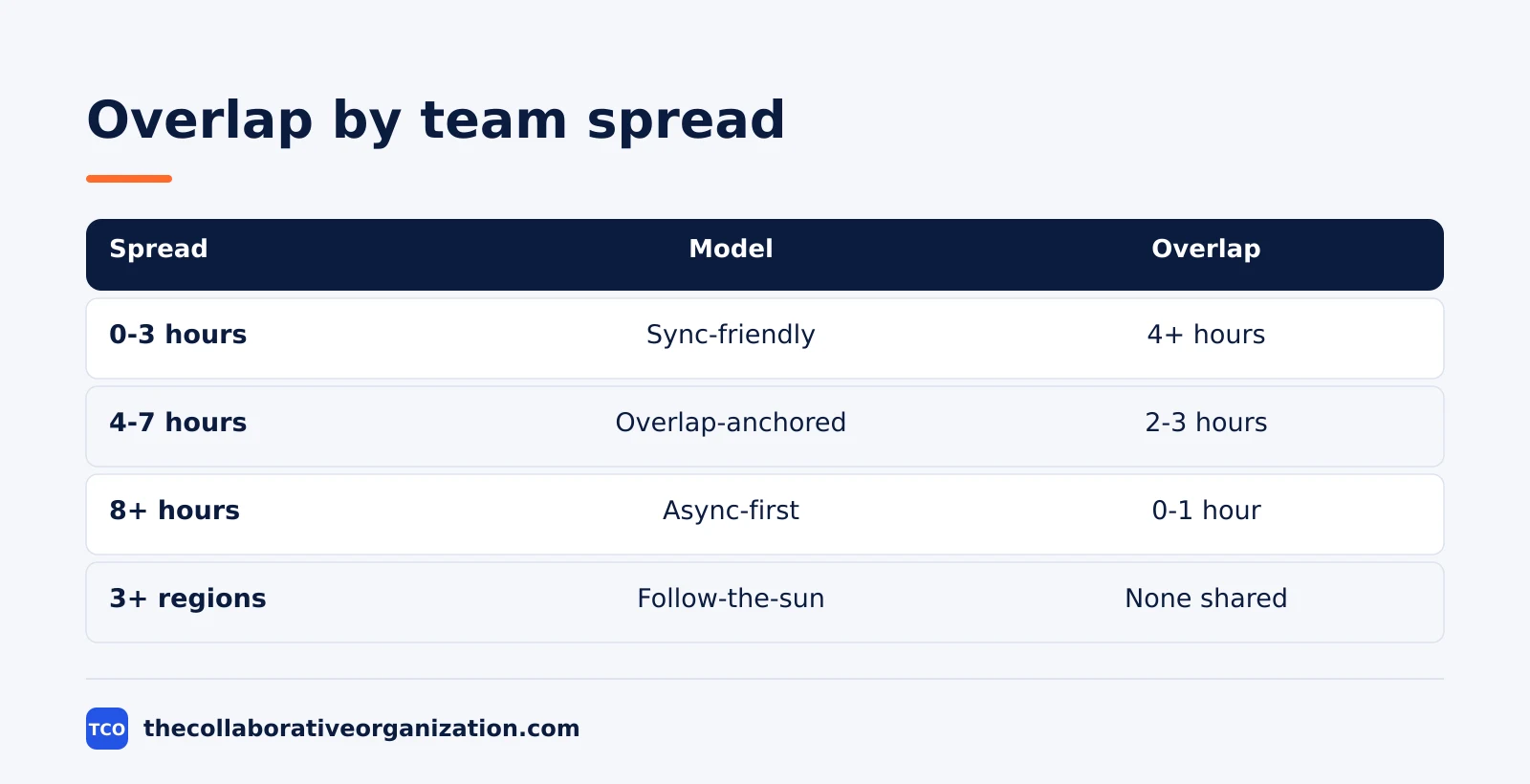
| Spread | Typical example | Operating model | Daily overlap target |
|---|---|---|---|
| 0-3 hours | US East and US West | Sync-friendly | 4+ hours |
| 4-7 hours | US and Europe | Overlap-anchored | 2-3 hours |
| 8+ hours | US and Asia-Pacific | Async-first | 0-1 hour, often shifted |
| Three or more regions | Americas, Europe, Asia-Pacific | Follow-the-sun | No shared window for everyone |
The spread decides the model. A team inside three hours can work almost like a co-located team, with standard core hours. A team spread across eight hours or more needs async-first working, because no window suits everyone. Our guide to how to manage a remote team covers the management side of the same spread.
Three regions need a different shape again. With the Americas, Europe and Asia-Pacific on one team, there is no hour when everyone is awake and working. The answer is regional meetings plus a rare all-hands, with formal handoffs between regions.
How much overlap do you need?
Aim for about two hours of shared working time between people who work closely together, and design everything else to work without it. Two hours is enough for a short live call plus quick back and forth on anything blocking.
The number matches the windows in GitLab’s public communication handbook, which suggests 8:00 AM to 10:00 AM Pacific Time for Europe and the Americas, equal to 4:00 PM to 6:00 PM in London or Lisbon.
The windows are set out in a 2026 guide to running a remote team across time zones. For Asia and the Americas, GitLab suggests 7:00 AM to 9:00 AM Hong Kong with 4:00 PM to 6:00 PM Pacific.
More overlap is not always better. Three or more shared hours support daily check-ins and pairing, but meetings tend to fill the window if nobody protects it. One shared hour can work if handovers are written well, with a weekly live call as the anchor.
Zero overlap is workable only for independent work. It needs structured handoffs, written decisions, and a rotated live slot once a month or once a week, so the team still meets as people. Roles that need frequent real-time collaboration should not be staffed across a nine-hour gap.
Make async the default
Async-first means written updates, recorded decisions and clear response times are the default, and live meetings are the exception. Writing does not need anyone else to be awake, which is why it scales across time zones and meetings do not.
Set response windows by channel, not by person. A normal question in chat gets an answer within one working day, an urgent item goes through an agreed channel, and a decision stays open for comment for 48 hours before it closes. The window should be written down, because unwritten windows turn into silent waiting.
Write decisions down where the team can find them. A short decision note names the decision, the options, who decided, and the date. GitLab runs this way with a public handbook of more than 2,000 pages, so an answer is usually searchable before anyone asks a person.
Keep the human part. Buffer’s 2023 survey found only 3% of respondents worked all async, while 29% worked mostly async and 31% split evenly. Most teams keep a small live window for relationship-building, and that window is worth protecting even when the work itself is async.
How to run meetings across time zones in 6 steps
Meetings across time zones work when the window is fixed, the burden is shared, and the notes are written. The six steps below turn a scattered calendar into a routine the team can trust.
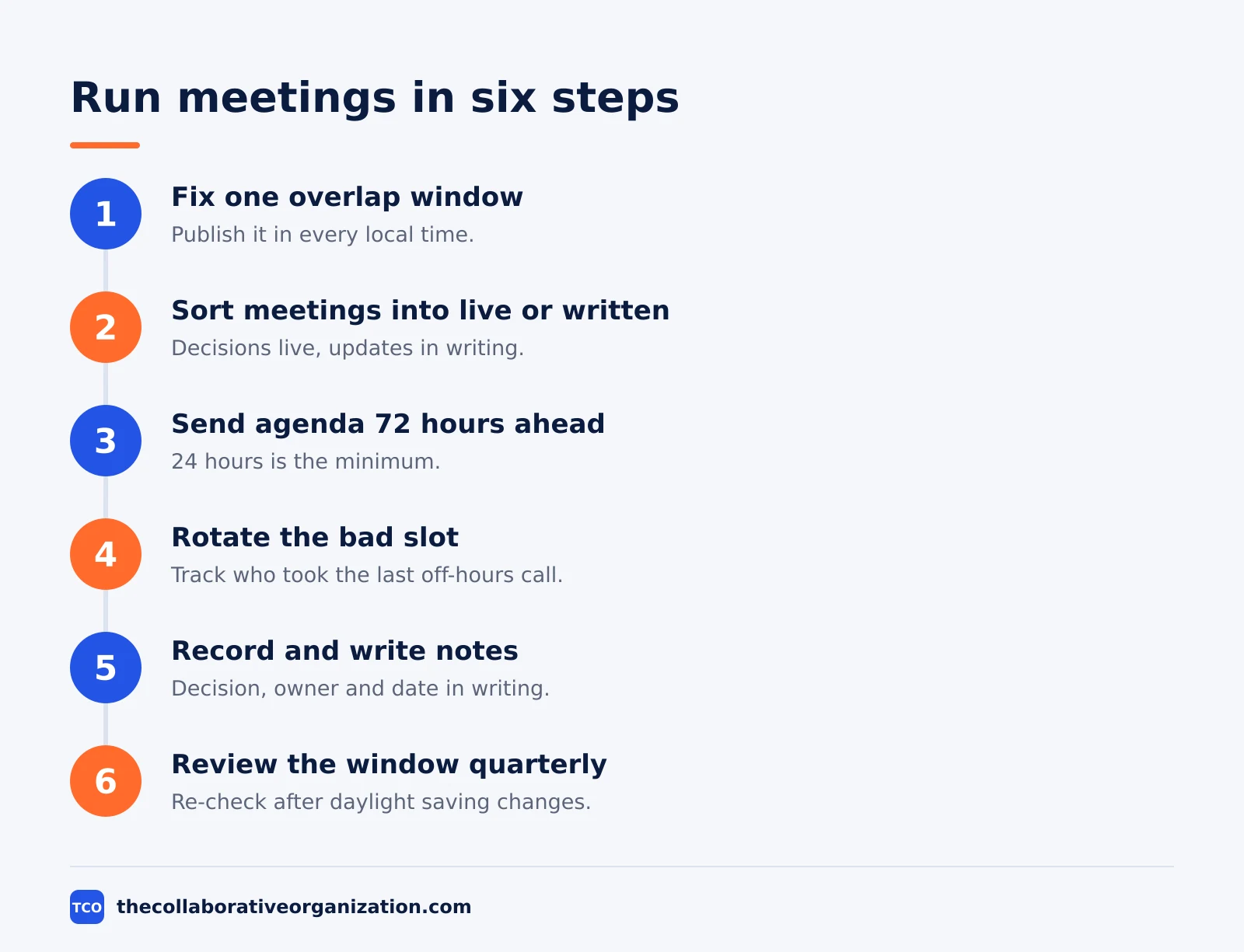
Step 1: Fix one overlap window and publish it in every local time
Pick the window from the spread table, then publish it as one line in every local time, such as core hours 09:00-11:00 Eastern, 14:00-16:00 London and 18:30-20:30 India. The window is the only time live meetings may be booked without asking first.
Step 2: Sort meetings into live, recorded or written
Decisions, complex problem-solving, incidents and sensitive talks belong in the overlap window. Status updates, simple approvals and information sharing go into writing. A meeting that could have been a written update should become one.
Step 3: Send the invite and the agenda 72 hours ahead
GitLab’s meeting guidance asks for invites with 72 hours’ notice where possible, and 24 hours as a minimum. The agenda goes with the invite, not at the start of the call, so people in other zones can read it in their own working hours.
Step 4: Rotate the inconvenient slot
When a meeting must fall outside someone’s normal hours, rotate it. Keep a simple shared document that tracks which time zone took the off-hours slot for each recurring meeting, and share the burden across quarters.
Step 5: Record by default and write the notes
Record the meeting, then write a short note with the decision, the owner and the date. Written notes are faster to read than recordings, and they keep absent regions in the loop without a second meeting.
Step 6: Review the window every quarter
Check the overlap after each daylight saving change and each quarter. In 2026 the US moved clocks on March 8 and November 1, while the EU changed on March 29 and October 25, so US-to-Europe gaps shrink by an hour for a few weeks each year. A window that worked in January may not work in April.
Handoffs that keep work moving
A handoff is a short written note at the end of each working day, and it is what makes follow-the-sun work possible. Without it, the next region starts the day by asking what happened, and the answer waits another day.
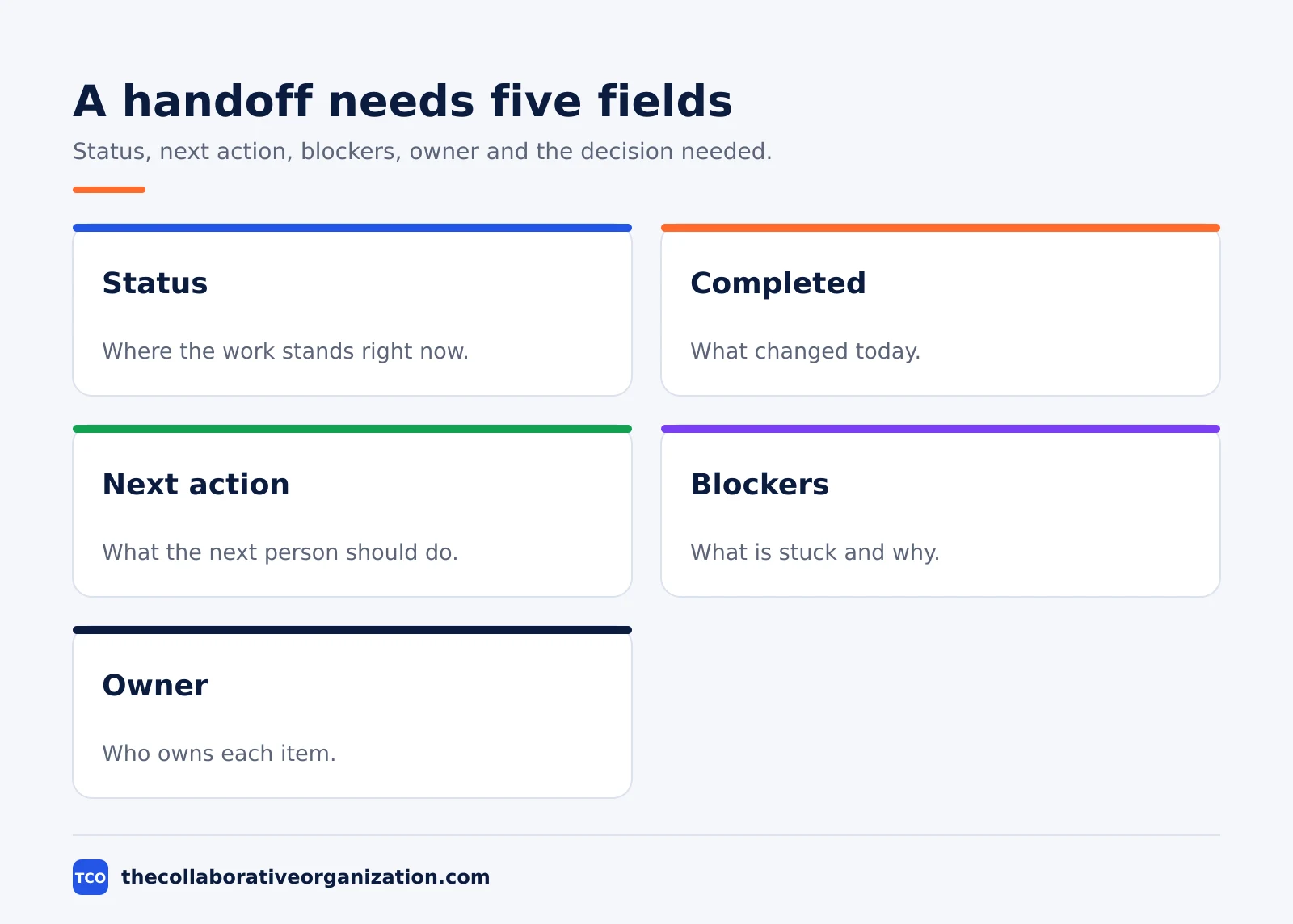
| Handoff field | What to write | Example |
|---|---|---|
| Status | Where the work stands | Checkout fix is in review |
| Completed | What changed today | Payment error reproduced |
| Next action | What the next person should do | Merge the fix after review |
| Blockers | What is stuck and why | Waiting on API key from vendor |
| Owner | Who owns each item | Priya owns the merge |
| Decision needed | What must be decided, and by when | Approve the refund flow by Friday |
GitLab reserves follow-the-sun handoffs for urgent work such as critical customer fixes and high-severity security issues, because handoffs are less efficient than one person working alone, even though they are faster than waiting. For routine work, a daily written handoff is enough.
Put deadlines in both relevant time zones, not just the sender’s. A deadline written as Friday 17:00 means nothing to a teammate nine hours ahead. Write Friday 17:00 London and 09:00 San Francisco, and the date will not slip by a day.
Daylight saving, holidays and local hours
Local hours are the default, and exceptions should be rare, explicit and rotated. Every person should publish normal working hours in their calendar and messaging profile, and managers should repeat the rule.
Microsoft found about 30% of employees it studied had a third evening peak of work, and Teams users sent 42% more chats per person after hours. Scheduled send and published working hours exist to stop that drift, and they only work if the team uses them.
Holidays differ by country, and a team that forgets that will book a meeting on a day half the team is away. Keep a shared holiday calendar, and check it before setting a deadline that crosses a holiday week. Our guide to how to run a hybrid meeting covers the same fairness rules for mixed on-site and remote groups.
Worked example: San Francisco, London and Berlin
Imagine a team of six with two people in San Francisco, two in London and two in Berlin, all on 9-to-5 days. The team converts every working hour to UTC to find the real overlap.
San Francisco 09:00 to 17:00 is 17:00 to 01:00 UTC. London 09:00 to 17:00 is 09:00 to 17:00 UTC. Berlin 09:00 to 17:00 is 08:00 to 16:00 UTC.
The only hour all three share is 16:00 to 17:00 UTC, which is 08:00 in San Francisco, 16:00 in London and 17:00 in Berlin.
The team protects that single hour for its daily stand-up and for decisions. Everything else goes async: a written update at the end of each day, a handoff note with status, next action and blockers, and a 48-hour comment window on decisions.
The team also rotates one evening call a month so the San Francisco pair does not always take the early slot. The example is an illustration, not a case study.
Common time zone management mistakes to avoid
Most time zone plans fail in the same five ways, and all five are easy to spot in a calendar review.
- Booking meetings outside the overlap window. Every meeting outside the window is a tax on someone’s evening or morning, and the same people pay it every week.
- Using overlap for status updates. Overlap is for decisions and sensitive talks. Status updates belong in writing, where any time zone can read them.
- Writing deadlines in one time zone only. A deadline with no zone is a deadline that slips by a day for half the team.
- Letting one region always take the bad slot. Rotate inconvenient times, and keep a record of who took the last one.
- Skipping the handoff. A day without a handoff is a day the next region spends asking what happened. Our guide to how to run a virtual meeting covers the note-taking habit that makes handoffs stick.
How to measure success
Measure four things each month: overlap use, decision speed, after-hours messages, and missed handoffs. Overlap use means the share of live meetings booked inside the window, and the target is 90% or more.
Decision speed means the days from a proposal to a written decision, and the target is two working days for routine calls. After-hours messages means chats and emails sent outside the recipient’s published hours, and the trend should fall after scheduled send is switched on.
Missed handoffs means working days with no handoff note, and the target is zero on handover days. If all four move the right way for two months, the system works. If decision speed stalls while overlap use is high, the window is being spent on status updates instead of decisions.
Tools that help across time zones
The tools should show local times, support scheduled send, and keep a written record. A shared calendar, a chat tool and a video tool cover most teams, and each one should display the time zone beside the name.
| Tool | Best for | Free plan | Starting price (as of November 2026) | Notable limit |
|---|---|---|---|---|
| Slack | Chat with local times and scheduled send | Free plan | $7.25 per active user per month (Pro), billed annually | Bills only active users in a 28-day window |
| Zoom | Video meetings inside the overlap window | Basic free, 40-minute meetings | $14.16 per user per month (Pro), billed annually | Pro covers up to 99 users |
| Microsoft Teams | Chat and meetings inside Microsoft 365 | Free plan | $4.00 per user per month (Teams Essentials), billed annually | Essentials has no full Microsoft 365 apps |
The Slack price comes from Slack pricing, corroborated by independent pricing checks in October and November 2026 that list Pro at $7.25 per active user per month billed annually.
The Zoom price comes from Zoom’s own pricing page, corroborated by independent pricing checks in November 2026 that list Pro at $14.16 per user per month billed annually.
The Microsoft Teams price comes from Microsoft’s own pricing page, which listed Teams Essentials at $4.00 per user per month in November 2026. Compare the options on our team communication software shortlist before you pick one.
Sources
- Buffer - 2023 State of Remote Work (2023)
- Helpware - How to Manage Remote Teams Across Time Zones (2026)
- Remote Builders - How to Manage a Remote Team Across Time Zones (2026)
- GlobalCityTime - Working With a Remote Team Across Time Zones (2026)
- Himalayas - Working Across Time Zones (2026)
- Slack - Pricing (2026)
Frequently asked questions
How much overlap do remote teams need?
About two hours of shared working time is enough for people who work closely together. Two hours covers a short live call plus quick back and forth on anything blocking. Three or more hours supports daily check-ins, while one hour means a weekly live call and async work for the rest.
What is the best way to schedule meetings across time zones?
Pick one fixed overlap window, publish it in every local time, and protect it for decisions and sensitive talks. Move status updates and routine approvals into writing. Rotate any meeting that falls outside normal hours so the same region does not always take the early or late slot.
Should remote teams work async first?
Yes, when the spread is four hours or more. Async-first means written updates, recorded decisions and clear response times are the default, and live meetings are the exception. GitLab runs this way with a public handbook, and only 3% of Buffer's 2023 respondents worked all async, so most teams still keep a small live window.
How do you handle daylight saving time changes?
Convert every working hour to UTC, which never shifts with daylight saving, and re-check the overlap after each change. In 2026 the US moved clocks on March 8 and November 1, while the EU changed on March 29 and October 25, so US-to-Europe gaps shrink by an hour for a few weeks each year.
What should a handoff note include?
A handoff note should list status, completed work, the next action, blockers, and who owns each item. It should also name the decision needed and the date it is needed by. A short written handoff lets the next region start work without a meeting, which is the whole point of follow-the-sun working.
What tools help with time zone management?
A shared calendar with multi-zone view, a chat tool with published working hours, and a docs tool for written decisions cover most teams. Slack, Zoom and Microsoft Teams all show local times and support scheduled send, so messages arrive in working hours instead of at midnight.
Related articles
team communication
Communication Plan for a Project: Template (2026)
A communication plan for a project names who gets which update, in which channel, how often, and from whom. Copy the template and the filled example below.
November 20, 2026 · 10 min read
team communication
How Often Should Managers Communicate With Teams? (2026)
Managers should hold one meaningful conversation with each person every week, plus a weekly team update. See the cadence table for meetings, updates and feedback.
November 20, 2026 · 9 min read
team communication
Upward Communication Examples: 10 That Work (2026)
Upward communication is a message that travels from an employee to a manager or leader. See 10 concrete examples, each with why it works and when to use it.
November 20, 2026 · 9 min read