How to Check If a SaaS Tool Is Secure (2026) | The Collaborative Organization
By The Collaborative Organization Team · November 19, 2026 · Last verified November 19, 2026 · 10 min read
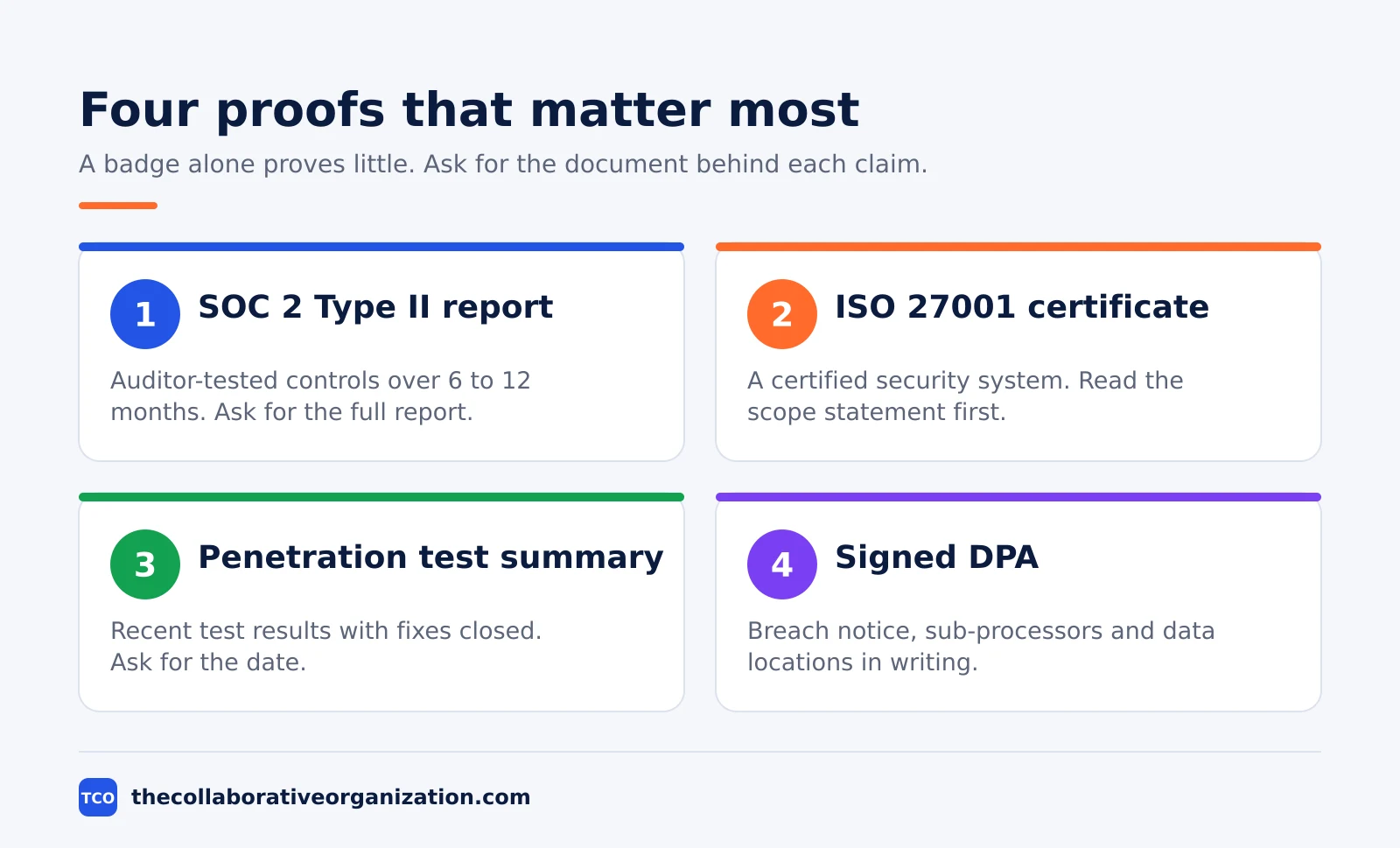
To check if a SaaS tool is secure, ask for its SOC 2 Type II report, confirm ISO 27001 certification, and test its encryption, login controls and data handling before you sign. A vendor badge on a marketing page proves nothing on its own. The checks below take about two hours and give you written evidence to file and share.
Key takeaways
- A SOC 2 Type II report is the standard ask: an auditor tested the controls over 6 to 12 months.
- ISO 27001 proves a certified security system, but the scope statement decides what it covers.
- SOC 2 is an attestation, not a pass or fail certificate, so read the exceptions section first.
- The global average cost of a data breach was $4.44 million in 2025, and the United States average hit a record $10.22 million.
- Check security on the plan you would buy, since SAML SSO and audit logs often sit on higher tiers.
- File every report with its date and re-check before each renewal.
What a secure SaaS tool looks like
A secure SaaS tool protects your data with tested controls, limits who can see it, and tells you quickly when something goes wrong. That means independent audit reports, encryption in transit and at rest, single sign-on, and a written agreement that names sub-processors and breach notice times.
The stakes are plain. IBM’s Cost of a Data Breach Report 2025, built on Ponemon Institute research across 600 organizations, puts the global average cost of a breach at $4.44 million, while the United States average hit a record $10.22 million, according to All Covered.
A marketing page that says “bank-grade security” is not evidence. Evidence is a report you can read, a certificate you can check, and settings you can test in a trial account.
What you need before you start checking
Before you check a vendor, write down what data the tool will hold, who will use it, and which rules apply to your team. A note-taking app for public meeting notes needs far less proof than a tool that stores customer records or payment details.
Gather four facts before you open the vendor site:
- The data types: names, email addresses, files, customer records, payment details.
- The users: how many people, which roles, and whether guests or clients get access.
- The rules: privacy law, industry rules, or customer contracts that set your own duties.
- The plan: which paid tier you would buy, since security features change by plan.
Our guide on how to evaluate SaaS software covers the wider buying checks, from price to fit, that sit next to the security checks here.
Set a time limit. Two hours covers a standard tool when the vendor has a public trust center, while a tool with no public documents can take a full day of emails.
How to check a SaaS tool in 7 steps
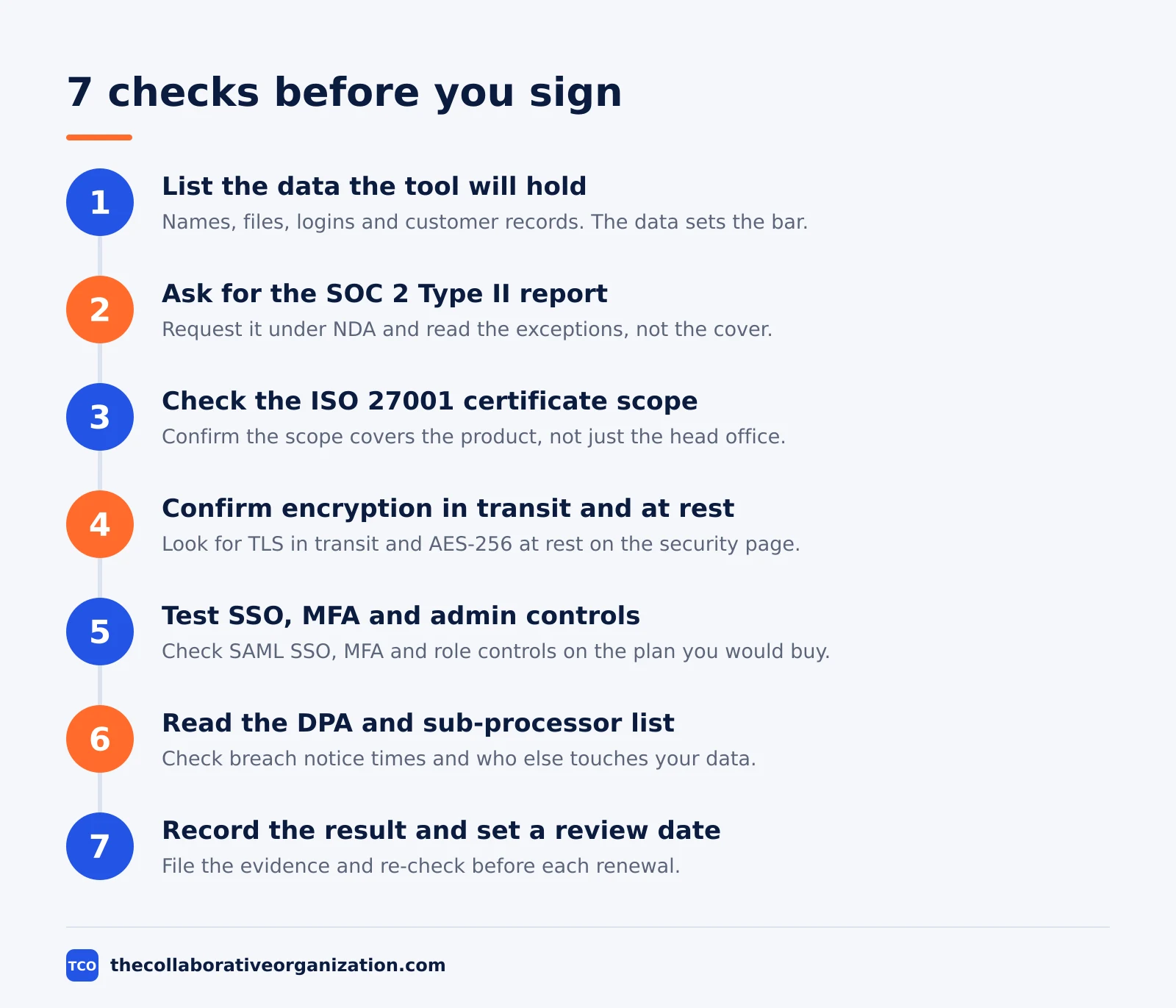
Work through the seven steps in order, and stop the purchase if any step turns up a blank. The steps run from the data you hold to the contract you sign, and each one ends with a piece of evidence you can file.
Step 1: List the data the tool will hold
Write the list before you open the vendor site. Names, files, logins and customer records set the bar, and a tool that touches payment details or health records needs the full set of checks below.
Step 2: Ask for the SOC 2 Type II report
Ask the vendor for the full report under NDA, then read the exceptions section first. Our SOC 2 guide for software buyers explains the five trust criteria, and a SOC 2 Type II report covers controls that an auditor tested over 6 to 12 months, which is why buyers treat it as the standard ask.
Step 3: Check the ISO 27001 certificate scope
A certificate proves the vendor runs a certified security management system, but the scope statement decides what it covers. Check the certificate in IAF CertSearch or the issuer register, and walk away if the scope covers only the head office and not the product. A genuine certificate can still say nothing about the service you pay for, so verify it at the source rather than trusting a PDF alone.
Step 4: Confirm encryption in transit and at rest
Look for TLS in transit and AES-256 at rest on the vendor security page, and ask where the keys live. Encryption at rest means stored files are unreadable without the key, while TLS protects data as it moves between your browser and the vendor servers.
Step 5: Test SSO, MFA and admin controls
Sign in to a trial and check whether the plan you would buy includes SAML single sign-on, multi-factor authentication and role-based access. SAML lets staff sign in with company credentials, and SCIM removes their access at once when they leave. Our SSO guide compares SAML, OAuth and plain SSO so you can match the method to your identity provider.
Step 6: Read the DPA and sub-processor list
Ask for the “data processing agreement” before you sign, and check the breach notice time, the sub-processors, and where data is stored. A vendor security assessment guide puts breach notice at 24 to 72 hours, and our GDPR guide for SaaS tools covers the clauses that matter when your team handles personal data.
Step 7: Record the result and set a review date
Save every report, certificate and screenshot in one folder, note the dates, and set a review before renewal. A check you cannot find later is a check you will repeat, and a vendor that changes its sub-processors should trigger a fresh look.
How to read a SOC 2 report without missing the gaps
Read the exceptions first, the scope second, and the marketing summary last. The exceptions name the controls that failed or were missing, and the scope names the systems the auditor actually looked at.
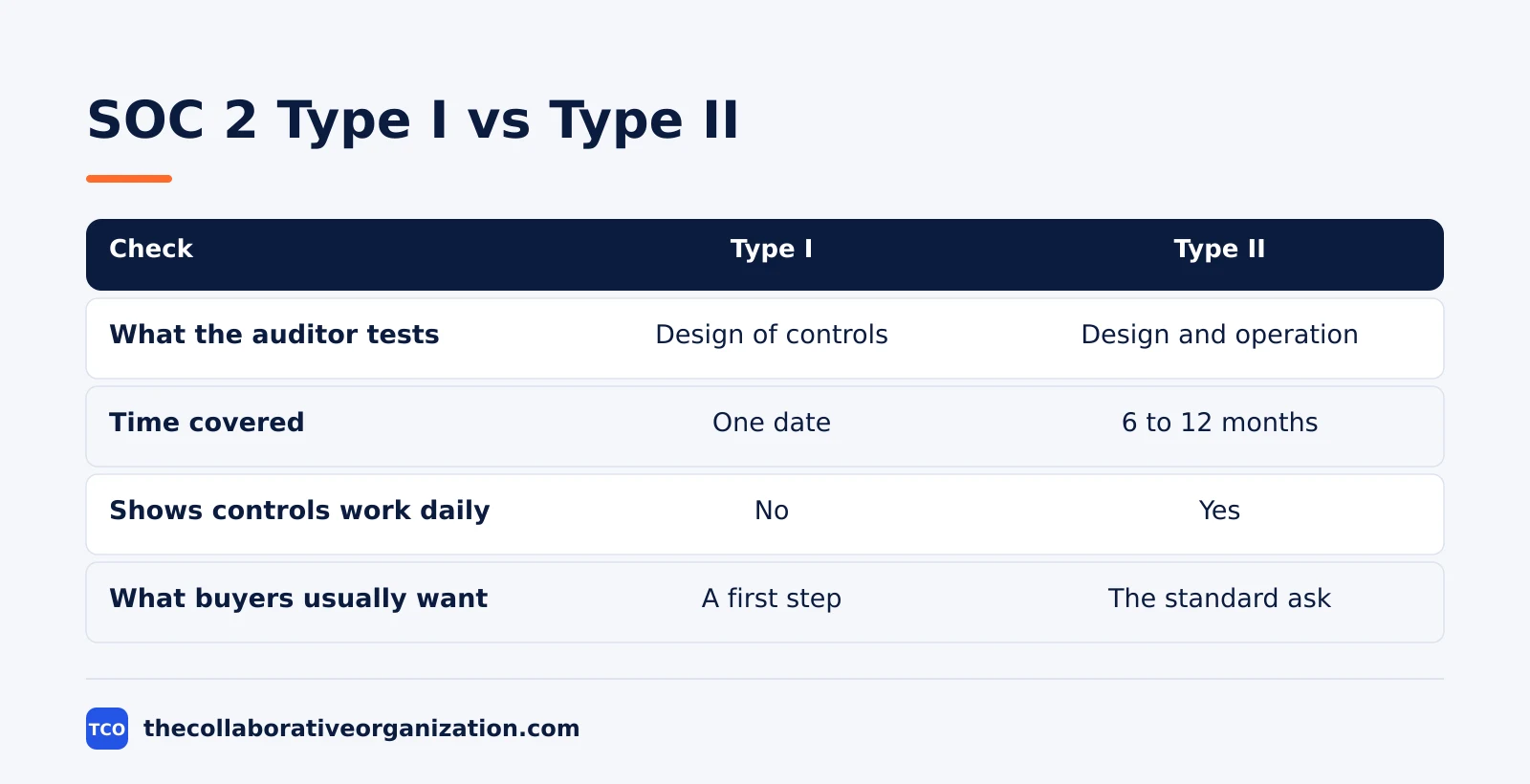
Type I reports cover the design of controls on one date, while Type II reports cover design and operation over 6 to 12 months. The longer window is the reason most enterprise buyers ask for Type II, and a Type I report is best read as a first step rather than proof.
Check the audit period dates and the report date. A report that ended 18 months ago says little about the vendor today, so ask for the latest report and the plan for the next audit.
SOC 2 is an attestation, not a pass or fail certificate, so no vendor can show you a “SOC 2 certificate” as proof. The report carries an auditor opinion, and a vendor that claims a pass mark has mixed up the framework with another standard.
Encryption, logins and access controls to confirm
Confirm three things in the trial: data is encrypted in transit and at rest, logins use multi-factor authentication, and admins can limit what each role sees. If any of the three is missing on the plan you would buy, price the higher plan before you compare vendors.
Check the data location too. Our data residency guide explains where vendors store data and why the region matters for privacy rules, and the vendor trust center should name the regions it uses.
Ask how the vendor handles a leaver. Access should end the day someone leaves, not at the next quarterly review, and shared accounts should not exist at all. A tool with no SCIM or automated deprovisioning needs a manual offboarding step in your own process.
Look for audit logs on the plan you buy. Logs that record who viewed, changed or exported records turn a security incident into a short investigation instead of a guess.
Worked example: checking a project tool for a 40-person team
Imagine a 40-person marketing team that wants a project tool to hold client files, campaign plans and contractor logins. The team lead sets aside two hours, lists the data, and asks three shortlisted vendors for their SOC 2 Type II reports and DPAs. This is an illustration, not a real case.
Vendor A sends a Type II report dated three months ago with no exceptions and a DPA that names two sub-processors and a 48-hour breach notice. Vendor B sends a Type I report only and a DPA with no breach notice time. Vendor C has no trust center and asks the team to sign first and review later.
| Vendor | Report | DPA breach notice | Decision |
|---|---|---|---|
| Vendor A | Type II, 3 months old, no exceptions | 48 hours, 2 sub-processors named | Shortlist and test the trial |
| Vendor B | Type I only | No breach notice time | Hold until a Type II report arrives |
| Vendor C | None, no trust center | Review after signing | Drop from the shortlist |
The team picks Vendor A, checks SAML single sign-on on the plan they would buy, and files the report with a renewal review date. Vendor B stays on the list for a later review, and Vendor C is dropped because a vendor that will not show its controls before signing rarely improves after it.
Common mistakes when checking SaaS security
Most failed checks share the same five mistakes, and each one is easy to avoid. Run through the list before you sign anything.
- Trusting a badge on a marketing page. A logo proves the vendor once held a report, not that the scope covers your product or that the report is current.
- Accepting a Type I report as full proof. Type I covers design on one date, so it says nothing about whether controls worked day to day.
- Skipping the DPA. The contract sets breach notice times and sub-processors, and a signed deal without it leaves you with no written duties.
- Checking the wrong plan. Security features such as SAML SSO often sit on higher tiers, so check the plan you would buy, not the top plan.
- Forgetting shadow IT. A tool your team already uses without approval still holds company data, so our shadow IT guide is worth a read before you start.
- Never re-checking. Certificates lapse and sub-processors change, so set a review date at renewal time.
Tools that publish clear security information
Start with vendors that publish a trust center, a security page and clear plan limits. The three tools below all publish pricing and security pages, and each one links to its own profile on this site for the full detail.
| Tool | Best for | Free plan | Starting price (as of November 2026) | Notable limit |
|---|---|---|---|---|
| Asana | Teams that want task ownership with audit trails | Personal free for 2 users | $10.99 per user per month (Starter), billed annually | SAML and SCIM need the Enterprise plan |
| monday.com | Teams that want visual boards with status tracking | Free plan for up to 2 seats | $9 per seat per month (Basic), billed annually | Paid plans need at least 3 seats |
| ClickUp | Teams that want custom fields and views | Free Forever plan | $9 per user per month (Core), billed annually | Yearly billing needed for that price |
The Asana price comes from Asana pricing: Personal is free for 2 users and Starter is $10.99 per user per month billed annually.
The monday.com pricing page lists Basic at $9 per seat per month billed annually, with a 3-seat minimum.
The ClickUp pricing page lists Core at $9 per user per month billed yearly.
If you run this check across a whole stack, our guide to auditing your software stack shows how to list every tool first, so no app escapes the review.
Sources
- Security Compliance Guide - What Is SOC 2 Type 2? (2026)
- Sterling GRC - How to Verify an ISO/IEC 27001 Certificate and Spot a Fake (2026)
- WorkInSync - How to Run a Vendor Security Assessment for Workplace SaaS (2026)
- All Covered - Key Insights from IBM’s 2025 Cost of a Data Breach Report (2025)
- Selenios - Enterprise SSO in Your ATS: What SAML, SCIM Are (2026)
- Asana - Pricing (2026)
- monday.com - Pricing (2026)
- ClickUp - Pricing (2026)
Frequently asked questions
How long does it take to check if a SaaS tool is secure?
About two hours for a standard tool when the vendor has a public trust center with a SOC 2 report, a security page and a data processing agreement. A vendor with no public documents takes longer, because each answer arrives by email. Set a time limit before you start, and treat a slow or vague reply as a finding, not a delay.
Is a SOC 2 Type I report enough for a small team?
It is a start, not proof. A Type I report says the controls were well designed on one date, but it says nothing about whether the vendor followed them day to day. For a tool that holds customer records or payment details, ask for a Type II report. For a low-risk tool with public data only, a Type I report plus a recent penetration test can be enough.
What should I do if a vendor will not share its SOC 2 report?
Ask again under NDA, and ask for the audit period, the scope and the exceptions in writing. Vendors share full reports with serious buyers every day, so a flat refusal is a real signal. If the tool is low risk and cheap to replace, you can accept the gap and note it. If it holds sensitive data, pick another vendor.
Does ISO 27001 certification mean a tool is safe to use?
No. It means the vendor runs a certified security management system, but the scope statement decides what the certificate covers. A certificate that covers the head office and not the product says nothing about your data. Check the scope, the expiry date and the certification body, and read the scope before you trust the badge.
How often should I re-check a vendor's security?
At every renewal, and sooner when the vendor changes sub-processors, suffers a breach, or moves your data to a new region. SOC 2 reports run on a 6 to 12 month cycle, so a report that is 18 months old is out of date. Save each report with its date, and set a review date when you file it.
Related articles

guides
Free Project Management Templates: 7 to Copy (2026)
Seven free project management templates from monday, Wrike, Teamwork, Smartsheet, ClickUp, Asana and Trello, with what each one is for and what free really costs.
November 20, 2026 · 7 min read

guides
Project Proposal Template: Copy and Win Work (2026)
A project proposal template pitches the work before it is approved: problem, solution, scope, budget, timeline and terms. Copy the template and filled example.
November 20, 2026 · 10 min read

guides
Action Plan Template: Goal to Done in One Page (2026)
An action plan template turns one goal into owned steps with dates, dependencies and a success measure. Copy the table and see it filled for a support team.
November 20, 2026 · 11 min read