SSO vs SAML vs OAuth: What Is the Difference? (2026) | The Collaborative Organization
By The Collaborative Organization Team · November 19, 2026 · Last verified November 19, 2026 · 9 min read
SSO is the one-login experience, SAML and OpenID Connect are the protocols that deliver it, and OAuth 2.0 grants apps access to data instead of proving who you are. Mixing them up is easy, because they almost always appear together in the same sign-in flow.
Key takeaways
- SSO is an outcome, not a protocol: one sign-in at an identity provider, then access to many apps without another password.
- SAML 2.0 is an XML-based protocol from 2005 for enterprise web SSO, and it carries a signed assertion about the user.
- OAuth 2.0 is an authorization framework from 2012: it lets an app use data on your behalf, but it does not say who you are.
- OpenID Connect adds an identity layer on top of OAuth 2.0, with a signed ID token, and it is the default for new and mobile apps.
- Choose OpenID Connect when the app supports it, SAML for older enterprise apps, and OAuth only for delegated data access.
The core difference in one sentence
SSO describes what the user feels, while SAML, OAuth and OpenID Connect describe how the systems make it happen. SSO is the goal, and the other three are tools that serve different parts of that goal.
Think of it as a trip. SSO is arriving at every building on a campus with one badge. SAML is one type of badge reader, and OpenID Connect is a newer badge reader.
OAuth is the permission slip that lets one office read files from another office on your behalf. The badge readers check who you are, and the permission slip decides what an app may do with your data.
That split explains why vendors list them together. A product page may say it supports SSO via SAML and OIDC, and also uses OAuth for API access. Those are three separate claims about three separate jobs, and a buyer should check each one on its own.
What SSO is
Single sign-on is the experience of signing in once with an identity provider and then opening many apps without signing in again. It is not a protocol, a standard, or a file format, and you cannot install SSO as a single piece of software.
The parts are a user, an identity provider that checks the user, and service providers, the apps, that trust the provider. When the provider trusts you, it sends a signed proof to each app, and the app creates a session for you.
Okta puts it plainly: after the identity provider trusts a user, that user is granted access to all connected service providers.
SSO can use several protocols under the surface. Flamingo lists the range: Microsoft Entra ID alone offers OpenID Connect, OAuth, SAML, password-based, linked, Windows and header-based options for connecting apps. The user sees one login either way, and the protocol choice is a technical detail, not the product.
What SAML is
SAML 2.0 is an XML-based standard for exchanging identity information between an identity provider and an app, and it is the oldest route to SSO still in wide use. SAML stands for Security Assertion Markup Language, and version 2.0 became an OASIS standard on 15 March 2005.
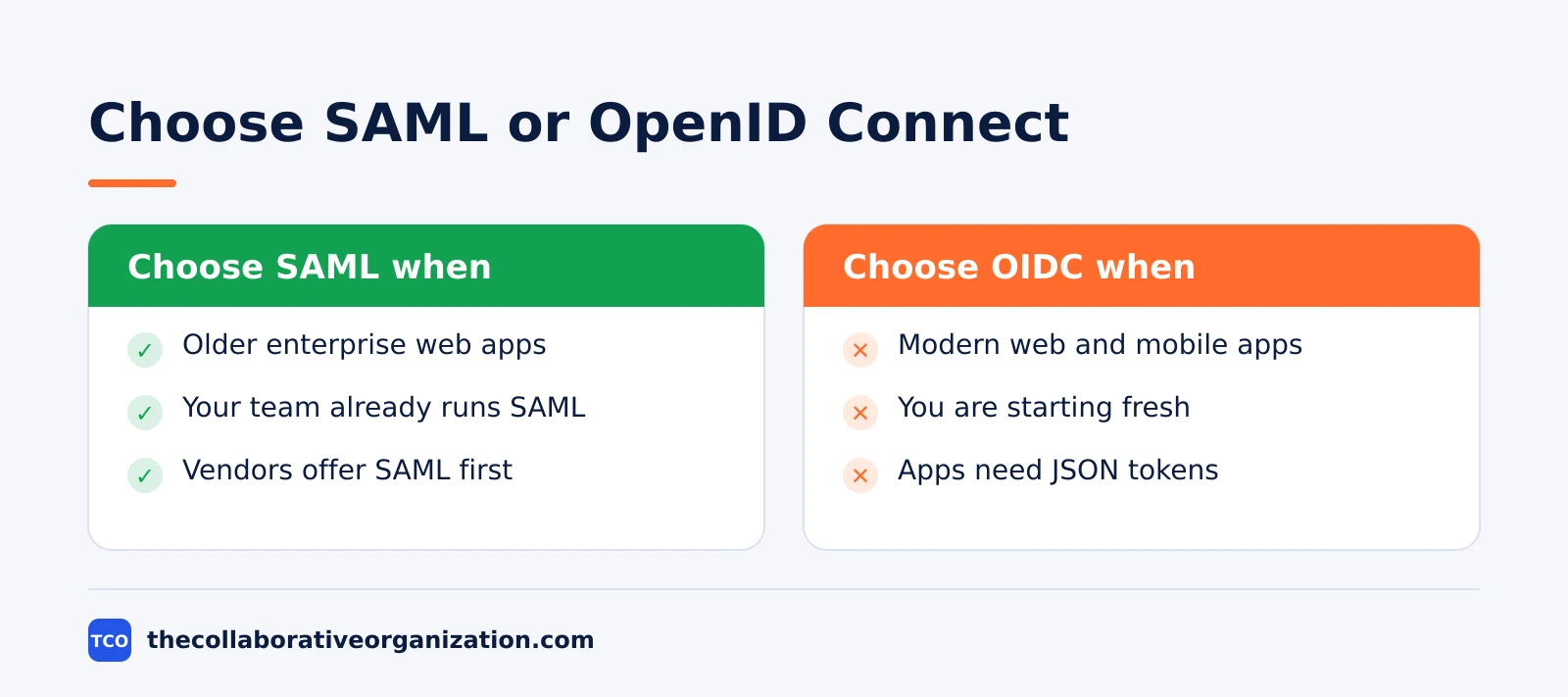
In a SAML flow, the app sends the user to the identity provider, the provider checks the user, and then it sends back a signed XML assertion through the browser. The assertion states who the user is, when they signed in, and which groups they belong to. The app checks the signature, trusts the claims, and signs the user in.
SAML suits enterprise web apps, especially older ones that were built before JSON-based standards took over. It carries rich user attributes in the assertion, and many large SaaS vendors still offer SAML first. Its weak spots are its age: XML is verbose, it was built for browsers rather than mobile apps, and certificate expiry can break sign-in without warning.
What OAuth 2.0 is
OAuth 2.0 is an authorization framework that lets one app access data in another app on your behalf, without ever seeing your password. It answers the question “what can this app do?” rather than “who is this user?”
The flow has four roles, and the user is only one of them. You, the resource owner, approve an app, the client, to ask an authorization server for an access token.
The app then shows that token to the resource server, the API that holds your data, and gets limited access, such as reading your calendar or posting on your behalf.
That token is not proof of identity. Duende states the split clearly: OAuth 2.0 handles authorization, what an application can do, while OpenID Connect handles authentication, who the user is. OAuth 2.0 is defined in RFC 6749, published in October 2012, and it says nothing reliable about identity on its own.
What OpenID Connect adds
OpenID Connect adds an identity layer on top of OAuth 2.0, so the same flow that grants access also proves who the user is. It is the protocol behind most “Sign in with Google” and “Sign in with Microsoft” buttons.
OIDC adds three things to OAuth 2.0. First, an ID token, a signed JSON Web Token that names the user, the issuer, and the time of sign-in. Second, a UserInfo endpoint that returns basic profile data.
Third, a discovery document that tells apps where to find the provider keys and endpoints. The OpenID Connect Core 1.0 specification calls it a simple identity layer on top of the OAuth 2.0 protocol.
When people say “OAuth login”, they almost always mean OIDC. The login button runs the OAuth 2.0 authorization code flow, and the ID token is what turns it into a sign-in. OIDC suits modern web apps, mobile apps and APIs, because its tokens are small JSON messages rather than XML documents.
SSO vs SAML vs OAuth side by side
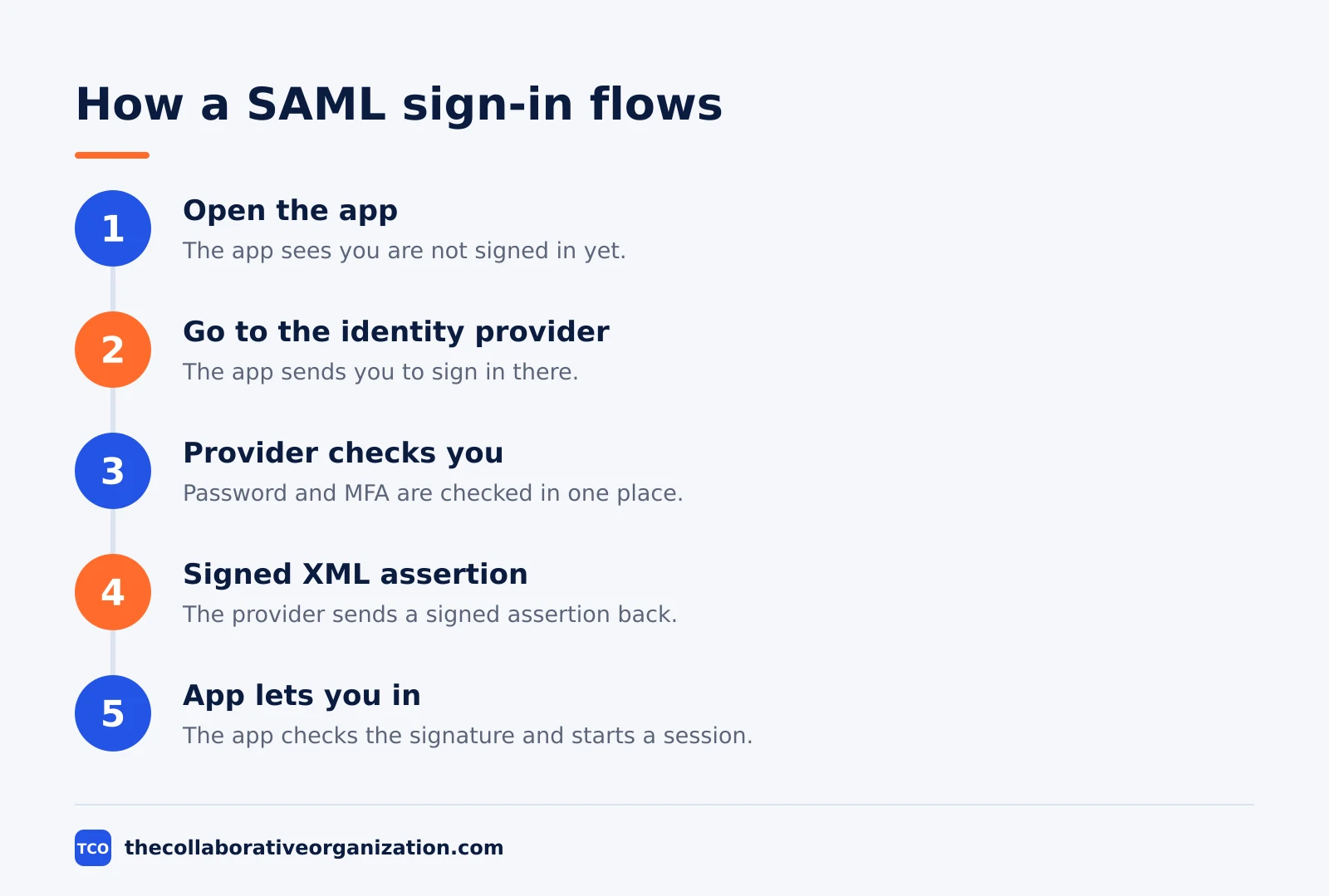
The table below shows the split in one view: SAML and OpenID Connect sign people in, OAuth grants access, and SSO is the experience all of them serve. Keep it open when you read a vendor page.
| Item | SSO | SAML 2.0 | OAuth 2.0 | OpenID Connect |
|---|---|---|---|---|
| What it is | User experience | Authentication protocol | Authorization framework | Authentication layer |
| Question it answers | How often do I sign in? | Who is this user? | What may this app do? | Who is this user? |
| Token format | None of its own | Signed XML assertion | Access token | Signed JWT ID token |
| Standard | None | OASIS, 2005 | RFC 6749, 2012 | OpenID Foundation, 2014 |
| Best for | Every team | Older enterprise web apps | API access on your behalf | New web and mobile apps |
Two rows deserve a second look. The “standard” row shows age: SAML is the oldest, OIDC the newest, and OAuth sits between them. The “best for” row shows the practical rule: SAML for apps that already speak it, OIDC for apps you are building or buying now, and OAuth for the data access underneath both.
Which one to choose
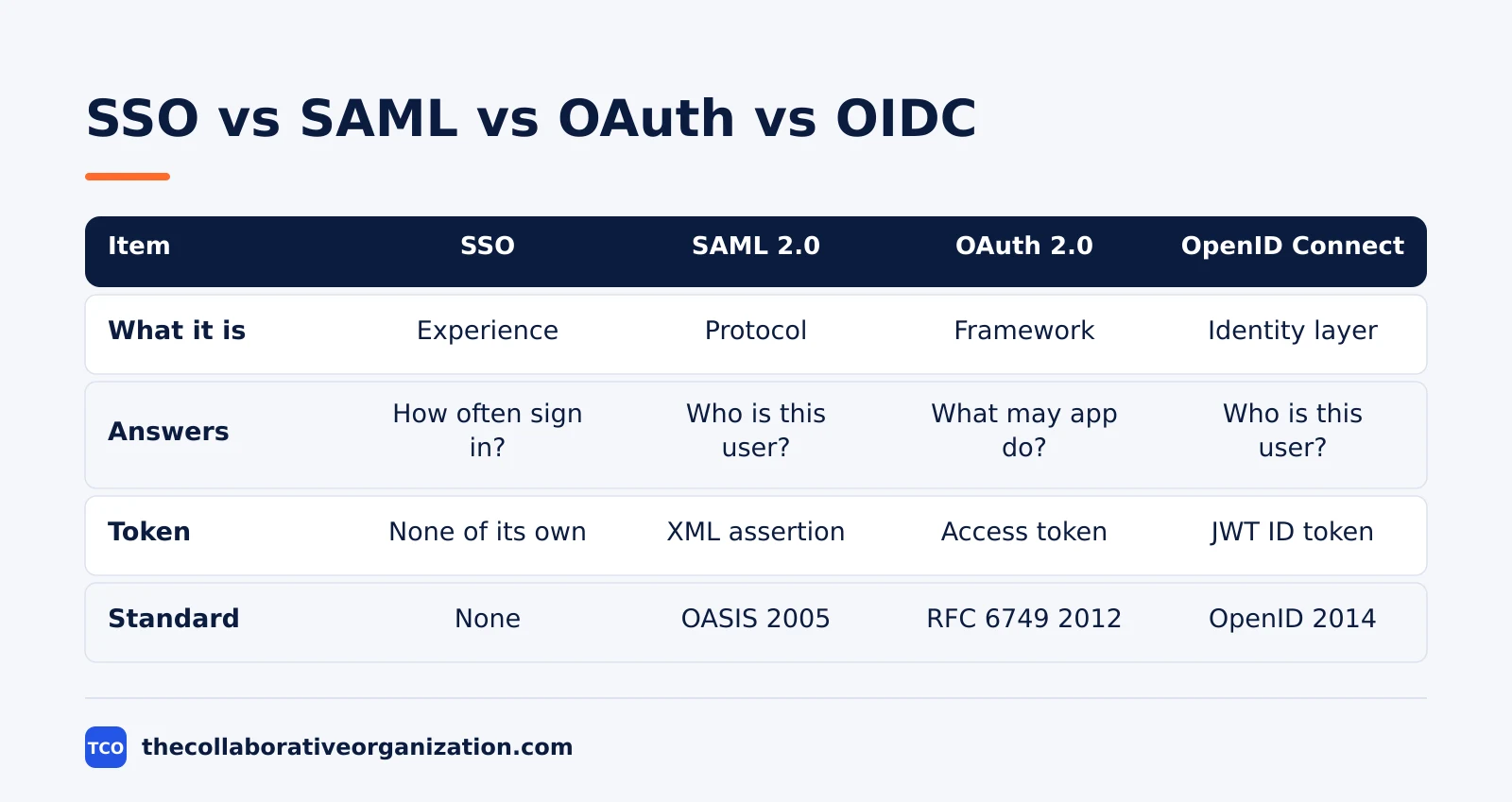
Choose OpenID Connect when the app supports it, SAML for existing enterprise apps that do not, and OAuth only when an app needs data access on a user’s behalf. That is the short version of the guidance vendors publish, and it holds up in practice.
Choose SAML if your stack is full of older enterprise SaaS, your identity team already runs it, and the apps you buy list SAML first. It is proven, well understood, and most enterprise vendors support it.
Choose OpenID Connect if you are buying modern SaaS, building mobile apps, or starting fresh: its JSON tokens are lighter, and it works beyond the browser.
Choose OAuth 2.0 when the job is data access, not sign-in. A reporting tool that reads your calendar, a backup tool that copies files, or an integration that posts to chat all need OAuth scopes, not a login. If a vendor offers only OAuth for sign-in, ask where the identity check happens, because bare OAuth has no standard answer.
You can also combine them. A company can run SAML for its older HR system and OIDC for its new project tools, all behind one identity provider. The user sees one login, and the protocol differs per app. Our guide on how to evaluate SaaS software explains how to check protocol support during a shortlist.
Worked example: a buyer compares three vendors
A buyer who asks the right three questions can tell in one call whether a vendor’s SSO claim matches the team’s needs. Imagine a 60-person company buying a project tool, and three vendors each claim SSO support.
Vendor A supports SAML only, in its top plan. Vendor B supports SAML and OIDC in every paid plan. Vendor C offers “Sign in with Google”, which is OIDC, but no SAML. The buyer writes the answers into the RFP, and our guide on how to write an RFP for software shows how to make those answers binding.
The choice follows the stack. If the company already runs an identity provider with SAML, vendor A or B works, but A costs more. If the team uses Google Workspace and no SAML setup, vendor C is the fastest to switch on.
Vendor B wins on flexibility, since it covers both cases, and the buyer tests it first in a trial, as our guide on how to run a software trial advises.
Common SSO vs SAML vs OAuth mistakes to avoid
Most confusion in this area comes from five errors, and each one is easy to spot once you know the split. Check your plan against the list before you sign.
- Calling SAML and SSO the same thing. SSO is the goal, and SAML is one route to it. A vendor that offers SAML may still leave some apps outside SSO.
- Using bare OAuth 2.0 for login. OAuth grants access, it does not prove identity, and ITKorr warns that this mistake has led to real security flaws in custom integrations.
- Assuming OIDC and OAuth are rivals. OIDC builds on OAuth, so choosing OIDC means OAuth is already in the flow. They are layers, not alternatives.
- Buying SAML support you cannot use. If your identity provider or your plan tier does not include SAML, the vendor feature stays switched off. Check both sides before you buy.
- Forgetting certificate expiry. SAML signing certificates expire, and an expired certificate breaks sign-in for every user at once. Put the expiry date in your calendar with a 30-day warning.
If you are still deciding which tools to buy, start from our software guides hub and check the sign-in protocol for each app on your shortlist.
Sources
- Flamingo - SAML vs SSO: Where OAuth and OIDC Fit (2026)
- Okta Developer - Single Sign-On Overview (2026)
- OpenID Foundation - OpenID Connect Core 1.0 (2014)
- Duende - OAuth vs OIDC: Differences and Why They Matter (2026)
- ITKorr - Single Sign-On and Federation Explained (2026)
- SuperTokens - SAML vs SSO: What’s the Difference (2026)
Frequently asked questions
Is SSO the same as SAML?
No. SSO is the experience of signing in once and reaching many apps, while SAML is one protocol that makes that experience possible. SAML is a route to SSO, not SSO itself. Other routes include OpenID Connect, Kerberos and password-based SSO. Not all SSO is SAML, but all SAML sign-in is SSO.
Can OAuth 2.0 be used for login?
Not on its own. OAuth 2.0 grants an app limited access to data on your behalf, but it does not prove who you are. For login, add OpenID Connect, which builds an identity layer on top of OAuth 2.0 and returns a signed ID token. Using bare OAuth for sign-in is a known mistake that has caused real security flaws.
Which is better, SAML or OpenID Connect?
Neither is better in every case. SAML suits older enterprise web apps that already speak it, while OpenID Connect suits modern web, mobile and API apps that use JSON tokens. Microsoft advises choosing OpenID Connect when the app supports it, and SAML for existing apps that do not. Pick the one your apps support best.
Do I need all three: SSO, SAML and OAuth?
You need SSO as the goal, one sign-in protocol such as SAML or OpenID Connect to deliver it, and OAuth only where apps need access to data on a user's behalf. Most teams use SSO with either SAML or OpenID Connect, and OAuth runs quietly underneath OpenID Connect. You rarely choose all three as separate decisions.
What is OpenID Connect in simple terms?
OpenID Connect is the identity layer that turns OAuth 2.0 into a login system. It adds a signed ID token that says who the user is, when they signed in, and which provider checked them. The app reads that token, trusts the signature, and signs the user in without asking for a password.
Related articles

guides
Free Project Management Templates: 7 to Copy (2026)
Seven free project management templates from monday, Wrike, Teamwork, Smartsheet, ClickUp, Asana and Trello, with what each one is for and what free really costs.
November 20, 2026 · 7 min read

guides
Project Proposal Template: Copy and Win Work (2026)
A project proposal template pitches the work before it is approved: problem, solution, scope, budget, timeline and terms. Copy the template and filled example.
November 20, 2026 · 10 min read

guides
Action Plan Template: Goal to Done in One Page (2026)
An action plan template turns one goal into owned steps with dates, dependencies and a success measure. Copy the table and see it filled for a support team.
November 20, 2026 · 11 min read