Action Plan Template: Goal to Done in One Page (2026) | The Collaborative Organization
By The Collaborative Organization Team · November 20, 2026 · Last verified November 20, 2026 · 11 min read

An action plan template is a copyable table that turns one goal into owned steps, each with a date, a dependency, a resource and a success measure. Copy the table below, fill one row per step, and review the plan every week until the goal is met.
Key takeaways
- An action plan serves one goal over weeks or months, with milestones, dependencies and a success measure.
- Each step needs one named owner, a start date, a due date, a priority and a way to tell it is done.
- Write the goal as an outcome with a number and a date, never as an activity.
- Map dependencies before you set dates, so no step waits on work that has not started.
- Review the plan weekly for fast work and monthly for longer work, and track outcomes as well as finished tasks.
What an action plan template is
An action plan template is the blank form of a plan that connects a goal to the work that reaches it. The header holds the goal, and the table below holds the steps: what must be done, who is accountable, when each step is due, which resources it needs, and how success will be measured.
Creately defines an action plan as a structured list of the tasks required to achieve a specific goal. It records what must be done, who is accountable, when each task is due, which resources are required, and how success will be measured.
A plan is not a to-do list and not a weekly planner. A to-do list holds tasks with no shared goal. A weekly planner holds three priorities for seven days. An action plan holds one goal for weeks or months, and every step in it exists because it moves that goal forward.
Our guide on how to create a project plan covers the full plan document, with scope, budget and risks. This page stays on the action table itself: the one-page form you fill in after the goal is agreed.
Use the template right after a planning meeting, a performance review, a problem-solving session or a project kickoff. It captures what happens next while the decision and its context are still clear, instead of letting the next steps fade into chat.
The action plan template
Copy the table below into a sheet, a shared document or your project tool, then fill one row per step. One goal per plan keeps it readable, and one owner per row keeps it honest.
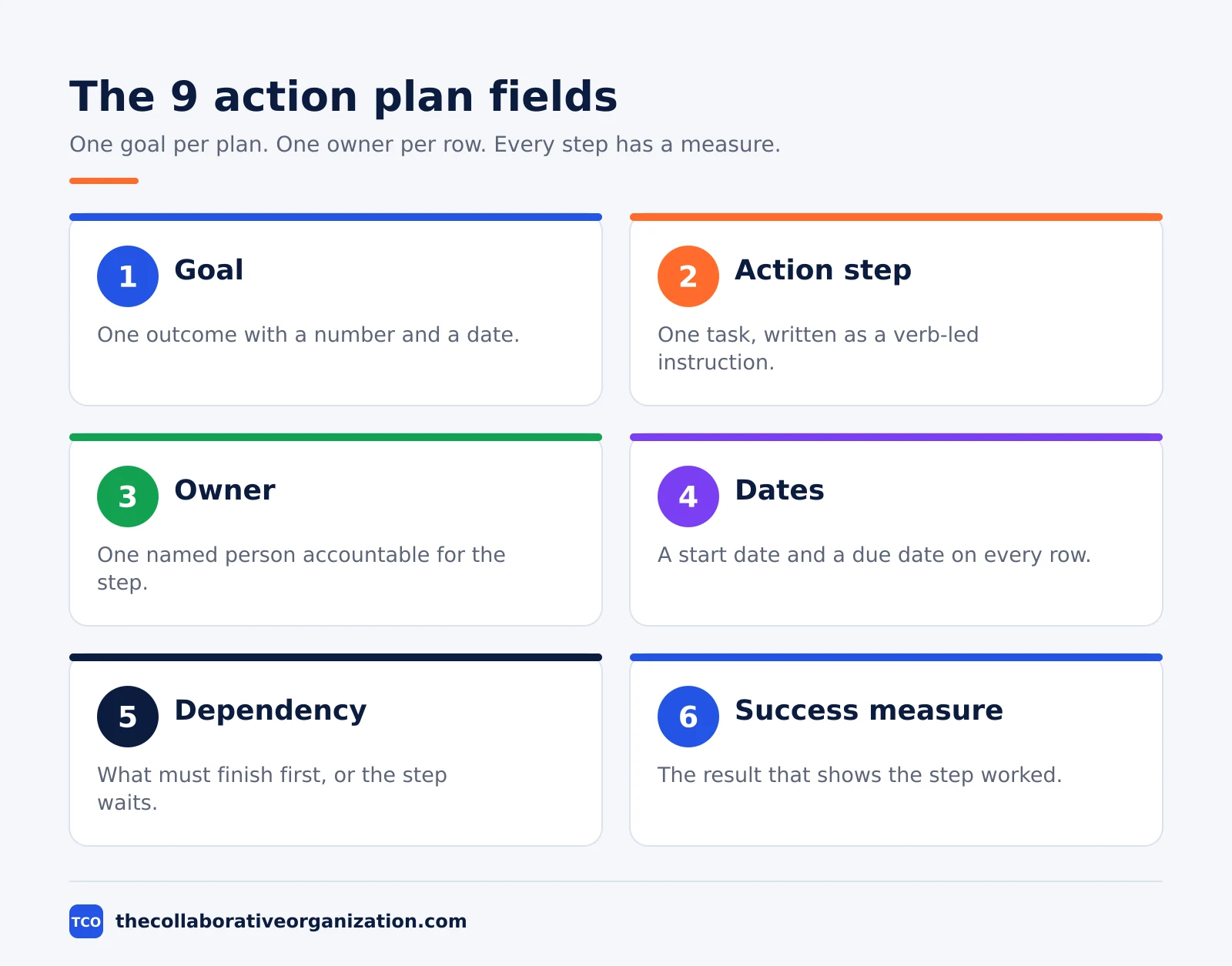
| Field | What to write |
|---|---|
| Goal | One outcome with a number and a date |
| Action step | One task, written as a verb-led instruction |
| Owner | One named person accountable for the step |
| Start date | When the work on this step begins |
| Due date | When the step must be finished |
| Priority | High, Medium or Low, with the meaning agreed |
| Dependency | What must finish first, or the step waits |
| Resources | People, money, tools, data or access it needs |
| Success measure | The result that shows the step worked |
| Status | Planned, Active, Blocked, Delayed or Complete |
Write every step as a clear verb-led instruction, such as “Research five customer segments” or “Approve the campaign message”. Creately gives the same rule: each task should be specific enough that its owner understands the expected output without needing to interpret the wording.
Shopify lists six parts every action plan needs: SMART goals, action steps, assignees, a timeline, resources and a tracking mechanism. The table above covers all six, with priority, dependencies and a success measure added so the plan can be run, not just read.
The same header works as a short text block for a doc or a note. Copy the block below and fill it in before you build the table.
ACTION PLAN - [Goal, one sentence with a number and a date]
Owner of the plan: [name] - Start: [date] - Finish: [date]
Success looks like: [the result that shows the goal is met]
Review: [weekly / monthly] - Next review: [date]
The second half names the milestones and the resources the goal depends on.
MILESTONES
[Milestone 1] - Due: [date] - [what it proves]
[Milestone 2] - Due: [date] - [what it proves]

RESOURCES AND RISKS
[Resource] - [where it comes from]
[Risk] - Response: [one line]
How to fill in the template in 5 steps
Fill the template in order, goal first and dates last, so the steps serve the outcome instead of filling the calendar. Work through the five steps below in one sitting.
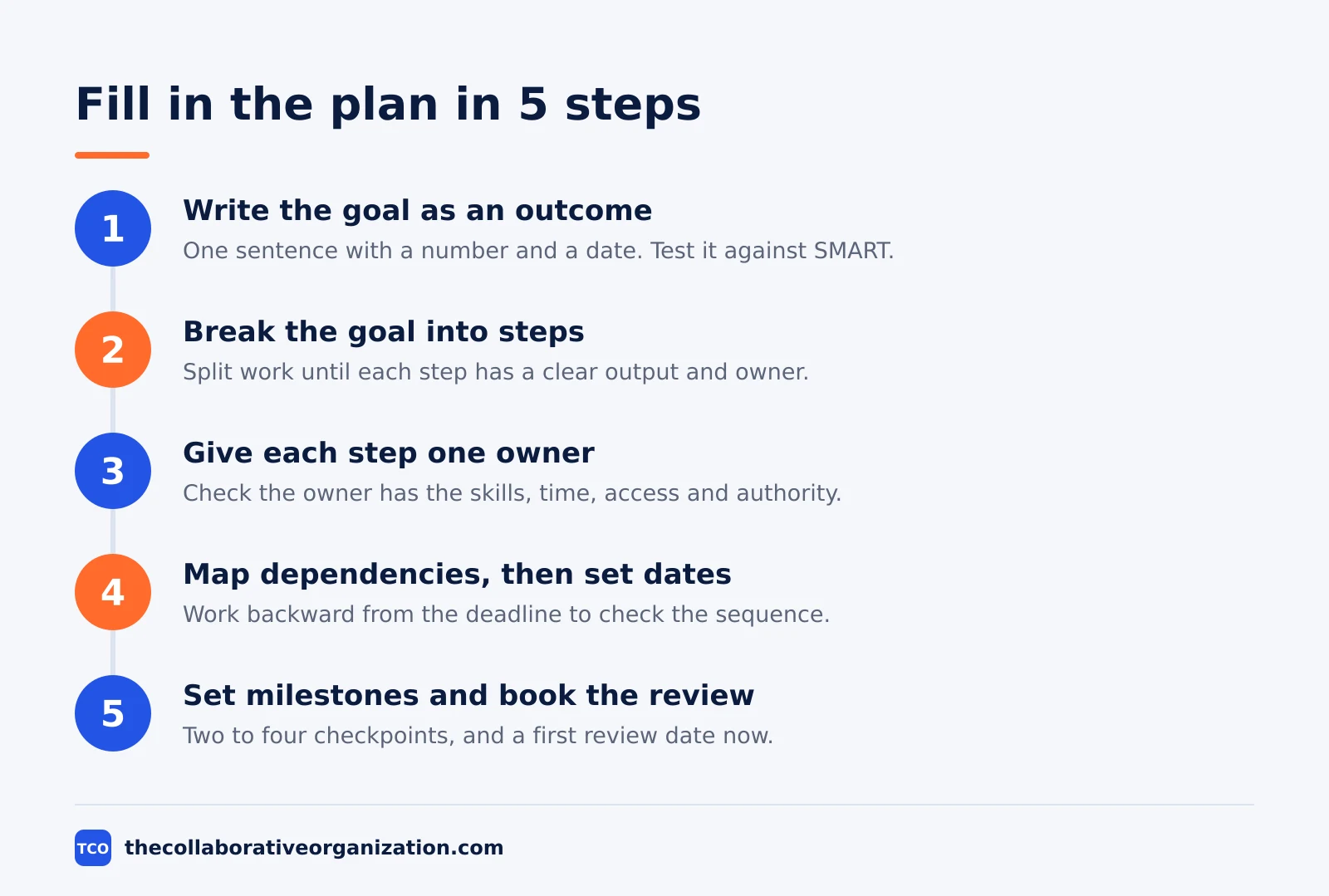
Step 1: Write the goal as an outcome
Write one sentence with a number and a date. Test it against SMART: specific, measurable, achievable, relevant and time-bound. “Increase monthly sales from $50,000 to $60,000 within six months” passes the test, while “increase sales” does not.
Step 2: Break the goal into steps
List everything that must happen, then split each large item until every step has a clear output, an owner and a completion condition. A step that is too broad cannot be managed, and a step that is too small makes the plan hard to maintain.
Step 3: Give each step one owner
Name one accountable owner per step, and check that person has the skills, the time, the access and the authority the step needs. Other people can help or review, but one name moves the step forward.
Step 4: Map dependencies, then set dates
Mark what must finish before each step can start, then add start and due dates. Work backward from the final deadline to check the sequence is realistic. If several key steps depend on the same person, adjust the schedule before the work starts.
Step 5: Set milestones and book the review
Add two to four milestones, each a checkpoint that proves a phase is done, such as “research approved” or “campaign launched”. Book the first review now, weekly for fast work and monthly for longer work, and write the next review date into the plan.
Filled example: a support team cuts first-response time
The example below fills the template for a fictional support team of eight people cutting first-response time from 9 hours to 4 hours in 8 weeks. The names and figures are an illustration, not a real project. The team answers about 400 tickets a week.
| Step | Owner | Due | Dependency | Success measure |
|---|---|---|---|---|
| Measure the current 9-hour baseline by hour and by queue | Noor, support lead | 27 Nov | Ticket data export | Baseline report approved |
| Write reply templates for the 10 most common tickets | Sam, senior agent | 4 Dec | Baseline report | 10 templates live in the helpdesk |
| Move 2 agents to a morning triage shift | Noor, support lead | 4 Dec | Staff rota agreed | Triage shift staffed every weekday |
| Train all 8 agents on the new triage flow | Priya, trainer | 11 Dec | Templates live | 8 of 8 agents trained |
| Cut the morning backlog each day before noon | Sam, senior agent | Weekly | Triage shift live | Backlog under 20 tickets at noon |
| Review response times and fix the slowest queue | Noor, support lead | Weekly | Current ticket data | First response under 4 hours |
Three things stand out. The baseline comes first, because a goal of 4 hours means nothing without a measured 9-hour start. The templates come before the training, because training on a flow with no templates wastes the session.
The weekly review step is a real row, not a note in the margin. Reclaim makes the same point: a plan stays useful after the first draft only when it is reviewed on a fixed schedule and changed when the numbers say so.
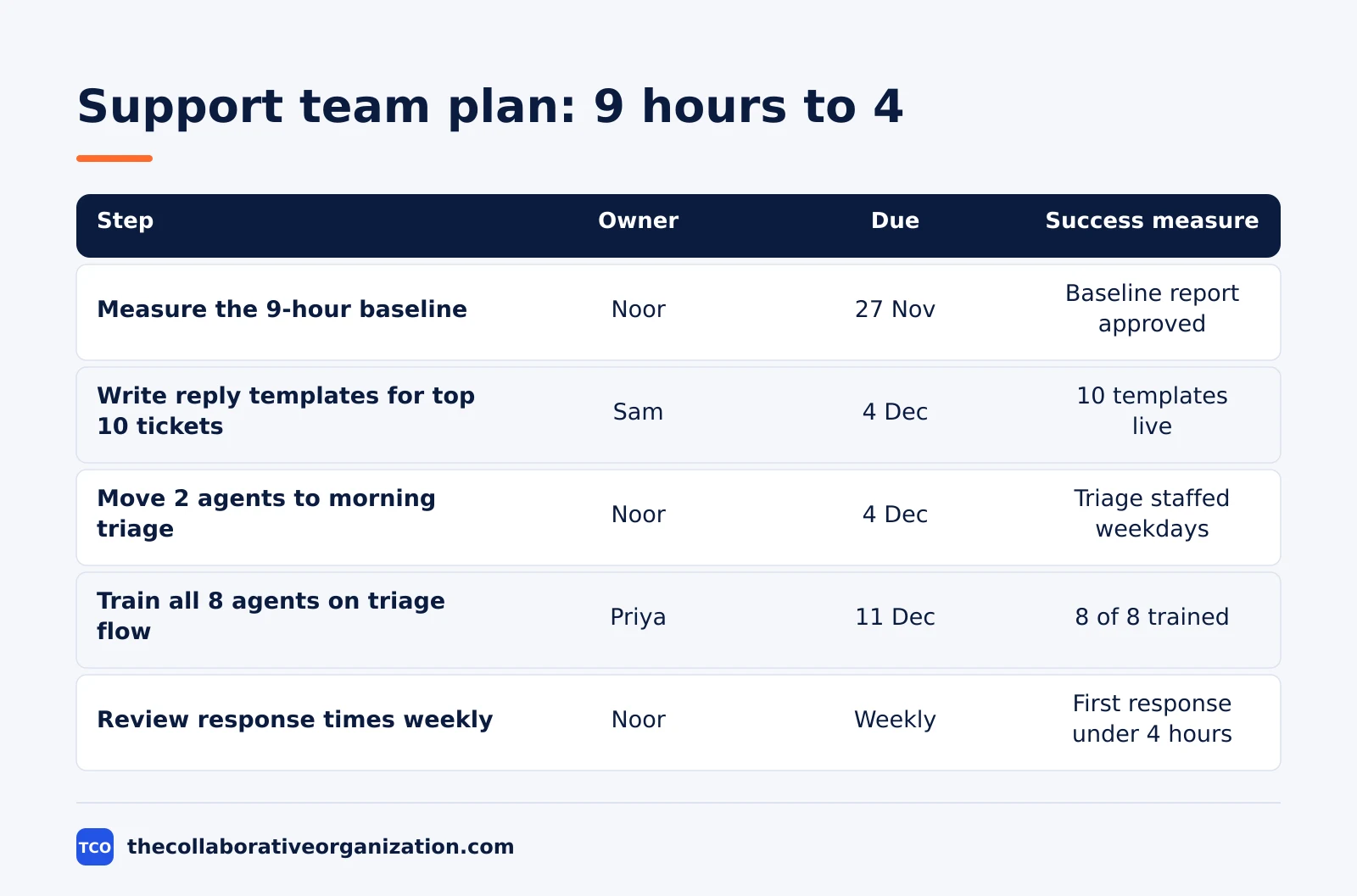
The goal row for this plan reads: cut first-response time from 9 hours to 4 hours by 22 January, measured across all tickets. The milestone dates are 4 December for templates and triage, 11 December for training, and 22 January for the goal itself.
How to customise the template
Keep the goal row and the nine fields fixed, and change only the extras, the milestones and the review rhythm. The fields are what readers learn to scan, so a new set of columns each time forces them to re-learn the plan.
- For a solo plan, drop the dependency column and keep a simple status column, since one person holds the whole sequence in their head.
- For a team plan, add a milestone column so each step shows which checkpoint it serves, and add a RACI note where two teams share a step.
- For a sales plan, add a numbers column for the leading measures, such as calls made or accounts contacted, so the team can see the work that drives the result.
- For a corrective plan, add a root-cause line above the table and a verify step at the end, so the fix is checked instead of assumed.
- For a long plan, split the table into one section per milestone, with three to five steps under each, and review one section per meeting instead of the whole plan at once.
Our guide on how to prioritize tasks at work covers the sorting step in more detail, including the Eisenhower matrix as one way to rank the steps. Use it to choose the order, then use this template to run the work.
Variations of the template
Three small changes fit the template to different kinds of work, and none of them changes the nine fields. First, a simple version holds one goal, five steps and one review date, for a goal that takes two weeks or less. Second, a team version adds a milestone column and a weekly review row, like the support example above.
Third, a corrective version starts with the problem and its root cause, then lists the fix steps, the prevention steps and a verify step. Use it when the goal is to stop a problem from returning, not to reach a new target.
When a step needs several people to agree, our RACI matrix guide helps separate the person who does the work from the one person who owns the outcome. The action plan names the owner, and the RACI chart names the rest of the roles around that owner.
Tools that hold the action plan
An action plan lives best where the team already tracks the work, so a step can point at the task it describes. A project tool keeps the plan, the tasks and the owners in one place, and a change to a task date can prompt a check of the plan. Compare the options on our project management software shortlist before you pick one.
| Tool | Best for | Free plan | Starting price (as of November 2026) | Notable limit |
|---|---|---|---|---|
| Asana | Team plans with owners, dates and milestones | Free for 2 people | $10.99 per user per month (Starter), billed annually | Free plan covers 2 people |
| Trello | Simple plans with one list per milestone | Free for up to 10 collaborators | $5 per user per month (Standard), billed annually | Calendar view needs Premium |
The Asana pricing page lists Starter at $10.99 per user per month when billed annually, with the Personal plan free for 2 users.
The Trello pricing page lists Standard at $5 per user per month billed annually, or $6 billed monthly, and Premium at $10.
If you have not picked a tool yet, start in a sheet. A sheet holds the nine fields with no setup, and the plan can move into a tool once the team uses it every week.
Our guides index holds the other planning templates, including the project plan and the weekly planner, for the documents that sit next to this one.
Common action plan template mistakes to avoid
Most action plans fail in the same five ways, and all five are easy to spot before the work starts. Run through the list before you share the plan.
- A goal written as an activity. “Run a campaign” describes work, while “generate 100 qualified leads by 30 September” describes an outcome, so write the outcome.
- Steps with no owner. A step assigned to a department belongs to nobody, so write one name on every row.
- Dates set before dependencies are mapped. A step cannot start until its dependency finishes, so map the chain first and set the dates second.
- No success measure on a step. A step with no measure cannot be checked, so write the result that shows it worked.
- A plan with no review date. A plan that is never reviewed goes stale within weeks, so book the first review when you write the plan.
Sources
- Creately - How to Write an Action Plan (2026)
- Shopify - How To Create an Action Plan in 6 Steps (2026)
- Reclaim - What is an Action Plan? How to Write (2026)
- Asana - Pricing (2026)
- Trello - Pricing (2026)
Frequently asked questions
What is the difference between an action plan template and a weekly planner?
An action plan template serves one goal over weeks or months, with milestones, dependencies and a success measure. A weekly planner serves one week, with three priorities and time blocks. Use the action plan to decide what the work is, and the weekly planner to decide when this week's part of it happens.
What fields should an action plan template have?
It needs a goal, one row per action step, an owner for each step, start and due dates, a priority, dependencies, resources, a success measure and a status. Add a milestone column for the checkpoints, and a risk line for anything that could block the goal. One goal per plan keeps it readable.
How many steps should an action plan have?
A first plan holds one goal and three to five activities under each milestone, with one owner per line. Break work down until each step has a clear output, an owner and a completion condition. Steps that are too broad cannot be managed, and steps that are too small make the plan hard to maintain.
What makes a good action plan goal?
A good goal is SMART: specific, measurable, achievable, relevant and time-bound. Write it as an outcome, not an activity. Generate 100 qualified leads by 30 September is a goal, while run a campaign is an activity. The goal should name a number, a date and the result that counts.
How often should an action plan be reviewed?
Review fast-moving plans weekly and longer initiatives monthly. Each review confirms what was completed, compares progress with milestones, names delayed or blocked tasks, and records the next review date. A plan that is never reviewed goes stale within weeks, so book the review when you write the plan.
Who owns an action plan?
One person owns the plan and its goal, and each step has its own owner. Other people can help, review or approve the work, but a single owner moves each step forward. Naming a whole department as the owner means nobody owns it, so write one name per line.
Related articles

guides
Free Project Management Templates: 7 to Copy (2026)
Seven free project management templates from monday, Wrike, Teamwork, Smartsheet, ClickUp, Asana and Trello, with what each one is for and what free really costs.
November 20, 2026 · 7 min read

guides
Project Proposal Template: Copy and Win Work (2026)
A project proposal template pitches the work before it is approved: problem, solution, scope, budget, timeline and terms. Copy the template and filled example.
November 20, 2026 · 10 min read
guides
Communication Matrix Template (2026): Copy and Use
A communication matrix template that maps who gets told what, when and how: audience, message, channel, frequency and owner, with a filled Bluepeak example.
November 20, 2026 · 11 min read