Free Project Management Templates: 7 to Copy (2026) | The Collaborative Organization
By The Collaborative Organization Team · November 20, 2026 · Last verified November 20, 2026 · 7 min read

Seven free project management templates cover most teams: a single-project board for beginners, a sprint board for agile teams, a Kanban board for simple work, and a budget sheet for tracking spend. Each one is free to open on the vendor’s free plan or trial, and each one does a different job. Pick by the job, not by the brand.
Key takeaways
- 7 free templates below, from monday, Wrike, Teamwork, Smartsheet, ClickUp, Asana and Trello.
- Most vendors ask you to sign up for a free plan or trial to open the template.
- Smartsheet has no free plan, only a 30-day trial, so its template is free to try, not free to keep.
- ClickUp’s free plan is the most generous, with unlimited tasks and members.
- Start from the job: beginners take the monday Single Project template, agile teams take Asana Sprint Planning, and simple work takes Trello Kanban.
7 free project management templates
The table below is the whole roundup: one line per template, saying what it is for and what it costs to open. Every template here was checked in a Tech.co roundup that signed up for each plan and opened each template. Start from the job column, not the vendor column.
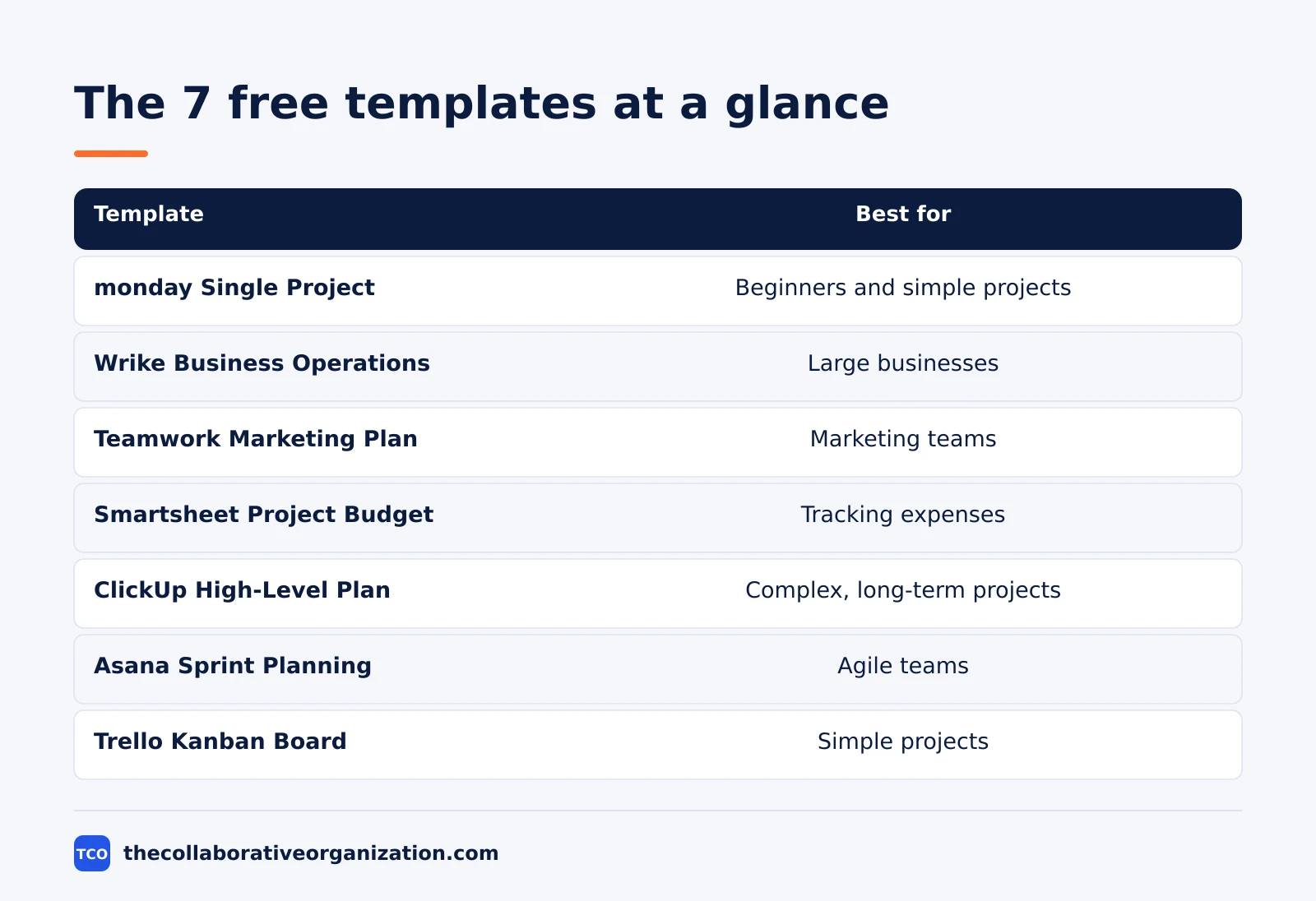
| Template | Best for | What it holds | Free access | Starting price (as of November 2026) |
|---|---|---|---|---|
| monday.com Single Project | Beginners and simple projects | Milestones, timelines, task groups, status, priority | Free plan, up to 2 seats | $9 per seat per month (Basic), billed annually |
| Wrike Business Operations | Large businesses | Workflows, requests, reporting across teams | Free plan | $10 per user per month (Team), billed annually |
| Teamwork Marketing Plan | Marketing teams | Campaign stages, assets, paid media, dashboard | Free plan, up to 5 users | $10.99 per user per month, billed annually |
| Smartsheet Project Budget | Tracking expenses | Costs, approval status, budget lines | 30-day trial only, no free plan | $9 per member per month, billed annually |
| ClickUp High-Level Project Plan | Complex, long-term projects | Custom fields, status columns, 5 views, KPIs | Free Forever plan | $9 per user per month (Core), billed annually |
| Asana Sprint Planning | Agile teams | Backlog items, sprint views, Smart Status | Free plan, up to 2 people | $10.99 per user per month (Starter), billed annually |
| Trello Kanban Board | Simple projects | Columns from To Do to Done, drag and drop | Free for up to 10 collaborators | $5 per user per month (Standard), billed annually |
The monday template is the simplest on the list, and that is its strength. It focuses on the basic functions: setting milestones and timelines, building groups for tasks, and sorting by status and priority. A team that wants a central hub for its tasks will find nothing in the way.
The Wrike template suits a business that runs many tasks across many teams, with requests and reporting that need one home. Wrike offers more than 80 templates, so the Business Operations template is a starting point, not the only option.
What free really means
Free means the template costs nothing to open, but the plan underneath it sets the limits, and the limits decide whether your team can use it. ClickUp’s Free Forever plan covers unlimited tasks and members, which makes it the most generous free plan on the list. Trello’s free plan covers up to 10 collaborators, which suits a small team.
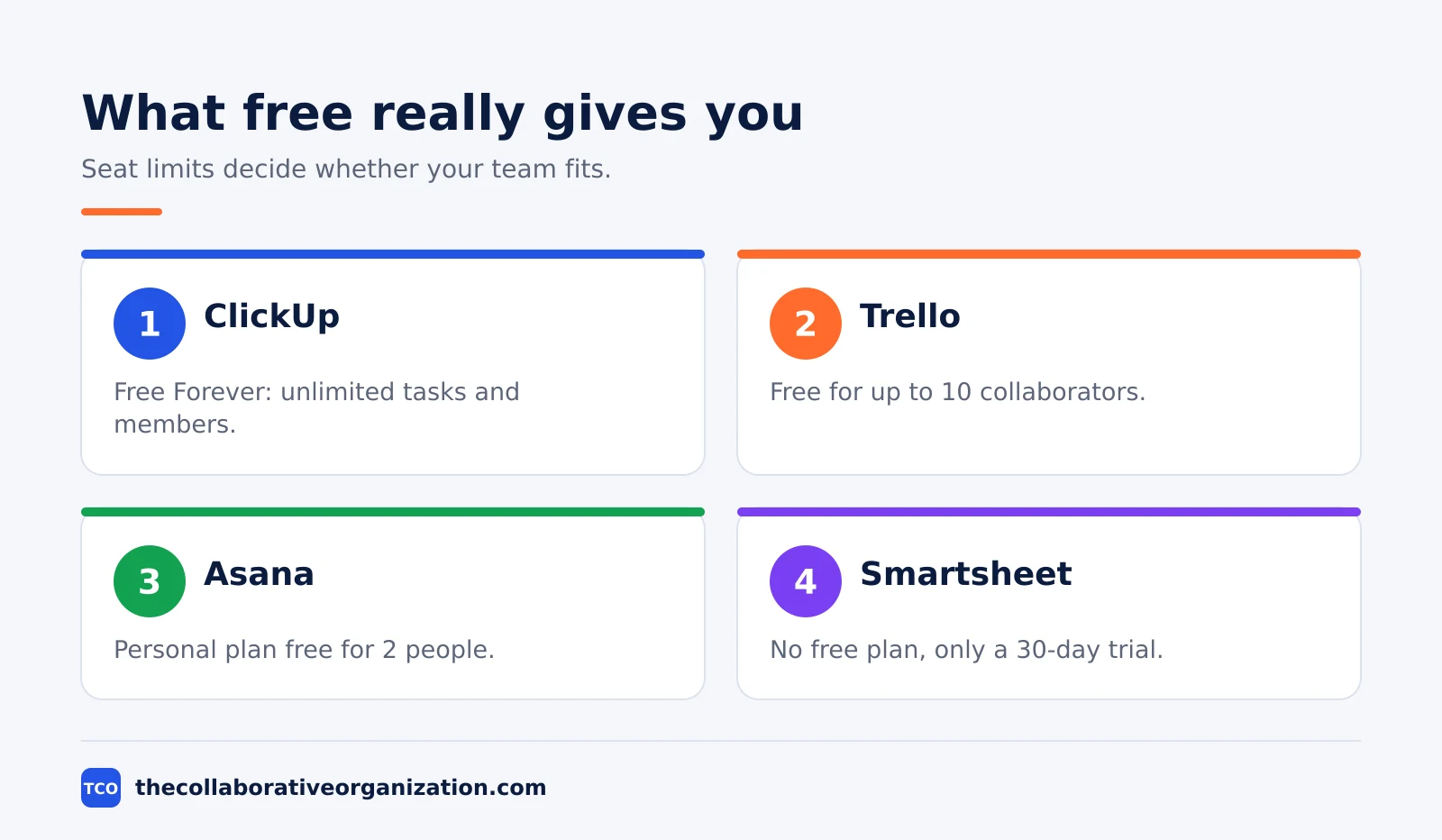
Asana’s Personal plan is free for 2 people, and monday’s free plan covers up to 2 seats. Both suit a very small team, but a team of 5 will outgrow them fast and need a paid plan. Check the seat limit before you invite the team, because a template half the team cannot open is a template you will rebuild.
Smartsheet is the exception on the list. It has no free plan, only a 30-day trial, so its Project Budget template is free to try and not free to keep. The budget template is still worth a look for tracking expenses, but plan for the paid plan from the start.
Two prices above rest on the Tech.co roundup rather than the vendor’s own page, so treat them as second-hand and check before you buy. Teamwork is listed at $10.99 per user per month, and Smartsheet at $9 per member per month, both from that roundup.
How to pick and start in one afternoon
Pick the template in 10 minutes, then spend the afternoon filling it with your real work. The template is a head start, not a finished project. Start from three questions, and let the answers choose the template.
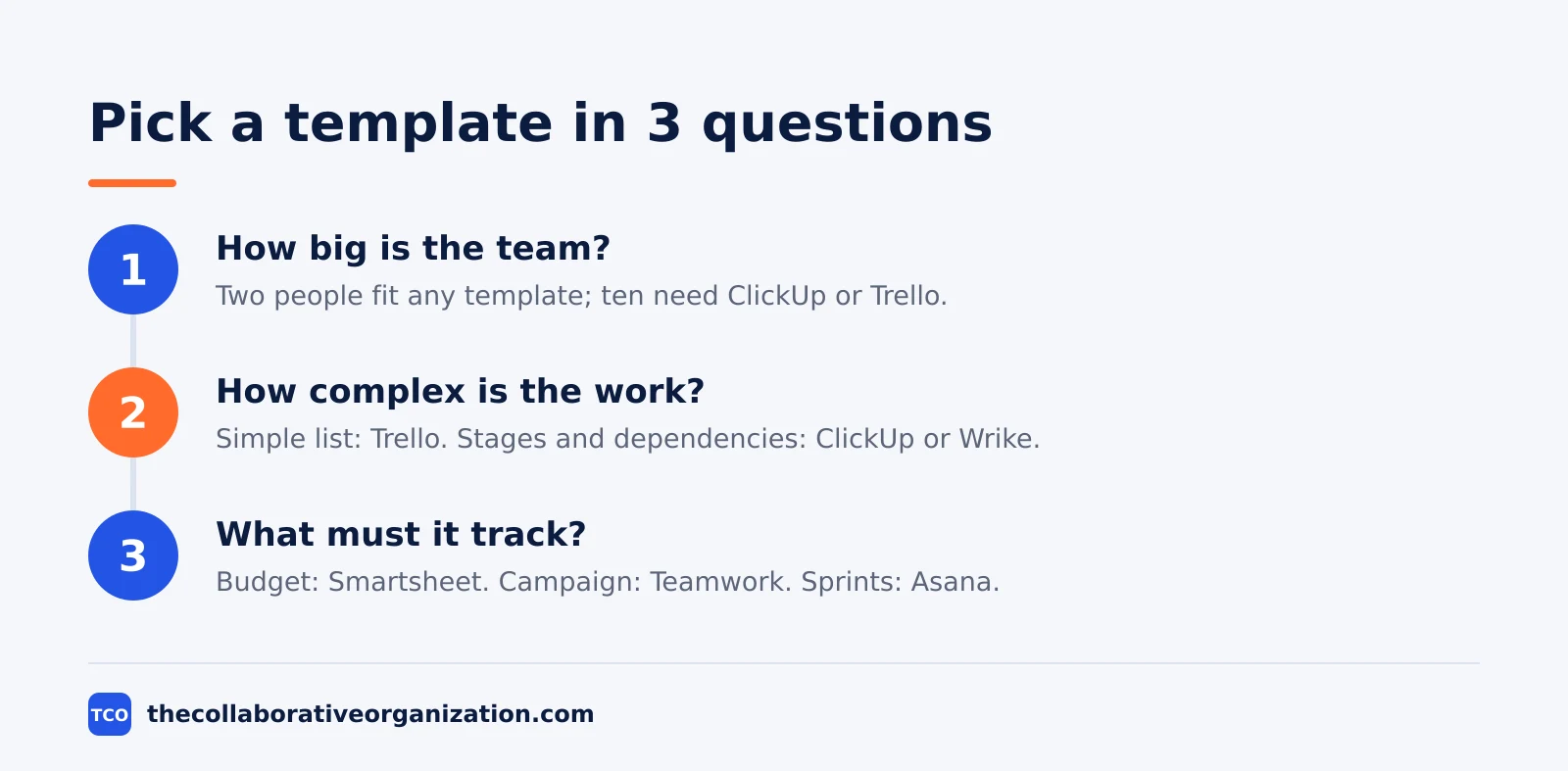
- How big is the team? Two people can use any template on the list. Ten people need ClickUp or Trello, because the 2-seat free plans will not hold them.
- How complex is the work? A simple task list takes the Trello Kanban template. A multi-stage project with dependencies takes ClickUp or Wrike. A sprint cycle takes Asana.
- What must it track? A budget needs the Smartsheet template. A campaign needs the Teamwork template. A single project with milestones needs the monday template.
Then open the template, delete the sample tasks, and add your own. Rename the status labels to match your team’s words, set the real due dates, and invite the team. A template with your tasks in it is a project; a template with sample tasks in it is a demo.
Our project plan template covers the full document that sits behind these templates, with 12 sections from scope to approvals. Use it when the template alone is not enough.
Our guides index lists the rest of our templates.
Worked example: a 6-person marketing team picks a template
Picture a 6-person marketing team planning a product launch in 8 weeks, with email, social media and a paid media push. The team needs one place for the campaign tasks, the asset list and the spend. The example below is an illustration, not a case study.
The team first tries the monday Single Project template, but 6 people do not fit the 2-seat free plan, so they would need the $9 per seat Basic plan. They then try the Teamwork Marketing Plan template, which is built for exactly this job: campaign stages, asset production, paid media, and a dashboard that is already built.
They pick Teamwork, delete the sample campaign tasks, and add their own: 12 emails, 20 social posts, and 3 paid ad sets. They set the priority, assignee and estimate columns, and the dashboard shows progress without anyone building it. The template saved them a day of setup, and the dashboard saved them a weekly report.
Common free template mistakes to avoid
Most teams waste their free template in the same five ways, and each one is easy to avoid. Check the list before you invite the team.
- Picking by brand, not by job. The best-known tool is not always the best fit. Start from the job, then read the table.
- Ignoring the seat limit. A 2-seat free plan cannot hold a 6-person team. Check the limit before you build anything in it.
- Keeping the sample tasks. Sample tasks with sample dates look like a finished project and confuse everyone. Delete them on day one.
- Using two templates for one project. Two templates mean two places to check, and the team will check neither. Pick one and customise it.
- Forgetting the trial clock. A template opened on a 30-day trial stops working on day 31. If you build on Smartsheet, budget for the paid plan from the start.
Compare the full shortlist on our project management software page before you pay for anything, and start with the free plan to test the fit.
Sources
- Tech.co - 7 Best Free Project Management Templates (2026)
- Asana - Pricing (2026)
- ClickUp - Pricing (2026)
- Trello - Pricing (2026)
- monday.com - Pricing (2026)
Frequently asked questions
Are project management templates really free?
The template itself is free, but most vendors ask you to sign up for a free plan or a free trial to open it. Asana, monday, ClickUp, Trello and Wrike all offer free plans with limits on seats or features. Smartsheet is the exception: it has no free plan, only a 30-day trial, so its template is free to try, not free to keep.
Which free project management template is best for beginners?
The monday Single Project template is the best starting point for beginners. It covers the basics, milestones, timelines, task groups, status and priority, with a shallow learning curve and room to customise. If your project is a simple list of tasks, the Trello Kanban template is even simpler, with columns from To Do to Done.
Which free template fits a complex, long-term project?
The ClickUp High-Level Project Plan template fits complex work best. It uses custom fields to mark project stages, custom status columns for detailed oversight, and five views for the same work. The Wrike Business Operations template is the other strong choice, built for large businesses that run many tasks across many teams.
Can I use a free template without buying the software?
Yes, on a free plan, for the vendors that offer one. ClickUp's Free Forever plan covers unlimited tasks and members, Asana's Personal plan covers 2 people, and monday's free plan covers 2 seats. Check the seat limit before you invite the team, because the template is useless if half the team cannot open it.
What should a good project management template include?
It should include the task list with owners and due dates, the milestones, the status of each item, and a way to see the whole project at a glance. A budget template adds costs and approval status, while a sprint template adds a backlog and sprint views. Pick the template that matches the job, not the one with the most features.
Do free templates work for marketing teams?
Yes. The Teamwork Marketing Plan template is built for marketing teams, with tasks for campaign stages, asset production and paid media, plus columns for priority, assignee, estimate and logged time. It also ships with a dashboard, so the team sees campaign progress without building one from scratch.
Related articles

guides
Project Proposal Template: Copy and Win Work (2026)
A project proposal template pitches the work before it is approved: problem, solution, scope, budget, timeline and terms. Copy the template and filled example.
November 20, 2026 · 10 min read

guides
Action Plan Template: Goal to Done in One Page (2026)
An action plan template turns one goal into owned steps with dates, dependencies and a success measure. Copy the table and see it filled for a support team.
November 20, 2026 · 11 min read
guides
Communication Matrix Template (2026): Copy and Use
A communication matrix template that maps who gets told what, when and how: audience, message, channel, frequency and owner, with a filled Bluepeak example.
November 20, 2026 · 11 min read