Wiki vs Knowledge Base: What Is the Difference? (2026) | The Collaborative Organization
By The Collaborative Organization Team · November 19, 2026 · Last verified November 19, 2026 · 10 min read
A wiki is a set of pages anyone with access can edit, while a knowledge base holds approved answers with named owners. The difference is control: a wiki makes writing fast, and a knowledge base makes finding the right answer fast. Pick the wiki for moving knowledge, and the knowledge base when the answer must be right.
Key takeaways
- A wiki invites every reader with access to edit any page, and the page history records each change.
- A knowledge base gives each article a named owner, and changes pass a review before readers see them.
- The word wiki comes from a Hawaiian word meaning quick, and the first wiki went online in March 1995.
- Confluence works as a wiki by default and can serve as a knowledge base with locked editing and templates.
- Use a wiki for internal notes and research, and a knowledge base for answers that reach customers or new staff.
What is a wiki?
A wiki is a website that its own readers write and edit together through a web browser. Pages link to each other, the software keeps every change in a history, and anyone with permission can update a page in seconds. Wikipedia describes a wiki as a form of hypertext publication that its audience edits and manages directly, with no defined owner or leader for the content.
The name tells you the point. Wiki is a Hawaiian word meaning quick, and Ward Cunningham built the first wiki software, WikiWikiWeb, in 1994 and put it online in March 1995, as Knowmax explains in its October 2026 guide.
Speed of editing defines a wiki. Accuracy does not come built in, since it depends on who edits, how carefully they check facts, and whether anyone returns to a page after the project ends.
A corporate wiki works the same way inside one company. It is an internal website where employees create, edit, and share information as they work, and only staff can see it. Project notes, meeting minutes, design discussions, and early research all belong there. Teams use a wiki to capture team collaboration as it happens, not after it is finished.
What is a knowledge base?
A knowledge base is a curated library of approved answers that readers can search quickly. Named owners write and maintain each article, and changes usually pass a review before readers see them. The goal is search and accuracy, not open editing, so the structure uses categories, tags, templates, and tuned search.
The reader is different too. A wiki is mostly read by the people who write it. A knowledge base is read by agents and customers who need an answer, often under time pressure. Articles follow a set form: a problem, steps to fix it, and related articles, so a reader can act without asking a colleague.
That discipline matters most where a wrong answer costs money or breaks a rule. In banking, telecom, and health care, an answer that breaks policy is worse than no answer at all. A knowledge base controls permissions and tracks versions, so only approved owners change customer-facing content.
Wiki vs knowledge base: side-by-side table
The table below follows from one choice: a wiki trades control for speed, and a knowledge base trades speed for control. Every other difference in the table grows out of that trade.
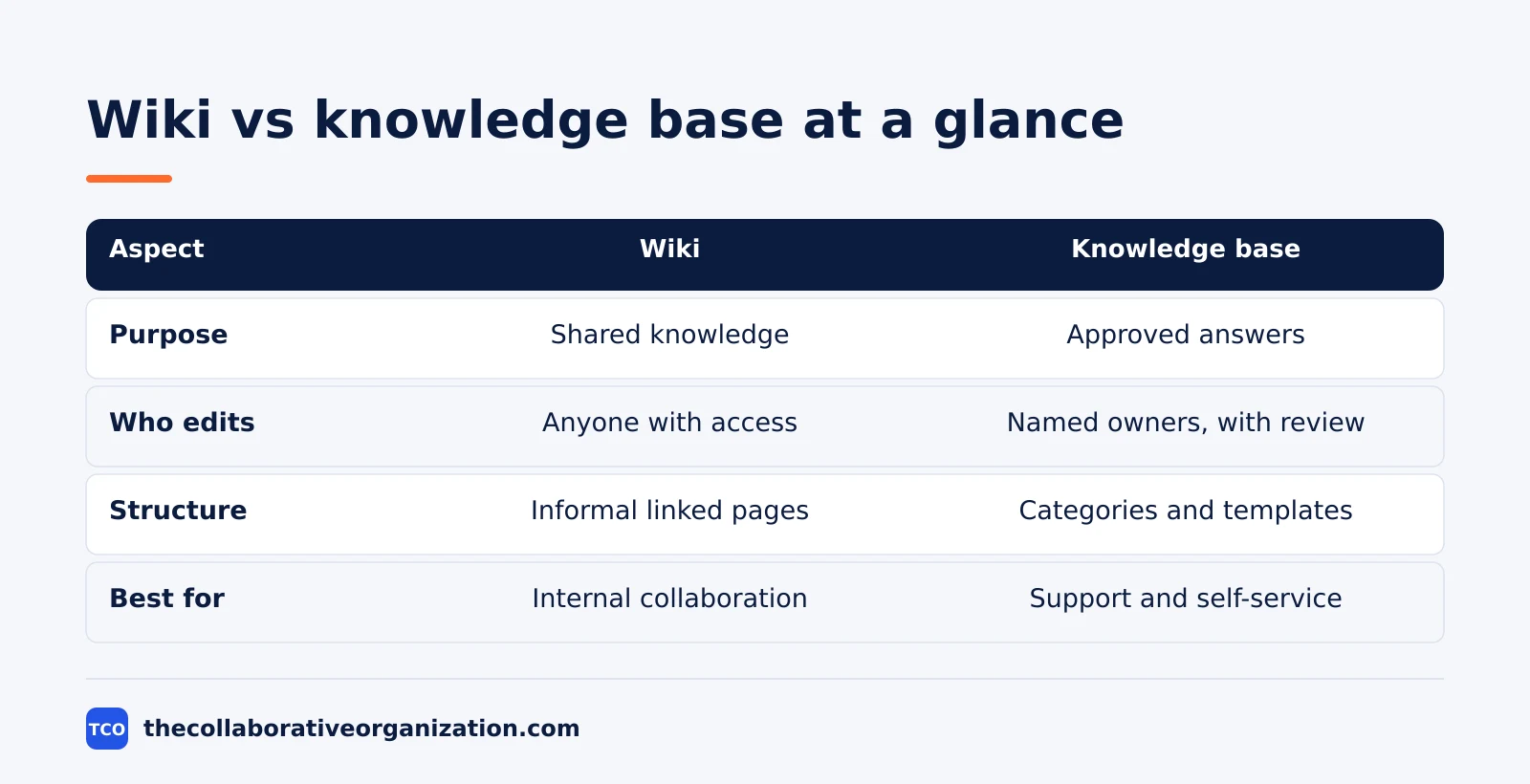
| Aspect | Wiki | Knowledge base |
|---|---|---|
| Purpose | Shared knowledge and documentation | Approved answers for quick problem solving |
| Who edits | Many contributors, often anyone with access | Named authors and owners, with review |
| Structure | Informal, interlinked pages | Categories, tags, templates, and tuned search |
| Accuracy | Can drift out of date without anyone noticing | Owners review and update it on a schedule |
| Search | Usually keyword matching across pages | Often intent-based search that reads the query |
| Audience | Mostly the people who write it | Agents and customers who need an answer |
| Best for | Internal collaboration and research | Customer support, self-service, and regulated answers |
Helpjuice draws the same line in its comparison: a wiki publishes at once with no approval, while a knowledge base needs approval before an article goes live. That one rule explains why a wiki feels fast on day one and messy on day one hundred.
Who edits the content, and who owns it?
In a wiki, the readers are the editors; in a knowledge base, named owners are the editors. That split decides how fast content changes and how much you can trust it.
Wiki editing is open by design. Anyone with access can fix a typo, add a page, or rewrite a section, and the history shows who changed what. This works well when the writers know the topic and the readers can spot errors. It fails when pages age quietly, because no one person is asked to check them.
Knowledge base editing is closed by design. One owner takes each article, reviews it on a schedule, and signs off changes. Readers get one approved version instead of five half-finished drafts. The cost is speed: a fix waits for review, and a busy owner becomes a bottleneck.
Ownership also decides what happens when someone leaves. A wiki page keeps its history, but no one inherits the job of keeping it current. A knowledge base article has an owner field, so a manager can hand it to a new person on day one. If no one owns an answer, it is a wiki page, whatever tool holds it.
Which one should you choose?
Choose a wiki when the knowledge changes often and the readers are the writers; choose a knowledge base when the answer must be right and the readers are strangers to the topic. Ask who reads it, and the choice usually makes itself.
Choose a wiki if the content is project notes, meeting minutes, design research, or early drafts. Choose it when engineers write for other engineers, the topic changes weekly, and no customer ever sees the page. Our guide on how to choose collaboration software covers the wider tool choice once you know which pattern you need.
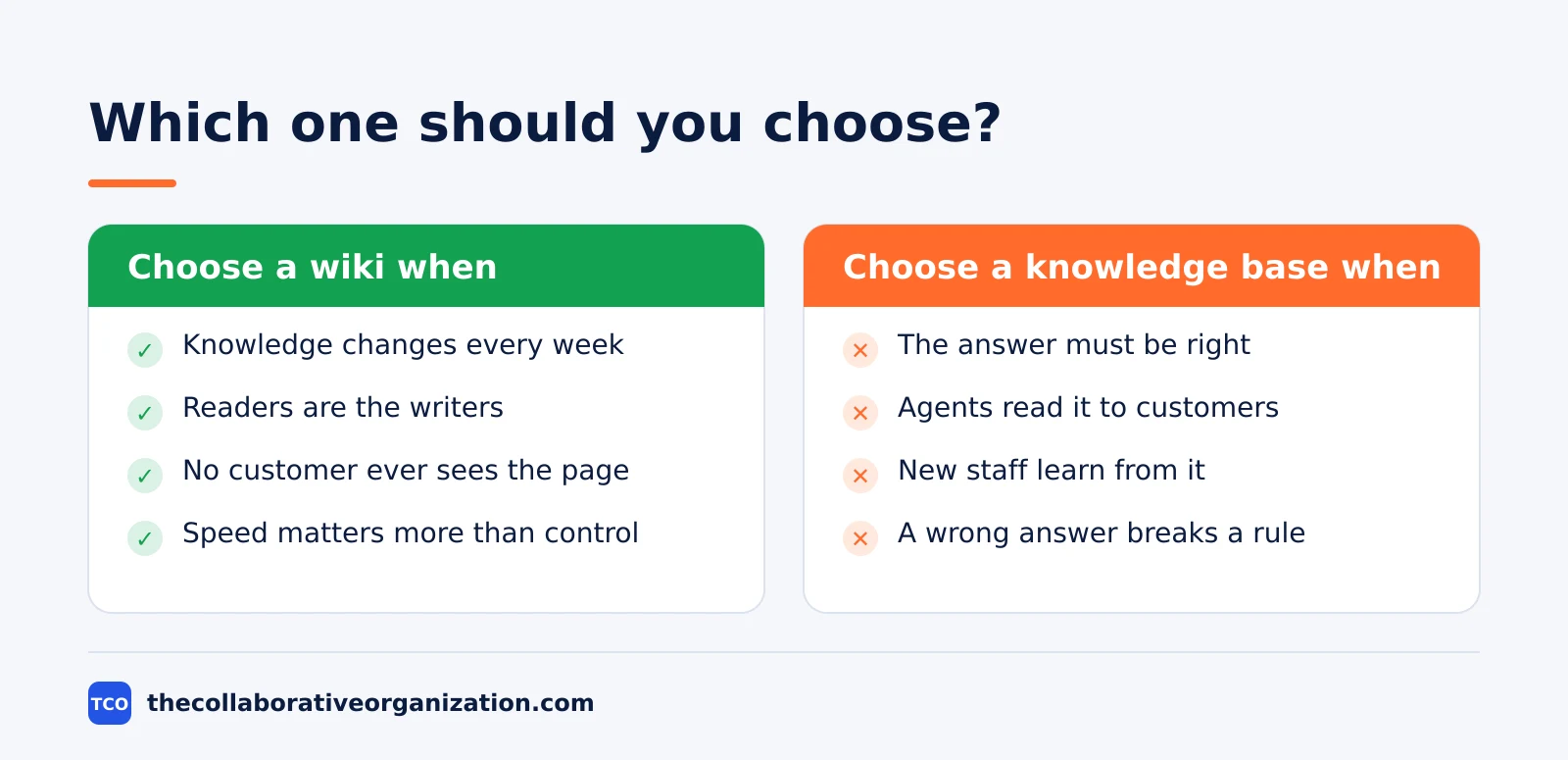
Choose a knowledge base if agents read answers to customers, new staff learn from the articles, or a wrong answer breaks a rule. Choose it for help center articles, troubleshooting steps, and regulated answers in banking or telecom. A knowledge base also fits when you need reports on which articles people open and which searches find nothing.
Choose neither alone if you run support. Most mature teams keep both: a wiki for the work in progress and a knowledge base for the settled answers. The line sits at the customer. Once an agent reads an answer to a customer, that answer needs an owner, a review date, and one approved version.
Can you use a wiki and a knowledge base together?
Yes, and most teams that do it well treat the wiki as the draft room and the knowledge base as the published shelf. The two tools serve different stages of the same knowledge, not different kinds of knowledge.
The flow is simple. A team works out a fix in the wiki, where many people can edit fast. Once the fix is settled and tested, the owner writes it as a knowledge base article, with steps and a clear outcome. The wiki page then links to the published article, so future readers land on the approved version.
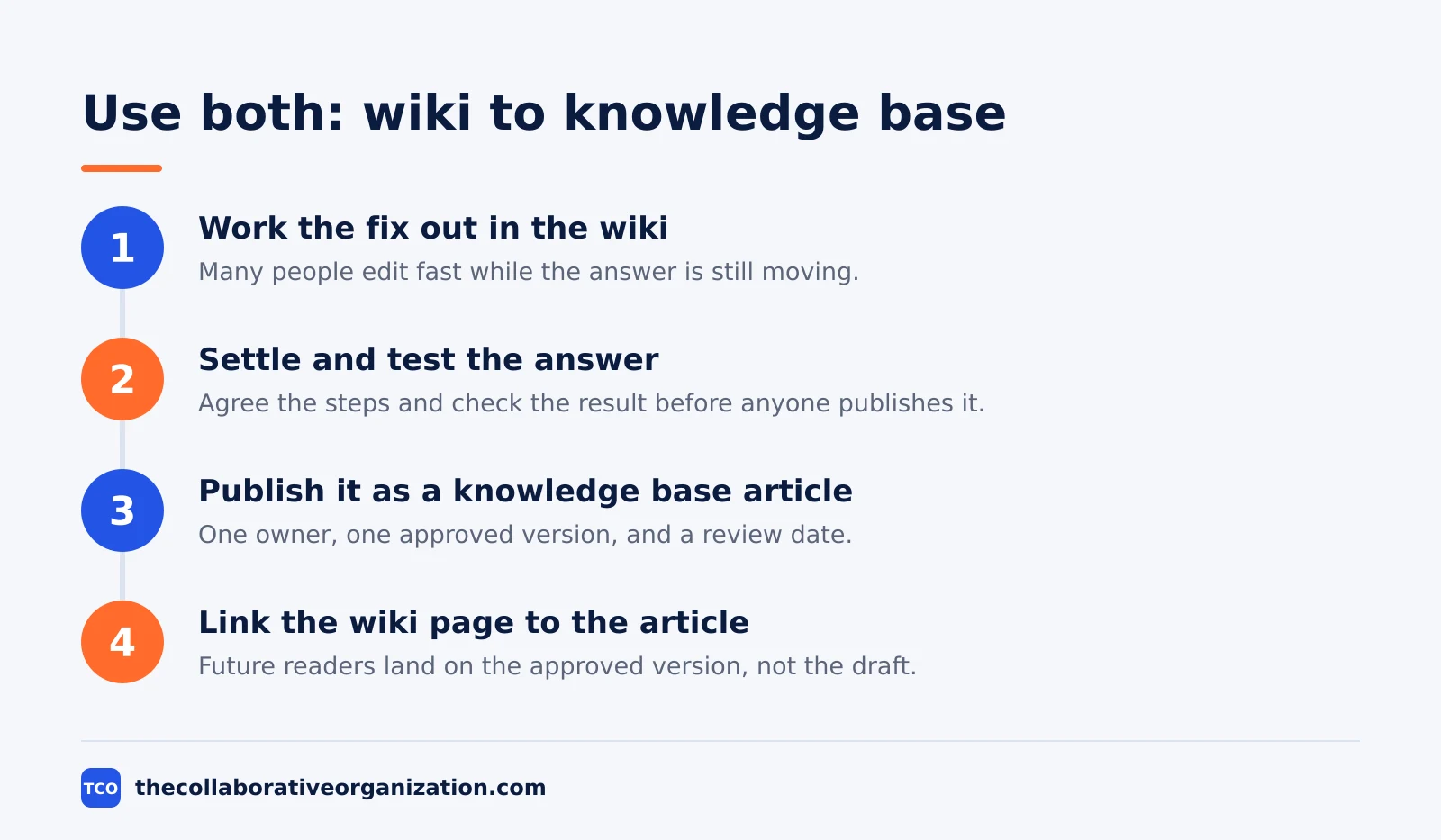
This split also protects the support team. Agents search one place for approved answers instead of digging through project notes. Meanwhile, engineers keep the freedom to write rough notes without a review step. A collaboration platform can hold both patterns, but only if the team agrees which content lives where.
One rule keeps the pair honest: never let the same answer live in both places with different wording. Pick one home for each answer, and link from the other place. Two versions of one answer will drift apart, and readers will trust neither.
Worked example: a support team that picked wrong
Imagine a 40-person support team that keeps its refund steps in a company wiki. Any agent can edit the page, so a new hire fixes a typo on Monday, a senior agent rewrites the steps on Wednesday, and no one reviews either change. By Friday, two agents give customers different refund windows.
The team moves the refund steps into a knowledge base. One owner takes the article, writes it as numbered steps with a clear outcome, and sets a quarterly review date. Agents now read the same approved version, and the wiki keeps only a link to it. Project notes about a new refund tool stay in the wiki.
The fix took one afternoon, and the lesson is plain. Content that reaches a customer needs an owner and a review, while content that only helps colleagues needs speed. The team did not need a new tool. It needed to decide which content was a draft and which was an answer.
Tools that hold a wiki or a knowledge base
Confluence is the default wiki for many teams, and Notion is the flexible option that can play either role. Both can hold a wiki or a knowledge base, so the choice is about how your team works, not about the brand.
Confluence organizes content into spaces and nested page trees, with labels, templates, and permissions. It is primarily a wiki, but it can function as a knowledge base when a team restricts editing to named owners. Notion organizes content into pages and databases, and small teams often use it as a flexible internal wiki for project tracking and documentation.
| Tool | Best for | Free plan | Starting price (as of November 2026) | Notable limit |
|---|---|---|---|---|
| Confluence | Teams that want a shared wiki with spaces and page trees | Free for up to 10 users | $7.15 per user per month (Standard), billed monthly for 1 to 100 users | Free plan covers 10 users and 2 GB of storage |
| Notion | Small teams that want one flexible workspace for notes and answers | Free plan for solo use | $10 per member per month (Plus), billed annually | Free plan limits blocks when 2 or more members join |
The Confluence price comes from Atlassian pricing. The page shows a headline of $5.78 per user per month, which is a blended rate for a larger team. The rate for 1 to 100 users on monthly billing is $7.15 for Standard and $14.10 for Premium, after Atlassian raised list prices on 13 October 2026.
The Notion pricing page lists Plus at $10 per member per month billed annually, or $12 month to month, as confirmed by November 2026 checks. See the full shortlist on our document collaboration software shortlist before you buy.
Common wiki vs knowledge base mistakes to avoid
Most teams fail in the same five ways, and all five come from treating the two tools as the same thing. Run through the list before you move content between them.
- Putting customer answers in a wiki with no owner. An agent reads a draft to a customer, and no one can say whether it is current.
- Forcing every wiki note through review. Drafts stall, engineers stop writing, and the wiki goes quiet.
- Keeping the same answer in both places. Two versions drift apart, and readers trust neither one.
- Judging a wiki by its search alone. A wiki matches keywords; a knowledge base is tuned to return the one right article.
- Never reviewing the knowledge base. Owners leave, articles age, and the approved shelf fills with stale answers. Set a review date on every article, and check the guides index for the review habit that fits your team.
Sources
- Knowmax - What Is a Wiki? Meaning and Wiki vs Knowledge Base (2026)
- Helpjuice - Wiki vs Knowledge Base: Which Documentation Tool Is Right for Your Team? (2026)
- Wikipedia - Wiki (2026)
- Atlassian - Confluence Pricing (2026)
- Notion - Pricing (2026)
- Gotechpresso - Confluence Pricing 2026: Per-User Costs, Plans and Rovo (2026)
Frequently asked questions
Is a wiki the same as a knowledge base?
No. A wiki is a shared set of pages that anyone with access can edit, while a knowledge base is a curated set of approved answers with named owners and a review step. The two tools overlap, since a wiki can hold answers and a knowledge base can hold notes, but they are built for different jobs.
Can Confluence be both a wiki and a knowledge base?
Yes. Confluence works as a wiki by default, because teams create and edit pages together in shared spaces. It can also work as a knowledge base when a team locks editing to named owners, adds page templates, and reviews pages before staff treat them as approved answers.
Is Wikipedia a knowledge base?
Wikipedia is a wiki, not a knowledge base in the business sense. Millions of readers use it to find general facts, but it has no named owner for each answer and no approval step before a change goes live. A support knowledge base needs both, so Wikipedia is a poor model for one.
Which is better for customer support, a wiki or a knowledge base?
A knowledge base is the better choice for customer support. Agents read answers to customers, so each answer needs one owner, one approved version, and a review date. A wiki suits internal notes and research that change often and that no customer ever sees.
Should a small team start with a wiki or a knowledge base?
Start with a wiki when the knowledge still changes every week and the readers are the same people who write it. Move the settled answers into a knowledge base once customers or new staff depend on them. Most teams end up with both, and that split is normal.
Related articles

guides
Free Project Management Templates: 7 to Copy (2026)
Seven free project management templates from monday, Wrike, Teamwork, Smartsheet, ClickUp, Asana and Trello, with what each one is for and what free really costs.
November 20, 2026 · 7 min read

guides
Project Proposal Template: Copy and Win Work (2026)
A project proposal template pitches the work before it is approved: problem, solution, scope, budget, timeline and terms. Copy the template and filled example.
November 20, 2026 · 10 min read

guides
Action Plan Template: Goal to Done in One Page (2026)
An action plan template turns one goal into owned steps with dates, dependencies and a success measure. Copy the table and see it filled for a support team.
November 20, 2026 · 11 min read