Project Roadmap vs Project Plan (2026) | The Collaborative Organization
By The Collaborative Organization Team · November 19, 2026 · Last verified November 19, 2026 · 10 min read
A project roadmap is the high-level visual view of a project, while a project plan is the detailed document the team works from. The roadmap shows goals, milestones and rough timing for stakeholders. The plan holds tasks, owners, budget, risks and dates for the team. One is the map, the other is the turn-by-turn directions.
Key takeaways
- A roadmap is the high-level visual view: goals, milestones, deliverables and rough timing, with no task-level detail.
- A project plan is the detailed working document: tasks, owners, budget, risks, schedule and success measures.
- Roadmaps speak to executives and sponsors, while plans speak to the team doing the work.
- Build the roadmap first, then derive the plan from it, and update the plan far more often than the roadmap.
- PMI’s Pulse of the Profession 2025 found only 23% of projects are aligned to strategic goals.
What is a project roadmap?
A project roadmap is a high-level visual summary of a project’s goals, milestones, key deliverables and overall timeline. It gives the project manager and the stakeholders a bird’s-eye view of the major parts. A sponsor who has no time to read the full plan can scan the roadmap and walk away knowing the status and the risk.
Tempo lists what a complete roadmap usually holds: project goals, milestones, primary deliverables, a high-level timeline, task dependencies, resource needs and notable risks. Note what is missing: no task list, no owners per task, no budget lines. A roadmap is a photograph of the project, not the project under a microscope.
The roadmap matters because alignment is rare. Tempo’s roadmap guide cites PMI’s Pulse of the Profession 2025, which found that only 23% of projects are aligned to strategic goals. That figure comes second-hand through Tempo, so treat it as a signal, not a precise measure.
A roadmap is the simplest fix for that gap: one page that shows where the project is going and why.
What is a project plan?
A project plan is the detailed document that defines how the project will be executed and controlled. It holds the work breakdown structure, task definitions with owners and due dates, resource allocation and budget, roles and responsibilities, success measures, and the communication and risk approaches. It is the working document, not a communication piece.
Toggl puts the plan in one question: a project plan is a detailed document that communicates what tasks need to be done, by when, and by whom. It is mostly internal. It helps the project manager assign tasks to team members and track milestone progress, and it is the document the team opens every day.
A plan is not a one-pager, and it is not a document for executives. It is too detailed for that audience, and that is fine: detail is its job. Our guide on project charter vs project plan explains where the charter ends and the plan begins, since the two are often confused in the same way.
Project roadmap vs project plan: the side-by-side table
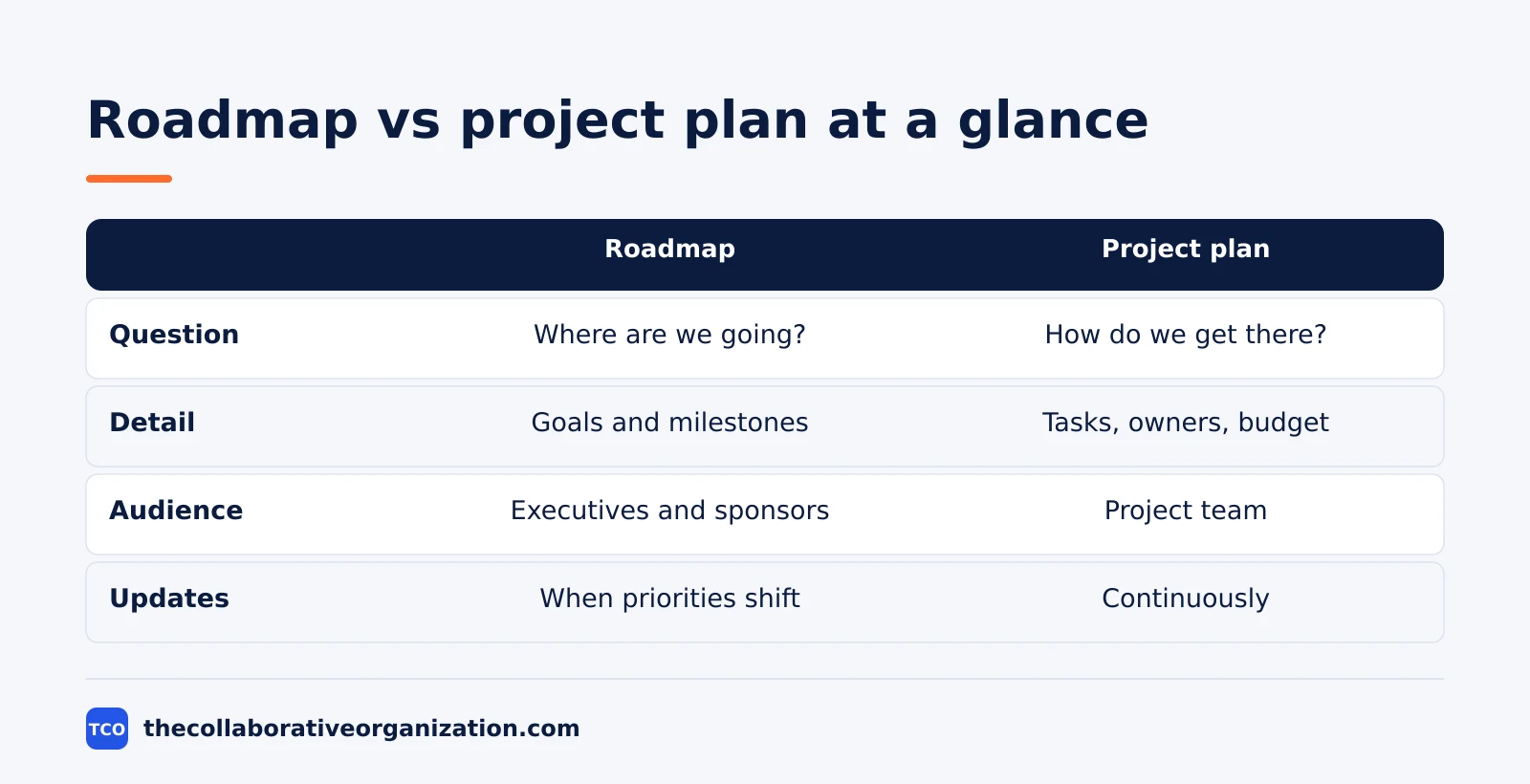
The difference is zoom level: the roadmap is the high-level view, and the plan gets into the details. Everything else follows from that one line: who reads it, how often it changes, and what happens when it is wrong.
| Aspect | Project roadmap | Project plan |
|---|---|---|
| Main question | Where are we going? | How do we get there? |
| Detail level | High-level: goals, milestones, timeline | Granular: tasks, resources, budget, risks |
| Audience | Executives, sponsors, stakeholders | Project team and anyone doing the work |
| Format | Visual, usually one page | Written document, often long |
| Update cadence | When priorities shift or milestones move | Continuously, as work changes |
| Commitment | Directional | Detailed and binding |
Doitify draws the same line: a roadmap is a high-level, strategic overview with no task-level detail, while a plan specifies tasks, resources, budget, roles, success metrics, timelines and risk responses. The roadmap says where you are going; the plan says exactly how you will get there.
Which one does your audience need?
Give the roadmap to people who decide, and give the plan to people who do the work. An executive sponsor needs to know when to expect deliverables, not every technical requirement. A team member needs to know what to do on Tuesday, not the five-year vision.
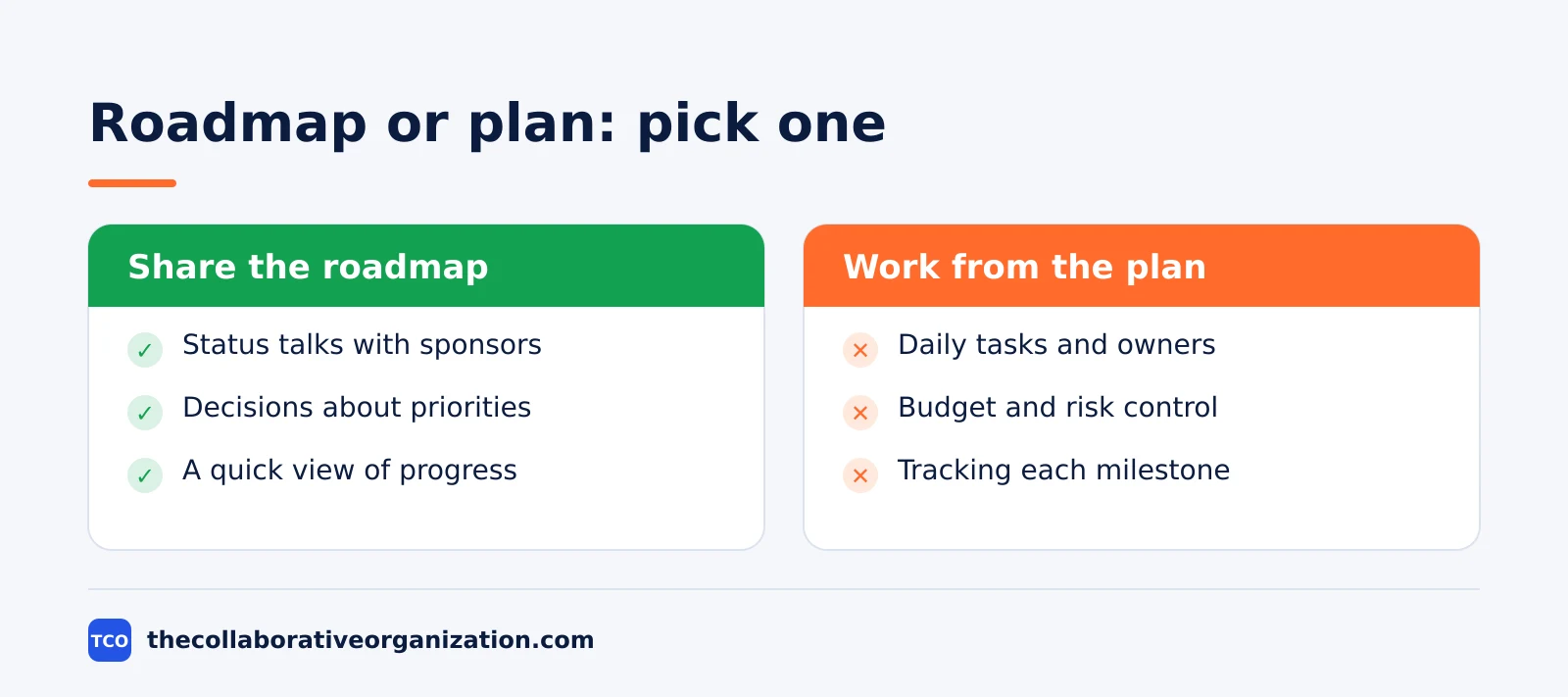
Share the roadmap in status talks with sponsors, in decisions about priorities, and whenever someone asks for a quick view of progress. Work from the plan for daily tasks and owners, for budget and risk control, and for tracking each milestone.
A roadmap shown to the team is too vague to work from, and a plan shown to a sponsor is too long to read.
The two also differ in what they promise. A roadmap is directional: it shows the route and the main stopping points, and the dates are rough. A plan is binding: its dates, owners and budget are the commitments the team is held to. Mixing the two up is how a rough roadmap date becomes a promise nobody agreed to.
How to build a project roadmap in 6 steps
A roadmap takes six steps, and the first two use no dates at all. Tempo sets out the sequence: define the goals and scope, pick the milestones and deliverables, set a high-level timeline, map dependencies and risks, choose a format, then share it and iterate.
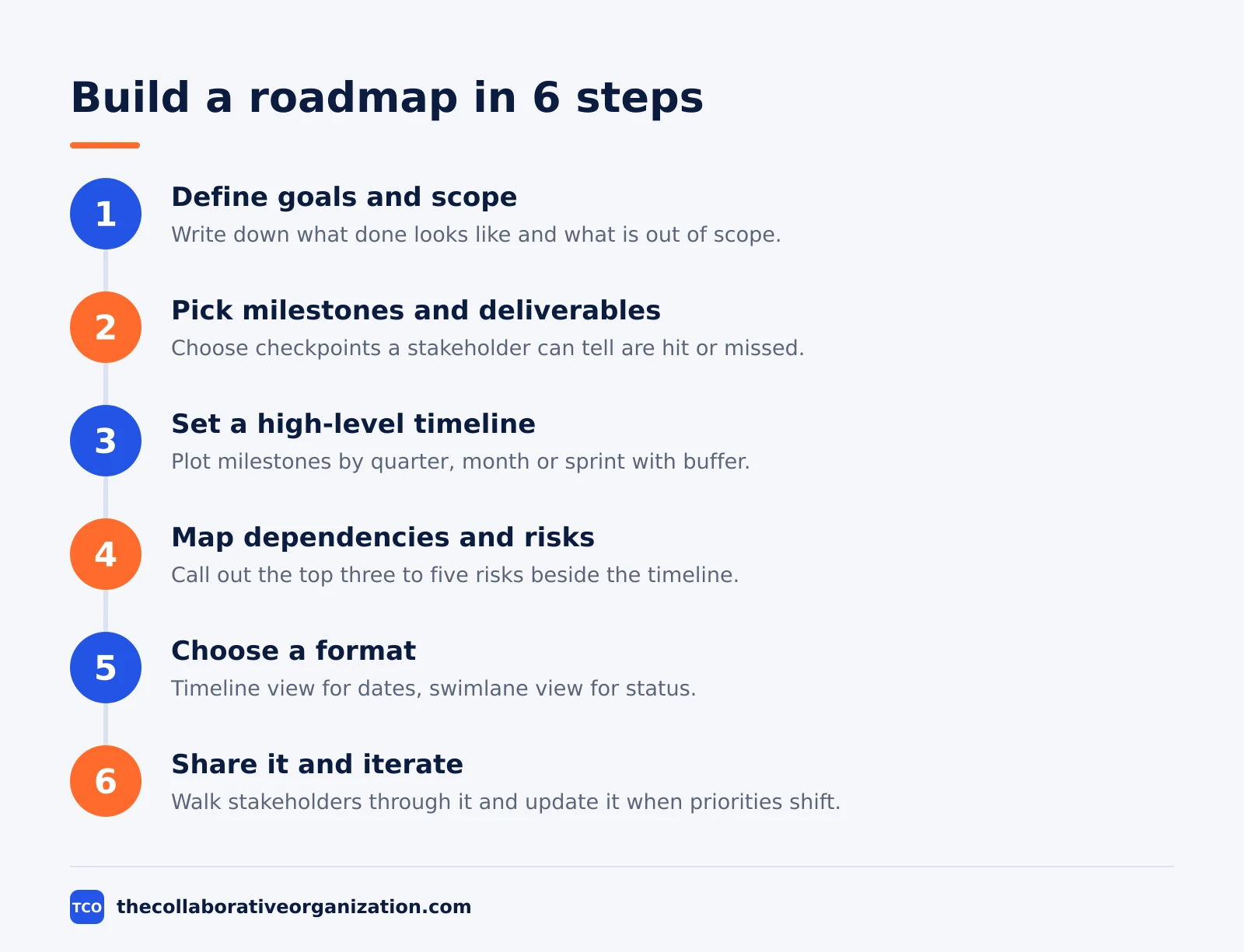
- Define the goals and scope. Write down what done looks like, what is included, and what is out of scope.
- Pick milestones and deliverables. Choose checkpoints a stakeholder can tell are hit or missed, each with at least one deliverable.
- Set a high-level timeline. Plot milestones by quarter, month or sprint, and leave buffer for testing, reviews and approvals.
- Map dependencies and risks. Call out the top three to five risks beside the timeline, plus the links between milestones.
- Choose a format. Use a timeline view when the question is when, and a swimlane view when the question is where things stand.
- Share it and iterate. Walk stakeholders through the first version, set a review cadence, and update the roadmap first when priorities shift.
The most common error is step three: scheduling milestones back-to-back with zero slack. One delay then cascades into every milestone after it. ClickUp makes the same point from the other side: a project plan is the detailed, operational document that lays down the steps, tasks, timelines, resources and responsibilities to complete the project.
How the two work together
The roadmap and the plan work together: the roadmap sets direction, the plan carries it out, and the plan feeds back into the roadmap when reality changes. Neither replaces the other, and each is weaker without the other.
The order is fixed. Create the roadmap first, agree it with stakeholders, then derive the plan from it. When priorities shift, update the roadmap first, then cascade the changes into the plan.
Tempo is clear on this: expect the first review to change things, and that is the point. A roadmap that never changes is a poster, not a plan.
The plan also protects the roadmap. When a milestone on the roadmap moves, the plan shows why: which tasks slipped, which dependency broke, and what it costs to recover. Without the plan, a moved milestone is just a surprise.
Our guide on roadmap vs backlog covers a nearby confusion, since backlogs and roadmaps are often mixed up in the same way.
Worked example: a 12-week website relaunch
A 12-week website relaunch shows what each document holds and what it leaves out. The roadmap fits on one page. The plan runs to 40 tasks. Both describe the same project, and neither can do the other’s job.
The roadmap has four milestones. Weeks 1 to 3: discovery complete, with the content audit as the deliverable. Weeks 4 to 7: new design approved, with the homepage and three key templates as deliverables.
Weeks 8 to 10: site built and tested, with the staging site as the deliverable. Weeks 11 to 12: launch, with the live site and the announcement as deliverables. The roadmap also names two risks: the design review may take a second round, and the content migration may run long.
The plan holds the detail behind those four lines. It lists the 40 tasks, each with an owner and a due date, a budget of $48,000, and a risk response for each named risk. The design review risk has a named backup reviewer and a one-week buffer.
The migration risk has a daily check-in during weeks 8 to 10. A sponsor reading the roadmap sees the launch date and the two risks. A team member reading the plan sees what to do on Tuesday and who to ask when it slips.
Common roadmap vs plan mistakes to avoid
Most roadmap and plan problems come from five habits, and all five are easy to spot. Run through the list each time either document changes.
- Cramming Gantt-level detail into the roadmap. A roadmap with 40 tasks is a plan in disguise, and sponsors will stop reading it.
- Stripping the roadmap to a slogan. A roadmap with no milestones, dates or risks gives leadership nothing to act on.
- Treating a roadmap date as a promise. Roadmap dates are rough. If a sponsor needs a commitment, put it in the plan.
- Updating the plan but not the roadmap. When the plan moves and the roadmap does not, the roadmap starts lying about the project.
- Writing the plan before the roadmap. The team then works out detail for work that leadership never agreed to, and the roadmap has to be retrofitted.
GeeksforGeeks draws the same line in its comparison: the roadmap covers the entire project duration at a high level, while the plan focuses on shorter, immediate timeframes in detail. The milestone vs deliverable distinction helps here too, since a milestone with no deliverable is hard to verify.
Tools that hold roadmaps and plans
A tool that shows both views saves the team from keeping two documents in two places. The three tools below hold roadmaps and plans side by side, with their starting prices as of November 2026.
| Tool | Best for | Free plan | Starting price (as of November 2026) | Notable limit |
|---|---|---|---|---|
| Asana | Teams that want timeline and Gantt views | Free for 2 people | $10.99 per user per month, billed annually | Timeline views need a paid plan |
| monday.com | Teams that want a visual board with phases | Free plan for up to 2 seats | $9 per seat per month (Basic), billed annually | Paid plans need at least 3 seats |
| ClickUp | Teams that want Gantt charts and goals in one place | Free Forever plan | $9 per user per month (Core), billed annually | Yearly billing needed for that price |
The Asana price comes from Asana pricing: the Personal plan is free for 2 users, and Starter is $10.99 per user per month when billed annually.
The monday.com price is $9 per seat per month for Basic, billed annually, with a 3-seat minimum. The monday.com pricing page renders only FAQ text to our fetcher, so the $9 figure rests on corroboration from a 2026 pricing roundup and several November 2026 checks.
The ClickUp price comes from ClickUp pricing: Core is $9 per user per month billed yearly, with a $12 regular price shown crossed out on the page.
A Gantt view makes both documents visible at once; our guide on kanban vs Gantt charts shows how the two views differ.
Our guide on how to choose project management software covers what to look for.
Sources
- Tempo - What’s a Project Roadmap? A Primer for Beginners (2026)
- Doitify - Roadmap vs Project Plan: What’s the Difference? (2026)
- Visor - What Is a Project Roadmap - and How Should You Make Them? (2026)
- Toggl - Project Roadmap: What Is It and How to Create One (2026)
- ClickUp - How to Create a Project Roadmap (with Examples) (2026)
- GeeksforGeeks - How to Create a Project Roadmap? (2025)
- Asana - Pricing (2026)
- monday.com - Pricing (2026)
- ClickUp - Pricing (2026)
Frequently asked questions
What is the difference between a project roadmap and a project plan?
A roadmap is the high-level visual view of a project: goals, major deliverables, milestones and rough timing, with no task-level detail. A plan is the detailed working document: tasks, owners, budget, risks, schedule and success measures. The roadmap says where you are going, and the plan says exactly how you will get there.
Do I need both a roadmap and a project plan?
Yes, for most projects. The roadmap aligns executives and sponsors on direction, while the plan gives the team the detail it needs to do the work. A roadmap without a plan has no instructions, and a plan without a roadmap has no shared direction. Small one-person tasks may need only a plan.
Which comes first, the roadmap or the plan?
The roadmap comes first. Agree the goals, milestones and rough timing with stakeholders, then derive the detailed plan from it. Building the plan first often means the team works out detail for work that leadership never agreed to, and the roadmap then has to be retrofitted.
How often should a roadmap be updated?
Update a roadmap when priorities shift or a milestone moves, which is far less often than the plan changes. The plan changes continuously as tasks, scope and details evolve. A roadmap that changes every week stops being a stable picture of direction and becomes a second plan.
Is a Gantt chart a roadmap or a plan?
A Gantt chart is closer to a plan. It shows tasks on a timeline in detail, with start dates, durations and dependencies. A roadmap shows the same project at a higher level, with phases and milestones instead of tasks. Teams often show both: the roadmap for sponsors and the Gantt chart for the team.
Related articles

guides
Free Project Management Templates: 7 to Copy (2026)
Seven free project management templates from monday, Wrike, Teamwork, Smartsheet, ClickUp, Asana and Trello, with what each one is for and what free really costs.
November 20, 2026 · 7 min read

guides
Project Proposal Template: Copy and Win Work (2026)
A project proposal template pitches the work before it is approved: problem, solution, scope, budget, timeline and terms. Copy the template and filled example.
November 20, 2026 · 10 min read

guides
Action Plan Template: Goal to Done in One Page (2026)
An action plan template turns one goal into owned steps with dates, dependencies and a success measure. Copy the table and see it filled for a support team.
November 20, 2026 · 11 min read