How to Choose Project Management Software (2026) | The Collaborative Organization
By The Collaborative Organization Team · November 19, 2026 · Last verified November 19, 2026 · 10 min read

Pick the tool that fits the work your team does every day, not the one with the longest feature list. Start by writing one sentence about the job, count the seats you will have in 90 days, and price that headcount before you fall for a demo. The right choice survives a two-week pilot on real work.
Key takeaways
- Name the job in one sentence before you compare tools, because a client project, a software backlog, and a content calendar need different tools.
- Count the seats you will have in 90 days and price that number, since free plans cap at 2 users on Asana and monday.com and 10 collaborators on Trello.
- Shortlist three tools, score them on the same checklist, and pilot the winner on one real project for two weeks.
- PMI’s Pulse of the Profession research puts waste from poor project performance at 9.4% of project investment, about $94 million per $1 billion.
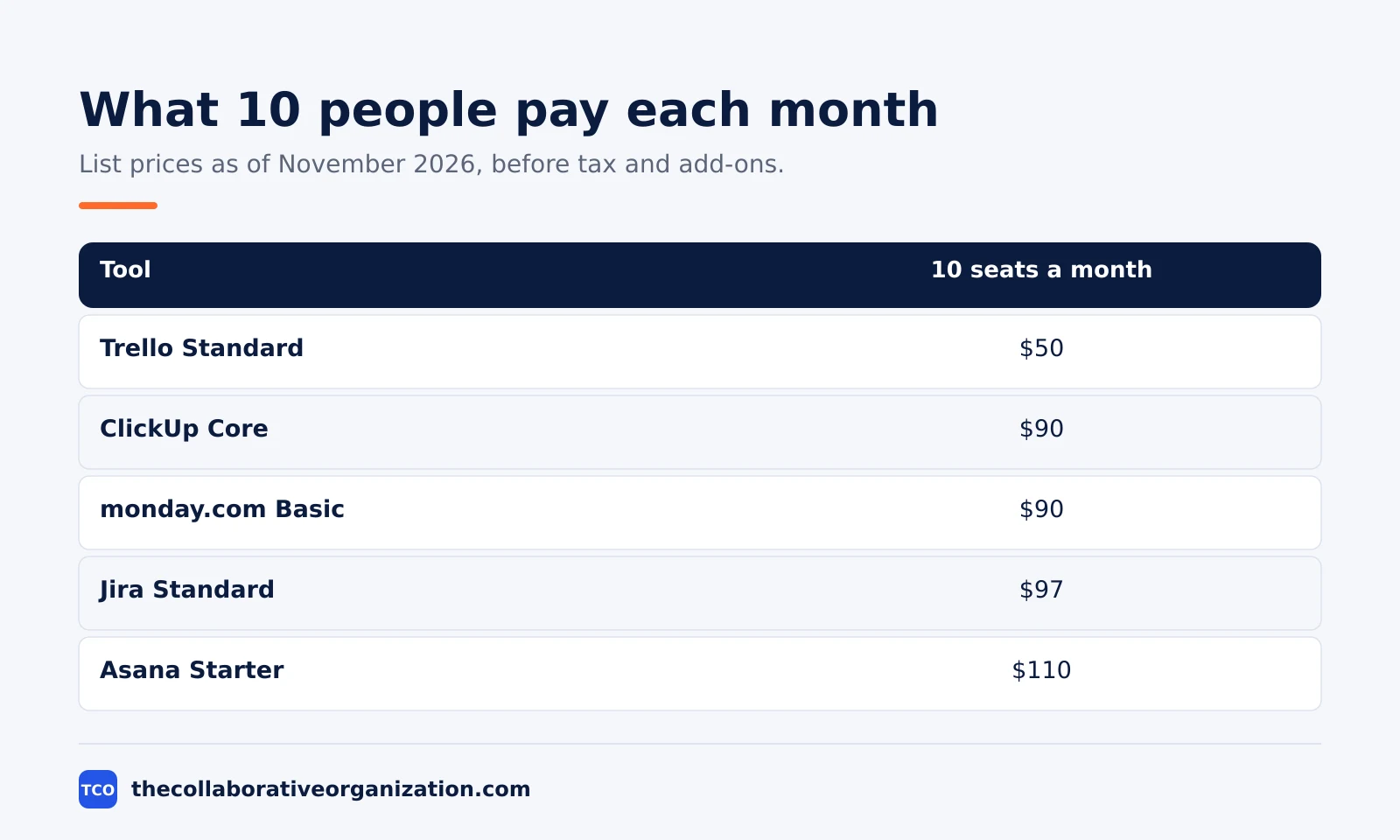
- A 10-person team pays $50 to $110 a month at list prices in November 2026, depending on the tool, before tax and add-ons.
Start from the work, not the feature list
The work decides the tool, because every leading tool can show a board but each one assumes a different job. Write one sentence about what the team ships. “We ship a client project every two weeks.” “We track bugs.” “We run a content calendar.” If you cannot write that sentence, you are not ready to compare tools.
A client project with a few owners fits a calm tool with message boards and to-dos. A software backlog fits Jira, which is built around issues, sprints, and workflows, including the sprint cycle, backlogs, and burndown charts.
Our guide to what is kanban covers the board flow that Trello and monday.com do best.
A marketing team that thinks in colored columns often starts with monday.com or Asana. A team that only needs cards can stay on Trello and pay nothing for months. The question is never which tool has more features. The question is which tool matches the sentence you wrote about the work.
Count seats and price the real cost
Free plans are not interchangeable, and the seat cap is the number that decides your bill. Asana Personal is free for 2 users, and the monday.com free plan covers up to 2 seats. Trello is free for up to 10 collaborators and 10 boards per Workspace. A pilot with two people will not reveal a cap that hits at person number three.
Write down the headcount you will have in 90 days, then price that headcount on the vendor page. A 10-person team pays about $50 a month on Trello Standard, $90 on ClickUp Core or monday.com Basic, and about $110 on Asana Starter, all at list prices as of November 2026.
Jira Standard is $97 a month for 10 users on monthly billing, since Atlassian raised its list prices on 13 October 2026.
| Tool | Best for | Free plan | Starting price (as of November 2026) | Notable limit |
|---|---|---|---|---|
| Asana | Teams that want every task to have a named owner | Free for 2 people | $10.99 per user per month (Starter), billed annually | Free plan covers 2 people |
| monday.com | Teams that want a visual board with phases and status | Free plan for up to 2 seats | $9 per seat per month (Basic), billed annually | Paid plans need at least 3 seats |
| ClickUp | Teams that want tasks, docs, and goals in one place | Free Forever plan | $9 per user per month (Core), billed annually | Yearly billing needed for that price |
| Jira | Software teams that run sprints and backlogs | Free for up to 10 users | $9.70 per user per month (Standard), billed monthly, first 100 users | Price falls only above 100 users |
| Trello | Teams where a board is the whole job | Free for up to 10 collaborators | $5 per user per month (Standard), billed annually | Free plan caps at 10 boards |
Watch the minimums as well as the per-seat price. monday.com paid plans need at least 3 seats, so the smallest paid bill is $27 a month.
Wrike Team is $10 per user per month billed annually for teams of 2 to 15 users, and the price was checked against the vendor pricing page in November 2026.
Basecamp Plus is $15 per user per month billed monthly, with a flat-rate Pro Unlimited plan at $299 a month for unlimited users, and both prices were checked against vendor pricing pages in November 2026.
Add the hidden costs before you compare totals. Training time, migration time, and paid add-ons often cost more than the subscription in year one. PMI’s Pulse of the Profession research puts the waste from poor project performance at 9.4% of project investment, about $94 million per $1 billion, and a tool nobody opens is part of that waste.
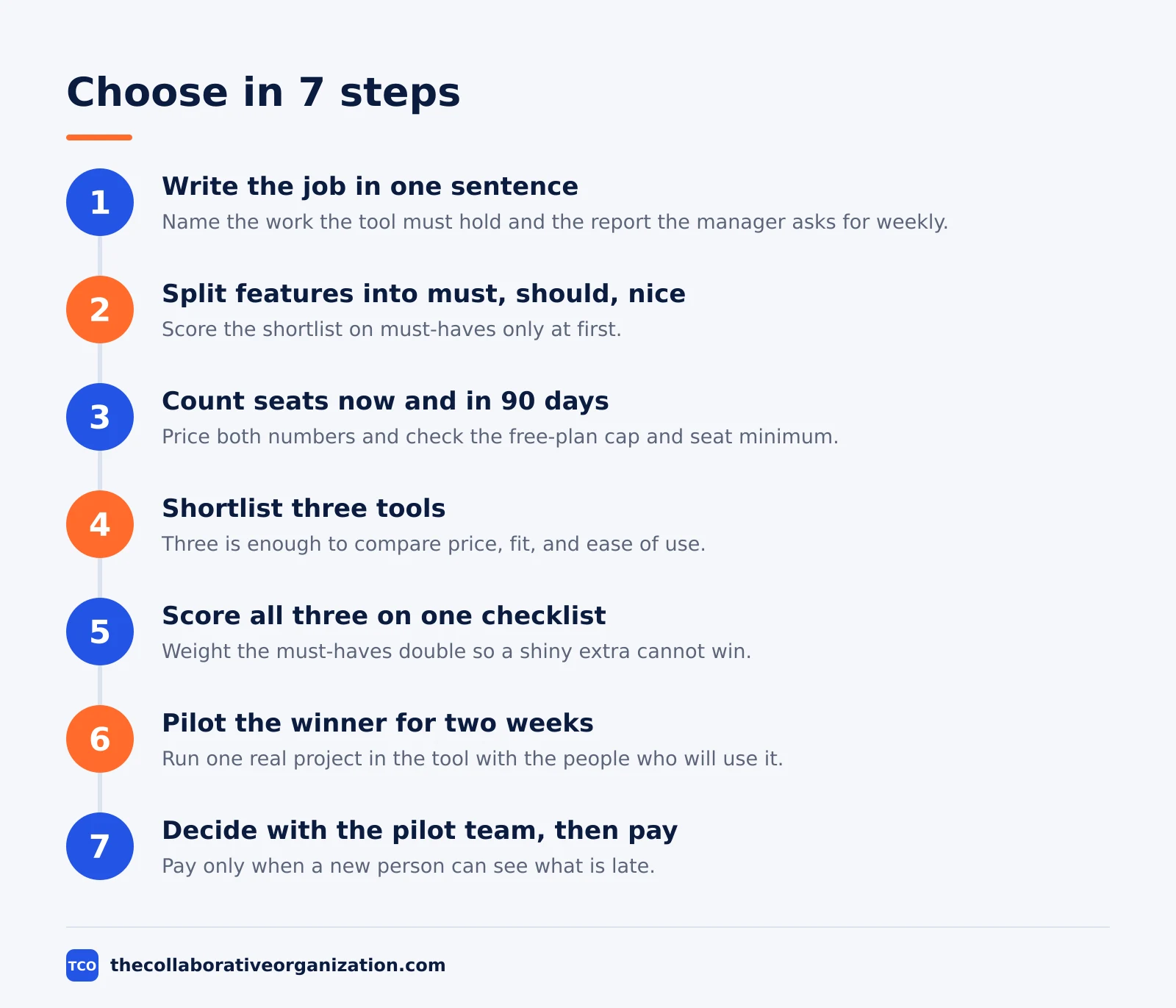
How to choose project management software in 7 steps
Choosing well takes seven steps, and the first three use no demo at all. The steps below turn a vague preference into a decision you can defend to the team and to the budget holder.
Step 1: Write the job in one sentence
Name the work the tool must hold. List the three tasks the team does most often, and the one report the manager asks for every week. If the tool cannot do those four things well, the rest of the feature list does not matter.
Step 2: List must-have, should-have, and nice-to-have features
Split the list into three groups. Must-have means the team cannot work without it, such as timelines or guest access. Should-have means the work is slower without it. Nice-to-have means it looks good in a demo. Score the shortlist on must-haves only at first.
Step 3: Count seats now and in 90 days
Write the headcount today and the headcount in 90 days. Price both numbers on each vendor page, and check the free-plan cap and the seat minimum. A tool that is free for two people and $110 a month for ten is a different decision at each size.
Step 4: Shortlist three tools
Pick three tools that fit the job sentence and the budget. Read our project management software shortlist to compare the leading options side by side. Three is enough to compare price, fit, and ease of use without turning the choice into a month of demos.
Step 5: Score all three on the same checklist
Use one checklist for every tool, and score each item 0 to 2: missing, partial, or full. Cover the must-haves, the free-plan cap, the starting price at your seat count, the integrations you already pay for, and data export. Weight the must-haves double so a shiny extra cannot beat a missing core feature.
Step 6: Pilot the winner on one real project
Run one real project in the top tool for two weeks. Give every task an owner, hold the weekly meeting inside the tool, and let the team do the daily work there. A pilot on fake data proves nothing, because fake tasks have no deadlines and no unhappy stakeholders.
Step 7: Decide with the pilot team, then pay
Ask the pilot team three questions: can a new person see what is late, can you add a request without emailing a coordinator, and can you explain the bill? If the answer to all three is yes, pay for the tool. If people kept a side spreadsheet, the rollout has already failed, so try the runner-up.
Worked example: a 12-person agency picks a tool
A 12-person marketing agency shows how the seven steps play out on real numbers. The agency ships four client projects a month, and the work is a mix of briefs, design, and publishing dates. Their job sentence is: “We ship client campaigns on a fixed date with three owners per project.”
The team counts 12 seats now and 15 in 90 days. At list prices as of November 2026, 15 seats cost $75 a month on Trello Standard, $135 on ClickUp Core or monday.com Basic, and about $165 on Asana Starter. The free plans cannot hold 12 people, so the team must pay whatever it picks.
They shortlist Trello, monday.com, and Asana. Trello scores full marks on ease and price, but the team needs timeline views and guest access for clients, which Trello keeps on Premium at $10 per user per month.
monday.com Basic has no timeline view and no automations, so the team would need Standard at $12 per seat. Asana Starter includes timelines, dashboards, and unlimited free guests at $10.99 per user per month.
They pilot Asana on one client campaign for two weeks. Every task gets an owner, the client follows as a free guest, and the weekly meeting runs from the timeline view.
The team can see what is late without asking, and the bill is one line they can explain. They pay for Asana and keep Trello as the fallback.
What to test in a two-week pilot
A pilot answers five questions, and each one needs a real task to test it. First, can a new person open the tool and see what is late without asking anyone? Second, can a teammate add a request without emailing a coordinator? Third, does the tool show the deadline, the owner, and the status in one view?
Fourth, test the integrations you already pay for. Connect the calendar, the file store, and the chat tool, and watch whether updates flow both ways.
A tool that needs manual copying between apps will be abandoned within a month. Fifth, test data export. Export one project and check that tasks, owners, dates, and comments come out in a usable file, because the exit plan matters as much as the entry plan.
Set a daily habit for the pilot, not a weekly one. People who open the tool once a week never learn it, and their feedback at the end of the pilot is a guess. Daily use for two weeks is the smallest test that tells the truth.
How to measure success after you switch
Success means the tool holds the work, not that the team likes the tool. Measure four numbers in the first month. First, the share of tasks with an owner and a due date, which should be above 90 percent. Second, the number of status meetings that shrink or disappear, since the board should answer the status question.
Third, count the side spreadsheets. If the team still keeps a second system for dates or owners, adoption has failed even when the tool looks busy.
Fourth, check the time to find an answer. Atlassian found in its 2025 State of Teams survey that workers spend 25 percent of their time searching for answers, so a good tool should cut that number, not add to it.
Review the numbers with the team at 30 days and at 90 days. Keep the tool when the numbers move in the right direction. Change the setup, or the tool, when they do not.
Common project management software mistakes to avoid
Most bad choices fail in the same five ways, and all five are easy to spot before you pay. Run through this list before the pilot ends.
- Buying for the feature list. A tool with 200 features is no help when the team uses five of them. Score the must-haves first and ignore the rest until the pilot.
- Pricing one seat instead of the team. A $9 seat is $90 a month for 10 people and $135 for 15. Price the headcount you will have in 90 days, not the headcount today.
- Skipping the free-plan cap. A pilot with two people hides the cap that hits at person three on Asana and monday.com, and at person eleven on Trello. Read the cap before you migrate.
- Migrating everything on day one. Importing every old project hides the new tool behind your old mess. Move one project, learn the tool, then move the rest.
- No owner for the rollout. When nobody owns the setup, the templates, and the training, each team invents its own way of working. Name one person to own the tool for the first 90 days.
Sources
- Asana - Pricing (2026)
- monday.com - Pricing (2026)
- ClickUp - Pricing (2026)
- Atlassian - Jira Pricing (2026)
- Trello - Pricing (2026)
- PMI - Beyond Agility: Pulse of the Profession 2021 (2021)
- Atlassian - State of Teams 2025 (2025)
Frequently asked questions
How long does it take to choose project management software?
Plan on two to four weeks. Spend the first week defining the work and shortlisting three tools, then run a two-week pilot on one real project with the people who will use the tool every day. A choice made in an afternoon usually means a migration done twice.
Should a small team pay for project management software?
Not always. A team of two or three people can often run on a free plan, since Asana Personal is free for two users and Trello is free for up to 10 collaborators. Pay when the free plan blocks the work, for example when you need timelines, guest access, or more than 10 boards.
What is the biggest mistake when choosing project management software?
Buying for the feature list instead of the daily job. Teams pick a tool with 200 features, then use five of them and keep a side spreadsheet for the rest. Name the job first, count the seats, and test the tool on one real project before you commit.
How many tools should you shortlist?
Three. One shortlist of three tools is enough to compare price, fit, and ease of use without turning the choice into a month of demos. Score all three on the same checklist, pilot the winner, and keep the runner-up as your fallback if the pilot fails.
Do you need a RACI matrix before you pick a tool?
It helps when several people share the work and nobody owns the result. A RACI chart names who does each task and who signs it off, which tells you which roles and permissions the tool must support. Build the chart first, then check that the tool can hold it.
What does project management software cost for a team of 10?
At list prices in November 2026, a 10-person team pays about $50 a month on Trello Standard, $90 on ClickUp Core or monday.com Basic, and about $110 on Asana Starter. Jira Standard is $97 a month for 10 users on monthly billing. Add tax and any paid add-ons on top.
Related articles

project management
What Is a RACI Matrix? Definition, Roles and Examples (2026)
A RACI matrix maps who is Responsible, Accountable, Consulted and Informed for each task. Learn the four roles, how to build one, and see a worked example.
November 19, 2026 · 9 min read

project management
Daily Standup Meeting Format That Works (2026)
A daily standup is a 15-minute meeting where Developers inspect progress toward the Sprint Goal and plan the next day. Use this format to run one that ends on time.
November 19, 2026 · 10 min read

project management
How to Run a Sprint Planning Meeting (2026)
Sprint planning opens every sprint with a goal, a set of backlog items and a plan. Follow these 6 steps to run the meeting in 90 minutes for a two-week sprint.
November 19, 2026 · 9 min read