Project Management Software vs Spreadsheets (2026) | The Collaborative Organization
By The Collaborative Organization Team · November 19, 2026 · Last verified November 19, 2026 · 11 min read
Project management software automates assignments, timelines and reminders, while a spreadsheet tracks a task list by hand. The difference is what each tool was built for. A spreadsheet calculates and stores rows. Project software coordinates people, dates and handoffs, and it keeps one current version that the whole team can see.
Key takeaways
- Spreadsheets organize data by hand and suit small, short task lists with one owner.
- Project software automates assignments, reminders, timelines and reporting from one dashboard.
- Capterra research cited by ProofHub found 42% of switchers left spreadsheets over inefficiency.
- A 2024 Wellingtone figure cited by Plutio says 54% of project managers still track work in spreadsheets.
- Entry plans start near $5 per user per month as of November 2026, with Trello Standard at $5.
The core difference in one sentence
A spreadsheet is a grid you maintain, while project management software is a system that maintains the work for you. That one line explains the whole comparison. In a sheet, a person updates the status, sends the reminder and rebuilds the report. In project software, the tool does those jobs when the work changes.
ProofHub draws the same line: spreadsheets organize data manually and support basic tracking for smaller teams, while project software automates assignments, timelines, notifications and reporting from a single dashboard. The sheet is a record; the software is a record plus a set of hands.
The gap grows with the number of people. One person with one list feels no gap at all. Five people, three projects and a shared deadline feel it every week, because every update must travel from the person doing the work to the person keeping the sheet.
What spreadsheets do well
Spreadsheets do well at fast, flexible, cheap tracking for one person or a tiny team. They open in seconds, cost little or nothing extra, and bend to any shape: a task list today, a budget tomorrow, a simple chart next week. No setup, no training, no admin panel.
Familiarity is the real strength. Research from Acuity Training, cited by Cloudwards, found that 66% of office workers use Excel at least once per hour. A team that already lives in Excel needs no new tool to start tracking a small project, and the sheet works offline on a plane or a site visit.
Sheets also shine as calculators. Estimates, budgets, cost tables and one-off analysis belong in a grid, where formulas and sorting do the work. Many teams keep sheets for those jobs long after the project plan moves into software, and that split is a good one: the sheet calculates, the software coordinates.
Where spreadsheets break down
Spreadsheets break down when several people edit them, when tasks depend on each other, or when reporting becomes a weekly chore. Each failure has the same root: the sheet is a file, not a system, so every job the tool cannot do falls on a person.
Version confusion comes first. One person downloads the file, another edits the shared copy, and by Friday there are three versions named “final”. Nulab lists version confusion first among the hidden costs, ahead of poor visibility and manual upkeep. The team wastes hours reconciling files instead of doing the work.
Dependencies come second. A sheet can show that task B follows task A, but it cannot move the dates when task A slips, and it cannot warn the owner of task B. Kanbanchi puts it plainly: spreadsheets were built for calculation, not coordination, and a project with several owners, shifting priorities and approvals turns the sheet into a fragile system.
The third failure is reporting time. A 2025 Wellingtone study, cited by Milient, found that 42% of project professionals spend one or more days manually collating project reports. When the report takes longer than the work it describes, the tracking tool has become the bottleneck.
Project management software vs spreadsheets side by side
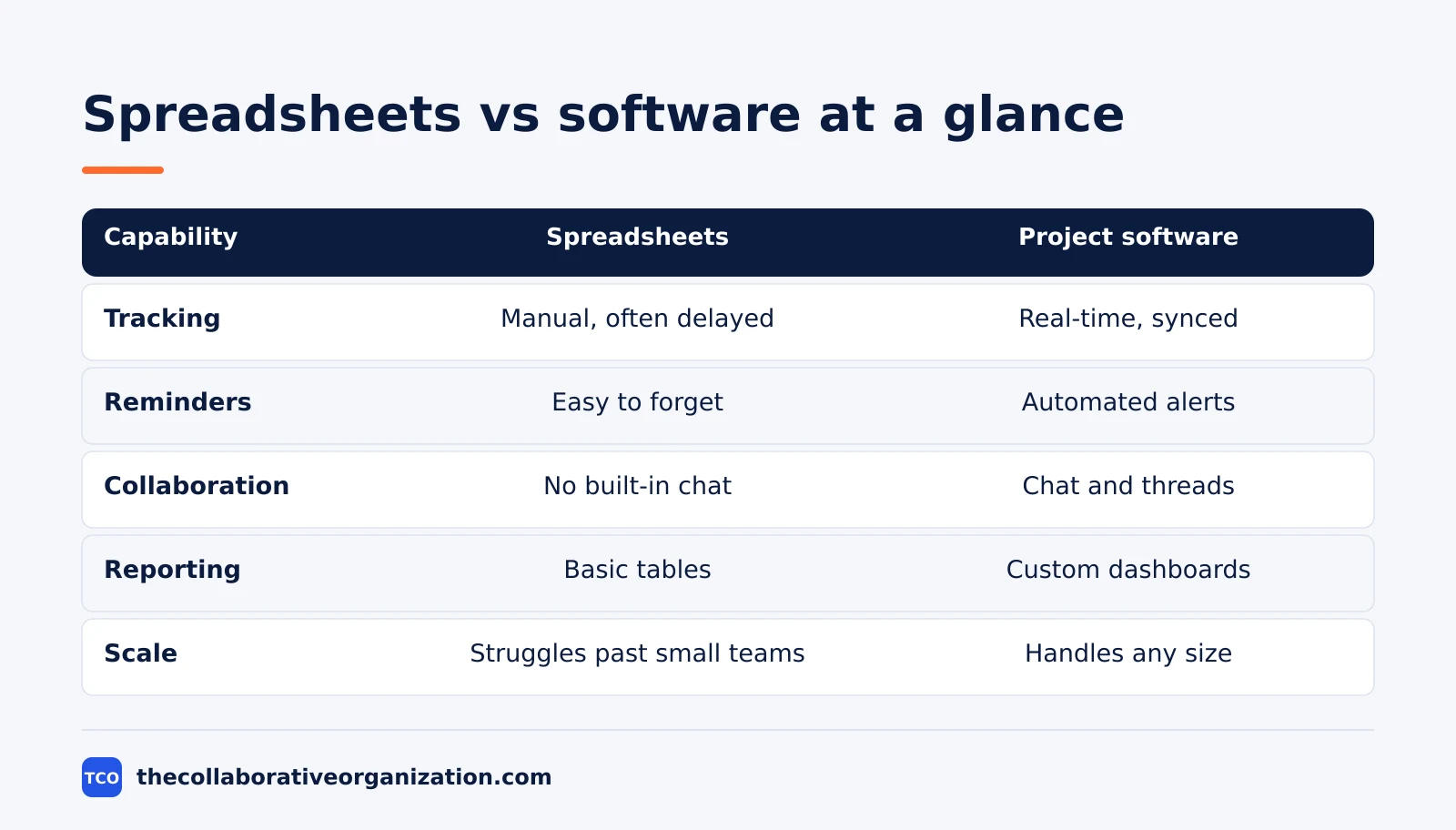
Side by side, software wins on automation, shared truth and scale, while spreadsheets win on cost, speed and flexibility. The table below compares the seven things that decide most switches.
| Capability | Spreadsheets | Project management software |
|---|---|---|
| Progress tracking | Manual updates, often delayed | Real-time updates, synced across the team |
| Reminders | Manual tracking, easy to forget | Automated alerts tied to deadlines |
| Collaboration | Limited, no built-in chat or comments | Built-in chat and shared discussion threads |
| Reporting | Basic tables and simple charts | Custom, detailed reports and dashboards |
| Scalability | Struggles with large teams and many projects | Handles teams and projects of any size |
| Mobile access | Hard to use on small screens | Dedicated mobile app |
| Automation | Limited scope, even with formulas | Automates a large chunk of repetitive tasks |
The numbers behind the switch tell the same story. Capterra research cited by ProofHub found that among buyers who eventually switch, 42% cite inefficiency as the main reason for leaving spreadsheets, and 36% point to functionality limits. The sheet did not fail; the work outgrew it.
One row deserves a closer look: shared truth. In software, the task, its owner, its due date and its status live in one place, so everyone sees the same facts. In a sheet, the facts live in whichever copy a person opened last, and the team spends its first ten minutes in every meeting agreeing on which copy is current.
Choose spreadsheets if, choose software if
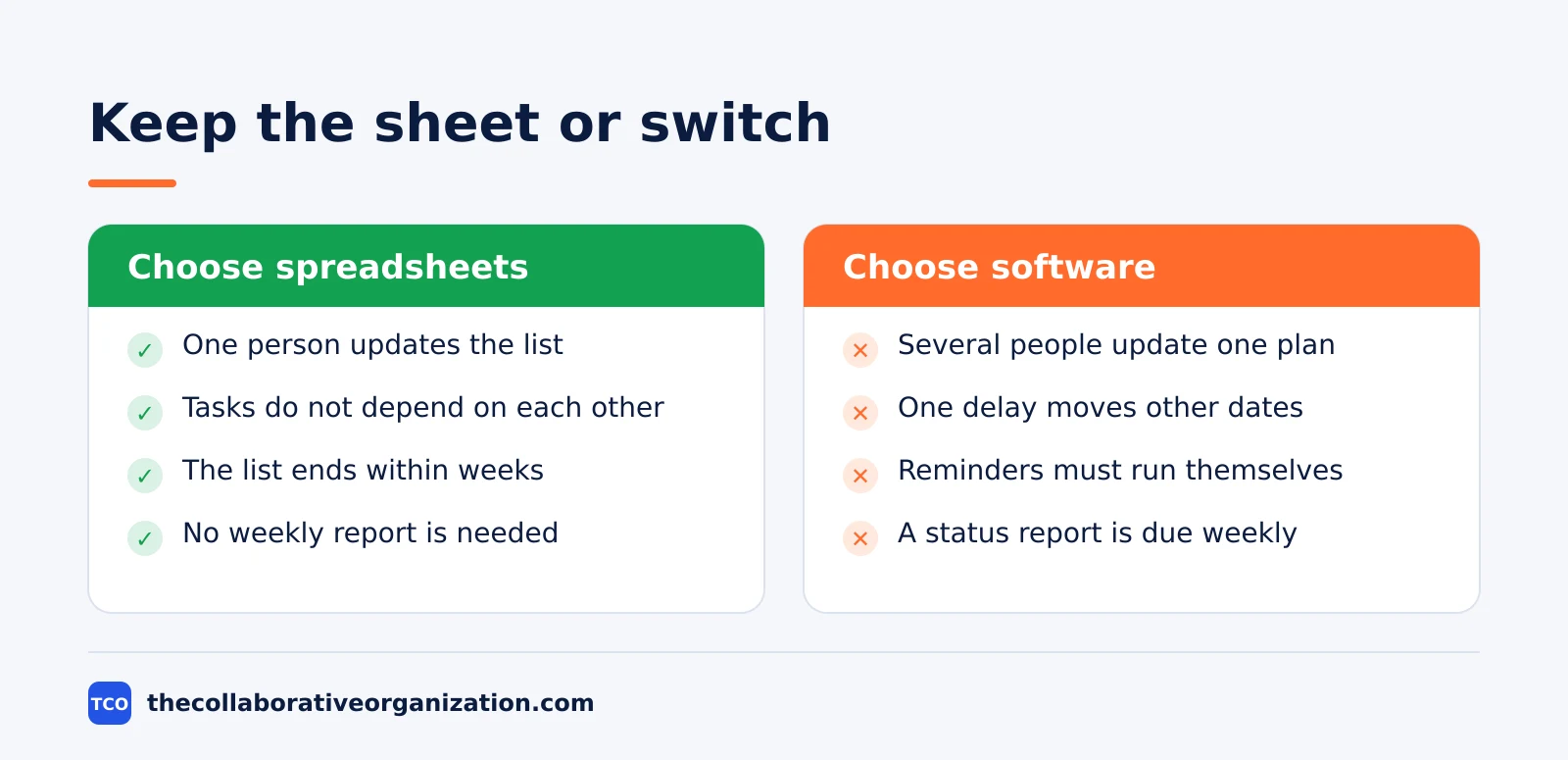
Choose spreadsheets for a short, simple list with one owner, and choose software when the work has several owners, a shared deadline or more than one project at once. The choice is about the work, not about the size of the company. A 200-person firm can track a two-week office move in a sheet, and a team of four can need software for one client launch.
Choose spreadsheets if the work looks like this: one person updates the list, tasks do not depend on each other, the list ends within a few weeks, and nobody needs a report beyond the sheet itself. A packing checklist, a one-off event list and a personal budget all fit here.
Choose software if the work looks like this: several people update the same plan, one delay moves other dates, the team needs reminders without chasing, or the manager needs a status report every week. Client work, product launches and any project with handoffs all fit here.
A middle path also works: keep the sheet for the budget and move the plan into software. The two tools do different jobs, and the team only gets into trouble when the sheet tries to do the software’s job, or the software tries to do the sheet’s calculations.
How to move from a spreadsheet to software
Moving from a spreadsheet to software takes five steps, and the cleaning step matters most. A messy sheet imported as-is becomes a messy project, with duplicate tasks, missing owners and dates from last year. Clean first, import second.
Start by freezing the sheet: pick one copy as the source, archive the rest, and agree that no new edits go into the old file. Then clean it: one row per task, one owner per row, one due date per row, and a single status column with three or four values.
Map the columns to the new tool before you import. The sheet’s task column becomes the task name, the owner column becomes the assignee, and the status column becomes the board column. Most tools import a CSV file, so export the cleaned sheet, import it, and check the first 20 tasks by hand before you invite the team.
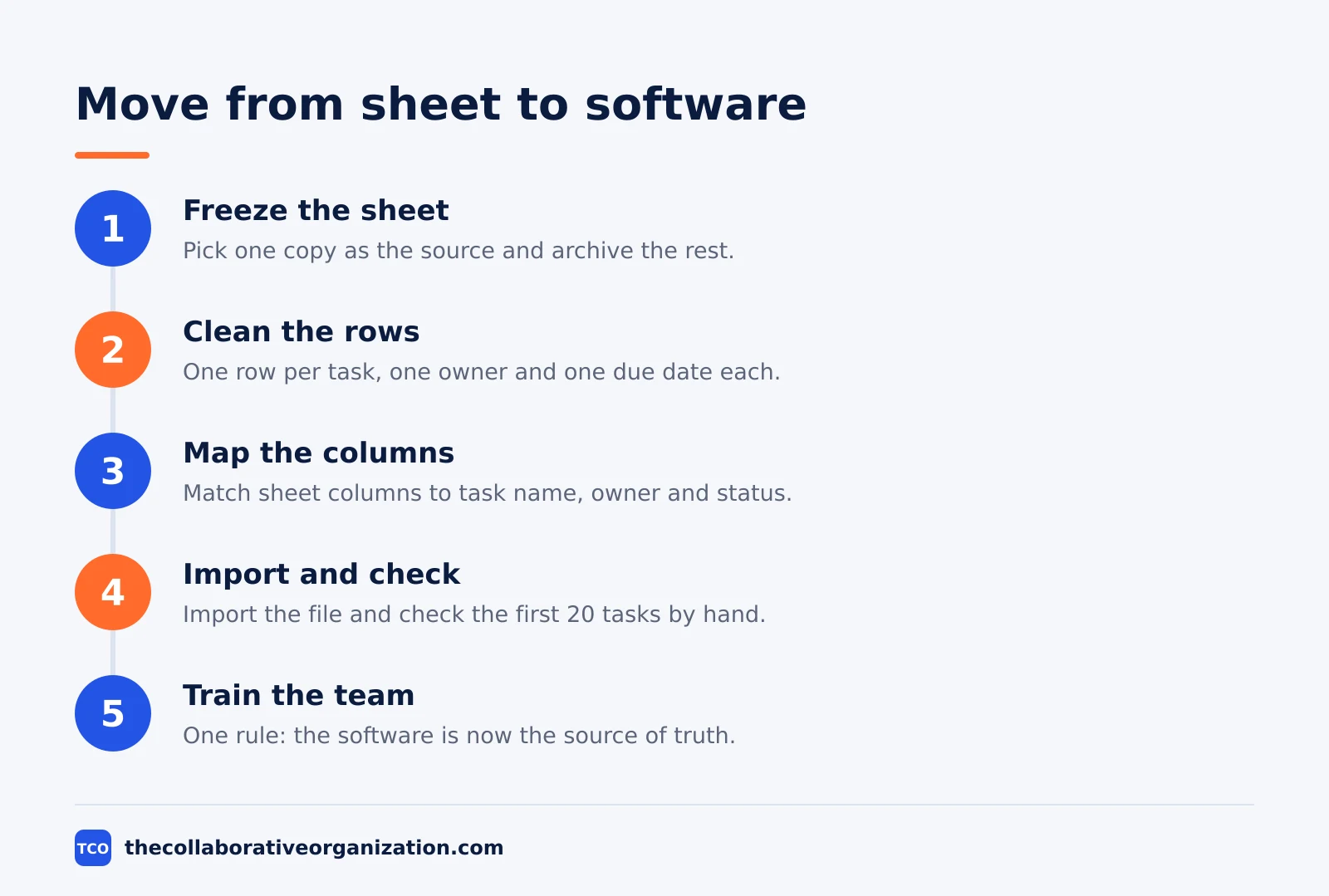
Train the team on one rule: the software is now the source of truth, and the sheet is only a calculator. Our guide on how to run a software trial shows how to test a tool on one real project before you roll it out. Keep the old sheet read-only for a month, then archive it.
Worked example: a 6-person team and its weekly admin
A 6-person team shows the cost gap in plain numbers. This is an illustration with one stated assumption, not a real team. The team runs four client projects at once, and the project sheet has about 80 rows. The sheet owner updates it by hand, chases status in chat, and rebuilds the Friday report from the rows.
Assume the sheet costs 2 hours a week of manual updates, chasing and reporting. That is 104 hours a year, or about 13 working days for one person. The licence cost is zero, because the sheet app is already installed, but the time cost is the largest line in the budget.
Now price the software. Six seats on monday.com Basic at $9 per seat per month billed annually cost $54 a month, or $648 a year. Six seats on Trello Standard at $5 cost $30 a month, or $360 a year. The software bill is real money, while the sheet bill is hidden time.
The break-even test is simple: if the software saves the sheet owner even 1 hour a week, it pays for itself at any normal hourly rate. The team in this example saves 2 hours a week, so the switch is worth it on time alone, before counting fewer missed deadlines and fewer version errors.
Tools that replace a project spreadsheet
Four tools replace a project spreadsheet at different prices, and all four import a CSV file. The table below lists real starting prices as of November 2026. Our guide on how to choose project management software covers seat counts, free-plan caps and paid tiers in more depth.
| Tool | Best for | Free plan | Starting price (as of November 2026) | Notable limit |
|---|---|---|---|---|
| Trello | Small teams that want simple boards | Free for up to 10 collaborators | $5 per user per month (Standard), billed annually | Timeline view needs Premium |
| Asana | Teams that want tasks with owners and timelines | Free for 2 people | $10.99 per user per month (Starter), billed annually | Free plan covers 2 people |
| monday.com | Teams that want visual boards and automations | Free plan for up to 2 seats | $9 per seat per month (Basic), billed annually | Paid plans need at least 3 seats |
| ClickUp | Teams that want tasks, docs and Gantt in one place | Free Forever plan | $9 per user per month (Core), billed annually | Yearly billing needed for that price |
The Trello price comes from Trello pricing, opened on 19 November 2026: Standard is $5 per user per month billed annually, and the free plan covers up to 10 collaborators per workspace.
The Asana price comes from Asana pricing, opened on 19 November 2026: the Personal plan is free for 2 users, and Starter is $10.99 per user per month when billed annually.
The monday.com price is $9 per seat per month billed annually for Basic, with a 3-seat minimum, per a November 2026 check of monday.com pricing.
The ClickUp price comes from ClickUp pricing, opened on 19 November 2026: Core is $9 per user per month billed yearly, with unlimited Gantt charts included.
Common project management software vs spreadsheets mistakes to avoid
Most switches fail for the same five reasons, and four of them happen before the import. Fix them in order and the move takes a week, not a quarter.
- Importing a dirty sheet. Duplicate rows, missing owners and stale dates become duplicate tasks and wrong deadlines in the new tool.
- Keeping the sheet as the record. If the team still updates the old file, the software holds stale data within days.
- Copying every column. A sheet with 20 columns becomes a project nobody can read; keep the five columns the team uses.
- No owner for the switch. Without one person who owns the import and the first month of use, the tool quietly dies.
- Buying the biggest plan first. Start on the cheapest paid plan, and upgrade only when a missing feature blocks real work.
A short check one month after the switch tells you if it worked: are status meetings shorter, do owners update their own tasks, and can the manager build the Friday report in minutes? Our guide on how to evaluate SaaS software covers the same kind of 30-day review for any new tool.
Sources
- ProofHub - Spreadsheets vs Project Management Software (2026)
- Cloudwards - Project Management Software vs Excel and Spreadsheet Tools (2026)
- Kanbanchi - Why Task and Project Management Software Beats Spreadsheets (2026)
- Nulab - Why traditional teams are ditching spreadsheets (2026)
- Milient - Project Management Software vs Excel (2026)
- Plutio - Spreadsheets to PM Software: Migration Guide (2026)
- Asana - Pricing (2026)
- Trello - Pricing (2026)
- ClickUp - Pricing (2026)
- monday.com - Pricing (2026)
Frequently asked questions
Can you manage a project in Excel or Google Sheets?
Yes, for a small project with one owner, a short task list and no dependencies. A sheet works until several people must update it, tasks depend on each other, or reporting takes more time than the work itself. Then a dedicated tool pays for itself.
What is the biggest difference between spreadsheets and project management software?
Automation and shared truth. Software assigns tasks, sends reminders, updates timelines when a date moves and shows one current status to everyone. A spreadsheet needs a person to do all of that by hand, and every copy can drift out of date.
When should a team switch from spreadsheets to project management software?
Switch when the sheet has more than one editor, when version confusion causes rework, or when status updates take over an hour a week. A team running three or more projects at once, or one project with dependencies, will usually feel the strain first.
Is project management software worth the cost for a small team?
Often yes, because entry plans start near $5 to $11 per user per month as of November 2026. Compare that with the hours spent updating sheets, chasing status and fixing version errors. If the sheet costs two hours a week, the software usually costs less than the time it saves.
Can you keep using spreadsheets alongside project management software?
Yes. Many teams keep sheets for budgets, estimates and one-off analysis, where a grid is the right tool. The project plan, the task owners and the deadlines move into the software, while the sheet stays as a calculator, not as the system of record.
Related articles

guides
Free Project Management Templates: 7 to Copy (2026)
Seven free project management templates from monday, Wrike, Teamwork, Smartsheet, ClickUp, Asana and Trello, with what each one is for and what free really costs.
November 20, 2026 · 7 min read

guides
Project Proposal Template: Copy and Win Work (2026)
A project proposal template pitches the work before it is approved: problem, solution, scope, budget, timeline and terms. Copy the template and filled example.
November 20, 2026 · 10 min read

guides
Action Plan Template: Goal to Done in One Page (2026)
An action plan template turns one goal into owned steps with dates, dependencies and a success measure. Copy the table and see it filled for a support team.
November 20, 2026 · 11 min read