How to Run a Software Trial: A Step-by-Step Guide (2026) | The Collaborative Organization
By The Collaborative Organization Team · November 19, 2026 · Last verified November 19, 2026 · 11 min read
A good software trial is a short experiment with a written pass mark, not a tour of menus. Pick one real workflow, run it with real data and the people who will use the tool every day, score what happens, and decide before the trial ends.
Key takeaways
- A trial must answer one question: does this tool fix the problem you named, with your real data?
- Two weeks, two tools and one scorecard is enough for most small-business software decisions.
- Test must-haves first, contact support once with a real question, and run a full data export before you pay.
- Put the trial end date in your calendar and decide two days before billing starts.
- Most trials last 7 to 30 days, and a trial that turns into a paid plan without a decision is a failed trial.
What you need before the trial starts
Before you sign up, write the decision the trial must support in one sentence. Name the problem, the workflow it affects, and what would make you walk away. A trial is a short, time-boxed experiment designed to validate one or two specific outcomes, and the decision sentence is what keeps it an experiment instead of a browse.
List five “must-haves” and three nice-to-haves, then shortlist two tools that meet every must-have. More than two tools means you will not finish either trial properly, and the comparison stops being fair. Our guide on how to choose project management software walks through the same shortlist step for project tools.
Prepare real test material before day one: 30 to 50 real contacts, a real campaign or project, and the awkward records that break imports, such as duplicates and missing fields. Clean the data first, and decide who else needs access and what they should not see.
Check the trial terms before you create an account. Read what the trial includes, whether it asks for a card, when it converts to paid, and how to cancel, then note the date and set a reminder two days earlier. The trial terms checklist from the same guide covers card, conversion and cancellation in one place.
How to run a software trial in 7 steps
The seven steps below turn a free trial into a decision, and each step has an outcome so you know when it is done. Work through them in order, and do not skip the scoring step: a trial with no scorecard ends in a feeling, not a verdict.
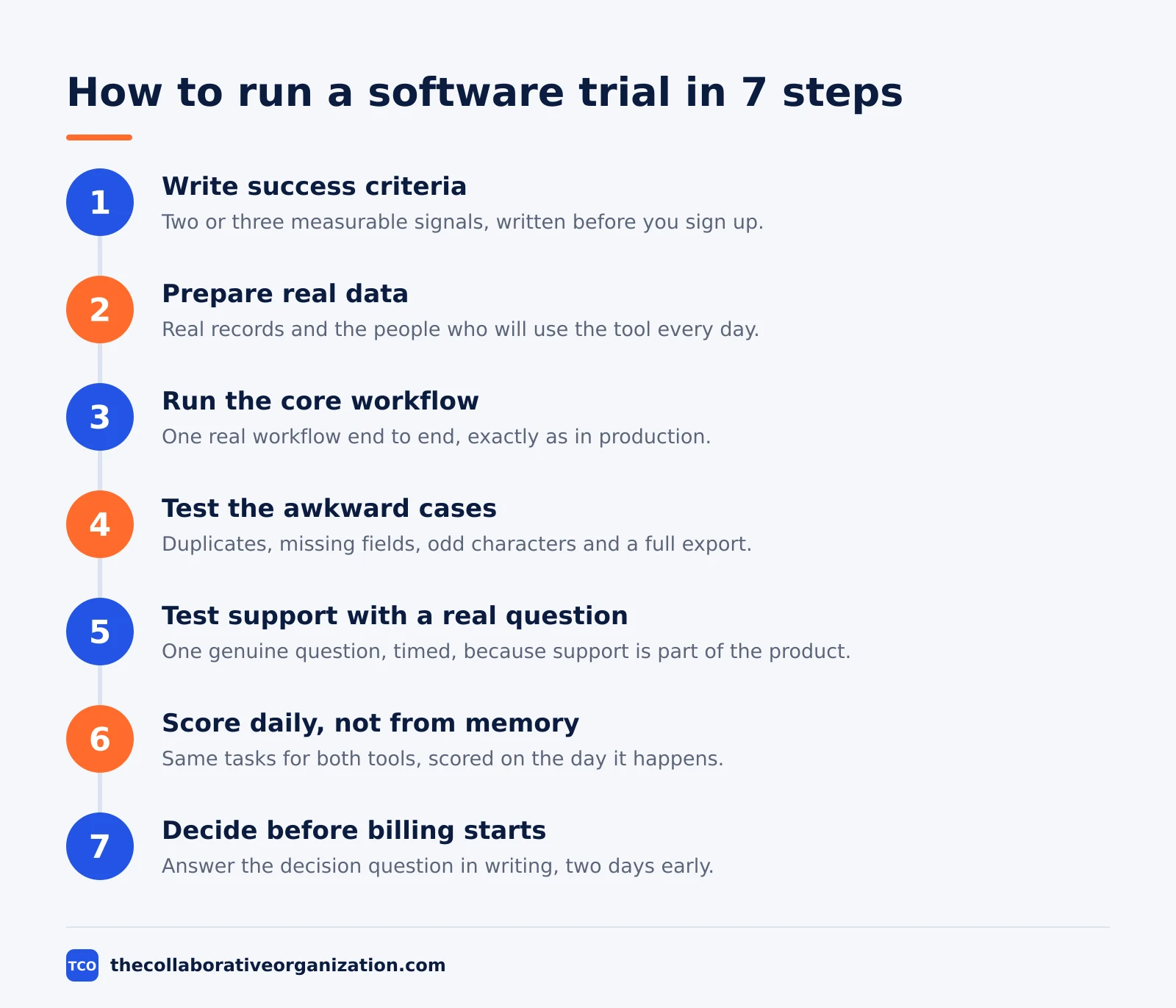
Step 1: Write the success criteria
Write two or three measurable signals before you sign up, such as finishing the core workflow without help or cutting the time it takes in half. The signals do not need to be perfect; they need to be observable on the day, not remembered at the end. Guidance from Self Employed puts it plainly: define two or three measurable signals before the trial starts.
Step 2: Prepare real data and real users
Give the trial to the people who will use the tool every day, and load the real records they work with. A trial should answer one question: does this tool fix the problem with our real data? Clicking around a demo account proves nothing, so use real data and real workflows, not the sample data.
Step 3: Run the core workflow end to end
Run a real two-week sprint, not a sandbox demo: create stories, estimate, assign, track and close tickets exactly as the team would in production. Our guide to how to run a sprint planning meeting shows the shape of that first sprint, and the trial should follow the same rhythm.
Step 4: Test the awkward cases
Reproduce a complete workflow end to end with your own records, then test the awkward records: duplicates, missing fields and odd characters. Let one colleague use the tool unaided and note where they stop, then run an export and open the file to check that everything came out. The evaluation checklist behind this step lists the same checks: real work, unaided use, awkward records, export.
Step 5: Test support with a real question
Contact support once with a real question and time the reply, because support is part of the product you are buying. Write down what annoyed you on day 1 and whether it still annoyed you on day 7, so a first-day learning curve does not get mistaken for a lasting flaw. This check comes from the software evaluation checklist published in October 2026.
Step 6: Score daily, not from memory
Score each item out of five on the day, not from memory at the end, and give both tools the same tasks so the comparison stays fair. For an email platform, use the same list, template and send time; for a scheduler, queue the same posts. The trial scorecard method behind this step uses identical tasks for each tool and scores on the day.
Step 7: Decide two days before billing starts
Decide on a specific date for the trial to end, ideally two days before billing begins, and answer the original decision question in writing on that day. Then document the outcome: why you tried the tool, what you tested, what worked, and why you kept or dropped it. Self Employed recommends the two-day buffer so the decision never happens after the money has moved.
How to score a software trial fairly
Score both tools on one scorecard with the same rows, and add up the numbers before you discuss feelings. A scorecard stops the loudest voice in the room from deciding, and it gives you a record to show the next person who asks why you chose this tool.
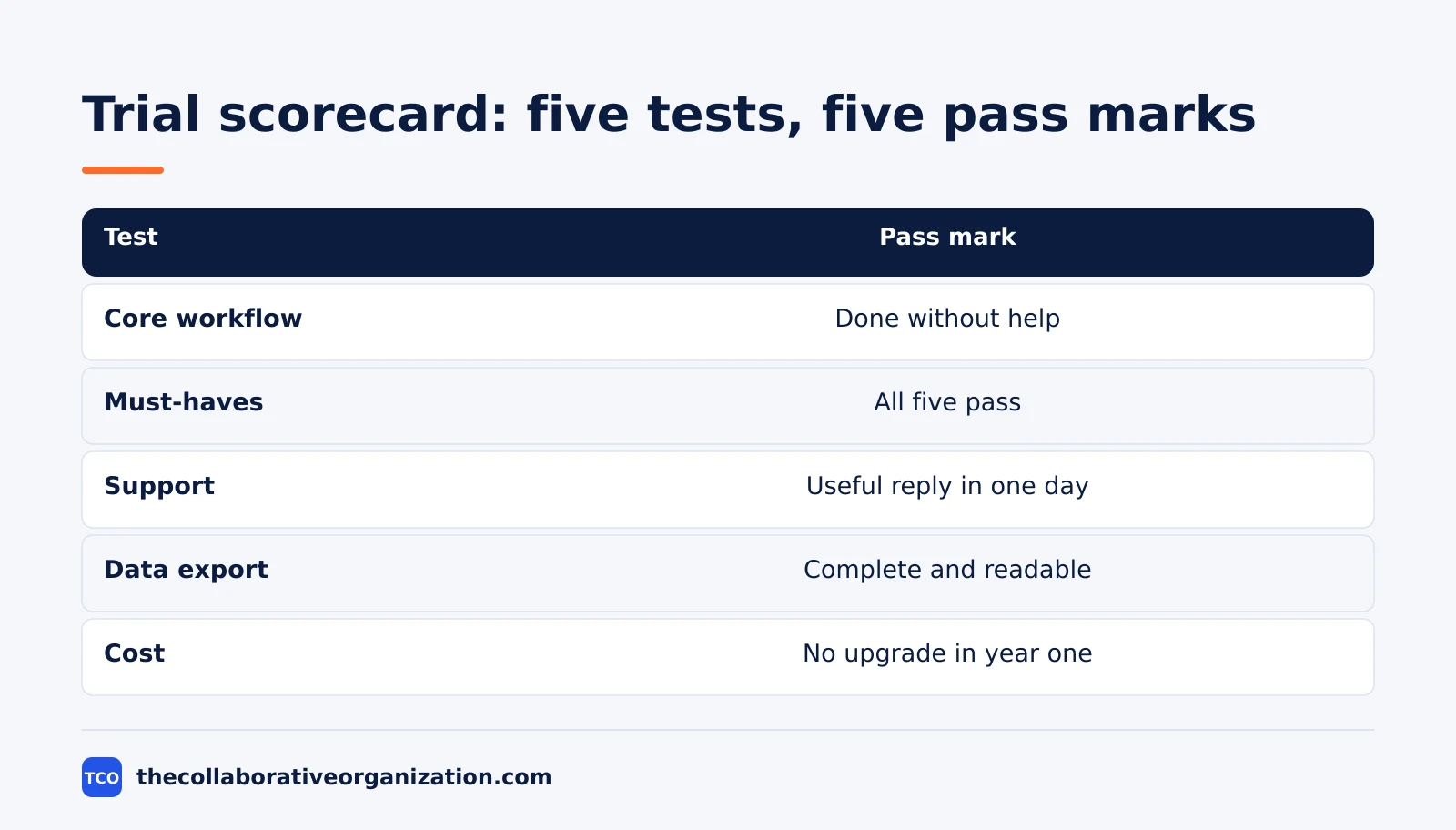
| Test | How to score it | Pass mark |
|---|---|---|
| Core workflow | Time the task and note where you needed help | Done without support or workarounds |
| Must-haves | Pass or fail for each of the five | All five pass |
| Support | Ask one real question and time the reply | A useful reply within one business day |
| Data export | Export everything and open the file | Complete and readable |
| Cost | Price the plan you need now and at double your size | No upgrade needed in the first year |
The rows above come from the trial scorecard in the Mega Marketing Tools trial guide: five must-haves as pass or fail, time to complete the core job, ease of use out of five, quality of support out of five, export completeness, and the monthly cost at your current size and at double it.
Add the numbers at the end of the trial, then ask three questions: did it solve the sentence you wrote, would you notice if it were removed, and what does leaving cost? If you reject both tools, keep the scorecard: it becomes the brief for the next search and shows which requirement was the real deal-breaker.
How long should a software trial last?
Most free trials last 7 to 30 days, and one to two weeks of real daily use is usually enough. The test is whether the tool fixes your problem with your own data and your must-haves first, not how many menus you opened. Two weeks of daily use by the real users tells you more than a month of occasional clicks.
Plan four to six weeks for the whole decision, not just the trial itself. One week goes to mapping workflows and defining requirements, two weeks to trials, one week to stakeholder review, and one week to negotiation and contracting. That four-to-six-week plan comes from the Ones agile buying guide, and it keeps the trial from drifting into an open-ended demo.
Gather feedback at three points during a two-week trial: day 1 for first impressions, day 5 for mid-sprint friction, and day 10 for the final assessment. Ask each tester directly whether they would choose to keep using the tool, because a polite yes at the end of a demo hides more than a blunt no on day 5.
What to test in every software trial
Every trial should test six things: the core job, the must-haves, the integrations, support, the exit, and the real price. Extra features can wait; these six decide whether the tool survives contact with your real work.
- The core job, end to end. Do the task from your problem sentence with real records, from start to finish, without a workaround.
- The must-haves, first. Test every must-have before you look at anything else, especially the integrations, because a failed must-have ends the trial.
- The awkward records. Duplicates, missing fields and odd characters are where imports break, so test them on purpose.
- Support, once, for real. One genuine question, timed, tells you more about the vendor than a sales call.
- The exit. Run a full export, open the file, and read the cancellation terms: what happens on cancellation, and how long is the data kept?
- The real price. Price the plan you would actually need, including per-user scaling, and check what becomes chargeable later: seats, usage, storage, integrations.
Security, contract and exit checks close the list. Before you pay, confirm what exactly is included at the tier you would buy, in writing, and what the contract says about data on cancellation. The evaluation checklist lists security, contract and exit as the final step for a reason: they are hardest to fix after you have signed.
Worked example: a 12-person team trials two project tools
Imagine a 12-person marketing team that needs one place to plan campaigns, and picture how a two-week trial would run. This example is an illustration, not a case study, and the numbers are made up to show the method.
The team writes one decision sentence: ‘We need a tool where a campaign moves from brief to publish without a status meeting.’ Their five must-haves are a shared board, due dates, file attachments, a calendar view and a Slack integration.
They shortlist two tools and give each the same test: plan one real campaign, from brief to publish, with real copy and real dates.
On day 1, each tool gets a first-impressions score. On day 5, the team lead asks where people got stuck: in Tool A, two people could not find the calendar view, while in Tool B, the Slack integration posted every update to the wrong channel.
On day 10, the team scores both tools. Tool A passes all five must-haves and the export is complete, while Tool B fails the Slack integration. The team picks Tool A, writes down why, and cancels Tool B two days before billing starts.
Tools that help you run a trial
A project tool keeps the trial itself organized: one board for the tasks, the scores and the decision. Compare the options on our project management software shortlist before you start, and run the trial inside the tool you are testing, not in a separate spreadsheet.
| Tool | Best for | Free plan | Starting price (as of November 2026) | Notable limit |
|---|---|---|---|---|
| Asana | Teams that run the trial as a real sprint | Free for 2 people | $10.99 per user per month (Starter), billed annually | Free plan covers 2 people |
| monday.com | Teams that want a visual board for trial tasks | Free plan for up to 2 seats | $9 per seat per month (Basic), billed annually | Paid plans need at least 3 seats |
| ClickUp | Teams that want trial notes and tasks in one workspace | Free Forever plan | $9 per user per month (Core), billed annually | Yearly billing needed for that price |
The Asana price comes from Asana pricing: the Personal plan is free for 2 users, and Starter is $10.99 per user per month when billed annually.
The ClickUp price comes from ClickUp pricing: Core is $9 per user per month when billed yearly, and the Free Forever plan costs nothing.
The monday.com price comes from monday.com pricing: Basic is $9 per seat per month billed annually, with a 3-seat minimum.
Common software trial mistakes to avoid
Most trials fail in the same ways, and all of them are decided before the trial starts. Run through this list before you create the first account.
- Starting without a written question. A trial with no decision sentence becomes a tour of menus and ends with a vague impression.
- Testing with demo data. Sample data hides the awkward records, the duplicates and the missing fields that break real imports.
- Trialling three or more tools at once. You will finish none of them properly, and the scores will not be comparable.
- Letting only power users test. The least technical user finds the friction the rest of the team will hit every day, so hand them the tool and watch where they stop.
- Scoring from memory at the end. Score each item on the day it happens, or the last impression wins and the early friction is forgotten.
- Forgetting the end date. Many trials turn into paid plans automatically, so the decision date belongs in your calendar before the trial starts.
- Skipping the export test. A tool you cannot leave is a tool you do not own, so export everything and open the file before you pay.
Sources
- AI Powered Buy - Software Evaluation Checklist for 2026 (2026)
- Ones.com - Agile Software Buying Guide for CTOs: A Checklist (2026)
- Mega Marketing Tools - How to Run a Marketing Software Trial Properly (2026)
- Self Employed - How to Run a Tool Trial Period Effectively (2026)
- Software 30-Day Free Trial - How to Evaluate Software Before You Pay for It (2026)
- Asana - Pricing (2026)
- ClickUp - Pricing (2026)
- monday.com - Pricing (2026)
- WalkMe - Software Adoption ROI: Improve Returns (2026)
Frequently asked questions
How long should a software trial last?
Most free trials last 7 to 30 days, and one to two weeks of real daily use is usually enough to judge a tool. Plan four to six weeks for the whole decision: one week to map workflows and set criteria, two weeks for trials, one week for stakeholder review, and one week for negotiation and contracting.
Should I trial one tool or two at a time?
Trial two tools on the same real work, scored on one scorecard, and no more than two. Three or more trials split your attention, and you will finish none of them properly. Give each tool the same tasks, the same data and the same pass marks so the comparison stays fair.
What should I test first in a software trial?
Test your must-haves first, especially the integrations, because a tool that fails a must-have is out whatever else it does well. Run one complete real workflow end to end with your own data, then test the awkward records, the data export and the support reply before you look at extra features.
Do I need a credit card for a free trial?
It depends on the vendor. Some trials ask for a card and convert to a paid plan automatically when the trial ends, while others do not. Read the trial terms before you sign up, note the end date in your calendar, and set a reminder two days before billing starts.
What if the trial ends and I still cannot decide?
Do not pay for more time to think. Go back to your written success criteria and scorecard: if neither tool passed, the answer is to keep looking, not to buy the closer one. If one tool passed and the other did not, the decision is already made and the hesitation is about change, not about the tool.
Related articles

guides
Free Project Management Templates: 7 to Copy (2026)
Seven free project management templates from monday, Wrike, Teamwork, Smartsheet, ClickUp, Asana and Trello, with what each one is for and what free really costs.
November 20, 2026 · 7 min read

guides
Project Proposal Template: Copy and Win Work (2026)
A project proposal template pitches the work before it is approved: problem, solution, scope, budget, timeline and terms. Copy the template and filled example.
November 20, 2026 · 10 min read

guides
Action Plan Template: Goal to Done in One Page (2026)
An action plan template turns one goal into owned steps with dates, dependencies and a success measure. Copy the table and see it filled for a support team.
November 20, 2026 · 11 min read