Intranet vs Knowledge Base: Which Do You Need? (2026) | The Collaborative Organization
By The Collaborative Organization Team · November 19, 2026 · Last verified November 19, 2026 · 10 min read
An intranet is the company hub where staff find news, people, and links to tools, while a knowledge base is a structured store of searchable answers. The intranet connects people; the knowledge base answers questions. Most teams need the answer store first, then add the hub once staff numbers grow.
Key takeaways
- An intranet is a private internal platform for communication, collaboration, and shared resources.
- A knowledge base is a central store of structured articles, guides, and FAQs built for fast search.
- The intranet is the broad front door, and the knowledge base is the focused library behind it.
- Comms or HR usually owns the intranet, while named experts own knowledge base articles.
- SharePoint is the most common intranet base, because it ships inside Microsoft 365.
- Many teams need both, with the intranet pointing staff toward the knowledge base.
What is an intranet?
An intranet is a private internal website that helps staff communicate, collaborate, and find company resources in one place. Only employees can reach it, and it acts as the front door to the company: news on the home page, links to tools, an employee directory, and pages for each department.
Happeo puts it plainly: an intranet serves as a company internal website and a central hub for company information, news, announcements, and resources. Its first audience is the whole staff, not one team of experts. HR publishes benefits information and policies there, managers post announcements, and staff check it to see what changed this week.
The content is broad and mixed. One page carries a leadership update, the next carries the holiday calendar, and a third links to the expense form. That breadth is the point. An intranet answers the question of where things live, and it gives new staff one place to start instead of ten.
What is a knowledge base?
A knowledge base is a central store of structured information built so staff can find one answer fast, without asking a colleague. Articles follow a set form, with a problem, steps to fix it, and related articles, and the whole store is tuned for search.
The audience is narrower and the goal is sharper. A reader arrives with one question, such as how to reset a password or file an expense, and leaves with the steps. Bloomfire describes it as a central searchable place for company information, where modern software collects, organizes, retrieves, and shares what the company knows.
Ownership is what keeps it trustworthy. Tettra notes that an internal knowledge base gives employees easy access to company knowledge, policies, procedures, and best practices, and cuts repeated questions. Each article has a named owner who reviews it, so staff read one approved version instead of five conflicting notes.
Intranet vs knowledge base: side-by-side table
The table below shows the split in one line: the intranet is built to be seen, and the knowledge base is built to be searched. Everything else follows from that split.
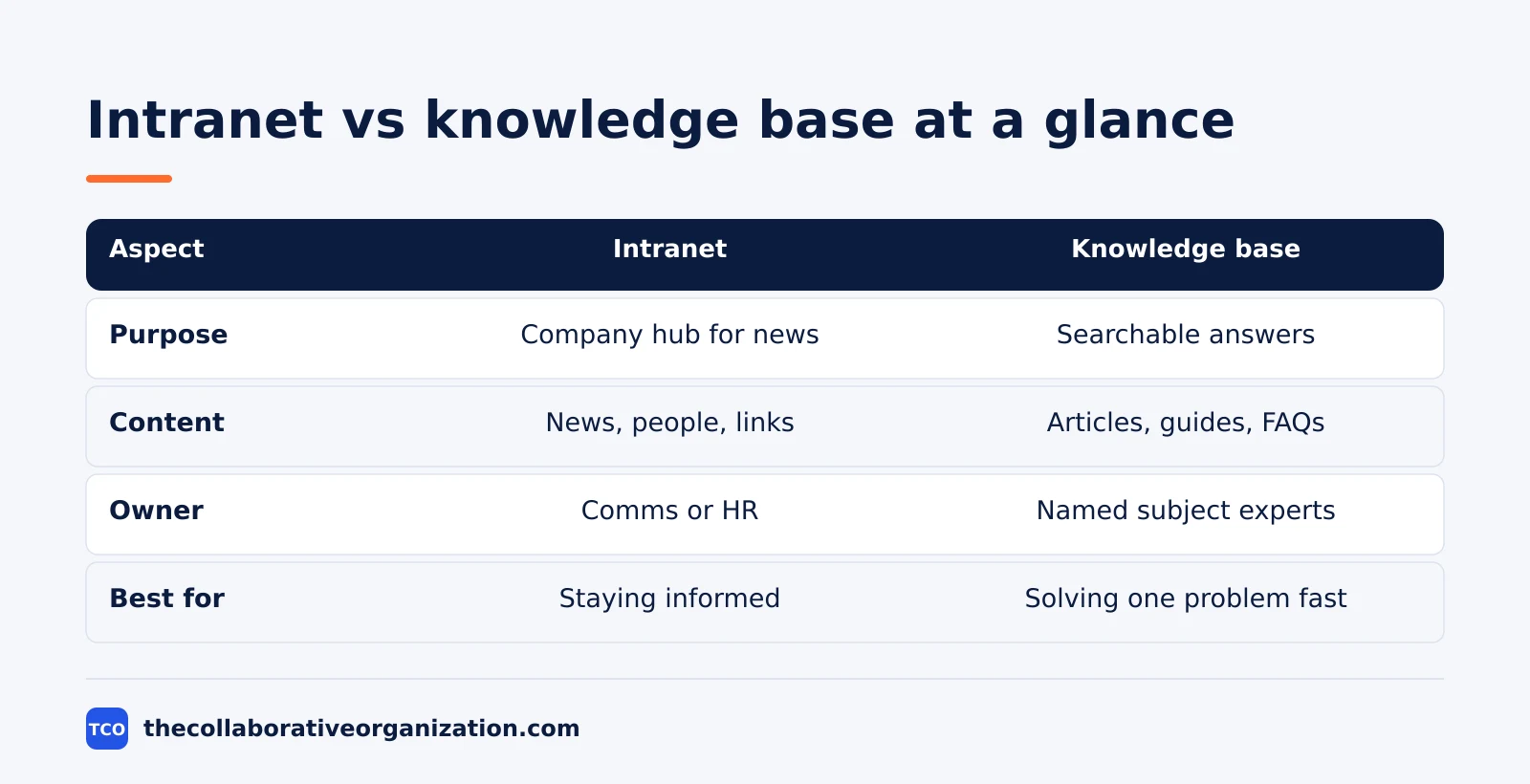
| Aspect | Intranet | Knowledge base |
|---|---|---|
| Primary purpose | Company hub for communication and resources | Structured answers for fast self-service |
| Content style | Broad and mixed: news, people, links, events | Focused articles, guides, and FAQs |
| Who creates it | Mostly comms and HR, top down | Named experts and dedicated owners |
| Who reads it | All staff, often daily | Staff with one question, when they need it |
| Search | Basic search across pages and files | Tuned search built to return one article |
| Best for | Staying informed and connected | Solving a problem without asking anyone |
| Main risk | Staff stop visiting when news goes stale | Articles go stale when no owner reviews them |
AgilityPortal frames the pair as two layers of one system: the knowledge base is the structured layer that stores information, while the intranet is the communication layer that connects employees to it. Neither layer replaces the other.
How the two fit together
Think of the intranet as the front door and the knowledge base as the library behind it. Staff walk through the door each morning, see the news, then step into the library when they have a question.
The intranet points and the knowledge base answers. A news post about a new expense rule links to the knowledge base article with the steps, and the employee directory links to the IT help articles for new starters. Without those links, the intranet is a notice board, and the knowledge base is a library with no sign on the door.
This pairing explains why one tool does both jobs poorly. A page built to broadcast news makes a poor answer article, and an article built to answer one question makes a poor home page. Teams that force one tool to do both end up with a home page no one reads and a search box that returns news posts.
The test is simple. If staff visit it to see what is new, it is an intranet. If they visit it to fix one problem, it is a knowledge base. Most companies need a place for each habit, even if both live inside one platform.
Which one should you choose first?
Choose the knowledge base first when staff keep asking the same questions, and choose the intranet first when staff cannot find news, people, or tools. The pain you feel most often points to the tool you need.
Choose a knowledge base if the help desk answers the same five questions every week, new hires wait days for basic answers, or policies live in scattered files. A small team can start with twenty articles and grow from there. Our guide on how to choose collaboration software covers the wider tool choice once you know the pattern you need.
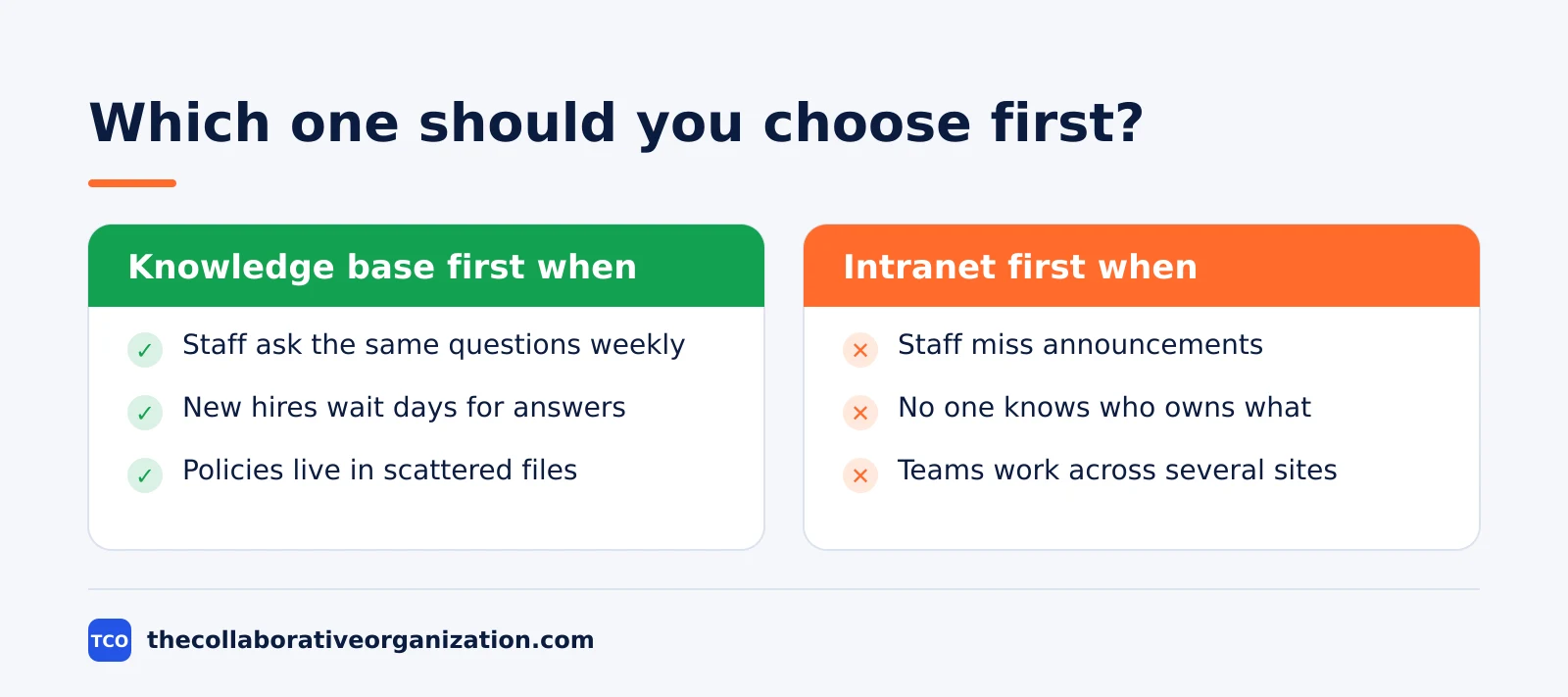
Choose an intranet if the company has grown past one office, staff miss announcements, or no one knows who owns what. A home page with news, a directory, and links to tools fixes that in weeks. It also helps hybrid teams, where staff in different places need one shared view of the company.
Choose both when the company passes about 100 staff, or when it runs several sites. At that size, news needs a home and answers need owners, and one tool cannot carry both loads. Start with the knowledge base, add the intranet next, and link them from day one.
A SharePoint intranet, and other common setups
SharePoint is the most common intranet base, because most companies already pay for it inside Microsoft 365. A SharePoint intranet is an internal website where employees find the information, tools, and resources they need, and it usually starts with a company home page for news, resources, events, and links, as Dev4Side explains.
The usual shape is a home site for company news, department sites below it, and a document library that shares the same permissions as the rest of Microsoft 365. Staff already use Teams, OneDrive, and Outlook, so the intranet needs no new login.
That is also its weakness: without an owner who posts news and prunes old pages, it turns into a file store that staff visit only when forced.
Other teams build the pair inside one workspace tool. Confluence can hold the knowledge base in its spaces and add a company hub on its Premium plan for the intranet side. Notion can hold both in one workspace, with a home page that links to answer databases.
The tool matters less than the split: one place to see what is new, and one place to find the answer.
Worked example: a 120-person company with neither
Imagine a 120-person company spread over two offices, with no intranet and no knowledge base. News travels by email, policies live in shared drives, and new hires ask the same questions for their first month. The ops lead picks the knowledge base first.
In week one, the team writes twenty articles: password resets, expense claims, holiday requests, and the ten questions new hires ask most. Each article gets one owner and a review date.
In week four, the team adds a simple intranet home page with news, the directory, and links to the twenty articles. Staff now check one page each morning and search one library when stuck.
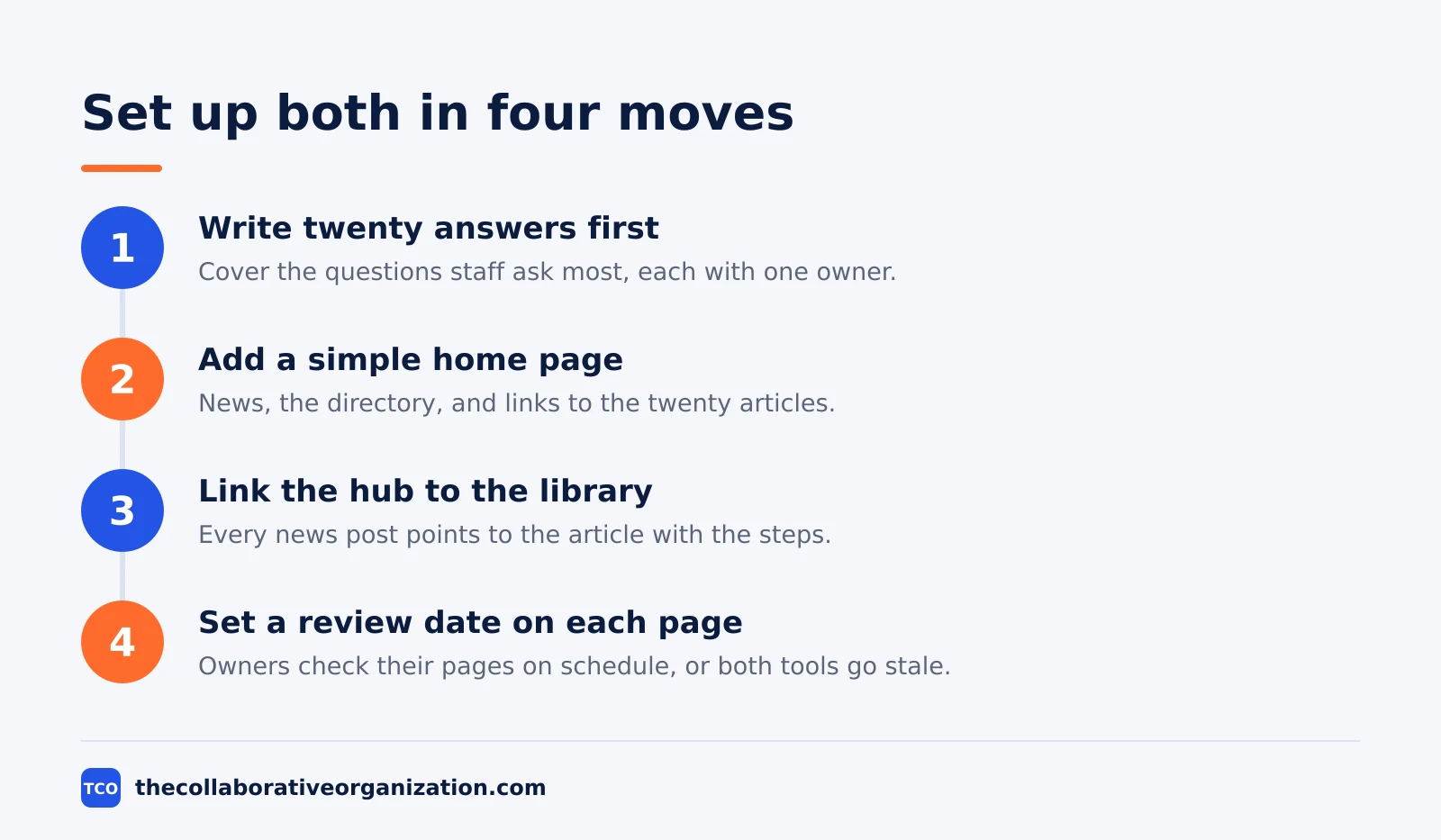
The order mattered. If the team had built the intranet first, it would have linked to scattered files and solved nothing. By writing the answers first, the home page had somewhere useful to point. The intranet made the answers visible, and the knowledge base made them trustworthy.
Tools that hold an intranet or a knowledge base
Confluence suits teams that want a wiki plus a company hub, Notion suits small teams that want one workspace, and Slack suits the daily chatter that an intranet cannot carry. Pick the tool that matches the job, not the one with the longest list of features.
Confluence organizes content into spaces and page trees, and its Premium plan adds a company hub for the intranet side. Notion holds pages and databases in one workspace, so a home page can link straight to answer collections. Slack carries announcements and quick questions, but it is a poor store for answers, since chat scrolls away.
| Tool | Best for | Free plan | Starting price (as of November 2026) | Notable limit |
|---|---|---|---|---|
| Confluence | Wiki plus a company hub intranet | Free for up to 10 users | $7.15 per user per month (Standard), billed monthly for 1 to 100 users | Company hub needs the Premium plan |
| Notion | One workspace for a home page and answers | Free plan for solo use | $10 per member per month (Plus), billed annually | Free plan limits blocks when 2 or more members join |
| Slack | Daily announcements and quick questions | Free plan with limited history | $7.25 per user per month (Pro), billed annually | Chat is a poor store for lasting answers |
The Confluence price uses the 1 to 100 user monthly rate of $7.15 for Standard, after Atlassian raised list prices on 13 October 2026. The Atlassian pricing page shows a headline of $5.78, which is a blended rate for a larger team.
The Notion pricing page lists Plus at $10 per member per month billed annually, as confirmed by November 2026 checks. Slack Pro is $7.25 per user per month billed annually, based on October and November 2026 pricing checks, since the Slack pricing page returns a script shell to our fetcher.
Read our team collaboration guide to see how the chat layer fits around these tools.
Common intranet vs knowledge base mistakes to avoid
Most failures come from building one tool and expecting it to do the other job. Check the list below before you buy or build.
- Building an intranet with no news owner. The home page goes stale in a month, and staff stop visiting it.
- Storing answers only in chat or email. The answer exists, but no one can find it twice.
- Letting the intranet fill with how-to guides. The home page turns into a manual, and staff stop reading the news.
- Writing knowledge base articles with no owner. Articles age, owners leave, and staff learn to distrust the library.
- Buying a big intranet before writing twenty answers. The hub links to scattered files, and the launch solves nothing. Start with the answers, then build the hub, and keep the guides index handy for the writing habit.
Sources
- Happeo - Intranet vs Knowledge Base (2026)
- Bloomfire - Intranet vs. Knowledge Base (2022)
- AgilityPortal - Knowledge Base vs Intranet: What Is the Difference (2026)
- Tettra - Knowledge Base vs Intranet: Do You Need Both? (2024)
- Dev4Side - SharePoint Intranet: Examples, Benefits, and How to Create It (2026)
- Atlassian - Confluence Pricing (2026)
- Notion - Pricing (2026)
- Slack - Pricing (2026)
Frequently asked questions
Is an intranet the same as a knowledge base?
No. An intranet is a company hub for news, people, and links to tools, while a knowledge base is a structured store of searchable answers. An intranet helps staff stay informed and connected, and a knowledge base helps them find one answer fast without asking a colleague.
Can an intranet replace a knowledge base?
It can hold some answers, but it replaces a knowledge base poorly. Intranet pages are built for broadcast and browsing, not for tuned search and owned articles. A team that stores answers only on the intranet usually finds that staff cannot locate them when they need them.
Do you need both an intranet and a knowledge base?
Many mid-size teams do. The intranet is the front door that points staff to news, people, and tools, and the knowledge base is the library behind it that holds the answers. Small teams can start with one and add the second when staff start asking the same questions twice.
What is a SharePoint intranet?
A SharePoint intranet is an internal company website built on Microsoft SharePoint, usually bundled into a Microsoft 365 subscription. It typically has a home site for company news, department sites below it, and a document library that shares the same permissions as the rest of Microsoft 365.
Who owns an intranet, and who owns a knowledge base?
Comms or HR usually owns the intranet, because it carries news, policies, and the employee directory. Named subject experts own knowledge base articles, because each answer needs one person who keeps it current and signs off changes. Both need an owner, or both go stale.
Related articles

guides
Free Project Management Templates: 7 to Copy (2026)
Seven free project management templates from monday, Wrike, Teamwork, Smartsheet, ClickUp, Asana and Trello, with what each one is for and what free really costs.
November 20, 2026 · 7 min read

guides
Project Proposal Template: Copy and Win Work (2026)
A project proposal template pitches the work before it is approved: problem, solution, scope, budget, timeline and terms. Copy the template and filled example.
November 20, 2026 · 10 min read

guides
Action Plan Template: Goal to Done in One Page (2026)
An action plan template turns one goal into owned steps with dates, dependencies and a success measure. Copy the table and see it filled for a support team.
November 20, 2026 · 11 min read