How to Build an Internal Knowledge Base (2026) | The Collaborative Organization
By The Collaborative Organization Team · November 19, 2026 · Last verified November 19, 2026 · 11 min read
To build an internal knowledge base, define who it serves, audit what already exists, assign an owner to every article, and launch with the 20 questions your team asks most often. The build takes 4 to 6 weeks for a small team, and the launch is the starting line, not the finish.
Key takeaways
- Start with a focused scope: the small set of content that answers most questions, not everything at once.
- Audit before you write, because most teams already have more documented than they realize, scattered and unfindable.
- Every article needs one named owner and one review date, or the base decays within months.
- Launch with 10 to 20 articles, then add new ones from tickets and searches with no results.
- Review fast-changing pages every 30 to 90 days, and stable policies once a year.
What you need before you start
You need three things before you write a single article: a named sponsor, a clear scope, and a list of the questions your team already asks. Without a sponsor, the base loses budget and attention after launch. Without a scope, it tries to document everything and finishes nothing. Without the question list, it answers questions nobody asked.
Start with a focused scope, the small set of content that answers most questions, rather than trying to document everything before launch. Pick one audience first, such as all employees for HR and IT answers, or one department, such as support. A base that serves one audience well earns trust faster than a base that serves five audiences badly.
Ask your team two questions to find the scope: what questions do you answer again and again for other people, and what do you wish you could look up instead of asking someone? The answers to those two questions are your first 20 articles. Write them down before you touch any tool.
Step 1: Define the purpose and audience
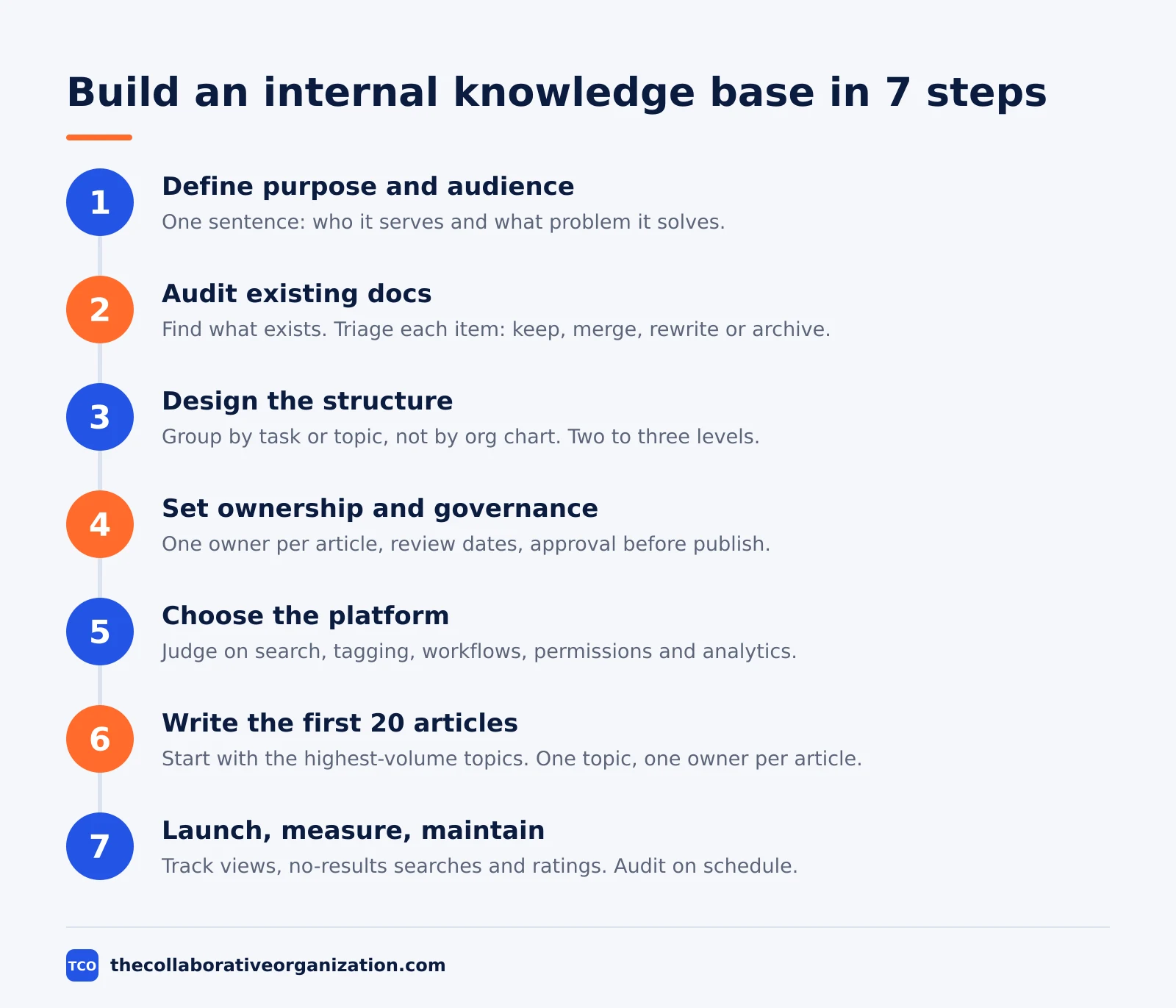
Write one sentence that says who the base serves and what problem it solves. A base that cuts onboarding time looks different from a base that cuts IT tickets, and both look different from a base that standardizes sales answers. Getting this right shapes every decision that follows, from what you write to who can read it.
Common purposes include cutting inbound questions to IT and HR, speeding up new-hire ramp time, and preserving knowledge as teams scale. Pick one main purpose and name the audience in the same sentence, such as “new hires in their first 30 days” or “every employee with an IT question”. If you cannot name the audience, the scope is too wide.
Set a launch goal you can measure, such as 20 articles live and 50 searches in the first month, or a 20% drop in repeat IT questions. A goal with a number keeps the build honest and gives the sponsor something to report.
Step 2: Audit your existing documentation
Before creating new content, find out what already exists, because most teams have more documented than they realize. It is scattered across shared drives, wikis, email threads, chat channels, ticket replies, and personal notes. Gather it first, and you will write far less than you feared.
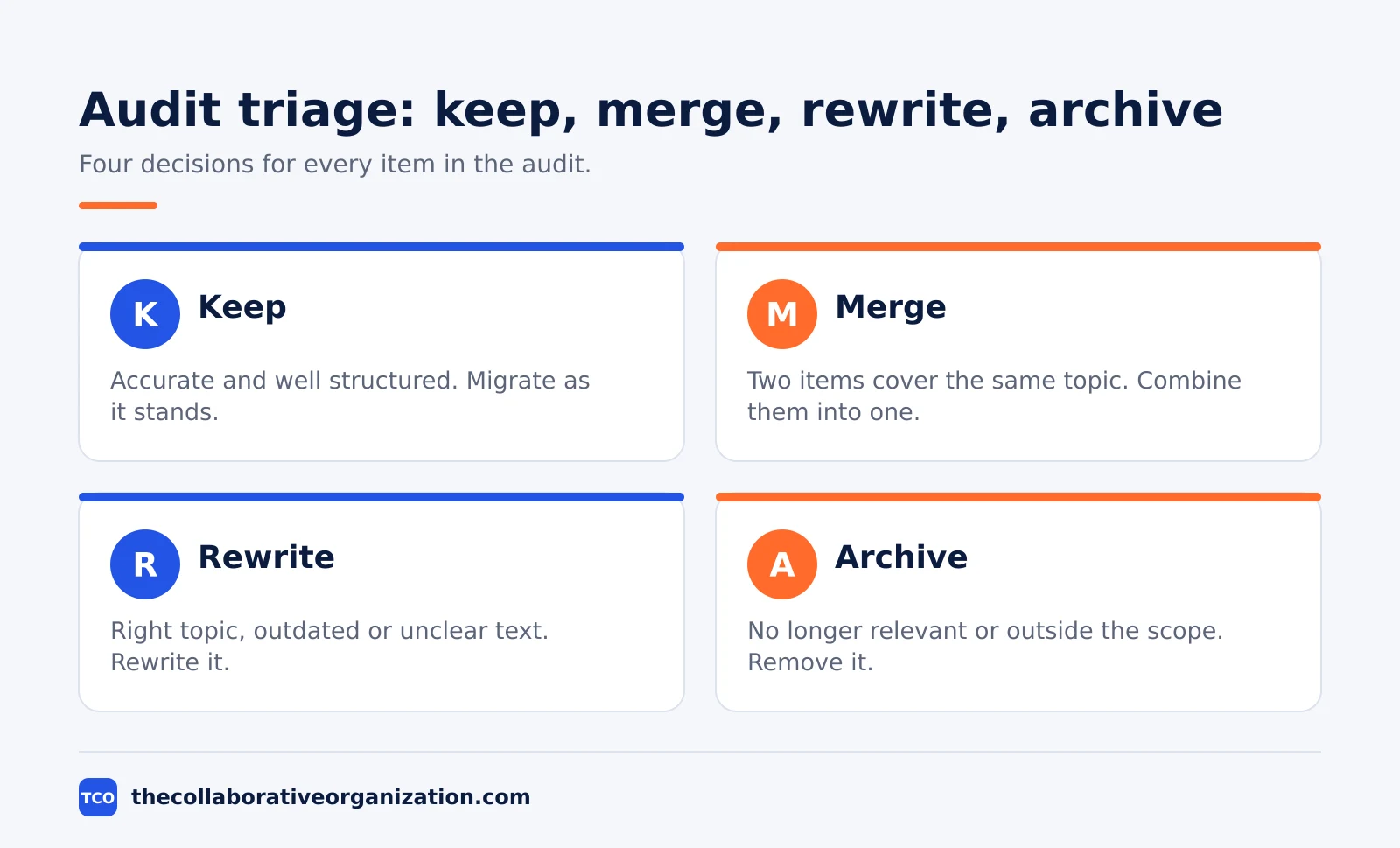
Catalog each item in a simple inventory with four columns: what it is, where it lives now, who owns it, and its status. Then triage everything you find: Keep it when it is accurate, Merge it when two items cover the same topic, Rewrite it when the text is outdated, and Archive it when it is no longer relevant.
Look for three problems as you audit: duplicate content that says different things, conflicting versions of the same policy, and documents nobody has opened in over a year. Flag content that lacks an owner or a last-reviewed date, since those pages will go stale first.
Step 3: Design the structure around how people search
Design the structure around how employees look for information, not around how your org chart is organized. People search by their problem, such as “reset my password” or “book annual leave”, not by department name. Group content by task or topic, and keep the hierarchy shallow: two to three levels is enough for most teams.
Define a simple taxonomy before you write: content types, such as policy, how-to guide, reference document, and FAQ; topic areas, such as HR, IT, and onboarding; and content owners, the person responsible for accuracy. A controlled set of terms keeps the library tidy when many people contribute.
Plan the front page too. A clear structure needs a prominent search bar, topic cards for browsing, links to the most-visited articles, and a clear path to contact support when self-service does not resolve the issue. Group content by product area, task type, or audience, whichever maps most naturally to how your users think about their problems.
Step 4: Set ownership and governance before you write
Assign an owner to every content area before a single article goes live, because a base without governance decays within months. Content without ownership goes stale, ownership becomes unclear, and quality varies until employees stop trusting the library. Establish governance before launch, since retrofitting ownership onto an existing base is much harder than building it in from the start.
Give each article one owner, not a committee. The owner is the person closest to the process: HR owns onboarding, benefits, and workplace policies, while IT owns troubleshooting guides and security rules. The owner creates the page, reviews its accuracy, updates it when the process changes, removes duplicates, and answers questions about the topic.
Set review dates by how fast the topic changes. Review fast-changing pages every 30 to 90 days, and stable policies once a year. Build a publishing workflow that routes every new article and every edit through approval, so no page goes live without a check.
| Content area | Owner | Review frequency |
|---|---|---|
| Benefits and compensation | Benefits manager | Annually, plus at every policy change |
| IT help and security | IT manager | Quarterly |
| Company policies | HR director | Annually |
| Onboarding guides | Hiring manager or HR | Every 6 months |
| Sales process and specs | Sales operations lead | Quarterly |
Step 5: Choose the platform
Choose the platform after the scope and the structure are set, not before, and judge it on five features. Search and discovery comes first: fast search that suggests results as users type, and that surfaces answers even when the query does not match exact article titles. AI-powered search is increasingly standard, and it improves self-service when it cites the article behind each answer.
Next, check categorization and tagging, so articles surface in the right places without hand sorting. Then check collaboration and workflow tools: version control, in-line commenting, and approval workflows, so several contributors can work without overwriting each other.
Permissions and access control are essential for internal bases. Analytics should show which articles get the most views, where users drop off, and what searches return no results.
Our comparison of intranet vs knowledge base helps when the choice is between a full intranet and a focused library. A wiki such as Confluence fits teams that live in one, while a tool such as Notion fits small teams that mix docs and tasks.
Our comparison of wiki vs knowledge base covers the trade-offs in detail.
Step 6: Write and publish the first 20 articles
Write the first 20 articles from your audit and your question list, starting with the highest-volume topics. Each article should cover one topic, answer one question, and carry one owner. Lead with the answer, use simple language, and format for scanning with numbered steps, headers, and bullets, since most users scan for the relevant section rather than reading top to bottom.
Keep the writing rules tight. Every article carries a last updated date and an owner, so readers know whether to trust it. Use the same template for every article: the answer first, the steps second, and related links last.
Do not try to write everything before launch. Publish the first 20, launch, and add the next batch from real data: ticket topics, chat questions, and searches with no results. A base that grows from real questions stays useful, while a base written from guesses fills with pages nobody reads.
Step 7: Launch, measure, and keep it current
Launch is the starting line, not the finish line, so plan for ongoing measurement, feedback, and improvement from day one. Tell the team where the base lives, how to search it, and how to request a new article. Put the link where people already work: the intranet home page, the chat channel topic, and the onboarding checklist.
Track five numbers each month: article views, search-to-click rates, no-results searches, article ratings, and questions people still ask in chat or tickets. Those numbers tell you what works and what is missing. A page with many views and low ratings needs a rewrite, and a search term with no results is your next article.
Run regular content audits on the cadence you set in step 4: quarterly for fast-moving areas, annually for stable policies. The owner of each area reviews their pages, updates links and procedures, and adds content based on recurring questions. When a process changes, the owner updates the article in the same week, not the same quarter.
A worked example: a 40-person company in 6 weeks
A short example shows the seven steps on a realistic timeline. Imagine a 40-person company where new hires ask the same onboarding questions, and IT answers the same password and VPN questions every week.
| Week | What happens | Outcome |
|---|---|---|
| 1 | Define purpose and audience; list repeat questions | Scope: onboarding, HR, and IT for all employees |
| 2 | Audit drives, wikis, chats, and tickets | 60 items found; 20 to keep, 15 to merge, 25 to archive |
| 3 | Design structure; assign owners; pick the platform | 3 topic areas, 8 owners, review dates set |
| 4 - 5 | Write and publish the first 20 articles | 20 articles live, each with an owner and a date |
| 6 | Launch, train the team, and start measuring | Link on the intranet home page; first metrics in week 7 |
In week 7, the team checks the numbers: the password reset article is the most viewed page, and three searches return no results. They write those three articles in week 8. By month three, IT reports fewer repeat questions, and new hires finish onboarding with fewer calls to HR.
Tools for an internal knowledge base
The tool matters less than the ownership, but the right platform makes search, permissions, and review dates easy. Pick the tool your team already opens every day, and check that it supports the five features from step 5.
If you have not picked a tool yet, compare the options on our document collaboration software shortlist first.
Our guide on how to choose collaboration software covers seat counts and free-plan caps.
| Tool | Best for | Free plan | Starting price (as of November 2026) | Notable limit |
|---|---|---|---|---|
| Confluence | Teams that keep a wiki as their source of truth | Free for up to 10 users | $7.15 per user per month (Standard), billed monthly for 1-100 users | SSO needs a separate Guard subscription |
| Notion | Small teams that mix docs, wikis, and tasks | Free plan for solo use | $10 per member per month (Plus), billed annually | Plus keeps 30 days of page history |
| Google Docs | Simple shared docs, not a full knowledge base | Free with a Google account | Free; Workspace Business Starter $7 per user per month, billed annually | No built-in knowledge base structure |
The Confluence price needs a note: the page shows $5.78 for Standard and $11.16 for Premium, but that is the blended rate for a 300-user team. A team of 1 to 100 users pays $7.15 on Standard and $14.10 on Premium, billed monthly, after the rise on 13 October 2026.
The Notion price is $10 per member per month on Plus when billed annually, or $12 billed monthly.
The Google Docs price comes from Google Workspace pricing, where Business Starter is $7 per user per month on the annual plan and $8.40 on the flexible plan, as of November 2026.
Common mistakes when building an internal knowledge base
Most internal knowledge bases fail in the same few ways, and all of them trace back to scope, ownership, or measurement. Check this list before you launch.
- Documenting everything before launch. A base that tries to cover every topic ships late and stale. Launch with the 20 questions people actually ask, and add the rest from real data.
- No assigned owner for content. When nobody owns a page, nobody updates it, and the base becomes another abandoned wiki within months. Name one owner per article.
- Importing messy content as it stands. Moving disorganized files into a new platform does not fix them. Audit first, triage each item, and rewrite what is outdated.
- Structuring by org chart. Employees search by their problem, not by department name. Design around tasks and topics, and keep the hierarchy to two or three levels.
- Skipping the review schedule. A page with no review date is a page that will go stale. Set the cadence at launch: 30 to 90 days for fast-changing pages, annually for stable ones.
- Measuring nothing after launch. Without views, no-results searches, and ratings, you cannot tell which articles work. Track five numbers each month and act on them.
Sources
- HubSpot - What Is a Knowledge Base, and Why Do You Need One? (2026)
- GoLinks - How to Build a Company Knowledge Base That Employees Actually Use (2026)
- Joysuite - Internal Knowledge Base: How to Build One (2026)
- LivePro - How to Create an Internal Knowledge Base? (2026)
- Pumble - How to Create an Internal Knowledge Base: Step-by-Step (2026)
- Atlassian - Confluence Pricing (2026)
- Notion - Pricing (2026)
Frequently asked questions
How long does it take to build an internal knowledge base?
A small team can launch a useful base in 4 to 6 weeks: one week to define scope and audit what exists, one week to set structure and owners, two weeks to write the first 20 articles, and one week to launch and train the team. A larger company with several departments should plan 8 to 12 weeks and launch one department at a time.
How many articles should an internal knowledge base launch with?
Launch with 10 to 20 articles that answer the questions your team asks most often. That is enough to prove the base works and small enough to keep correct. Add new articles from support tickets, chat questions, and search terms that return no results, in small batches each month.
Who should own the content in an internal knowledge base?
Each article needs one named owner, usually the person closest to the topic, such as HR for policy pages or IT for troubleshooting guides. One program owner should watch the whole library: articles with no owner, pages past their review date, and searches that return no results.
What is the best tool for an internal knowledge base?
The best tool is the one your team already opens every day and that supports search, permissions, and review dates. Confluence fits teams that live in a wiki, Notion fits small teams that mix docs and tasks, and Google Docs works only for very small libraries. Pick the tool after you define the scope, not before.
How do you keep an internal knowledge base up to date?
Give every article an owner and a review date, and review fast-changing pages every 30 to 90 days and stable policies once a year. Track searches with no results, article ratings, and questions people still ask in chat. When a process changes, the owner updates the article in the same week.
Related articles

document collaboration
Airtable vs Google Sheets: Which to Use in 2026
Airtable is a database with views and automations; Google Sheets is a free spreadsheet. Learn the limits, the 2026 prices, and which one fits your team's data.
November 19, 2026 · 7 min read
document collaboration
Confluence vs SharePoint: Which to Use in 2026
Confluence is a wiki built around pages; SharePoint is a document platform built around files. Learn the differences, the 2026 prices, and which one fits your team.
November 19, 2026 · 7 min read
document collaboration
How to Document Processes: A Step-by-Step Guide (2026)
To document a process, pick one task, watch it done for real, map the steps and decisions, then test the draft on someone new. Follow the 7 steps in this guide.
November 19, 2026 · 10 min read