Eisenhower Matrix Explained: Prioritize in 4 Steps (2026) | The Collaborative Organization
By The Collaborative Organization Team · November 19, 2026 · Last verified November 19, 2026 · 9 min read
The Eisenhower Matrix is a four-quadrant grid that sorts every task by two questions: is it urgent, and is it important? Each answer puts the task in one box with one action: do it now, schedule it, delegate it, or delete it. The grid is named after Dwight D. Eisenhower. Use it on a crowded list.
Key takeaways
- The Eisenhower Matrix sorts tasks by urgency and importance into four boxes: do, schedule, delegate and delete.
- Urgent means it needs attention soon, while important means it moves a goal you care about.
- Eisenhower quoted the urgent-versus-important idea in a 1954 speech, crediting an unnamed former college president.
- Stephen Covey made the four-quadrant grid widely known in his 1989 book The 7 Habits of Highly Effective People.
- Quadrant 2, important work that is not yet urgent, gives the best return on your time.
What the Eisenhower Matrix is
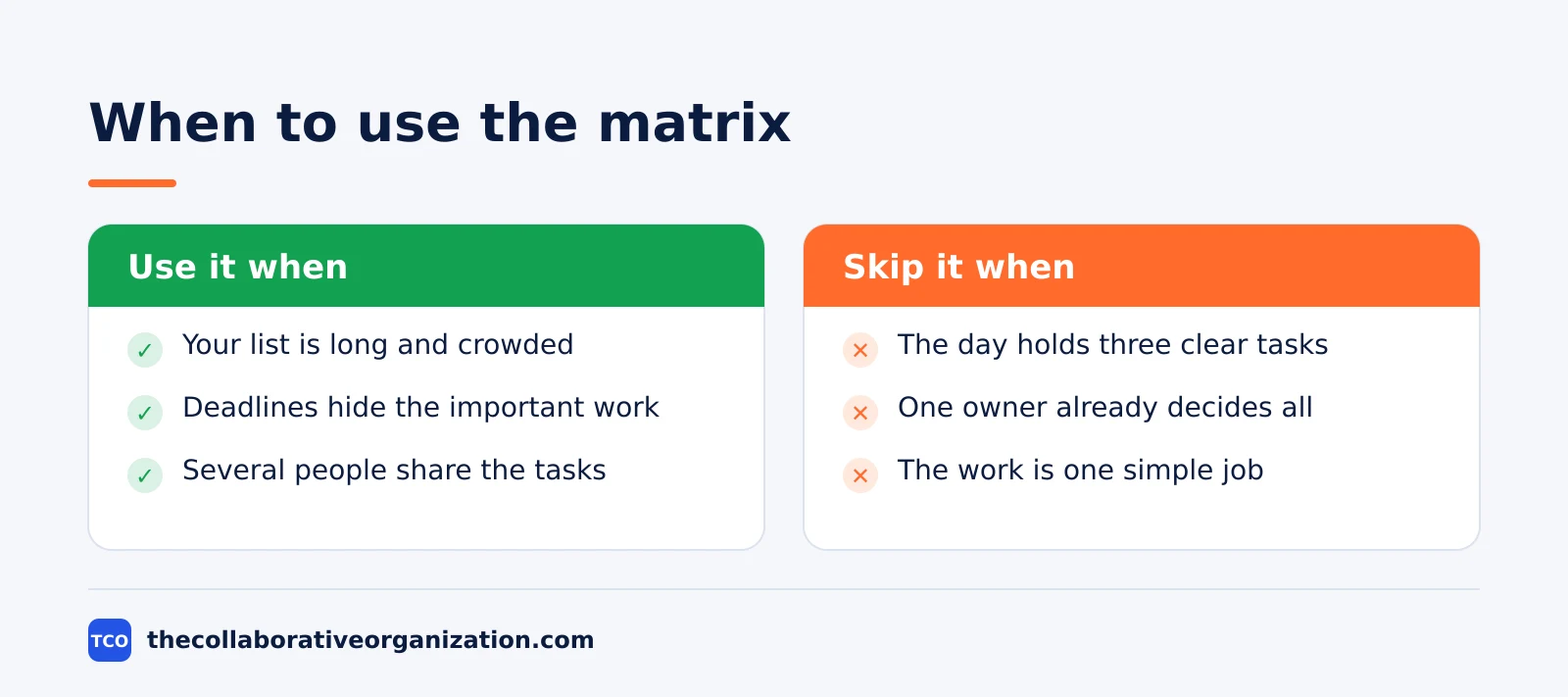
The Eisenhower Matrix is a sorting tool that turns a long to-do list into four clear actions. You ask two questions about each task, then place it in the box that matches your answers. The tool is also called the “Eisenhower Box”, the “urgent-important matrix” and the “time management matrix”.
Urgency is about timing. A task is urgent when it needs attention soon and something bad happens if you wait. Importance is about consequence. A task is important when its result moves a goal you are accountable for, such as a launch, a client relationship or your health.
Most to-do lists rank by urgency alone, so the loudest task wins the day. The matrix breaks that habit by forcing you to judge importance separately. A ringing phone feels urgent, but it rarely matters as much as the plan you keep putting off.
The grid works for one person and for a team. A manager can sort a shared backlog the same way, and the boxes make the trade-offs visible to everyone. Our guide on how to choose a task management app covers what to look for when the list outgrows paper.
The four quadrants of the Eisenhower Matrix
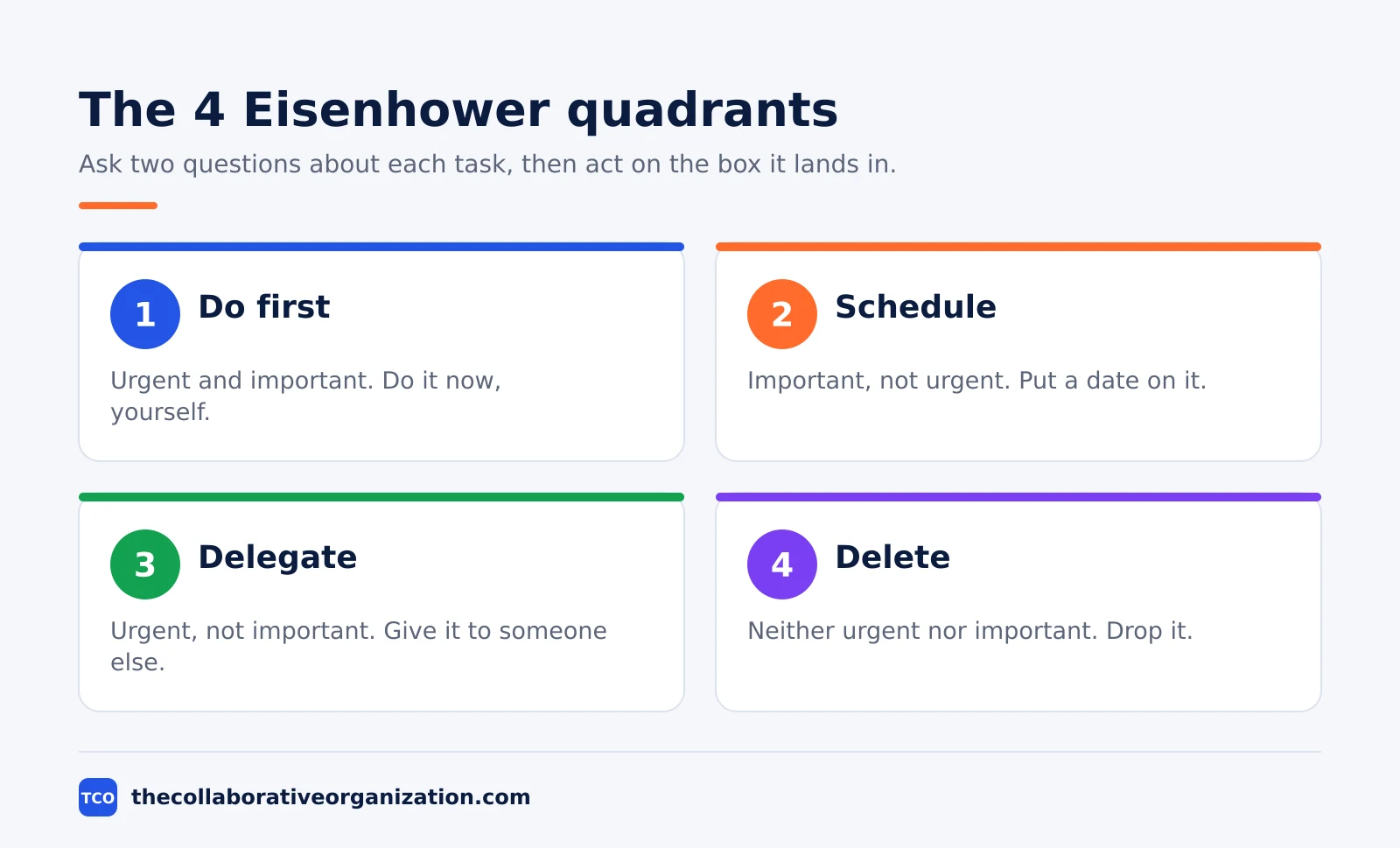
Each quadrant pairs one combination of urgent and important with one action. The table below shows all four, with the kind of work that belongs in each.
| Quadrant | Urgent and important | Action |
|---|---|---|
| 1 - Do first | Urgent and important | Do it now, yourself |
| 2 - Schedule | Important, not urgent | Put a date and time on it |
| 3 - Delegate | Urgent, not important | Give it to someone else |
| 4 - Delete | Not urgent, not important | Drop it or say no |
Quadrant 1 holds crises and hard deadlines: a system outage, a proposal due tomorrow, a client problem that blocks a launch. Do this work first, and keep the box as small as you can. A full Quadrant 1 is a sign that planning work was left too late.
Quadrant 2 holds planning, learning, prevention and relationship building. Nothing in this box shouts for attention, so it is the easiest box to skip and the most costly to skip. FranklinCovey puts it plainly: the best return on your time comes from important work that is not yet urgent.
Quadrant 3 holds interruptions that feel pressing but serve someone else’s goal: routine requests, status meetings and reports nobody reads. Delegate them when you can, or batch them into one short slot. Quadrant 4 holds distractions and busywork. Delete them, or at least stop scheduling them.
Where the Eisenhower Matrix came from
The matrix is named after Dwight D. Eisenhower, but the popular story about its origin is wrong in one key detail. On 19 August 1954, speaking to the Second Assembly of the World Council of Churches in Evanston, Illinois, Eisenhower said: “I have two kinds of problems, the urgent and the important. The urgent are not important, and the important are never urgent.”
He did not claim those words as his own. In the same speech he introduced them as the statement of a former college president, whom he never named. The speech text is held by the American Presidency Project, and the wording above is quoted from it.
The smoother version you see most often, that what is important is seldom urgent, came later. Quote Investigator traced the saying and found the 1954 speech is the earliest evidence, while the word “seldom” appears to come from a listener’s memory of the talk. It also notes there is no evidence Eisenhower used a matrix himself.
The four-quadrant grid came from Stephen Covey. His 1989 book The 7 Habits of Highly Effective People placed urgency against importance in a time management matrix under Habit 3, “Put First Things First”. Covey numbered the boxes I to IV, and the Do, Schedule, Delegate and Delete labels were added by later writers.
How to use the Eisenhower Matrix in 5 steps
Using the matrix takes five steps, and the first two use no boxes at all. Asana describes the same flow in its own guide: sort each task by the two questions, then act on the box it lands in.
Step 1: Write down every open task
Empty your head onto one list, work and personal mixed. Do not sort yet. A task that stays in your head cannot be judged, and sorting while you capture only slows you down.
Step 2: Ask the two questions for each task
For each item, ask if it is urgent, then if it is important. Be strict about urgency: a task is urgent only when delay has a real cost, not when someone asked loudly. Judge importance against your goals, not against the sender’s goals.
Step 3: Place each task in one quadrant
Put each task in exactly one box. If a task seems to fit two boxes, pick the one that matches the bigger risk: missing the deadline or missing the goal. Move on fast; a sort that takes an hour will not survive the week.
Step 4: Act on each box in order
Clear Quadrant 1 first, then schedule Quadrant 2 work before the calendar fills. Hand Quadrant 3 tasks to the right person with clear instructions, and delete Quadrant 4 tasks instead of parking them for later.
Step 5: Review the matrix every week
Re-sort once a week, because deadlines move and new requests arrive. A scheduled task becomes urgent as its date nears, and a delegated task may need a follow-up. The review is the step most people skip, and it is the step that keeps the matrix honest.
Eisenhower Matrix example: one overloaded week
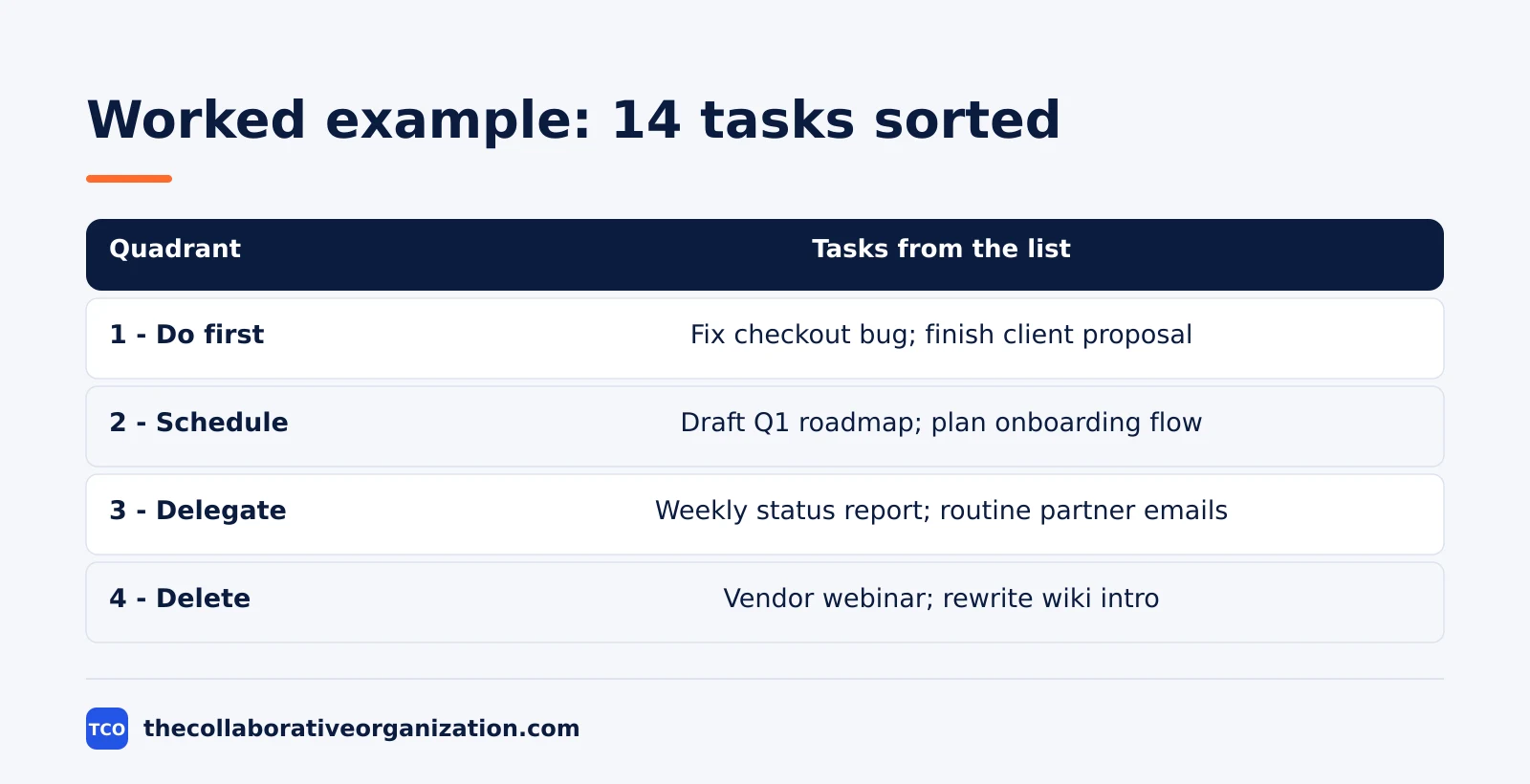
A product manager with 14 open tasks shows how the sort changes a week. Imagine Maya, a product manager at a 20-person software company, starting Monday with a list that will not fit the week. She sorts it in 20 minutes and the picture below is what she gets.
| Quadrant | Tasks from Maya’s list |
|---|---|
| 1 - Do first | Fix the checkout bug blocking payments; finish the client proposal due Tuesday |
| 2 - Schedule | Draft the Q1 roadmap; plan the onboarding flow; book the design review |
| 3 - Delegate | Compile the weekly status report; answer routine partner emails |
| 4 - Delete | Attend the optional vendor webinar; rewrite the team wiki intro |
Three things stand out. Only two tasks are truly urgent and important, so Monday has a clear shape. The roadmap and onboarding work get real dates instead of waiting for a free afternoon. Five tasks leave her list entirely, through delegation or deletion, which frees about six hours across the week.
The example is an illustration, not a case study, but the pattern is common: most overloaded lists hold a few real deadlines, several important tasks with no date, and a tail of work that adds little. Sorting makes that tail visible, which is the whole point.
Tools that can hold your Eisenhower Matrix
A paper grid works for a first sort, but an app keeps the matrix next to the work it describes. The boxes stay current when tasks, owners and dates live in one place. Project management and task management are different jobs, so pick a tool sized to your list, not to someone else’s team.
If you have not picked a tool yet, compare the options on our task management software shortlist before you build the matrix. The right tool is the one you will open every day, not the one with the longest feature list.
| Tool | Best for | Free plan | Starting price (as of November 2026) | Notable limit |
|---|---|---|---|---|
| Asana | Teams that sort shared work into four sections | Free for 2 people | $10.99 per user per month, billed annually | Free plan covers 2 people |
| Trello | Visual boards with one list per quadrant | Free for up to 10 collaborators | $5 per user per month (Standard), billed annually | Calendar view needs Premium |
| Todoist | Personal lists with priorities and due dates | Free, 5 personal projects | $5 per month (Pro), billed annually | No team features on Pro |
The Asana price comes from Asana pricing: the Personal plan is free for 2 users, and Starter is $10.99 per user per month when billed annually. On the Trello pricing page, Standard is $5 per user per month billed annually, with Premium at $10. The Todoist pricing page lists Pro at $5 per month, billed as $60 per year.
Asana also publishes a ready-made Eisenhower Matrix template with four sections matching the quadrants. In Asana, each section tells you what to do with the task next, which keeps the sort from becoming a list you never revisit.
Common Eisenhower Matrix mistakes to avoid
Most matrices fail in the same five ways, and all five are easy to spot in a review. Run through the list below each time you re-sort.
- Everything lands in Quadrant 1. When every task is urgent and important, your urgency test is too loose. Ask what actually breaks if the task waits a day.
- Quadrant 2 stays empty. An empty Schedule box means important work has no date. Block time for one Quadrant 2 task before the week fills up.
- Delegation becomes dumping. A delegated task still needs a clear owner, a deadline and a check-in. Without those, it comes back as a Quadrant 1 crisis.
- Delete feels rude, so nothing gets deleted. A task you keep rescheduling is a task you have already decided not to do. Delete it and free the slot.
- The matrix is sorted once and never reviewed. Priorities move every week, so a stale matrix misleads you. Estimating project time honestly helps here too, since a task with a real time estimate is easier to place.
Sources
- American Presidency Project - Address at the Second Assembly of the World Council of Churches (1954)
- Quote Investigator - What Is Important Is Seldom Urgent (2014)
- FranklinCovey - Habit 3: Put First Things First (2026)
- Asana - The Eisenhower Matrix: How to Prioritize Your To-Do List (2026)
- Asana - Eisenhower Matrix Template (2026)
- Asana - Pricing (2026)
- Trello - Pricing (2026)
- Todoist - Pricing (2026)
Frequently asked questions
What is the Eisenhower Matrix in simple terms?
It is a four-box grid that sorts each task by two questions: is it urgent, and is it important? Urgent and important tasks get done now, important tasks that are not urgent get scheduled, urgent tasks that are not important get delegated, and tasks that are neither get deleted.
Did Eisenhower invent the Eisenhower Matrix?
No. Eisenhower quoted the urgent-versus-important idea in a 1954 speech, crediting an unnamed former college president. Stephen Covey turned the idea into a four-quadrant grid in his 1989 book The 7 Habits of Highly Effective People. Eisenhower never drew the matrix himself.
What goes in Quadrant 2 of the Eisenhower Matrix?
Quadrant 2 holds important work that is not yet urgent: planning, learning, relationship building, prevention and long-term projects. Covey called this the quadrant with the best return on your time, because nothing reminds you to do this work until it becomes urgent.
How often should you redo your Eisenhower Matrix?
Review it once a week and sort new tasks as they arrive. Priorities shift as deadlines move, so a matrix from last month will mislead you. A short weekly review keeps each task in the right quadrant and stops urgent work from crowding out important work.
Can a task belong in two quadrants at once?
No. Each task gets one quadrant based on your best judgement of its urgency and importance right now. If a task feels stuck between two boxes, ask which question matters more: the deadline or the goal it serves. Pick one box and move on.
Related articles
task management
Getting Things Done Method Explained: GTD in 5 Steps (2026)
Getting Things Done (GTD) moves every commitment out of your head into a trusted system, in five steps: capture, clarify, organize, reflect, engage.
November 19, 2026 · 9 min read
task management
How to Create a To-Do List That Works: 7 Steps (2026)
A to-do list that works starts with one capture list and a short today list of 1 to 3 priorities. Follow these 7 steps to build a list you finish.
November 19, 2026 · 10 min read
task management
How to Time Block Your Day in 6 Steps (2026)
To time block your day, list your tasks, put deep work first, and give every hour a job the evening before. Follow these 6 steps tonight.
November 19, 2026 · 9 min read