How to Choose a Task Management App (2026) | The Collaborative Organization
By The Collaborative Organization Team · November 19, 2026 · Last verified November 19, 2026 · 9 min read
Pick the app that holds your daily list in one view, not the one with the most features. List the tasks you do every day, test the free plan against that list, and run one app for two weeks before you pay for it.
Key takeaways
- A task app holds your list, while project software adds timelines and reporting across many projects, so start with the list when the job is a list.
- Todoist Pro is $4 per user per month billed annually, Trello Standard is $5, and Asana Starter is $10.99, all at list prices in November 2026.
- The free plan limit that bites first is usually reminders on Todoist, the 10-board cap on Trello, or the 2-person cap on Asana.
- Keep a short today list of 5 to 10 tasks, a small this-week list, and a backlog you review once a week.
- Pilot one app for two weeks on real daily tasks, then pay only if you still trust the list at the end.
Start with your daily list, not the app store
The app has one job: hold the tasks you do every day in a view you will open each morning. Write down the 10 tasks you did yesterday, with their due dates and owners. If the list is mostly solo work with dates, a simple list app fits. If the list is shared work with handoffs, you need shared projects and comments.
Count how many tasks are active at once. Most people can hold 5 to 10 active tasks in mind, so a list of 200 open tasks is a backlog, not a plan.
The app should make the today list short and the backlog easy to ignore until review day. A tool that shows every task at once will be ignored, because nobody opens a wall of 200 items each morning.
Note where tasks arrive from. Email, chat, meetings, and your own head are the usual sources. The app you pick must catch tasks from at least two of those sources without manual copying, or the list will go stale within a week.
Compare the leading task apps and their real prices
The five leading task apps differ in shape more than in price, so match the shape to your list. Todoist is a fast list. Trello is a board. Asana and ClickUp add structure for teams. Notion holds docs and tasks in one workspace.
| Tool | Best for | Free plan | Starting price (as of November 2026) | Notable limit |
|---|---|---|---|---|
| Todoist | A fast personal list with natural-language add | Free Beginner plan | $4 per user per month (Pro), billed annually | Reminders need the Pro plan |
| Trello | Teams that think in boards and cards | Free for up to 10 collaborators | $5 per user per month (Standard), billed annually | Free plan caps at 10 boards |
| Asana | Teams that want every task to have a named owner | Free for 2 people | $10.99 per user per month (Starter), billed annually | Free plan covers 2 people |
| ClickUp | Teams that want tasks, docs, and goals in one place | Free Forever plan | $9 per user per month (Core), billed annually | Yearly billing needed for that price |
| Notion | Teams that want docs and tasks in one workspace | Free plan | $10 per member per month (Plus), billed annually | Free plan caps team blocks at 1,000 |
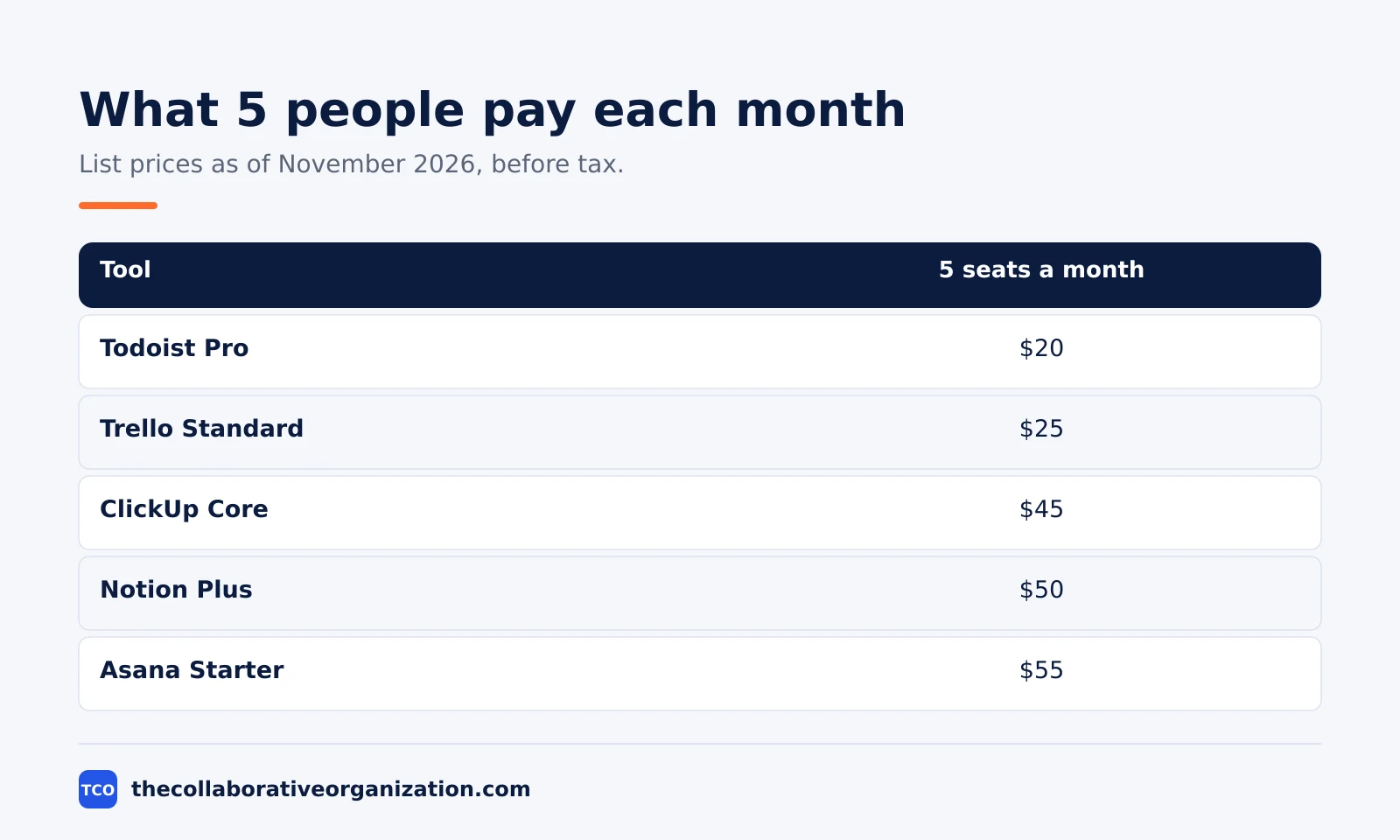
For a 5-person team at list prices as of November 2026, Todoist Pro is $20 a month, Trello Standard is $25, ClickUp Core is $45, Notion Plus is $50, and Asana Starter is about $55. Those are list prices before tax, and each tool bills per user or member.
Watch the free-plan limit that bites first. On Todoist it is reminders, which sit behind the Pro plan. On Trello it is the 10-board cap per Workspace.
On Asana it is the 2-person cap. On Notion the free plan caps team blocks at 1,000, which a busy team can hit fast. The paid plan that removes the limit you hit first is usually the right one.
How to choose a task management app in 6 steps
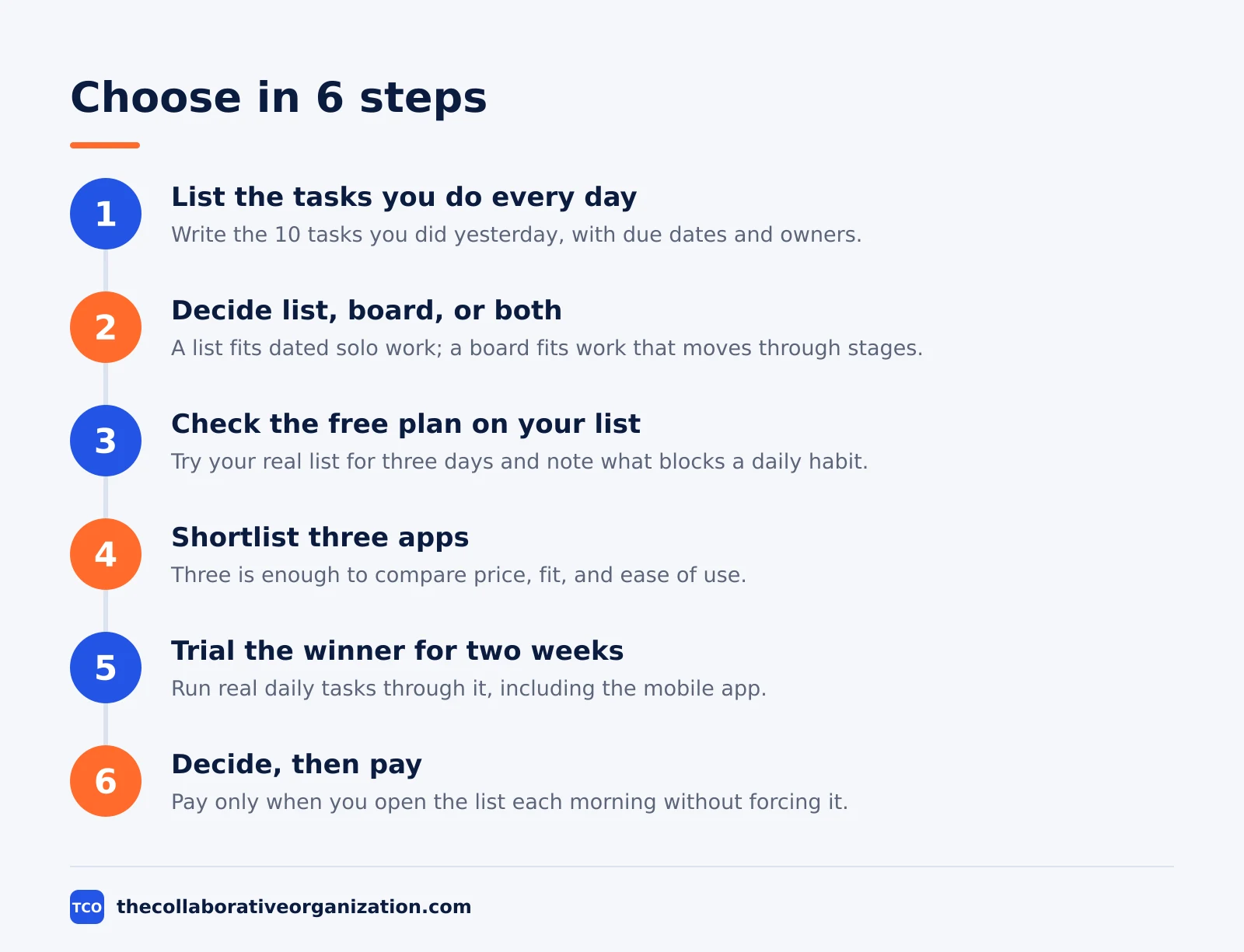
Choosing well takes six steps, and the first three need no download at all. The steps below turn a vague preference into a decision you will still like in three months.
Step 1: List the tasks you do every day
Write the 10 tasks you did yesterday, with due dates and owners. Note which ones repeat, which ones have subtasks, and which ones need a file attached. That list is the test every app must pass.
Step 2: Decide list, board, or both
Pick the view that matches how you plan. A list fits dated solo work with priorities. A board fits work that moves through stages, such as to do, doing, and done. Our guide on how to set up a kanban board shows the board flow in practice.
Our guide to what is a kanban board explains the columns behind it.
Step 3: Check the free plan against your list
Open the free plan and try your real list in it for three days. Check reminders, subtasks, file limits, and the mobile app. If the free plan blocks a daily habit, note the paid price that removes the block.
Step 4: Shortlist three apps
Pick three apps that fit your list and your budget. Three is enough to compare price, fit, and ease of use without turning the choice into a month of trials.
Step 5: Trial the winner for two weeks
Run your real daily tasks through the top app for two weeks. Use the mobile app on the move, add tasks from email or chat, and check the list each morning. A trial on fake tasks proves nothing, because fake tasks have no deadlines and no real owners.
Step 6: Decide, then pay
Ask three questions at the end of the trial: do you open the list each morning without forcing it, can you find any task in under a minute, and can you explain the bill? If the answer to all three is yes, pay for the app. If you kept a paper list beside it, the app has already failed.
Worked example: a freelance designer picks an app
A freelance designer shows how the six steps play out on real work. She juggles six clients, and each client has 3 to 5 open tasks with dates. Her list is mostly solo work with deadlines, plus a few tasks she hands to a developer. Her job sentence is: “I need to see what is due today across six clients, and hand two tasks a week to a developer.”
She shortlists Todoist, Trello, and Notion. Todoist Pro is $4 a month and holds her daily list with natural-language dates, reminders, and filters per client.
Trello is free for her size but shows one board at a time, so seeing all six clients takes six boards. Notion Plus is $10 a month and holds docs beside tasks, but she already keeps briefs in Google Docs.
She trials Todoist for two weeks on real client work. The today view shows all six clients in one list, filters split the work per client, and reminders catch the two tasks she hands to the developer. She pays $4 a month and keeps Trello as the fallback for any client who wants a board view.
When a task app is not enough
A task app stops being enough when the work needs dates across people, not just a list. The signs are clear: you need a timeline view to see what slips, you need dependencies so one late task moves the next, or you need a report that shows who is overloaded. At that point the job is project management, not task tracking.
Airtable is the middle step for teams whose task list is really a tracker with statuses, owners, and dates. The Team plan is $20 per seat per month billed annually (Airtable pricing).
The plan is dearer than a task app, so use it only when the list needs database views. Our guide on how to choose project management software covers the step up to a full project tool, with prices and a pilot plan.
The same rule applies in reverse. A team that buys project software for a simple list pays $10.99 a seat for features it never opens. Start with the task app, and move up only when the list itself proves too small.
How to keep the list honest after you pick
A task list only works when it is reviewed, and the review takes 15 minutes a week. Pick one day each week to clear the list: mark what is done, move what slipped with a new date, and delete what no longer matters. A list that grows without a review becomes a guilt pile, and guilt piles get ignored.
Keep three lists, not one. The today list holds 5 to 10 tasks you will finish today. The this-week list holds the rest of the week. The backlog holds everything else, and you look at it only on review day.
Researchers writing in Harvard Business Review found the average worker toggled between apps nearly 1,200 times a day, and a single list in a single app is the simplest way to cut that switching.
Set a rule for new tasks: every task gets an owner and a date within 24 hours of arriving, or it leaves the list. A task with no date is a wish, and wishes clog the list until the real work is hard to find.
Common task management app mistakes to avoid
Most bad choices fail in the same five ways, and all five are easy to spot before you pay. Run through this list before the trial ends.
- Picking the app with the most features. A task app with 200 features is no help when you use five of them. Score the daily list first and ignore the rest until the trial.
- Keeping two lists. A paper list beside the app means the app has already failed. Move everything into one list on day one of the trial.
- No weekly review. A list that is never reviewed grows until it is ignored. Block 15 minutes each week to clear it, or the app becomes a guilt pile.
- Ignoring the mobile app. Half of all task capture happens away from the desk. Test the mobile app on the move during the trial, not only the desktop view.
- Paying before the free plan breaks. A solo user rarely needs a paid plan in week one. Pay when the free plan blocks a daily habit, such as reminders or more than 10 boards.
Sources
- Todoist - Pricing (2026)
- Trello - Pricing (2026)
- Asana - Pricing (2026)
- ClickUp - Pricing (2026)
- Notion - Pricing (2026)
- Airtable - Pricing (2026)
- Harvard Business Review - How Much Time and Energy Do We Waste Toggling Between Applications? (2022)
Frequently asked questions
What is the best task management app for personal use?
Todoist Pro fits most people who want a fast personal list, at $4 per user per month billed annually, with natural-language quick add and reminders. Trello fits people who think in boards, and it is free for up to 10 collaborators. Pick the one whose daily view matches how you already plan your day.
Should I pay for a task management app?
Pay when the free plan blocks a daily habit. On Todoist, reminders sit behind the Pro plan. On Trello, the free plan caps at 10 boards and 10 collaborators. On Asana, the free plan covers only two people. If the free plan holds your whole week, keep your money.
What is the difference between a task app and project management software?
A task app holds your list: what to do, when it is due, and who owns it. Project management software adds timelines, dependencies, portfolios, and reporting across many projects. Start with a task app when the job is a list, and move up when you need to plan across a team.
How many tasks should a task app hold?
As many as you can review in one sitting. Most people can hold 5 to 10 active tasks in mind, so a list of 200 open tasks is a backlog, not a plan. Keep a short today list, a small this-week list, and a backlog you review once a week.
How long should I trial a task management app?
Two weeks of real daily use. One week is too short to hit the free-plan limits, and a month is long enough for bad habits to settle. Run your real tasks through it, test the mobile app on the move, and check whether you still trust the list at the end.
What does a task management app cost for a small team?
At list prices in November 2026, a 5-person team pays $20 a month on Todoist Pro, $25 on Trello Standard, $45 on ClickUp Core, $50 on Notion Plus, and about $55 on Asana Starter. Free plans cover solo users and tiny teams, but not a team of five.
Related articles

guides
Free Project Management Templates: 7 to Copy (2026)
Seven free project management templates from monday, Wrike, Teamwork, Smartsheet, ClickUp, Asana and Trello, with what each one is for and what free really costs.
November 20, 2026 · 7 min read

guides
Project Proposal Template: Copy and Win Work (2026)
A project proposal template pitches the work before it is approved: problem, solution, scope, budget, timeline and terms. Copy the template and filled example.
November 20, 2026 · 10 min read

guides
Action Plan Template: Goal to Done in One Page (2026)
An action plan template turns one goal into owned steps with dates, dependencies and a success measure. Copy the table and see it filled for a support team.
November 20, 2026 · 11 min read