How to Create a To-Do List That Works: 7 Steps (2026) | The Collaborative Organization
By The Collaborative Organization Team · November 19, 2026 · Last verified November 19, 2026 · 10 min read
A to-do list that works has two parts: one capture list that holds everything, and a short today list with 1 to 3 priorities. Write each task as a physical next action, add the minutes it will take, and review both lists at the end of the day. The seven steps below turn that idea into a daily habit.
Key takeaways
- Keep two lists: a capture list for everything, and a short today list with 1 to 3 priorities.
- Write each task as a physical next action that starts with a verb, such as call, draft or send.
- Add a time estimate to every task, then check the total against the hours the day really holds.
- A specific plan quiets unfinished tasks: Masicampo and Baumeister showed this in a 2011 study.
- Review the list at the end of each day and once a week, and move unfinished tasks on purpose.
What a to-do list that works looks like
A working to-do list is short, specific and timed, and it lives in one place you trust. It is not a wish list of 20 items. It is a plan for today, with a clear first step for each task and a realistic total time.
The two-list system is the core idea. The capture list holds every open task, errand and promise, so nothing is lost. The today list holds only what you plan to finish today, picked from the capture list each evening. Splitting the two stops the daily list from becoming a storage dump.
There is a reason capture matters. Unfinished goals keep intruding on your attention, a pattern psychologists call the “Zeigarnik effect”. In a 2011 study, Masicampo and Baumeister found that unfinished goals caused intrusive thoughts and worse scores on an unrelated word puzzle, but making a specific plan for the goal removed those effects.
A good task passes a simple test: you could start it right now without deciding anything first. “Plan the launch” fails the test, because the first step is unclear. “Open the launch doc and list the five deliverables” passes it. See how to choose a task management app for where to keep the two lists once the habit sticks.
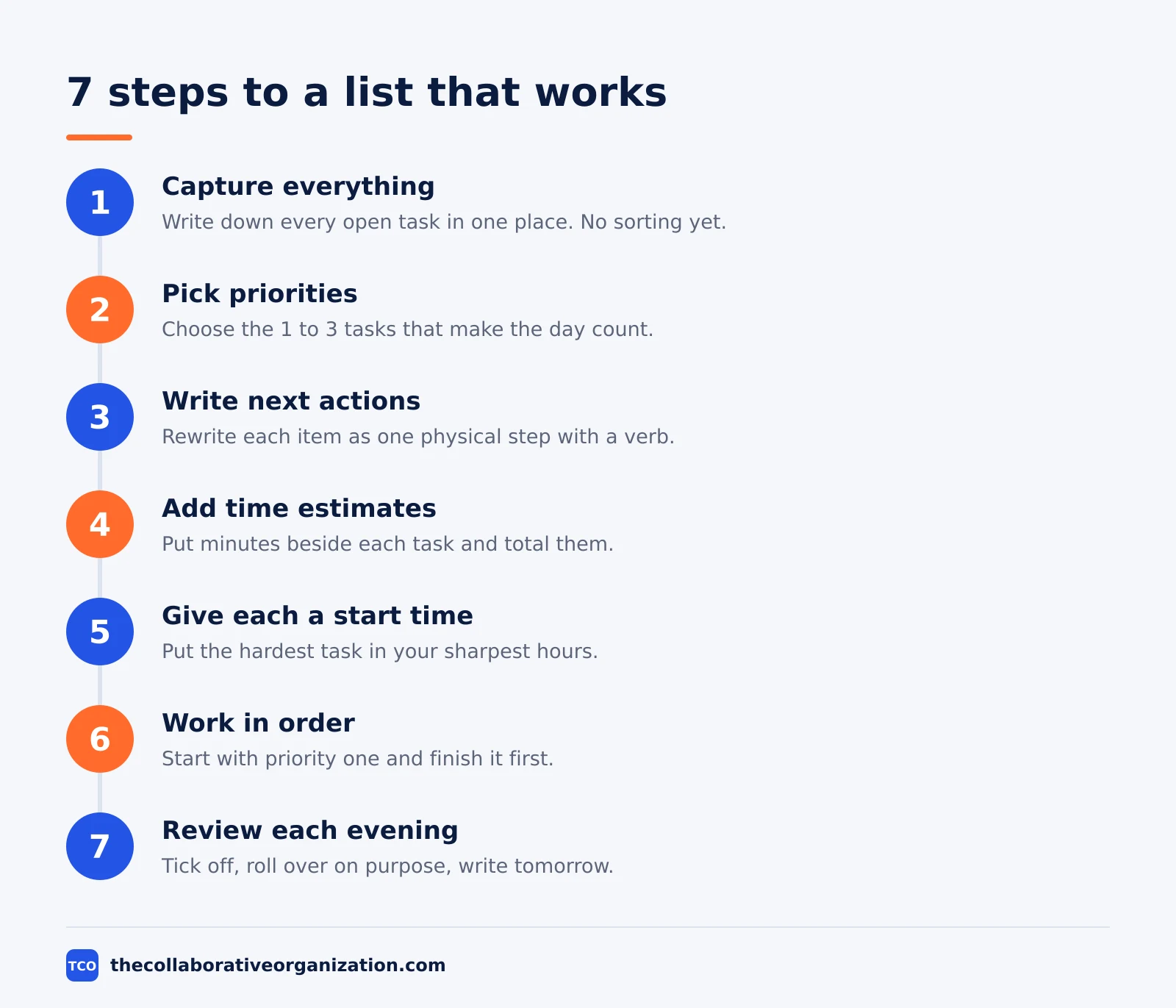
How to create a to-do list that works in 7 steps
Building a list that works takes seven steps, and the first one takes ten minutes. The steps below come from the capture-first method used by monday.com, with the research behind each step noted as it appears.
Step 1: Capture everything in one place
Write down every open task, errand, call and promise in one sitting. Use one notebook or one app inbox, and do not sort while you capture. Sorting while capturing turns a ten-minute job into an hour of planning.
Step 2: Pick 1 to 3 priorities for today
From the capture list, choose the tasks that would make the day count even if nothing else got done. Put them at the top of the today list, in order. The rest stays on the capture list, where it is safe but out of the way.
Step 3: Write each task as a next action
Rewrite every item as one physical step that starts with a verb. David Allen calls this the “next action”: the very next physical thing you would do, written so plainly that future you needs no thought to start. Replace “taxes” with “pull last year’s return from the filing cabinet”.
Step 4: Add a time estimate, then add them up
Write the minutes next to each task and total them. Then compare the total with the free time the day really holds, after meetings, lunch and travel. This step catches the most common failure: a list that needs 11 hours from an 8-hour day.
People are poor judges of task time. In a 1994 study by Buehler, Griffin and Ross, students guessed 33.9 days to finish a thesis and took 55.5 days, and only 29.7% finished by their predicted date. Planado reports the figures, and the pattern has a name: the “planning fallacy”. Plan no more than three quarters of your free time.
Step 5: Give each task a start time
A list says what to do, and a time says when. Put the hardest task in your sharpest hours, usually the morning, and batch small jobs such as email into one or two short slots. A task with no start time waits all day and usually loses to whatever arrives loudest.
Step 6: Work the list in order
Start with priority one and finish it before moving on. If a task blocks, note the blocker, pick the next action that unblocks it, and keep going. Do not re-sort the list mid-morning; the order was decided when your head was clear.
Step 7: Review at the end of the day, and once a week
Each evening, tick off what is done, move unfinished tasks to a new today list on purpose, and write tomorrow’s list. Once a week, clear the capture list: delete dead tasks, break big ones into next actions, and check that nothing important has sat untouched for a month.
A worked example: one day, two lists
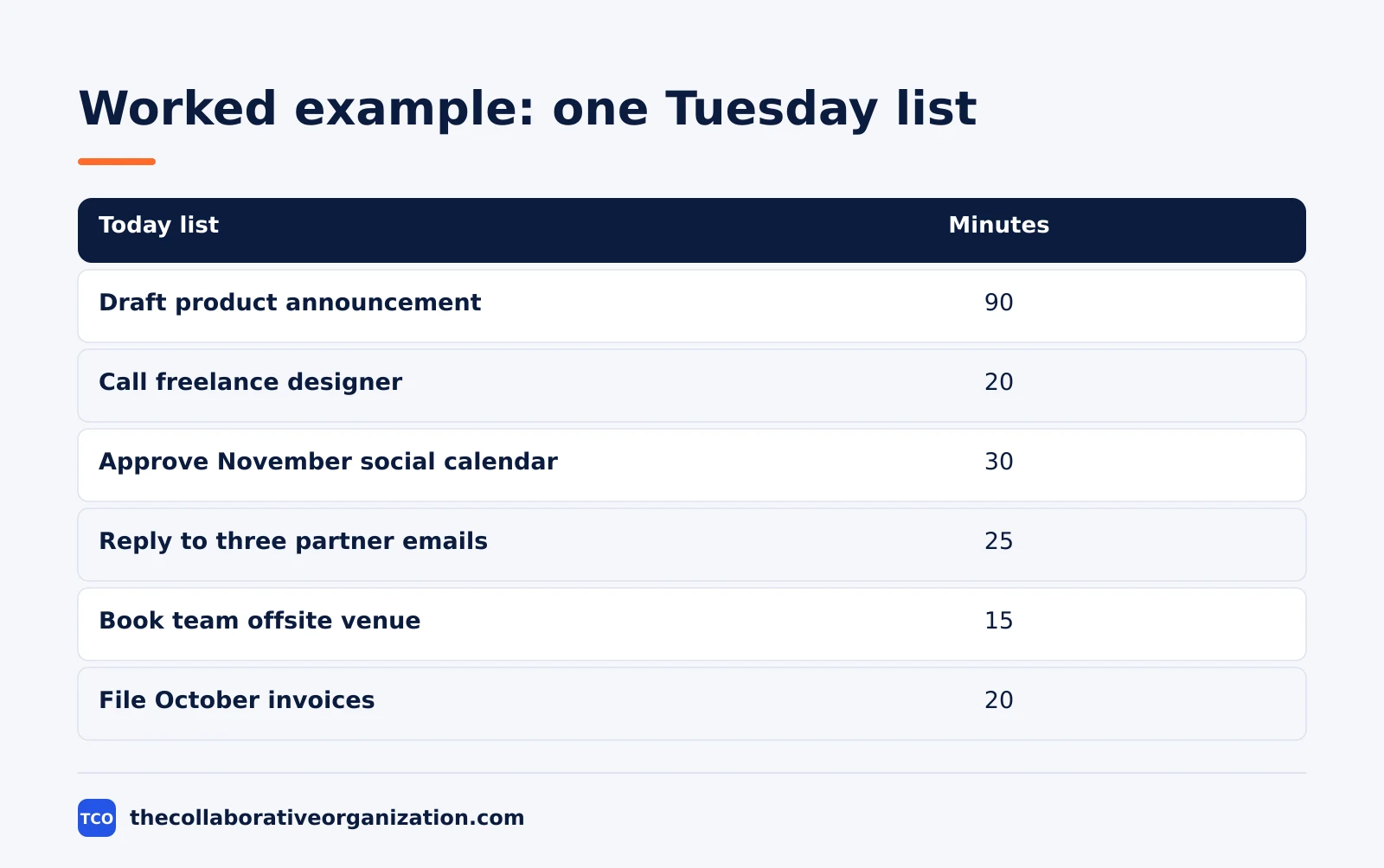
A marketing lead with a crowded Tuesday shows how the two lists work in practice. Imagine Sara, who runs content for a 12-person team. Her capture list holds 23 items on Monday evening. She picks three priorities and five small tasks for Tuesday, and the rest stays parked.
| Today list | Minutes |
|---|---|
| Draft the product announcement (priority 1) | 90 |
| Call the freelance designer about the homepage | 20 |
| Approve the November social calendar | 30 |
| Reply to the three partner emails | 25 |
| Book the team offsite venue | 15 |
| File the October invoices | 20 |
| Total | 200 |
Sara has about five free hours on Tuesday after meetings, so 200 minutes of tasks leaves room for overruns. The announcement gets the 9:00 slot, when she is sharpest, and the emails are batched at 15:00. The other 17 capture items stay on the capture list, and three of them get a date later in the week.
The example is an illustration, not a case study. Its point is the arithmetic: a list you can add up is a list you can trust, and a list you trust is one you will keep using.
Pick a method: 1-3-5, Ivy Lee or Eisenhower
Three simple methods cap the day, and you should use only one per list. Mixing methods adds labels and scores that fight each other, so pick the one that fits your day and run it for two weeks before judging it.
| Method | How it works | Best for |
|---|---|---|
| 1-3-5 rule | 1 big task, 3 medium, 5 small each day | Days with mixed task sizes |
| Ivy Lee method | 6 tasks each evening, ranked, worked in order | Days with a long backlog |
| Eisenhower Matrix | Sort by urgent and important first | Days where priorities are unclear |
The 1-3-5 rule is the most forgiving: it caps the day without forcing a strict order. The Ivy Lee method dates to 1918, when Ivy Lee gave Bethlehem Steel president Charles Schwab a six-task evening list. The $25,000 payment in the story has no verified primary source, notes Aziz Publishing, so judge the method on its merits.
The Eisenhower Matrix sorts by urgency and importance before you pick the day’s tasks, which helps when everything feels urgent. Whichever method you pick, the rule is the same: the cap is a ceiling, not a quota, and a day full of meetings needs fewer tasks, not more.
Tools that hold your to-do list
An app earns its place when it makes capture fast and review easy. The list below covers personal tools with real starting prices as of November 2026. Compare the wider field on our task management software shortlist before you commit to one.
| Tool | Best for | Free plan | Starting price (as of November 2026) | Notable limit |
|---|---|---|---|---|
| Todoist | Fast capture with priorities and due dates | Free, 5 personal projects | $5 per month (Pro), billed annually | No team features on Pro |
| TickTick | Lists plus calendar and focus timer | Free, 9 lists | $2.99 per month (Premium), billed annually | One person only, no team plan |
| Things 3 | Calm daily plan on Apple devices | No free plan, 15-day Mac trial | $49.99 once (Mac) | Apple devices only |
| Trello | Visual boards for lists and due dates | Free, up to 10 collaborators | $5 per user per month (Standard), billed annually | Calendar view needs Premium |
The Todoist price comes from Todoist pricing: Pro is $5 per month, billed as $60 per year. TickTick Premium is $35.99 per year according to November 2026 checks on LifeStack, and one check notes $35.99 is a promotional price against a $49.99 list price, so confirm the renewal price before you pay.
Things 3 is a one-time purchase per Apple device: Mac $49.99, iPhone $9.99 and iPad $19.99, with no subscription. Those figures come from November 2026 App Store checks on Merlin Computer, since the vendor page lists no prices. The Trello pricing page lists Standard at $5 per user per month billed annually.
Common to-do list mistakes to avoid
Most lists fail in the same five ways, and each one has a simple fix. Check your list against this set at the weekly review.
- Vague tasks with no first step. “Website” is a project, not a task. Rewrite it as the next physical action, such as “email the designer the homepage copy”.
- A list with no time budget. A list of 20 tasks is a guess, not a plan. Add the minutes, total them, and cut until the total fits the day.
- One list doing two jobs. A capture list and a today list serve different purposes. Mixing them turns the today list into a storage dump you learn to ignore.
- Rolled-over tasks with no decision. A task that rolls over three days needs a verdict: do it, delegate it, schedule it, or delete it. Estimating project time honestly helps, since a task with a real estimate is easier to place.
- No review, so the list goes stale. A list that is never reviewed fills with dead tasks. A five-minute evening review keeps it current and keeps you trusting it.
How to measure whether your list works
A list works when you finish the priorities most days and the capture list shrinks each week. Count two numbers for two weeks: how many of your 1 to 3 daily priorities got done, and how many capture items are older than a month. Both should move in the right direction.
If priorities keep failing, the problem is usually the plan, not your effort. Shorten the list, add time estimates, or move the hard task earlier in the day. If the capture list keeps growing, the problem is intake: too many new commitments, or tasks that should have been delegated or deleted at capture time.
Task and subtask boundaries matter here too. When a task keeps rolling over, it is often a project in disguise: break it into subtasks, pick the first one as the next action, and let the rest wait on the capture list.
Sources
- Masicampo and Baumeister - Consider It Done! Plan Making Can Eliminate the Cognitive Effects of Unfulfilled Goals (2011)
- monday.com - How to Create an Effective To-Do List in 7 Steps (2026)
- Planado - To-Do List Template (2026)
- UseFlo - How to Make a To-Do List That Actually Works (2026)
- Aziz Publishing - Ivy Lee Method Explained (2026)
- Todoist - Pricing (2026)
- LifeStack - TickTick Pricing in 2026 (2026)
- Merlin Computer - Best To-Do List Apps for Mac (2026)
- Trello - Pricing (2026)
Frequently asked questions
How many tasks should a daily to-do list have?
Aim for 1 to 3 must-do tasks, plus up to 5 small ones, using the 1-3-5 rule. A list of 20 tasks sets you up to fail, because the day only holds so many hours. Keep everything else on a separate capture list, and pull from it only when a slot opens up.
Should I use paper or an app for my to-do list?
Use whichever one you will open every day. Paper is fast and has no notifications, while an app adds reminders, due dates and sync across devices. The method matters more than the medium, so pick one system, keep every task in it, and review it daily.
What is the 1-3-5 rule for to-do lists?
The 1-3-5 rule caps each day at one big task, three medium tasks and five small tasks. It stops the list from growing past what a day can hold. On a day full of meetings, one big task and three medium ones is plenty, and the small tasks can wait.
Why do my to-do lists never get finished?
Most unfinished lists fail in the same ways: vague tasks with no clear first step, no time estimate, and too many items for one day. Rewrite each task as a physical next action, add the minutes it will take, and cap the day at 1 to 3 priorities.
When should I write tomorrow's to-do list?
Write it at the end of today, while the work is still fresh in your mind. Pick the 1 to 3 tasks that matter most and put them at the top in order. Starting the morning with a ready list beats spending the first half hour deciding what to do.
Related articles
task management
Eisenhower Matrix Explained: Prioritize in 4 Steps (2026)
The Eisenhower Matrix sorts tasks by urgency and importance into four quadrants: do, schedule, delegate, delete. Learn each quadrant and how to use it.
November 19, 2026 · 9 min read
task management
Getting Things Done Method Explained: GTD in 5 Steps (2026)
Getting Things Done (GTD) moves every commitment out of your head into a trusted system, in five steps: capture, clarify, organize, reflect, engage.
November 19, 2026 · 9 min read
task management
How to Time Block Your Day in 6 Steps (2026)
To time block your day, list your tasks, put deep work first, and give every hour a job the evening before. Follow these 6 steps tonight.
November 19, 2026 · 9 min read