What Is Resource Leveling? Definition and Examples (2026) | The Collaborative Organization
By The Collaborative Organization Team · November 19, 2026 · Last verified November 19, 2026 · 9 min read

Resource leveling is a scheduling technique that fixes overallocation by adjusting task start and finish dates to match the resources you actually have. When one person is booked for more work than a day holds, leveling moves the work until the load fits. It can push the end date later: an honest date beats a plan nobody can keep.
Key takeaways
- Resource leveling adjusts task dates to fit resource limits, and it can move the end date and change the critical path.
- Overallocation means a person is booked for more work than their capacity allows in a given period.
- The four moves are delay a task, split a task, stretch a task, or add resources when the deadline cannot move.
- Leveling differs from smoothing: smoothing works only inside existing float, so the deadline never moves.
- Leveling answers one question: with the people and equipment you actually have, when can you finish?
What resource leveling is
Resource leveling is a technique that resolves scheduling conflicts where resources are assigned more work than they can handle in a given period. The PMBOK Guide defines it as a technique in which start and finish dates are adjusted based on resource constraints, with the goal of balancing demand for resources with the available supply. In plainer terms, it rearranges the schedule so no one is expected to do more work than they physically can in the time given.
Asana describes the same idea in its 2026 guide: leveling adjusts project timelines or task assignments so work can be completed with available resources, including time, materials, and tools. The purpose is to get the most out of the resources on hand while working within the project’s time, cost, and scope limits.
Leveling deals with a resource-constrained schedule: limited resource availability, with little or no fixed time limit. That is the opposite of a time-constrained project, where the deadline cannot move and extra resources must be found instead. Knowing which constraint rules your project tells you whether leveling is even an option.
How resource leveling works
Resource leveling works by changing when work happens, not by removing work from anyone’s plate. The schedule assumes a certain capacity, the real capacity turns out smaller, and leveling closes the gap with four moves: delay, split, stretch, or add resources.
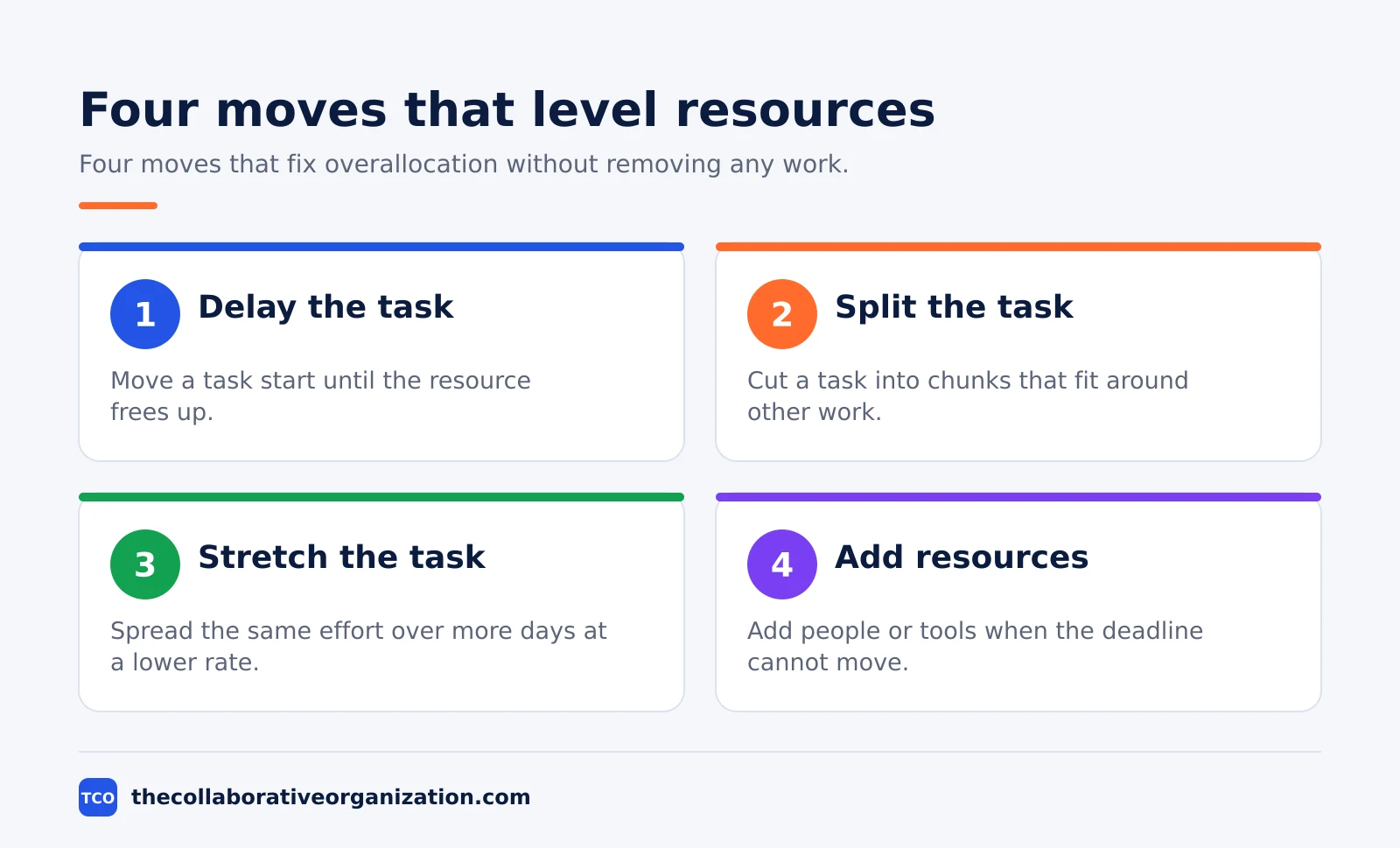
Delay moves a task start until the resource frees up. Split cuts a task into chunks that fit around other commitments.
Stretch extends a task’s duration so the same total effort spreads over more days at a lower rate per day. Add resources brings in extra people or tools, which only works when the deadline is fixed and the budget allows it.
A simple example comes from Asana’s guide: a project needs a designer to create mock-ups, but the designer is double-booked and the rest of the design team is busy too. The team starts the project two days later, when the designer is free.
Since the designer works fast, the end date stays the same. Leveling fixed the conflict without adding a single hour of work.
Resource leveling vs resource smoothing
Leveling and smoothing fix the same problem in opposite ways: leveling moves the deadline to fit the people, while smoothing moves the people to fit the deadline. Both sit inside the PMBOK Guide’s resource optimization techniques, but a manager reaches for them under different conditions, and the effect on the schedule is different.
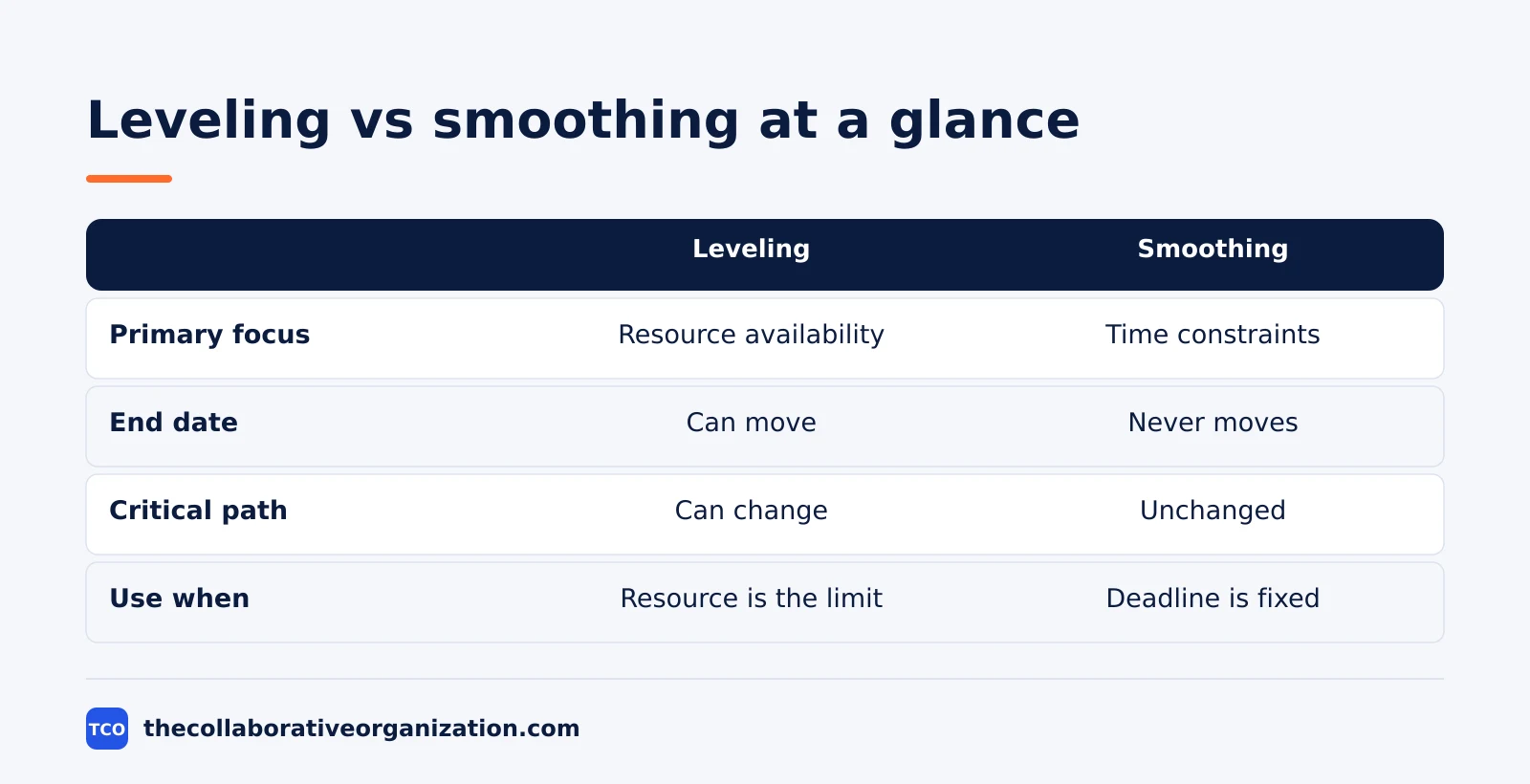
| Factor | Resource leveling | Resource smoothing |
|---|---|---|
| Primary focus | Resource availability | Time constraints |
| End date | Can move later | Never moves |
| Critical path | Can change | Unchanged |
| Use when | A resource is the hard limit | The workload is uneven but fits |
The contrast is sharpest in one line from Rework: the constraint in leveling is your resources, while the constraint in smoothing is your deadline. Leveling is the right choice when a specific person or piece of equipment is the hard limit, when the end date is negotiable, or when overallocation is so severe that float alone cannot absorb it.
Smoothing has its own tidy example. You are booked for eight hours a day for five days, but you only need 30 hours of work. You redistribute the schedule to six hours a day, which gives you leeway for other tasks without touching the deadline. After leveling resolves overallocation, smoothing can balance the schedule that remains.
The techniques that level resources
Four techniques do the leveling work, and each one solves a different mix of constraints. The Critical Path Method finds the float, fast tracking and crashing compress the schedule, and the critical chain method builds resource limits into the path itself.
The Critical Path Method links dependent activities in a logical sequence and calculates the earliest and latest start and finish dates for each one. Total float is the late finish date minus the early finish date, and free float is the early start of the next task minus the early finish of the current one.
Tasks on the critical path have zero float, so any delay there delays the project. Our guide to calculating the critical path walks through the arithmetic.
Fast tracking runs tasks in parallel where overlap is possible, which can only work if the activities can overlap to some extent. Asana gives the example of a software team starting the back end of a website while the design team finishes the mock-up. The work gets done on time, but the chance of rework rises.
Crashing adds resources to shorten the timeline instead, which needs a budget check first: assess the priority tasks, weigh cost against value, and get approval before hiring.
The critical chain method is an updated version of the critical path that accounts for resource limits.
The critical chain is the longest path of tasks once both task and resource dependencies count, and it adds a buffer between the last task and the finish date. A five-day buffer on a content launch, for example, absorbs review delays without moving the publish date.
Worked example: one designer, three projects
One designer shared across three projects shows how leveling turns a hidden overload into a visible, dated plan. This is an illustration, not a real team, and the numbers are simple on purpose so the moves are easy to follow.
The designer has 8 hours a day. On Tuesday, three projects each need her for a full day: 8 hours on the homepage mock-ups, 8 hours on the campaign art, and 8 hours on the report layout.
That is 24 hours of work in an 8-hour day, or three times her capacity. The schedule as written is a promise nobody can keep.
Leveling fixes it in three moves. The homepage mock-ups stay on Tuesday, since the client review is Wednesday.
The campaign art splits into two 4-hour chunks on Wednesday and Thursday, fitting around the designer’s other work. The report layout stretches to 4 hours a day over Thursday and Friday, since its deadline is Monday. Nothing is removed, and every task still finishes before its deadline.
The cost is real: the campaign art finishes a day later than first planned, and the report layout now runs across two days. The gain is bigger: the designer works normal hours, the quality holds, and the next week starts clean.
That trade is the heart of leveling, and it is why Teamwork calls it the fix for the gap between what the schedule assumes and what a team can actually deliver.
Tools that show workload and leveling
A tool helps leveling when it shows who is booked for how many hours, across all projects, before the overload becomes a missed date. A single-project board hides the problem, since the same person can look free on three boards at once. Workload views and resource management sit on paid plans, so the price below is the real entry cost for this feature.
| Tool | Best for | Free plan | Starting price (as of November 2026) | Notable limit |
|---|---|---|---|---|
| Asana | Workload view across portfolios | Free for 2 people | $24.99 per user per month (Advanced), billed annually | Resource management needs Advanced |
| ClickUp | Resource management with timesheets | Free Forever plan | $17 per user per month (Business), billed yearly | Resource management needs Business |
| Wrike | Resource management with time tracking | Free plan | $25 per user per month (Business), billed annually | Resource tools need Business |
The Asana price comes from Asana pricing: Advanced is $24.99 per user per month when billed annually and includes resource management, workload, and native time tracking.
The ClickUp price comes from ClickUp pricing: Business is $17 per user per month billed yearly and includes resource management and timesheets.
Wrike Business is $25 per user per month billed annually for 5 to 200 users, according to an independent check of the vendor page in October 2026 by Seoraf.
A tool can apply leveling rules on its own, but the output almost always needs a human review, as Rework notes in its leveling guide. An algorithm may delay a low-priority task that a client actually needs first.
Use the workload view to spot the overload, then decide the move yourself. Our guide to managing multiple projects at once shows how to run that weekly capacity check across a portfolio.
Common resource leveling mistakes to avoid
Leveling fails in the same five ways, and most of them come from leveling the wrong thing or leveling once and never again. Check this list each time the schedule changes.
- Leveling a schedule with no real capacity data. Guessed hours produce guessed dates. Record how many hours each person truly has before you move any task.
- Treating every overload as a leveling problem. Some overloads need more people, a smaller scope, or a later date. Leveling moves dates; it cannot create hours.
- Letting the tool decide alone. Auto-leveling follows priority rules, not judgment. Review every move the tool makes before you share the dates.
- Forgetting the critical path. A moved task can become the new critical path. Re-check the path after every leveling pass, or the end date will surprise you.
- Leveling once and never again. People join, leave, and get sick, and scope changes. Re-run the check at each phase gate, or the plan quietly stops matching reality.
Sources
- Asana - Resource Leveling: Techniques, Examples, and Tools (2026)
- Rework - Resource Leveling vs Smoothing Explained (2026)
- Teamwork - Resource Levelling: Techniques and Examples (2026)
- Mudassir Iqbal - Resource Leveling vs Resource Smoothing (2026)
- OnPlana - Resource Leveling: How Schedulers Resolve Overallocation (2026)
- Asana - Pricing (2026)
- ClickUp - Pricing (2026)
- Seoraf - Wrike Pricing 2026 (2026)
Frequently asked questions
What is resource leveling in simple terms?
Resource leveling fixes a schedule where someone is booked for more work than they can do in the time given. You move task dates, split tasks, or stretch them until every assignment fits inside the person's real capacity. It does not remove work from anyone, it moves when the work happens, and it can push the project end date later.
What is the difference between resource leveling and smoothing?
Leveling changes the schedule to fit the resources and can move the end date and the critical path. Smoothing changes resource use only within the float that already exists, so the end date never moves. Use leveling when a person or tool is the hard limit. Use smoothing when the deadline is fixed and the workload is just uneven.
When should you use resource leveling?
Use it when a shared or critical resource is available only at certain times or in limited quantity, when one person is assigned to two or more tasks at the same time, or when overallocation is so severe that float alone cannot absorb it. If the end date is fixed and the overload is small, try smoothing first.
Does resource leveling change the critical path?
Yes, it can. Leveling moves tasks to fit resource limits, and when a moved task sits on the critical path, the path changes and the project can finish later. That is the main cost of leveling: an honest date that reflects real capacity instead of a date that assumes people can do two jobs at once.
What is overallocation in project management?
Overallocation means a resource is assigned more work than its capacity allows in a given period, such as one designer booked for 12 hours of work in an 8-hour day. It shows up as missed dates, rushed work, and burnout. Leveling resolves it by delaying, splitting, or stretching tasks until the load fits the hours available.
Related articles

project management
How to Choose Project Management Software (2026)
Pick project management software in seven steps: define the work, count seats, price the real cost, and run a two-week pilot before you pay.
November 19, 2026 · 10 min read

project management
What Is a RACI Matrix? Definition, Roles and Examples (2026)
A RACI matrix maps who is Responsible, Accountable, Consulted and Informed for each task. Learn the four roles, how to build one, and see a worked example.
November 19, 2026 · 9 min read

project management
Daily Standup Meeting Format That Works (2026)
A daily standup is a 15-minute meeting where Developers inspect progress toward the Sprint Goal and plan the next day. Use this format to run one that ends on time.
November 19, 2026 · 10 min read