How to Calculate the Critical Path in 6 Steps (2026) | The Collaborative Organization
By The Collaborative Organization Team · November 19, 2026 · Last verified November 19, 2026 · 12 min read
To calculate the critical path, list every task with its duration and dependencies, run a forward pass to find the earliest dates, run a backward pass to find the latest dates, then mark the tasks with zero float. The zero-float tasks form the longest chain through the project, and their total length is the shortest time the project can take.
Key takeaways
- The critical path is the longest chain of dependent tasks, and its length is the minimum project duration.
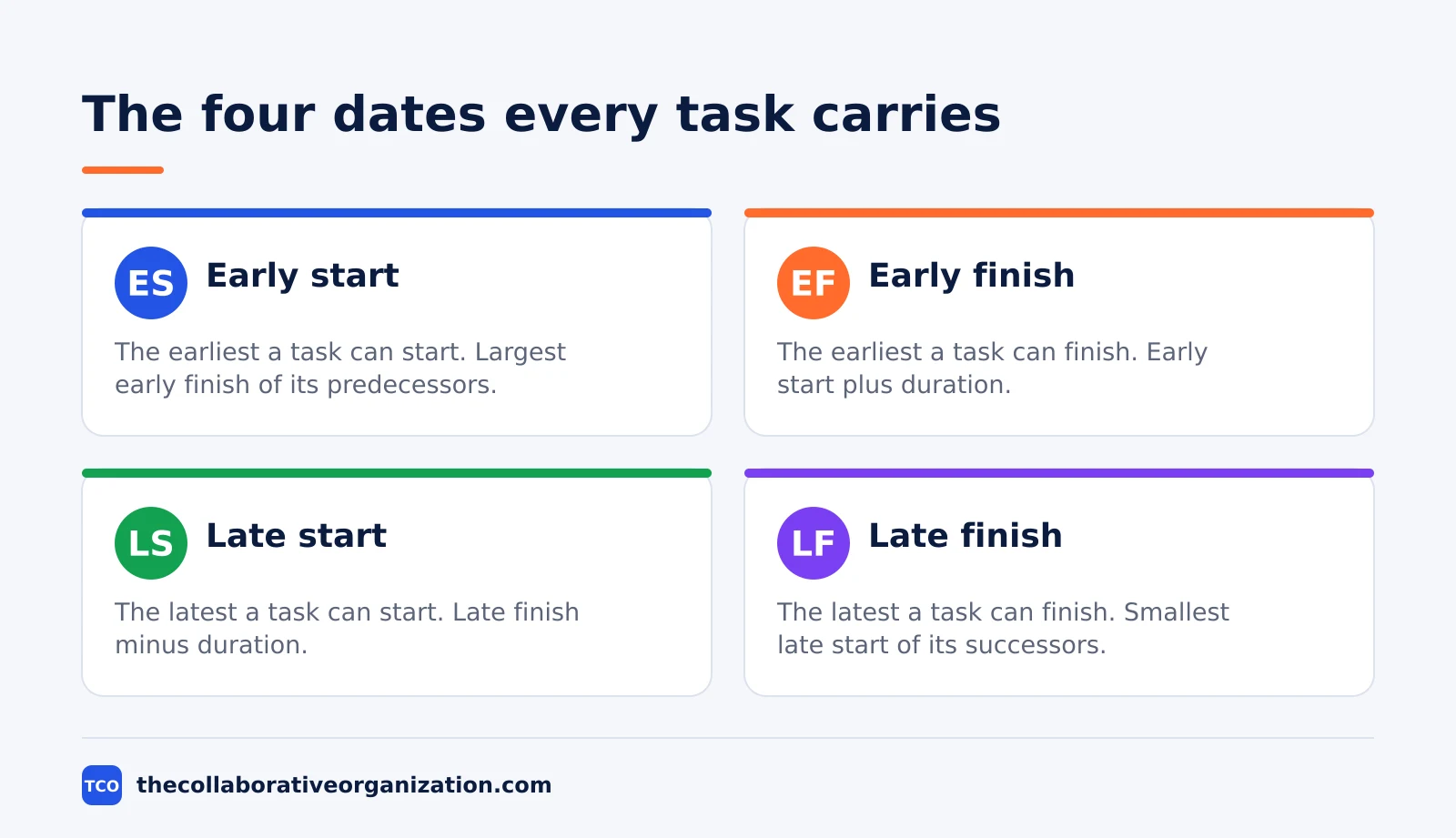
- A forward pass gives early start and early finish; a backward pass gives late start and late finish.
- Early finish equals early start plus duration, and late start equals late finish minus duration.
- Total float equals late start minus early start, and zero-float tasks form the critical path.
- In the worked example below, the path A-B-D-E-F takes 17 days, and task C has 2 days of float.
- Re-run the passes whenever a date, duration or dependency changes, because the path can move.
What you need before you start
You need three things before the first calculation: a task list, a duration for each task, and the dependencies between them. Without all three, the passes have nothing to run on, and the answer will be a guess dressed up as a date.
Start with the task list. Break the project into tasks that one person can finish, and keep each task concrete enough that its duration can be estimated. Our guide on how to create a project plan covers the planning steps that produce this list, including the work breakdown structure that most teams start from.
Next, give every task one duration estimate. Use working days, not calendar days, and use the same unit for every task. When a duration is uncertain, use the PERT formula to set it: expected time equals (optimistic + 4 x most likely + pessimistic) / 6. The PERT estimate turns three guesses into one number you can defend.
Then map the dependencies. For each task, write down which tasks must finish before it can start. Most dependencies are finish-to-start, which means task B starts only after task A finishes. A task with several predecessors waits for the slowest one, and that rule is what makes the forward pass work.
How to calculate the critical path in 6 steps
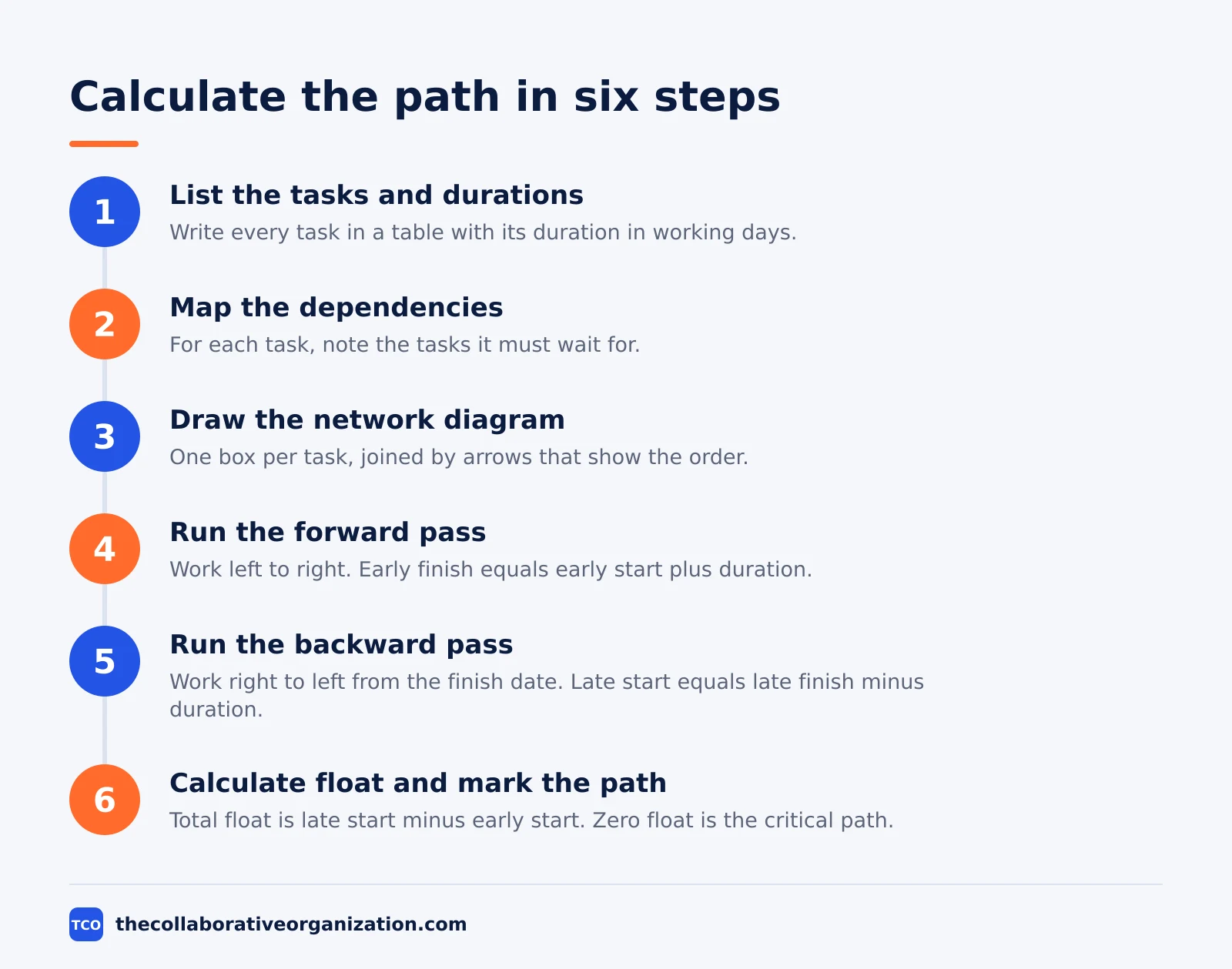
Six steps take you from a task list to a marked critical path, and the order matters: list, link, draw, forward, backward, then float. Skip a step and the numbers will not add up.
Step 1: List the tasks and durations
Write every task in a table with its duration in working days. Keep the list short enough to check: if a task takes more than a few weeks, split it. A task list with 10 to 30 tasks is easy to calculate by hand, and larger lists belong in a tool.
Step 2: Map the dependencies
For each task, note the tasks it depends on. Check the map twice, because a missing link shortens the path and a wrong link lengthens it. Ask the people doing the work to confirm the order, since they know which tasks truly block each other.
Step 3: Draw the network diagram
Draw one box per task and join them with arrows that show the dependencies. Put the task name and duration in each box. The diagram is your working paper: the passes fill in the four dates around each box, and the path becomes visible as a chain of boxes.
Step 4: Run the forward pass
Start at day 0 and work left to right. The early start of a task is the largest early finish among its predecessors, or 0 if it has none. The early finish is the early start plus the duration. The early finish of the last task is the project duration.
Step 5: Run the backward pass
Start at the project finish date and work right to left. The late finish of a task is the smallest late start among its successors, or the project end date for the final task. The late start is the late finish minus the duration. The backward pass shows how late each task can run.
Step 6: Calculate float and mark the path
For each task, total float equals late start minus early start. Tasks with zero float form the critical path. Draw the path on the diagram, usually with a bold line or a colour, so the team can see at a glance which tasks must not slip.
Worked example: an app launch in 17 days
A small app launch shows the full calculation, with every number worked out by hand. The project has six tasks, and the durations are in working days. This is an illustration with made-up numbers, not a real project.
| Task | Duration | Depends on | ES | EF | LS | LF | Float |
|---|---|---|---|---|---|---|---|
| A - Scope | 2 days | - | 0 | 2 | 0 | 2 | 0 |
| B - Design | 5 days | A | 2 | 7 | 2 | 7 | 0 |
| C - Copy | 3 days | A | 2 | 5 | 4 | 7 | 2 |
| D - Build | 6 days | B, C | 7 | 13 | 7 | 13 | 0 |
| E - Test | 3 days | D | 13 | 16 | 13 | 16 | 0 |
| F - Launch | 1 day | E | 16 | 17 | 16 | 17 | 0 |
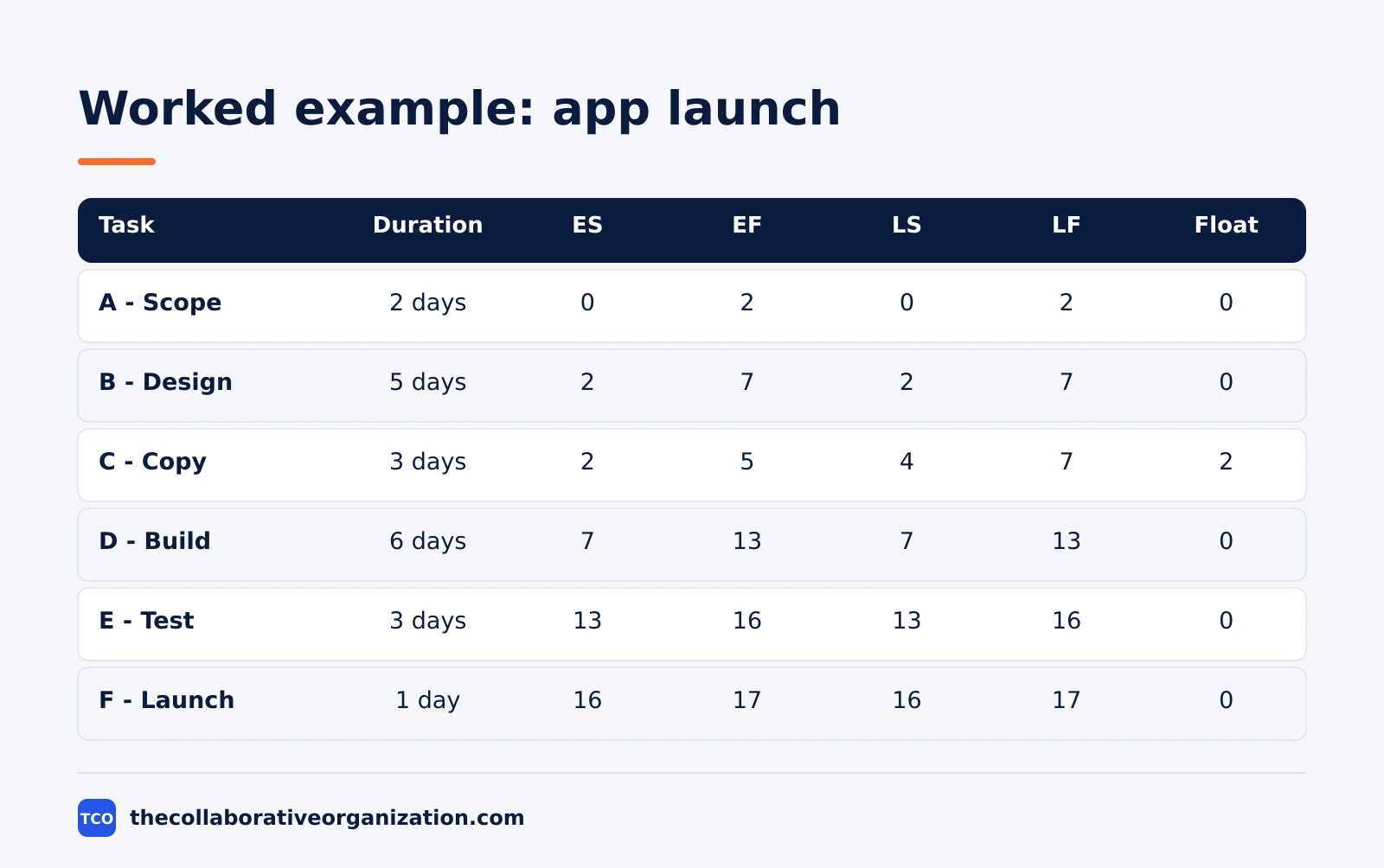
The forward pass runs left to right. Task A starts at day 0 and finishes at day 2. Tasks B and C both start at day 2, because both wait for A. B finishes at day 7 and C finishes at day 5.
Task D waits for both B and C, so it starts at day 7, the later of the two finishes, and ends at day 13. E runs from day 13 to day 16, and F runs from day 16 to day 17.
The backward pass runs right to left from day 17. F must start by day 16, so E must finish by day 16 and start by day 13. D must finish by day 13 and start by day 7.
B must finish by day 7 and start by day 2. C must also finish by day 7, so it can start as late as day 4. A must finish by day 2 and start at day 0.
The float column tells the story. Tasks A, B, D, E and F have zero float, so the critical path is A-B-D-E-F, and 2 + 5 + 6 + 3 + 1 = 17 days. Task C, the copy, has 2 days of float: it can start on day 4 instead of day 2 and the launch still happens on day 17.
How to calculate float for each task
Float is the gap between the earliest and latest dates, and each task has two kinds worth knowing. Total float guards the finish date, and free float guards the next task. Both come from the same four dates.
Total float equals late start minus early start, which is the same as late finish minus early finish. In the worked example, task C has a late start of day 4 and an early start of day 2, so its total float is 2 days. A task with zero total float is critical.
Free float is smaller and stricter. It equals the smallest early start among a task’s successors minus the task’s early finish. Task C feeds task D, which starts at day 7, and C finishes at day 5, so C has 2 days of free float as well. When a task feeds several successors, use the earliest of their early starts.
Two checks keep the numbers honest. First, total float can never be negative on a valid schedule: a negative number means the finish date is already impossible. Second, the last task always has zero float when the backward pass starts from the forward pass finish date, so use it as a check that the passes agree.
What to do when the path changes
The critical path moves whenever a task slips, finishes early, or changes its dependencies, so treat the first calculation as a snapshot, not a fixed fact. A task with float that slips past its float becomes critical. A critical task that finishes early can hand the path to another chain.
When a task on the path slips, first re-run the passes with the new dates. The new path may be the same chain with a later finish, or a different chain may now be longest. Do not guess which one it is: the pass takes minutes and the guess costs weeks.
Then choose how to recover the time. Two schedule compression techniques apply here, and our guide to fast tracking vs crashing explains both in detail. Fast tracking runs critical tasks in parallel where the work allows it, and crashing adds people or hours to critical tasks. Both cost something, either risk or money.
If recovery is not possible, move the finish date and say so early. A missed date announced in week 3 is a re-plan; the same date announced in week 9 is a surprise. Update the baseline, tell the sponsor what moved and why, and record the new path as the one to watch.
Critical path calculation vs PERT estimates
CPM and PERT are partners: PERT sets the durations, and CPM finds the path. The confusion comes from the fact that both are taught together and both use networks, but they solve different problems.
| Method | What it calculates | Estimates per task | Best when |
|---|---|---|---|
| CPM | The longest chain and the float | One duration | Durations are known |
| PERT | An expected duration and a range | Three: optimistic, most likely, pessimistic | Durations are uncertain |
The PERT formula turns three estimates into one expected duration: tE = (O + 4M + P) / 6. The Orchesia PERT guide works a full example with this formula, showing how the expected durations feed the forward and backward passes. Use PERT when the team has never done the work before, and use a single estimate when past projects give a solid number.
One more check from the PERT side: the spread between the optimistic and pessimistic estimates shows how much the duration could move. A task with a wide spread is a risk to the path even if it is not critical today, because a bad outcome can push it onto the path. Flag those tasks in the plan.
Tools that calculate the critical path for you
A tool earns its keep on this job by re-running the passes the moment a date changes, which is the part people skip by hand. The calculation itself is simple, but keeping it current across 50 tasks is not. Compare the options on our project management software shortlist before you pick one.
| Tool | Best for | Free plan | Starting price (as of November 2026) | Notable limit |
|---|---|---|---|---|
| Asana | Teams that want Timeline and Gantt views with dependencies | Free for 2 people | $10.99 per user per month, billed annually | Free plan covers 2 people |
| ClickUp | Teams that want unlimited Gantt charts on a low-cost plan | Free Forever plan | $9 per user per month (Core), billed annually | $9 price is shown against a $12 regular price |
| Trello | Small teams that want a simple board with a Timeline view | Free for up to 10 collaborators | $5 per user per month (Standard), billed annually | Timeline view needs a paid plan |
The Asana price comes from Asana pricing: the Personal plan is free for 2 users, and Starter is $10.99 per user per month when billed annually. The ClickUp pricing page lists Core at $9 per user per month billed yearly, with a $12 regular price struck through, so the $9 figure may be promotional.
The Trello pricing page lists Standard at $5 per user per month billed annually, or $6 billed monthly. Two vendor pages showed no prices to our reader on 19 November 2026: the monday.com and Wrike pricing pages rendered no dollar figures, and the Jira page returned an error.
Common critical path calculation mistakes to avoid
Most calculation errors are input errors, and the passes will happily turn a wrong input into a wrong path. Run through the list below before you share the dates.
- Mixing working days and calendar days. Pick one unit for every task. A path that mixes five-day weeks with seven-day weeks is wrong by a day for every week it spans.
- Forgetting a dependency. A missing link shortens the path and promises a finish date the team cannot meet. Confirm the links with the people doing the work.
- Starting the forward pass at day 1 and the backward pass at day 0. Pick one convention and use it for both passes. This article uses day 0, as the AIMS Education worked example does.
- Treating float as spare time to spend. Float belongs to the project, not to one task. Spend it on one task and the next task on the same chain loses it.
- Never re-running the passes. The path from week 1 is stale by week 4. Re-run the passes at each review, and mark the new path on the diagram.
- Hiding the path from the team. A path only the manager knows does not protect the dates. Share the diagram and name the critical tasks in the weekly update.
Sources
- Asana - Critical Path Method (CPM): Steps, Float, Examples (2026)
- Careersmarter - Critical Path Analysis: How to Find the Critical Path (2026)
- AIMS Education - Critical Path Method (CPM): How to Calculate It with Example (2026)
- OpsCalculators - Critical Path Calculator (CPM) (2026)
- Orchesia - PERT Formula: Calculation and Worked Example (2026)
- Asana - Pricing (2026)
- ClickUp - Pricing (2026)
- Trello - Pricing (2026)
Frequently asked questions
What is the first step to calculate the critical path?
List every task with its duration and its dependencies, the tasks it must wait for. Without that list, the passes have nothing to run on. A work breakdown structure is the usual starting point, because it already breaks the project into tasks one person can finish.
What is the formula for early finish?
Early finish equals early start plus duration. The early start of a task is the largest early finish among its predecessors, or zero if it has none. So a task that starts on day 2 and takes 5 days has an early finish of day 7.
What is the formula for total float?
Total float equals late start minus early start, which gives the same answer as late finish minus early finish. A task with zero total float sits on the critical path. A task with two days of total float can start two days late without moving the finish date.
Do I need a backward pass to find the critical path?
Strictly, no. The longest chain of tasks is the critical path, and the forward pass alone gives the project duration. But the backward pass is what gives you float, and float is what tells you which tasks can slip and which ones cannot.
What happens if two paths have the same length?
Both paths are critical, and either one can delay the project. Watch both chains, not just one. When paths tie, the chain with the most dependencies is usually treated as the main critical path, because it has more links that can break.
How long does a critical path calculation take?
A small project with under 20 tasks takes about an hour by hand, once the task list and durations exist. Larger projects need a tool, because each date change forces a fresh pass. Most project tools re-run the passes the moment a date or dependency changes.
Related articles

project management
How to Choose Project Management Software (2026)
Pick project management software in seven steps: define the work, count seats, price the real cost, and run a two-week pilot before you pay.
November 19, 2026 · 10 min read

project management
What Is a RACI Matrix? Definition, Roles and Examples (2026)
A RACI matrix maps who is Responsible, Accountable, Consulted and Informed for each task. Learn the four roles, how to build one, and see a worked example.
November 19, 2026 · 9 min read

project management
Daily Standup Meeting Format That Works (2026)
A daily standup is a 15-minute meeting where Developers inspect progress toward the Sprint Goal and plan the next day. Use this format to run one that ends on time.
November 19, 2026 · 10 min read