What Is Fast Tracking vs Crashing? (2026) | The Collaborative Organization
By The Collaborative Organization Team · November 19, 2026 · Last verified November 19, 2026 · 9 min read
Fast tracking overlaps tasks that were planned in sequence, while crashing adds resources to critical path work to finish it sooner. Both are schedule compression techniques from the PMBOK Guide. Both shorten the project without cutting scope, and both only work on the critical path. The difference is what you pay: fast tracking costs risk, crashing costs money.
Key takeaways
- Fast tracking runs sequential tasks in parallel, while crashing adds resources so critical path work finishes sooner.
- The PMBOK Guide defines only two schedule compression techniques: fast tracking and crashing.
- Fast tracking costs no extra budget but raises rework risk, while crashing raises cost and keeps risk lower.
- Both only shorten the project on critical path work; compressing work with float changes nothing.
- Crash cheapest first: an activity at $2,000 per day saved beats one at $3,333 per day saved.
What is fast tracking?
Fast tracking is a schedule compression technique in which activities or phases normally done in sequence are performed in parallel for at least a portion of their duration. That is the PMBOK Guide definition, word for word. You change the logic of the schedule, not the amount of work.
ProjectCubicle gives a clear picture: task A runs, then task B runs, for 10 days in total. Overlap B with A by 3 days and the pair takes 7 days. Nothing was added and nothing was cut. The saving comes only from the overlap.
Fast tracking is free in budget terms, and the cost is risk. If task A changes while task B is already running on its early output, task B needs rework. The overlap that saved 3 days at planning can cost 8 days in rework during execution.
That trade is worth making only when the first task is well understood and unlikely to change. A Gantt view makes the overlap visible; our guide on kanban vs Gantt charts shows how the two views differ.
The hard limit is logic. Some finish-to-start links exist because of a real physical or technical dependency: you cannot test software before any code exists, and you cannot pour concrete before the formwork is in place. Those links cannot be fast-tracked without defects or rework.
The links that can be overlapped are the soft ones, set for convenience or planning caution, such as testing starting while the last development tasks still run.
What is crashing?
Crashing is a technique used to shorten the schedule duration for the least incremental cost by adding resources. That is the PMBOK Guide definition. You add people, approve overtime, bring in outside help, or pay to speed up delivery on critical path work, and the work finishes sooner.
The key words in the definition are “least incremental cost.” Crashing is not just adding resources. It is finding the cheapest compression on offer.
Not all work crashes at the same cost per day saved, so the right move is to crash in order of cost-slope: start with the work that gives the most compression for the least extra money, then move to the next, and stop when the target date is reached or no further compression is on offer.
PrepCast puts the trade plainly: crashing almost always involves a financial cost, while fast tracking often increases risk. Crashing also has a hard limit. Every activity has a crash point, the shortest duration it can reach no matter how many resources you add. Past that point, more people only add cost.
Fast tracking vs crashing: the side-by-side table
The core difference is the currency: fast tracking spends risk to buy time, and crashing spends money to buy time. That one line decides which technique fits your project. A fixed budget points to fast tracking. A fixed risk appetite points to crashing.
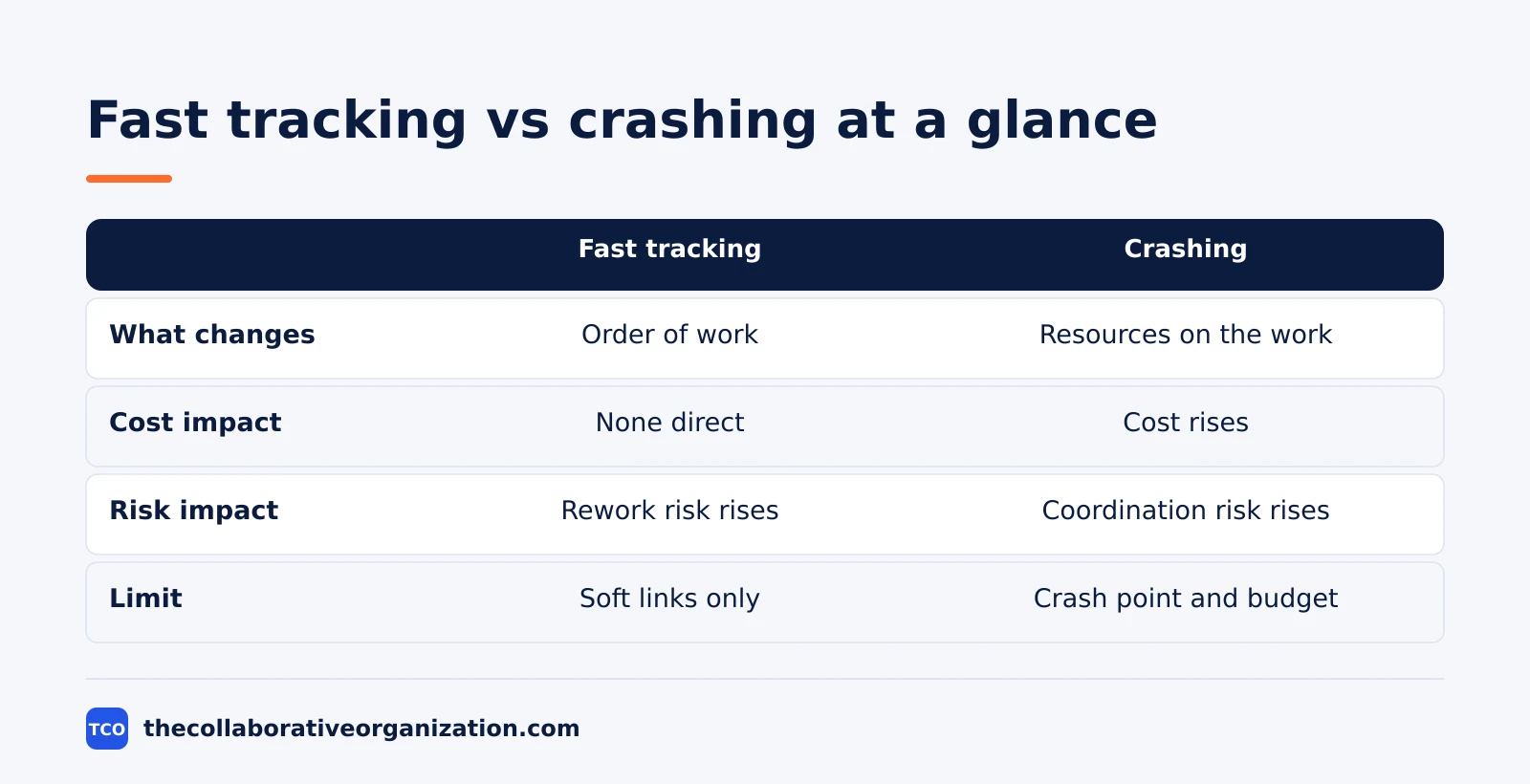
| Aspect | Fast tracking | Crashing |
|---|---|---|
| What changes | Order of work | Resources on the work |
| Cost impact | None direct | Cost rises |
| Risk impact | Rework risk rises | Coordination risk rises |
| When it applies | Soft finish-to-start links | Work where resources shorten duration |
| Budget | Preferred when budget is fixed | Needs free budget |
| Amount of compression | Limited by overlap | Limited by crash point and budget |
| First step | Find soft links on the critical path | Work out the cost-slope of each task |
In practice, most recovery plans use both. Fast-track whatever the logic truly allows, then crash the rest if the budget allows it. The order matters: fast tracking first because it is free, crashing second because it costs money you may need elsewhere. Never use either on work that is not driving the end date.
How to work out the cost-slope
Cost-slope is the extra cost per unit of time saved by crashing one activity, and you crash the lowest cost-slope first. The formula is simple: cost-slope equals crash cost minus normal cost, divided by normal duration minus crash duration.
ProjectCubicle works the numbers through. One activity has a normal cost of $10,000, a crash cost of $16,000, a normal duration of 10 days and a crash duration of 7 days. Its cost-slope is ($16,000 - $10,000) divided by (10 - 7), which is $2,000 per day.
A second activity costs $8,000 normally and $18,000 crashed, over 8 days normally and 5 days crashed. Its cost-slope is $3,333 per day. Crash the first activity before the second: the same day of compression costs $1,333 less.
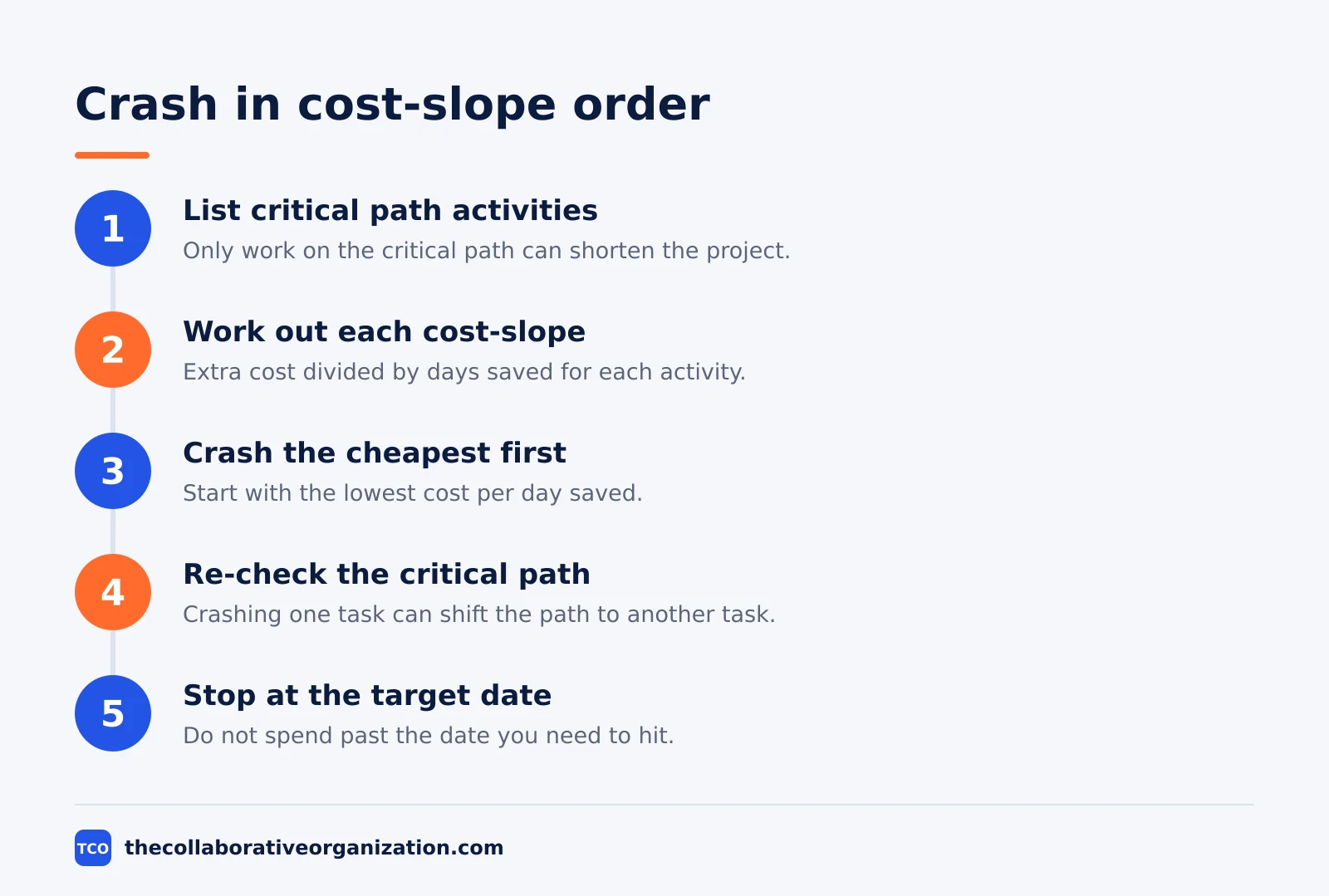
The process has five steps. List all critical path activities, work out the cost-slope for each, rank them from lowest to highest, and crash in that order until the target date is reached. Re-check the critical path after each step.
Crashing one activity can shift the critical path to a different sequence, and then you are working with a new set of activities.
Diminishing returns apply on top of the crash point. Adding a second crew to a task often does not halve its duration, because coordination overhead, congestion and handoffs eat into the gain. Build that into the crash duration estimate, not only the cost estimate.
Brooks’s Law, that adding people to a late software project makes it later, is the extreme version of the same point.
Which one should you use first?
Use fast tracking first when the budget is fixed, and crash second when the budget is free and time is not. That order follows from the cost: fast tracking adds no direct resource cost, so it costs nothing to try, while every day of crashing spends money that cannot be spent twice.
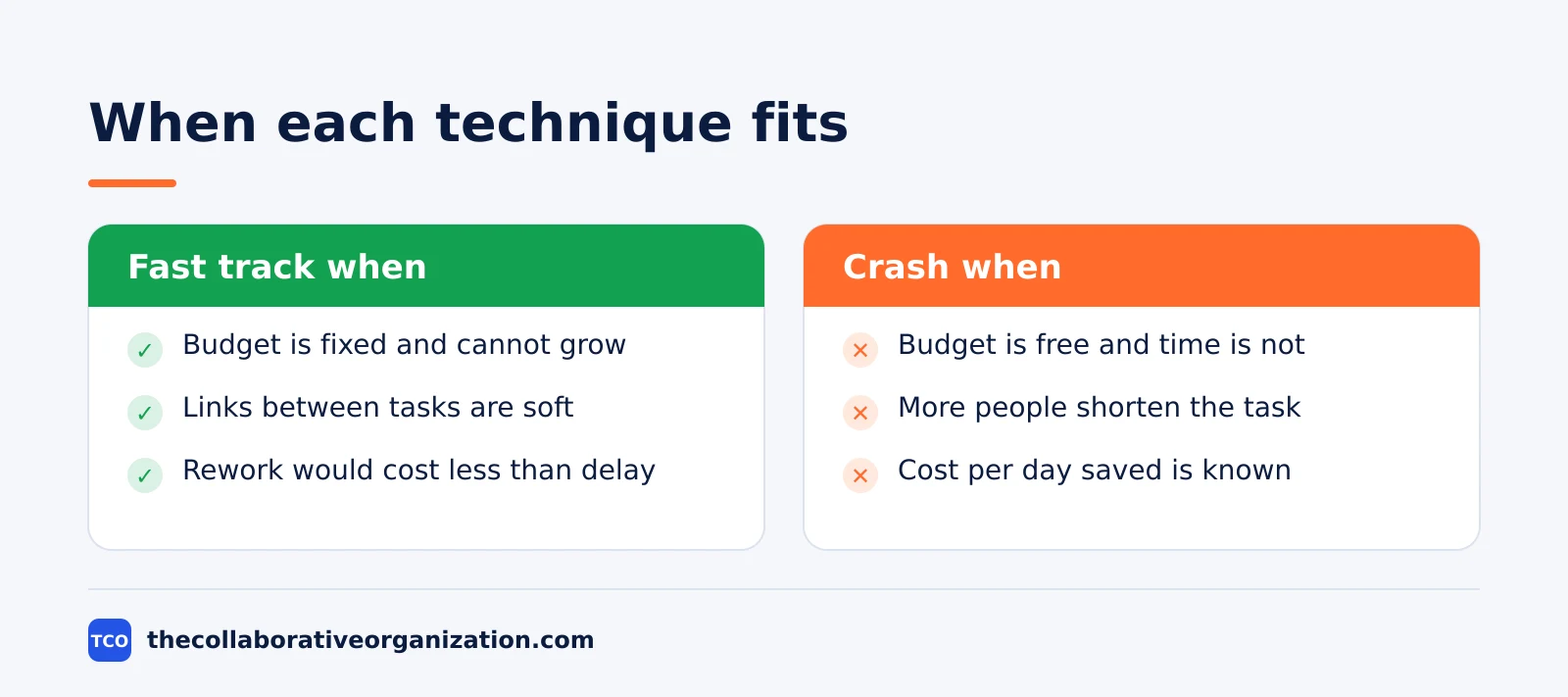
Fast track when the links between tasks are soft, the earlier task is stable, and rework would cost less than the delay. Sikhanaseekho sums it up in one line: crashing trades money for time, and fast tracking trades risk for time.
Crash when more people genuinely shorten the task, the cost per day saved is known, and the budget has room for it.
The plan you start from matters too. Our guide on project charter vs project plan explains the baseline the compression is measured against.
A tool with a clear schedule view helps you see the critical path before you touch it. Our guide on how to choose project management software covers what to look for in that view.
Worked example: a software project two weeks behind
A software project with 12 weeks left and a 2-week slip shows how the two techniques combine. The team needs 8 working days back. The critical path runs through two tasks: build the reporting module, then test it end to end. The illustration below uses the cost-slope numbers from the section above.
First, fast track. Testing was planned to start only when the build finished, but the test team can start writing test cases and setting up test data while the last build tasks still run. That overlap saves 3 days and costs nothing in budget.
The risk is real: if the build changes the reporting output, some test cases need rework. The team accepts it because the build is stable and the change is small.
That leaves 5 days to find. The team looks at two critical path activities it can crash. Activity A has a cost-slope of $2,000 per day and can save 3 days. Activity B has a cost-slope of $3,333 per day and can save 3 days.
Crashing A by 3 days costs $6,000. Crashing B by 2 days costs $6,666. Together with the 3 fast-tracked days, that is 8 days back for $12,666, and the team still holds 1 day of crash capacity on activity B in reserve.
The team tracks the recovery on a burndown chart so the remaining work stays visible each day. If the build slips again, the chart shows it at once, and the team can use the last day of crash capacity or open the conversation about scope and the deadline.
When neither technique is the right answer
When the delay comes from a deeper problem, compression hides it instead of fixing it. Fast tracking into a design that is still unstable creates rework. Crashing onto an underperforming contractor costs more money for the same output. If the project is behind because quality is poor, a key supplier is failing, or the design keeps changing, fix the cause first.
Trusted Institute notes the same limit: fast-tracking is only possible when activities can logically overlap, and mandatory dependencies cannot be fast-tracked. Crashing has its own wall: at some point, adding more resources yields no further time saved, or may actually slow work down.
Timing matters as well. A project manager who burns all available fast tracking and crashing in month three arrives at the final phase with no tools left.
The client has already been told twice that the project is back on track. When both techniques are exhausted, the honest conversation is about scope or the deadline, not about technique. The milestone vs deliverable distinction helps here: moving a milestone date is a different decision from dropping a deliverable, and the two should not be confused.
Common fast tracking and crashing mistakes to avoid
Most schedule compression fails in the same five ways, and all five are easy to spot in a review. Run through the list before you touch the schedule.
- Compressing work off the critical path. Work with float does not drive the end date. Compressing it wastes time and money and changes nothing.
- Fast-tracking a hard dependency. If the link exists for a real technical reason, overlapping the tasks creates defects or rework instead of saving time.
- Crashing past the crash point. Past the minimum duration, more resources only add cost. Check the crash point before you add people.
- Ignoring diminishing returns. A second crew rarely halves the duration. Coordination and congestion eat the gain, and Brooks’s Law is the extreme case.
- Spending all compression early. Keep some fast tracking and crashing in reserve for the final phase, when the next slip has nowhere else to go.
Sources
- ProjectCubicle - Schedule Compression: Fast Tracking vs Crashing (2026)
- PrepCast - PMP Exam Tip: Crashing and Fast Tracking Explained (2026)
- Mudassir Iqbal - Crashing and Fast Tracking: PMBOK 8 Guide for PMP 2026 (2026)
- Trusted Institute - Schedule Compression: Crashing and Fast-Tracking (2026)
- Sikhanaseekho - Schedule Compression Techniques in Project Management 2026 (2026)
- Karneliuk - Scheduling the Project: Critical Path Method, Fast Tracking, Crashing (2016)
Frequently asked questions
What is the difference between fast tracking and crashing?
Fast tracking runs tasks in parallel that were planned in sequence, so it changes the order of work. Crashing adds resources to critical path tasks so they finish sooner, so it changes how much effort goes into the work. Fast tracking costs risk, crashing costs money.
Which should you try first, fast tracking or crashing?
Try fast tracking first, because it adds no direct resource cost. Overlap the critical path tasks whose links are soft, then crash what is left if the budget allows it. Most recovery plans use both, in that order, and re-check the critical path after each step.
Does fast tracking always save time?
No. Fast tracking only helps when the tasks can truly overlap and the earlier task does not change while the later one runs. If the first task changes, the second task needs rework, and the rework can cost more days than the overlap saved. It only works on critical path tasks.
What is a cost-slope in crashing?
Cost-slope is the extra cost per unit of time saved by crashing one activity. The formula is crash cost minus normal cost, divided by normal duration minus crash duration. Crash the activity with the lowest cost-slope first, then move to the next cheapest until you reach the target date.
Can you crash a task past its crash point?
No. Every activity has a crash point, the shortest duration it can reach no matter how many resources you add. Past that point, more people only add cost. Some work has hard limits, such as a concrete cure time, that no amount of resources can shorten.
Related articles

guides
Free Project Management Templates: 7 to Copy (2026)
Seven free project management templates from monday, Wrike, Teamwork, Smartsheet, ClickUp, Asana and Trello, with what each one is for and what free really costs.
November 20, 2026 · 7 min read

guides
Project Proposal Template: Copy and Win Work (2026)
A project proposal template pitches the work before it is approved: problem, solution, scope, budget, timeline and terms. Copy the template and filled example.
November 20, 2026 · 10 min read

guides
Action Plan Template: Goal to Done in One Page (2026)
An action plan template turns one goal into owned steps with dates, dependencies and a success measure. Copy the table and see it filled for a support team.
November 20, 2026 · 11 min read