What Is an Intranet? Definition, Types and Uses (2026) | The Collaborative Organization
By The Collaborative Organization Team · November 19, 2026 · Last verified November 19, 2026 · 12 min read
An intranet is a private website that only a company’s employees can open, where they read news, find documents and policies, open tools and look up colleagues. It runs on the same web technology as the public internet, but it sits behind the company login, so outsiders cannot reach it. Most run in the cloud and work on phones too.
Key takeaways
- An intranet is a private, employee-only website: news, documents, policies, tools and a people directory in one place.
- It works like a normal website with a guest list: sign-in, permissions and audience targeting decide who sees what.
- Gartner found in 2023 that 47% of digital workers struggle to find the information they need to do their jobs.
- The main types are native SharePoint, SharePoint with an extension, standalone software, a mobile-first app, open-source builds and legacy on-premises systems.
- An intranet differs from a wiki: a wiki stores knowledge, while an intranet is the front door to news, tools and people as well.
What is an intranet?
An intranet is a private network and website that an organization runs for its own people, closed to outsiders. The word joins the Latin prefix intra, meaning within, to net, short for network. In everyday use, people mean the website that sits on that network: the company portal, signed in with a work account and shaped for employees only.
Jint puts the working definition in one line: an intranet is a private website reserved for a company’s employees, where they read internal news, find documents and policies, access business tools and connect with colleagues. That list is the test for any intranet: a page that does none of those jobs is a file store with a nicer name.
The meaning has shifted over thirty years. In the 1990s an intranet was static pages on a server in the building. Today it is a cloud platform that personalizes content, works on a phone and plugs into email, chat and HR software. The audience rule never changed: the space belongs to the company’s people alone.
An intranet is also one part of a bigger whole. It is a building block of the digital workplace, which covers every digital tool employees use to work, from email and chat to meetings, files and business apps. The intranet often serves as the entry point to that wider set of tools.
How does an intranet work?
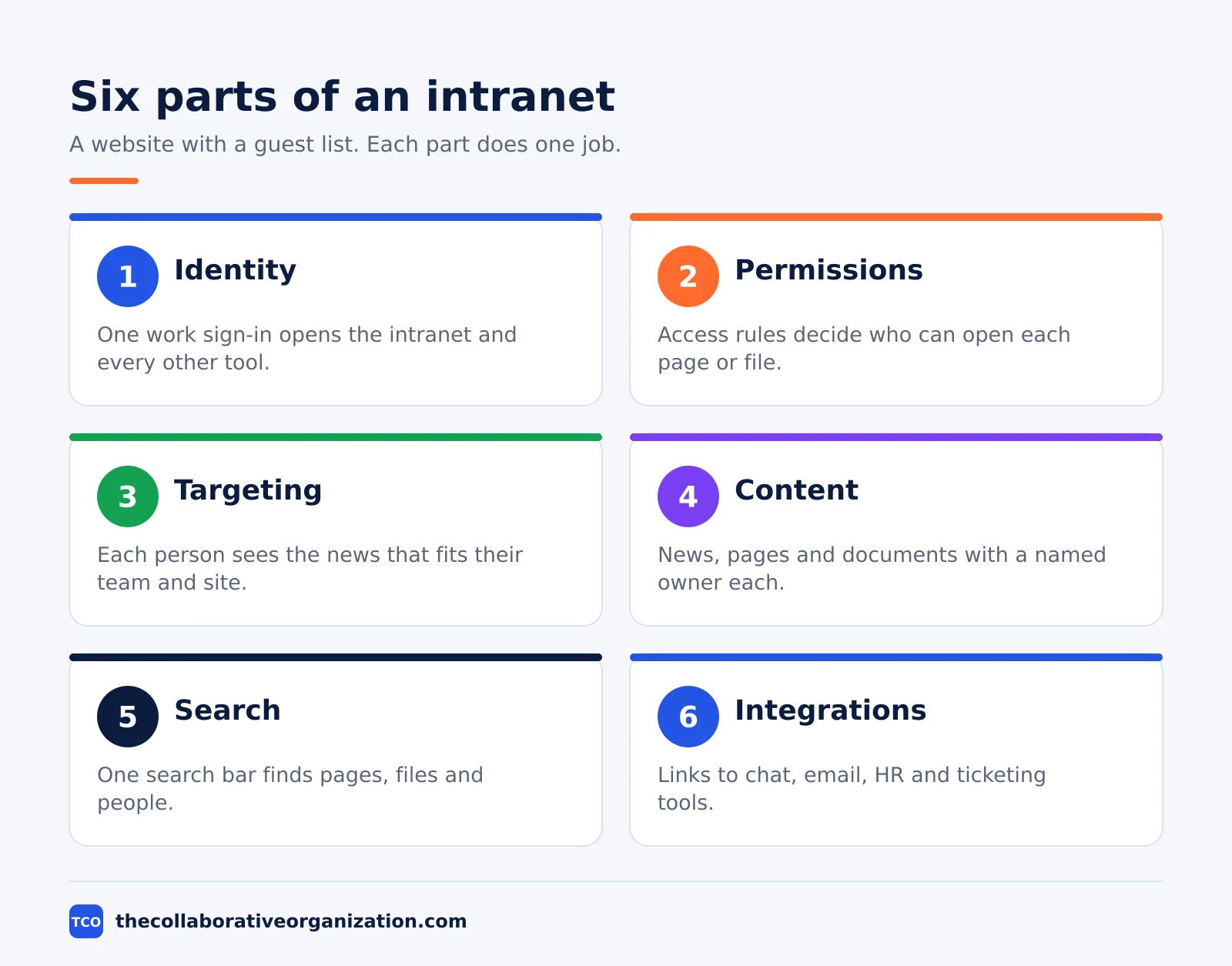
An intranet works like a website with a guest list, built from six parts: identity, permissions, audience targeting, content, search and integrations. Employees sign in once with their work account, usually through “single sign-on”, and that one sign-in opens the intranet, email, chat and file storage together.
Permissions decide who can open each site, page or document. HR files stay restricted to HR, whatever the home page shows.
Audience targeting then decides what each person sees first: a local notice on one site, a policy update for managers only. Targeting changes the display; it does not protect content, since a person outside the audience can still find a page through search if they have access to it.
Search is the part employees feel most. One search bar indexes pages, files and people, so an employee types a question instead of browsing folders. That matters because the average knowledge worker used 11 applications in Gartner’s 2023 survey, up from 6 in 2019. A good intranet gives those workers one entry point and one search bar.
Integrations connect the intranet to the tools people already use, such as Teams, Outlook and HR software. Microsoft’s own documentation presents SharePoint sites, hubs and news as the backbone of what it calls an intelligent intranet, and Microsoft Teams carries that intranet into daily chat through Viva Connections.
What are the types of intranet?
Most intranets fall into six technology families, and most teams pick from the first three. The right family depends on the tools the company already pays for, the share of deskless staff and the skills of the team that will run it.
- Native SharePoint intranet. Communication sites and hubs built with Microsoft’s own tools. Best for organizations with SharePoint skills and time to design, run and maintain the portal.
- SharePoint with an extension. Ready-made features added on top of SharePoint and Teams, with content staying in Microsoft 365. Best for Microsoft 365 teams that want a modern intranet without custom code.
- Standalone software. A separate platform with its own content store, connected to Microsoft 365 or Google Workspace. Best for organizations outside Microsoft 365 or with mixed systems.
- Mobile-first employee app. An app built around news and communication for deskless staff. Best for workforces with a large frontline population, though often weak on documents and knowledge.
- Open-source or custom build. Built on a content system such as Drupal or WordPress and kept in-house. Best for teams with developers and very specific needs, at the cost of upkeep.
- Legacy on-premises intranet. Hosted on company servers. Now rare, kept mainly for strict hosting rules, with slower updates and costly upgrades.
Teams also sort intranets by what they do. A top-down intranet broadcasts news from management, while a collaborative one centers on shared documents and team sites.
A social intranet adds posts, comments and communities. A digital workplace intranet becomes the single entry point to the whole work environment. Most intranets in 2026 mix all four, with one style in front.
Intranet vs internet vs extranet
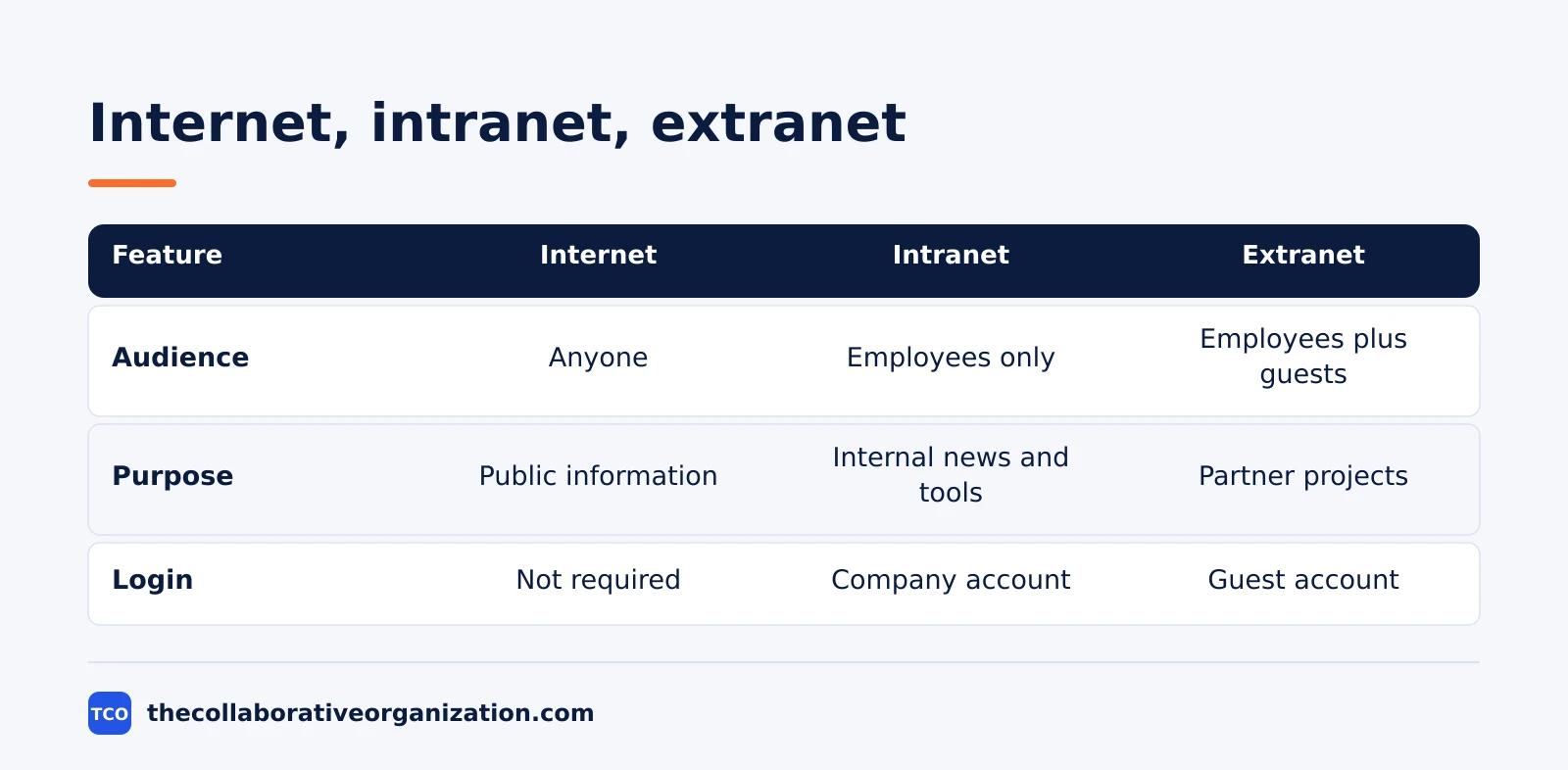
The three words share the same technology but not the same audience: the internet is public, the intranet is for employees only, and the extranet opens part of the intranet to invited outsiders. That audience line decides what each one can hold and who can see it.
| Feature | Internet | Intranet | Extranet |
|---|---|---|---|
| Who can access it | Anyone | Employees only | Employees and invited external users |
| Main purpose | Public information, marketing, sales | Internal news, knowledge, everyday tools | Sharing documents and projects with partners |
| Login | Not required | Company account | Guest or partner account |
| Typical example | A public company website | Company news and resources portal | A supplier portal or a client project space |
People also mix up the intranet with its neighbors. A company wiki stores knowledge pages; the intranet is wider, adding news, tools and people. Our guide with company wiki examples shows what a wiki does best.
An employee portal is the same idea as an intranet, with the emphasis on the single front door rather than the whole site.
The extranet deserves care. Opening a slice of the intranet to a supplier or client is useful, but every guest account is a door that needs its own permissions and review date. Keep guest access narrow, time-limited and checked each quarter.
What is an intranet used for?
Employees use an intranet for six jobs: read targeted news, find documents, look up colleagues, finish routine tasks, follow onboarding and join the conversation. When it does those six jobs well, it replaces a dozen scattered habits: asking in chat, digging through shared drives and emailing HR for the same form twice.
News is the daily draw. Targeted announcements reach each team, site or country, so a warehouse worker sees shift news while a manager sees a policy update. Documents come next: policies in their latest version, each with one owner and review date. The people directory answers the new hire’s first question: who does what, and how do I reach them.
Routine tasks are the quiet win. Requesting leave, opening an IT ticket or ordering equipment can all start from the intranet instead of from a bookmarked form nobody remembers. Onboarding works the same way: a new hire follows one path through the directory, the key policies and the first training, instead of piecing it together from welcome emails.
A worked example makes it concrete. Picture a 300-person office that replaced a WordPress intranet with one built inside Microsoft 365. HR now publishes without waiting on IT, and staff find forms, news and contacts from one home page. That size is where an intranet starts to pay.
What are the benefits of an intranet?
The benefits show up as time saved on search, clearer communication, faster onboarding and fewer tools to maintain. None of them arrive on launch day. Each one depends on content that stays current and on employees who can find it in seconds.
Time saved is the easiest to measure. When policies, forms and answers sit in one searchable place, employees stop asking the same questions in chat and stop digging through old email threads. Gartner’s 2023 survey gives the business case in one number: 47% of digital workers struggle to find what they need.
Communication gets clearer because the intranet gives leadership one trusted channel. Strategy notes, change updates and results all live in the same place, with a date and a named author. Employees can check the source instead of trusting a forwarded message. That trust is what turns a noticeboard into a place people open each morning.
Onboarding gets faster because the first weeks stop depending on memory. A new hire follows the same path as the last one, finds the same policies and meets the same directory. Retention also gains: a visible, two-way channel gives every employee a voice and a clear view of where the company is heading.
Costs fall when portals, newsletters and shared drives merge into one platform. Fewer logins, fewer licenses and one place to maintain beat five half-used tools. The saving only holds if someone retires the old tools; keeping both the intranet and the old drive doubles the mess instead of halving it.
Tools that power an intranet
A spreadsheet works for a first draft, but a real intranet needs a platform that holds pages, search, permissions and a mobile view together. The three tools below cover the most common routes: a knowledge workspace, a flexible wiki and a chat tool that carries the intranet into daily work.
| Tool | Best for | Free plan | Starting price (as of November 2026) | Notable limit |
|---|---|---|---|---|
| Confluence | Teams that want a structured knowledge base behind the intranet | Free for up to 10 users | $7.15 per user per month (Standard), billed monthly for 1-100 users | The page headline of $5.78 is a blended rate for larger teams, not the 1-100 user rate |
| Notion | Teams that want wiki pages, databases and docs in one flexible workspace | Free plan | $10 per member per month (Plus), billed annually | Notion’s pricing page renders no dollar figures to a text reader, so the figure rests on independent November 2026 checks |
| Slack | Teams that want chat, channels and announcements next to the intranet | Free plan with 90-day history | $7.25 per user per month (Pro), billed annually | The free plan keeps only 90 days of message history |
The Confluence price comes from independent November 2026 reads of Atlassian’s pricing page, which list Standard at $7.15 and Premium at $14.10 per user per month for the first 100 users on monthly billing. The headline figures of $5.78 and $11.16 are the blended rates for a larger team, so check the rate for your own headcount before budgeting.
The Notion prices come from independent November 2026 checks: Plus at $10 per member per month and Business at $20, both billed annually. Notion’s own pricing page shows no dollar figures to a text reader, so treat the figure as corroborated rather than read direct from the vendor page.
The Slack price comes from an independent November 2026 read of Slack’s pricing page: Pro at $7.25 per user per month billed annually, or $8.75 month to month, with Business+ at $15. If your company already pays for Microsoft 365, compare the options on our document collaboration software shortlist before buying a second platform.
Our guide on how to set up a company wiki covers the knowledge side in detail, since a wiki is often the first section a new intranet needs. Start with the wiki, the news page and the directory; add the rest once people open the home page every day.
When to use an intranet, and when not to
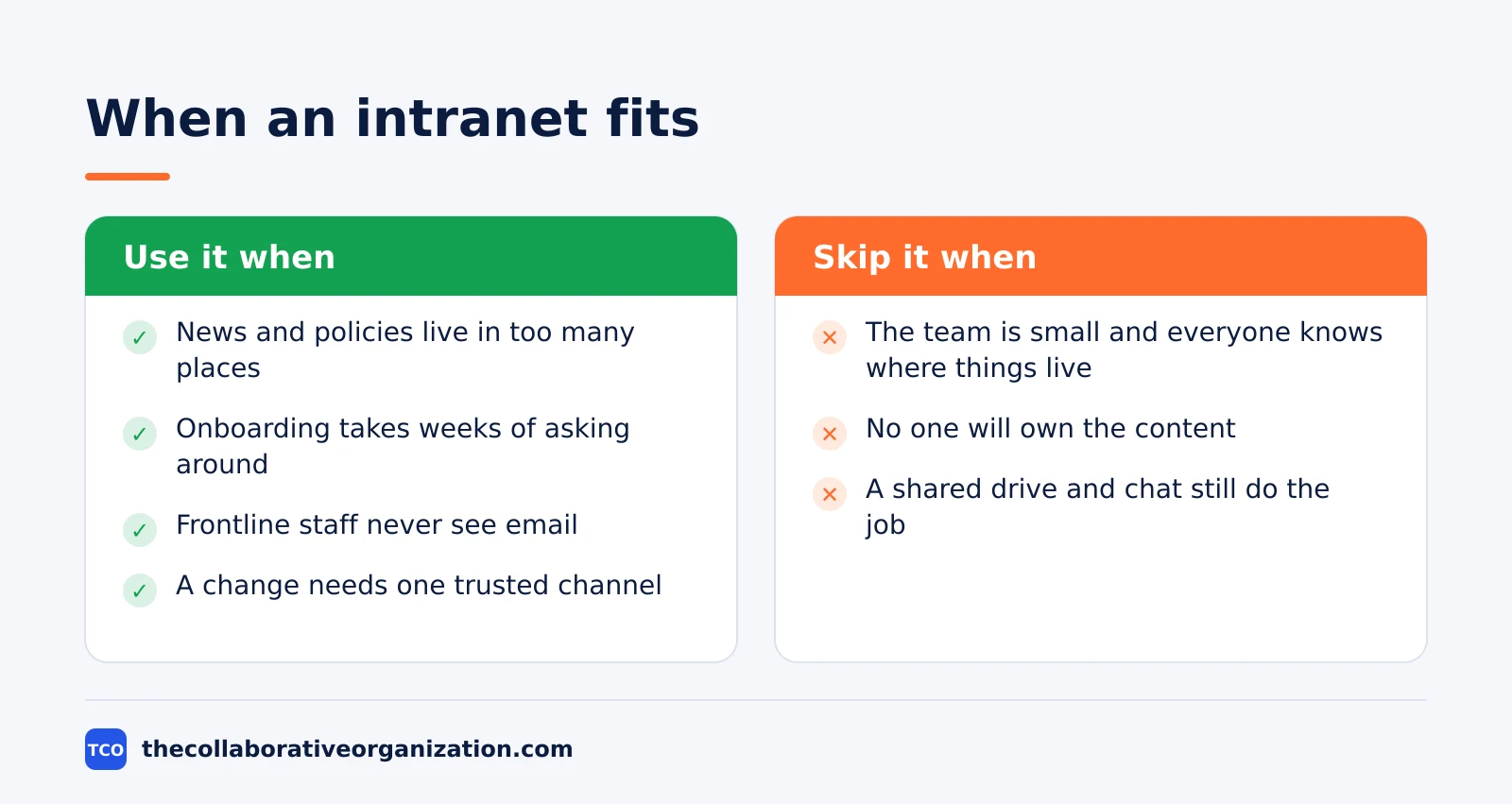
Use an intranet when news, policies and tools live in too many places for employees to find them, and skip it while a shared drive and a chat channel still do the job. Size is the usual trigger: around 50 to 100 employees, or several sites, or a large frontline group that email never reaches.
Use one when onboarding takes weeks because every answer lives in someone’s head. Use one when the same policy question arrives by email every month. Use one when a merger, a move or a reorganization needs one trusted channel for what changes and when. In each case the intranet earns its place by cutting the search, not by adding pages.
Skip it when the team is small and everyone already knows where things live. A two-page wiki and a pinned chat message beat a platform nobody maintains. Skip it too when no one owns the content: an intranet with no named owners and no review dates goes stale in a quarter, and stale pages teach employees to stop looking.
Common intranet mistakes to avoid
Most intranets fail in the same five ways, and all five trace back to treating launch day as the finish line. A launch is the start of the upkeep, not the end of the project.
- No named owner per section. When nobody owns a page, nobody updates it. Give every section one owner, one backup editor and one review date.
- Migrating everything as it is. Moving ten years of stale files into a new intranet just moves the mess. Audit first: keep what is current, archive the rest, delete duplicates.
- No mobile view for frontline staff. Employees without a desk cannot open a desktop-only portal. Test the home page on a phone before launch, not after.
- Search left to chance. Pages without clear titles, owners and dates sink in search results. Write titles the way employees ask the question.
- Measuring logins instead of answers. A login count says someone opened the door. Track search success, page views and repeat visits to learn whether people found what they needed.
The Nielsen Norman Group found that the best intranets of 2020 took 8 to 48 months to build, with the average build time at 1.4 years since 2014. That is the real timeline for a good intranet: months of content work and testing, not a weekend of page design. Plan for it, and the intranet has a chance to last.
Sources
- Jint - What Is an Intranet? Definition, Examples and Guide (2026)
- Gartner - Survey Reveals 47% of Digital Workers Struggle to Find Information (2023)
- Microsoft Learn - Intelligent Intranet Roles and Tasks (2026)
- Nielsen Norman Group - 10 Best Intranets of 2020 (2020)
- Notion - What Is an Intranet, and Why Does Your Business Need One? (2023)
- Silicon Reef - What Is Viva Connections? (2026)
- GoTechPresso - Confluence Pricing 2026 (2026)
Frequently asked questions
What is an intranet in simple words?
An intranet is a private company website that only employees can open. It holds company news, documents, policies, tools and a directory of colleagues in one place. It works like a normal website, but you sign in with your work account, and people outside the company cannot see it.
What is the difference between an intranet and the internet?
The internet is public and anyone can open it. An intranet is private and only employees of one company can open it. Both use the same web technology, but the intranet sits behind the company login. An extranet sits between the two: it opens part of the intranet to invited outsiders such as partners or suppliers.
Do small companies need an intranet?
A team under 20 people usually does not. A shared drive, a chat tool and a wiki page cover the same needs with less upkeep. An intranet earns its place once news, policies and tools spread across too many places for new hires to find them, which often happens around 50 to 100 employees.
Is SharePoint an intranet?
SharePoint is the platform many intranets are built on, not an intranet by itself. A SharePoint intranet uses communication sites, hub sites and news pages to form the company portal. Microsoft also adds Viva Connections, which puts that intranet inside Teams as a pinned app.
How much does an intranet cost?
It depends on the route. A SharePoint intranet is covered by the Microsoft 365 plan a company already pays for, with Business Basic at 7 dollars per user per month as of November 2026. A standalone intranet platform is usually sold by quote, so the price depends on headcount, features and the length of the contract.
What is an intranet portal?
An intranet portal is the front door of the intranet: the home page, Teams app or mobile app where employees start their day. From there they reach news, search, the people directory and their everyday tools. In practice, portal and intranet mean almost the same thing, with portal stressing the single entry point.
Related articles
document collaboration
Airtable vs Google Sheets: Which to Use in 2026
Airtable is a database with views and automations; Google Sheets is a free spreadsheet. Learn the limits, the 2026 prices, and which one fits your team's data.
November 19, 2026 · 7 min read
document collaboration
Confluence vs SharePoint: Which to Use in 2026
Confluence is a wiki built around pages; SharePoint is a document platform built around files. Learn the differences, the 2026 prices, and which one fits your team.
November 19, 2026 · 7 min read

document collaboration
How to Document Processes: A Step-by-Step Guide (2026)
To document a process, pick one task, watch it done for real, map the steps and decisions, then test the draft on someone new. Follow the 7 steps in this guide.
November 19, 2026 · 10 min read