What Is a Digital Workplace? Definition and Parts (2026) | The Collaborative Organization
By The Collaborative Organization Team · November 19, 2026 · Last verified November 19, 2026 · 12 min read
A digital workplace is the full set of technology, data and working practices that lets employees do their jobs from anywhere, on any device. It is a business strategy, not a single product: it joins the intranet, email, chat, meetings, files and business apps with the rules for how teams use them. The goal is work that flows.
Key takeaways
- A digital workplace is a strategy that joins tools, data and working practices so employees can work productively across locations and devices.
- Gartner defines it as a business strategy that boosts workforce digital dexterity: the ambition and ability to use technology to improve business outcomes.
- It has three layers: the technology foundation, the ways of working, and governance and operations.
- An intranet is one part of the digital workplace, and a digital workspace is only the user-facing hub.
- Gartner’s maturity model has five levels, and most assessed organizations sit at the second level, Supporting.
What is a digital workplace?
A digital workplace is the integrated environment of technology, data and practices that enables employees to work productively across locations and devices. It is more than a stack of collaboration apps or a remote-access setup. It is a work system that joins cloud services, identity, devices, content and workflows, plus the norms that govern their use.
Gartner frames it as a business strategy, not a product. Its definition calls the digital workplace a business strategy that boosts workforce digital dexterity, which means the ambition and ability to apply technology to improve business outcomes. That framing matters: it forces decisions about experience, security, governance and change to sit at the same table.
HCLTech puts the same idea in plain terms: the digital workplace is the operating fabric that holds modern work together. Done well, it unifies tools, data and ways of working into one coherent experience. Done poorly, it multiplies friction and risk, with too many tools and no clear rules.
The scope is wide. It covers collaboration tools, endpoint management, content and knowledge, workflow automation, observability and security services such as single sign-on and data loss prevention. Culture is part of the system too: async communication, trust-based management and measurable outcomes make the technology work.
The 3 layers of a digital workplace
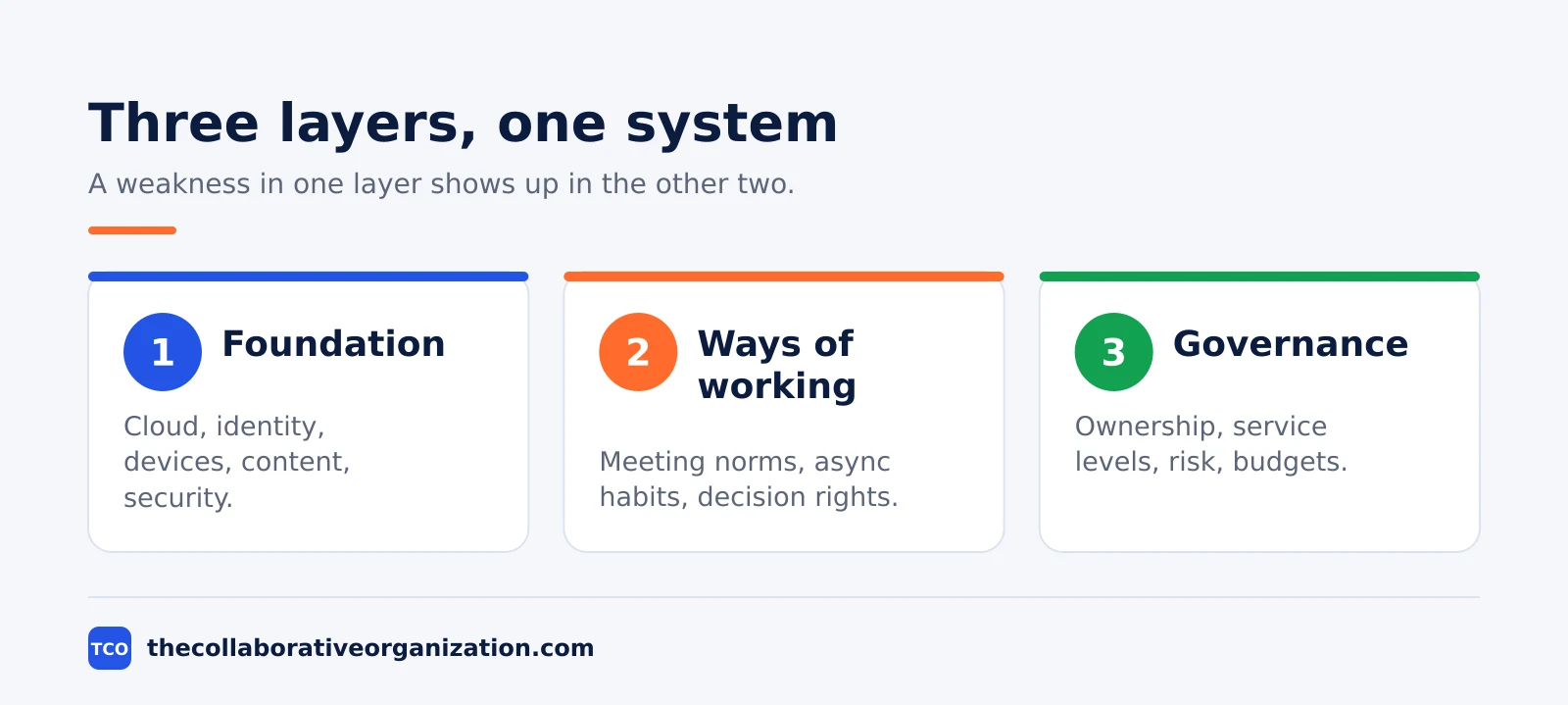
A useful digital workplace model has three layers that are tightly joined and governed together: the technology foundation, the ways of working, and governance and operations. A weakness in any one layer shows up in the other two.
The technology foundation covers cloud platforms, identity and access, endpoint management, collaboration, content and knowledge, workflow automation, observability, security controls and integration services. The foundation should favor open standards, strong APIs and zero-trust principles, so the company keeps its options open as tools change.
The ways of working cover decision rights, meeting norms, async practices, documentation standards and feedback loops. This layer defines how teams collaborate across time zones, with outcome-based goals and shared backlogs instead of extra meetings. Without it, new tools just speed up the old habits.
Governance and operations form the backbone: product ownership for core capabilities, intake and prioritization for improvements, service-level objectives, risk management and financial guardrails. Legal, security and HR policies must line up with guidance employees can actually follow. When a change in collaboration tools needs security exceptions to be useful, the model is misaligned.
Digital workplace vs intranet vs digital workspace
The digital workplace is the widest of the three: the intranet is one part of it, and the digital workspace is only the hub employees see. Mixing the three up leads to buying a hub when the company needs a strategy.
| Feature | Intranet | Digital workspace | Digital workplace |
|---|---|---|---|
| What it is | Private employee website | User-facing hub of apps and files | Full system of tools, data and practices |
| Scope | News, documents, people, tools | Apps, files, notifications in one place | Intranet, chat, meetings, apps, security, support |
| Question it answers | Where do I find company information? | Where do I start my working day? | How do we work together, wherever we are? |
| Usual owner | Internal communications, with HR and IT | IT, with the vendor | IT, with business teams |
The intranet is the front door of the digital workplace: news, documents, policies and the people directory. Our guide with company wiki examples shows the knowledge pages that often live behind that front door. The workspace is the hub where applications, files and notifications come together for one person.
The distinction matters when buying. A vendor that sells a workspace hub is not selling a digital workplace, even if the hub looks complete. The workplace also needs identity, devices, support, governance and working norms, and none of those come in the hub alone.
What does a digital workplace include?
A digital workplace includes six groups of capability: identity and access, devices, content and knowledge, communication and collaboration, workflow automation, and security and support. Each group needs an owner and a measure, or it drifts.
Identity and access come first. Single sign-on, adaptive multifactor authentication, conditional access and role-based permissions form the new perimeter, since identity is what protects the work now that the office network no longer does. Directories stay clean, and joiner-mover-leaver events are automated.
Devices and endpoints come next: standard images, unified endpoint management, mobile device management and patching, with frontline and specialist devices held to the same standard. Network and connectivity follow, with enough bandwidth, split tunneling where it fits and private access to sensitive workloads.
Content and knowledge cover information architecture, retention and classification, encryption in transit and at rest, and sharing models that favor search and discovery across systems. Communication and collaboration cover chat, meetings, email and the intranet, with the intranet as the entry point.
Workflow automation targets repetitive cross-team handoffs: joiner-mover-leaver processes, finance approvals and case triage. Success looks like fewer manual steps and clearer accountability, not a higher count of bots. Security and support close the loop with zero-trust controls, data loss prevention, logging, alerting and response playbooks.
How does a digital workplace work in practice?
In practice, a digital workplace works as one journey: an employee signs in once, finds the work, does it with the right people and hands it on without a meeting. The test is whether that journey needs fewer steps than yesterday, not whether the tool list grew.
Picture a 200-person services company with two offices and a field team. A new hire signs in once on the first morning and reaches email, chat, the intranet and the HR system from the same account. The onboarding path on the intranet lists the first-week tasks, the policies and the people to meet, with a named buddy.
A field engineer opens the same intranet on a phone, finds the safety form, files it and moves on. A project manager tracks status in the shared task board instead of calling a meeting. A finance approver signs an expense from the workflow queue. Each step uses a different tool, but the employee feels one system.
That feeling is the product. When the tools share identity, search and notifications, work flows between them. When each tool keeps its own login, its own search and its own alerts, the employee does the integration work by hand, and the digital workplace has failed its own test.
Digital workplace maturity: the 5 levels
Gartner’s maturity model gives five levels for a digital workplace: Reacting, Supporting, Enabling, Empowering and Transforming. Most organizations sit near the bottom, and climbing one level is a year of work, not a quarter.
Level 1, Reacting, means no intent to build a program: tools arrive by accident and each team picks its own. Level 2, Supporting, means the basics exist but vary by team, with IT fixing problems as they appear. Level 3, Enabling, means the company starts to design the experience on purpose, with shared tools and norms.
Level 4, Empowering, means employees can shape how they work, with self-service, automation and feedback loops. Level 5, Transforming, means the digital workplace is tuned as a product, with measured outcomes and steady improvement. The model is a guide for investment, not a score to chase.
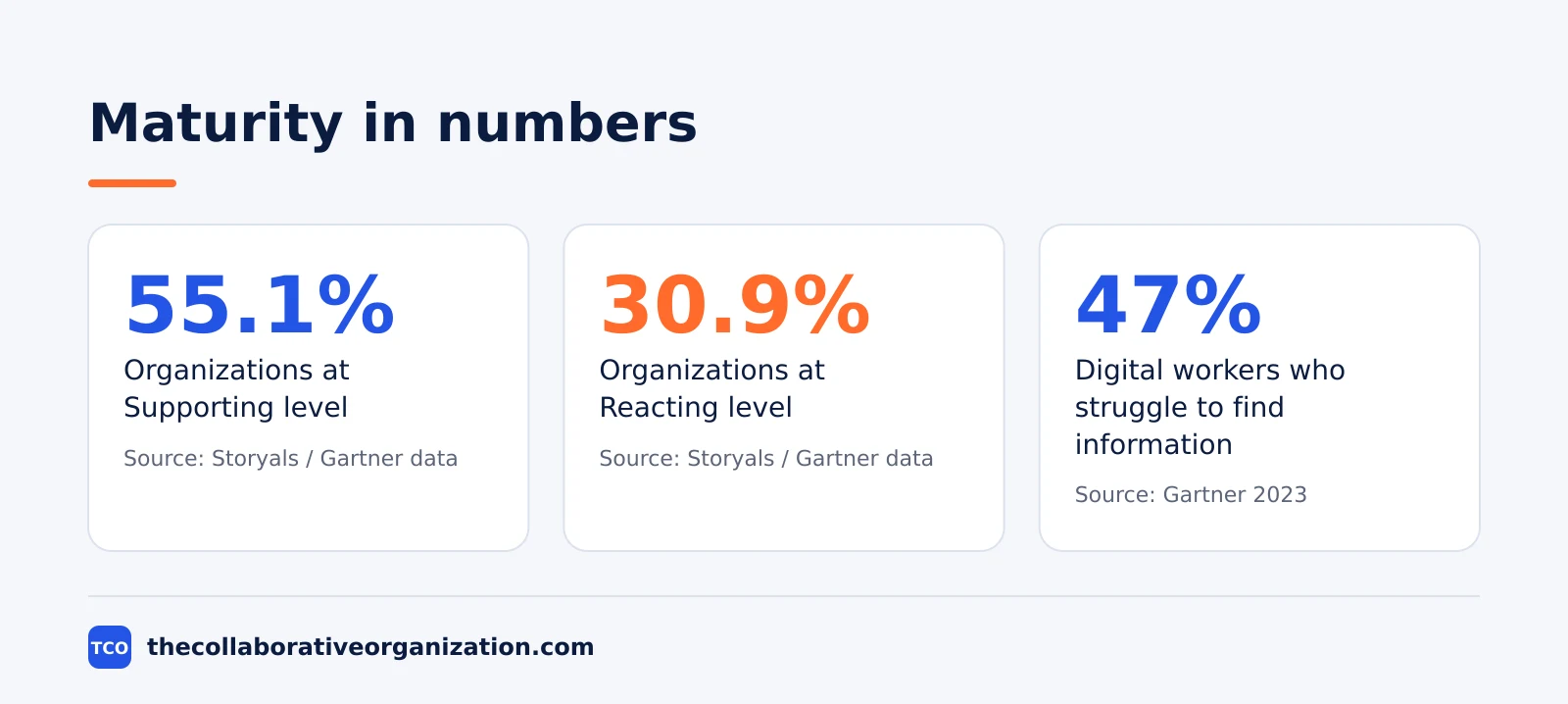
The numbers show how early most companies are. Storyals reports Gartner assessment data from 773 organizations as of July 2024, with 55.1% at Supporting and 30.9% at Reacting.
That figure comes from a secondary summary of Gartner’s assessment data, not from Gartner’s own page, so treat it as reported. The lesson still holds: most teams are still fixing basics, not tuning a mature product.
What are the benefits and risks?
The benefits show up where work tends to slow: handoffs, context switching, access barriers and inconsistent processes. Standardizing identity, consolidating tools and digitizing core workflows cut cycle times and error rates. Flexible models and clear policies also widen the hiring pool, since reliable tools and clear norms let people work from more places.
Resilience is another gain. Distributed operations keep running through disruptions when access is secure and protocols are clear. Cost also improves: real estate and travel can fall, while durable savings come from automation, reduced rework and better use of assets. Compliance gets easier too, since one set of controls covers access, audit and retention.
The risks are real and common. Tool sprawl tops the list: every new tool adds a login, a search box and a notification stream. Notification overload follows, and unclear decision rights leave nobody sure who decides. Complexity also widens the attack surface, so security must mature with the tool count.
The balance is discipline, not spending. Consolidating tools without changing how people use them gives short-lived savings. Automating a broken process just makes the confusion faster. The organizations that gain are the ones that fix the fundamentals first, then add AI and automation as platform capabilities, not as side projects.
Tools that power a digital workplace
No single product is a digital workplace, but a small set of tools covers most of the foundation: a suite for identity and files, a chat tool, a knowledge workspace and a task tool. The table below shows the usual starting points, with real prices as of November 2026.
| Tool | Best for | Free plan | Starting price (as of November 2026) | Notable limit |
|---|---|---|---|---|
| Microsoft Teams | Companies on Microsoft 365 that want chat, meetings and the intranet in one place | Included in Microsoft 365 Business plans | $7 per user per month (Business Basic), billed annually | Business plans cap at 300 users per tenant |
| Slack | Teams that want chat, channels and announcements | Free plan with 90-day history | $7.25 per user per month (Pro), billed annually | The free plan keeps only 90 days of message history |
| Notion | Teams that want wiki pages and databases in one flexible workspace | Free plan | $10 per member per month (Plus), billed annually | The pricing page shows no dollar figures to a text reader, so the figure rests on independent November 2026 checks |
| Confluence | Teams that want a structured knowledge base behind the intranet | Free for up to 10 users | $7.15 per user per month (Standard), billed monthly for 1-100 users | The page headline of $5.78 is a blended rate for larger teams |
The Microsoft 365 prices come from independent November 2026 reads of Microsoft’s pricing: Business Basic at $7, Standard at $14 and Premium at $22 per user per month on an annual commitment, after the rise on 1 July 2026. Microsoft also sells Standard and Premium bundled with Copilot at $23.50 and $32.
The Slack price rests on an independent November 2026 read of Slack’s pricing page: Pro at $7.25 per user per month billed annually. The Notion prices rest on independent November 2026 checks: Plus at $10 and Business at $20 per member per month, billed annually.
The Confluence price rests on independent November 2026 reads of Atlassian’s pricing page: Standard at $7.15 and Premium at $14.10 per user per month for the first 100 users. Compare the wider set on our document collaboration software shortlist before you commit to a suite.
How to get started with a digital workplace
Start with the foundation, not with a new tool: fix identity, clean up files and knowledge, and pick one place to find work in progress. Those three moves pay back before any new purchase.
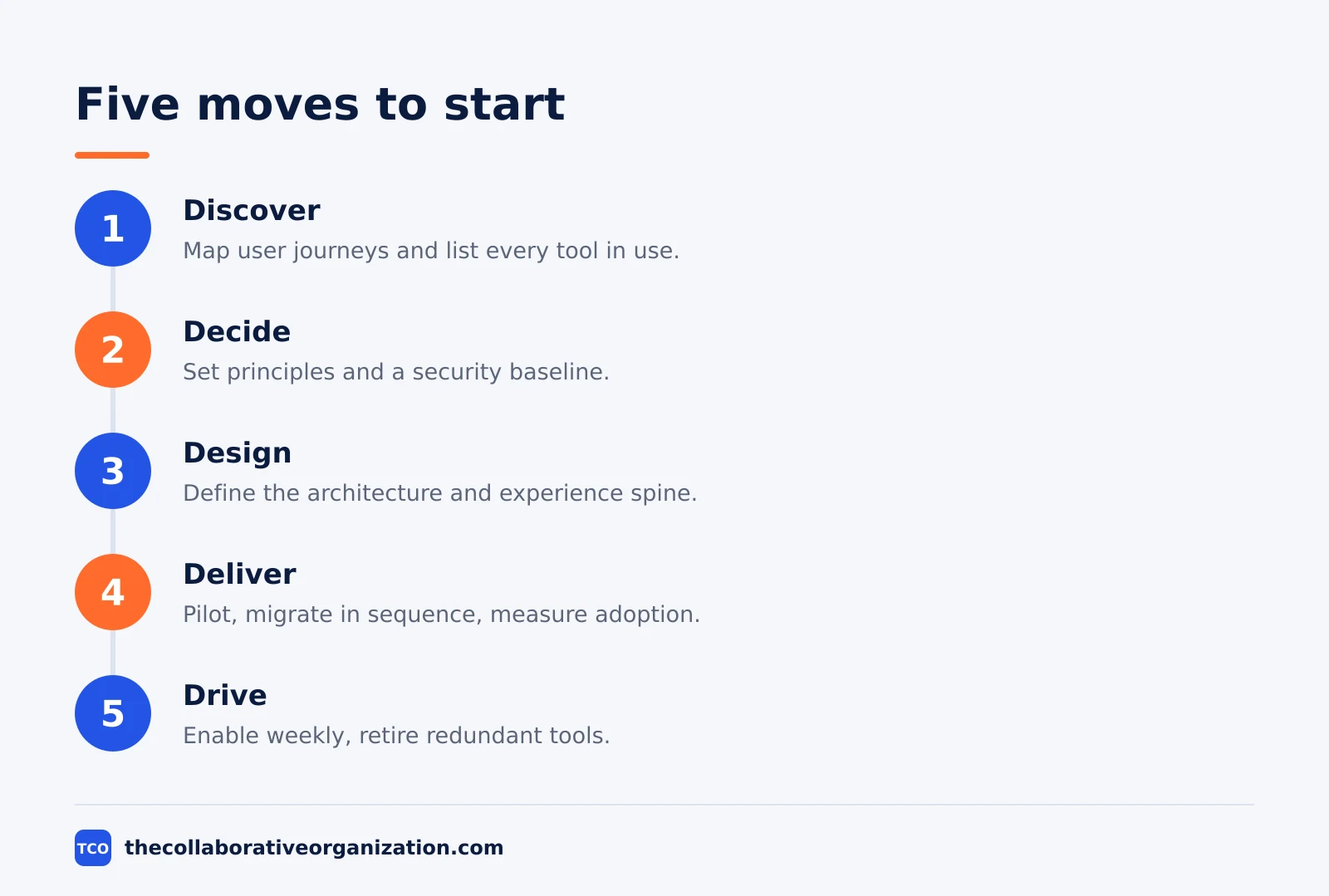
HCLTech lays out five moves: Discover, Decide, Design, Deliver and Drive. Discover means mapping user journeys for real personas and listing the tools, integrations and shadow workarounds in use. Decide means setting principles, such as default to open or async first, and agreeing a security baseline early.
Design means defining the target architecture and the experience spine that joins identity, collaboration, file storage, knowledge and workflow. Deliver means piloting with willing and critical users, sequencing migrations to cut context switching, and measuring adoption, not just provisioning. Drive means building enablement into the working week, keeping norms visible and retiring redundant tools on a schedule.
Change management sits in the middle, not at the end. Seed champions inside business units, script the common scenarios and put feedback inside the tools themselves. Organizations that treat the digital workplace as a program with executive sponsorship and measurable outcomes reach value faster than those that treat it as IT plumbing.
Common digital workplace mistakes to avoid
Most digital workplace programs fail in the same five ways, and all five come from buying tools before fixing the work. Each one is avoidable with a plan and a named owner.
- Buying tools before fixing identity. A new collaboration tool on top of messy directories and shared logins just spreads the mess. Clean identity first.
- Letting every team pick its own stack. Ten chat tools and five file stores mean nobody can find anything. Standardize the core, and let teams vary at the edges.
- Skipping the working norms. Tools without meeting norms, async habits and decision rights just speed up the old meetings. Write the norms down.
- Measuring licenses instead of outcomes. A seat count says the tool was bought. Track search success, task time, adoption and feedback instead.
- Treating change as the last mile. Champions, training and feedback belong in the middle of the program, not in a launch email at the end.
Gartner’s 2023 survey found that 47% of digital workers struggle to find the information they need, and the average knowledge worker used 11 applications. A digital workplace earns its place by cutting that search, not by adding a twelfth app.
Our guide on digital transformation statistics shows the wider numbers behind that shift, and the intranet is where most teams start fixing it.
Sources
- HCLTech - What Is a Digital Workplace: Strategy, Model and Value (2026)
- Gartner - How to Strengthen Your Digital Workplace Program (2019)
- CMSWire - What a Digital Workplace Is and What It Is Not (2026)
- Jint - What Is an Intranet? Definition, Examples and Guide (2026)
- Gartner - Survey Reveals 47% of Digital Workers Struggle to Find Information (2023)
- Storyals - Digital Workplace Maturity (2026)
- GoTechPresso - Confluence Pricing 2026 (2026)
- Plus1 Technology - Microsoft 365 Business Standard vs Premium (2026)
Frequently asked questions
What is a digital workplace in simple words?
A digital workplace is the full set of tools, data and working habits that lets employees do their jobs from anywhere: chat, email, meetings, files, the intranet and the business apps, plus the rules for how teams use them. It is a strategy and a way of working, not one single product you can buy.
What is the difference between a digital workplace and an intranet?
An intranet is one part of the digital workplace. The intranet is the front door: news, documents, policies and the people directory. The digital workplace is wider: it covers every digital tool employees use, from email and chat to meetings, file sharing, business apps and AI assistants.
What is the difference between a digital workplace and a digital workspace?
A digital workspace is the hub employees see: the apps, files and notifications in one place. A digital workplace is wider: it includes that hub plus the infrastructure, support processes and policies behind it. The workspace is the front room; the workplace is the whole building.
What are the parts of a digital workplace?
Three layers work together: the technology foundation, the ways of working, and governance and operations. The foundation covers identity, devices, content and security. Ways of working cover meeting norms, async habits and decision rights. Governance covers ownership, risk, service levels and budgets.
How do you measure a digital workplace?
Measure the experience, not the licenses. Track search success, task completion time, adoption of key tools, meeting load and employee feedback. Gartner's maturity model gives five levels, from Reacting to Transforming, and most assessed organizations sit at the second level, Supporting.
Is a digital workplace only for remote teams?
No. On-site teams depend on the same identity controls, knowledge systems and automation as remote teams. Hybrid work is a common outcome of a digital workplace, not the definition. A factory team with shared devices and mobile apps needs the same foundation as a fully remote team.
Related articles
document collaboration
Airtable vs Google Sheets: Which to Use in 2026
Airtable is a database with views and automations; Google Sheets is a free spreadsheet. Learn the limits, the 2026 prices, and which one fits your team's data.
November 19, 2026 · 7 min read
document collaboration
Confluence vs SharePoint: Which to Use in 2026
Confluence is a wiki built around pages; SharePoint is a document platform built around files. Learn the differences, the 2026 prices, and which one fits your team.
November 19, 2026 · 7 min read
document collaboration
How to Document Processes: A Step-by-Step Guide (2026)
To document a process, pick one task, watch it done for real, map the steps and decisions, then test the draft on someone new. Follow the 7 steps in this guide.
November 19, 2026 · 10 min read