Remote Team Communication Plan Template (2026) | The Collaborative Organization
By The Collaborative Organization Team · November 19, 2026 · Last verified November 19, 2026 · 11 min read
A remote team communication plan is a one-page written agreement that says which channel carries each kind of message, how fast each one deserves a reply, what counts as urgent, and when the team meets. It turns private assumptions into shared rules, so nobody has to guess where to post or how long to wait.
Key takeaways
- 48% of hybrid workers say their team has never discussed a plan for how to collaborate, according to Gallup.
- Teams with a hybrid collaboration plan are 66% more likely to be engaged and 29% less likely to be burned out, Gallup found.
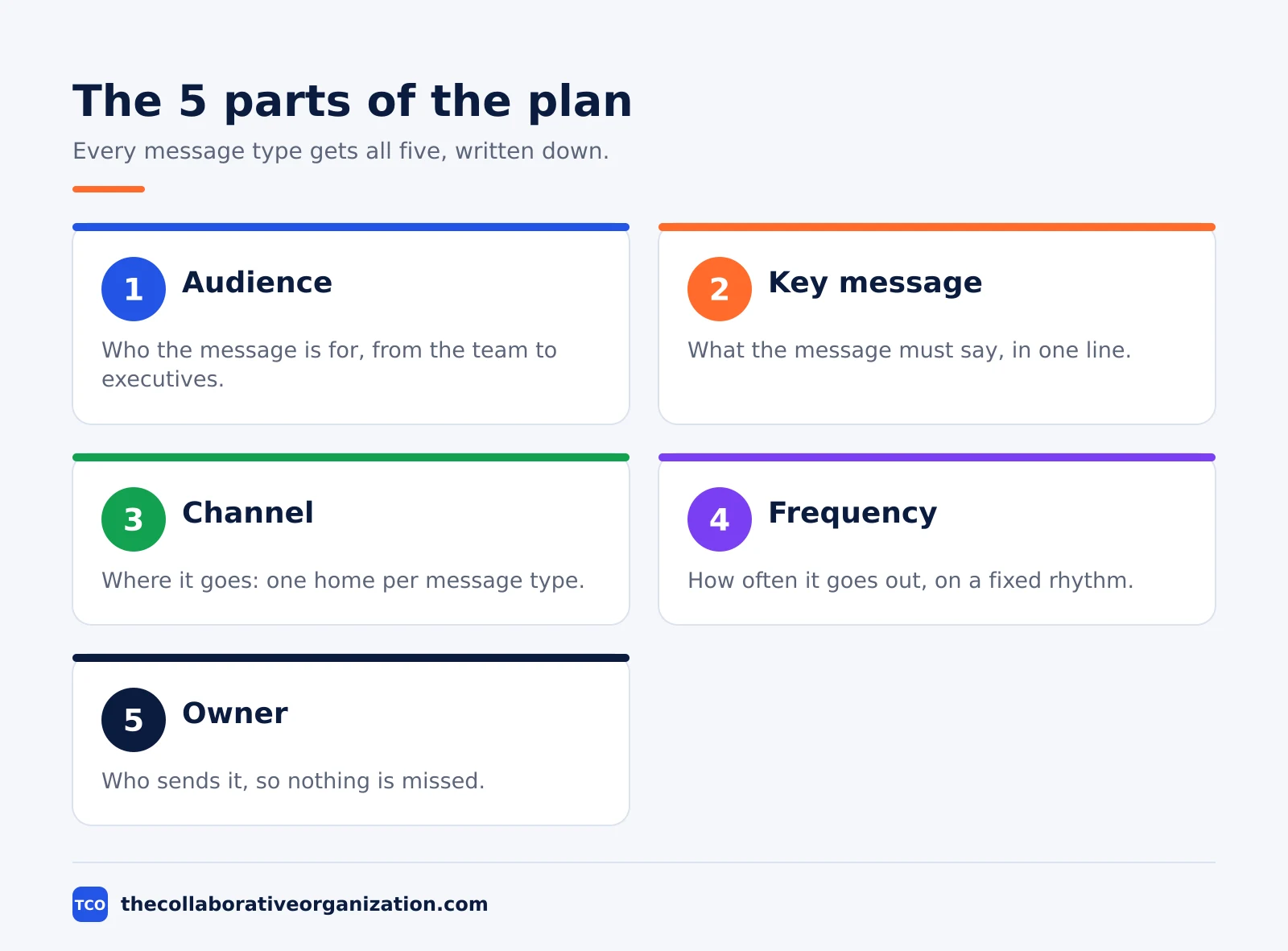
- A plan has 5 parts: audience, key message, channel, frequency and owner.
- Use 3 urgency tiers, not 5: emergency, urgent and normal, each with a clear marker and reply time.
- Keep the plan to 1 or 2 pages, ratify it with the team, and review it every quarter.
What a remote team communication plan is
A remote team communication plan is a short document that answers five questions for every kind of message: who it is for, what it says, where it goes, how often it goes out, and who sends it. Asana lists those five parts as audience, key message, channel, frequency and owner, and the same five parts work for a remote team plan. The plan is not a style guide, a values statement or a code of conduct. It is a working agreement about how messages move.
The need for one is plain in the numbers. Gallup found that 48% of hybrid workers say their team has never discussed a plan for how to collaborate, while leaders cite communication (48%) and collaboration (44%) as their top hybrid challenges.
Teams that do have a plan are 66% more likely to be engaged and 29% less likely to be burned out. Our guide on how to communicate with remote employees covers the daily practices; this page gives you the written plan itself.
A plan also protects focus. Without agreed reply times, every unanswered message feels urgent, so people check chat all day. With a plan, an unmarked message is by definition not urgent, and people can batch their replies without guilt. That single shift is the reason most teams write one.
The plan template: channel map
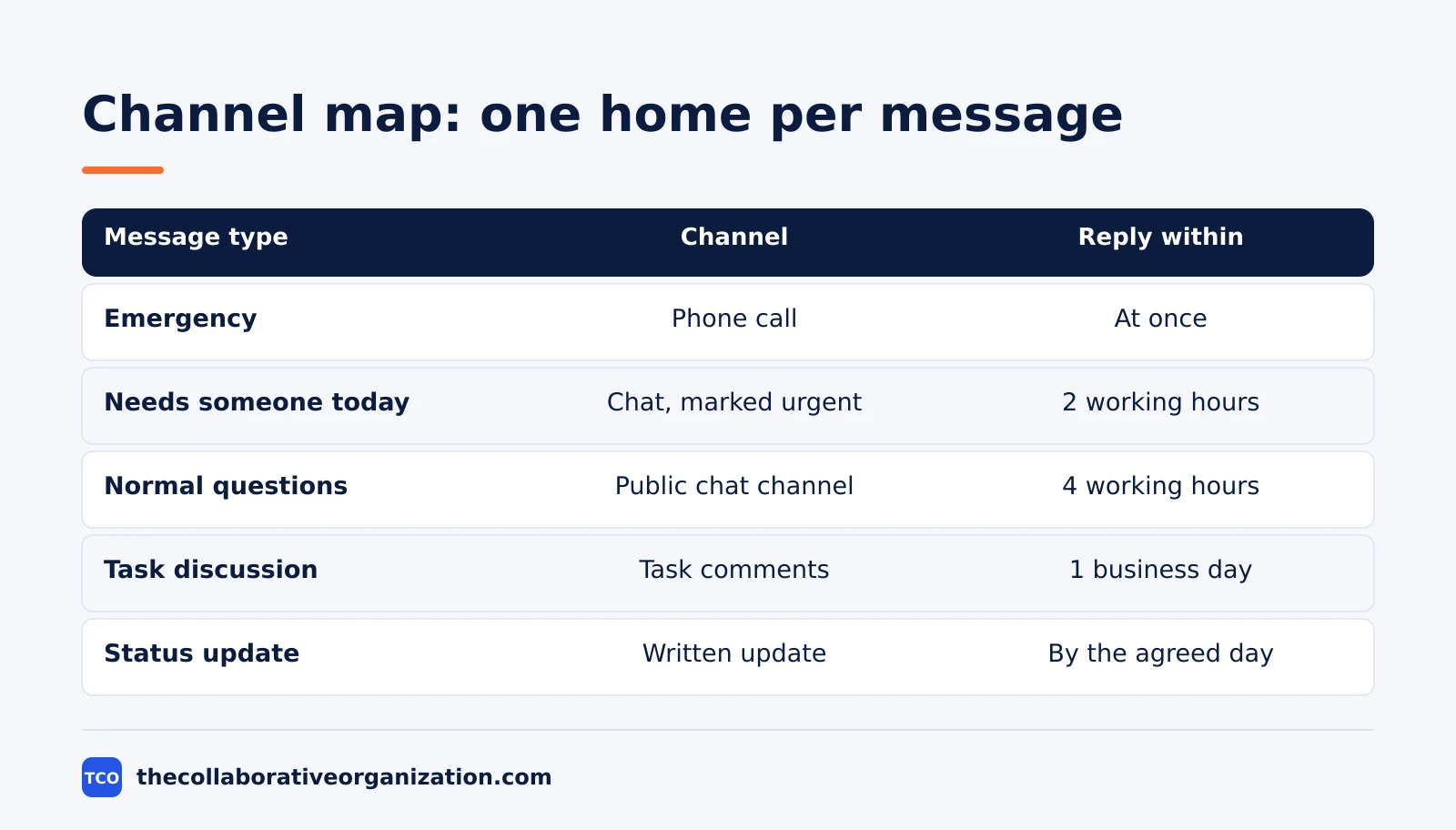
The heart of the plan is the channel map, a table that gives every kind of message exactly one home. Build it from message types, not from tools: decide what kinds of communication the team has, then assign each type one channel. The table below is the copyable core of the template. Replace the channel names with your own tools and the reply times with your own numbers.
| Message type | Channel | Reply within | Owner |
|---|---|---|---|
| Emergency: service down, security incident | Phone call or paging alert | At once | On-call lead |
| Needs someone today | Chat, marked urgent | 2 working hours | Sender |
| Normal questions and coordination | Public chat channel, threaded | 4 working hours | Everyone |
| Task discussion | Comments on the task itself | 1 business day | Task owner |
| Proposal needing a decision | Shared doc, announced in chat | 1 business day | Proposal author |
| Status update | Written update in the agreed channel | By the agreed day | Everyone |
| Announcement for everyone | Team feed post, pinned if important | No reply needed | Manager |
| Long-lived reference | Team wiki | No reply needed | Doc owner |
| Social and thanks | Dedicated social channel | No reply needed | Everyone |
OpenBook recommends three urgency tiers and the same one-home-per-type rule, and warns that posting in chat and email at once teaches people that every channel might hold anything, so they must watch them all.
Keep public channels the default: work questions go where others can see the answer, and direct messages stay for personal or sensitive matters. Name one overflow rule for messages that fit nowhere, such as posting in the main channel and letting the team redirect it kindly.
The plan template: the full copyable text
The two blocks below are the whole plan in copyable form, ready to paste into a doc and fill in. The first block holds the channels and reply times. The second holds the meetings, updates and off-hours rules. Together they fit on one page.
REMOTE TEAM COMMUNICATION PLAN - v1.0
Team: [name] | Owner: [name] | Review: [date]
Channels: chat [tool] | video [tool] | tasks [tool] | docs [tool]
Emergency: phone call only. Urgent: chat with [today] tag.
Normal chat: reply within 4 working hours.
Email and doc comments: reply within 1 business day.
Meetings: weekly sync [day, time, length] | 1:1s [day]
Status: written update every [day] in [channel]
Decisions: written in [doc], same day as the meeting
Off hours: no reply expected outside working hours
Focus: [days] are meeting-free until [time]Fill in the brackets in one session, then delete any line the team does not need. A plan with 8 lines that everyone follows beats a plan with 30 lines that nobody reads. Stamp it with a version number and a review date, such as v1.0 adopted 19 November 2026, review February 2027.
Filled-in example: a 9-person team across 3 time zones
Picture a 9-person support team: 4 people in Berlin, 3 in Toronto and 2 in Sydney, with only 1 hour a day when all three cities overlap. Their old habit was instant replies in chat at all hours, and the Sydney pair felt permanently behind. The manager drafts a one-page plan from the template above and the team ratifies it in a 30-minute call.
The filled plan names Slack for chat, Zoom for video, Asana for tasks and a shared wiki for reference. Emergencies go by phone call only. Urgent messages carry a [today] tag and deserve a reply within 2 working hours.
Normal chat gets 4 working hours, and email and task comments get 1 business day. Reply clocks run only during overlap hours, so a request posted at the end of a Berlin day starts its clock the next morning.
Meetings shrink to 2 per week: a 25-minute team sync in the overlap hour and a 30-minute one-on-one per person. Status moves to a written update every Thursday in the team channel. Decisions are written in the wiki the same day they are made.
Tuesday and Thursday mornings are meeting-free focus blocks. This is an illustration, not a case study: the team and the numbers are made up to show the shape of a finished plan.
How to customise the plan in one session
Customise the template in a single 45-minute working session, not a week of drafts. Start from the audit, not from a blank page: for one week before the session, the team notes where messages arrive and where they felt unsure. Most teams find 8 to 12 inbound surfaces, and at least 3 that duplicate each other, according to OpenBook.
- Cut channels first. If 2 channels do the same job, close one. Every channel you keep is a place someone must check.
- Set generous reply times. 4 working hours for chat feels slow to a team used to instant replies, and that is the point: the time is a ceiling, not a target.
- Name the urgent marker. One marker, used by everyone, such as a [today] tag. Urgency is declared by the sender, never guessed by the receiver.
- Write the off-hours line. Sending late is fine, expecting late replies is not. State that reply clocks stop outside working hours.
- Add the anti-anxiety clause. Write down that nobody must watch any channel nonstop, and that checking chat 2 to 4 times a day is normal.
End the session by naming the owner and the review date. The owner keeps the plan findable, and the review date keeps it honest. For the wider job of running the team, see our guide to project management for remote teams.
Variations for different teams
The same template fits a 3-person team and a 60-person department, but the detail changes. A team of 3 can fill it in during a 20-minute call: one channel per message type, one reply time per channel, one line on meetings. The written version still pays off when the fourth person joins, because the new hire reads the plan instead of guessing.
A team across 5 or more time zones may have no hour when everyone is awake. Say so in the plan, and name pairwise expectations instead of a fake overlap window. Berlin and Toronto share mornings, Toronto and Sydney share evenings, and the team sync rotates so no city always takes the bad slot. See our time zone management guide.
Teams with contractors need one extra line: which channels contractors can see, and which decisions stay internal. External partners get the task tool and the status channel, but not the social channel or the people discussions. A remote work policy covers the employment side of that split; this plan covers only how messages move, so keep the two documents separate.
Tools that carry the plan
Tools carry the plan, but they are not the plan. Pick the chat tool the team already opens, add video calls for the weekly rhythm, and keep decisions in the task tool. The table below lists the usual starting set, with starting prices as of November 2026.
| Tool | Best for | Free plan | Starting price (as of November 2026) | Notable limit |
|---|---|---|---|---|
| Slack | Chat-first remote teams | Free plan, 90 days of history | $7.25 per user per month (Pro), billed annually | Free plan hides messages older than 90 days |
| Microsoft Teams | Teams already on Microsoft 365 | Free plan, 60-minute group meetings | $4.00 per user per month (Teams Essentials), paid yearly | Free plan caps group meetings at 60 minutes |
| Asana | Tasks, decisions and status in one place | Personal, free for 2 people | $10.99 per user per month (Starter), billed annually | Free plan covers 2 people |
| Trello | Small teams tracking work on boards | Free for up to 10 collaborators | $5 per user per month (Standard), billed annually | Free plan caps at 10 collaborators |
The Slack pricing page lists Pro at $7.25 per user per month billed annually. Trello pricing lists Standard at $5 per user per month billed annually, or $6 billed monthly.
Asana Starter is $10.99 per user per month billed annually, and Microsoft Teams Essentials is $4.00 per user per month, with one source noting $4.50 after a July 2026 increase, so check the vendor page before you buy. Compare the full shortlist on our team communication software page before you choose.
One tool per purpose is the rule that matters most. Asana found that the average knowledge worker switches between 10 and 25 apps a day, and a plan that names one home per message type cuts that switching at the source.
How to roll out the plan and review it
Roll the plan out in under 2 weeks, then review it every quarter. One person drafts it from the audit and the working session. The draft goes out for a 3 to 5 day async comment window, with silence counted as consent, and disagreements pushed toward concrete alternatives, such as a 6-hour reply time instead of 4.
Then hold one 30-minute ratification call to resolve the open threads and collect real yeses, not silence. Publish the plan where new hires cannot miss it: the team wiki, linked from onboarding, and pinned in the main channel. An unfindable plan governs nothing.
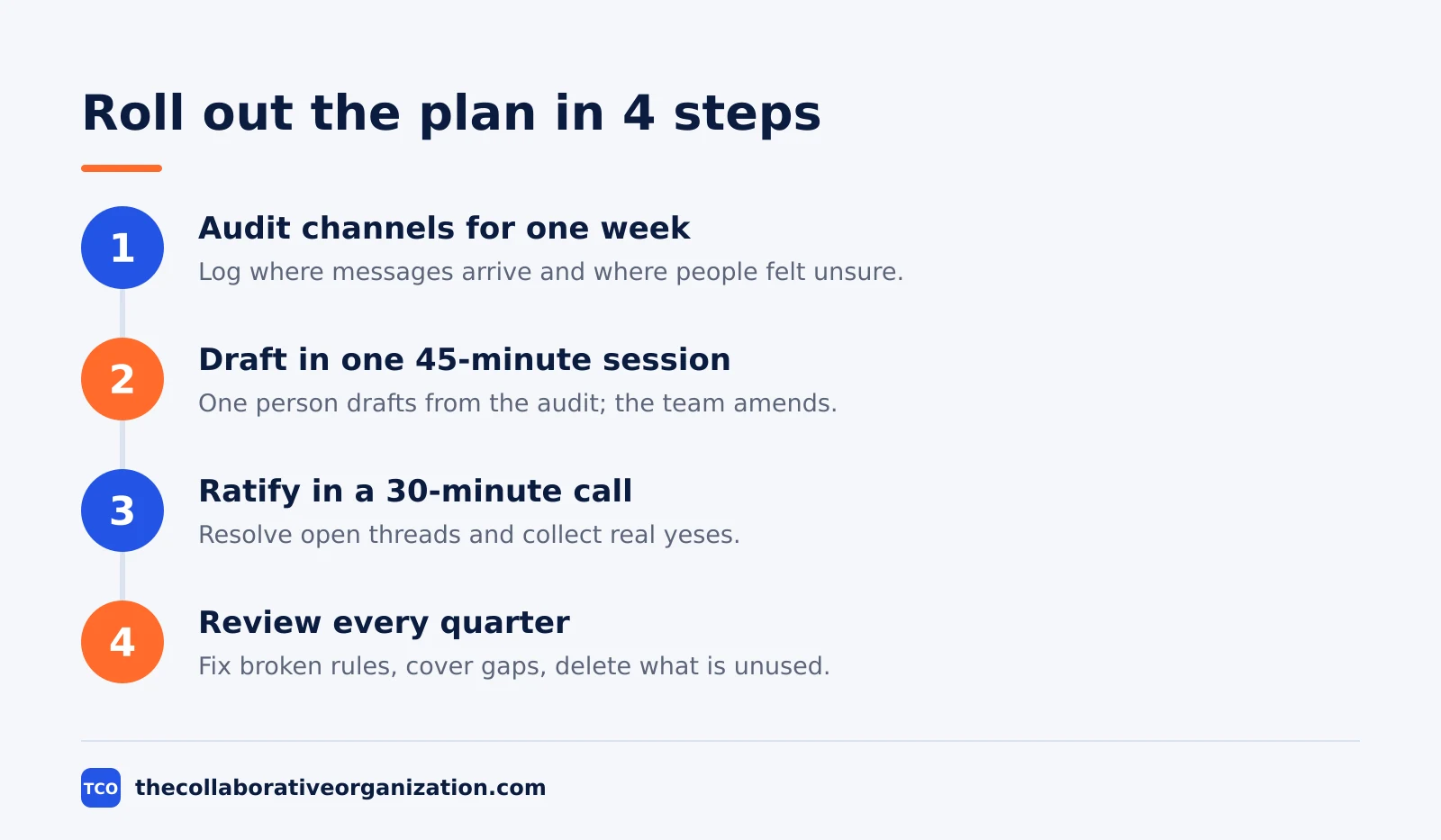
At each quarterly review, ask 3 questions: which rule did we break constantly, which ambiguity did the plan fail to cover, and what can we delete. A rule broken constantly is probably a wrong rule, so fix the rule instead of blaming the team. Shorter is stronger, and a plan that shrinks each quarter is a plan that works.
Common remote communication plan mistakes to avoid
Most remote communication plans fail in the same few ways, and each one is easy to spot before you publish. Run through the list below before the ratification call.
- Writing a 12-page plan. A plan that covers style, values and meeting agendas in one document becomes a file nobody rereads. Keep it to 1 or 2 pages.
- Decreeing it from above. A plan the manager writes alone reads as orders. Draft with the team and ratify it together, or people will quietly ignore it.
- Five urgency tiers. Nobody remembers 5 tiers under pressure. Use 3: emergency, urgent and normal.
- Reply times in calendar hours. A 4-hour promise that counts overnight hours puts the Sydney pair permanently in arrears. Count working hours and overlap only.
- No owner and no review date. A plan with no owner goes stale, and a plan with no review date goes stale silently. Name both on the first line.
- Duplicating messages across channels. Posting in chat and email at once teaches people to watch everything. One home per message type, with duplication only for genuine emergencies.
Sources
- Gallup - A Strategic Guide for Managing Hybrid and Remote Teams (2026)
- Asana - How to Write a Communication Plan (2026)
- OpenBook - How to Write a Team Communication Charter (2026)
- WeLikeRemoteStack - Remote Team Communication SLA Template (2026)
- Slack - Pricing (2026)
- Microsoft - Microsoft Teams Pricing (2026)
- Asana - Pricing (2026)
- Trello - Pricing (2026)
Frequently asked questions
How long should a remote team communication plan be?
One page, or two at most. A plan that runs longer becomes a document nobody rereads, and a plan nobody rereads governs nothing. Put the channel map, the reply times, the urgency tiers and the meeting rules on the first page. Move background, examples and tool setup notes to a second page or a linked document that people can read once.
Who should write a remote team communication plan?
One person drafts it, usually the manager or a volunteer, and the whole team ratifies it. A plan written by one person alone reads as a set of orders, while a plan written by committee reads as mush. Draft from a one-week audit of how the team actually communicates, open a short comment window, then agree it together in one call.
How often should a remote team communication plan be reviewed?
Every quarter, and after any big change such as a new time zone, a new tool or a team that doubles in size. At each review ask three questions: which rule did we break constantly, which ambiguity did the plan fail to cover, and what can we delete. A plan that never gets reviewed slowly stops matching how the team works.
What reply times should a remote team set for chat and email?
A common starting point is 4 working hours for normal chat, 2 working hours for messages marked urgent, and 1 business day for email and comments on documents. Count only working hours, and for teams across time zones count only the overlap. The reply time is a ceiling on obligation, not a target, so most replies will still come faster.
Does a small team of 3 people need a written communication plan?
Yes, in a shorter form. Three people can agree on channels and reply times in 20 minutes, and the written version still pays off when the fourth person joins. Keep the same five parts, but cut the detail: one channel per message type, one reply time per channel, and one line on meetings. The plan grows with the team.
Related articles
team communication
Communication Plan for a Project: Template (2026)
A communication plan for a project names who gets which update, in which channel, how often, and from whom. Copy the template and the filled example below.
November 20, 2026 · 10 min read
team communication
How Often Should Managers Communicate With Teams? (2026)
Managers should hold one meaningful conversation with each person every week, plus a weekly team update. See the cadence table for meetings, updates and feedback.
November 20, 2026 · 9 min read
team communication
Upward Communication Examples: 10 That Work (2026)
Upward communication is a message that travels from an employee to a manager or leader. See 10 concrete examples, each with why it works and when to use it.
November 20, 2026 · 9 min read