Project Management for Remote Teams: Async-First Guide (2026) | The Collaborative Organization
By The Collaborative Organization Team · November 19, 2026 · Last verified November 19, 2026 · 10 min read
Project management for remote teams means running a project where the work, the decisions, and the status all live in writing, with a small daily overlap window for the talks that need voices. The office habits of hallway updates and shoulder taps do not survive distance, so the plan has to carry the weight instead.
Key takeaways
- Run the project async-first: written decisions, written status, and written handoffs, with live meetings only for talks that need voices.
- Buffer found 98% of remote workers would keep working remotely for their whole careers, so the model is here to stay.
- Two to three hours of shared working time a day is enough for most remote projects.
- Every task needs one named owner, a due date, and a written decision behind it.
- Measure output, not hours: tasks finished, milestones hit on time, and blockers older than two days.
What project management for remote teams means
Project management for remote teams is the same job as any project management, with one change: nothing counts until it is written down where the whole team can find it. Scope, owners, dates, and decisions live in the project tool and the shared docs, not in chat threads or memory.
That change matters because remote work is now normal. Zoom’s roundup of Buffer’s survey found 98% of remote workers would work remotely for the rest of their careers and recommend it to others, and 70% say focused work is easier when remote.
The teams that keep those workers are the ones that stop asking people to be online at the same time to get answers.
Our guide on how to manage a remote team covers the people side of this job: hiring, onboarding, and day-to-day leading. This guide covers the project side: how to set up one project, keep it moving across time zones, and land it on its date.
Why remote projects stall in three places
Remote projects stall in three places: decisions that were never written down, handoffs that wait a day for an answer, and trust that thins out when nobody can see the work. Each one has a fix, and all three fixes are the same habit: write it down.
Buffer’s survey shows where the friction sits. Working across time zones was the biggest struggle for 14% of remote workers, and loneliness and staying at home too often topped the list for others. A project plan cannot fix loneliness, but it can fix the time zone problem by making every handoff readable without a meeting.
The written record is also how trust is built at a distance. Our guide on how to build trust in remote teams makes the same point from the people side: visible follow-through beats reassurance. On a project, that means a plan everyone can read and a weekly update that says what shipped, what slipped, and what is next.
Set up an async-first project in 6 steps
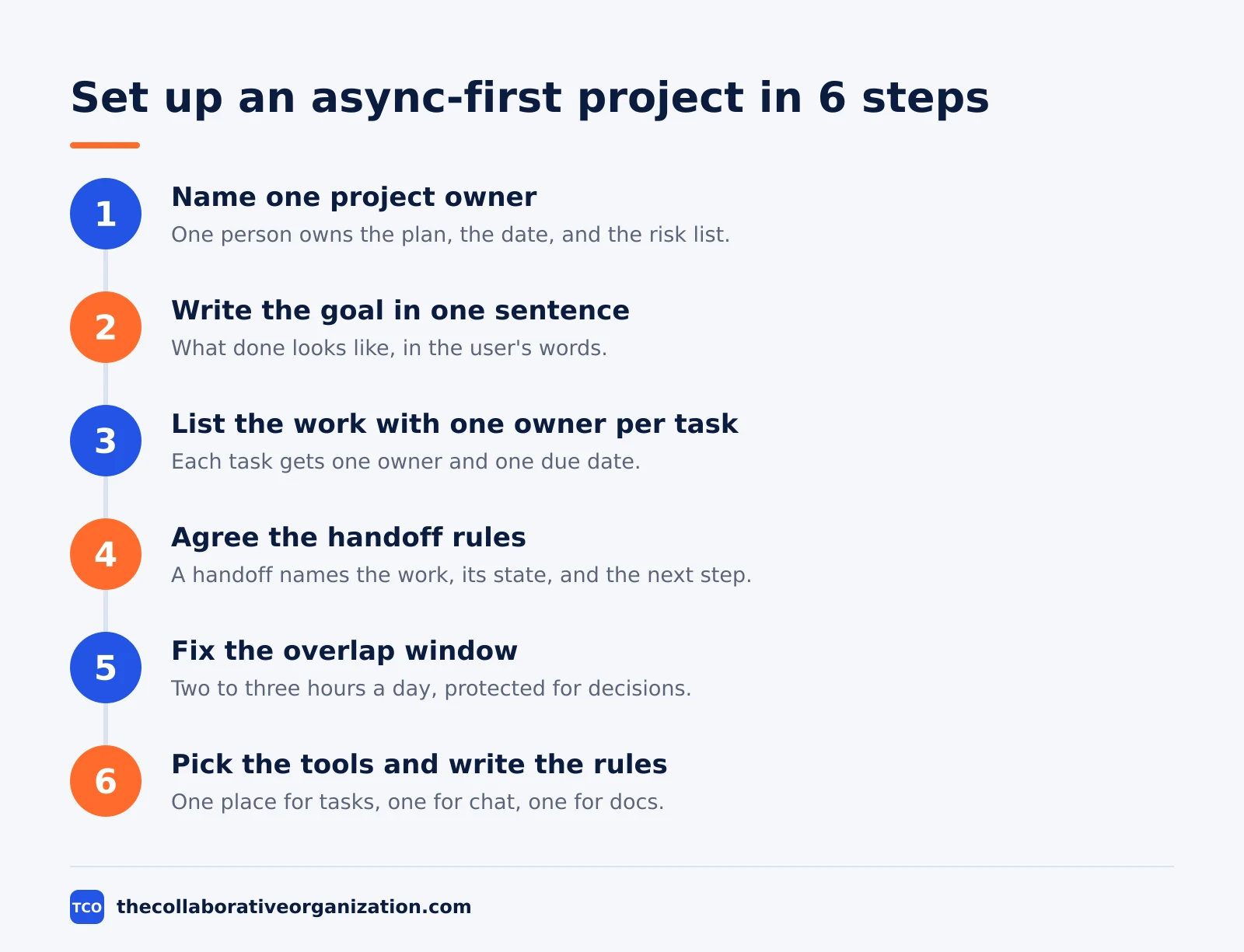
Set up an async-first project in six steps: name the owner, write the goal, list the work, agree the handoff rules, fix the overlap window, and pick the tools. Each step produces something written that the team can point at.
Step 1: Name one project owner
One person owns the plan, the date, and the risk list. That person is not the boss of the work; they are the person who answers when a date slips. Name them in the project tool, not only in a kickoff call.
Step 2: Write the goal in one sentence
Write what “done” looks like in one sentence, in the user’s words. A support portal project might read: customers can find answers and raise a ticket without emailing support. Every task below must serve that sentence.
Step 3: List the work with one owner per task
Break the goal into tasks that one person can finish and one person can check. Give each task one owner and one due date. A task with two owners has no owner, and a task with no date has no deadline.
Step 4: Agree the handoff rules
Write down how work passes between time zones: what a handoff message must contain, where it lives, and how fast the next person replies. The rule for this guide is simple: a handoff names the work, its state, and the next step, and it sits in the task itself.
Step 5: Fix the overlap window
Pick two to three hours a day when everyone is online, and protect that window for decisions and unblocking. Everything else moves async. Publish the window in the project doc so new joiners see it on day one.
Step 6: Pick the tools and write the rules for each
Choose one place for tasks, one place for chat, and one place for docs. Then write one line per tool saying what goes there. Three tools with clear rules beat six tools with none.
Map the time zones and fix the overlap window
Map the time zones before you plan the work, because the overlap window decides what can be decided live and what must move in writing. A team spread across four zones cannot hold a daily standup that suits everyone, so it should not try.
Start by listing each person’s working hours in one shared time, such as UTC. The window where most people overlap is your live window. GitLab’s all-remote handbook takes the same approach: default to written work, and treat meetings as the exception that needs a reason.
Our guide on time zone management for remote teams covers the full method, including daylight saving changes and holiday calendars. The project-level rule is shorter: one live window a day, published in the project doc, and every decision from that window written into the task within the hour.
Rotate the pain when the spread is wide. If one zone always takes the early call, share it: move the weekly live meeting by an hour each month, or alternate between two windows. A team that shares the awkward hour keeps the trust that a fixed 6:00 call slowly spends.
The weekly rhythm: one live meeting, the rest in writing
A remote project runs on one live meeting a week, a short written update from each person, and a task board that tells the truth. Everything else is noise that fills calendars without moving work.
The written update is the heart of the rhythm. Each person posts three lines by the same time each week: what finished, what is next, and what is blocked.
The project owner reads the updates, clears the blockers, and posts one summary. That summary is the status meeting, and it takes 20 minutes to write instead of an hour to hold.
The one live meeting is for the work that writing cannot do: a stuck decision, a design review, or a milestone check. It has an agenda sent a day ahead, a written decision at the end, and no status round. If the agenda is only status, cancel the meeting and read the updates.
Keep the board honest. A board where done tasks pile up and blocked tasks hide is worse than no board, because it tells the team the project is fine when it is not. The owner reviews the board every day for five minutes and asks about any task that has not moved in three days.
Worked example: a 12-person team across 4 time zones launches a support portal
A 12-person team across four time zones shows how an async-first project runs in practice. The example below is an illustration, not a real team. The team works for a software company, and its project is to launch a customer support portal in 10 weeks.
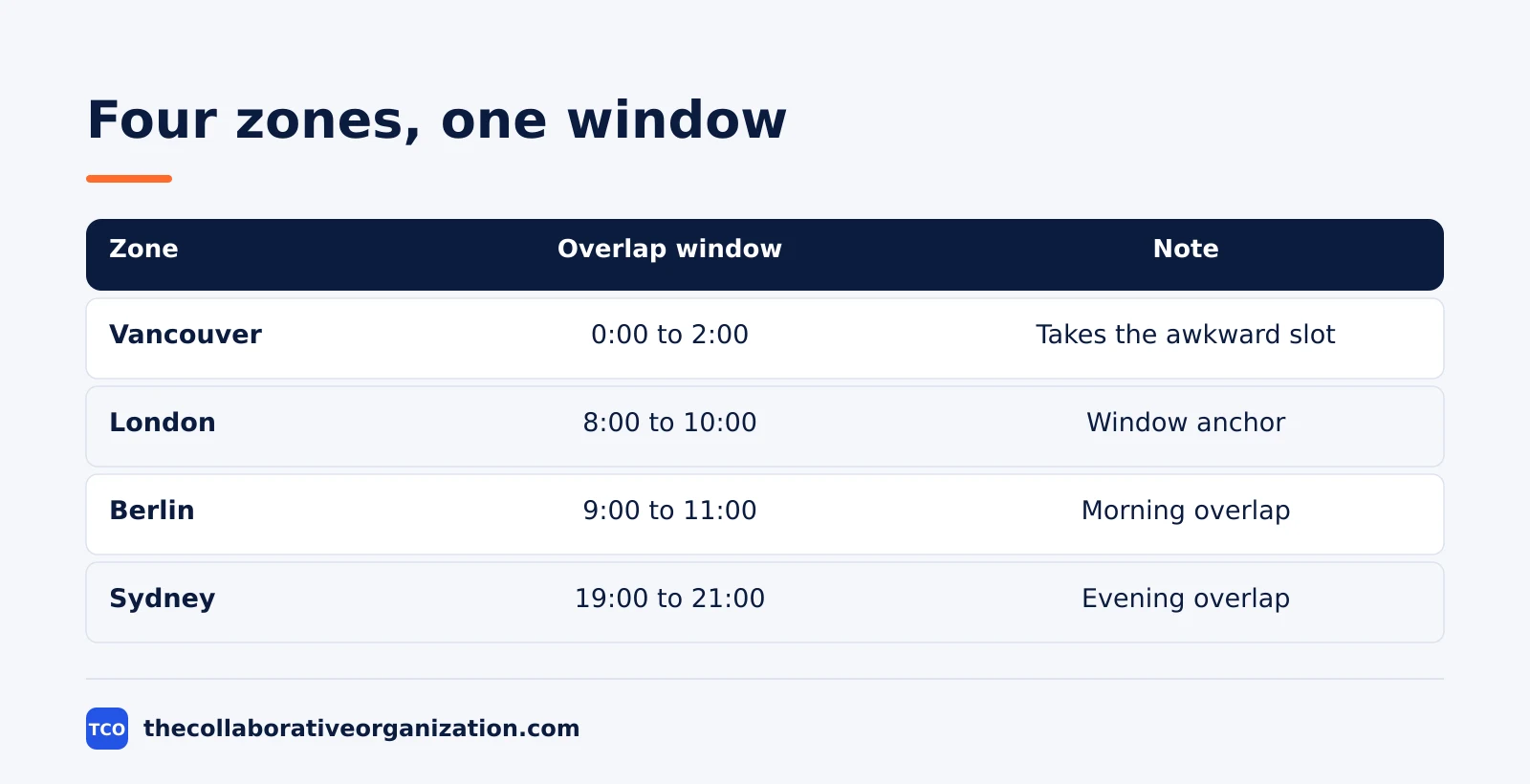
The four zones are Vancouver, London, Berlin, and Sydney. The shared window is two hours: 8:00 to 10:00 in London, which is 0:00 to 2:00 in Vancouver, 9:00 to 11:00 in Berlin, and 19:00 to 21:00 in Sydney.
Vancouver takes the awkward slot in this window, so the team alternates it with a second window, 16:00 to 18:00 in London, which suits Vancouver mornings and asks Sydney for the early hours instead. The rest of the work moves in writing.
The goal is one sentence: customers can find answers and raise a ticket without emailing support. The work splits into four workstreams: help articles, ticket forms, search, and launch comms. Each workstream has one lead, and each task has one owner and one due date.
Week 1 sets the rules. The owner writes the goal, the handoff rules, and the overlap window into the project doc. Week 2 to week 7 runs in two-week cycles: each cycle ends with a written review, and the live meeting only handles stuck decisions.
Week 8 is the pilot: 20 customers try the portal, and their feedback goes straight into the task list.
The launch lands in week 10. The portal opens with 40 help articles, a ticket form, and search. The team measures success on three numbers: tickets raised through the portal in the first month, articles rated helpful, and emails to support, which should fall as the portal takes the load.
How to measure a remote project
Measure a remote project on output, not on hours online. Three numbers tell you most of what you need: tasks finished per week, milestones hit on time, and blockers older than two days.
Tasks finished per week shows pace. Compare it with the plan, not with last week, because a week of hard tasks looks slow even when the team is on track. A steady fall over three weeks is the warning sign, not one quiet week.
Milestones hit on time shows whether the date holds. A milestone is a real deliverable, such as the pilot portal live for 20 customers, not a phase name. If two milestones slip in a row, re-plan the date in writing instead of hoping the team catches up.
Blockers older than two days show where the plan is stuck. A blocker that sits for a week usually means the owner is waiting on someone who does not know they are needed. The project owner clears blockers in the weekly summary, names the next action, and sets a date for it.
Tools that run remote projects
A remote project needs four tools: one for tasks, one for chat, one for docs, and one for live calls, with a written rule for each. Compare the options on our project management software shortlist before you pick.
| Tool | Best for | Free plan | Starting price (as of November 2026) | Notable limit |
|---|---|---|---|---|
| Asana | Task lists, owners, and due dates | Free for 2 people | $10.99 per user per month (Starter), billed annually | Free plan covers 2 people |
| Trello | Simple boards for workstreams | Free for up to 10 collaborators | $5 per user per month (Standard), billed annually | Free plan caps at 10 collaborators |
| Slack | Fast chat and channel updates | Free, 90 days of message history | $7.25 per user per month (Pro), billed annually | Free plan keeps 90 days of history |
| Zoom | The one live meeting a week | Free, 40-minute meetings | $14.16 per user per month (Pro), billed annually | Free plan caps meetings at 40 minutes |
The Asana price comes from Asana pricing: Starter is $10.99 per user per month when billed annually. Trello pricing lists Standard at $5 per user per month billed annually, or $6 billed monthly.
Slack pricing lists Pro at $7.25 per user per month billed annually. The Zoom pricing page lists Pro at $14.16 per user per month billed annually, or $16.99 billed monthly, with 30-hour meetings.
Common remote project management mistakes to avoid
Most remote projects fail in the same six ways, and all six are easy to spot in a weekly review. Check the list at each milestone.
- Decisions made in calls and never written down. A decision that lives only in memory will be re-argued next week. Write it into the task within the hour.
- Status meetings that could have been a written update. A live meeting for status wastes the overlap window. Save the window for decisions.
- A task with no owner or no date. Unowned work waits for someone else to pick it up. Name one owner and one date for every task.
- Handoffs with no next step. A handoff that says “done my part” leaves the next person guessing. Name the work, its state, and the next step.
- One time zone always taking the awkward hour. A fixed early call burns out one group first. Rotate the window or alternate it.
- Tracking hours instead of output. Hours online tell you nothing about what shipped. Track tasks finished, milestones hit, and old blockers.
Sources
- Zoom - 25 must-know remote work statistics for 2025 (2025)
- Search Engine Land - 14 remote work statistics (2026)
- GitLab - Guide to All-Remote (2026)
- Buffer - Working Remotely When Everyone is in a Different Timezone (2026)
- Asana - Pricing (2026)
- Trello - Pricing (2026)
- Slack - Pricing (2026)
- Zoom - Pricing (2026)
Frequently asked questions
How many live meetings should a remote project have each week?
One live meeting a week is enough for most remote projects, plus a short kickoff and a review at each milestone. The rest of the work moves in writing: status updates, decisions, and handoffs live in the project tool and the shared docs. Add a second live meeting only when a decision is stuck after two rounds of written discussion.
How much time zone overlap does a remote team need?
Two to three hours of shared working time a day covers most remote projects. That window is for decisions, reviews, and unblocking work, not for status reports. Teams with less than two hours of overlap need tighter written handoffs, because a question asked at the end of one day is answered the next day.
What is the first thing to fix when a remote project falls behind?
Fix the written record first. Check whether every task has one named owner, a due date, and a written decision behind it. Most remote delays come from work that was agreed in a call and never written down, so nobody knows who owns it. Once the record is clear, the real blockers show up fast.
Should remote teams track hours or output?
Track output. Hours tell you who was online, not what shipped. Pick three measures that fit the project, such as tasks finished per week, milestones hit on time, and open blockers older than two days. Review them in the weekly written update, and use them to spot overload before it becomes a missed deadline.
How do you build trust on a remote project team?
Trust grows from kept promises that everyone can see. Publish the plan, post a short written update each week, and say plainly when a date slips and what changes. Small, visible follow-through beats team socials. A team that sees work land on time, week after week, stops checking up on each other.
Related articles

project management
How to Choose Project Management Software (2026)
Pick project management software in seven steps: define the work, count seats, price the real cost, and run a two-week pilot before you pay.
November 19, 2026 · 10 min read

project management
What Is a RACI Matrix? Definition, Roles and Examples (2026)
A RACI matrix maps who is Responsible, Accountable, Consulted and Informed for each task. Learn the four roles, how to build one, and see a worked example.
November 19, 2026 · 9 min read

project management
Daily Standup Meeting Format That Works (2026)
A daily standup is a 15-minute meeting where Developers inspect progress toward the Sprint Goal and plan the next day. Use this format to run one that ends on time.
November 19, 2026 · 10 min read