Meeting Notes vs Minutes: Key Differences (2026) | The Collaborative Organization
By The Collaborative Organization Team · November 19, 2026 · Last verified November 19, 2026 · 11 min read
Meeting notes are an informal working record that helps a team act, while meeting minutes are the formal approved record that proves what a body decided. Notes help people remember and move; minutes help an organization prove what happened. The two documents answer the same question, what happened in the meeting, for two different readers.
Key takeaways
- Meeting notes are informal, flexible, and written for the team; meeting minutes are formal, structured, and written as the official record.
- Notes are written by any attendee and approved by nobody, while minutes are written by one named person and approved at the next meeting.
- Minutes record what was done, not what was said: attendance, motions, decisions, votes, and actions.
- Use notes for one-to-ones, brainstorms, and routine team meetings, and minutes for board meetings, formal votes, and anything that may need to stand up later.
- Both documents fail the same way: an action item with no owner and no date.
The core difference in one sentence
Notes help people act, and minutes help an organization prove what happened. Otto draws the line this way: notes are informal, personal, and fast, while minutes are formal, neutral, and structured. The difference is not the length or the template. It is the weight the document carries after the meeting ends.
Meeting notes are a working document. Anyone in the meeting can write them, in any layout, and nobody approves them. NoterAI describes them plainly: they go to the people who attended and to the people who missed it, and their job is to make sure everyone leaves with the same list of decisions and tasks.
Meeting minutes are a record. One named person writes them in a fixed order: the meeting details, who attended, each agenda item with its decision, the actions, and the closing time. The group then confirms that the minutes are correct, usually at its next meeting. After that, the minutes are the organization’s own account of what was decided.
The word itself gives a clue. “Minutes” comes from the Latin “minuta scriptura”, meaning small notes, so minutes are condensed notes, not a minute-by-minute record. Comulytic notes the same point: minutes keep the outcome and leave out the talk. Good minutes are often shorter than good notes for exactly that reason.
Meeting notes vs meeting minutes side by side
Notes and minutes differ on eight points, and the table below sets them out. Otter.ai compares the two across formality, purpose, structure, authorship, detail, legal standing, approval, and retention. Read the row that matters most to your meeting, and the choice usually makes itself.
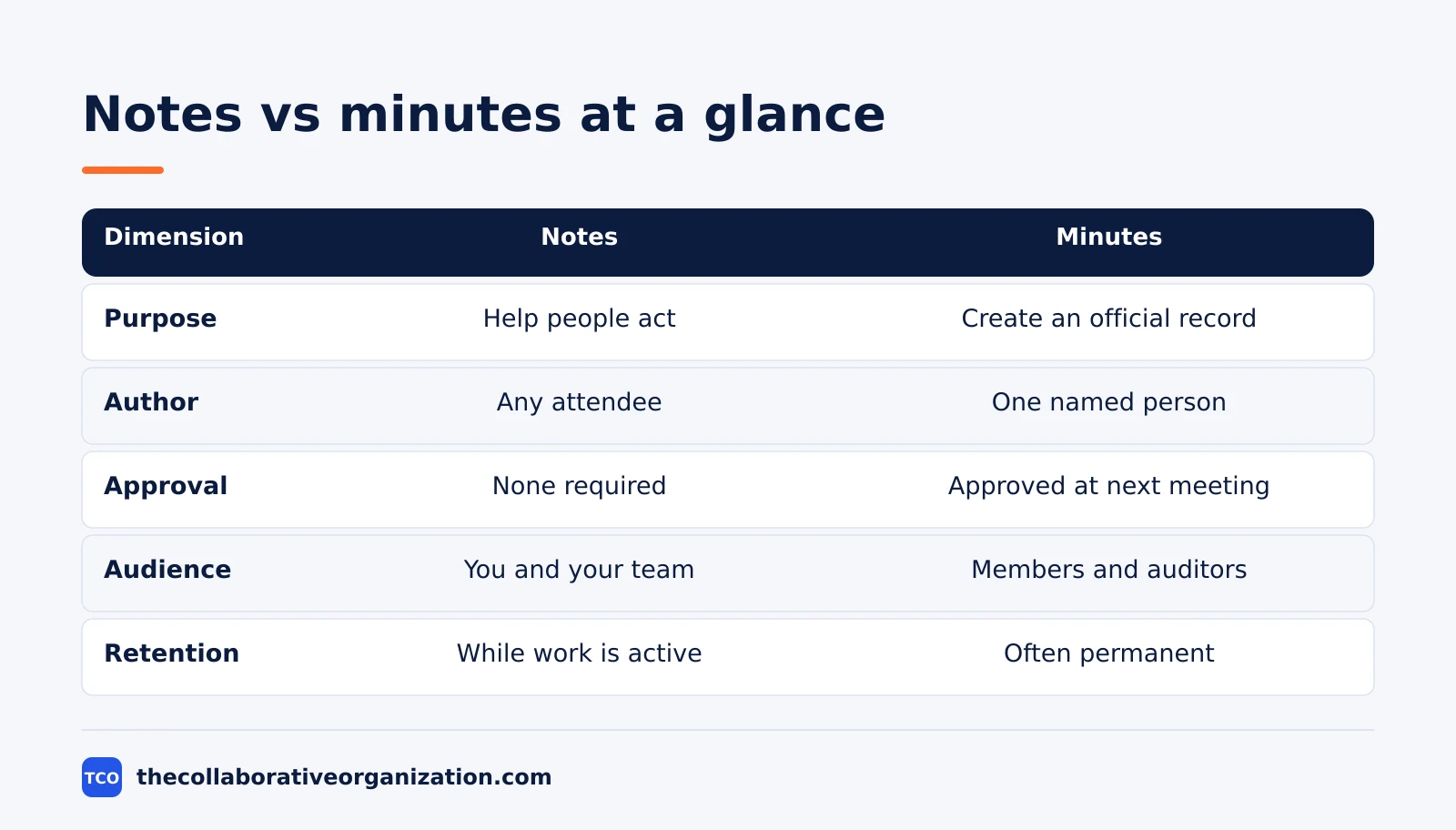
| Dimension | Meeting notes | Meeting minutes |
|---|---|---|
| Purpose | Help people remember and act | Create an official record |
| Audience | You and your team | Members, stakeholders, boards, auditors |
| Tone | Casual, shorthand, can include opinion | Formal, neutral, objective |
| Format | Free-form, any template | Standard structure, same order every time |
| Author | Any attendee | One named person, often the secretary |
| Approval | None required | Formal approval at the next meeting |
| Detail | Key points, decisions, actions | Attendance, motions, votes, actions |
| Retention | While the work is active | As long as the rules say, often permanently |
Legal standing is the row with the sharpest edge. Minutes are official corporate records in many jurisdictions, and they can be called on in legal proceedings. Notes usually sit outside the approved record, though how they are created and stored can still matter, so the legal weight cuts both ways.
If a meeting may ever be reviewed by an auditor, a regulator, or a court, write minutes.
Approval is the row that changes the document after it is written. Notes are done when they are sent. Minutes are a draft until the group approves them, usually at the next meeting, and the approved version is the one that counts. Corrections happen at approval time, not in a chat thread afterwards.
What meeting notes look like
Good notes have six headings, and the same six every time. Open a note with the header filled in before the meeting, then write a few words per line under decisions, actions with an owner and a date, open questions, and context. Keep your eyes on the room, not on the page.
The test of a good note is whether a teammate who missed the meeting can read it and know what to do. That means every action needs an owner and a due date, and every decision needs one line of context.
A note that says “we decided to launch” without saying when, who, and why is a reminder to ask again, not a record.
Notes fit meetings where the work matters more than the record. Weekly team meetings, standups, one-to-ones, brainstorms, and project check-ins all run on notes.
Our guide on the daily standup meeting format shows the same habit: short, regular, and focused on the next step. Send a short recap right after the meeting, while the room is still fresh in your mind.
Teams that collaborate on a document in real time often keep one shared notes page per meeting, so everyone writes in the same place. That works well for notes, because the document is a working file. It does not work for minutes, because minutes need one author and one approved version.
What meeting minutes look like
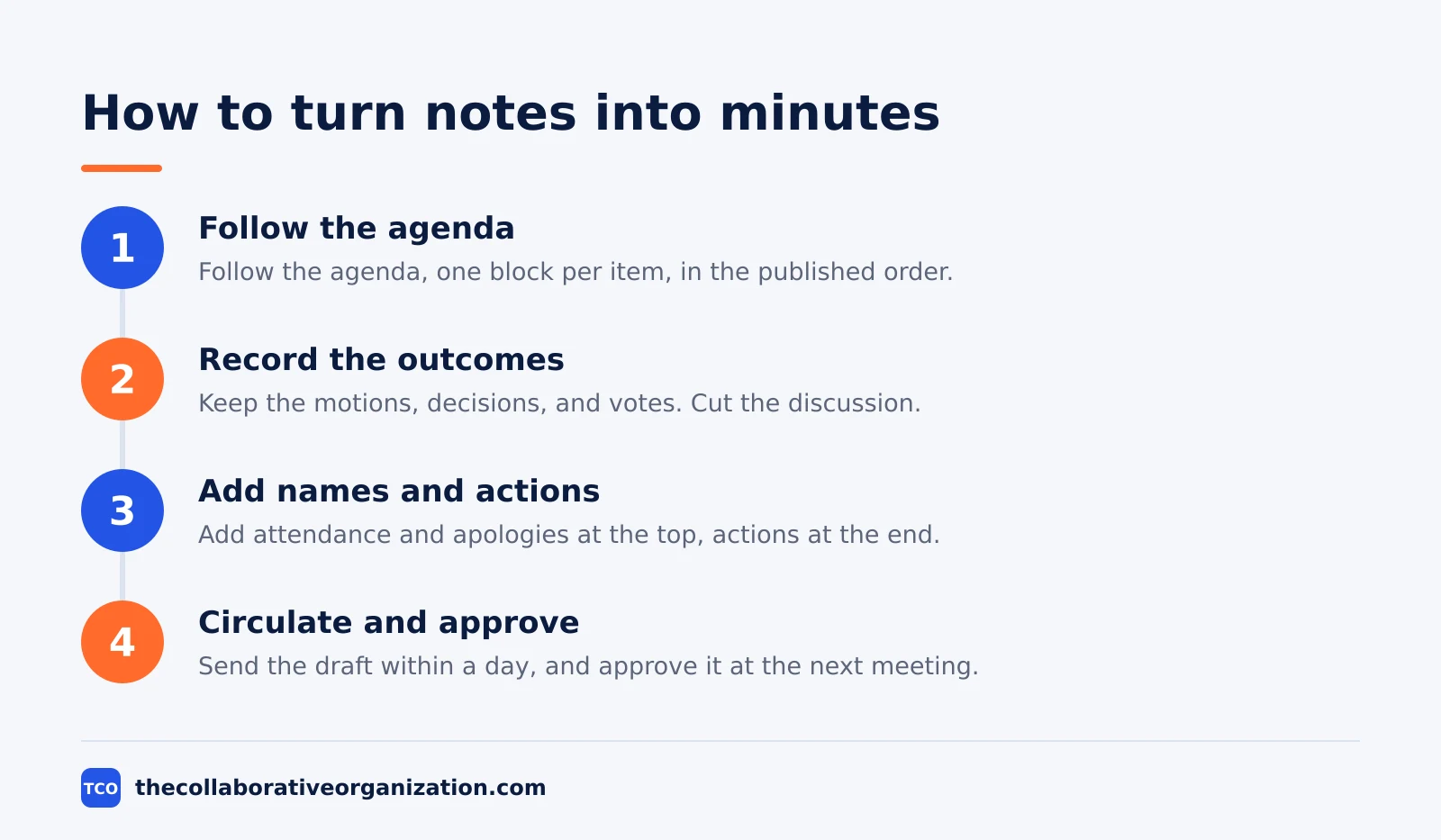
Minutes follow the agenda, not the conversation, and they record the outcome of each item. One block per agenda item, in the order it was published, so the minutes can be read against the agenda. Each block keeps what was proposed, by whom, and what the group decided.
Robert’s Rules of Order gives the classic rule: minutes are a record of what was done, not what was said. A summary of the 12th edition lists what minutes should include: the kind of meeting, the name of the body, the date and time, the place if it varies, and the motions and what happened to them.
That summary comes from Otto, so treat it as a second-hand account of the rules rather than the rules themselves.
The minutes also need the attendance list and the apologies at the top, and the actions with owners and dates at the end. For a formal body, record the wording of each motion and the vote. Then circulate the draft within a day or two, and have it approved, with corrections, at the start of the next meeting.
Minutes fit meetings where the decision matters more than the discussion. Board meetings, committee meetings, formal votes, budget approvals, policy adoptions, and contract awards all call for minutes.
Whether minutes are required, what they must contain, and how long they must be kept depends on the organization and the country, so check your governing documents first. This article states no legal rule.
Which one to choose
Ask who will read it: if the readers are only the team, write notes, and if someone outside the meeting may rely on it later, write minutes. NoterAI gives the same test, and it settles most cases in seconds. The reader decides the document, not the writer.
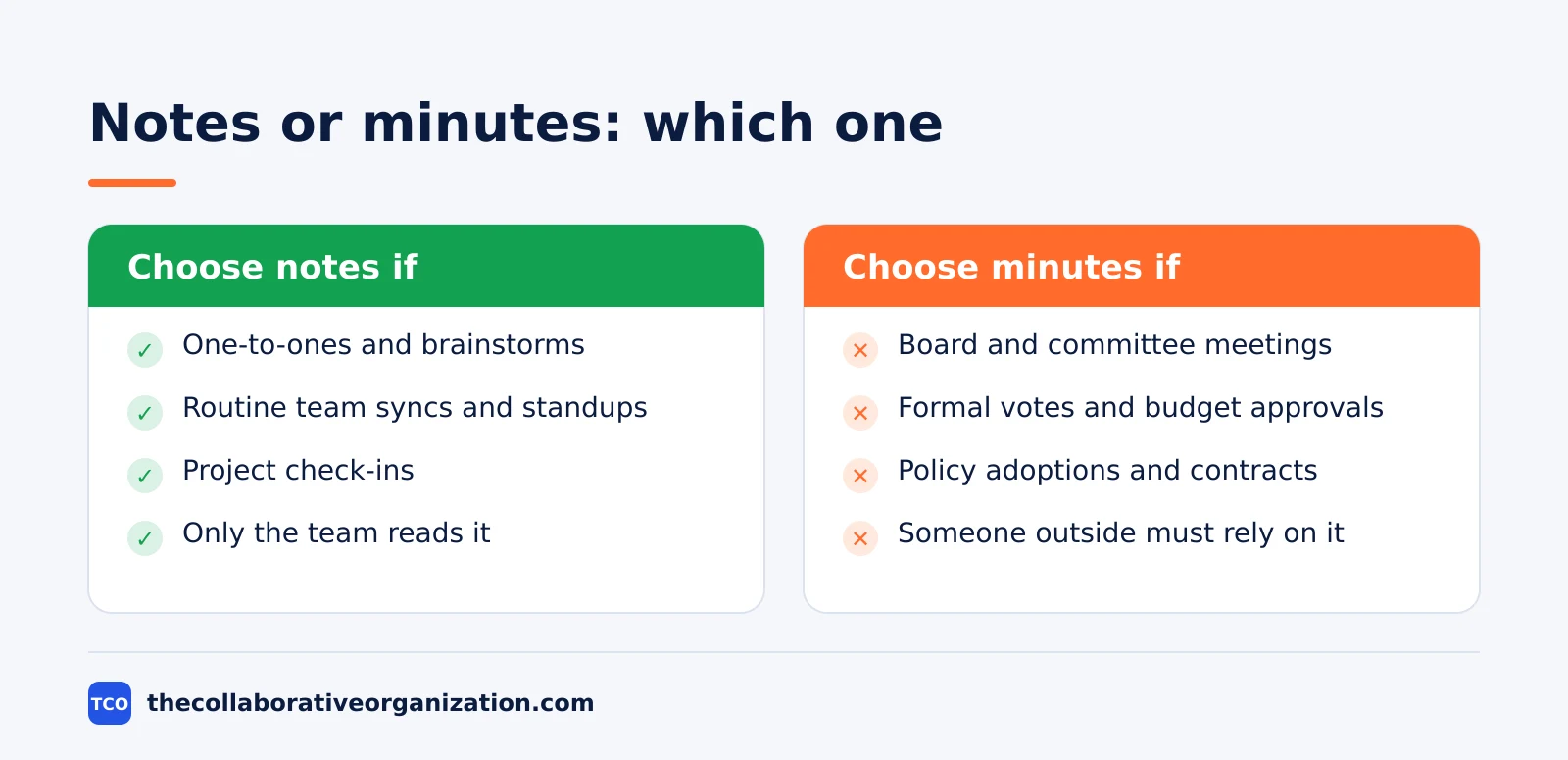
Choose notes when the meeting is a one-to-one, a brainstorm, a routine team sync, or a project check-in. The readers are the people doing the work, the tasks matter most, and nobody outside the room will rely on the document later. Any attendee can take them, and taking turns works well.
Choose minutes when the meeting makes decisions on behalf of other people. Boards, committees, formal votes, budget approvals, and policy adoptions all need minutes, because the people who were absent need a record they can trust. Use minutes when law, bylaws, policy, or the meeting’s governance process requires an approved record.
You can take both from the same meeting, but not in the same document. Equerry puts it well: minutes answer “what did this body decide?”, while notes answer “what do I owe, and what did they really mean?” Keep the two files apart, and file the minutes where the record lives.
Our guide on how to build an internal knowledge base covers where team records belong once they are written.
Worked example: one meeting, two documents
A product team meeting shows how the same hour produces two different documents. The example below is an illustration, not a real meeting. The team meets for 45 minutes to review the launch plan and to vote on a $12,000 marketing budget for the launch week.
The notes capture the discussion: the launch date stays 15 December, the checkout page needs two fixes before launch, and the team agrees to cut one feature from the first release.
Each action has an owner and a date: Ana fixes the checkout total by Friday, Ben removes the feature flag by Wednesday, and Carla books the launch review for Monday.
The minutes capture only the decisions. The meeting opened at 10 a.m. with six members present and one apology. The group approved the launch date of 15 December, approved the $12,000 marketing budget by a vote of five in favor and one against, and assigned the three actions above.
The minutes close at 10:45 a.m., and the draft goes out the same day for approval at the next meeting.
Two things make this example work. First, the notes keep the reasoning, so a teammate who missed the meeting learns why the feature was cut.
Second, the minutes keep the vote, so the budget decision stands on its own if anyone asks later. The two documents share the same actions, but they serve different readers, and neither one replaces the other.
Tools that hold notes and minutes
Notes and minutes live best in the same tool the team already opens every day. A shared document works for notes, and a wiki works better for minutes, because the approved record needs one home that everyone can find. Compare the options on our document collaboration software shortlist before you pick one.
| Tool | Best for | Free plan | Starting price (as of November 2026) | Notable limit |
|---|---|---|---|---|
| Notion | Meeting notes in a database beside tasks and wikis | Free plan | $10 per member per month (Plus), billed annually | No built-in approval flow for minutes |
| Google Docs | Fast shared notes with comments and suggestions | Free with a Google account | $0, or $7 per user per month for Workspace Starter | No versioned approval states |
| Confluence | Approved minutes that live beside team docs | Free for up to 10 users | $7.15 per user per month (Standard), billed monthly for 1-100 users | Page approvals need a workflow add-on |
The Confluence price needs a note. Its pricing page shows $5.78 per user per month for Standard, but that is a blended rate for a 300-user team.
A team of 1-100 users pays $7.15 per user per month on monthly billing, and Premium is $14.10 on the same basis. Both rates rose on 13 October 2026. Notion Plus is $10 per member per month billed annually, or $12 billed monthly, and guests are free.
File the minutes where the record lives, and file the notes where the work lives.
Minutes belong in the wiki or the shared drive folder for the body that made the decision, and notes belong in the project space beside the tasks.
Our guide on how to organize shared drive folders covers how to keep the two apart so the record never gets lost among drafts.
Common meeting notes vs minutes mistakes to avoid
Notes and minutes fail in the same ways, and each one is easy to spot after the meeting. Run through the list below before you send your next document out.
- An action item with no owner and no date. Both documents fail this way, and it is the most common one. Every action needs a name and a date, or it will not happen.
- Minutes that record the discussion. Minutes record what was done, not what was said. Cut the talk and keep the motions, the decisions, and the votes.
- Notes that nobody sends. Notes written in a private notebook help one person and nobody else. Send a short recap to the team right after the meeting.
- Two versions in one file. Notes and minutes in the same document confuse the reader about which one is the record. Keep them in separate files.
- Minutes that are never approved. A draft that is never approved is not the record. Put approval on the agenda of the next meeting, and file the approved version.
Sources
- Otter.ai - Meeting Notes vs. Meeting Minutes: Key Differences & When to Use Each (2026)
- NoterAI - Meeting Notes vs Meeting Minutes: The Difference (2026)
- Otto - Meeting Minutes vs. Notes: Differences and When to Use Each (2026)
- Comulytic - How to Take Meeting Notes: Methods, Example, AI Route (2026)
- Equerry - Meeting Notes: Definition, Template and How to Take Them (2026)
- Atlassian - Confluence Pricing (2026)
- Notion - Pricing (2026)
- Google Workspace - Pricing (2026)
Frequently asked questions
Can meeting notes become meeting minutes?
Yes, and good notes are the raw material for good minutes. Write the notes during the meeting, then turn them into minutes by cutting the discussion, keeping the decisions and votes, adding attendance, and sending the draft for approval. Do not keep both versions in one file, because the team will not know which one is the record.
Who should take meeting minutes?
One named person takes the minutes, usually the secretary or clerk, and it should not be the meeting chair. The chair runs the discussion, and the minute taker records what was decided. Naming the person before the meeting starts matters, because nobody takes good minutes by accident.
Do meeting minutes need to record everything that was said?
No. Minutes record what was done, not what was said, so they keep the motions, the decisions, the votes, and the actions, and leave out the discussion. A verbatim transcript is not minutes, and it is harder to read later. Short minutes that record the outcome are better than long ones that record the talk.
How long should meeting minutes be kept?
Minutes are usually kept for as long as the organization keeps its records, and often permanently, because they are the official account of what the body decided. Notes are kept only while the work is active. Check your own governing documents or ask the person responsible for governance, because the rule depends on the organization and the country.
What should meeting notes include?
Notes should include the key discussion points, the decisions made, the action items with an owner and a due date, and the open questions. Add one or two lines of context that will matter later, such as why a decision was made. Skip the word-for-word record, and send a short recap to the team right after the meeting.
Related articles

document collaboration
Airtable vs Google Sheets: Which to Use in 2026
Airtable is a database with views and automations; Google Sheets is a free spreadsheet. Learn the limits, the 2026 prices, and which one fits your team's data.
November 19, 2026 · 7 min read

document collaboration
Confluence vs SharePoint: Which to Use in 2026
Confluence is a wiki built around pages; SharePoint is a document platform built around files. Learn the differences, the 2026 prices, and which one fits your team.
November 19, 2026 · 7 min read

document collaboration
How to Document Processes: A Step-by-Step Guide (2026)
To document a process, pick one task, watch it done for real, map the steps and decisions, then test the draft on someone new. Follow the 7 steps in this guide.
November 19, 2026 · 10 min read