How to Write a Project Brief (2026) | The Collaborative Organization
By The Collaborative Organization Team · November 19, 2026 · Last verified November 19, 2026 · 11 min read
To write a project brief, state the goal, scope, timeline, and audience on one or two pages, then get one named person to approve it. A brief is the short document a project runs on: it says why the project exists, what it will deliver, by when, and how anyone will know it worked.
Key takeaways
- A project brief is a short summary of a project’s goals, scope, timeline, and target audience, and it fits on one or two pages.
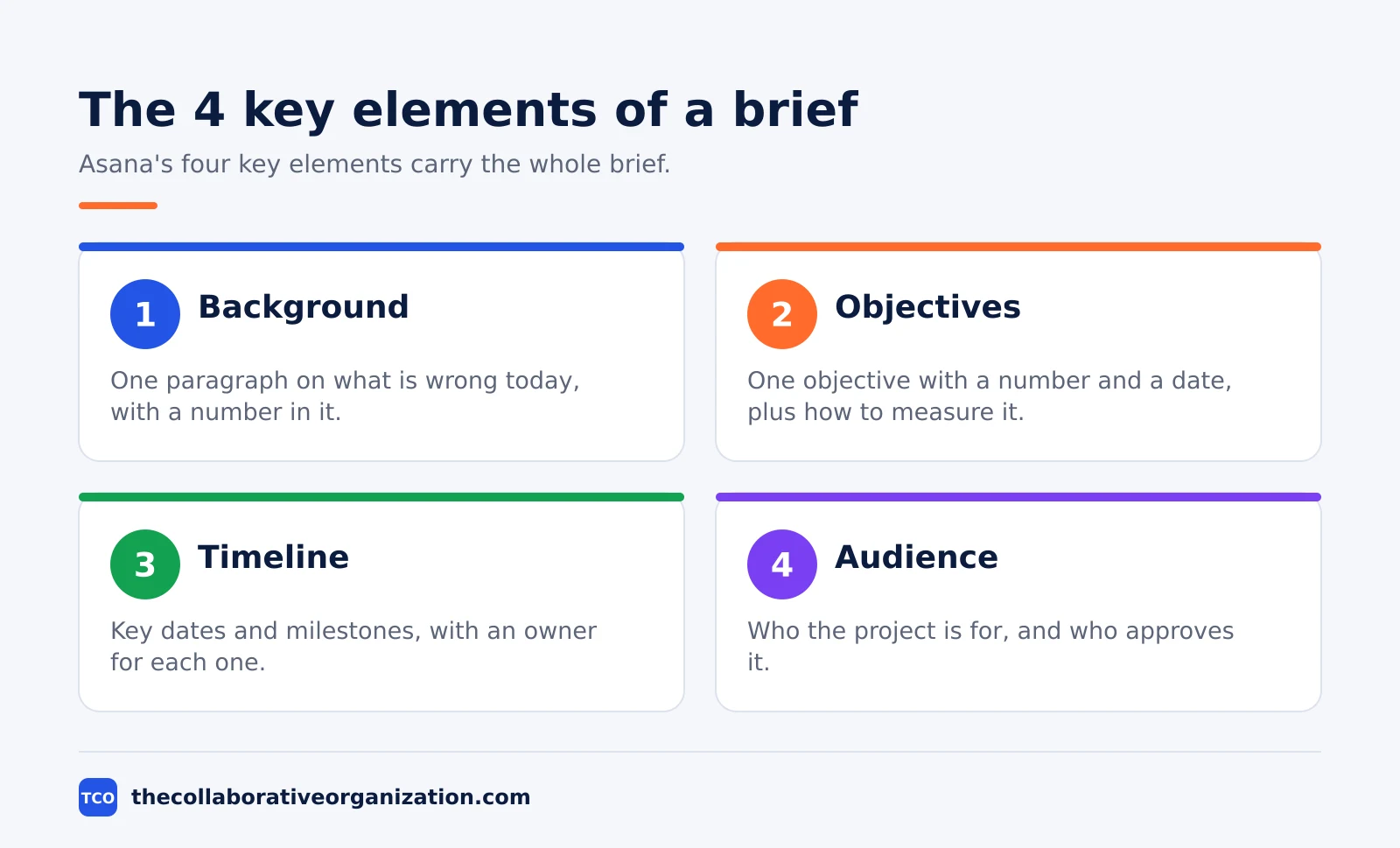
- Asana’s four key elements are background, objectives and success metrics, timeline, and target audience.
- A strong objective has a number and a date, and an objective without either one is a wish, not a goal.
- The out-of-scope list and the budget range are the two sections easiest to skip and most expensive to leave out.
- A brief needs one named approver and one signature, because a brief nobody approved is a draft, not a decision.
What a project brief is
A project brief is a short document that summarizes your project’s goals, scope, timeline, and target audience in one place. Asana defines it this way, and adds that the brief is a condensed version of a project plan. A full project plan has seven elements, and a brief only needs four of them: project objectives, timeline, target audience, and project scope.
The brief exists so everyone starts from the same facts. The team, the client, and the sponsor all read the same page and agree on what the project is for before anyone books time or spends money. When the brief is missing, each person works from their own version of the goal, and the project drifts.
A brief is not a plan, and it is not a charter. Our guide on project charter vs project plan draws the lines between the longer documents.
The brief is the shortest of the three: it states the shape of the project so the plan can fill in the detail. If your brief starts listing tasks and owners, it has grown into a plan, and you should split it.
The brief also protects the writer. A signed brief records what was agreed, so a later request to add work can be answered with the scope section instead of an argument. That only works if the brief names the approver and carries a date, so both belong at the top of the page.
The nine sections of a project brief
A full brief has nine sections, and each one answers a question the team will ask anyway. Rock.so sets out the same nine headings: why, objective, scope, deliverables, milestones, team, budget, success measure, and risks. The table below gives the shape of each one.
| Section | What goes in it |
|---|---|
| Why | One paragraph on what is wrong today, with a number |
| Objective | One sentence with a number and a date |
| Scope | What the project does, and what it does not do |
| Deliverables | What gets handed over, each with a due date |
| Milestones | The five or six dates everyone plans around |
| Team | Who does the work, and one named approver |
| Budget | The number, how it is paid, and what it excludes |
| Success measure | How the objective is checked, with what data, on what date |
| Risks and assumptions | The three or four things most likely to move the date |
The objective is the section that needs the most care. Write one sentence with a number and a date, such as “Launch the new shop on 15 December 2026 with checkout conversion at or above 2.0 percent.” If the objective cannot be measured on that date, it is a wish, not an objective, and it cannot be tested later.
The scope section has two lists: what the project does, and what it does not do. The out list is the one the budget stands on, because every item left off it becomes an argument later. A software brief from Stackovation makes the same point: being clear about “later” matters as much as the must-have list.
Risks and assumptions close the brief. List the three or four things most likely to move the date, each with what you are doing about it, then list what the plan takes as true without proof. A brief that hides its risks does not remove them; it only moves the surprise to launch week.
How to write a project brief in 5 steps
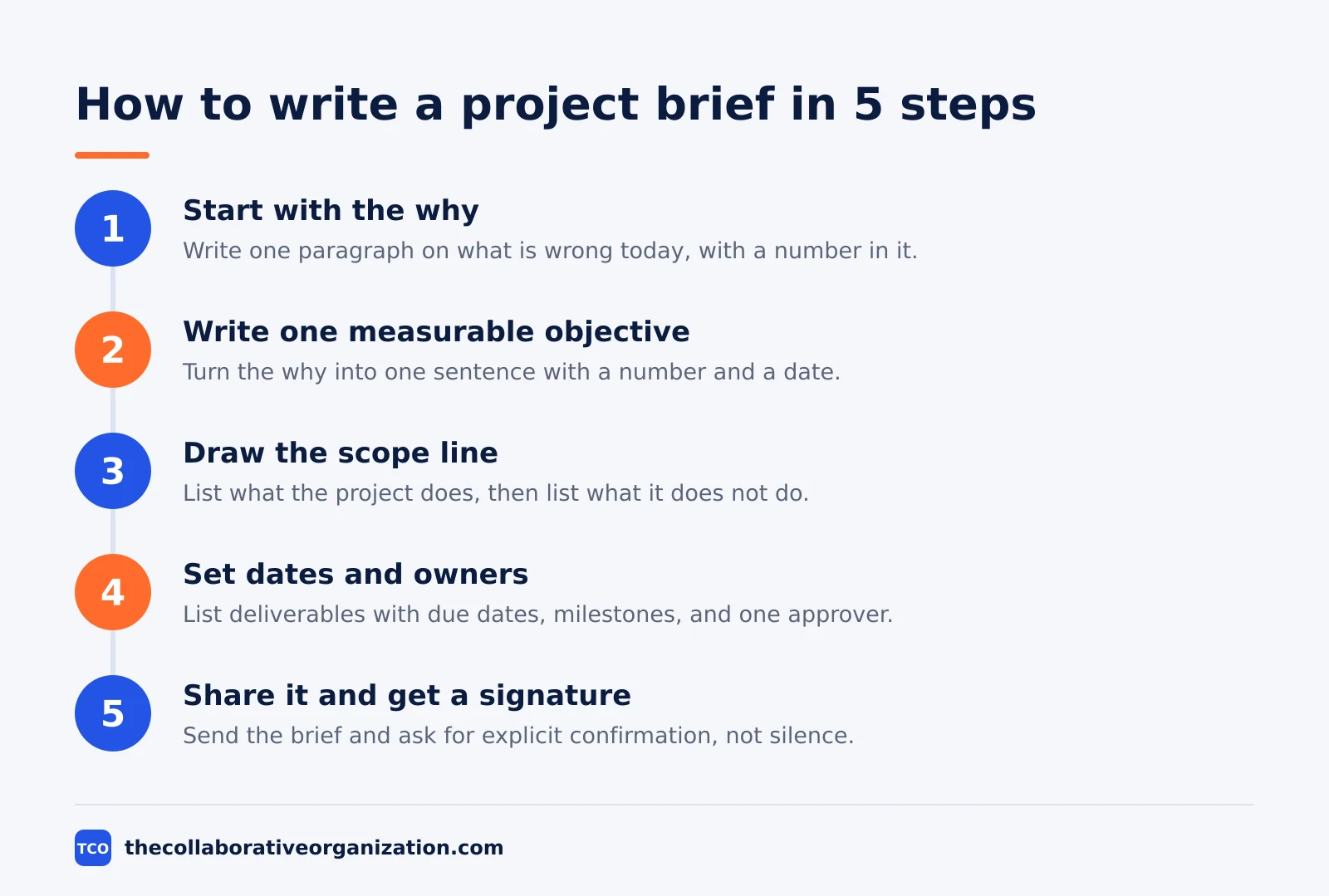
Writing a brief takes five steps, and the first two use no template at all. Asana lists the same five moves: add context, bring in objectives and success metrics, clarify the timeline, spotlight the target audience, then connect stakeholders to other resources. Work through them in order.
Step 1: Start with the why
Write one paragraph on what is wrong or missing today, with a number in it. A shop platform that ends support in March 2027 is a reason; “we need a new website” is not. The outcome of this step is a problem statement the sponsor agrees with, because a brief built on a disputed problem will be rewritten later.
Step 2: Write one measurable objective
Turn the why into one sentence with a number and a date. Add the success measure beside it: what data you will check, and on what date. The outcome is an objective the team can test, so there is no argument at the end about whether the project worked.
Step 3: Draw the scope line
List what the project does, one line per item, then list what it does not do. Keep the out list honest: if the loyalty program is out, write it down, even if the client hoped otherwise. Ronasit warns that the out-of-scope list and the budget range are the two items easiest to skip and most expensive to leave out. The outcome is a scope the budget can actually cover.
Step 4: Set dates, deliverables, and owners
List each deliverable with its due date, then the five or six milestone dates everyone plans around: kickoff, approvals, freezes, launch, and review. Name the team and one approver. The outcome is a page where every date has a name beside it, so nothing waits for “someone” to decide.
Step 5: Share it and get a signature
Send the brief to the team, the sponsor, and the client, and ask for explicit confirmation, not silence. A client brief guide from Docsaura makes the same point: send it and ask for confirmation, because a brief nobody answered is not approved. The outcome is a signed brief with a date, and that date is when the plan can start.
Worked example: a website relaunch brief
A nine-person agency relaunching a client shop shows what a filled-in brief looks like. The example below is an illustration, not a real project. The client is a small retailer whose shop runs on a platform that ends support in June 2027, and the agency has twelve weeks to relaunch it.
| Section | The filled-in line |
|---|---|
| Why | The shop platform ends support in June 2027, and checkout fails on 1 in 60 orders |
| Objective | Launch the new shop on 15 December 2026 with checkout conversion at or above 2.0 percent |
| Scope | Five items in, including new templates and checkout; loyalty program out |
| Deliverables | 10 page designs by 3 November 2026, launch on 15 December 2026 |
| Milestones | Kickoff 14 September, design approval 10 November, content freeze 24 November |
| Team | 9 people, with the client director as the single approver |
| Budget | $45,000 fixed fee in three payments: 30 percent at kickoff, 40 at design approval, 30 at launch |
| Success measure | Measured on 15 January: conversion, sessions, redirects, and open bugs |
| Risks | Design approval slips past 10 November, so the approval meeting is booked for 6 November |
Three things make this brief work. The objective has a number and a date, so the team can test it on 15 January. The scope names the loyalty program as out, so nobody can add it in week ten without a new decision.
The budget states the payment split, so the client knows when each payment falls due. A brief this clear takes about an hour to write once the facts are gathered, and it saves weeks of argument later. Share it at the team kickoff so everyone hears the same numbers at the same time.
Project brief vs project charter vs project plan
The brief is the shortest of the three documents, and it comes first. Each one has a different job, and teams that mix them up end up writing the plan twice. The table below draws the line.
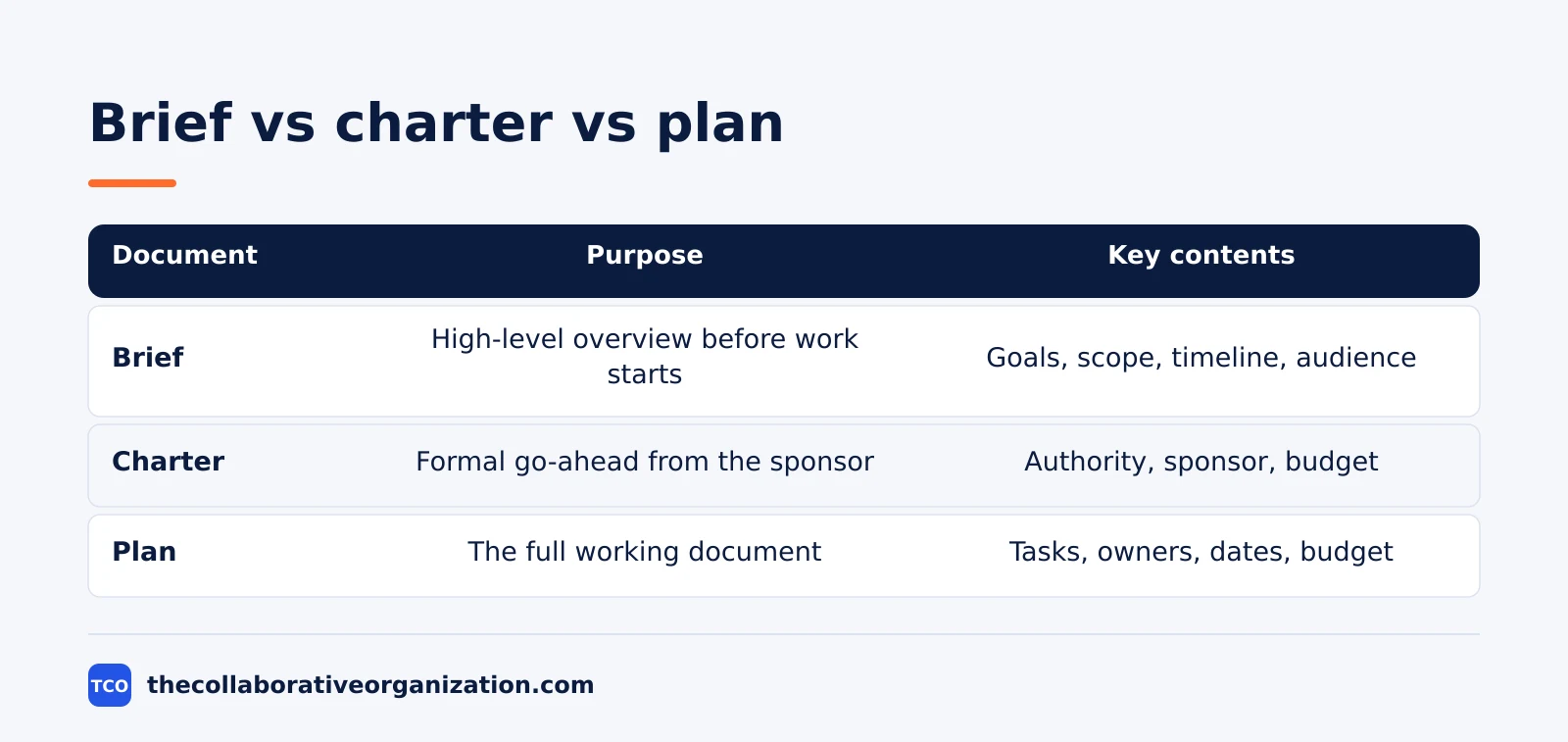
| Document | Purpose | Key contents |
|---|---|---|
| Project brief | High-level overview before work starts | Goals, scope, timeline, target audience |
| Project charter | Formal go-ahead from the sponsor | Authority, sponsor, high-level budget |
| Project plan | The full working document for delivery | Tasks, owners, dates, dependencies, budget |
The charter is the sponsor’s formal go-ahead. It gives the project manager authority to spend money and book time, and it usually carries the high-level budget. A small internal project often skips the charter and runs on the brief alone, while a project that crosses departments usually needs both.
The plan is the document the team works from day to day. It holds the task list, the owners, the dates, the dependencies, and the detailed budget.
Our guide on how to choose project management software covers where a plan lives once the brief is signed. The brief stays short so people read it; the plan stays detailed so people can run the work.
Tools that hold your project brief
A brief lives best where the plan will live, so the team never hunts for it. A shared doc works for a one-off brief, but a project tool keeps the brief beside the tasks, the dates, and the approvals. Compare the options on our project management software shortlist before you pick one.
| Tool | Best for | Free plan | Starting price (as of November 2026) | Notable limit |
|---|---|---|---|---|
| Asana | Briefs that turn into task lists and timelines | Free for 2 users | $10.99 per user per month (Starter), billed annually | Free plan covers 2 users |
| monday.com | Briefs with visual boards and status columns | Free plan for up to 2 seats | $9 per seat per month (Basic), billed annually | Paid plans need at least 3 seats |
| Notion | Briefs that live beside wikis and meeting notes | Free plan | $10 per member per month (Plus), billed annually | No built-in timeline view on Plus |
Asana ships a project brief template with background, goals, non-goals, and a hypothesis, and its guide says a short brief should include the project objectives, deadlines, stakeholders, deliverables, and constraints.
Notion Plus is $10 per member per month billed annually, or $12 billed monthly, and guests are free. The monday.com Basic price is $9 per seat per month billed annually, with a 3-seat minimum.
Common project brief mistakes to avoid
Most briefs fail in the same five ways, and each one shows up in the first week of the project. Run through the list below before you send the brief out.
- An objective with no number and no date. “Improve the website” cannot be tested, so the team cannot tell if the project worked. Give every objective a number and a date.
- No out-of-scope list. Without it, every request sounds in scope, and the budget quietly doubles. Write the out list first if you have to.
- No named approver. A brief approved by “the team” was approved by nobody. Name one person who signs it, and name a backup.
- Dates with no owners. A milestone with no name beside it waits for someone else to move it. Every date needs an owner.
- A brief that never gets updated. When the date or the budget moves, update the brief the same day and send the new version to everyone who signed the first one.
How to tell if your brief worked
A brief worked if the team can answer four questions from it without asking you. The test is simple: hand the brief to a new team member and ask what the project is for, what is in scope, when it lands, and who approves it. If they answer all four from the page, the brief did its job.
Measure the result against the success measure you wrote in step 2. Check the data on the date you named in the brief, and write the result down in the same place the brief lives. A brief that promised 2.0 percent checkout conversion gets checked on 15 January against real orders, not against a feeling in a meeting.
If the project missed its objective, the brief still helps: it shows which assumption was wrong, so the next brief starts from a better number. Keep the old briefs on file.
A team that can read last year’s briefs writes better ones this year, because the numbers in them are real. Good objectives start as user stories with a clear user and a clear outcome, and the brief turns them into a promise with a date.
Sources
- Asana - Project Brief: Definition, Template, Examples + Steps (2026)
- Rock.so - Project Brief Template: Example and Word Download (2026)
- Stackovation - How to Write a Software Project Brief (Template) (2026)
- Ronasit - How to write a project brief for software development (2026)
- Docsaura - How to Write a Project Brief for Clients: Freelancer’s Guide + Template (2026)
- Asana - Pricing (2026)
- monday.com - Pricing (2026)
- Notion - Pricing (2026)
Frequently asked questions
How long should a project brief be?
One to two pages covers most projects, and a software brief runs two to four pages when it must list users, features, and technical needs. If the brief runs longer than four pages, it is turning into a project plan, and most readers will stop reading. Keep the brief short and link to the plan for the detail.
Who writes the project brief?
The project manager writes it, usually right after the kickoff call or the first client meeting, and the sponsor or client approves it. On a small team, the person leading the project writes it. The writer gathers the facts from stakeholders first, because a brief written alone in a corner misses the constraints that matter.
What is the difference between a project brief and a project plan?
A brief is a short summary of the goal, scope, timeline, and audience, written before work starts so everyone agrees on the shape of the project. A plan is the full working document that follows it, with tasks, owners, dates, dependencies, and budgets. The brief says what and why, and the plan says how and when.
Should a project brief include a budget?
Yes, always include the budget or at least a budget range, because the budget decides what the scope can hold. A brief without a number lets the team promise work the money cannot cover. If the exact figure is not set yet, write the range and the date when the final number will be confirmed.
How often should you update a project brief?
Update the brief whenever the goal, the scope, the date, or the budget changes, and send the new version to everyone who approved the first one. A brief that still promises the old date after the date moved will mislead the team. Keep the old versions on file so the team can see what changed and when.
Related articles

document collaboration
Airtable vs Google Sheets: Which to Use in 2026
Airtable is a database with views and automations; Google Sheets is a free spreadsheet. Learn the limits, the 2026 prices, and which one fits your team's data.
November 19, 2026 · 7 min read
document collaboration
Confluence vs SharePoint: Which to Use in 2026
Confluence is a wiki built around pages; SharePoint is a document platform built around files. Learn the differences, the 2026 prices, and which one fits your team.
November 19, 2026 · 7 min read
document collaboration
How to Document Processes: A Step-by-Step Guide (2026)
To document a process, pick one task, watch it done for real, map the steps and decisions, then test the draft on someone new. Follow the 7 steps in this guide.
November 19, 2026 · 10 min read