How to Avoid Task Switching and Protect Focus (2026) | The Collaborative Organization
By The Collaborative Organization Team · November 19, 2026 · Last verified November 19, 2026 · 9 min read
Avoiding task switching means finishing one thing before starting the next, and giving the switch a note when you cannot. The brain does not run two demanding tasks at once; it swaps between them, and every swap costs time and accuracy. The six steps below cut the swaps you control and tame the ones you do not.
Key takeaways
- Task switching is not multitasking: the brain swaps between tasks, and every swap has a cost.
- People spend about 3 minutes on one event before switching, and 44% of interruptions are self-made.
- Unfinished tasks leave “attention residue” that hurts the next task; a one-minute note clears most of it.
- Batch small tasks, block 90 minutes for one hard task, and keep notifications off inside the block.
- Count your switches for a week; the top cause is usually one app or one habit.
What task switching is, and what it is not
Task switching means leaving one task unfinished and starting another, while true multitasking would mean doing both at once. The brain does not run two demanding tasks in parallel. It swaps between them, and psychologists call the penalty for each swap a switch cost.
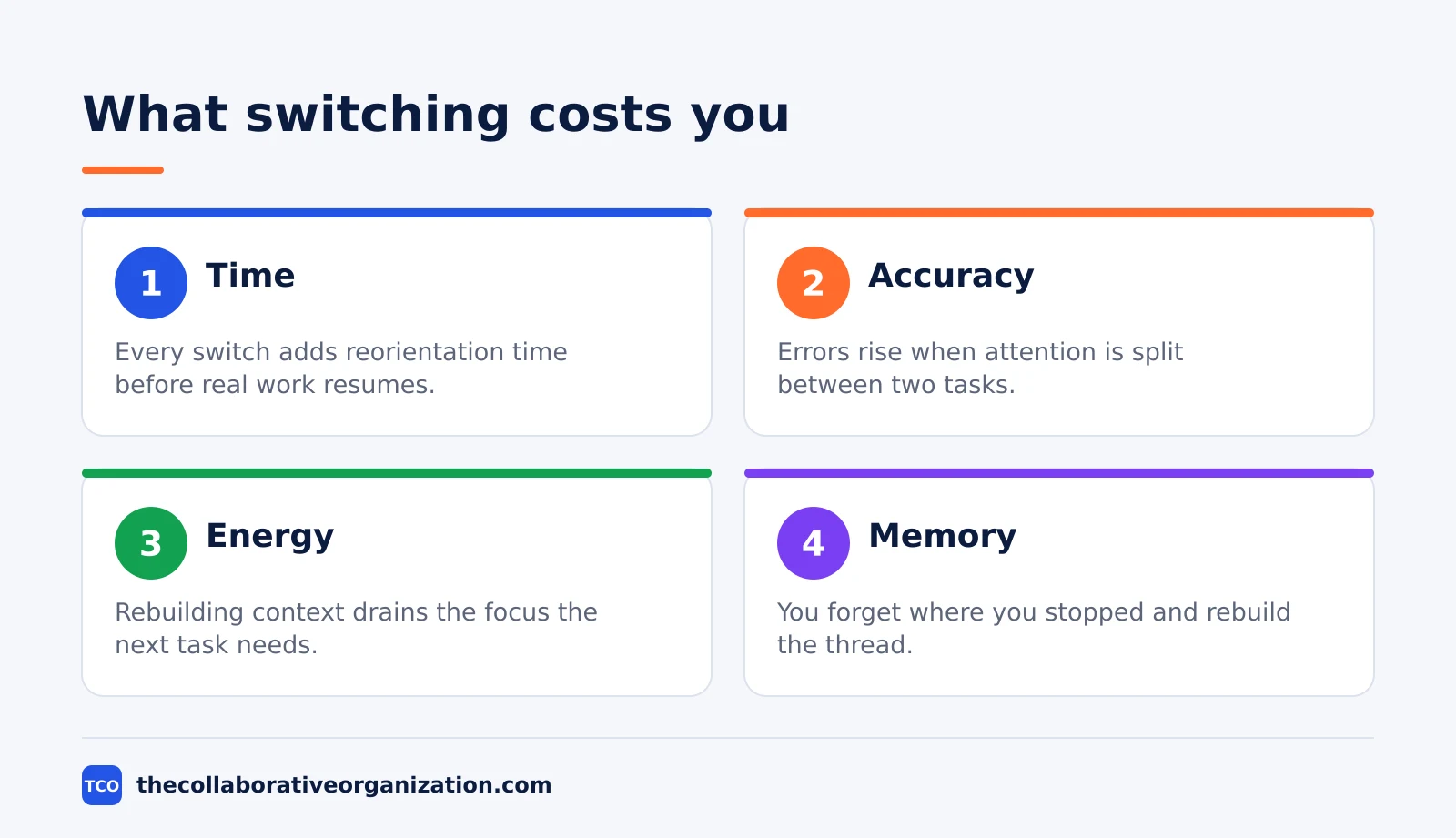
The cost has two parts: the time to reorient, and the residue. Reorienting means finding where you stopped and reloading the context.
The residue is the part of your attention that stays on the task you left, which Sophie Leroy named “attention residue” in 2009. Her experiments showed that difficulty letting go of an unfinished task hurts performance on the next one, in Organizational Behavior and Human Decision Processes.
Switching is not the same as changing tasks on purpose. A planned move at the end of a block is a decision; a mid-sentence jump to the inbox is a switch. This guide is about cutting the second kind.
Why switching feels good and costs so much
Switching feels productive because it clears small tasks fast, while the cost lands later, on the hard task. Each small win gives a quick sense of progress. The hard task waits, its context fades, and the return takes longer than the switch saved.
The numbers show how often it happens. People spent an average of 3 minutes and 5 seconds on one event before switching, and 2 minutes and 11 seconds on a device, Gloria Mark found in her 2006 Gallup interview. They worked on 12.2 different working spheres a day and switched between them every 10 minutes and 29 seconds.
Almost half the switches are self-made. People interrupted themselves about 44% of the time, Mark found, nearly as often as outside sources interrupted them. That is good news: the switches you make yourself are the ones you can stop. Our knowledge worker productivity statistics guide puts the message load behind the switches in numbers.
The laboratory cost is large. Brief mental blocks from shifting between tasks can cost as much as 40% of someone’s productive time, the American Psychological Association reports, quoting psychologist David Meyer. The figure is an upper bound from lab experiments, and the cost grows with how complex and unfamiliar the new task is.
The message load behind the switches is large. The average worker receives 117 emails a day and 153 Teams messages per weekday, Microsoft found in 2025.
How to avoid task switching in 6 steps
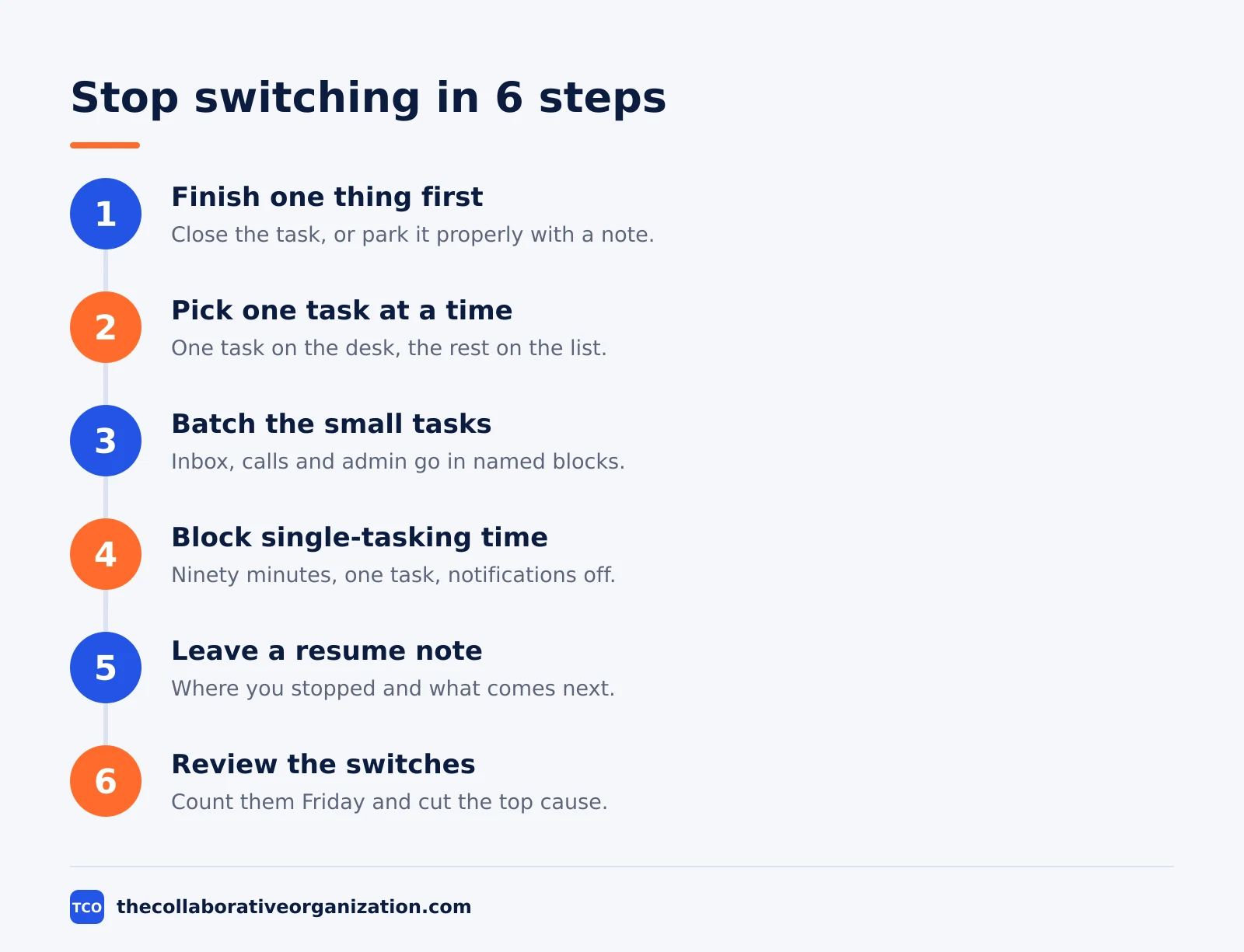
Six steps cut the switches you control: finish, pick one, batch, block, note, and review. Each step ends with something visible, so you know when it is done. Start with steps 1 and 5; they do most of the work.
Step 1: Finish one thing before starting the next
Close the task, or park it properly, before you open another. A finished task releases your attention; an unfinished one holds it. If you cannot finish, write the resume note from step 5 first.
Step 2: Pick one task at a time
Choose the single task for the next block and put the rest on the list, out of sight. One task on the desk beats five tabs open. Our guide on how to prioritize tasks at work shows how to pick the one that matters.
Step 3: Batch the small tasks
Put inbox, calls and admin together in named blocks instead of scattering them through the day. Small tasks done in a batch cost less than the same tasks split across ten switches. Give each batch a start and an end.
Step 4: Block 90 minutes for one hard task
Give the hardest task a 90-minute block with notifications off and the phone out of reach. Ninety minutes is long enough to load the problem fully and short enough to defend. One protected block a day beats five broken ones.
Step 5: Leave a ready-to-resume note before every switch
Before you switch, write down where you stopped, what is next, and what is still unclear. The note takes about a minute and is the fastest fix in this guide; the next section explains why it works.
Step 6: Review the switches every Friday
Count the switches for a week: what pulled you away, and when? The top cause is usually one app or one habit. Cut that one first, then count again the next week.
The ready-to-resume note: one minute that clears the residue
A one-minute note before you switch clears most of the residue that an unfinished task leaves behind. Write three lines: where you stopped, what comes next, and what is still unclear. That is the whole note, and it takes about a minute.
The note works because it gives the unfinished task a place to wait. In four studies, Leroy and Glomb found that a brief ready-to-resume plan reduced attention residue without harming performance on the new task, in Organization Science (2018). The plan was a short note about where to pick the work up again.
Leroy’s first finding explains why the note matters. Merely finishing the first task did not remove the residue in her 2009 experiments; finishing it under time pressure did. A note creates the same sense of closure: the task feels parked, so attention can move. The 2009 paper is the source for both findings.
Batching: the one exception that works
Batching works because it groups the same kind of work together, so the switches happen once, not ten times. Answer all the email in one block, make all the calls in another, and do the admin last. The work is the same; the switching is not.
Meetings batch well too. Group them into one or two blocks a day instead of letting them split every hour. Our guide on how to reduce meetings at work covers the cuts that free the blocks in the first place.
Time blocking is batching at the scale of the day. Cal Newport’s method partitions the day into blocks and assigns specific work to each one, spending 10 to 20 minutes building the next day’s schedule, he writes on his blog. When the plan breaks, redraw the rest of the day.
Tools that cut switching
A tool cuts switching when it holds the list, the notes and the calendar in one place. Every extra app is another place to check and another reason to switch. Pick one tool for tasks and live in it.
Compare the options on our task management software shortlist before you commit. The table below lists four tools with real starting prices, as of November 2026.
| Tool | Best for | Free plan | Starting price (as of November 2026) | Notable limit |
|---|---|---|---|---|
| Asana | Teams that want one list with due dates | Free for 2 people | $10.99 per user per month (Starter), billed annually | Free plan covers 2 people |
| ClickUp | Teams that want tasks, docs and goals together | Free Forever plan | $9 per user per month (Core), billed annually | $9 shown against a $12 regular price |
| Trello | People who want one board for the day | Free for up to 10 collaborators | $5 per user per month (Standard), billed annually | Free plan covers up to 10 collaborators per workspace |
| Todoist | People who want a fast single list | Free Beginner plan (5 projects) | $5 per month (Pro), $60 billed yearly | Team projects need the Business plan |
The Asana price comes from Asana pricing: the Personal plan is free for 2 users, and Starter is $10.99 per user per month when billed annually. The Advanced plan, at $24.99, adds resource management and capacity planning.
The ClickUp pricing page lists Core at $9 per user per month billed yearly, shown against a $12 regular price, so treat the $9 as a possible promotion.
Trello pricing lists Standard at $5 per user per month billed annually, with Premium at $10.
Todoist pricing lists Pro at $5 per month, $60 billed yearly, with Business at $8 per user per month.
Worked example: a morning without switching
A writer with a report due at noon finishes it by 11, because the morning holds one task at a time. The example below is an illustration, not a real person. It shows the six steps in one morning.
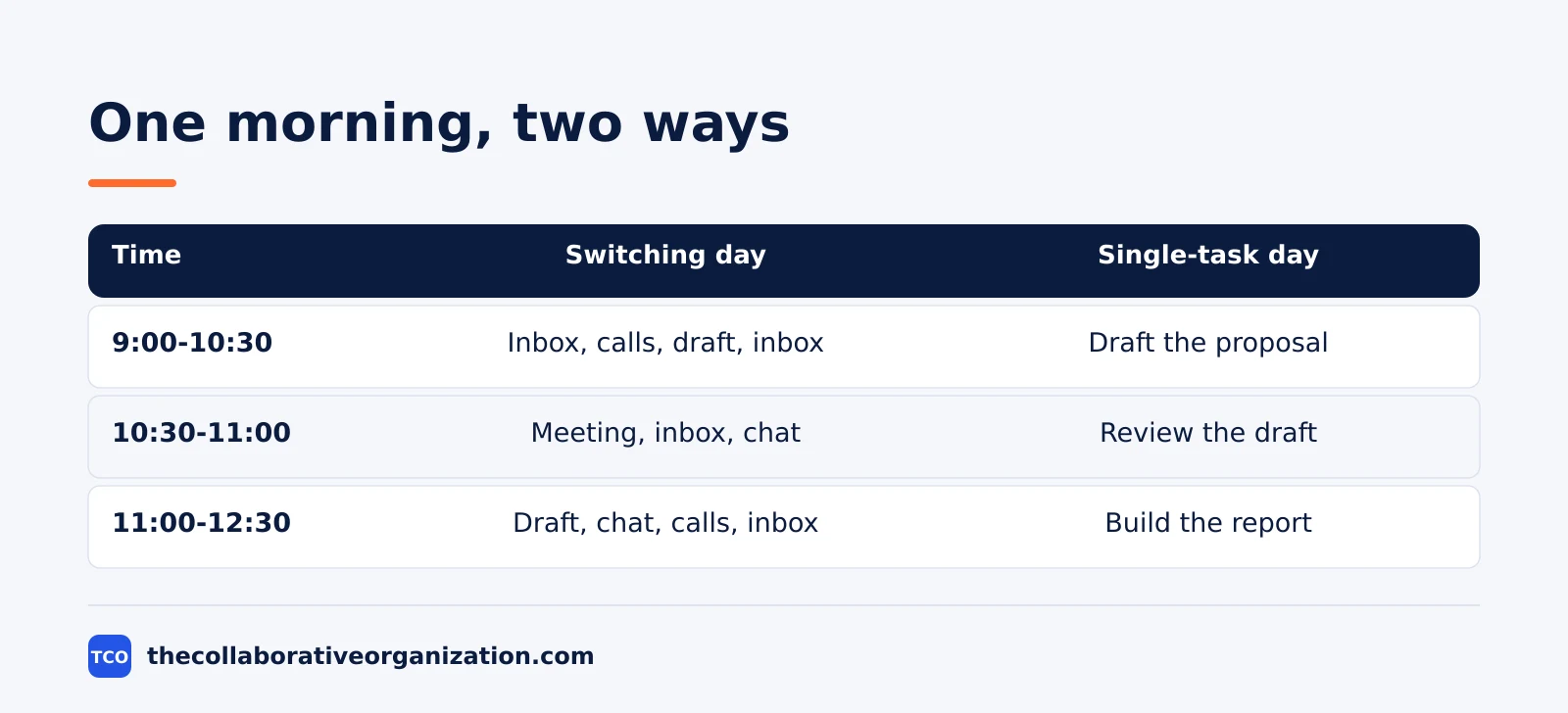
Sara blocks 9 to 11 for the report, with notifications off and the phone in another room. The inbox gets one batch at 11, and calls get one batch at 11:30. When a colleague messages at 9:40, she leaves a resume note and answers in the 11 o’clock batch.
By 11 the draft is done, and the inbox batch takes 25 minutes because every message already has a decision waiting. On a switching day, the same morning produced half a draft and an inbox that never emptied. The measure that matters is simple: one finished task before noon.
Common task-switching mistakes to avoid
Most attempts to stop switching fail in the same five ways, and all five are easy to avoid.
- Believing you are the exception. In one lab study, about 2.5% of people could multitask without measurable decline (Watson and Strayer, 2010). Assume you are in the other 97.5%.
- Switching to “just check” the inbox. A quick check is a switch, and the inbox always has one more thing.
- Keeping five tabs open “just in case”. Every open tab is a switch waiting to happen. Close all but the task in hand.
- Skipping the resume note. A switch without a note leaves the task open, and the residue follows you into the next task.
- Blaming the tools instead of the habit. A new app does not stop switching; one list and one block at a time does.
Sources
- American Psychological Association - Multitasking: Switching Costs (2006)
- Gallup - Too Many Interruptions at Work? (2006)
- Leroy - Why Is It So Hard to Do My Work? (2009)
- Leroy and Glomb - Tasks Interrupted (2018)
- Microsoft - Breaking Down the Infinite Workday (2025)
- Cal Newport - Deep Habits: The Importance of Planning Every Minute of Your Work Day (2013)
- Asana - Pricing (2026)
- ClickUp - Pricing (2026)
- Trello - Pricing (2026)
- Todoist - Pricing (2026)
Frequently asked questions
How do I stop switching between tasks at work?
Finish one thing before starting the next, and leave a one-minute resume note when you must switch. Batch small tasks into named blocks, give the hardest task a 90-minute block with notifications off, and count your switches for a week to find the top cause.
Is multitasking bad for productivity?
For demanding tasks, yes. The brain swaps between tasks instead of running them together, and the American Psychological Association reports that the mental blocks from shifting can cost as much as 40% of productive time. Simple, familiar pairs, like folding laundry while listening to a call, are the exception.
How long does it take to refocus after an interruption?
The often-quoted 23 minutes and 15 seconds is not refocus time. It is the average clock time until interrupted work was resumed, Gloria Mark told Gallup in 2006, after about two other tasks. The peer-reviewed figure from her team is 25 minutes and 26 seconds.
What is attention residue?
Attention residue is the part of your attention that stays on a task you left, named by Sophie Leroy in 2009. It is heaviest when the first task was left unfinished, and it hurts performance on the next task. A one-minute ready-to-resume note before switching clears most of it.
How many tasks should I work on at once?
One. Pick the single task for the next block and put the rest on the list, out of sight. Batch the small tasks together, and give the hardest task a protected 90-minute block. One finished task beats three half-started ones.
Related articles
task management
Eisenhower Matrix Explained: Prioritize in 4 Steps (2026)
The Eisenhower Matrix sorts tasks by urgency and importance into four quadrants: do, schedule, delegate, delete. Learn each quadrant and how to use it.
November 19, 2026 · 9 min read
task management
Getting Things Done Method Explained: GTD in 5 Steps (2026)
Getting Things Done (GTD) moves every commitment out of your head into a trusted system, in five steps: capture, clarify, organize, reflect, engage.
November 19, 2026 · 9 min read
task management
How to Create a To-Do List That Works: 7 Steps (2026)
A to-do list that works starts with one capture list and a short today list of 1 to 3 priorities. Follow these 7 steps to build a list you finish.
November 19, 2026 · 10 min read