Sprint Review vs Sprint Retrospective (2026) | The Collaborative Organization
By The Collaborative Organization Team · November 19, 2026 · Last verified November 19, 2026 · 8 min read
The sprint review inspects the product the team built, while the sprint retrospective inspects how the team worked to build it. The review faces outward to stakeholders and updates the product backlog. The retrospective faces inward to the team and agrees improvements for the next sprint. One looks at the output, the other at the process.
Key takeaways
- The sprint review inspects the product with stakeholders, while the retrospective inspects the process with the Scrum Team only.
- The review is capped at 4 hours and the retrospective at 3 hours for a one-month sprint, per the Scrum Guide 2020.
- The review runs second to last in the sprint, and the retrospective closes the sprint.
- Only Done work is shown at the review, and unfinished work goes back to the Product Backlog.
- The most helpful retrospective improvements may be added to the next Sprint Backlog.
What is a sprint review?
A sprint review is the Scrum event where the Scrum Team and stakeholders inspect what the sprint produced and decide what to do next. The team presents the results of its work to key stakeholders, and together they discuss progress toward the Product Goal and what has changed in their environment. The Product Backlog may be adjusted to reflect new opportunities.
Scrumdemy follows the Scrum Guide 2020 here: the review “inspects the outcome of the Sprint and decides on future adaptations.” The guide describes it as a working session and says the Scrum Team should avoid limiting it to a presentation. Stakeholders react, ask questions, and help shape what comes next, rather than sitting through a slide deck.
Two rules matter most. The review is not a release gate: an Increment can be delivered to stakeholders as soon as it meets the “Definition of Done”, even before the review. Our guide on what Scrum is covers the five events the review belongs to.
And only Done work is shown: work that does not meet the “Definition of Done” is not part of an Increment, cannot be presented at the review, and goes back to the Product Backlog. Our guide on the product backlog explains what the review updates.
What is a sprint retrospective?
A sprint retrospective is the Scrum event that closes the sprint, where the team plans ways to increase quality and effectiveness. The Scrum Team inspects how the last sprint went with regard to individuals, interactions, processes, tools and its “Definition of Done”, then identifies the most helpful changes. The most impactful improvements are addressed as soon as possible and may even be added to the Sprint Backlog for the next sprint.
The structure that holds up, sprint after sprint, comes from Esther Derby and Diana Larsen’s book Agile Retrospectives. TeamRetro lists their five stages: set the stage, gather data, generate insights, decide what to do, and close the retrospective. The Scrum Guide sets the purpose and the timebox but no facilitation sequence, so teams choose their own format for each session.
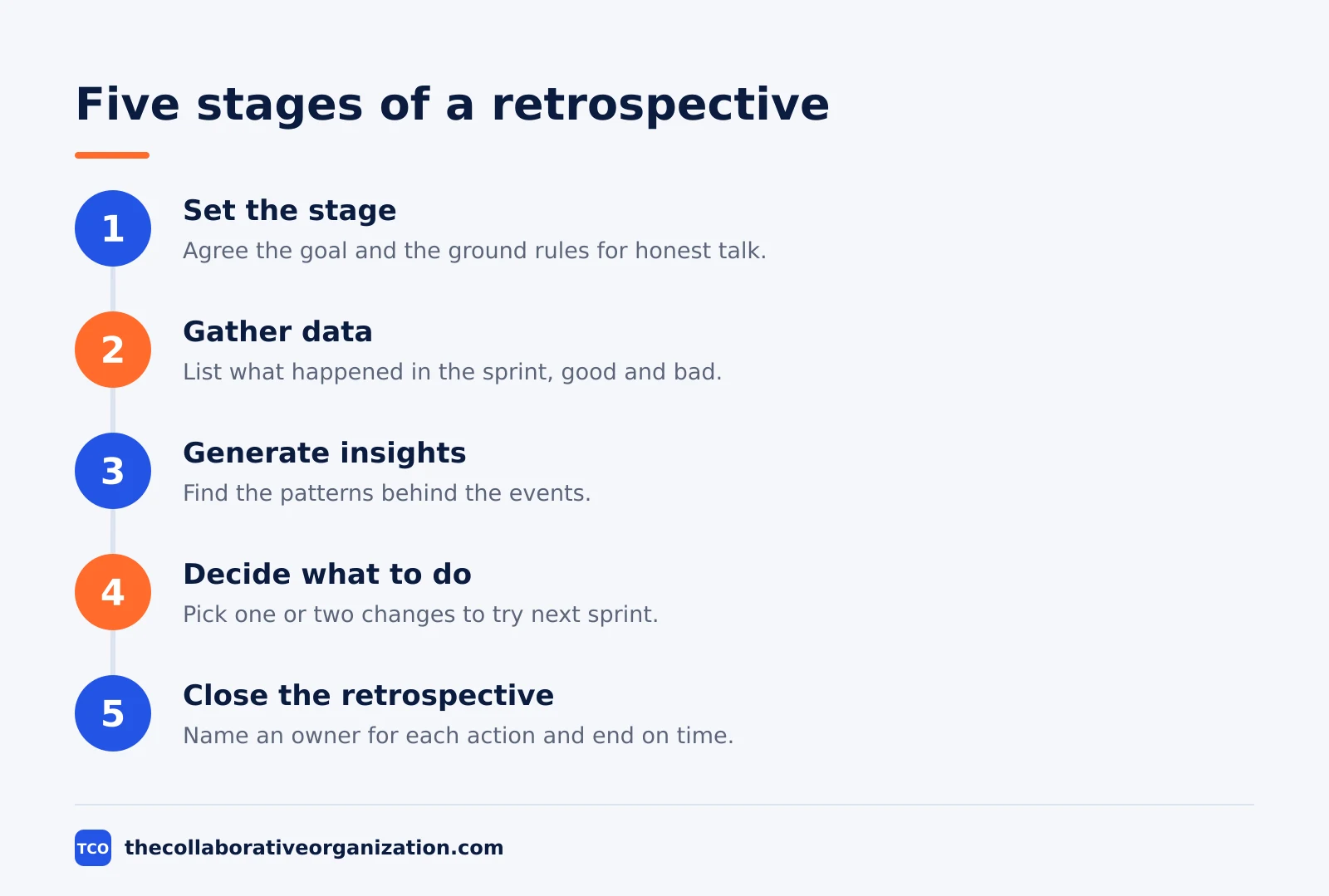
The retrospective looks at how the team worked, not what it built. Inspecting the product is the job of the review. A retrospective that drifts into a status update has lost its purpose, and the fix is to return to the process: what slowed the team down, what helped, and what one or two changes it will try next.
Sprint review vs sprint retrospective: the side-by-side table
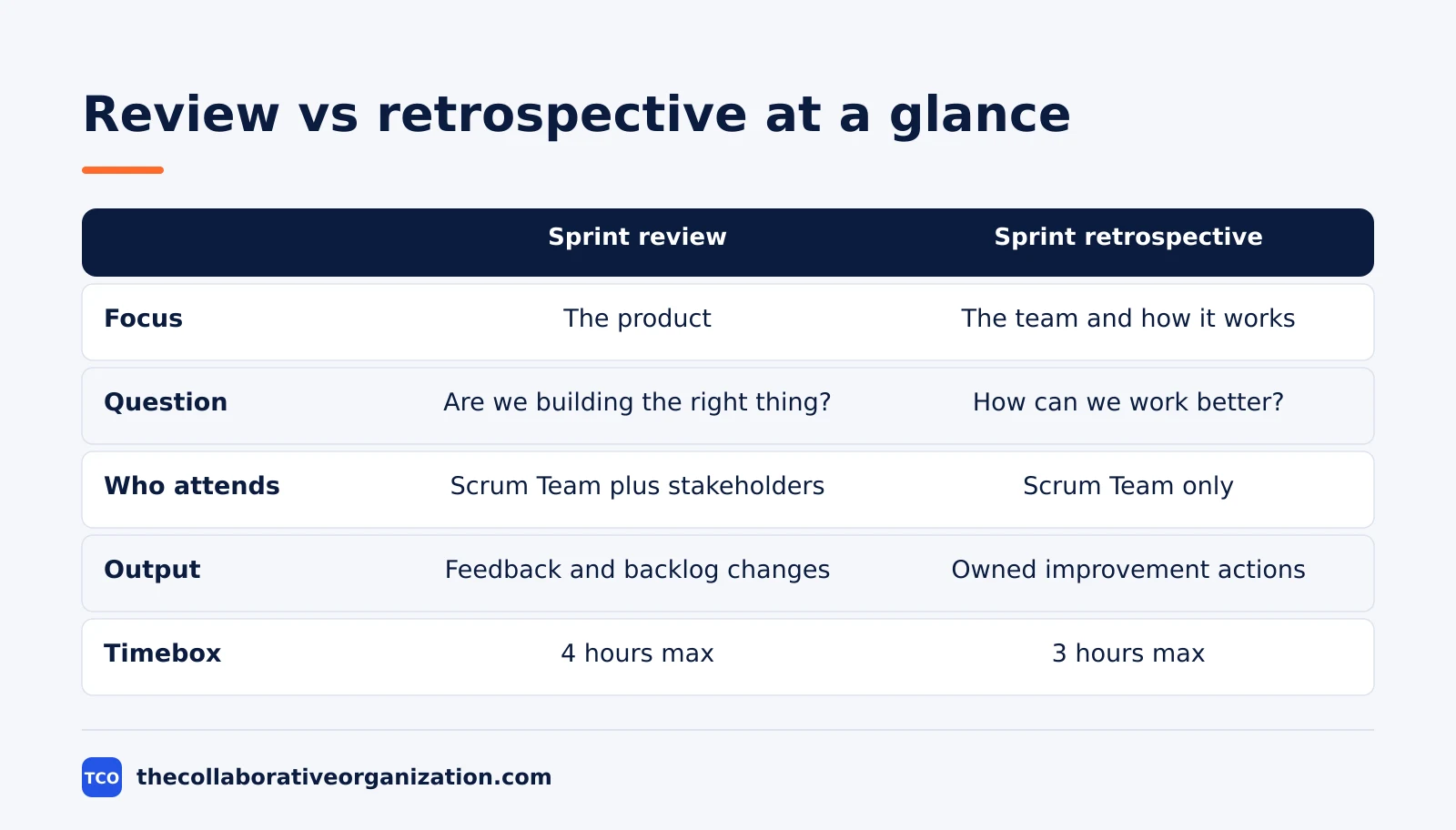
The review looks at the product, the retrospective looks at the process, and every other difference follows from that one line. Different subject, different attendees, different output, different tone.
| Aspect | Sprint review | Sprint retrospective |
|---|---|---|
| Focus | The product and the increment | The team and how it works |
| Core question | Are we building the right thing? | How can we work better together? |
| Attendees | Scrum Team plus stakeholders | Scrum Team only |
| Timing | Second to last event of the sprint | Final event, closes the sprint |
| Output | Feedback and an updated Product Backlog | Owned improvement actions |
| Timebox (one-month sprint) | 4 hours maximum | 3 hours maximum |
| Tone | Demonstrative and collaborative | Internal and candid |
Our guide to agile ceremonies places both events in the sprint cycle, and the table above is the quickest way to tell them apart. If the meeting is about the product, it is a review. If it is about how the team worked, it is a retrospective.
Who attends each event, and why it matters
Stakeholders attend the review because it is about the product, and they stay out of the retrospective because it is about the team. That split is the whole reason the two events exist separately. The review needs outside eyes on the product. The retrospective needs honest talk about the process.
The review brings the Scrum Team together with key stakeholders: users, customers, managers, and anyone with a stake in the product. They see the Increment, react to it, and help decide what the backlog should hold next. The wider the feedback, the better the next sprint’s direction.
The retrospective brings the Scrum Team only: the Developers, the Product Owner and the Scrum Master. Our guide on Scrum roles and responsibilities explains who each of those is.
No stakeholders, no executives unless they are on the team. People will not talk honestly about process problems, slow handoffs or friction with each other when external stakeholders are in the room, and without that honesty the retrospective produces nothing worth acting on.
How long does each event take?
The Scrum Guide 2020 caps the review at 4 hours and the retrospective at 3 hours for a one-month sprint, and both are usually shorter for shorter sprints. A timebox is a maximum, not a target. Either event can end as soon as its purpose is achieved, and it should not run past its timebox.
Scrumdemy lists the full set for a one-month sprint: Sprint Planning 8 hours, the Daily Scrum 15 minutes, the Sprint Review 4 hours and the Sprint Retrospective 3 hours. The sprint itself lasts one month or less. For a two-week sprint, most teams run the retrospective in 60 to 90 minutes, and the review in about the same.
The guide gives no formula for shorter sprints, so do not expect an exact figure for a two-week event. The known numbers are the one-month maximums. Our guide on what a sprint is in Scrum covers the container these events sit in.
Our guide on sprint vs iteration clears up the naming confusion around it.
Worked example: the last day of a two-week sprint
A team on a two-week sprint runs both events on the final Friday, review first, retrospective second, with a break between them. The illustration below follows the timeboxes and the order the Scrum Guide sets, with times a real team would use.
The review runs from 10:00 to 11:00. The team demos the two features that meet the “Definition of Done”: a new checkout step and a faster search. A third feature is not Done, so it is not shown and it goes back to the Product Backlog.
Stakeholders ask for the checkout step to reach a second user group first, and the Product Owner moves two backlog items up and one down. The review ends with an updated backlog and a shared view of where the product stands.
The retrospective runs from 11:15 to 12:15, with the Scrum Team only. The team gathers data: the checkout work waited 2 days for a review, and the search work went smoothly. The insight is that reviews are the bottleneck, not coding.
The team agrees two changes: reviews happen within one working day, and the reviewer is named when work starts. The first change goes into the next Sprint Backlog, so it has the same visibility as product work. Our guide on how to run a sprint planning meeting shows where that backlog item lands on Monday.
Can you combine the review and the retrospective?
No, combining them damages both, and the retrospective suffers most. Product talk is louder than process talk, so the retrospective gets squeezed into the last ten minutes. Worse, people will not speak honestly about internal friction with stakeholders in the room, so the process conversation never happens at all.
WorksBuddy puts it plainly: the distinction is not just semantic, because it decides who speaks, what gets decided, and what changes as a result. The review is an external conversation about the product. The retrospective is an internal one about the team.
Rework agrees: running them as one meeting is a common mistake that kills candor. Keep them separate, run the review first, take a break, then run the retrospective with the team only. The break matters: it marks the switch from product talk to process talk, and it gives stakeholders time to leave.
Common sprint review vs retrospective mistakes to avoid
Most teams confuse the two events in the same five ways, and all five are easy to spot. Run through the list before the last day of the sprint.
- Turning the review into a slide deck. The guide calls the review a working session. Show working software, take feedback, and adapt the backlog.
- Showing unfinished work at the review. Only Done work is part of an Increment. Unfinished work goes back to the Product Backlog.
- Inviting stakeholders to the retrospective. Their presence stifles honest talk about process, and the retrospective produces nothing worth acting on.
- Ending the retrospective with no owner. An improvement with no named owner and no place in the next Sprint Backlog will not happen.
- Skipping the retrospective when the sprint went well. A good sprint still has one thing worth improving, and skipping the event teaches the team it is optional.
Sources
- Scrumdemy - Scrum Events and Timeboxes Explained (Scrum Guide 2020) (2026)
- Scrum Guide - The Scrum Guide 2020 (2020)
- TeamRetro - What Is a Sprint Retrospective? (2026)
- Rework - Sprint Retrospective: Formats, Questions, and Examples (2026)
- WorksBuddy - Sprint Retrospective vs Sprint Review Guide (2026)
- Simpliaxis - What Is Sprint Retrospective in Agile? (2026)
- Sprightbulb - Sprint Review in Scrum: 10 Common Questions, Answered (2026)
- Scrum.org - Length of a Sprint and Change in Timeboxes of Other Events (2020)
Frequently asked questions
What is the difference between a sprint review and a sprint retrospective?
The sprint review inspects the product: the team shows completed work to stakeholders and gathers feedback. The sprint retrospective inspects the process: the team reflects on how it worked and agrees improvements. The review faces outward to stakeholders, and the retrospective faces inward to the team.
Who attends the sprint review and the sprint retrospective?
The sprint review is attended by the Scrum Team and key stakeholders, since it is about the product and what happens next. The sprint retrospective is attended by the Scrum Team only, since it is about how the team worked and needs honest talk that stakeholders in the room would stifle.
How long should a sprint review and a retrospective take?
The Scrum Guide 2020 caps the review at 4 hours and the retrospective at 3 hours for a one-month sprint, and both are usually shorter for shorter sprints. Most teams on two-week sprints run each in about 60 minutes. A timebox is a maximum, not a target, so either meeting can end early.
Can you combine the sprint review and the retrospective into one meeting?
No. Combining them damages both. Product talk is louder than process talk, so the retrospective gets squeezed, and people will not speak honestly about internal friction with stakeholders in the room. Run the review first, take a break, then run the retrospective with the team only.
What comes out of a sprint retrospective?
The retrospective produces one to three improvement actions, each owned by a named team member. The most helpful improvements may be added to the Sprint Backlog for the next sprint, which gives them the same visibility and accountability as product work.
Related articles

guides
Free Project Management Templates: 7 to Copy (2026)
Seven free project management templates from monday, Wrike, Teamwork, Smartsheet, ClickUp, Asana and Trello, with what each one is for and what free really costs.
November 20, 2026 · 7 min read

guides
Project Proposal Template: Copy and Win Work (2026)
A project proposal template pitches the work before it is approved: problem, solution, scope, budget, timeline and terms. Copy the template and filled example.
November 20, 2026 · 10 min read

guides
Action Plan Template: Goal to Done in One Page (2026)
An action plan template turns one goal into owned steps with dates, dependencies and a success measure. Copy the table and see it filled for a support team.
November 20, 2026 · 11 min read