Project Management Phases: The 5 Phases Explained (2026) | The Collaborative Organization
By The Collaborative Organization Team · November 19, 2026 · Last verified November 19, 2026 · 11 min read
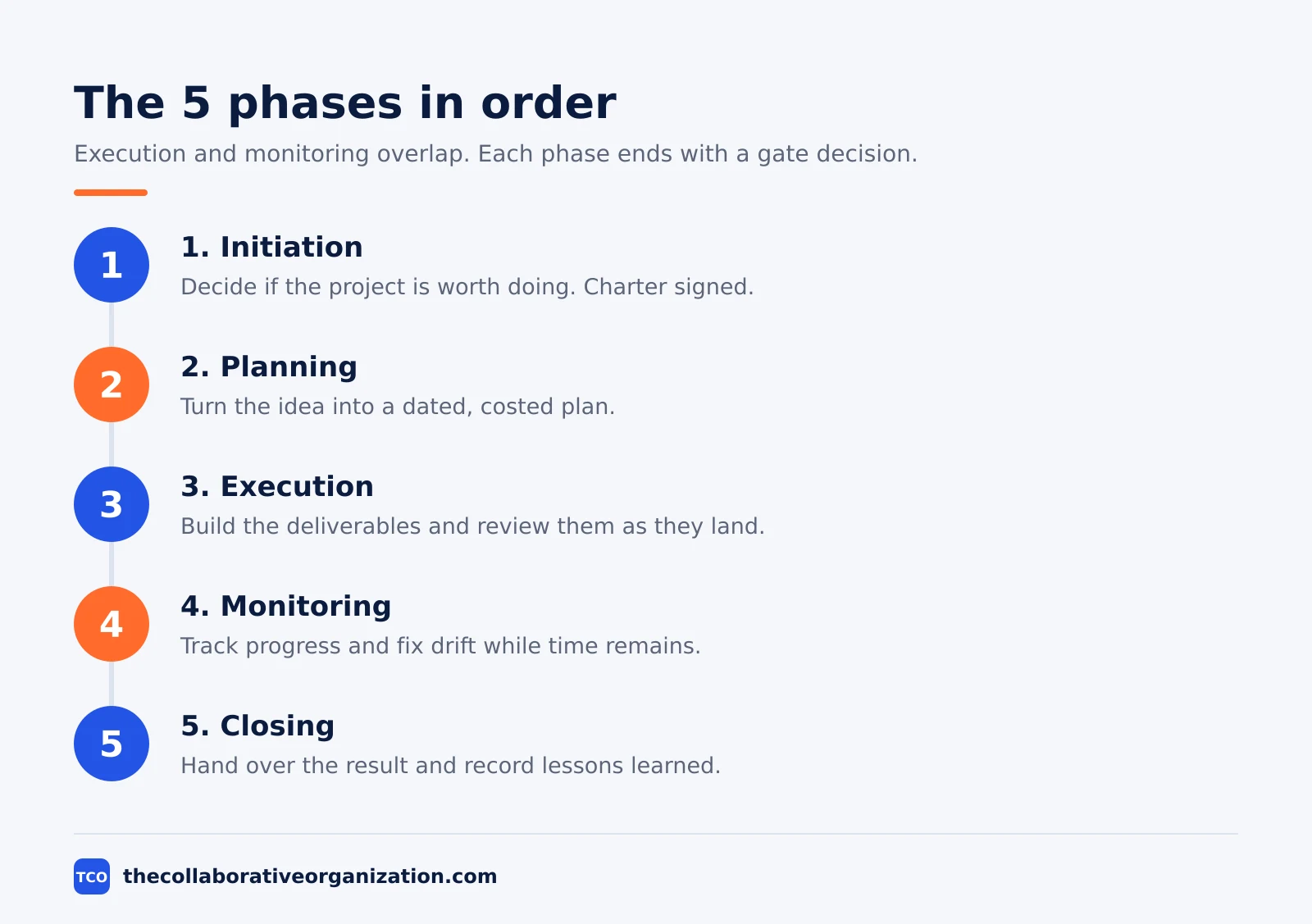
The five project management phases are initiation, planning, execution, monitoring and closing. Each phase organizes a set of activities and ends with a deliverable and a decision: go on, change course or stop. Together they carry a project from an idea to a finished, handed-over result.
Key takeaways
- The five phases are initiation, planning, execution, monitoring and closing.
- Initiation decides whether the project is worth doing, and planning turns the idea into a dated, costed plan.
- Execution and monitoring overlap, because the team tracks progress while it builds the deliverables.
- A phase gate ends each phase, and stakeholders decide there whether the project goes on, changes or stops.
- Closing hands over the result, releases the team and records lessons learned for the next project.
- The phases are periods of time, while the PMI process groups are kinds of work that run across them.
What the project management phases are
The project management phases are the distinct stages a project moves through from initiation to completion. Each phase has a purpose, a set of activities and a deliverable that proves the work is done. The phases give a project its rhythm: decide, plan, build, check, close.
Atlassian describes the same five phases and notes one exception to the order: execution and monitoring often overlap, because it matters to find problems before the final product launches. That overlap is normal, not a sign of a broken plan.
A team that finds a defect in week three can fix it for the cost of a day, while the same defect found in the final week can cost the launch date.
The phases are not the same as the PMI process groups, even though the names look alike. A phase is a period of time that ends at a gate, while a process group is a kind of work that runs through several phases.
Monitoring and controlling, for example, is a process group that runs from the first week to the last, while monitoring as a phase is the work of checking progress during execution.
Phase 1: Initiation
Initiation decides whether the project is worth doing, before any detailed planning starts. The team defines the purpose at a high level, checks that the project is feasible and names the people who must be involved. The phase exists to stop bad projects early, when the cost of stopping is still small.
The main outputs are the business case, a feasibility check, a stakeholder list and the project charter. The business case says why the project is worth the money.
The feasibility check asks whether the team can actually do it with the time and people available. The charter then authorizes the work and gives the project manager the authority to use resources.
Our guide on project charter vs project plan explains why the charter is short by design: it authorizes the project and states the goal, while the plan that follows says how the work gets done. A charter that tries to plan the work in detail has already drifted into the next phase.
Gate at the end of initiation
The sponsor reviews the business case and the charter and decides: approve the project, ask for changes or stop it. A project that fails this gate has cost a few days of thinking, not months of building, which is the whole point of the phase.
Phase 2: Planning
Planning turns the approved idea into a clear plan with scope, dates, owners, risks and a budget. This is the phase where the team writes down what will be built, in what order, by whom and for how much. A plan written well here saves far more time than it costs, because it prevents rework during execution.
The work starts with the scope statement, then breaks the scope into a work breakdown structure and sequences the work into a schedule with milestones. The team then costs the work, logs the risks and writes the communication plan. Atlassian lists the same contents for the planning phase: scope, timeline, milestones, risks, owners and dependencies.
Planning also sets the baselines: the approved scope, schedule and budget that later progress is measured against. Save the baselines before execution starts, and change them only through a recorded change, or the team will have no honest way to say whether it is late.
Gate at the end of planning
The sponsor and the key stakeholders review the plan and approve it, ask for changes or stop the project. A plan approved here is the promise the team will be measured against, so the review should be honest, not a formality.
Phase 3: Execution
Execution is where the team does the planned work and produces the deliverables. Tasks are assigned, work is built, blockers are cleared and the result takes shape. This phase usually takes the most time and the most people, because it holds all of the building work.
The manager’s job shifts in this phase from writing to watching. Short check-ins replace long planning meetings, and the manager spends the day clearing the path.
That means chasing a late approval, settling a disagreement about the result or finding help for a task that is stuck. The team reports progress in the tool, so the manager sees status without asking for it.
Quality checks belong inside execution, not after it. A deliverable reviewed as soon as it is built can be fixed in hours, while a deliverable reviewed only at the end of the phase needs days of rework. Build the review into the task, with a named reviewer and a date.
Gate at the end of execution
The team confirms the deliverables are built and pass their checks, and the sponsor accepts them or asks for fixes. Work that is built but never accepted is not done, and the phase should not close until the acceptance is written down.
Phase 4: Monitoring
Monitoring tracks progress against the plan and starts fixes while there is still time to fix them. The manager compares real dates and spend with the baselines, reviews risks, watches scope changes and reports status to stakeholders. Monitoring runs beside execution, not after it, because a problem found late costs far more than the same problem found early.
The tools are simple: a status report, a risk log and a change log. The status report says what is done, what is late and what is blocked.
The risk log says what might go wrong next and who owns the response. The change log records every approved change, so the plan and the real work never drift apart without a record.
Atlassian lists the same checks for this phase: status, deadlines, risks, budget, blockers and scope changes. A manager who tracks only dates will miss the budget, and a manager who tracks only the budget will miss the scope, so all six need one short weekly review.
Gate at the end of monitoring
There is no single gate for monitoring, because it runs through the whole project. Instead, each weekly review is a small gate: the team decides whether the plan still holds, whether a change is needed and whether the sponsor must be told.
Phase 5: Closing
Closing wraps up the project: the result is handed over, the team is released and the lessons are recorded. The team confirms the work is complete, gets written acceptance from the sponsor, closes contracts and files the final documents. Closing is the shortest phase, but skipping it leaves the project open, with small requests arriving for months.
The last step is a retrospective with the team, where the group asks what worked, what went wrong and what to change next time. Our guide on how to run a retrospective meeting covers the format for that session. Write the answers in one page and file them where the next project manager will find them.
Closing also frees the people. Team members return to their normal work or move to the next project, and the budget is closed so no further spend lands on it. A project with no formal close keeps costing attention long after the work is done.
Gate at the end of closing
The sponsor signs the final acceptance and the project is formally closed. If the signature never comes, the project is not closed, even if the team has moved on to other work.
The five phases at a glance
The table below sums up each phase, its purpose and its main output. Use it as a quick reference when you plan a new project, and check the gate column before you move from one phase to the next.
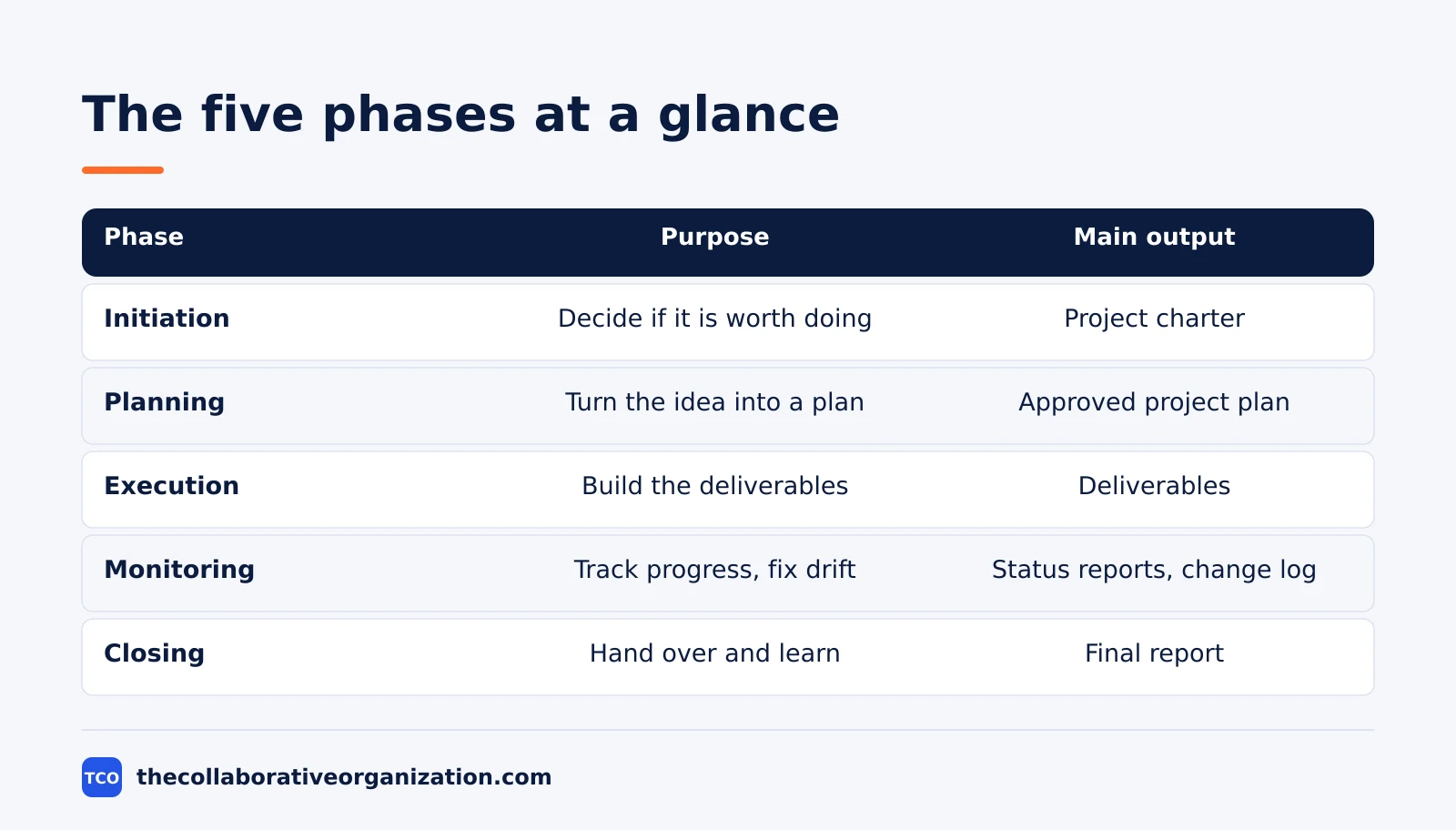
| Phase | Main purpose | Key activities | Main output |
|---|---|---|---|
| Initiation | Decide if the project is worth doing | Business case, feasibility, stakeholders | Project charter |
| Planning | Turn the idea into a clear plan | Scope, schedule, budget, risks | Approved project plan |
| Execution | Build the deliverables | Assign tasks, build, review, clear blockers | Deliverables |
| Monitoring | Track progress and fix drift | Status, risks, budget, changes | Status reports, change log |
| Closing | Hand over the result and learn | Acceptance, handover, retrospective | Final report, lessons learned |
The table shows the flow, but remember the overlap: monitoring runs beside execution, and the plan is updated through the whole project, not only in the planning phase. The phases are a map, not a set of locked rooms.
How the phases differ from the process groups
Phases are periods of time, and process groups are kinds of work, which is why the two lists look alike but mean different things. The five process groups from the PMBOK Guide are Initiating, Planning, Executing, Monitoring and Controlling, and Closing. The names match the phases, but the idea is different.
A process group is a logical grouping of processes that achieves a set of objectives, and the groups overlap and interact through the whole project. Planning processes, for example, run during execution too, whenever a change needs a new plan.
A phase, by contrast, has a start, an end and a gate, and the project moves from one phase to the next.
Teamwork makes the same point: PMI treats the five process groups as independent from the life cycle, even though they follow it closely in name and content. When someone says “we are in the planning phase,” they mean a period of time. When they say “we are doing planning work,” they may mean the same work during execution.
Worked example: a 12-week office move
A 12-week office move shows all five phases in order, with gates that matter. Imagine a company of 40 people moving to a new office, with a fixed move date set by the end of the old lease. The result is one working office: desks, network, phones and a signed handover.
Initiation takes one week. The manager writes a business case: the new office costs less per desk and fits the team, and the move is feasible in 12 weeks. The sponsor signs the charter and names the manager. The gate approves the move.
Planning takes three weeks. The scope lists the new desks, the network install and the phone move, and excludes new furniture, which the sponsor wants next year. The schedule sets milestones for the network, the desks and the move weekend, and the budget is set at $60,000. The gate approves the plan.
Execution and monitoring run for seven weeks. The network is installed, the desks arrive, and the weekly check catches a late phone install in week eight.
The fix is a weekend visit from the supplier, which costs $1,500 and keeps the date. Closing takes one week: the sponsor signs the handover, the old lease is closed, and the lessons page says to book the phone supplier four weeks earlier next time.
Tools that support each phase
A project tool carries the plan through all five phases, so the charter, the schedule and the status live in one place. The tool holds the tasks for execution, the dates for monitoring and the files for closing, which means the manager updates one place instead of five documents.
| Tool | Best for | Free plan | Starting price (as of November 2026) | Notable limit |
|---|---|---|---|---|
| Asana | Teams that want each phase to have named owners | Free for 2 people | $10.99 per user per month (Starter), billed annually | Free plan covers 2 people |
| ClickUp | Teams that want phases, Gantt charts and docs together | Free Forever plan | $9 per user per month (Core), billed annually | Page shows $9 against a $12 regular price, so it may be promotional |
The Asana price comes from Asana pricing: the Personal plan is free for 2 users, and Starter is $10.99 per user per month when billed annually. The ClickUp pricing page lists Core at $9 per user per month billed yearly, shown against a $12 regular price.
If you have not picked a tool yet, compare the options on our project management software shortlist. The right tool is the one the team opens every day, not the one with the longest feature list.
Common project management phase mistakes to avoid
Most phase failures come from rushing a gate, not from the work inside the phase. Check this list at each gate.
- Skipping initiation. A project that starts without a business case or a charter has no written reason to exist, and the first hard question kills it.
- Planning too little. A plan written in an afternoon cannot hold a 12-week project, and the gaps show up as rework in execution.
- Monitoring only at the end. Progress checked after the work is done is a report, not control, and the fixes come too late.
- Closing without acceptance. A project with no signed handover drifts on, with small requests arriving for months after the team has moved on.
- No lessons recorded. A closing phase with no lessons page teaches the next project nothing, so the same mistakes repeat.
Sources
- Atlassian - The 5 Project Management Phases (2026)
- Atlassian - Project Life Cycle: The 5 Phases Explained (2026)
- PMI - What Is Project Management (2026)
- Teamwork - The 5 Project Management Process Groups (2026)
- monday.com - The 5 Project Management Process Groups (2026)
- Asana - Pricing (2026)
- ClickUp - Pricing (2026)
Frequently asked questions
What are the five phases of project management?
The five phases are initiation, planning, execution, monitoring and closing. Initiation decides whether the project is worth doing, planning turns the idea into a dated plan, execution does the work, monitoring tracks progress and starts fixes, and closing hands over the result and records lessons learned.
Do the five phases run in order?
Mostly, but not strictly. Initiation comes first and closing comes last, while execution and monitoring overlap through the middle of the project. A team that waits until the end to monitor has missed the point, since monitoring is meant to catch problems while there is still time to fix them.
What is a phase gate?
A phase gate is a checkpoint at the end of a phase where stakeholders review what the phase delivered and decide whether the project goes on, goes on with changes, or stops. The gate protects the budget, because it stops a weak project before the next phase spends more money on it.
What is the difference between a phase and a process group?
A phase is a period of time in the project, such as planning, that ends at a gate. A process group is a kind of work, such as monitoring and controlling, that runs through several phases at once. The five phases and the five process groups use similar names, which is why people mix them up.
Which phase takes the longest?
Execution usually takes the longest, because it is where the team builds the deliverables. Planning takes the second most time, and it is the phase where extra effort pays off most, since a clear plan prevents rework during execution. Initiation and closing are the shortest phases on most projects.
Related articles

project management
How to Choose Project Management Software (2026)
Pick project management software in seven steps: define the work, count seats, price the real cost, and run a two-week pilot before you pay.
November 19, 2026 · 10 min read

project management
What Is a RACI Matrix? Definition, Roles and Examples (2026)
A RACI matrix maps who is Responsible, Accountable, Consulted and Informed for each task. Learn the four roles, how to build one, and see a worked example.
November 19, 2026 · 9 min read

project management
Daily Standup Meeting Format That Works (2026)
A daily standup is a 15-minute meeting where Developers inspect progress toward the Sprint Goal and plan the next day. Use this format to run one that ends on time.
November 19, 2026 · 10 min read