How to Run an Effective Meeting in 7 Steps (2026) | The Collaborative Organization
By The Collaborative Organization Team · November 19, 2026 · Last verified November 19, 2026 · 12 min read
An effective meeting is one that ends with a decision, an owner and a date. It takes seven steps to run one: set the purpose, write the agenda, invite the people needed, start on time, keep the discussion on track, close with actions, and send notes. Most meetings fail at the first two steps, not in the room.
Key takeaways
- Meetings are ineffective 72% of the time, Atlassian found in a 2024 survey of 5,000 knowledge workers.
- Only 37% of workplace meetings actively use agendas, and 38% of workers get no agenda or pre-read before internal meetings.
- 54% of workers frequently leave meetings without a clear idea of next steps or who owns which task.
- Keep the guest list under eight people: larger meetings carry a higher risk of being ineffective.
- End every meeting with decisions read aloud, one owner per action, and a date for each one.
- Send the notes within a day, because 40% of workers get no follow-up notes or action items at all.
What makes a meeting effective
A meeting is effective when it produces something a message could not: a decision, a commitment or a shared understanding. The test is simple. If everyone leaves knowing what was decided, who does what, and by when, the meeting worked. If they leave with the same questions they brought in, it did not.
The data shows how far most teams are from that test. Atlassian surveyed 5,000 knowledge workers in March 2024 and found meetings ineffective 72% of the time.
The same survey found 78% of workers are expected to attend so many meetings that it is hard to get their work done, and 51% work overtime at least a few days a week because of meeting overload.
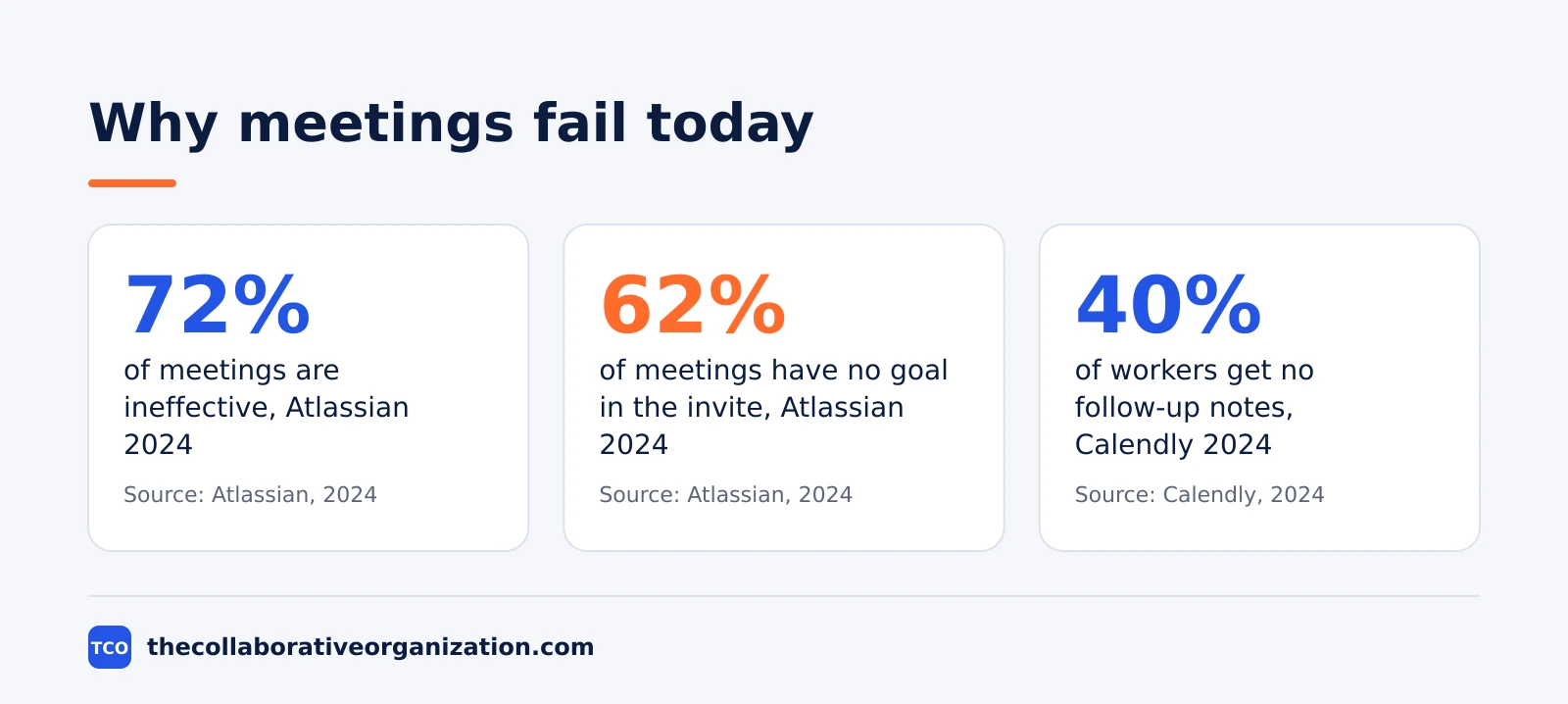
The failure is not about effort. It is about design. Meetings with no goal stated in the invite are common: 62% of workers attend them, Atlassian found.
And 77% of workers say they are frequently in meetings that end in a decision to schedule a follow-up meeting. A meeting that only books another meeting has failed at its job.
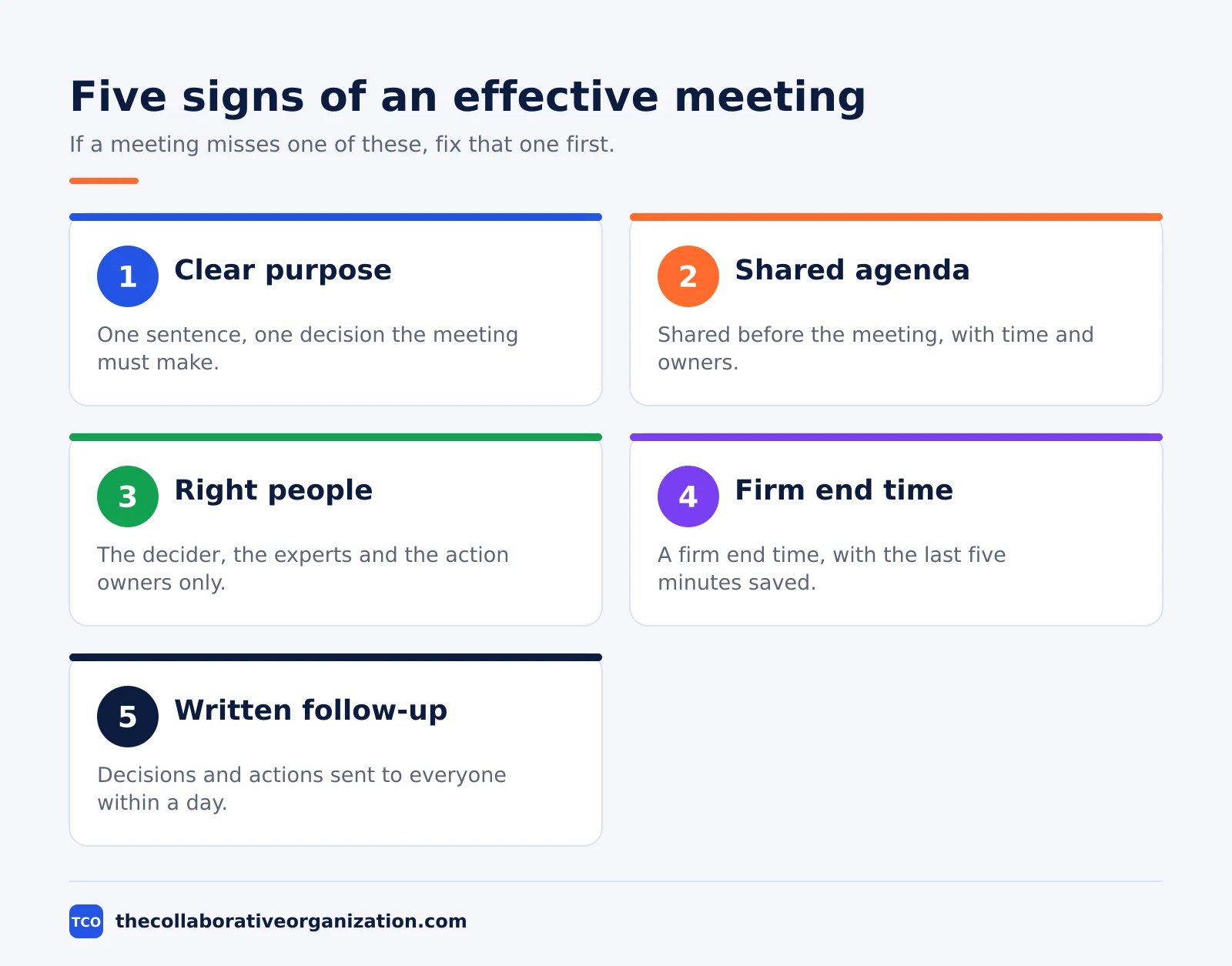
Five signs mark a meeting that works. It has one clear purpose, stated in a sentence. It has an agenda that people saw before the meeting. It has only the people the purpose needs.
It ends on time, with the last five minutes saved for actions. And it produces written notes that reach everyone, including people who missed it.
What you need before you meet
You need four things before you send the invite: a purpose, a decision, a list of people, and a time limit. If you cannot name the decision the meeting must make, do not book the room. Write the purpose as one sentence that starts with a verb, such as “Decide the launch date for the new pricing page.”
Next, write the agenda and send it with the invite. Fellow found 67% of professionals call a clear agenda the most important element of an effective meeting. Calendly found 38% of workers get no agenda or pre-read before internal meetings, which is why so many meetings start with ten minutes of context-setting.
Then pick the people. Invite the decider, the people with the facts, and the people who must act on the outcome. Everyone else gets the notes. Research published in Harvard Business Review shows meetings with eight or more attendees carry a higher risk of being ineffective, so treat eight as a ceiling, not a target.
Last, set the time limit and the end date. Fellow found 92.4% of meetings have no end date, so they repeat for months after their purpose is gone. Give every recurring meeting a review date, and let it die when the review finds nothing left to decide.
How to run an effective meeting in 7 steps
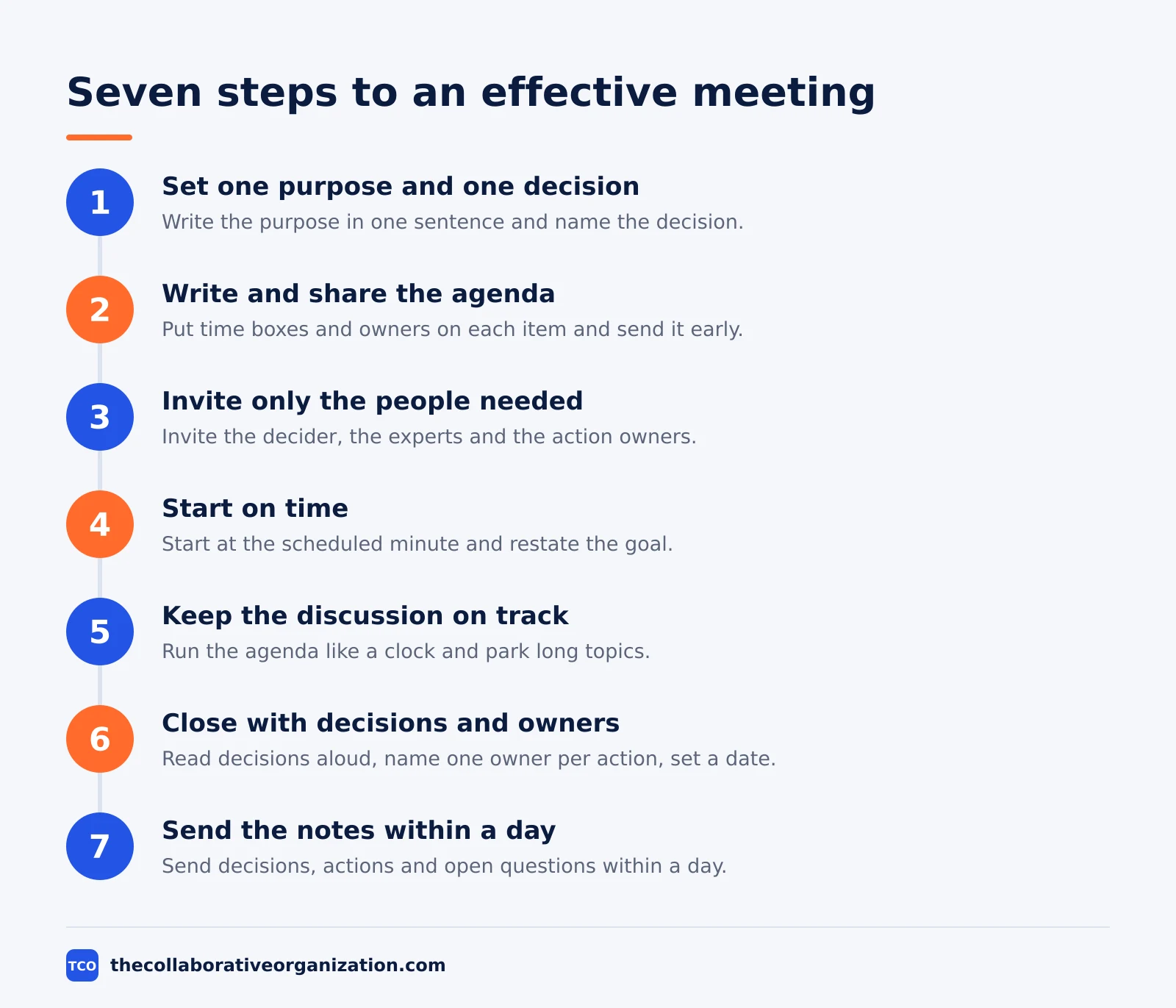
The seven steps below take a meeting from invite to follow-up, and each one has a clear outcome. Skip a step and the next one gets harder. A meeting with no agenda cannot stay on time, and a meeting with no close cannot produce actions.
Step 1: Set one purpose and one decision
Write the purpose in one sentence and name the decision the meeting must make. The outcome is a sentence everyone can repeat: “We will decide the launch date today.” If the meeting has three purposes, split it into three meetings or cut two of them.
A purpose also tells people whether to come. When the purpose is “share updates”, the meeting is usually a message in disguise. Our guide on how to run a sprint planning meeting shows the same rule in a planning setting: one goal, stated up front.
Step 2: Write and share the agenda
Put the agenda in the invite, with a time box and an owner for each item. The outcome is that people arrive prepared instead of catching up in the room. Send it at least a day ahead for a normal meeting, and three days ahead when people must read or prepare material.
Keep the agenda short: three to five items, each with a verb. “Discuss the launch” is not an item. “Decide the launch date (10 min, Priya)” is. Leave the last five minutes of the meeting unscheduled, so the close has room.
Step 3: Invite only the people the purpose needs
Invite the decider, the experts and the owners of the actions. The outcome is a room small enough for a real discussion. Send the notes to everyone else, and let them read in five minutes what would have cost them an hour in the room.
For a status meeting, ask whether each person must speak or only listen. Listeners can read the update instead. Our daily standup meeting format shows how a 15-minute check-in works with a tight guest list and a fixed shape.
Step 4: Start on time and state the goal
Start at the scheduled minute, even if two people are late. The outcome is that the team learns the start time is real. Restate the purpose and the decision in 30 seconds, then move to the first agenda item without a warm-up round.
Late starts cost more than they look. Microsoft telemetry shows 57% of meetings are ad hoc calls without a calendar invite, and 1 in 10 scheduled meetings is booked at the last minute. A meeting that starts late and runs long eats the focus time on both sides of it.
Step 5: Keep the discussion on the agenda
Run the agenda like a clock. The outcome is that every item gets its time box and nothing runs over. When a topic needs more time than its box allows, park it in a list and decide whether it needs its own meeting, a document, or a smaller group.
Watch for the two common drifts. The first is the status report that turns into a debate; cut it off and move the debate to its own item. The second is the side conversation between two people; ask them to take it offline and keep the room moving. A team kickoff meeting uses the same discipline on a larger scale.
Step 6: Close with decisions, owners and dates
Spend the last five minutes on the close. The outcome is a list of decisions and actions that everyone heard. Read each decision aloud, name one owner per action, and set a date. If an action has no owner and no date, it does not exist yet.
This step matters most. Atlassian found 54% of workers frequently leave meetings without a clear idea of next steps or who owns which task. A close that names owners fixes that gap in five minutes, and it is the cheapest fix in this guide.
Step 7: Send the notes within a day
Send short notes within 24 hours, and sooner when the decisions are urgent. The outcome is that absent people can act without asking for a replay. Notes need three parts: decisions made, actions with owner and date, and open questions with a next step.
Calendly found 40% of workers get no follow-up notes or action items after meetings. That gap is why decisions get remade in the next meeting. Our guide on meeting notes vs minutes explains the difference between quick notes and a formal record.
Worked example: a 30-minute weekly team meeting
A six-person team holds a 30-minute weekly meeting, and the seven steps turn it from a status call into a decision point. The team is a product group of six people who ship a web app. Before the change, the meeting ran 60 minutes with no agenda and no notes, and it always ran over.
The new shape is simple. The invite carries one purpose: “Decide what ships this week and what is blocked.” The agenda has three items: shipped last week (5 min), blocked work and decisions needed (15 min), and next actions with owners (10 min, including the close). Only the six team members attend, and the notes go to the wider group.
The cost math shows why the change pays. At an assumed $60 per hour in loaded cost, six people for 30 minutes costs $180 a week, or about $9,360 a year.
The old 60-minute version cost twice that, and it produced no written decisions. The saving is real, but the bigger gain is the written record: every week ends with named owners and dates.
Two weeks in, the team adds one rule: any item that needs more than 15 minutes of debate leaves the meeting and becomes a document with a decision deadline. The meeting stays at 30 minutes, and the debate happens in writing, where more people can read it.
How long should each type of meeting be
Match the length to the decision, not to the calendar default of 30 or 60 minutes. Short meetings force clear agendas, and long meetings need a break in the middle. The table below gives starting lengths for common meeting types.
| Meeting type | Starting length | When to go longer |
|---|---|---|
| Daily standup | 15 minutes | Never; move long topics out |
| Weekly team meeting | 30 minutes | When a real decision needs debate |
| One-to-one | 30 minutes | When the person raises a hard topic |
| Project kickoff | 60 minutes | When several teams must align |
| Planning session | 60-90 minutes | When the plan covers a full quarter |
| Decision meeting | 30 minutes | When more than two options are live |
Atlassian found 80% of workers say most meetings could take half the time. Try cutting the default length in half for two weeks and watch what happens: most meetings fit, and the ones that do not reveal which agendas were too full.
Tools that help run better meetings
The tool matters less than the habit, but a good video tool removes friction: clear audio, easy recording and a shared agenda. Pick one tool for the whole team and learn its recording and notes features. Our video conferencing software shortlist compares the main options side by side.
| Tool | Best for | Free plan | Starting price (as of November 2026) | Notable limit |
|---|---|---|---|---|
| Zoom | Teams that want reliable video with built-in AI summaries | Basic plan, 40-minute meetings | $14.16 per user per month (Pro), billed annually | Group meetings capped at 40 minutes on Basic |
| Google Meet | Teams already on Google Workspace | No free business plan; 14-day trial | $7 per user per month (Business Starter), billed annually | AI notes need Business Standard or higher |
| Microsoft Teams | Teams already on Microsoft 365 | No free business plan | $14 per user per month (Business Standard), billed annually | Business plans cover up to 300 users |
The Zoom price comes from Zoom pricing: Pro is $14.16 per user per month billed annually, or $16.99 billed monthly. The Basic plan is free with 40-minute meetings and 100 participants, and Pro adds unlimited AI meeting summaries.
Google Workspace Business Starter is $7 per user per month on the annual plan, or $8.40 on the flexible plan, according to Google Workspace pricing as read by independent checks in November 2026, since the page renders no dollar figures to our fetcher.
Microsoft 365 Business Standard is $14 per user per month billed annually, with Business Basic at $7 and Premium at $22, after the July 2026 price rise.
The Microsoft 365 pricing page lists the plans but renders no dollar figures to our fetcher, so the figures rest on the standing checks noted in our research notes. A video call vs phone call comparison can help when the meeting itself is the wrong tool.
How to measure whether meetings are working
Track three numbers every month: decisions with owners, meetings that start on time, and hours spent in meetings. If the first number rises and the third falls, the changes are working. If the hours fall but decisions do not get written down, the team is skipping meetings it still needs.
Ask the team one question each month: “Did meetings help you do your work this week?” A yes-or-no answer tracked over time beats a long survey. Fellow found 45% of employees feel overwhelmed by the number of meetings they attend, so the trend matters more than any single week.
Count the cost too. Otter.ai and researcher Steven Rogelberg found workers spend about 18 hours a week in meetings and call about 30% of that time unnecessary, worth roughly $25,000 per employee per year. Multiply your own hours by your own loaded cost and the case for shorter meetings writes itself.
Common effective meeting mistakes to avoid
Most bad meetings fail in the same five ways, and all five are easy to spot before the invite goes out.
- No purpose in the invite. If the purpose is “catch up”, cancel the meeting and write the update instead.
- Too many people. Every extra person adds silence and cost. Invite the decider and the owners, and send notes to the rest.
- No agenda, or an agenda sent at the last minute. People cannot prepare for a meeting they first hear about in the room.
- No close. A meeting that ends with “let us think about it” has produced nothing. Read the decisions and name the owners.
- No notes. If the decisions live only in memory, they will be remade next week. Send the notes within a day.
Sources
- Atlassian - Workplace Woes: Meetings (2024)
- Fellow - 45 Meeting Statistics and Behavior Trends in 2025 (2025)
- Calendly - The State of Meetings 2024 (2024)
- Harvard Business Review - Stop the Meeting Madness (2017)
- Microsoft - Work Trend Index 2024 (2024)
- Inc. - Otter.ai and Rogelberg meeting cost study (2022)
- Zoom - Pricing (2026)
- Google Workspace - Pricing (2026)
- Microsoft 365 - Pricing for Business (2026)
- ConversionGems - Google Workspace Pricing (2026)
Frequently asked questions
How long should an effective meeting be?
Match the length to the decision, not the calendar default. A status check fits in 15 minutes, a weekly team meeting in 30, and a planning session in 60 to 90. Atlassian found 80% of workers say most meetings could take half the time, so start short and add time only when the agenda needs it.
How many people should attend a meeting?
Invite only the people who must decide, contribute or act. Research published in Harvard Business Review shows meetings with eight or more attendees carry a higher risk of being ineffective. Fellow found about 19% of meetings have eight or more people, so most teams can already cut the list.
What makes a meeting effective?
A clear purpose, a shared agenda, the right people, a firm end time, and written follow-up. Fellow found 67% of professionals call a clear agenda the most important element of an effective meeting, and 72% say clear objectives are the key. Without those two, the meeting drifts no matter how good the discussion is.
Should every meeting have an agenda?
Yes. Only 37% of workplace meetings actively use agendas, Fellow found, and 38% of workers get no agenda or pre-read before internal meetings, according to Calendly. An agenda tells people what to prepare, what the meeting must decide, and when it ends. A meeting without one should be a message instead.
How do you end a meeting well?
Spend the last five minutes on decisions and owners. Read each decision aloud, name one owner per action, and set a date for it. Calendly found 40% of workers get no follow-up notes or action items after meetings, which is why so many decisions vanish. Send the notes within a day.
How do you know if your meetings are working?
Track three numbers: the share of meetings that end with written decisions and owners, the share that start on time, and the hours spent in meetings each week. Ask the team every month whether meetings help them do their work. If the answers stay flat, change the format before you add more meetings.
Related articles
video conferencing
Loom vs Zoom Clips: Which Async Video Tool Wins? (2026)
Loom is the dedicated async video tool, while Zoom Clips is built into Zoom Workplace. Compare recording, editing, analytics and price to pick the right one.
November 19, 2026 · 9 min read
video conferencing
How to Reduce Meetings at Work: A 5-Week Plan (2026)
Cut meetings by a third without losing decisions: audit the calendar, cancel the weak ones, replace updates with writing, and protect focus days.
November 19, 2026 · 10 min read
video conferencing
How to Take Meeting Notes That People Actually Use (2026)
Good meeting notes record decisions, owners and dates in one page, sent within a day. Learn the format, the tools and a worked example.
November 19, 2026 · 11 min read