Loom vs Zoom Clips: Which Async Video Tool Wins? (2026) | The Collaborative Organization
By The Collaborative Organization Team · November 19, 2026 · Last verified November 19, 2026 · 9 min read
Loom is a dedicated async video tool, while Zoom Clips is an async video feature built into Zoom Workplace, and the core difference is focus. Loom does one job deeply, and Zoom Clips does it well enough inside a tool you already pay for.
Key takeaways
- Loom is built only for async video, while Zoom Clips is one feature inside Zoom Workplace, beside meetings, chat and mail.
- Loom Business costs $12.50 per user per month billed annually, with unlimited videos and length; Starter is free with 25 videos at 5 minutes each.
- Zoom Pro costs $13.33 per user per month billed annually, and Clips is included at no extra per-seat cost.
- Loom leads on viewer analytics, AI editing and recording polish; Zoom Clips leads on convenience and one bill.
- Zoom Clips records screen, camera or both, and AI Companion adds titles, chapters and translated captions.
- Loom does not host live meetings; Zoom is live-first, and Clips is its async add-on.
Loom vs Zoom Clips at a glance
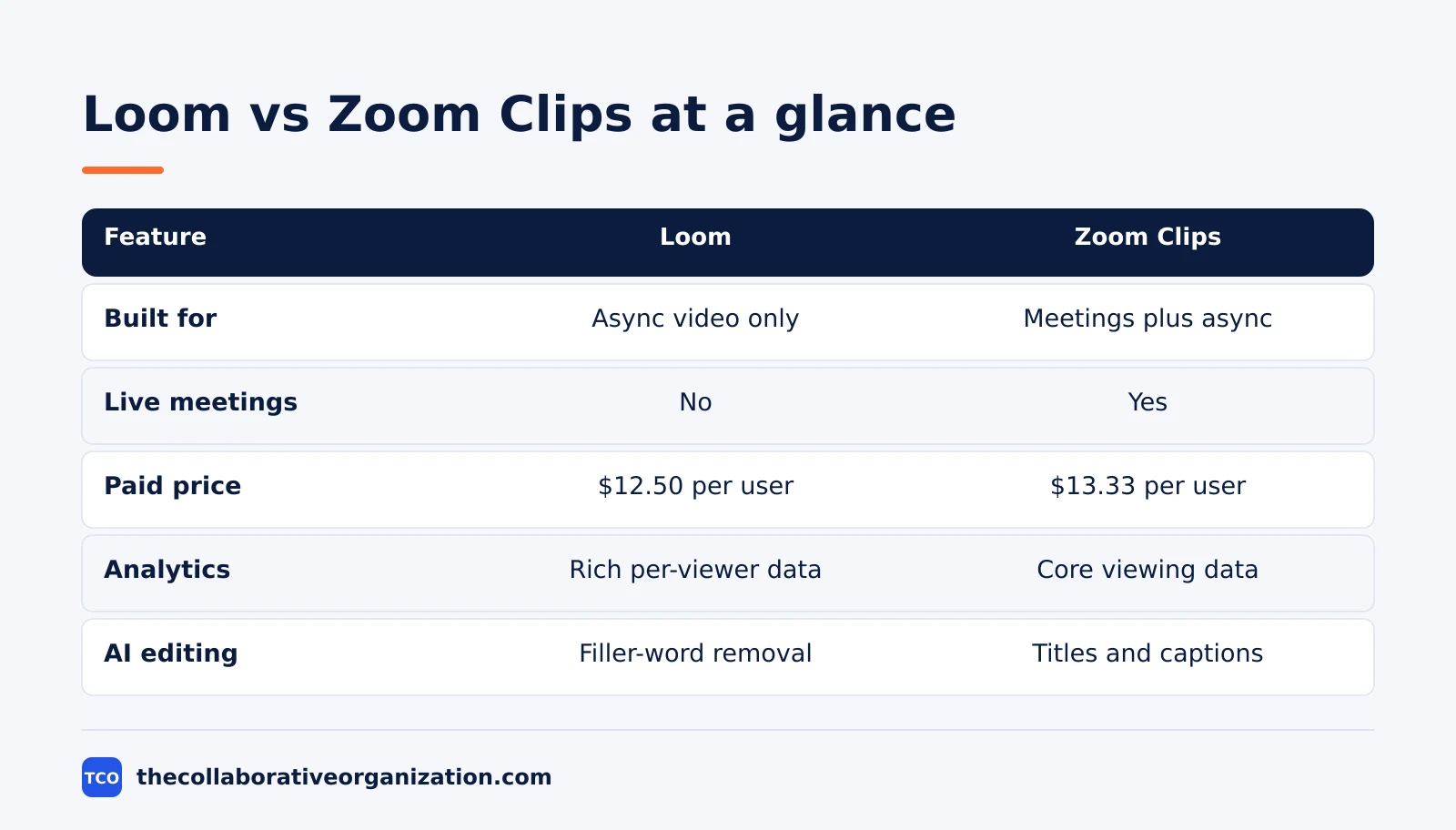
The short version is that Loom wins on depth and Zoom Clips wins on convenience. Loom has the most polished recording experience in the category, the richest viewer analytics and the strongest AI editing. Zoom Clips has the advantage of living where your meetings already happen, with one admin console, one bill and no new tool to learn.
| Feature | Loom | Zoom Clips |
|---|---|---|
| Async video recording | Yes, purpose-built | Yes, built into Zoom Workplace |
| Live meetings | No | Yes, core product |
| Recording | Screen, camera, or both | Screen, camera, or both |
| Free plan | Starter: 25 videos, 5 minutes each | Basic: basic Clips, 40-minute meetings |
| Paid price (as of November 2026) | $12.50 per user per month (Business), billed annually | $13.33 per user per month (Pro), billed annually |
| AI features | AI titles, summaries, filler-word removal | AI Companion titles, chapters, captions |
| Viewer analytics | Rich, per-viewer watch data | Core viewing data |
| Sharing | Link, embed, password protection | Link, Zoom Chat, Canvas, Mail, Whiteboard |
The price and free-plan details come from the vendors and from recent checks.
Loom lists Starter as free with 25 videos at 5 minutes each and Business at $12.50 per user billed annually. Zoom pricing lists Pro at $13.33 per user per month billed annually, with a 40-minute limit on the free Basic plan.
What Loom does best
Loom does async video better than any other tool, because it was built for that one job. Recording starts in one click from the desktop app or browser extension, with screen and camera together, and the viewer gets a clean page with the video, a transcript and a place to react. The workflow is short: record, share the link, and see who watched. That simplicity is why teams that send many updates a week keep coming back to it.
Analytics are the clearest lead. Loom shows who watched, how much of the video they watched, and where they dropped off, so a manager can see whether a team actually watched a walkthrough instead of assuming it. Comments and emoji reactions sit on the video itself, so feedback stays attached to the moment it refers to.
AI features add titles, summaries and chapters, and the paid plans remove filler words automatically.
Loom was acquired by Atlassian in 2023, which deepened its integration with Jira and Confluence, according to the comparison by OperDrive.
What Zoom Clips does best
Zoom Clips does async video well enough inside a platform teams already use, and that convenience is its whole case. Clips is built into Zoom Workplace, so a teammate records a short video update and shares it in Zoom Chat, Canvas, Mail or a Whiteboard without switching tools. Recipients watch on their own schedule, which removes the need for everyone to be free at the same time. Zoom describes exactly that flow: a three-minute Clip replaces a 30-minute meeting for a walkthrough or a status update.
The feature set covers the basics and the useful extras.
Clips supports three recording formats, screen only, camera only, or both, and AI Companion can generate titles, descriptions, chapters and translated captions.
Sharing can be a direct link, an embed in Chat or email, or a restricted link for specific people, with password protection for sensitive content. All Clips live in a central, searchable library, so a team can find an old walkthrough instead of asking for it again.
Recording, editing and sharing compared
Recording is a tie, editing favours Loom, and sharing favours whichever tool your audience already uses. Both tools record screen, camera or both, and both produce a shareable link in seconds. Loom pulls ahead on editing: it trims, stitches and removes filler words, and its AI Suite adds auto-titles and summaries. Zoom Clips edits inside the Zoom app, with AI Companion for titles, chapters and captions, but it does not match Loom on filler-word removal or stitching.
Sharing shows the deeper difference. A Loom link opens a dedicated viewing page with reactions, comments and viewer data, and it works for anyone with the link, whether or not they use Loom. A Zoom Clip opens inside Zoom Workplace, which is smoother for a Zoom team and slightly heavier for an outside client.
If your viewers are clients who do not use Zoom, Loom is the easier share. If your viewers are colleagues who live in Zoom Chat, Clips is the easier share. Our guide to Zoom covers the wider Zoom Workplace plans that Clips sits inside.
Pricing and total cost compared
The pricing question is not Loom against Zoom, it is Loom plus Zoom against Zoom alone. A team that already pays for Zoom gets Clips at no extra per-seat cost, so adding Loom means paying twice for overlapping capability. A team that does not use Zoom pays for Loom alone and keeps its live meeting tool separate. The comparison by Codimite, a Zoom Certified Integrator, makes exactly this point: for most organisations consolidating their stack, Zoom Clips wins on cost and simplicity.
The numbers are close at the individual level.
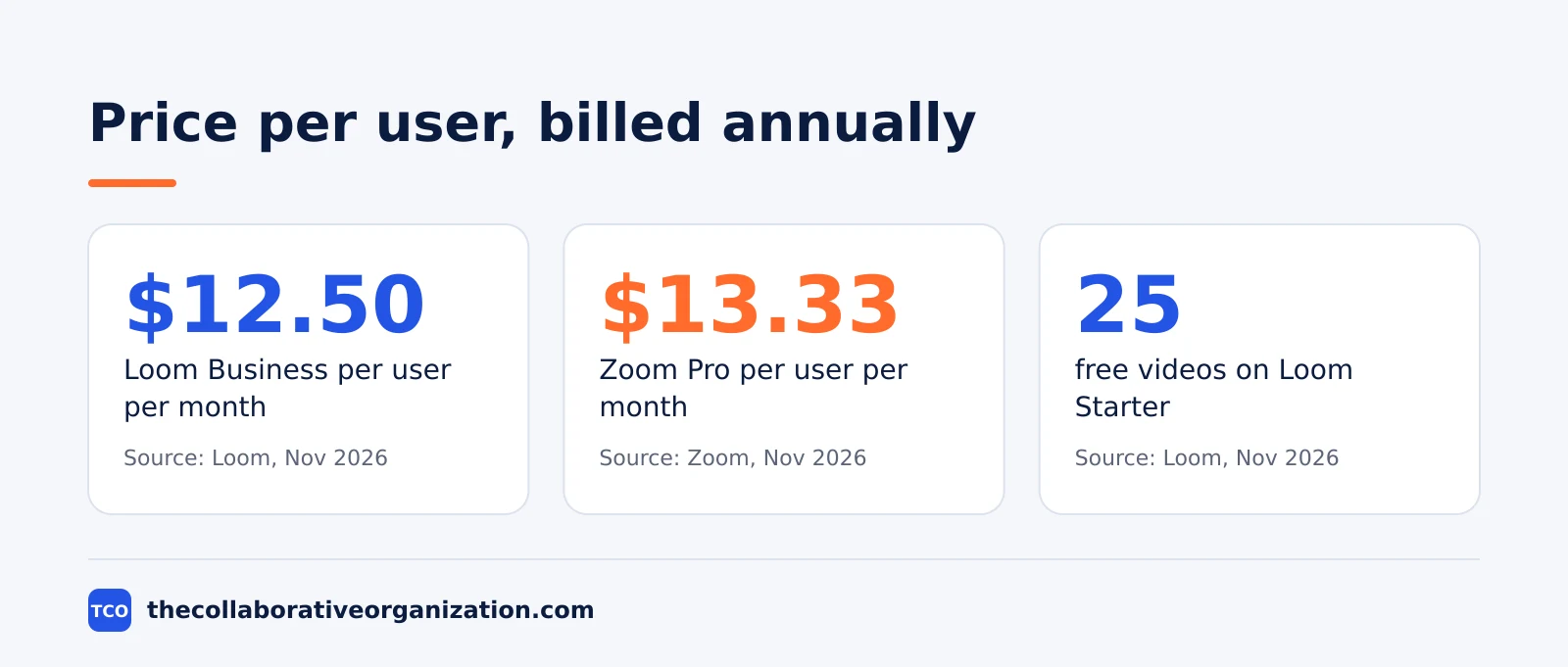
Loom Business is $12.50 per user per month billed annually, and Loom confirms that price on its own site.
Zoom Pro is $13.33 per user per month billed annually, and it includes unlimited meetings, cloud recording and AI Companion.
Monthly billing is higher for both: Loom Business is $18 per user per month on monthly billing, and Zoom Pro is $16.99, according to the October 2026 check by AgencyShed.
A five-person team on annual billing pays about $750 a year for Loom Business or about $800 a year for Zoom Pro, before any other tools.
Worked example: a remote team picks one tool
A fictional 12-person remote team sends about 30 async updates a month, and the example below shows how the choice plays out in practice. The team already pays for Zoom Pro for live meetings, and it sends walkthroughs, design feedback and weekly updates as video. It tries Zoom Clips first, because it costs nothing extra, and it works well for internal updates: the clips sit in Zoom Chat, the team watches them when free, and AI Companion writes the titles.
After a month, the team finds two gaps. Client walkthroughs need proof of viewing, because a client who never watched a video still asks for a live call, and the design lead wants filler-word removal for polished feedback videos.
The team keeps Zoom Clips for internal updates and adds Loom Business for client-facing videos only, for the five people who record them. The example is an illustration, not a case study, and the lesson is that the two tools can split the job by audience.
Choose Loom if, choose Zoom Clips if
Choose Loom when async video is a core workflow and proof of viewing matters, and choose Zoom Clips when your team already lives in Zoom and needs basic async video. The two sentences below cover most teams, and the list after them covers the edge cases.
Choose Loom if you send many client updates, you need to know who watched and how much, you want AI editing that removes filler words, or your viewers do not use Zoom.
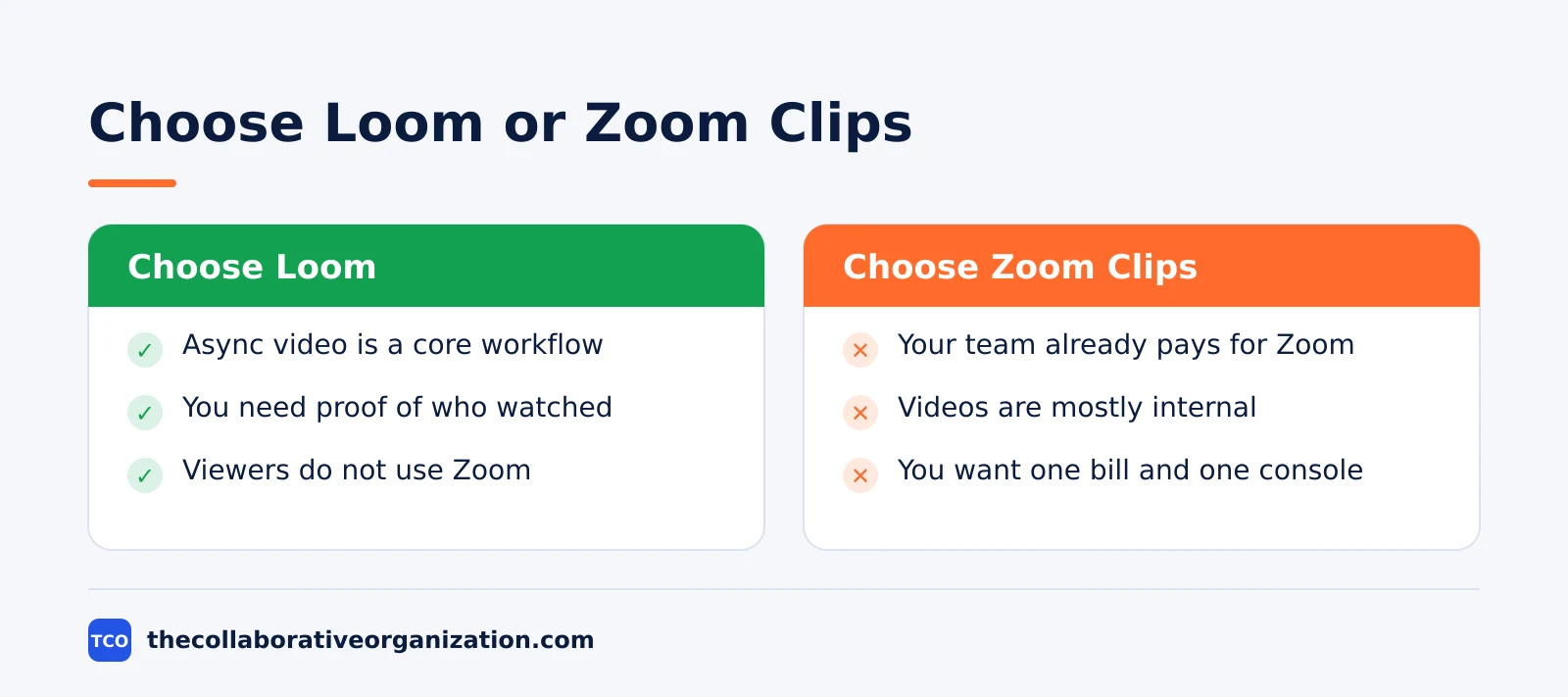
Choose Zoom Clips if your team already pays for Zoom Workplace and your async videos are mostly internal.
You also want one bill and one admin console, and you want clips to sit beside meetings and chat.
Both tools are free to try, so run a two-week test with real updates before you pay for either one. Before you standardise on one channel, read our guide on before you standardize team chat, which covers how async habits spread across a team.
The best video conferencing software shortlist puts Zoom in context with the other meeting tools your team may already use.
Can you use both together?
Yes, and many teams do: Zoom Clips for internal updates and Loom for client-facing videos. The split works because the two audiences need different things. If you drop Zoom entirely, Google Meet is a live meeting option that pairs well with Loom for async updates. Internal updates need speed and a familiar home, which Clips provides inside Zoom. Client videos need polish and proof of viewing, which Loom provides on its viewing page. The cost is one extra subscription for the people who record client videos, not for the whole team.
Moving from one tool to the other is possible but not clean. A Zoom Certified Integrator can re-host Loom video files into Zoom Clips and re-establish ownership and sharing, but view counts and engagement history do not transfer, according to Codimite.
Plan the move as a fresh start for analytics, and keep the old Loom links live until the new clips have replaced them.
Common Loom vs Zoom Clips mistakes to avoid
The most common mistake is comparing the two tools as if they were the same kind of product. Loom is a specialist async tool, and Zoom Clips is a feature inside a live meeting platform, so a feature checklist alone will mislead you. Check the list below before you decide.
- Paying for both for the same job. If your team already pays for Zoom, try Clips for internal updates before you add a Loom bill for the same videos.
- Judging Loom by its free plan. The free Starter plan caps videos at 25 and 5 minutes each, which is a trial limit, not the product, so test the Business plan before you judge it.
- Judging Clips by Loom’s analytics. Clips gives core viewing data, not per-viewer watch-through, so do not expect Loom-level analytics from a bundled feature.
- Forgetting live meetings. Loom does not host live meetings, so a Loom-only team still needs a meeting tool, and that cost belongs in the comparison.
- Ignoring who watches. A tool your clients will not open is the wrong tool, whatever its features, so test the viewing experience with a real client before you commit.
Sources
- Zoom - Async meeting best practices for productive teams (2026)
- Zoom Community - That Meeting Could Have Been a Clip (2025)
- Loom - 5 Best Enterprise Sales Software to Close More Deals (2024)
- Loom - Top 10 Team Communication Tools for 2024 (2024)
- Codimite - Loom vs Zoom Clips (2026)
- AgencyShed - Loom vs Zoom for Agencies (2026) (2026)
- OperDrive - Loom vs Zoom vs Google Meet 2026 (2026)
- Pumble - Zoom Pricing Guide 2026 (2026)
Frequently asked questions
What is the difference between Loom and Zoom Clips?
Loom is a standalone tool built only for async video messages, with deep viewer analytics and AI editing. Zoom Clips is an async video feature built into Zoom Workplace, so it lives beside meetings, chat and mail. Loom is the specialist; Zoom Clips is the convenient add-on for teams already on Zoom.
Is Zoom Clips free?
Zoom Clips is included in Zoom Workplace, and the free Basic plan includes basic Clips. Paid plans add more: Pro at $13.33 per user per month billed annually includes unlimited Clips, longer meetings and AI Companion. You do not pay a separate per-seat fee for Clips itself.
Is Loom free?
Loom has a free Starter plan with 25 videos and a 5-minute limit per video. The Business plan costs $12.50 per user per month billed annually, with unlimited videos and recording length, plus AI summaries and custom branding. Enterprise pricing is a custom quote.
Can Zoom Clips replace Loom?
It can for teams that already pay for Zoom and need basic async video. Zoom Clips records screen, camera or both, adds AI titles and captions, and shares inside Zoom Workplace. It cannot match Loom on viewer analytics, filler-word removal or the polished recording experience, so analytics-led teams usually keep Loom.
Does Loom do live meetings?
No. Loom records video for people to watch later, and it does not host live meetings. Zoom is the opposite: live meetings are its core product, and Clips is the async feature on top. Most teams that pick Loom still need a live meeting tool, and most Zoom teams do not need a second video tool.
Which is better for client updates?
Loom is usually better for client updates, because it shows who watched, how much they watched, and lets viewers react and comment on the video. Zoom Clips is better when the client already uses Zoom, because the clip arrives in a familiar place with no new account. Pick Loom for proof of viewing, and Clips for convenience.
Related articles
video conferencing
How to Reduce Meetings at Work: A 5-Week Plan (2026)
Cut meetings by a third without losing decisions: audit the calendar, cancel the weak ones, replace updates with writing, and protect focus days.
November 19, 2026 · 10 min read
video conferencing
How to Run an Effective Meeting in 7 Steps (2026)
An effective meeting starts with a clear purpose, a short agenda and named owners for every action. Follow 7 steps to run meetings people value.
November 19, 2026 · 12 min read
video conferencing
How to Take Meeting Notes That People Actually Use (2026)
Good meeting notes record decisions, owners and dates in one page, sent within a day. Learn the format, the tools and a worked example.
November 19, 2026 · 11 min read