How to Improve Team Communication at Work (2026) | The Collaborative Organization
By The Collaborative Organization Team · November 19, 2026 · Last verified November 19, 2026 · 10 min read
Improving team communication means giving every message a clear home, a clear owner and a clear reply time, so nobody has to guess where to post or when to expect an answer. Most teams do not need more tools. They need a few shared rules, fewer meetings and one place where decisions are written down.
Key takeaways
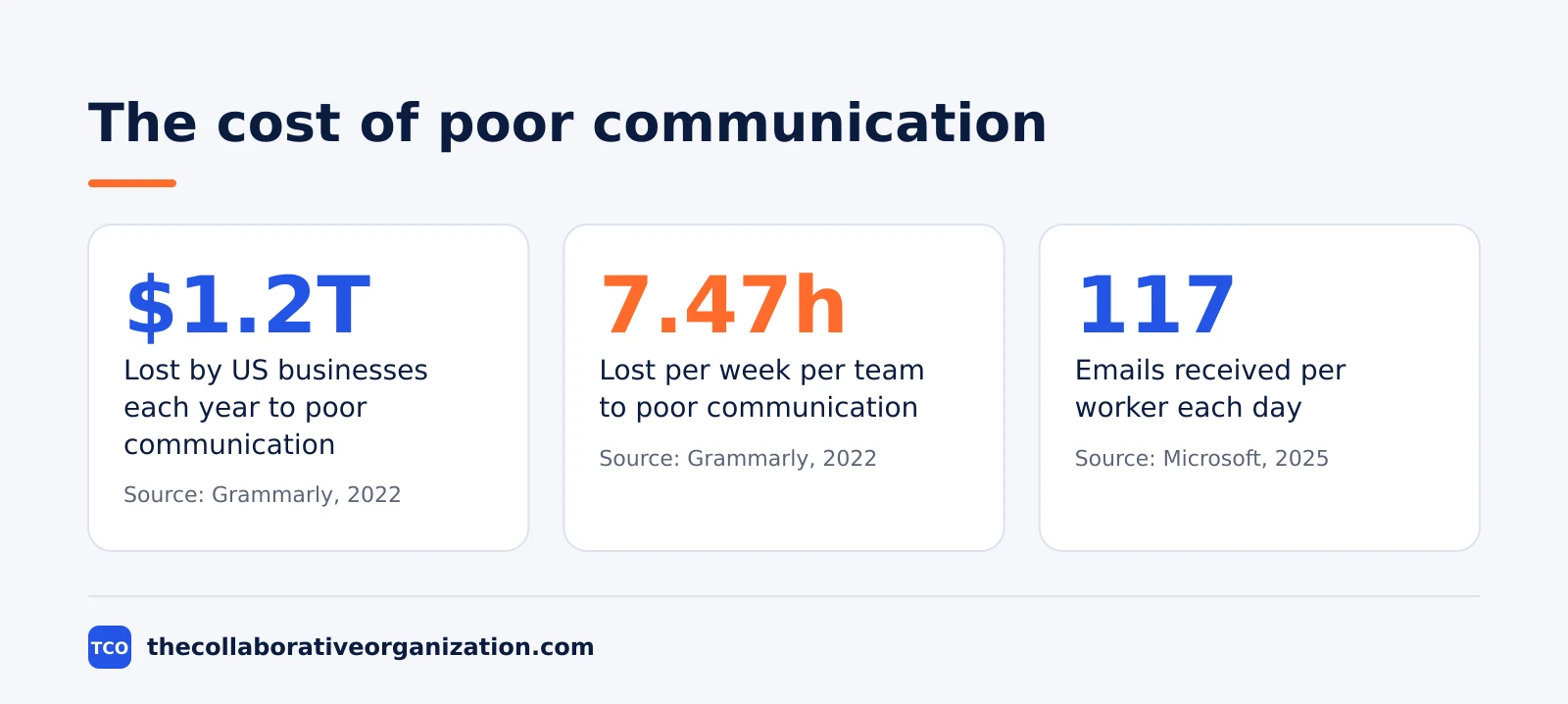
- Poor communication costs US businesses about $1.2 trillion a year, or about $12,506 per employee per year, in the Grammarly and Harris Poll study.
- Business leaders estimate their teams lose 7.47 hours per week to poor communication, almost one full workday.
- The average worker receives 117 emails and 153 Teams messages per weekday, Microsoft telemetry from 2025 shows.
- Seven steps fix most teams: audit, pick channels, set reply times, write decisions down, cut meetings, name owners and review monthly.
- Daily AI users are 64% more likely to report very good productivity than colleagues who do not use AI, in Slack’s 2025 Workforce Index.
What good team communication looks like
Good team communication is easy to spot: anyone can find a decision, anyone knows who owns it, and nobody waits days for a reply they needed in hours. A new joiner can read the last month of a project channel and understand what happened, what was decided and what comes next, without asking five people.
Good communication has four traits. Messages are short and state the point first. Each channel has one job, so a question lands in the right place the first time.
Decisions are written down where the work happens, not buried in a private chat. And replies arrive inside a time the team agreed in advance, so silence does not feel like neglect.
Grammarly and the Harris Poll found that knowledge workers spend about half a typical workweek, around 20 hours, on written communication. That is why small fixes pay off fast: when half the week is writing and reading, a clearer message saves hours, not minutes.
Why team communication breaks down
Team communication breaks down when the volume grows faster than the rules, and every person invents their own system. One person posts in chat, another sends email, a third mentions it in a meeting, and the decision lives in none of those places.
The numbers show how loud the average day has become. Microsoft telemetry from 2025 found the average worker receives 117 emails a day and 153 Teams messages per weekday, and is interrupted every 2 minutes during core work hours. Nearly half of employees, 48%, and more than half of leaders, 52%, say their work feels chaotic and fragmented.
Three patterns cause most of the damage. First, too many channels with no stated purpose, so the same topic spreads across chat, email and docs. Second, no reply-time rule, so urgent and routine messages look identical.
Third, decisions made in meetings that nobody writes down, so the team debates the same point twice. Fix those three and most of the noise goes away.
How to improve team communication in 7 steps
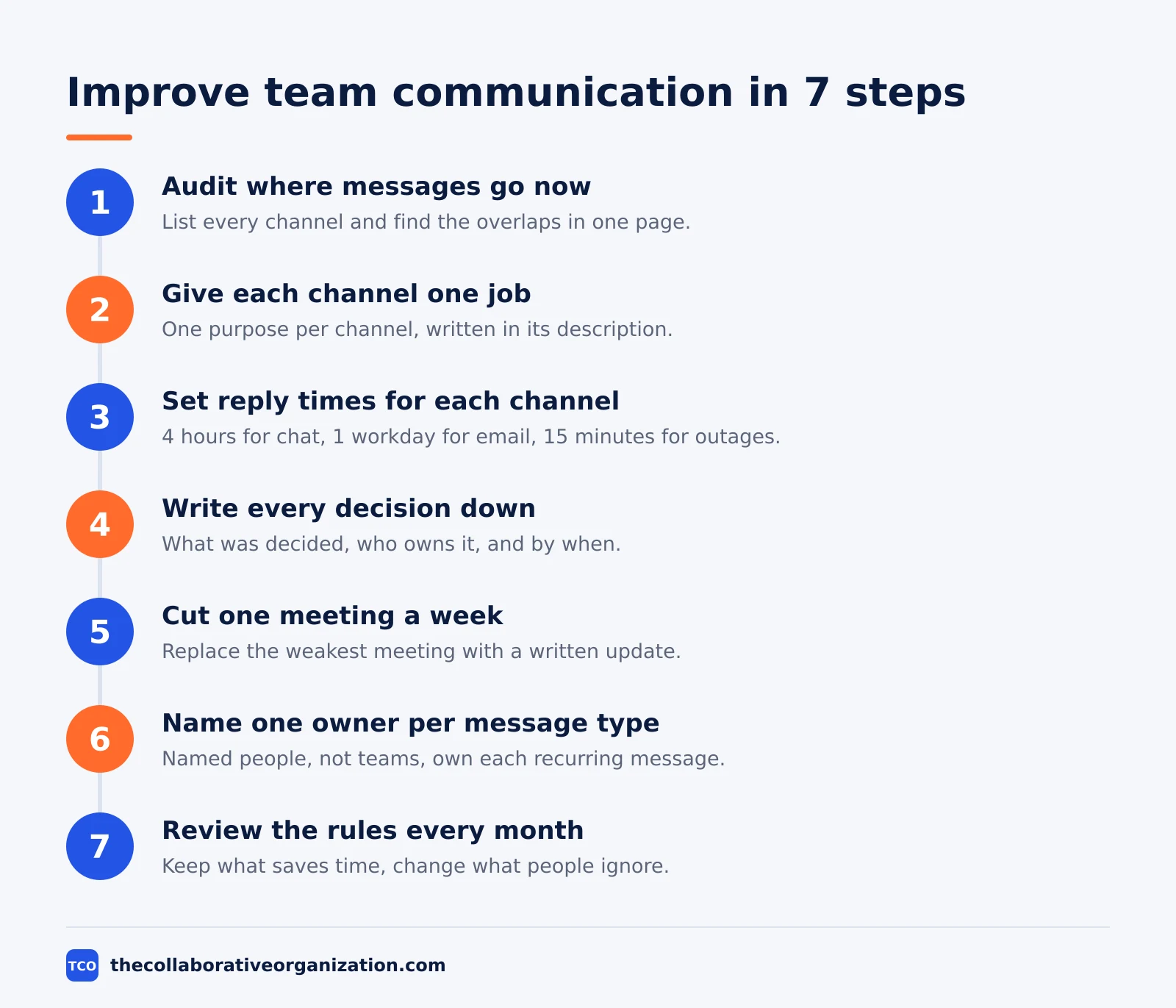
Seven steps take a team from noisy to clear in about a month, and each step takes less than a week. Work through them in order, because a new tool cannot fix rules that do not exist yet.
Step 1: Audit where messages go now
List every channel, inbox and doc the team uses, then ask each person where they post each type of message. Write down the overlaps. Most teams find three places for the same update and one topic with no home at all. Keep the audit to one page.
Step 2: Give each channel one job
Assign one purpose to each channel: one for team talk, one for announcements, one per project, one for help. Write the purpose in the channel description. If a channel needs two purposes, split it. A channel with one job is easy to search and easy to join.
Step 3: Set reply times for each channel
Agree a reply window per channel, not per person. Try 4 hours for team chat, 1 workday for email, and 15 minutes for a true outage channel. Write the windows where everyone can see them. A reply window turns waiting into a plan.
Step 4: Write every decision down
End each meeting and each long thread with one written line: what was decided, who owns it, and by when. Put that line in the project channel or doc, not in a private message. A written decision stops the same debate from returning next week.
Step 5: Cut one meeting a week
Pick the meeting with the weakest agenda and replace it with a written update. Our guide on how to reduce meetings at work shows how to test which meetings earn their time. If nobody misses the meeting after two weeks, delete it for good.
Step 6: Name one owner per message type
Give each recurring message an owner: who posts the weekly update, who answers help questions, who sends the launch note. Owners are named people, not teams. When no one owns a message, it either never gets sent or gets sent three times.
Step 7: Review the rules every month
Spend 30 minutes a month asking what still works. Keep the rules that save time, change the ones people ignore, and delete the ones nobody remembers. A monthly review keeps the system honest as the team grows.
Set rules for each channel
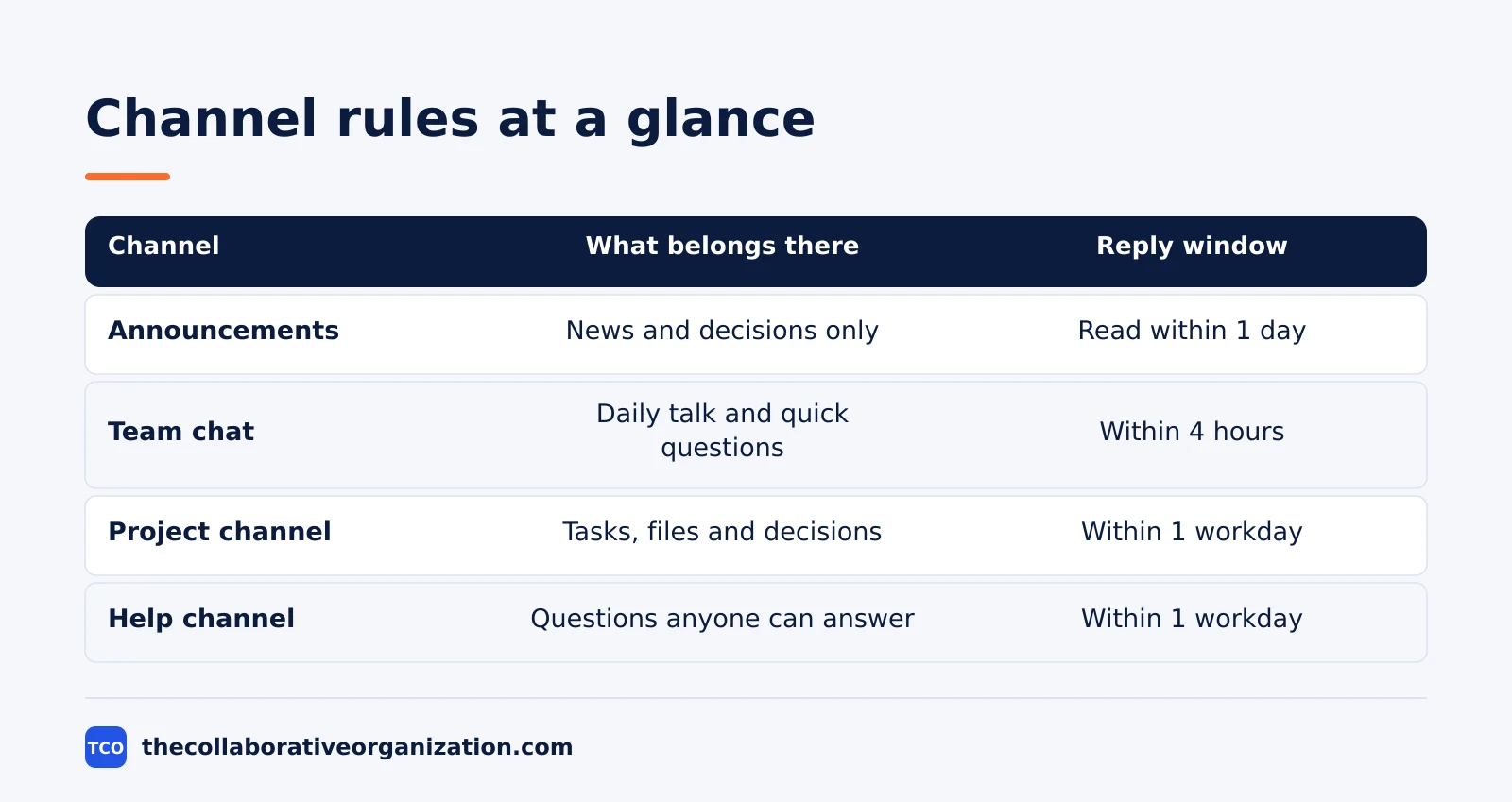
A channel rule answers three questions: what belongs here, who replies, and how fast. Write the answers in the channel topic or a pinned message, so a new joiner learns them in a minute.
Start with the four channels every team needs. Announcements carry news only, and only a few people may post. Team chat carries daily talk and quick questions.
Project channels carry one project each, with decisions pinned. Help channels carry questions anyone may answer, so the answer helps the next person too.
Team communication only works when people can tell a routine message from an urgent one. Use a simple tag for urgency, such as “today” or “this week”, and reserve direct mentions for work that truly needs one person now. A mention should mean “please read this today”, not “I thought of you”.
| Channel | What belongs there | Reply window | Who posts |
|---|---|---|---|
| Announcements | News and decisions only | Read within 1 day | Managers and owners |
| Team chat | Daily talk and quick questions | Within 4 hours | Everyone |
| Project channel | Tasks, files and decisions for one project | Within 1 workday | Project members |
| Help channel | Questions anyone can answer | Within 1 workday | Everyone |
Measure whether communication is improving
Measure three numbers before and after the change: meetings per week, repeat questions per week, and time to first reply. If all three fall, the rules work. If they do not, change the rules, not the people.
Count meetings from the team calendar, and count repeat questions by asking the help channel owner to tally them for two weeks. Time to first reply comes from a quick sample of 20 messages, not from a new tracking tool. A simple count beats a dashboard nobody opens.
Watch for the quiet signs too. Fewer “did you see my message” follow-ups means the rules are clear. Faster decisions mean the written record works. And when new joiners stop asking where things live, the channels finally make sense.
Research on interruptions explains why the count matters. In a 2005 field study, Gloria Mark and colleagues shadowed 24 information workers for over 700 hours. They found interrupted work was resumed the same day after 25 minutes 26 seconds on average, after about two other tasks.
The study measured elapsed clock time until the work was resumed, not how long refocusing took. Every needless interruption buys that detour.
Tools that can help teams communicate better
A tool helps only when it matches a rule the team already agreed, so pick the tool after the rules, not before. Compare the options on our team communication software shortlist before you pay for anything, and start with the free plan to test the fit.
Slack fits teams that live in chat and want apps and huddles in one place. Microsoft Teams fits teams already on Microsoft 365. Zoom fits teams whose work is mostly live meetings.
ClickUp fits teams that want chat beside tasks and docs. Google Chat fits teams already on Google Workspace.
| Tool | Best for | Free plan | Starting price (as of November 2026) | Notable limit |
|---|---|---|---|---|
| Slack | Chat-first teams that want apps and huddles | Free plan with 90 days of history | $7.25 per active user per month (Pro), billed annually | Full history needs a paid plan |
| Microsoft Teams | Teams already on Microsoft 365 | Free plan | $4.00 per user per month (Essentials), billed annually | Essentials has no Office apps |
| Zoom | Teams whose work is mostly live meetings | Free plan, 40-minute group meetings | $14.16 per user per month (Pro), billed annually | Free plan caps group meetings at 40 minutes |
| ClickUp | Teams that want chat beside tasks and docs | Free Forever plan | $9 per user per month (Core), billed annually | Core shows a $12 regular price on the page |
| Google Chat | Teams already on Google Workspace | Included with Workspace trial | $7 per user per month (Business Starter), billed annually | Business plans cap at 300 users |
Slack lists Pro at $7.25 per active user per month billed annually, or $8.75 billed monthly, and Business+ at $15 billed annually. Three independent pricing checks from October and November 2026 confirm those figures, since Slack’s own pricing page returns a script shell to our reader.
Microsoft lists Teams Essentials at $4.00 per user per month, paid yearly, with meetings up to 30 hours, up to 300 participants and 10 GB of cloud storage per user.
Zoom lists Pro at $14.16 per user per month billed annually, or $16.99 billed monthly, after a price rise in March 2026.
ClickUp lists Core at $9 per user per month billed annually against a $12 regular price, so the $9 rate may be promotional. Business is $17 per user per month billed annually.
Google lists Workspace Business Starter at $7 per user per month on the annual plan, or $8.40 on the flexible month-to-month plan, with 30 GB of pooled storage per user.
Worked example: a 12-person team fixes its chat in 4 weeks
A 12-person support team had 40 channels, 6 hours of status meetings a week, and the same three questions asked every day. The manager ran the seven steps above, and the fix took four weeks.
Week 1, the audit found 40 channels for 12 people, with 9 of them silent for a month. The team archived the 9 silent channels and merged 6 duplicates into 3 project channels. Week 2, they wrote reply windows: 4 hours for team chat, 1 workday for email, and 15 minutes for the outage channel only.
Week 3, they replaced two weekly status meetings with a written update posted every Monday, and named one owner for the help channel. Week 4, they counted the result: meetings fell from 6 hours to 3.5 hours a week, and repeat questions fell from 15 a week to 4.
Common team communication mistakes to avoid
Most teams make the same five mistakes, and each one has a simple fix. Check the list at the monthly review.
- Too many channels. Every new topic gets a channel, and nobody can find anything. Fix it by archiving silent channels and merging duplicates.
- No written decisions. Choices live in meetings and private chats, so the team debates them twice. Fix it with one written decision line per meeting.
- Every message marked urgent. When everything is urgent, nothing is, and people stop reading. Fix it by reserving mentions for work that needs one person today.
- Status meetings for status. A meeting that only shares updates wastes live time. Fix it with a written update and keep meetings for debate.
- Rules nobody wrote down. Unwritten rules differ from person to person, so each person follows their own. Fix it by writing the rules on one page and pinning them.
Sources
- Grammarly - The State of Business Communication (2022)
- Microsoft - Breaking Down the Infinite Workday (2025)
- Slack - The New AI Advantage (2025)
- ACM - No Task Left Behind? Examining the Nature of Fragmented Work (2005)
- Slack - Pricing (2026)
- Microsoft - Microsoft Teams Pricing (2026)
- Zoom - Pricing (2026)
- ClickUp - Pricing (2026)
- Google - Google Workspace Pricing (2026)
Frequently asked questions
What is the fastest way to improve team communication?
Write one page of rules first: which channel to use for what, how fast each channel needs a reply, and when to meet instead of writing. Then cut one recurring meeting and replace it with a written update. Most teams feel the difference in two weeks, because the rules remove the daily guessing about where a message belongs.
How do I know if my team has a communication problem?
Look for the signs: the same question asked in three places, decisions remade because nobody wrote the first one down, and messages that get a reply days later. If people say they cannot find information or they sit in meetings that repeat what chat already said, the problem is the system, not the people.
Should a team use chat, email or meetings most?
Use chat for quick questions and team talk, email for formal records and outside contacts, and meetings only for debate, hard news and decisions that need live discussion. Status updates belong in writing. A message that needs no reply within minutes should never become a meeting.
How often should a team review its communication rules?
Review the rules every three months, or sooner when the team grows, adds a tool or starts a big project. Ask the team what still works and what wastes time, then change one rule at a time. Rules that nobody reviews go stale, and stale rules get ignored.
Can better communication really save a team time?
Yes, when the fix removes real work instead of adding it. Clear rules cut duplicate questions, written updates replace status meetings, and one shared channel stops the same news from travelling through five private chats. Measure the change by counting meetings and repeat questions before and after the fix.
Related articles

team communication
Communication Plan for a Project: Template (2026)
A communication plan for a project names who gets which update, in which channel, how often, and from whom. Copy the template and the filled example below.
November 20, 2026 · 10 min read
team communication
How Often Should Managers Communicate With Teams? (2026)
Managers should hold one meaningful conversation with each person every week, plus a weekly team update. See the cadence table for meetings, updates and feedback.
November 20, 2026 · 9 min read
team communication
Upward Communication Examples: 10 That Work (2026)
Upward communication is a message that travels from an employee to a manager or leader. See 10 concrete examples, each with why it works and when to use it.
November 20, 2026 · 9 min read