How to Create a Work Breakdown Structure in 7 Steps | The Collaborative Organization
By The Collaborative Organization Team · November 19, 2026 · Last verified November 19, 2026 · 10 min read
To create a work breakdown structure, start from the agreed scope, break it into major deliverables, then break those into work packages one owner can estimate and run. Give every package a code and a dictionary entry, check the tree against the 100% rule with the team, then baseline it.
Key takeaways
- Build a WBS top-down, from the whole project to major deliverables to work packages, never from a list of tasks.
- Each work package should take about 8 to 80 hours of effort and have exactly one owner.
- The 100% rule applies at every level: the children of any element must add up to exactly that element.
- Every work package gets a code (such as 1.2.1) and a dictionary entry with its scope, owner and acceptance test.
- Validate the WBS with the people who will do the work, then baseline it before you build the schedule.
What you need before you start
You need an agreed scope, the people who will do the work, and a place to draw the tree. Without an agreed scope, the WBS becomes a wish list. Without the owners in the room, it becomes a guess. The scope statement, the project charter and the requirements list are the inputs that matter most.
Gather the project charter if one exists, plus the scope statement and any requirements the sponsor has signed. These documents say what the project must deliver, and the WBS must cover all of it. If the scope is still being argued, settle it first: a WBS built on unsettled scope will be rebuilt within a week.
Book a workshop of one to two hours for a small project, with the project manager, the sponsor or their delegate, and the future work-package owners. Bring a whiteboard, a shared doc or a project tool where the tree can be edited live.
The session works best when the owners shape the branches they will own, because they know what each deliverable really involves. For the wider sequence, see our guide to what is project management.
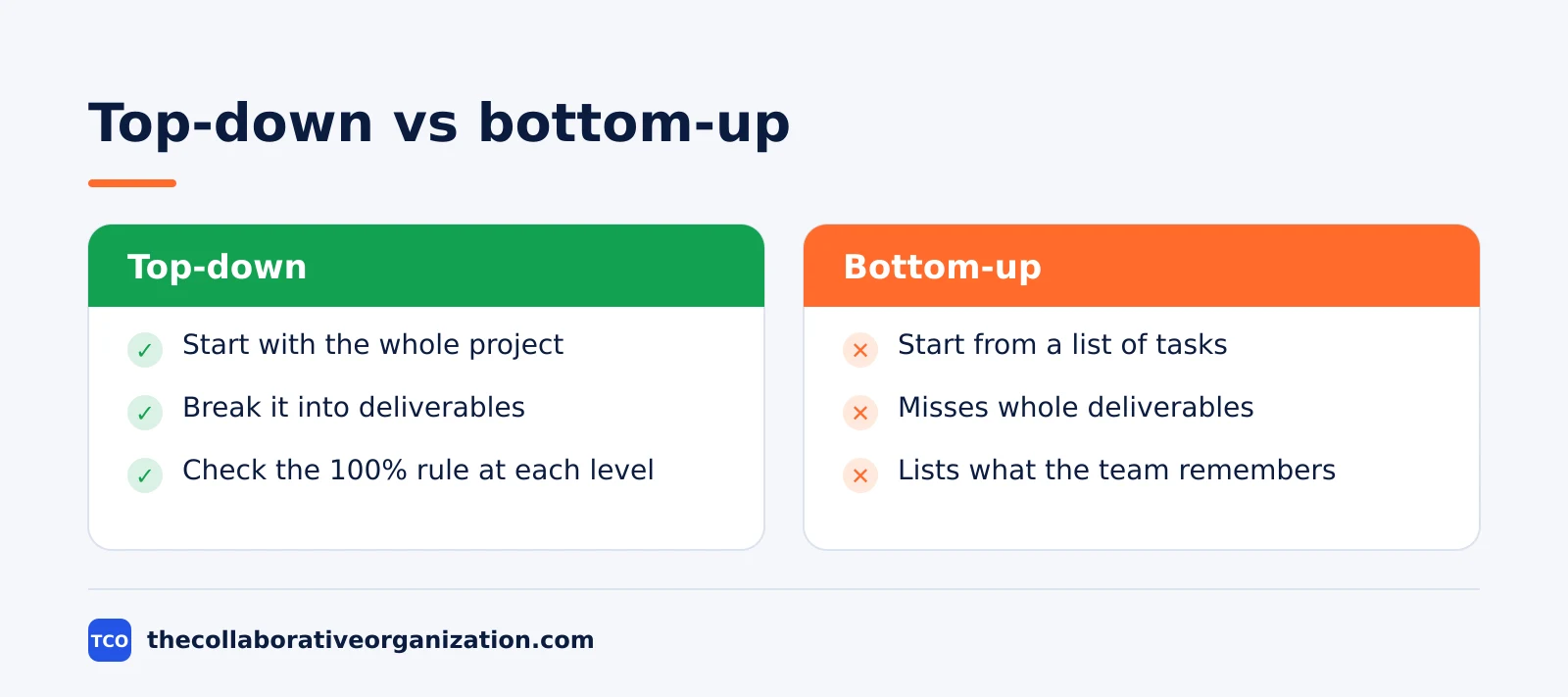
Build the tree top-down, from the whole project down to the packages. A bottom-up list of tasks misses whole deliverables, because the team lists what it remembers instead of what the scope requires.
How to create a work breakdown structure in 7 steps
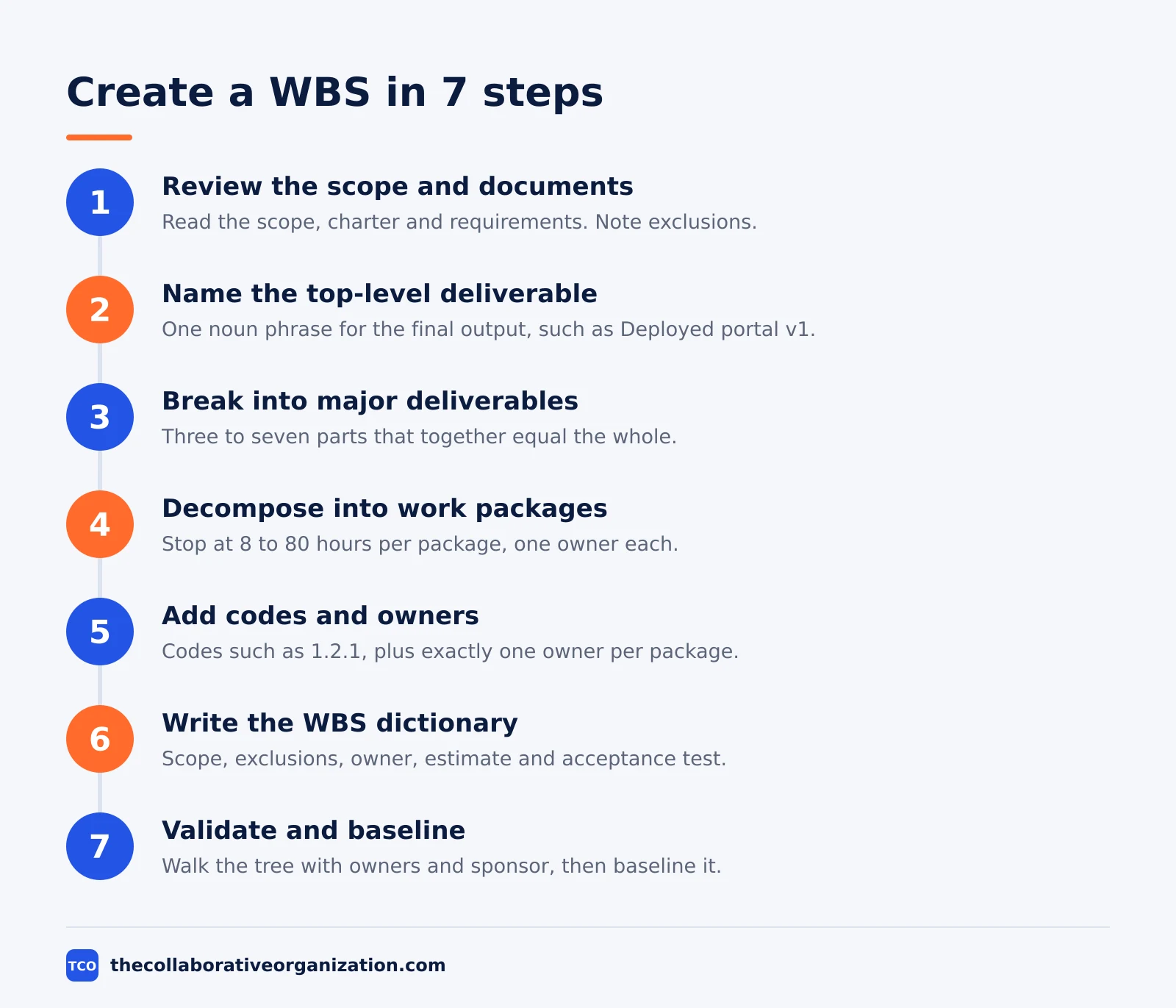
Creating a WBS takes seven steps, and the first two use no codes or dictionary entries at all. The steps below follow the shape used in standard WBS guides: define the scope, name the deliverables, decompose them, code them, describe them, then validate the result with the team.
Step 1: Review the scope and supporting documents
Read the scope statement, the charter and the requirements before you draw anything. Note the final deliverables, the boundaries and the exclusions. Write the exclusions on the board where everyone can see them, because they are the first thing a WBS forgets.
Step 2: Name the top-level deliverable
Write one noun phrase that describes the final output, such as “Deployed customer portal v1.” Everything below this node exists only to produce it. If the top line names an activity instead of an outcome, rewrite it before you go further.
Step 3: Break the project into major deliverables
Split the top deliverable into three to seven major deliverables that together equal the whole. For a portal, that might be “Login and accounts,” “Order pages,” “Ticket pages” and “Launch.” Each one is a thing you hand over, not a task you perform. Check the 100% rule now: the parts must add up to the whole, with nothing missing and nothing extra.
Step 4: Decompose each deliverable into work packages
Work through each major deliverable and break it into smaller parts until you reach work packages. Stop when each package meets two tests: one person or team can own it completely, and it can be estimated in about 8 to 80 hours of effort. TruTimer gives the same range in its WBS guide, and notes that a package above 80 hours should be split again.
Step 5: Add codes and owners
Give every element a unique code that shows its place in the tree, such as 1.2.1 for the first package under deliverable 1.2. Numbering such as 1.0, 1.1 and 1.1.1 is a de facto standard across project management, not a mandated format, so adapt it to your tool. Then name exactly one owner for each work package. A package with two owners has no owner when the work is late.
Step 6: Write the WBS dictionary
For each work package, write a short entry: what it includes, what it excludes, the owner, the estimate and the acceptance criteria. Keep each entry short enough to read in a minute. The dictionary is where a label becomes something a person can act on, and it stops two people from reading the same package name in two ways.
Step 7: Validate with the team and baseline it
Walk the tree with the owners and the sponsor. Ask three questions at each branch: is anything missing, does anything overlap, and does each package have one owner and one estimate. Fix what you find, then baseline the WBS with its dictionary. After that point, scope changes go through change control, and the schedule is built from the baselined packages.
Work breakdown structure example: a mobile app launch
One example shows the seven steps applied to a real-shaped project. Imagine a team launching a mobile app for booking fitness classes, with eight weeks to launch. The scope is agreed: members can browse classes, book a place, pay in the app and cancel up to two hours before class. These figures are an illustration, not a real project.
| Code | Element | Owner | Estimate |
|---|---|---|---|
| 1.0 | Bookable fitness app | Project manager | - |
| 1.1 | Class browsing | Designer | - |
| 1.1.1 | Class list screen | Designer | 24 hours |
| 1.1.2 | Class detail screen | Designer | 16 hours |
| 1.2 | Booking and payment | Developer | - |
| 1.2.1 | Booking flow | Developer | 40 hours |
| 1.2.2 | Payment integration | Developer | 32 hours |
| 1.3 | Launch and enrolment | Marketing lead | - |
| 1.3.1 | App store listing | Marketing lead | 12 hours |
| 1.3.2 | Launch emails | Marketing lead | 8 hours |
Three checks pass on this tree. Every package sits inside the 8 to 80 hour range, and every package has one owner.
The children of 1.2, booking flow and payment integration, add up to the booking and payment deliverable with nothing missing. The dictionary entry for 1.2.2 records that payment means card payments only, and that the acceptance test is a successful test purchase.
How to validate a WBS before you baseline it
Validation is a review with the people who will do the work, not a solo check by the manager. PMI notes in its August 2026 guide that a WBS stakeholders have reviewed and approved is a shared agreement, while one made alone is only a diagram. Run the review against a short list of tests.
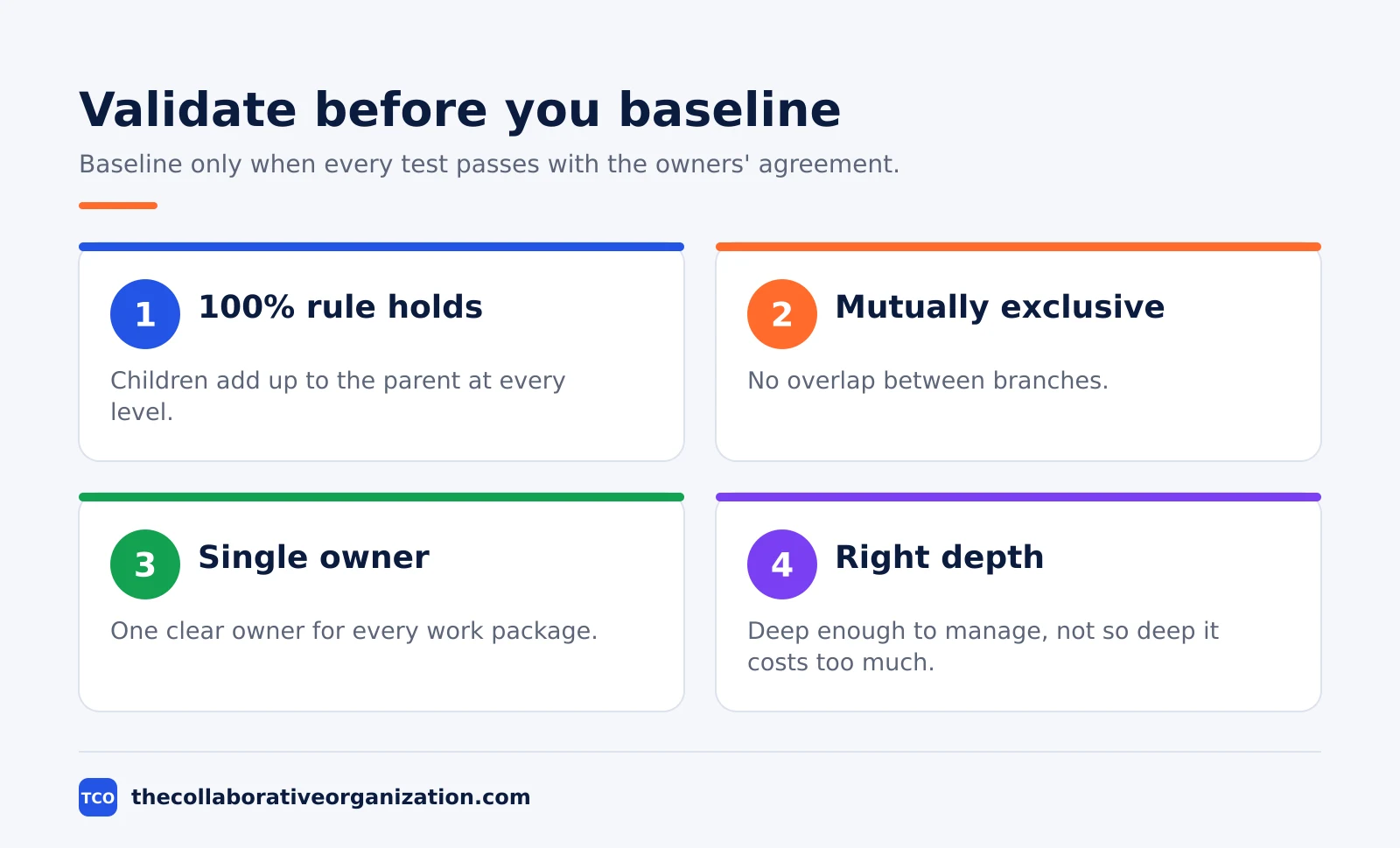
First, check the 100% rule at every level, not only at the top. Second, check that every element is mutually exclusive, with no overlap between branches. Third, check that every work package has a single, clear point of responsibility.
Fourth, check that the depth is right: decomposed enough to manage, but not so deep that tracking it costs more than it returns.
ITToolkit lists the same five moves in its WBS guide: define the scope, name the major deliverables, break them into work packages, assign codes and owners, then validate and refine.
When the review finds a gap, add the branch and re-check the 100% rule. When it finds an overlap, merge the branches. Baseline only when the owners agree the tree matches the work they will do.
How to know your WBS worked
A good WBS shows up in the numbers that follow it: estimates that hold, a schedule with no missing work, and few change requests. The test comes weeks later, when the team is building. If the schedule keeps gaining tasks nobody planned, the WBS had gaps. If the budget keeps growing, the WBS had scope creep.
Three signs tell you the structure did its job. Estimates for work packages land close to the actual effort, because each package was small enough to judge. Handoffs are clean, because each package names one owner and the dictionary states what done looks like. Change requests are rare and small, because the exclusions list settled the boundary early.
Measure it simply. Count the change requests in the first month that add work the WBS missed. Count the packages whose actual effort runs more than 25% over the estimate, and ask whether the package was too big or too vague.
A WBS that scores well on both counts is one the team will reuse as a template, with the branches checked against the new scope first.
Tools that can hold your WBS
A project tool holds the tree, the dictionary and the schedule in one place, so the WBS stays current as the work changes. A shared outline works for the first draft, but a tool keeps the codes, owners and estimates linked to the tasks. Our project management software shortlist compares the options side by side.
| Tool | Best for | Free plan | Starting price (as of November 2026) | Notable limit |
|---|---|---|---|---|
| Asana | Teams that map WBS branches to sections and tasks | Free for 2 people | $10.99 per user per month (Starter), billed annually | Free plan covers 2 people |
| ClickUp | Teams that want a tree view with custom fields per package | Free Forever plan | $9 per user per month (Core), billed yearly | Yearly billing needed for that price |
| Trello | Small teams that track packages as cards on a board | Free for up to 10 collaborators | $5 per user per month (Standard), billed annually | Timeline view needs Premium |
The Asana price comes from Asana pricing: the Personal plan is free for 2 users, and Starter is $10.99 per user per month when billed annually.
The ClickUp price comes from ClickUp pricing: Core is $9 per user per month billed yearly, shown against a regular price of $12, so the $9 figure may be promotional.
The Trello price comes from Trello pricing: Standard is $5 per user per month billed annually, or $6 billed monthly.
PMI notes that tools such as Microsoft Project, Smartsheet and Wrike generate and maintain the hierarchy, while Jira and Asana express the same logic through epics and stories. Pick the tool the team will open every day. A project brief stored in the same workspace gives new joiners the context behind the tree.
Common work breakdown structure mistakes to avoid
Most WBS builds fail in the same five ways, and all five are easy to spot in a review. Run through the list below before you baseline the structure.
- Starting from a task list. A list of activities misses whole deliverables. Start from the scope and the final output instead.
- Skipping the dictionary. Package names alone are not enough. Without entries, two owners read the same name in two ways.
- Packages with no owner or two owners. Every package needs exactly one point of responsibility, or nobody answers for its estimate.
- Going too deep too fast. Packages under 8 hours cost more to track than they return, and the tree turns into a task list.
- Baselining without the team. A WBS the owners have not reviewed is a diagram, not an agreement, and it will not survive the first change request.
The last mistake is the one that costs the most time. A manager who builds the tree alone, then hands it to the team, spends the next two weeks fixing gaps the owners would have caught in one workshop.
Build it with them, in the room, and the review in step 7 becomes a short check instead of a rebuild. For the wider sequence, see the project management process step by step.
Sources
- PMI - What Is a Work Breakdown Structure (WBS)? (2026)
- ITToolkit - Work Breakdown Structure Guide: Steps, Examples and Templates (2026)
- TruTimer - How to Create a Work Breakdown Structure: 7 Steps (2026)
- WorksBuddy - Work Breakdown Structure Examples: What They Are and How to Build One in 5 Steps (2026)
- PMLearning - What is a Work Breakdown Structure (WBS)? (2026)
- Asana - Pricing (2026)
- ClickUp - Pricing (2026)
- Trello - Pricing (2026)
Frequently asked questions
How long does it take to create a work breakdown structure?
A small project WBS takes one focused workshop of one to two hours with the people who will do the work. A large project takes several sessions over a few days, because each branch needs its owner to confirm the scope and the estimate. The review with stakeholders adds more time, but it is the step that makes the WBS an agreement instead of a drawing.
Who should be in the room when you build a WBS?
Bring the project manager, the sponsor or their delegate, and the people who will own the work packages. The owners know what each deliverable really involves, so they catch missing work the manager would miss. Leave the room too small and the WBS becomes a guess; invite everyone and the session turns into a status meeting.
Should you build a WBS top-down or bottom-up?
Build it top-down. Start with the whole project, break it into major deliverables, then break those into work packages. A bottom-up list of tasks usually misses whole deliverables, because the team lists what it remembers instead of what the scope requires. Use the 100% rule at each level to check that the children add up to the parent.
What comes after the WBS is finished?
Break each work package into activities, then put those activities into a schedule with dates and dependencies. The WBS feeds the schedule, the budget and the responsibility assignments, so none of those should start before the structure is baselined. Any change to scope after that point goes through change control, not a quiet edit.
Can you reuse a WBS from another project?
Yes, as a starting template, not as a finished plan. Similar projects share branches, such as design, build and test, and a template saves time. But every project has different deliverables, so check each branch against the new scope with the 100% rule and delete or add branches before you baseline it.
Related articles

project management
How to Choose Project Management Software (2026)
Pick project management software in seven steps: define the work, count seats, price the real cost, and run a two-week pilot before you pay.
November 19, 2026 · 10 min read

project management
What Is a RACI Matrix? Definition, Roles and Examples (2026)
A RACI matrix maps who is Responsible, Accountable, Consulted and Informed for each task. Learn the four roles, how to build one, and see a worked example.
November 19, 2026 · 9 min read

project management
Daily Standup Meeting Format That Works (2026)
A daily standup is a 15-minute meeting where Developers inspect progress toward the Sprint Goal and plan the next day. Use this format to run one that ends on time.
November 19, 2026 · 10 min read