How to Choose Team Communication Software (2026) | The Collaborative Organization
By The Collaborative Organization Team · November 19, 2026 · Last verified November 19, 2026 · 9 min read
Pick the tool that matches how your team already talks, not the one with the longest feature list. Map the four kinds of talk your team does every day, check what you already pay for, and pilot one tool for two weeks before you pay for it.
Key takeaways
- Teams do four kinds of talk: quick questions, project updates, decisions, and announcements, and each kind needs a different home.
- Microsoft found the most heavily pinged workers are interrupted about every two minutes during core hours, roughly 275 times a day, so rules matter as much as the tool.
- Slack Free keeps only 90 days of message history, which is the limit that pushes most growing teams to a paid plan.
- A 10-person team pays $40 to $142 a month at list prices in November 2026, depending on the tool, before tax.
- Pilot one tool for two weeks with the whole team, then ask what they could not find before you pay.
Map how your team talks before you compare tools
Team talk falls into four kinds, and a tool that handles one kind well can fail at the other three. Quick questions need a fast reply in a shared channel. Project updates need a thread tied to the work. Decisions need a written record with a name and a date. Announcements need one channel that nobody can flood.
Write down where each kind lives today. If decisions live in a chat thread, they will be buried by Friday. If announcements share a channel with jokes and questions, half the team will miss them.
The map shows what the new tool must fix, and it stops you from buying a video tool when the real problem is lost decisions.
Read our guide on before you standardize team chat first if your team already uses chat and the problem is sprawl, not the tool. Standardizing too early locks in bad habits, while standardizing too late leaves every team on a different app.
Check what you already pay for
Most teams already own a chat tool inside a suite they pay for, and that tool is the default to beat. Microsoft 365 Business Basic includes Teams at $7 per user per month billed annually, and Google Workspace Business Starter includes Chat at $7 per user per month on the annual plan. A separate chat subscription only makes sense when the bundled tool misses a must-have.
The bundled tool is not free in the real sense. It costs the time to learn it and the habits it shapes. But it does remove one bill, one login, and one more app to toggle between.
Researchers writing in Harvard Business Review tracked 137 users across three Fortune 500 companies and found the average person toggled between apps and websites nearly 1,200 times a day, losing just under four hours a week to reorienting.
If the team already lives in Gmail, Docs, and Meet, Google Chat costs nothing extra and keeps the work in one place. If the team already pays for Microsoft 365, Teams is the same story. Only pay for Slack when the team needs its app directory, its search, or its guest channels enough to justify a second bill.
How to choose team communication software in 6 steps
Choosing well takes six steps, and the first three need no demo at all. The steps below turn a vague preference into a decision the team will actually follow.
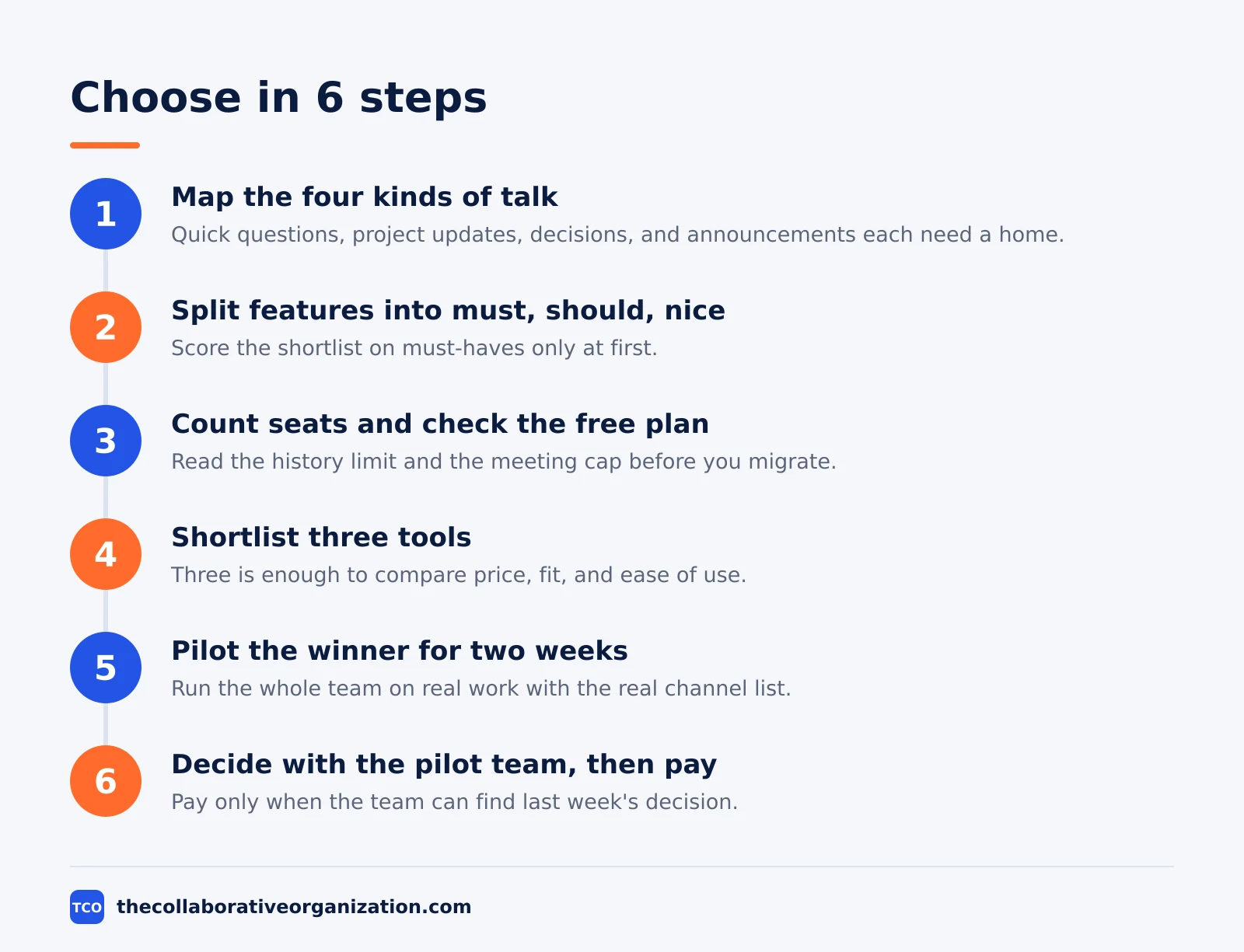
Step 1: Map the four kinds of talk
List where quick questions, project updates, decisions, and announcements live today. Name the channel or tool for each one. The gaps in that map are the requirements for the new tool.
Step 2: List must-have, should-have, and nice-to-have features
Split the list into three groups. Must-have means the team cannot work without it, such as searchable history or guest access. Should-have means the work is slower without it. Nice-to-have means it looks good in a demo. Score the shortlist on must-haves only at first.
Step 3: Count seats and check the free plan
Write the headcount today and in 90 days, then read the free-plan limit for each tool. Slack Free keeps 90 days of history and 10 apps. The Teams free plan limits group meetings to 60 minutes and 100 participants. Google Chat is free for personal accounts, while business features need a Workspace plan.
Step 4: Shortlist three tools
Pick three tools that fit the map and the budget. Compare them on our team communication software shortlist to see the leading options side by side. Three is enough to compare price, fit, and ease of use without turning the choice into a month of demos.
Step 5: Pilot the winner for two weeks
Run the top tool with the whole team on real work for two weeks. Set up the real channel list, move one live project into it, and hold the daily talk there. A pilot on fake messages proves nothing, because fake talk has no deadlines and no unhappy stakeholders.
Step 6: Decide with the pilot team, then pay
Ask the pilot team three questions: could you find last week’s decision, could a new person catch up without asking anyone, and can you explain the bill? If the answer to all three is yes, pay for the tool. If people kept a side chat group, the rollout has already failed.
Compare the leading tools and their real prices
The four leading tools differ more in packaging than in chat, so price them at your seat count. Slack sells chat on its own. Teams and Google Chat come inside suites. Zoom sells meetings first and chat second.
| Tool | Best for | Free plan | Starting price (as of November 2026) | Notable limit |
|---|---|---|---|---|
| Slack | Teams that want the widest app directory | Free, 90 days of history | $7.25 per user per month (Pro), billed annually | Free plan caps at 10 apps |
| Microsoft Teams | Teams that already pay for Microsoft 365 | Free, 60-minute group meetings | $4 per user per month (Essentials), paid yearly | No business email or Office apps |
| Google Chat | Teams that live in Google Workspace | Free for personal accounts | $7 per user per month (Workspace Business Starter), annual plan | Business plans cap at 300 users |
| Zoom | Teams where video meetings drive the work | Free, 40-minute meetings | $14.16 per user per month (Pro), billed annually | Pro covers up to 99 users |
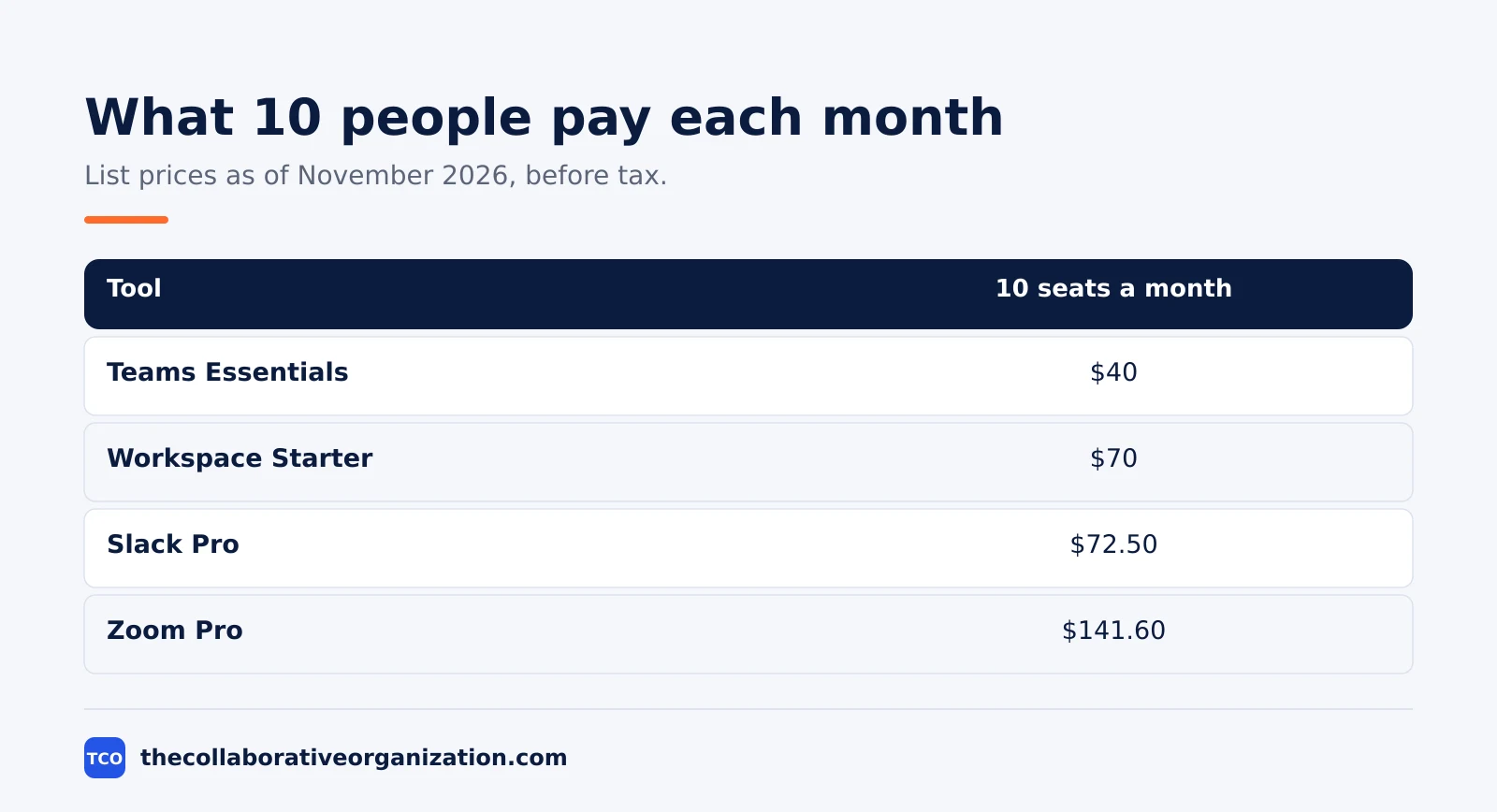
For a 10-person team at list prices as of November 2026, Teams Essentials is $40 a month, Google Workspace Business Starter is $70, Slack Pro is $72.50, and Zoom Pro is $141.60. Those are list prices before tax, and Slack bills per active member while Zoom bills per host.
Watch the limit that bites first on each free plan. On Slack it is the 90-day history window, since anything older drops out of view and data older than a year is deleted.
On Teams it is the 60-minute group meeting cap. On Zoom it is the 40-minute meeting cap on the free Basic plan. The paid plan that removes the limit you hit first is usually the right one.
Worked example: a 14-person support team picks a tool
A 14-person support team shows how the six steps play out on real numbers. The team answers customer tickets all day, and their talk is quick questions to each other, shift handover notes, and one weekly announcement. Their map shows three homes are missing: a searchable place for handover notes, a channel per shift, and an announcement channel nobody can flood.
The team already pays for Google Workspace Business Starter, so Google Chat costs nothing extra. Slack Pro would cost $101.50 a month for 14 people, and Teams Essentials would cost $56 a month on top of Workspace. The team shortlists Google Chat, Slack, and Teams, and scores them on the same checklist.
Slack wins on search and app directory, but the team uses only three apps and searches handover notes, not old threads. Teams would add a second suite to manage. Google Chat holds the shift channels, keeps the handover notes searchable, and costs nothing extra, so the team pilots it for two weeks.
The pilot works. Handover notes live in one space per shift, the announcement channel stays clean, and new hires catch up by reading the space instead of asking. The team keeps Google Chat and spends the saved money on a shared inbox tool, which was the real gap all along.
Rules that matter more than the tool
A chat tool without rules becomes a second inbox, and no feature fixes that. Microsoft’s Work Trend Index special report from June 2025 found that the most heavily pinged workers are interrupted about every two minutes during core hours, roughly 275 times a day, by meetings, emails, or chat messages. The tool delivers the pings, but the team sets the rules that decide how many arrive.
Set four rules on day one. First, one channel per project with a named owner, and no project talk outside its channel. Second, a reply window of a few hours for normal messages, so nobody watches chat all day.
Third, every decision gets written down where the work lives, with a name and a date, and the chat message links to it. Fourth, announcements go in one channel where only a few people can post.
Pair the chat tool with a project tool for the same reason. Our guide on how to choose project management software covers how to pick the tool that holds tasks, owners, and dates, while chat holds the talk around them. The two tools work together, and neither one replaces the other.
Common team communication software mistakes to avoid
Most bad choices fail in the same five ways, and all five are easy to spot before you pay. Run through this list before the pilot ends.
- Buying for the demo, not the daily talk. A tool with 2,600 apps is no help when the team uses three of them. Score the must-haves first and ignore the rest until the pilot.
- Ignoring the history limit. A free plan that hides messages after 90 days deletes the team memory. Check the history window before you migrate a year of talk into it.
- One channel for everything. A single channel mixes announcements, questions, and jokes, so half the team misses the announcement. Give each project and each announcement its own channel.
- No decision log. When decisions live only in chat, they get buried by Friday and re-argued on Monday. Write each decision down with a name and a date.
- Adding a tool instead of fixing a rule. A new chat app does not fix slow replies, missing owners, or flooded channels. Fix the rule first, then pick the tool that supports it.
Sources
- Slack - Pricing (2026)
- Microsoft - Teams Pricing for Business (2026)
- Google - Workspace Pricing (2026)
- Zoom - Workplace Pricing (2026)
- Harvard Business Review - How Much Time and Energy Do We Waste Toggling Between Applications? (2022)
- McKinsey Global Institute - The Social Economy (2012)
- Microsoft - Work Trend Index: Breaking Down the Infinite Workday (2025)
Frequently asked questions
What is the best team communication software for a small team?
It depends on what you already pay for. Slack Pro fits teams that want the widest app directory, Microsoft Teams fits teams that already pay for Microsoft 365, and Google Chat fits teams that live in Google Workspace. Start with the suite you already own, then pay for a separate chat tool only if it misses a must-have.
Is Slack free plan good enough for a team?
For a short project, yes. Slack Free has no seat limit, but it keeps only 90 days of message history and allows up to 10 apps, and data older than a year is deleted. A team that needs last quarter's decisions or more than 10 integrations will need Pro at $7.25 per user per month billed annually.
How do you stop chat from eating the whole workday?
Set three rules before you pick a tool: one channel per project with a named owner, a reply window instead of instant replies, and a decision log outside chat. Microsoft found the most heavily pinged workers are interrupted about every two minutes during core hours, so the tool matters less than the rules around it.
Should team communication and project management live in one tool?
They can share a home, but they do different jobs. Chat carries fast questions and updates, while a project tool holds tasks, owners, and dates. When decisions live only in chat, they get buried. Link the channel to the project, and write each decision down where the work lives.
How long should a communication tool pilot run?
Two weeks with the whole team on real work. One week is too short to hit the free-plan limits, and a month is long enough for bad habits to settle. Run the pilot on one project channel set, then ask the team what they could not find and what they missed.
What does team communication software cost for 10 people?
At list prices in November 2026, 10 people cost $40 a month on Microsoft Teams Essentials, $70 on Google Workspace Business Starter, $72.50 on Slack Pro billed annually, and $141.60 on Zoom Pro billed annually. Slack Free and Google Chat for personal accounts cost nothing but carry strict limits.
Related articles

guides
Free Project Management Templates: 7 to Copy (2026)
Seven free project management templates from monday, Wrike, Teamwork, Smartsheet, ClickUp, Asana and Trello, with what each one is for and what free really costs.
November 20, 2026 · 7 min read

guides
Project Proposal Template: Copy and Win Work (2026)
A project proposal template pitches the work before it is approved: problem, solution, scope, budget, timeline and terms. Copy the template and filled example.
November 20, 2026 · 10 min read

guides
Action Plan Template: Goal to Done in One Page (2026)
An action plan template turns one goal into owned steps with dates, dependencies and a success measure. Copy the table and see it filled for a support team.
November 20, 2026 · 11 min read