What Is a Project Milestone? Definition and Examples (2026) | The Collaborative Organization
By The Collaborative Organization Team · November 19, 2026 · Last verified November 19, 2026 · 12 min read
A project milestone is a point in the project schedule with zero duration that marks a major event, such as the end of a phase, a signed approval, or a product going live. It takes no time and no effort itself. It records the moment the work before it ends and the work after it can start.
Key takeaways
- A milestone is a significant point or event in a project, with zero duration and no resources assigned.
- On a Gantt chart a milestone is drawn as a diamond, not a bar, because it has no length to draw.
- A milestone is not a task and not a deliverable: tasks are work, deliverables are outputs, milestones are dates.
- Good milestones are binary, mark real progress, and have a date and a named owner.
- A three-month project is legible with six or seven milestones, about one per phase boundary or major deliverable.
- A phase gate is a milestone with a go or no-go decision attached, and every schedule needs a start and a finish milestone.
What a project milestone is
A project milestone is a fixed point on the timeline that says the project has reached a place that matters. PMI defines it in one short line: a milestone is “a significant point or event in the project.” That line comes from the PMI Practice Standard for Scheduling, quoted on the Ottotaskly milestone guide.
The same PMI standard is stricter about what a milestone must not have. It says milestones “will have zero duration, no resources assigned, will be used as benchmarks to measure progress.” If hours are booked against it, it stopped being a milestone and became a task.
The GAO Schedule Assessment Guide puts it in similar terms: milestones are points in time with no duration that mark key events and accomplishments, such as program events or contract start dates. That wording is quoted on the Vact milestone guide, which cites GAO-16-89G from 22 December 2015.
Think of a milestone as a flag in the ground. The flag says “we have reached this point,” so everyone can tell at a glance whether the project is on track. The work that got the team there sits behind the flag, and the work that comes next sits ahead of it.
Milestone vs task vs deliverable vs phase gate
Tasks, deliverables, milestones and phase gates answer four different questions, and mixing them up is the most common reason a plan reads as confusing. Tasks are the how, deliverables are the what, milestones are the when, and a phase gate is a milestone that also asks whether to continue.
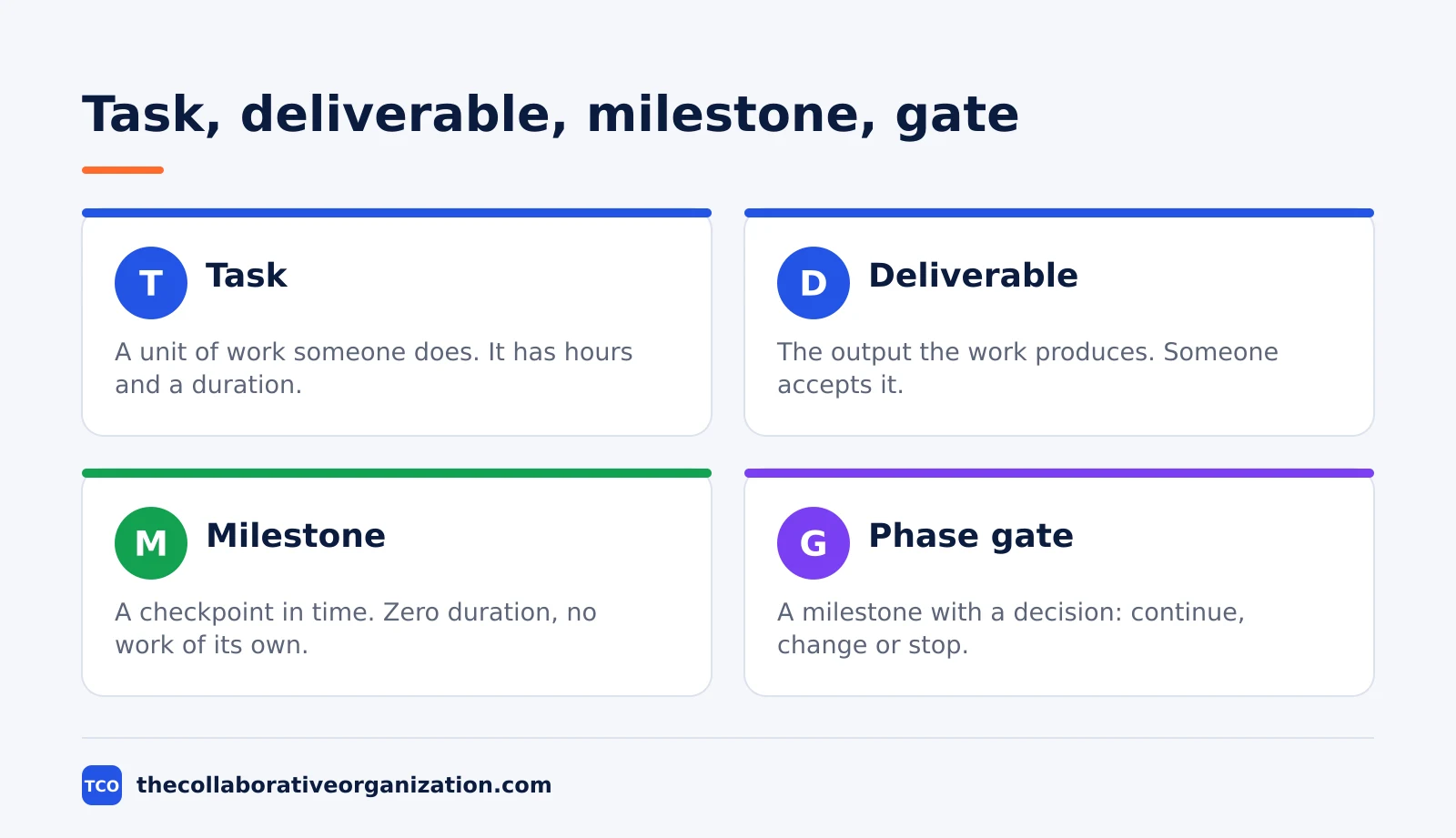
| Item | What it is | Has duration? | Example |
|---|---|---|---|
| Task | A unit of work someone does | Yes, hours or days | Build the checkout page |
| Deliverable | The output the work produces | No, but effort sits behind it | The finished checkout page |
| Milestone | A checkpoint in time | No, zero duration | Checkout live in production |
| Phase gate | A milestone with a decision | No, though the review meeting takes time | Design gate passed, build approved |
A quick test sorts them out. If you can put hours against it, it is a task. If you can hand it over and ask whether it meets what was agreed, it is a deliverable. If it is a date you aim to hit, with nothing to do except confirm you got there, it is a milestone.
Our guide on milestone vs deliverable goes deeper into the middle two, because that pair causes the most confusion. The short version is that a deliverable is a thing and a milestone is a date, and a project needs both to show progress.
The five types of project milestones
Milestones cluster at the edges of phases and at moments of approval, handoff or payment. Sorting them by what causes them is more useful than sorting them by date, because the cause tells you who needs to be in the room.
- Phase and stage milestones. The boundaries of the plan: kickoff, design complete, development complete, project close. These form the skeleton, and most projects need nothing more than these plus a launch date.
- Approval and sign-off milestones. The moment a named person accepts a major deliverable: design approved, budget released, security review passed. These slip most often, because they depend on somebody else’s calendar.
- External dependency milestones. Something outside the team lands: a contract is signed, a permit is granted, a vendor delivers hardware. Mark these even though you control them least, because a late one moves everything after it.
- Delivery and go-live milestones. The product ships, the campaign runs, the feature is public. This is usually the one milestone everybody outside the project can name.
- Contractual or payment milestones. Dates written into an agreement that release money or trigger an obligation. These are the only milestones with a direct financial cost for being late, which is why they get tracked with care.
Notice that none of these is work you do. Each one is a moment you arrive at after a batch of tasks is finished, which is exactly what makes it a useful checkpoint.
How to set milestones that actually help
A milestone earns its place only if it tells you something, and a good one has three qualities: it is binary, it marks real progress, and it has a date and an owner. A date with no name against it is a wish, and a milestone that nobody can fail is decoration.
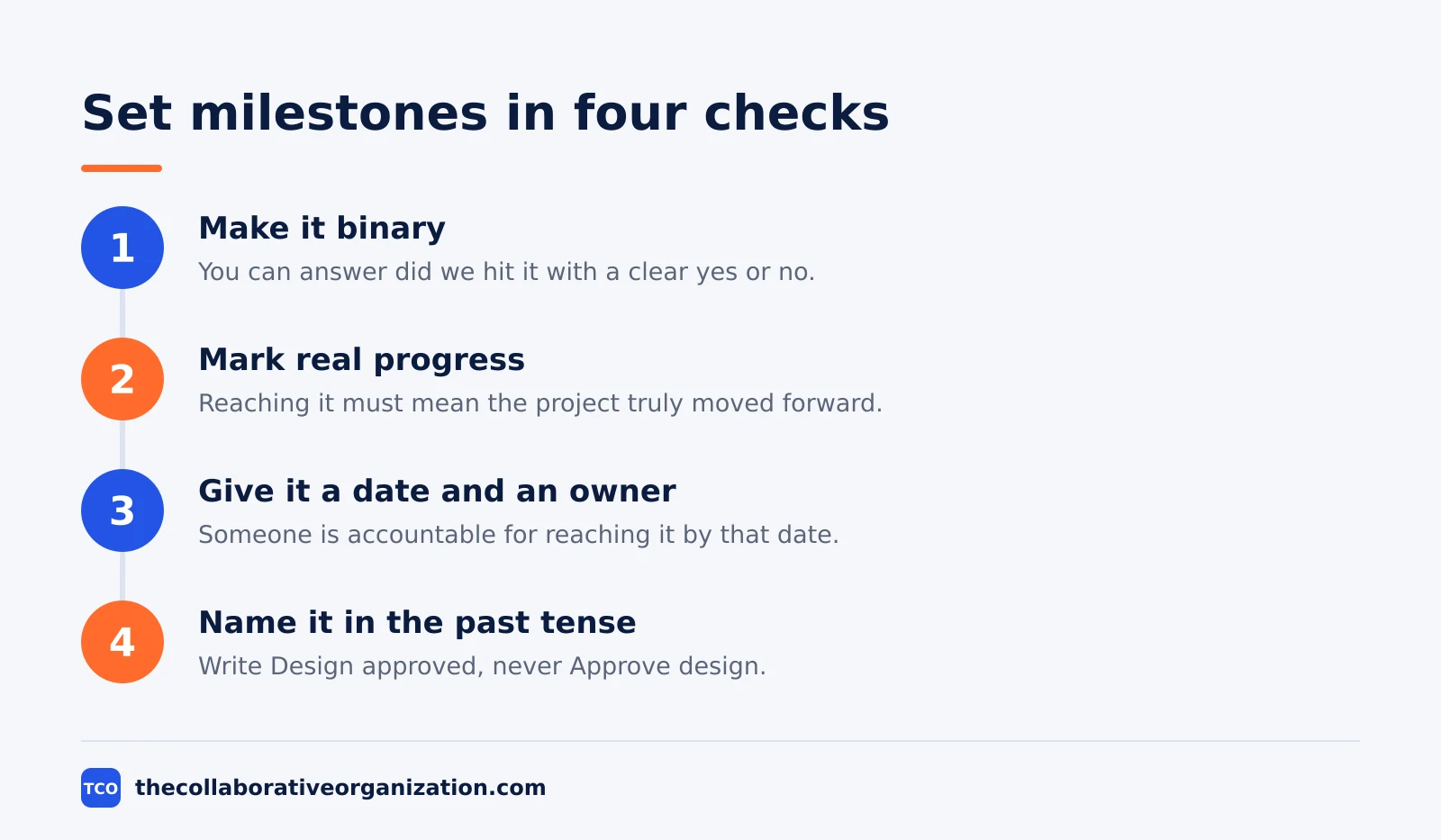
First, make it binary. You should be able to answer “did we hit it?” with a clear yes or no, and no “sort of.” “Beta released to test users” passes this test. “Making good progress on the beta” does not, because it can be true on any day.
Second, mark real progress. Reaching the milestone should mean the project genuinely moved forward, not that a small box got ticked. Too many milestones and none of them mean anything. A handful of major ones tells the real story.
Third, give it a date and an owner. Someone is accountable for the project reaching that point by that date, even though the milestone itself has no work attached. Usually that is the project manager or the owner of the deliverable the milestone marks.
Fourth, name it in the past tense, as a state the project has arrived in. Write “Design approved”, never “Approve design.” The past tense makes the binary test automatic: “Design approved” is either true on the day or it is not, while “Approve design” is an instruction, which is to say a task.
Milestone example: a marketing website launch
A marketing website launch shows how a few milestones can carry a whole plan. The project takes 10 weeks, and it has dozens of tasks and one main deliverable: the finished, published site. Four milestones mark the dates that matter to everyone watching.
| Milestone | Week | Reached when | Owner |
|---|---|---|---|
| Kickoff complete | 0 | The brief is signed and the team is staffed | Project manager |
| Design approved | 3 | The brand lead signs off every page design | Design lead |
| Content complete | 6 | All copy is written and loaded into the pages | Content lead |
| Site live | 10 | The site is published and serving real traffic | Project manager |
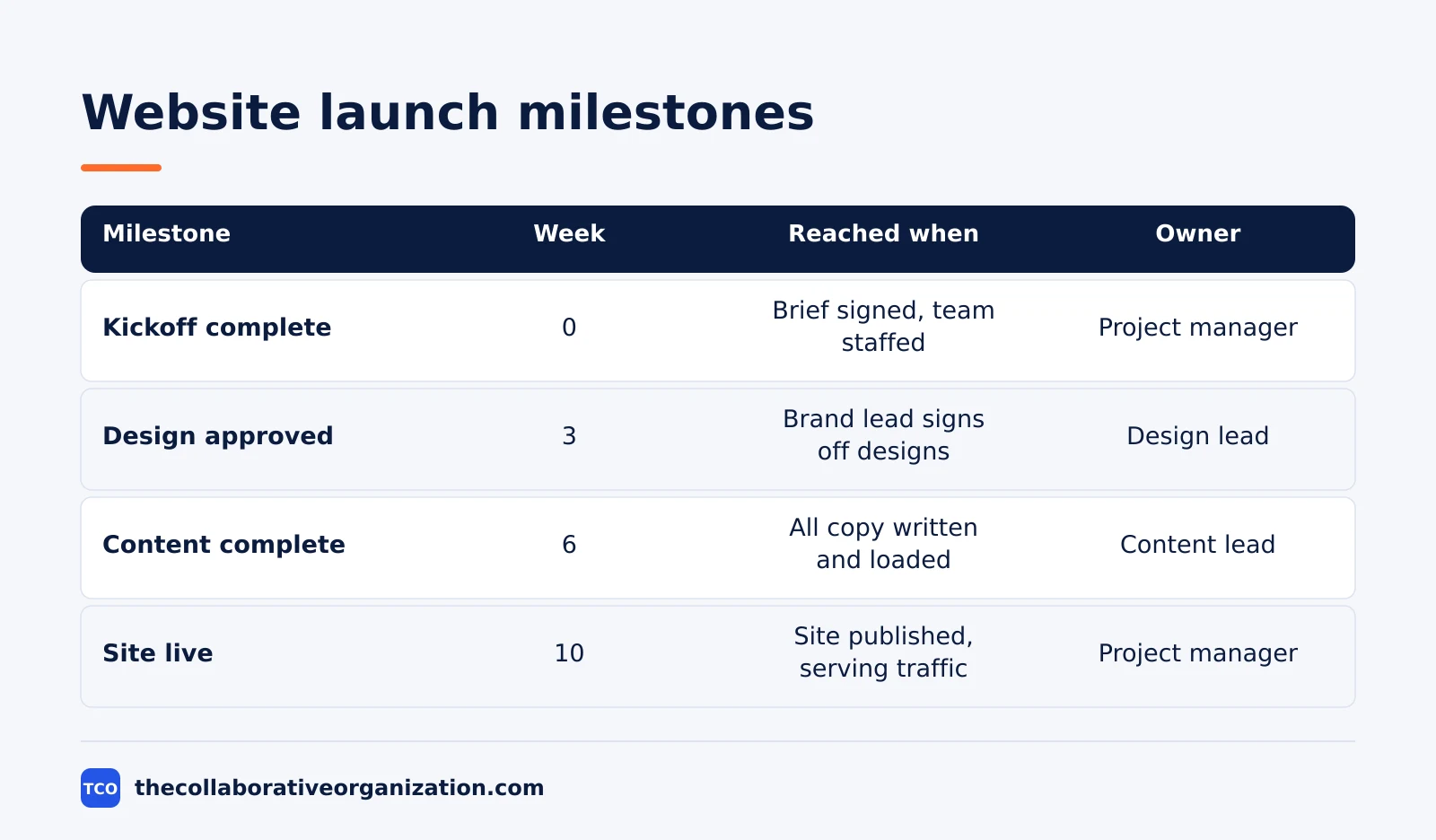
Each milestone is written in the past tense, each one has somebody responsible for reaching it, and each one being late tells you which part of the project is in trouble. If “Design approved” slips by a week, the build starts late. If “Content complete” slips, the launch date is at risk even though the build is done.
The milestones also sit on the project life cycle: kickoff ends initiation, design approval ends the design phase, content complete ends the build phase, and site live ends the project. A stakeholder who never reads the task list can still follow the project from these four dates alone.
How many milestones should a project have?
Fewer than most plans contain, and about one per phase boundary or major deliverable is the practical rule. A milestone that would not change how you describe the health of the project is probably a task in disguise, and it should come off the list.
The PMI scheduling standard says every schedule needs two milestones regardless: a start milestone and a finish milestone. Beyond those, add one for each phase boundary, each major deliverable, and each handoff between teams or companies. A three-month project with six or seven milestones is legible, while the same project with thirty hides the useful signal.
The Planitude milestone guide lands in the same place: about one milestone per decision or hand-over, plus six to ten on a three-month project with five people. The exact number matters less than the test behind it: if a milestone slips, does it change a decision? If not, it is not a milestone.
The failure runs both ways. A project whose only milestone is “launch” gives you no warning: you find out you are late on the day you were supposed to finish, when it is far too late to do anything about it. Mark each phase boundary, so a slip surfaces while it is still cheap to fix.
What happens when you miss a milestone?
Missing a milestone means every date built on top of it is now wrong, whether or not anyone has said so out loud. The useful response has three steps: say it at once, work out whether the slip sits on the critical path, then choose openly between recovering the time, moving the dates, or cutting scope.
What makes a missed milestone expensive is almost never the days lost. It is the silent slip: the date passes, nobody re-plans, and the plan keeps showing dates that everyone has privately stopped believing. From that point the schedule is decoration, and the next four milestones will be missed too, each one a surprise.
The cost of acting late shows up in the numbers. PMI found that organizations with high value-delivery maturity complete 64% of projects on time, against 36% for those with low maturity, a figure quoted on the Ottotaskly milestone guide. The gap is largely about whether anyone acts on a checkpoint when it is missed.
Milestones on a Gantt chart, and in agile
On a Gantt chart a milestone is drawn as a diamond rather than a bar, exactly because it has no length to draw. PMI’s scheduling standard is firm about this: a milestone has no resources assigned and no duration, and its marker should have a unique shape such as a diamond. If your chart shows a milestone as a bar spanning three days, it is not a milestone.
Our comparison of kanban vs Gantt chart covers the chart side in more detail, including how dependencies and milestones sit together on the timeline. The diamond marks the date, and the bars around it show the work that leads up to it.
Agile teams have milestones too, but they refuse to predict a long chain of them. A sprint review is a milestone, and a release is a milestone. What agile drops is the twenty intermediate dates guessed at in month one. Our guide to what a sprint is in scrum explains how sprint reviews act as regular checkpoints.
The need for honest re-planning grows as work gets harder to predict. PMI reports that the share of projects rated high complexity rose from 35% in 2013 to 41% in 2018, a figure quoted on the Ottotaskly guide. Fewer milestones, honestly re-planned, beat many milestones defended long after they stopped being true.
Tools that track milestones
Most teams do not need a separate milestone system, because a project tool can hold the distinction between a task and a milestone in one place. The checkpoint stays visible without pretending to be a piece of work. Compare the options on our project management software shortlist before you pick one.
| Tool | Best for | Free plan | Starting price (as of November 2026) | Notable limit |
|---|---|---|---|---|
| Asana | Teams that want milestones on a Timeline with dependencies | Free for 2 people | $10.99 per user per month, billed annually | Free plan covers 2 people |
| ClickUp | Teams that want milestones as dated markers on Gantt charts | Free Forever plan | $9 per user per month (Core), billed annually | $9 price is shown against a $12 regular price |
| Trello | Small teams that mark milestones with dated cards | Free for up to 10 collaborators | $5 per user per month (Standard), billed annually | Timeline view needs a paid plan |
The Asana price comes from Asana pricing: the Personal plan is free for 2 users, and Starter is $10.99 per user per month when billed annually. The ClickUp pricing page lists Core at $9 per user per month billed yearly, with a $12 regular price struck through, so the $9 figure may be promotional.
The Trello pricing page lists Standard at $5 per user per month billed annually, or $6 billed monthly. Two vendor pages showed no prices to our reader on 19 November 2026: the monday.com and Wrike pricing pages rendered no dollar figures, and the Jira page returned an error.
Common project milestone mistakes to avoid
Most milestone lists fail in the same four ways, and each one has a simple fix. Run through the list below each time the plan changes hands.
- The milestone is a task. It has an owner doing work, hours against it, and a duration. Fix it by renaming it as the state that work produces, in the past tense.
- One milestone at the end. The only checkpoint is launch day, so there is no early warning. Fix it by marking each phase boundary, so a slip surfaces while it is still cheap.
- Milestones nobody owns. A date with no name against it is a wish. Fix it by assigning an owner even though the milestone contains no work.
- Dates that are never re-planned. Missed milestones stay in the plan unchanged, and the whole schedule quietly becomes fiction. Fix it by moving the date on the day you miss it, and saying what moved with it.
Sources
- Ottotaskly - What Is a Milestone in Project Management? (2026)
- Vact - Project Milestones: Definition, Gates, Payments, Example (2026)
- Planitude - Project Milestones: How to Set Them, with an Example (2026)
- Asana - Critical Path Method (CPM): Steps, Float, Examples (2026)
- Asana - Pricing (2026)
- ClickUp - Pricing (2026)
- Trello - Pricing (2026)
Frequently asked questions
What is a milestone in project management?
A milestone is a point in the project schedule with zero duration that marks a major event, such as a phase ending, a deliverable being approved, or a product going live. It takes no time and no effort itself. It records the moment the work before it ends and the work after it can start.
What is the difference between a milestone and a deliverable?
A deliverable is a thing the project produces and someone accepts, such as a finished report or a working feature. A milestone is the point in time that thing is accepted. Deliverables have owners, effort and acceptance criteria behind them. A milestone has a date and nothing else.
Does a milestone have a duration?
No. A milestone has zero duration and no resources assigned to it. That is what separates it from a task in every scheduling tool. A task consumes time and effort, while a milestone is a single point on the timeline, drawn as a diamond rather than a bar.
How many milestones should a project have?
Enough that someone who never reads the task list can follow the project, and few enough that each one means something. In practice that is about one per phase boundary or major deliverable. A three-month project with six or seven milestones is legible, and one with thirty is a task list in disguise.
What is a phase gate?
A phase gate is a milestone with a decision attached. An ordinary milestone records that something happened. A gate stops the project until somebody decides whether it continues, changes or stops. Every phase gate is a milestone, but most milestones are not gates.
What happens when you miss a milestone?
Say it at once, work out whether the slip sits on the critical path, then choose openly between recovering the time, moving the dates, or cutting scope. The expensive failure is the silent slip, where the date passes, nobody re-plans, and the plan keeps showing dates nobody believes.
Related articles

project management
How to Choose Project Management Software (2026)
Pick project management software in seven steps: define the work, count seats, price the real cost, and run a two-week pilot before you pay.
November 19, 2026 · 10 min read

project management
What Is a RACI Matrix? Definition, Roles and Examples (2026)
A RACI matrix maps who is Responsible, Accountable, Consulted and Informed for each task. Learn the four roles, how to build one, and see a worked example.
November 19, 2026 · 9 min read

project management
Daily Standup Meeting Format That Works (2026)
A daily standup is a 15-minute meeting where Developers inspect progress toward the Sprint Goal and plan the next day. Use this format to run one that ends on time.
November 19, 2026 · 10 min read