Project Plan Template: Copyable Sections (2026) | The Collaborative Organization
By The Collaborative Organization Team · November 19, 2026 · Last verified November 19, 2026 · 11 min read
A project plan template is a reusable outline of the sections a plan must hold, so no project starts from a blank page and no section is forgotten. Copy the sections below into a document, fill each one in, and get the sponsor to sign the approvals page. The template is the skeleton; your project is the flesh on it.
Key takeaways
- A project plan template holds 12 sections, from the overview and scope to the budget, risks and approvals page.
- The PMBOK Guide lists fifteen typical subsidiary plans, and a team keeps only the ones its project needs.
- A good plan tracks seven elements: goals, success metrics, stakeholders and roles, budget, milestones and deliverables, timeline, and communication.
- A three-week project needs about a two-page plan, while a six-month effort needs 15 to 20 pages, with the same sections.
- Approval turns the draft into the baseline, and the plan changes after that only through a recorded change request.
- Fill the template from the approved charter, and delete the sections a small project does not need.
What a project plan template is
A project plan template is a copyable set of headings that tells a project manager exactly what to write, in what order, and how much detail each part needs. It is not a plan itself, and it is not a task list. It is the empty form that becomes a plan once the project details are filled in.
Our guide on how to create a project plan teaches the eight steps that fill it in, so this page does not repeat them.
A plan is a formal, approved document that explains how a project will be carried out, tracked and brought to a close.
That definition comes from the Projeric guide, which also lists the sections a practical template needs: overview, approach, subsidiary plans, baselines, metrics and approvals. The template below follows that shape, cut down to the sections most projects actually use.
Use the template at the start of the planning phase, after the charter is signed. Fill it in section by section, in order, and ask the sponsor to review the scope before you cost the budget. A template filled in the wrong order is a plan built on guesses.
The project plan template
Copy the table below as the contents page of your plan, then fill in each section in order. Each row names the section, the question it answers, and what to write in it.
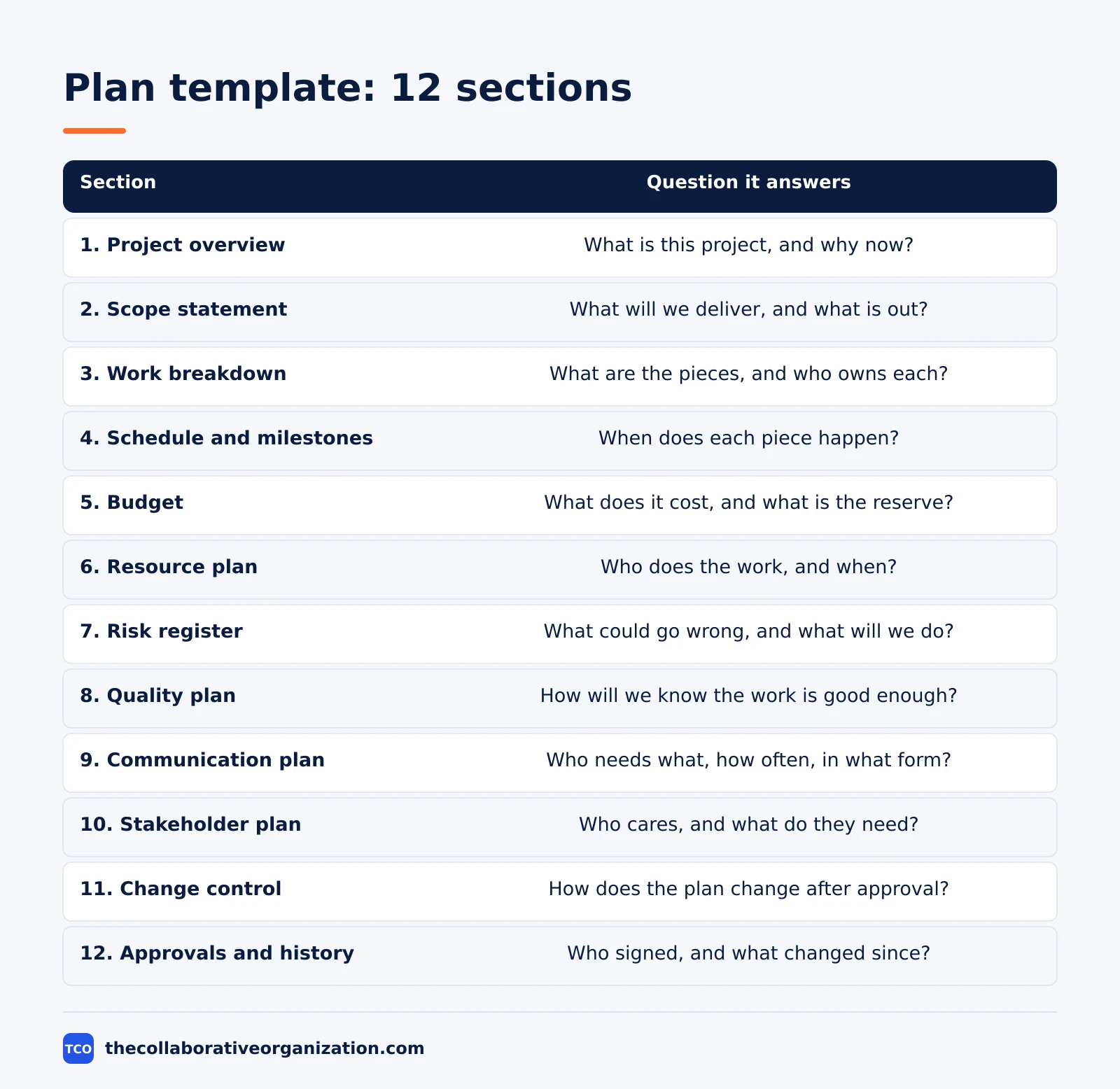
| Section | Question it answers | What to write |
|---|---|---|
| 1. Project overview | What is this project, and why now? | Goal, sponsor, manager, dates, link to the charter |
| 2. Scope statement | What will we deliver, and what is out? | Deliverables, exclusions, assumptions, limits |
| 3. Work breakdown | What are the pieces, and who owns each? | Deliverables split into work packages with owners |
| 4. Schedule and milestones | When does each piece happen? | Dates, dependencies, milestones, critical path |
| 5. Budget | What does it cost, and what is the reserve? | Cost per package, total, reserve, owner |
| 6. Resource plan | Who does the work, and when? | Named people, hours, dates, outside help |
| 7. Risk register | What could go wrong, and what will we do? | Risks, impact, likelihood, owner, response |
| 8. Quality plan | How will we know the work is good enough? | Acceptance criteria, checks, who signs off |
| 9. Communication plan | Who needs what, how often, in what form? | Stakeholders, message, frequency, format |
| 10. Stakeholder plan | Who cares, and what do they need? | Key people, interest, how to keep them informed |
| 11. Change control | How does the plan change after approval? | Request, review, approve, log |
| 12. Approvals and history | Who signed, and what changed since? | Signatures, dates, version log |
The same twelve sections work as a blank document outline. Copy the skeleton below into a fresh document, then write under each heading. Delete the sections a small project does not need, such as a separate stakeholder plan, and fold their one or two lines into the communication plan instead.
PROJECT PLAN - [Project name]
Version: [number] - Date: [date]
Project manager: [name] - Sponsor: [name]

1. PROJECT OVERVIEW
   Goal: [one sentence]
   Success looks like: [measurable outcome and date]

2. SCOPE STATEMENT
   In scope: [deliverables]
   Out of scope: [what is not included]
   Assumptions: [what you are taking as given]

3. WORK BREAKDOWN
   [Deliverable] - [work packages] - [owner each]

4. SCHEDULE AND MILESTONES
   [Milestone] - [date] - [owner]
   Critical path: [the chain that sets the end date]

5. BUDGET
   [Work package] - [cost]
   Total: [amount] - Reserve: [amount]

6. RESOURCE PLAN
   [Person] - [tasks] - [hours] - [dates]

7. RISK REGISTER
   [Risk] - [impact] - [likelihood] - [owner] - [response]

8. QUALITY PLAN
   Acceptance criteria: [how done is judged]
   Checks: [who checks, and when]

9. COMMUNICATION PLAN
   [Stakeholder] - [message] - [how often] - [format]

10. STAKEHOLDER PLAN
    [Person or group] - [interest] - [how to keep them informed]

11. CHANGE CONTROL
    [Request] - [reviewer] - [decision] - [date]

12. APPROVALS AND HISTORY
    Approved by: [sponsor name and date]
    Version log: [version, date, what changed]
The PMBOK Guide lists fifteen typical subsidiary plans, and expects each team to keep only the ones its project needs. That point comes from the Projeric guide. The twelve sections above are the practical cut: they cover the same ground, and a small project can merge or drop four of them without losing anything the sponsor needs to see.
A filled-in project plan example
The example below fills the template for a fictional office move, so you can see what each section holds at real size. All names, dates and figures are invented, and the company does not exist. The project moves a 40-person office to a new building in eight weeks, with a budget of $60,000.
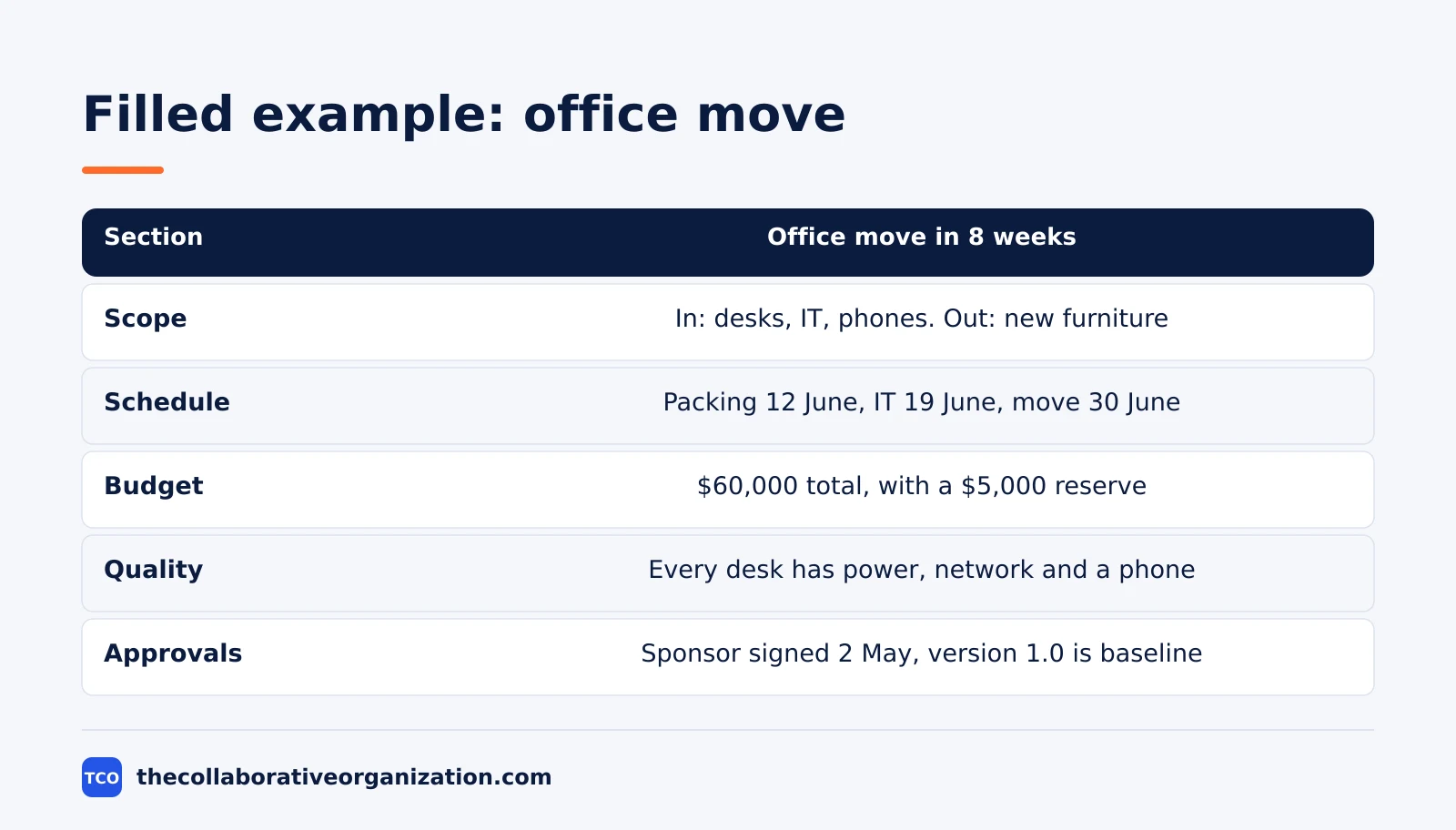
| Section | Filled in for the office move |
|---|---|
| Overview | Move 40 staff to the new building by 30 June; sponsor is the operations director |
| Scope | In: desks, IT setup, phone lines, signage. Out: new furniture, a new phone system |
| Work breakdown | Four packages: packing, IT move, fit-out checks, first-day support |
| Schedule | Packing done 12 June, IT moved 19 June, fit-out signed off 26 June, move day 30 June |
| Budget | Packing $8,000, IT move $22,000, fit-out $20,000, support $5,000, reserve $5,000 |
| Resources | Move lead, IT lead, facilities lead, plus a removal firm booked for 30 June |
| Risks | Lift booking lost, so a backup date is held; IT cutover overruns, so a rollback plan is written |
| Quality | Every desk has power, network and a working phone on the morning of 30 June |
| Communication | Weekly email to all staff each Friday; daily update in move week |
| Stakeholders | Staff, building manager, IT supplier, removal firm |
| Change control | Any change over $1,000 needs the sponsor’s written approval |
| Approvals | Sponsor signed 2 May; version 1.0 is the baseline |
Three things make this example work. The scope names what is out, so nobody expects new furniture. The budget adds to the total with a visible reserve, so the sponsor can see the cushion. The quality line is a test anyone can run on move morning, not a vague promise.
How to customise the template for your team
Start with the full twelve sections, then shape them to the size and style of your project. Customise it in five moves, and keep the same headings every time so the sponsor always knows where to look.
- Cut sections for small projects. A three-week project can fold the stakeholder plan into the communication plan and drop the separate quality plan, keeping its one acceptance line in the scope section.
- Add sections for big projects. A large project may need a procurement plan for suppliers and a separate requirements plan, both of which the PMBOK Guide lists among its subsidiary plans.
- Match the schedule to your method. A waterfall project fills in the full schedule up front, while an agile project keeps the milestone dates and plans the detail sprint by sprint.
- Name the baseline in the approvals page. Record the approved scope, schedule and budget as version 1.0, and log every change after that with a date and a decision.
- Keep one template for the whole team. Store it where everyone can copy it, and review it once a year. A template that lives in five different versions is five different templates.
Our guide to project charter vs project plan explains where the charter ends and this template begins. The charter authorizes the work in one or two pages, and the plan template holds the detail that follows. Fill the template from the charter’s goals and limits, and never plan work the charter did not approve.
Variations: small, large and agile plans
One template serves three sizes of project, because the sections stay the same and only the depth changes. A small plan keeps each section to a paragraph or a table. A large plan gives each section its own page, with the risk register and the schedule running to several pages each.
An agile plan keeps the same twelve headings but fills them differently. The scope section holds the product goal and the release scope, the schedule holds milestones and release dates instead of task dates, and the work breakdown holds epics instead of work packages.
The change control section matters more, not less, because scope moves every sprint and the log is what keeps the baseline honest.
Asana lists the same seven elements every good plan should track: goals, success metrics, key stakeholders and team roles, budget, milestones and deliverables, timeline and schedule, and a communication plan. That list comes from the Asana templates page at asana.com. Check your filled template against those seven, and add any one that is missing before you ask for sign-off.
Tools that hold the plan
A project tool holds the plan in one place, so the sections, the dates and the change log stay together. The tool carries the dates, the owners and the status, which means the manager updates one place instead of three documents. Compare the options on our project management software shortlist before you pick one.
| Tool | Best for | Free plan | Starting price (as of November 2026) | Notable limit |
|---|---|---|---|---|
| Asana | Teams that want the plan, tasks and timeline together | Free for 2 people | $10.99 per user per month (Starter), billed annually | Free plan covers 2 people |
| ClickUp | Teams that want the plan, docs and Gantt chart in one tool | Free Forever plan | $9 per user per month (Core), billed annually | $9 is shown against a $12 regular price |
| Trello | Small teams that want a simple board per plan section | Free for up to 10 collaborators | $5 per user per month (Standard), billed annually | $6 per user per month if billed monthly |
The Asana price comes from Asana pricing: the Personal plan is free for 2 users.
Starter is $10.99 per user per month when billed annually. The ClickUp pricing page lists Core at $9 per user per month billed yearly, shown against a $12 regular price. The Trello pricing page lists Standard at $5 per user per month billed annually, or $6 billed monthly.
A Gantt chart is the standard format for the schedule section.
Our guide on how to write a project status report shows how to report against the baseline once the plan is approved.
A milestone is a date with a result attached, so the schedule section should name the milestones the sponsor will watch, as our guide on what a project milestone is explains.
Common project plan template mistakes to avoid
Most plan templates fail in the same five ways, and all five are easy to spot before the sponsor signs. Run through the list before you ask for approval.
- Scope with no exclusions. A scope that never says what is out grows every week, and the date slips with it.
- A work breakdown that lists tasks, not deliverables. A tree of activities with no named result cannot be checked, so no one knows when a piece is done.
- No baseline saved. A plan that changes without a saved baseline cannot be measured, so no one knows if the project is late.
- Risks with no owner. A risk that no one owns has no response, and it will be the problem that surprises the team.
- A template copied but never filled in. Headings with blank space under them are not a plan, so fill every section or delete it before sign-off.
Sources
- Projeric - Project Management Plan: Template and Example (2026)
- WorksBuddy - What Goes into a PMI-Compliant Project Plan Template (2026)
- Asana - 30 Project Plan Templates to Kickstart Your Best Work (2026)
- Asana - Free Work Plan Template to Organize Your Team (2026)
- Asana - Pricing (2026)
- ClickUp - Pricing (2026)
- Trello - Pricing (2026)
Frequently asked questions
What should a project plan template include?
It should include the project overview, scope, work breakdown, schedule with milestones, budget, resource plan, risk register, communication plan, change control and an approvals page. Small projects can keep each section to a paragraph or a table, but none of them should be missing entirely, because the missing section is the one that causes the delay later.
How long should a project plan be?
A three-week internal project needs about a two-page plan, while a six-month cross-team effort needs a 15 to 20 page plan, with the same sections either way. The length follows the size of the work, not the size of the template. A plan that is longer than the work it describes is a sign of padding, not planning.
What is the difference between a project plan template and a project charter template?
The charter template authorizes the project in one or two pages: purpose, sponsor, budget and who is in charge. The plan template explains how the work will run in detail: tasks, owners, dates, budget lines and risks. Use the charter first, get it signed, then fill in the plan template from the charter's goals and limits.
Can I use one project plan template for every project?
Yes, if the template is built to be cut down. Start with the full set of sections, then delete the ones a small project does not need, such as procurement or a full stakeholder plan. Keep the same headings and order every time, so the team and the sponsor always know where to look for the budget, the dates and the risks.
Who approves a project plan?
The sponsor approves the plan, usually with the key stakeholders. Approval turns the draft into the baseline: the approved scope, schedule and budget that later progress is measured against. Once approved, the plan changes only through a recorded change request, not by quiet edits to the document.
How often should a project plan be updated?
Update it whenever a change is approved, and review it at least once a week during the work. A plan that is never updated becomes fiction within two weeks, and the team stops trusting it. Small updates through the change log keep the plan honest without rewriting the whole document each time.
Related articles

project management
How to Choose Project Management Software (2026)
Pick project management software in seven steps: define the work, count seats, price the real cost, and run a two-week pilot before you pay.
November 19, 2026 · 10 min read

project management
What Is a RACI Matrix? Definition, Roles and Examples (2026)
A RACI matrix maps who is Responsible, Accountable, Consulted and Informed for each task. Learn the four roles, how to build one, and see a worked example.
November 19, 2026 · 9 min read

project management
Daily Standup Meeting Format That Works (2026)
A daily standup is a 15-minute meeting where Developers inspect progress toward the Sprint Goal and plan the next day. Use this format to run one that ends on time.
November 19, 2026 · 10 min read