Billable vs Non-Billable Hours Explained (2026) | The Collaborative Organization
By The Collaborative Organization Team · November 19, 2026 · Last verified November 19, 2026 · 9 min read
Billable hours are the hours a client pays for; non-billable hours are the hours they do not. The difference decides whether a services firm makes money or quietly loses it. This guide explains what counts as billable, what never does, and how to reach the 70 to 85% utilization rate healthy firms aim for.
Key takeaways
- Billable hours are client work billed per a service agreement; non-billable hours are admin, internal meetings, training and business development.
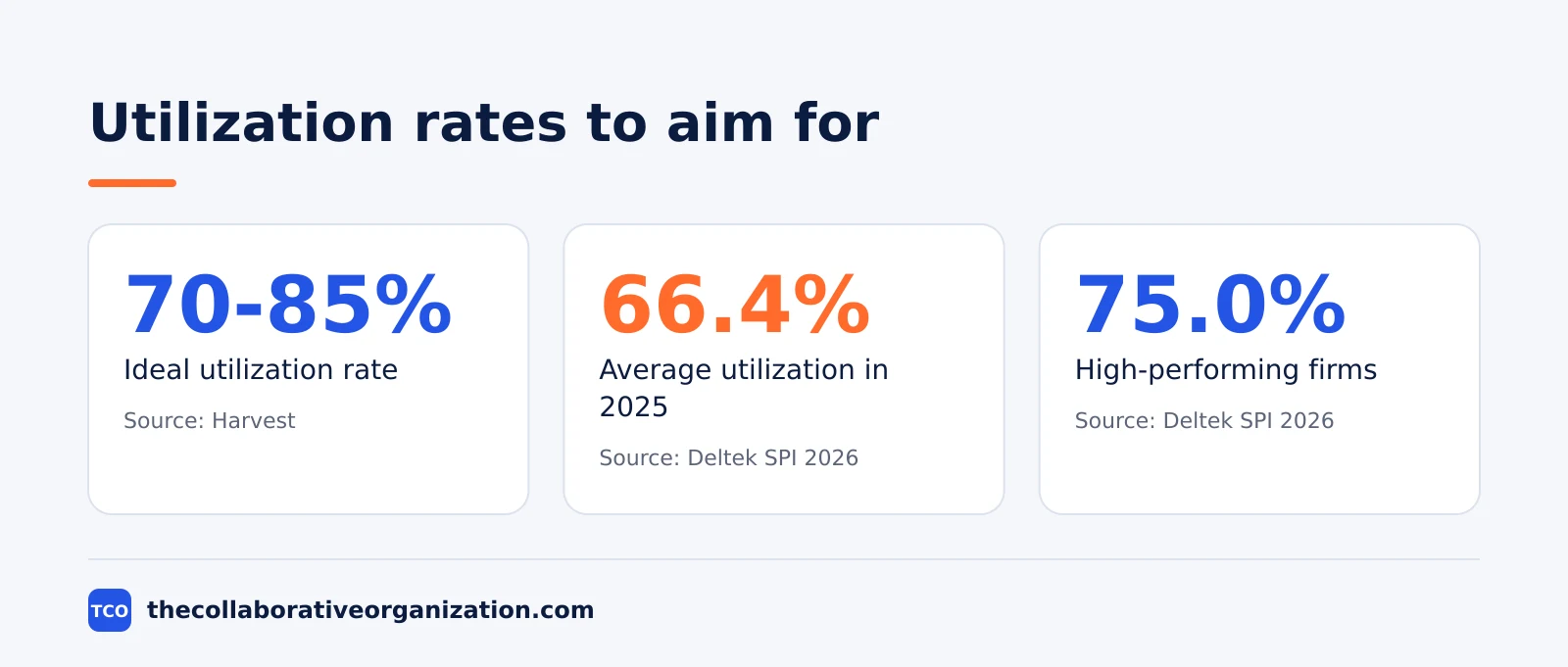
- Harvest puts the ideal utilization rate at 70 to 85% of total hours.
- Deltek’s 2026 SPI benchmark found average billable utilization of 66.4% in 2025, the lowest in nearly two decades.
- Fifteen untracked minutes a day is more than 60 hours a year per person, according to Harvest’s own estimate.
- A 6-minute increment (0.1 hour) is the standard unit for legal billing, and up to 25% of potential revenue is lost to misclassification.
What are billable hours?
Billable hours are hours spent on work a client pays for under a service agreement. Harvest defines them that way: time billed directly to a client, usually under a fixed fee, a retainer or an hourly rate. If the client sees the hour on the invoice, it is billable.
Common billable work includes client meetings, design and writing, coding, research for a client project, and the time spent reporting to the client. The test is simple: would the client accept this hour on an invoice? If the answer is yes and the agreement covers it, log it as billable.
Billing units vary by profession. Law firms commonly bill in 6-minute increments, called 0.1 of an hour, so a 12-minute call becomes two units. Consultancies usually round to the nearest quarter hour. Agree the unit in the contract, and say it to the client before the work starts, not after.
Our guide to what project management is covers the wider job these hours fit into. The key point here is narrow: billable hours are the firm’s revenue, measured one hour at a time.
What are non-billable hours?
Non-billable hours are hours the firm pays for but no client does. Harvest lists the usual suspects: administrative work, internal meetings, training, business development, and time spent fixing mistakes. The work is real, but nobody sends an invoice for it.
Non-billable work splits into two kinds. The first is necessary: payroll, hiring, compliance, and the training that keeps skills current. The second is waste: rework, duplicated effort, and meetings with no decision. Only the second kind can be cut; the first must be funded from billable hours.
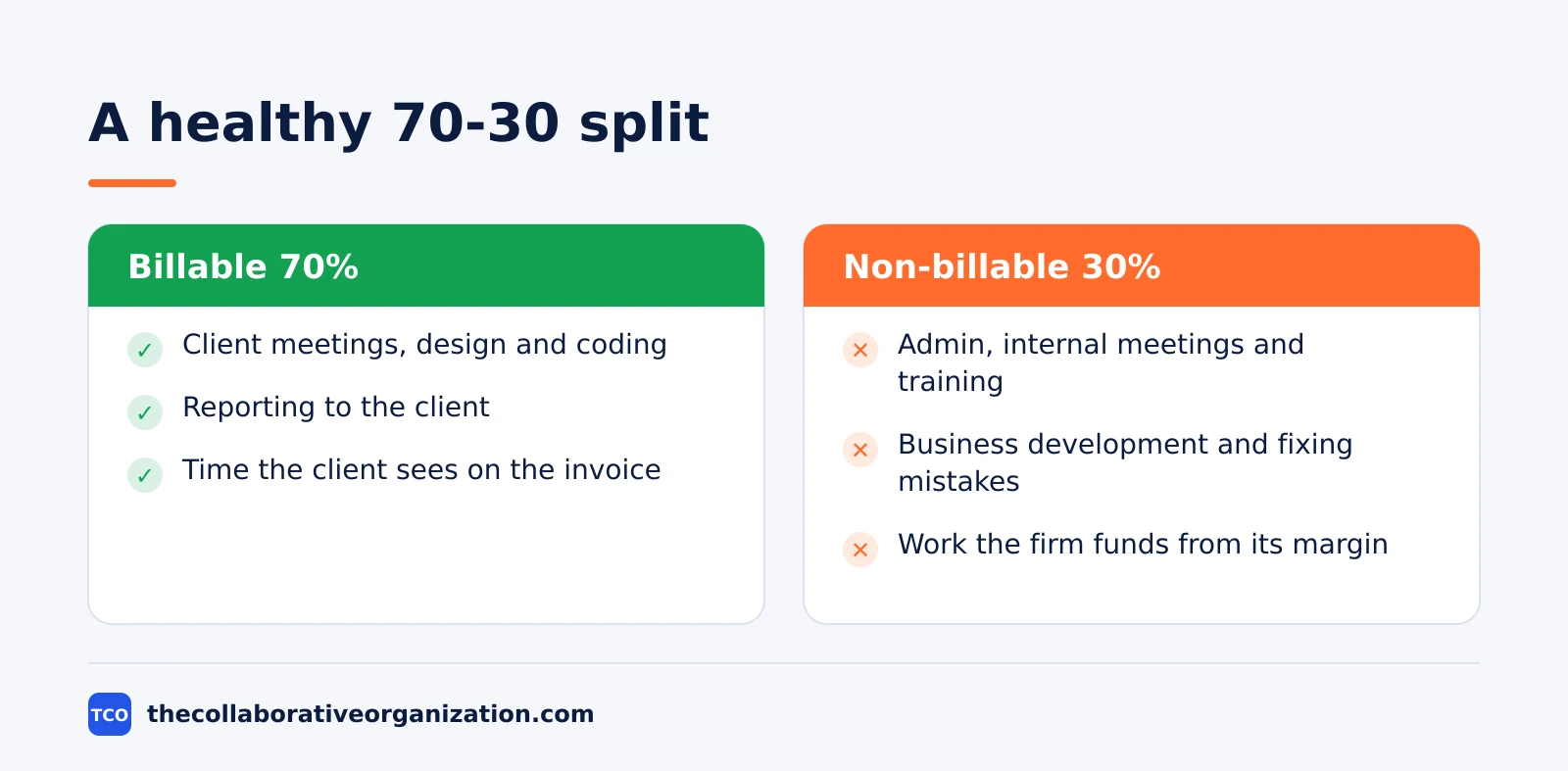
Every firm has both kinds, and the split matters more than the total. Harvest’s guide suggests managed service providers aim for about 70% billable and 30% non-billable hours. A firm at 50% billable is not lazy; it is spending half its week on work that earns nothing.
The same split drives hiring. A firm that wants to add staff must first know how many billable hours each person already carries, because new hires are paid from the margin on billable work. Track the split for a month before you hire, not after.
Billable vs non-billable hours: the comparison
The table below puts the two kinds side by side. The test for each hour is the same: does a client agreement cover it? If yes, it is billable; if no, it is non-billable, however useful the work is.
| Aspect | Billable hours | Non-billable hours |
|---|---|---|
| Who pays | The client, under the agreement | The firm, from its margin |
| Examples | Client meetings, design, coding, reporting | Admin, internal meetings, training, business development |
| On the invoice | Yes, listed line by line | No, never listed |
| Drives | Revenue and profit | Overhead and future capacity |
| Goal | More, up to a healthy ceiling | Enough, but no more than needed |
| Risk if ignored | Under-billing and lost revenue | Hidden overhead that eats profit |
The split between the two is the firm’s real health metric. A firm at 80% billable with 20% non-billable is funding its overhead from a fifth of its time. A firm at 50% billable is funding it from half. The second firm needs higher rates, fewer staff or tighter admin, and the table shows which lever to pull.
Neither kind is good or bad on its own. Training is non-billable and still worth doing; a client meeting that goes nowhere is billable and still wasted. Judge each hour by its return, not by its label.
How to calculate utilization rate
Utilization rate is billable hours divided by total working hours, times 100. A consultant with 30 billable hours out of 40 working hours runs at 75% utilization. The formula is the same for a person, a team or a whole firm.
Worked example: a consultant charges $100 per hour and works 40 hours a week. At 65% utilization she bills 26 hours a week, or $2,600. At 75% she bills 30 hours, or $3,000. The difference is $400 a week, or $20,800 over a 52-week year.
The benchmark to compare against comes from Deltek’s 2026 SPI Professional Services Maturity Benchmark. Average billable utilization was 66.4% in 2025, the lowest in nearly two decades, while high-performing firms reached 75.0%. Deltek’s summary of the benchmark puts the gap at more than 10 points.
Harvest puts the ideal range at 70 to 85%. Below 70%, overhead eats the margin; above 85%, staff have no time for training, rest or the work that wins the next client. Aim for the middle of the range, not the top.
Measure weekly, not yearly. A yearly average hides a bad quarter, and a bad quarter hides a team that stopped logging. Track the rate every Friday, and act when it drops three weeks in a row.
How to track billable hours without losing time
The rule is simple: log time the day it happens, not at the end of the week. Harvest’s guide estimates that 15 minutes of untracked time a day adds up to more than 60 hours a year per person, and for a 10-person firm that is over $200,000 a year in lost billable time.
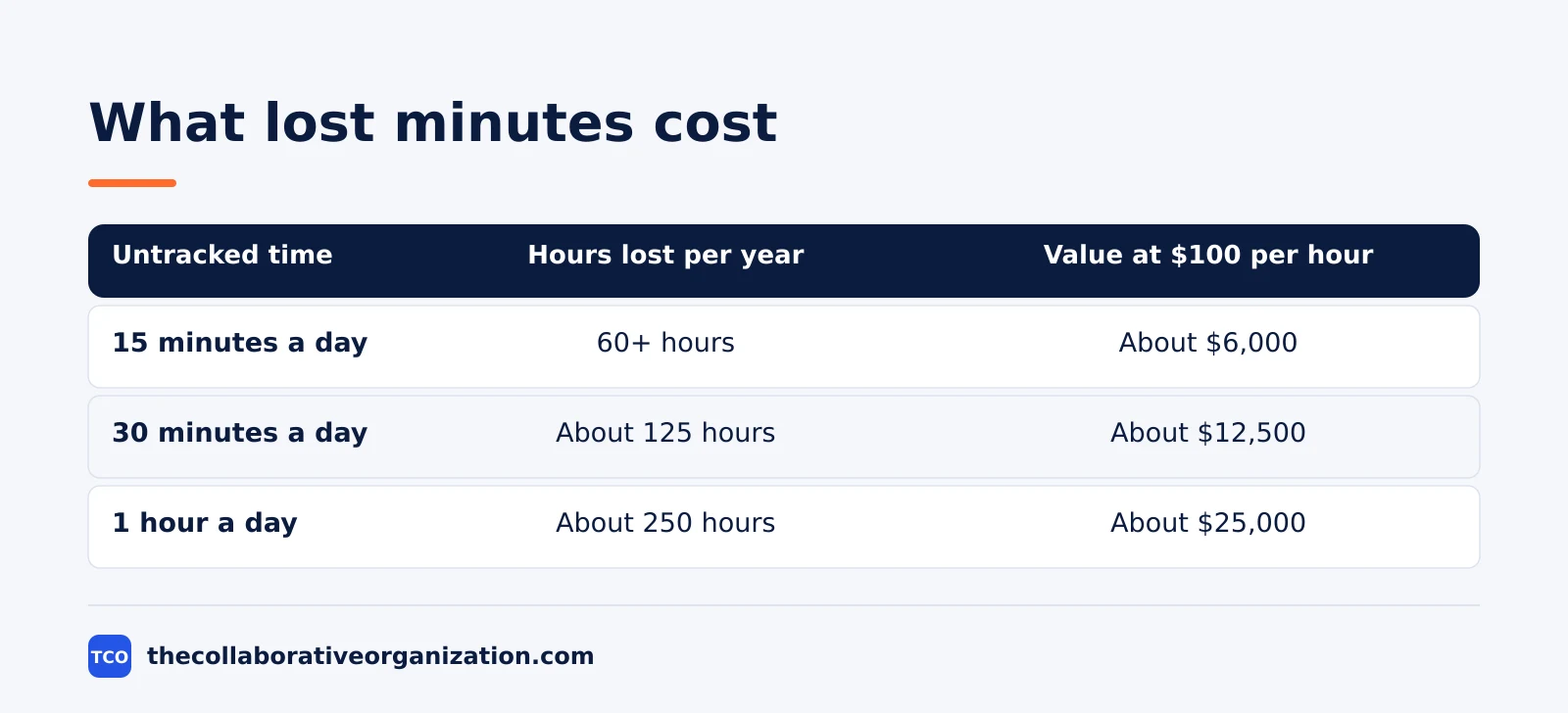
The table scales Harvest’s 15-minute example to 250 working days a year at $100 per hour, so the figures are arithmetic, not a separate study.
Three habits keep the log honest. First, start a timer when the work starts, not when you remember it. Second, write a short note on every entry, so the client can see what the hour bought. Third, review the week’s log every Friday, before the details fade.
Rounding rules matter, so agree them in advance. A 6-minute increment suits law firms; a quarter hour suits most consultancies. Whatever the unit, round the same way every time, and say the rule to the client before the first invoice.
Estimates feed the log, and bad estimates starve it. Our guide on how to estimate project time shows how to break work into timed tasks, so the hours you plan match the hours you bill.
Misclassification is the quiet leak. Harvest’s guide says up to 25% of potential revenue can be lost when billable work is logged as non-billable. Review the non-billable column each month, and move anything a client should have paid for.
Tools that track billable hours
A time tracker is worth the money when it makes logging automatic. The table below lists four tools that track billable time, with starting prices as of November 2026. Two of the prices come from the vendor’s own pricing page; two rest on independent November 2026 checks of the vendor’s pricing page, and the notes say so.
| Tool | Best for | Free plan | Starting price (as of November 2026) | Pricing note |
|---|---|---|---|---|
| Asana | Tasks with time tracking | Free for 2 people | $10.99 per user per month (Starter), billed annually | Vendor pricing page |
| ClickUp | All-in-one tracking | Free Forever plan | $9 per user per month (Core), billed annually | Vendor pricing page; $12 regular price crossed out |
| Harvest | Time tracking for client work | 1 seat, 2 projects | From $9 per seat per month, billed annually ($108 per seat) | Independent Nov 2026 checks of the vendor page |
| Toggl Track | Simple time tracking | Free plan | $9 per user per month (Starter), billed annually | Independent Nov 2026 checks of the vendor page |
Asana’s Starter plan costs $10.99 per user per month billed annually, according to Asana’s pricing page.
ClickUp’s Core plan costs $9 per user per month billed annually, with a $12 regular price crossed out on ClickUp’s pricing page. The Business plan costs $17 per user per month.
Harvest Teams starts from $9 per seat per month billed annually, according to independent November 2026 checks of Harvest’s pricing page. Confirm the price on the vendor’s site before you buy.
Toggl Track Starter costs $9 per user per month billed annually, according to independent November 2026 checks of Toggl Track’s pricing page. The Premium plan costs $16 per user per month billed annually.
Compare the full shortlist on our project management software page before you commit to a tool.
Our guide on how to choose project management software walks through the selection steps, from shortlist to trial, so the tracker you pick fits the way your team works.
Common billable hours mistakes to avoid
Most firms lose billable time the same few ways. Run through the list at the end of each month.
- Logging time at the end of the week. Memory fades fast, and Friday’s guess is always lower than Monday’s reality. Log daily, or use a timer.
- Calling every meeting non-billable. A meeting the client asked for is billable work, and a meeting about the client is usually billable too. Ask who requested it before you label it.
- Rounding up without a rule. A 6-minute increment and a quarter hour give different totals on the same week. Pick one unit, write it down, and use it every time.
- Hiding admin in billable hours. Padding client hours to cover admin inflates the rate the client sees and hides the real overhead. Keep the split honest, even when it hurts.
- Ignoring the utilization rate. A firm that never measures utilization learns about a thin month from the bank balance. Track the rate weekly and act after three low weeks.
- Forgetting to bill small work. A 12-minute call is two 6-minute units, and a week of them is a day of revenue. Small work adds up, so log it the same day.
Sources
- Harvest - Billable vs Non-Billable Hours: What to Know (2026)
- Deltek - Professional Services Billable Utilization at Historic Low (2026)
- Asana - Pricing (2026)
- ClickUp - Pricing (2026)
- Harvest - Pricing (2026)
- Toggl Track - Pricing (2026)
Frequently asked questions
What are billable hours?
Billable hours are hours spent on work a client pays for under a service agreement, usually under a fixed fee, a retainer or an hourly rate. If the client sees the hour on the invoice, it is billable. Common examples are client meetings, design, coding and reporting to the client.
What counts as non-billable hours?
Non-billable hours are hours the firm pays for but no client does: administrative work, internal meetings, training, business development and time spent fixing mistakes. The work is real, but nobody sends an invoice for it. Some of it is necessary, and some of it is waste.
What is a good utilization rate?
Harvest puts the ideal utilization rate at 70 to 85% of total hours. Deltek's 2026 SPI benchmark found an average of 66.4% in 2025, while high-performing firms reached 75.0%. Below 70%, overhead eats the margin; above 85%, staff have no time for training or rest.
How do you calculate utilization rate?
Divide billable hours by total working hours and multiply by 100. A consultant with 30 billable hours out of 40 working hours runs at 75% utilization. The formula works the same for a person, a team or a whole firm, and it should be measured weekly.
How much time do you lose by not tracking hours?
Harvest estimates that 15 minutes of untracked time a day adds up to more than 60 hours a year per person, and for a 10-person firm that is over $200,000 a year in lost billable time. Logging time the day it happens is the cheapest fix a firm can make.
Related articles

project management
How to Choose Project Management Software (2026)
Pick project management software in seven steps: define the work, count seats, price the real cost, and run a two-week pilot before you pay.
November 19, 2026 · 10 min read

project management
What Is a RACI Matrix? Definition, Roles and Examples (2026)
A RACI matrix maps who is Responsible, Accountable, Consulted and Informed for each task. Learn the four roles, how to build one, and see a worked example.
November 19, 2026 · 9 min read

project management
Daily Standup Meeting Format That Works (2026)
A daily standup is a 15-minute meeting where Developers inspect progress toward the Sprint Goal and plan the next day. Use this format to run one that ends on time.
November 19, 2026 · 10 min read