What Is a Sprint in Scrum? Definition (2026) | The Collaborative Organization
By The Collaborative Organization Team · November 19, 2026 · Last verified November 19, 2026 · 10 min read

A sprint is a fixed-length period of one month or less in which a Scrum Team turns Product Backlog items into a usable Increment. The Scrum Guide calls sprints “the heartbeat of Scrum, where ideas are turned into value”, and every Scrum event happens inside a sprint. A new sprint starts the moment the previous one ends, without a gap.
Key takeaways
- A sprint is a fixed-length event of one month or less, and its length never changes once it starts.
- Every other Scrum event happens inside a sprint: Sprint Planning, Daily Scrums, the Sprint Review, and the Sprint Retrospective.
- A new sprint starts immediately after the previous one ends, so the rhythm never pauses.
- Each sprint has one Sprint Goal, and the work that meets the “definition of done” becomes the Increment.
- Only the Product Owner can cancel a sprint, and only when the Sprint Goal has become obsolete.
What is a sprint in Scrum?
A sprint in Scrum is the container event that holds all the work and all the other events of one cycle. The Scrum Guide defines it as a fixed-length event of one month or less, and calls it the heartbeat of Scrum, where ideas are turned into value. It is not a meeting and not a phase: it is the timebox inside which planning, building, checking, and review all happen.
A sprint works like a short project. The team agrees on a goal, picks the work that serves that goal, builds it, and then inspects the result with stakeholders. At the end of the sprint the team decides what to do next, and the next sprint starts at once.
That loop is what makes Scrum empirical: the team learns from real results instead of guessing months ahead.
The length is fixed on purpose. A fixed length makes progress easy to compare from sprint to sprint, because each cycle covers the same amount of time. Teams that change length every sprint lose that comparison, and their forecasts get worse.
Sprints also limit risk. The Guide notes that sprints ensure inspection and adaptation of progress toward a Product Goal at least every calendar month. A bad bet costs at most one sprint, not a whole project.
How a sprint works: the five events inside
A sprint holds four other events, and each one inspects or adapts the work at a different point in the cycle. Sprint Planning opens the sprint, Daily Scrums steer it day by day, the Sprint Review inspects the result, and the Sprint Retrospective closes it by improving how the team works.
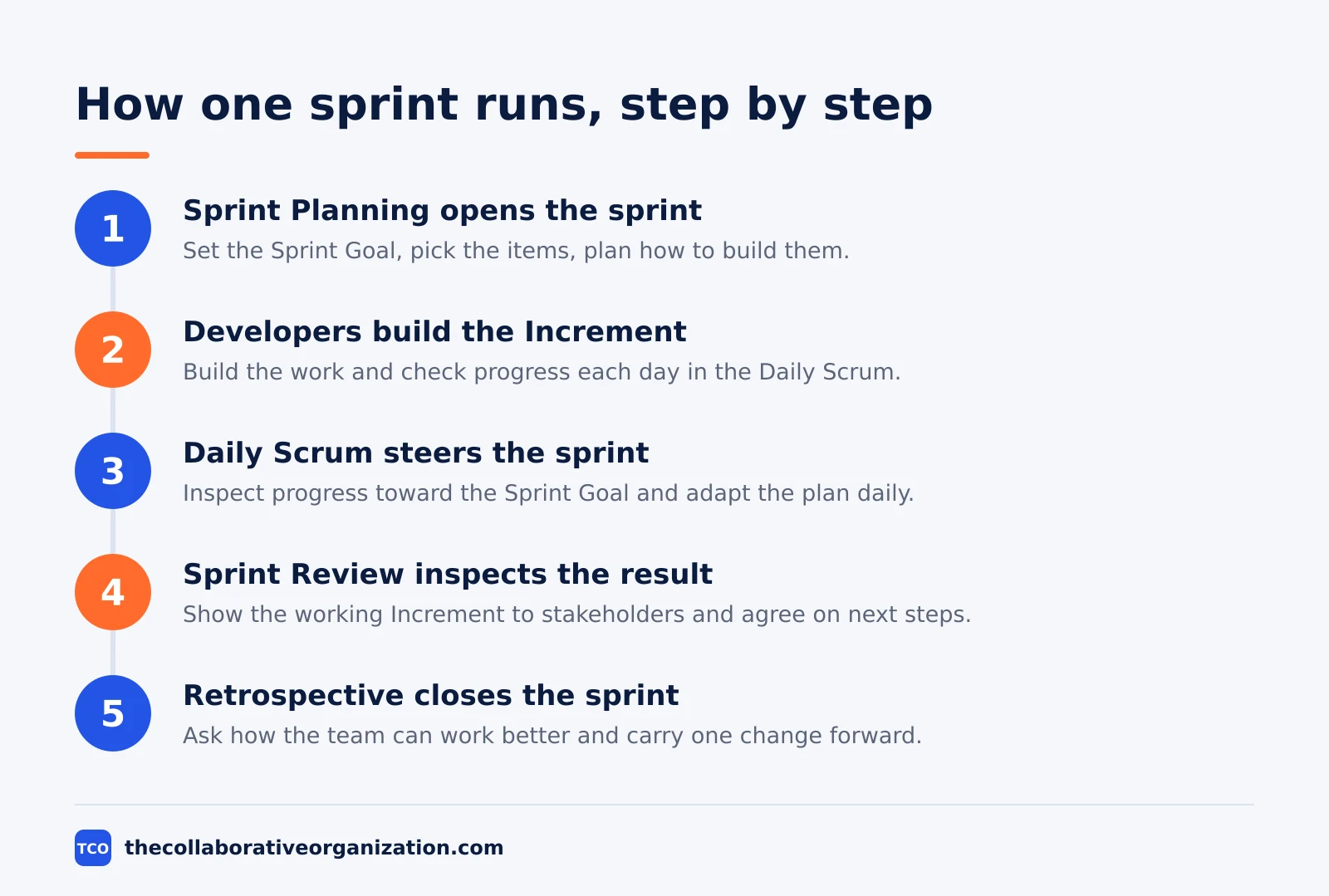
Sprint Planning sets the goal and the plan. The whole Scrum Team meets, the Product Owner proposes why the sprint matters, the Developers pick the items, and the team agrees on how to build them. The output is the Sprint Backlog: the goal, the items, and the plan.
During the sprint, the Developers do the work and meet each working day for a 15-minute Daily Scrum. They inspect progress toward the Sprint Goal and adapt the plan for the next day. The backlog is refined as needed, and scope can be clarified with the Product Owner as the team learns more.
The Sprint Review inspects the Increment with stakeholders near the end of the sprint. The team shows working software, talks about what changed, and agrees on what to do next. The Retrospective then asks how the team can work better, and the most useful change goes into the next Sprint Backlog.
Sprint length and timeboxes
A sprint lasts one month or less, and every event inside it has a maximum length set by the Scrum Guide. The timeboxes below are for a one-month sprint, and shorter sprints use shorter events. A timebox is a maximum, not a target: a team that finishes early stops early.
| Event | Maximum timebox (one-month sprint) | For a two-week sprint | Purpose |
|---|---|---|---|
| Sprint | One month or less | Two weeks | Container for all work and events |
| Sprint Planning | 8 hours | About 4 hours | Set the goal, pick the work, plan how |
| Daily Scrum | 15 minutes, every working day | 15 minutes | Inspect progress, plan the next day |
| Sprint Review | 4 hours | About 2 hours | Inspect the Increment with stakeholders |
| Sprint Retrospective | 3 hours | About 90 minutes | Improve how the team works |
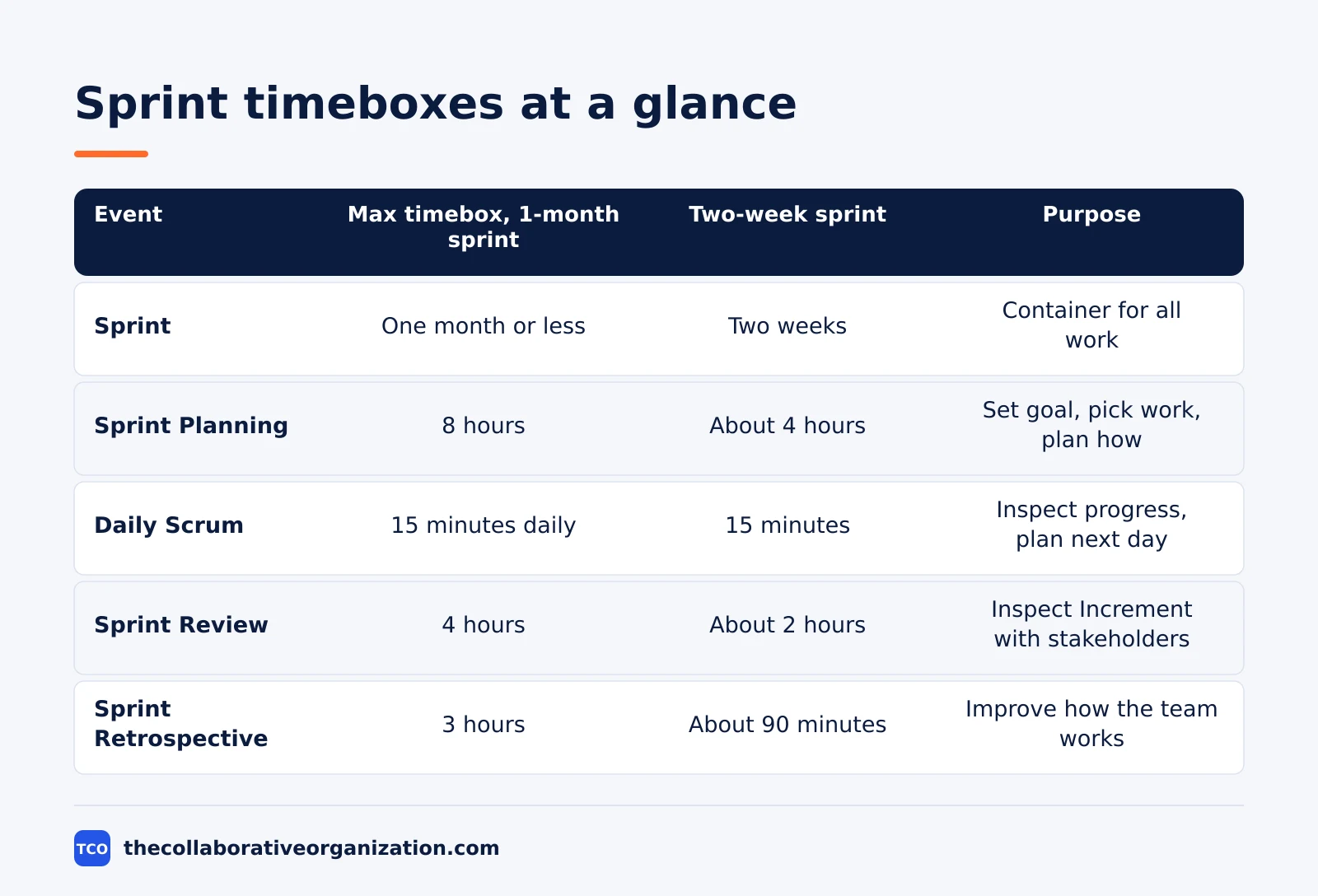
Two weeks is the length most teams choose. One week gives fast feedback but leaves little time to build anything sizable, while four weeks gives more room but delays feedback and raises the risk that the goal goes stale. A team that is new to Scrum should start with two weeks and change only after a few sprints of data.
The length should stay the same across sprints. A steady length lets the team compare how much it finished in each sprint, which is the raw material for better forecasts. Changing length every sprint throws that comparison away.
Sprint Goal, Sprint Backlog, and Increment
Each sprint produces three things that lock together: one Sprint Goal, one Sprint Backlog, and one Increment. The Sprint Goal is the single objective for the sprint, the Sprint Backlog is the plan to reach it, and the Increment is the finished, usable result.
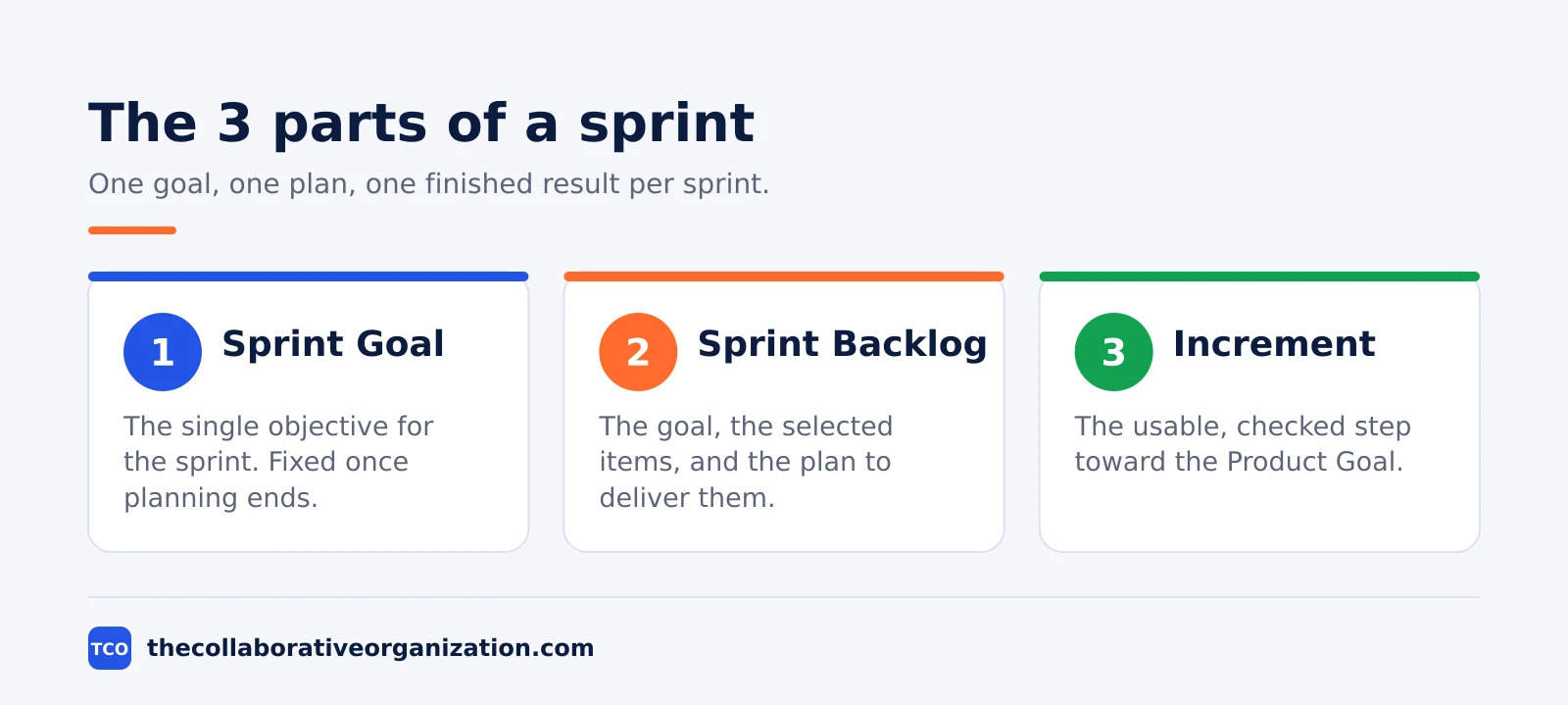
The Sprint Goal gives the sprint coherence. It is created during Sprint Planning and added to the Sprint Backlog, and it stays fixed even when the exact work shifts. Scrum.org notes that the goal creates focus and encourages the team to work together rather than on separate tasks.
The Sprint Backlog holds the goal, the selected Product Backlog items, and the plan for delivering them. It is a plan by and for the Developers, updated through the sprint as the team learns more. It should hold enough detail for the team to inspect progress in the Daily Scrum.
The Increment is the concrete step toward the Product Goal. Each Increment adds to all prior Increments, is fully checked, and must be usable. Work that does not meet the “definition of done” cannot be part of an Increment, and returns to the Product Backlog instead.
A two-week sprint, day by day
A two-week sprint follows the same shape every time, and the example below shows one cycle for a small team. Imagine a team of 6 people building a booking app for a small clinic. The example is an illustration, not a real team.
The Product Owner sets the goal: let patients book a visit online without phoning the clinic. In Sprint Planning on Monday morning, the Developers pick 5 backlog items: the booking form, the confirmation email, the calendar view, the cancel link, and the reminder text. They break each item into tasks of one day or less.
| Day | What happens |
|---|---|
| Monday, week 1 | Sprint Planning in the morning, then building starts |
| Tuesday to Friday, week 1 | Daily Scrums each morning, building and testing |
| Monday, week 2 | Daily Scrum, mid-sprint check against the goal |
| Tuesday to Thursday, week 2 | Daily Scrums, finishing and checking the Increment |
| Friday, week 2 | Sprint Review with clinic staff, then the Retrospective |
By Friday of week 2, the team has a working booking flow that meets the “definition of done”: tested, reviewed, and ready to use. Two items fell short and return to the Product Backlog. The next sprint starts on the following Monday, with a new goal built on what the clinic staff said in the review.
Sprint vs Scrum vs iteration
Scrum is the framework, a sprint is the repeating timebox inside it, and an iteration is the general idea of working in cycles. People mix the three up because they all describe work in chunks, but only one of them is a Scrum event with rules.
Scrum is the whole framework: 3 accountabilities, 5 events, and 3 artifacts, as the Guide defines it. A sprint is one of those 5 events, the container that holds the other 4. You cannot run a sprint without Scrum, but you can run Scrum only by running sprints.
An iteration is a wider term from agile work. Every sprint is an iteration, but not every iteration is a sprint: Kanban teams iterate without sprints, and a design team can iterate on a mockup with no Scrum at all. The word iteration says nothing about length, goals, or roles.
A release is different again. A sprint is a planning cycle, not a release cycle, so a team can release during a sprint, at its end, or after several sprints. Treating the Sprint Review as a release gate holds value back for no reason, since the Guide says the review should never be seen as a gate to releasing value.
Tools that track sprints
A board that shows the Sprint Backlog, the Sprint Goal, and the burndown keeps the whole sprint visible in one place. The Developers update it daily, the Product Owner reads the order from it, and the Scrum Master spots stalls early. Our guide on how to choose project management software covers seat counts and free-plan caps in more detail.
If you have not picked a tool yet, compare the options on our project management software shortlist before the team starts its first sprint. The right tool is the one the team updates every day, not the one with the longest feature list.
| Tool | Best for | Free plan | Starting price (as of November 2026) | Notable limit |
|---|---|---|---|---|
| Asana | Teams that track sprint goals and owners | Free for 2 people | $10.99 per user per month (Starter), billed annually | Free plan covers 2 people |
| monday.com | Teams that want a visual sprint board | Free plan for up to 2 seats | $9 per seat per month (Basic), billed annually | Paid plans need at least 3 seats |
| ClickUp | Teams that want sprints and docs in one place | Free Forever plan | $9 per user per month (Core), billed annually | Yearly billing needed for that price |
The Asana price comes from Asana pricing: the Personal plan is free for 2 users, and Starter is $10.99 per user per month when billed annually. On the monday.com pricing page, Basic is $9 per seat per month billed annually, with a 3-seat minimum. The ClickUp pricing page lists Core at $9 per user per month billed yearly.
Common sprint mistakes to avoid
Most sprint problems come from treating the sprint as a deadline instead of a learning cycle. Check for these five mistakes at the end of every sprint.
- Changing the sprint length mid-cycle. Moving the end date hides missed forecasts and breaks the rhythm the next sprint depends on.
- No Sprint Goal, only a task list. A sprint without a goal is a pile of tasks, and the team cannot judge trade-offs when time runs short.
- Scope changes that endanger the goal. New work can enter a sprint, but only if the Product Owner agrees and the goal stays safe.
- Treating the Sprint Review as a demo. A review is a working session with stakeholders, not a slide show, and the backlog should change because of it.
- Skipping the Retrospective. A team that never inspects how it works repeats the same problems in every sprint that follows.
Ownership also blurs when no one maps who decides what. A RACI chart can help there: our guide on what is a RACI matrix explains the four letters and when a chart fits a team that Scrum alone does not cover.
Sources
- Scrum Guides - The Scrum Guide (2020)
- Scrum.org - What is a Sprint Backlog? (2026)
- Atlassian - Sprint Planning (2026)
- Atlassian - Agile Scrum Roles (2026)
- Asana - Pricing (2026)
- monday.com - Pricing (2026)
- ClickUp - Pricing (2026)
Frequently asked questions
How long is a sprint in Scrum?
A sprint lasts one month or less, and most teams pick 1, 2, or 4 weeks. Two weeks is the most common length, because it is long enough to finish real work and short enough to get feedback fast. The length stays fixed once the sprint starts, and teams keep the same length from sprint to sprint.
Can a sprint be extended once it starts?
No. The length of a sprint is fixed when it starts, and the end date does not move. If the team finishes early, it pulls more work from the backlog, and if work is left over, that work returns to the Product Backlog. Moving the end date would break the rhythm that makes sprint forecasts useful.
Who can cancel a sprint?
Only the Product Owner can cancel a sprint, and only when the Sprint Goal has become obsolete. A goal can become obsolete when the market shifts, a customer need disappears, or new facts make the planned work worthless. Cancellation is rare, because it wastes the planning work and breaks the team's rhythm.
What happens to unfinished work at the end of a sprint?
Unfinished items go back to the Product Backlog, and the Product Owner reorders them for a later sprint. Work that meets the Definition of Done stays in the Increment, while work that falls short does not count as done. The team reviews what blocked the unfinished work in the Sprint Retrospective.
How many sprints make a release?
There is no fixed number, because a sprint is a planning cycle and not a release cycle. A team can release an Increment during a sprint, at the end of one, or after several sprints, depending on what users need. The Sprint Review is a working session for feedback, not a gate that holds value back.
Related articles

project management
What Is a RACI Matrix? Definition, Roles and Examples (2026)
A RACI matrix maps who is Responsible, Accountable, Consulted and Informed for each task. Learn the four roles, how to build one, and see a worked example.
November 19, 2026 · 9 min read

project management
Daily Standup Meeting Format That Works (2026)
A daily standup is a 15-minute meeting where Developers inspect progress toward the Sprint Goal and plan the next day. Use this format to run one that ends on time.
November 19, 2026 · 10 min read
project management
How to Run a Sprint Planning Meeting (2026)
Sprint planning opens every sprint with a goal, a set of backlog items and a plan. Follow these 6 steps to run the meeting in 90 minutes for a two-week sprint.
November 19, 2026 · 9 min read