How to Run a Sprint Planning Meeting (2026) | The Collaborative Organization
By The Collaborative Organization Team · November 19, 2026 · Last verified November 19, 2026 · 9 min read
Sprint planning opens every sprint, and it ends with one Sprint Goal, a set of backlog items, and a plan for building them. The whole Scrum Team attends: the Product Owner brings the goal and backlog, and the Developers pick the work and plan it. For a two-week sprint, a good session takes 60 to 90 minutes.
Key takeaways
- Sprint planning answers three questions: why this sprint matters, what the team will build, and how it will build it.
- The Scrum Guide caps planning at 8 hours for a one-month sprint, so a two-week sprint caps at about 4 hours.
- The Product Owner proposes the Sprint Goal, and the Developers pick the items and own the plan.
- A refined backlog is the main input: items at the top must be small, clear, and ready to build.
- The meeting ends with a Sprint Backlog that every team member can state in one sentence.
What you need before the meeting
Sprint planning works only when the inputs are ready, and the main input is a refined Product Backlog. The Product Owner should arrive with a clear goal for the sprint, the top items ordered by value, and enough detail on each item for the Developers to estimate it. Without that, the meeting turns into a refinement session.
The team also needs three facts in hand: the capacity for the sprint, the “definition of done”, and what happened last sprint. Capacity means who is away, which days are lost to holidays or support work, and how much the team finished last time. The Definition of Done sets the quality bar every item must clear.
The Scrum Master checks the setup: a room or call link, a board everyone can see, and a timer for the timebox. Atlassian advises the Product Owner to arrive with lessons from the last Sprint Review and stakeholder feedback, so the goal reflects what users actually need next.
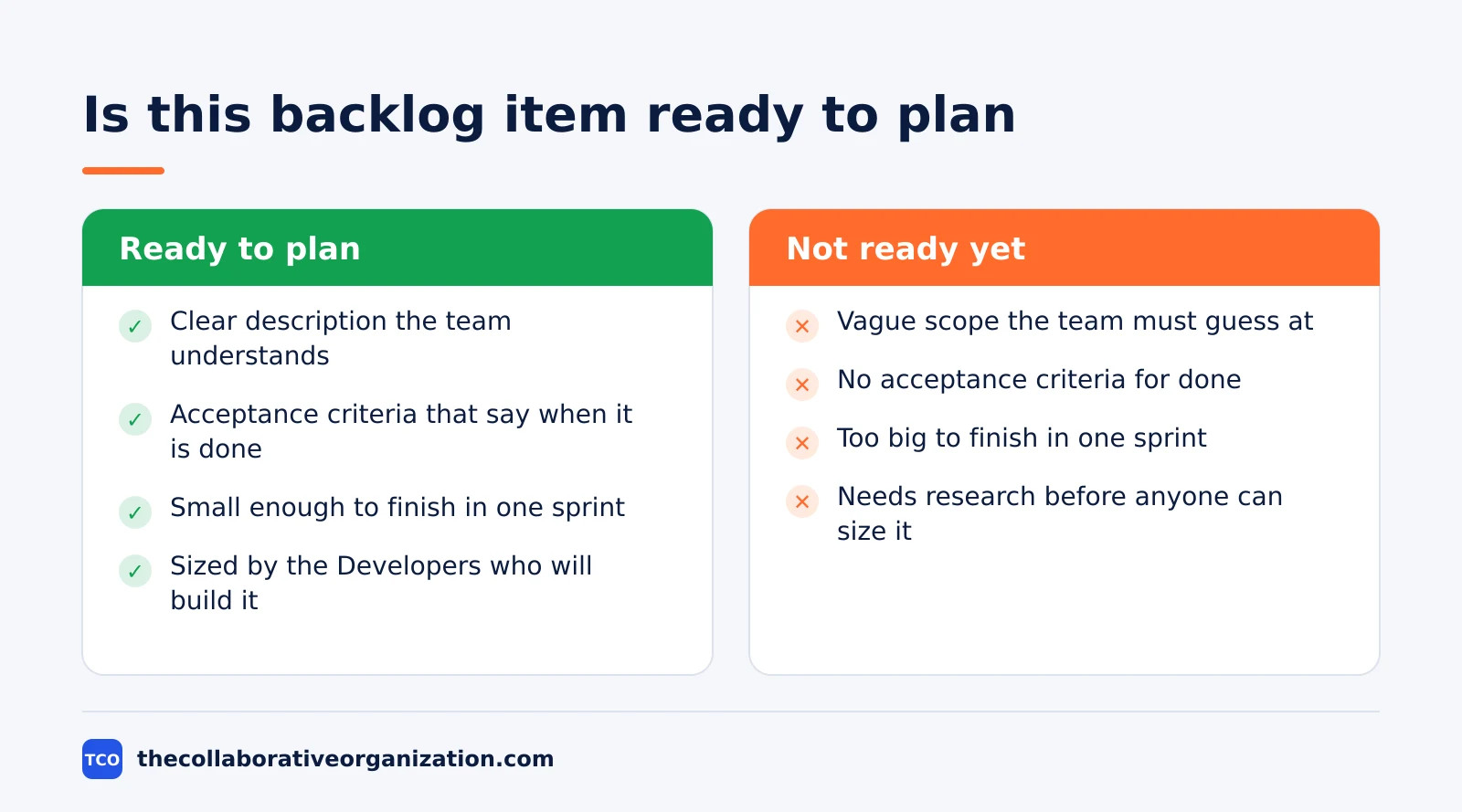
A short checklist before the meeting starts keeps it on track: the goal is written in one sentence, the top 10 items are refined, capacity is known, and the board is open. If any box is unchecked, spend the first 10 minutes fixing it or send the meeting back to refinement.
How to run a sprint planning meeting in 6 steps
Run sprint planning in six steps, and treat the timebox as a hard stop, not a target. The steps below fit a 90-minute meeting for a two-week sprint, and they scale up for longer sprints.
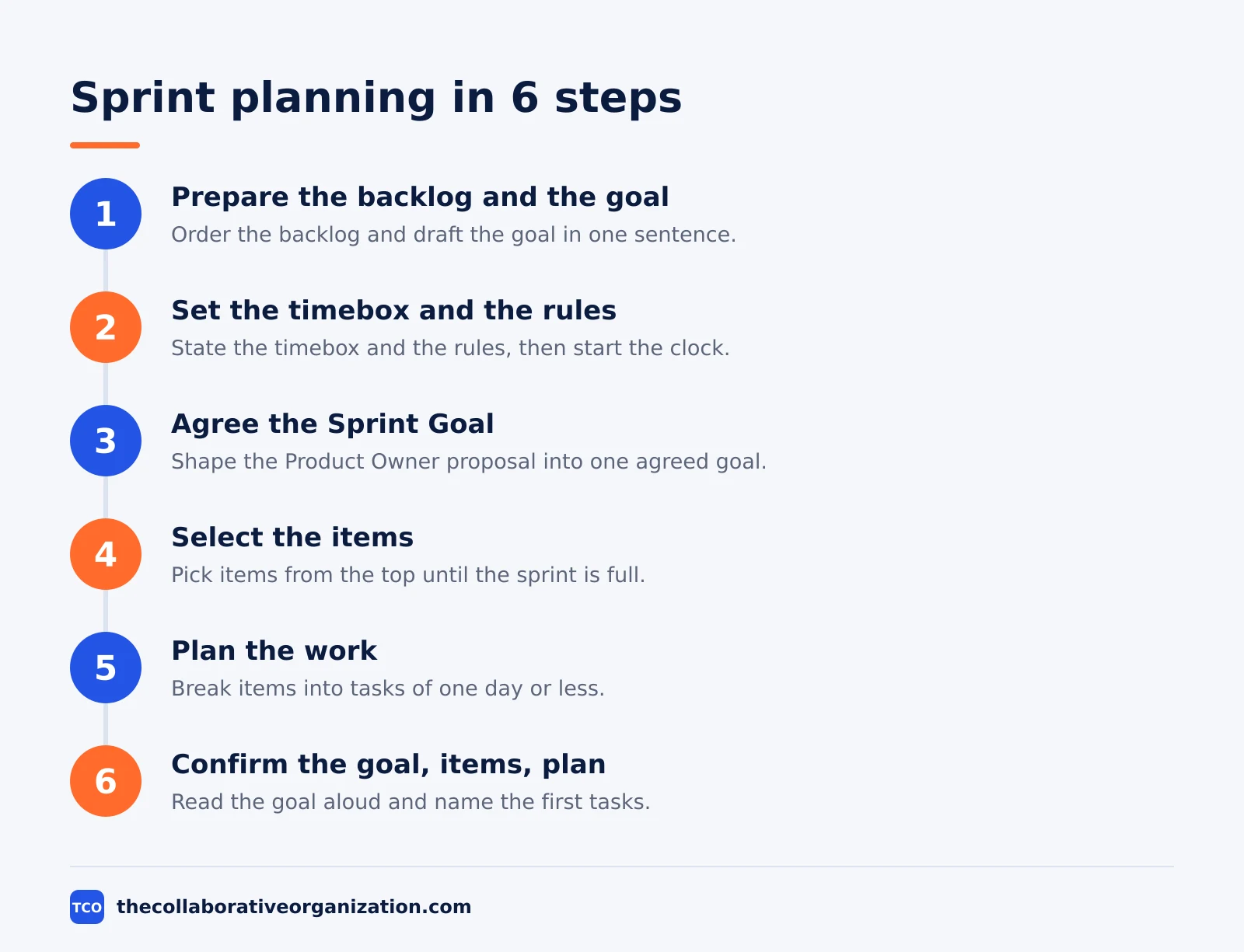
Step 1: Prepare the backlog and the goal
The Product Owner orders the backlog and drafts a goal before the meeting starts. The top items should be small enough to finish in one sprint, with a clear description and acceptance criteria. The outcome is a short list the team can plan from, not a pile of vague ideas.
Step 2: Set the timebox and the rules
The Scrum Master states the timebox at the start: 90 minutes for a two-week sprint, with a hard stop at the end. The team agrees on two rules: one conversation at a time, and any item that needs more than a few minutes of debate goes back to the backlog. The outcome is a meeting that ends on time.
Step 3: Agree the Sprint Goal (Why)
The Product Owner proposes how the product could gain value in this sprint, and the whole team shapes that into a Sprint Goal. The goal must be one sentence that says why the sprint matters to users. The Scrum Guide requires the goal to be set before planning ends, because the goal is what the rest of the meeting serves.
Step 4: Select the items (What)
Through talks with the Product Owner, the Developers pick items from the top of the backlog until the sprint is full. They weigh past performance, upcoming capacity, and the “definition of done” before they commit. The outcome is a set of items the team believes it can finish, not a wish list.
Step 5: Plan the work (How)
For each selected item, the Developers plan the work needed to build an Increment that meets the “definition of done”. They often break items into tasks of one day or less, and no one else tells them how to do it. The outcome is a plan the Developers own, with the first tasks ready to start.
Step 6: Confirm the goal, items, and plan
The Scrum Master reads the Sprint Goal aloud, lists the selected items, and asks each Developer to name their first task. Anyone who cannot commit raises it now, while the plan can still change. The outcome is the Sprint Backlog, and the sprint starts.
Sprint planning agenda for a two-week sprint
A 90-minute agenda keeps the meeting tight, and each block has one owner and one output. Use the times below as a starting point and adjust them to your team, but keep the order: goal first, items second, plan third.
| Time | Block | Owner | Output |
|---|---|---|---|
| 0-10 min | Set the Sprint Goal | Product Owner | One-sentence goal everyone agrees on |
| 10-40 min | Select backlog items | Developers with Product Owner | Items that fit capacity and the goal |
| 40-75 min | Break down and estimate | Developers | Tasks of one day or less per item |
| 75-85 min | Check capacity and risks | Scrum Master | Risks named, with an owner each |
| 85-90 min | Confirm and start | Scrum Master | Sprint Backlog agreed, sprint starts |
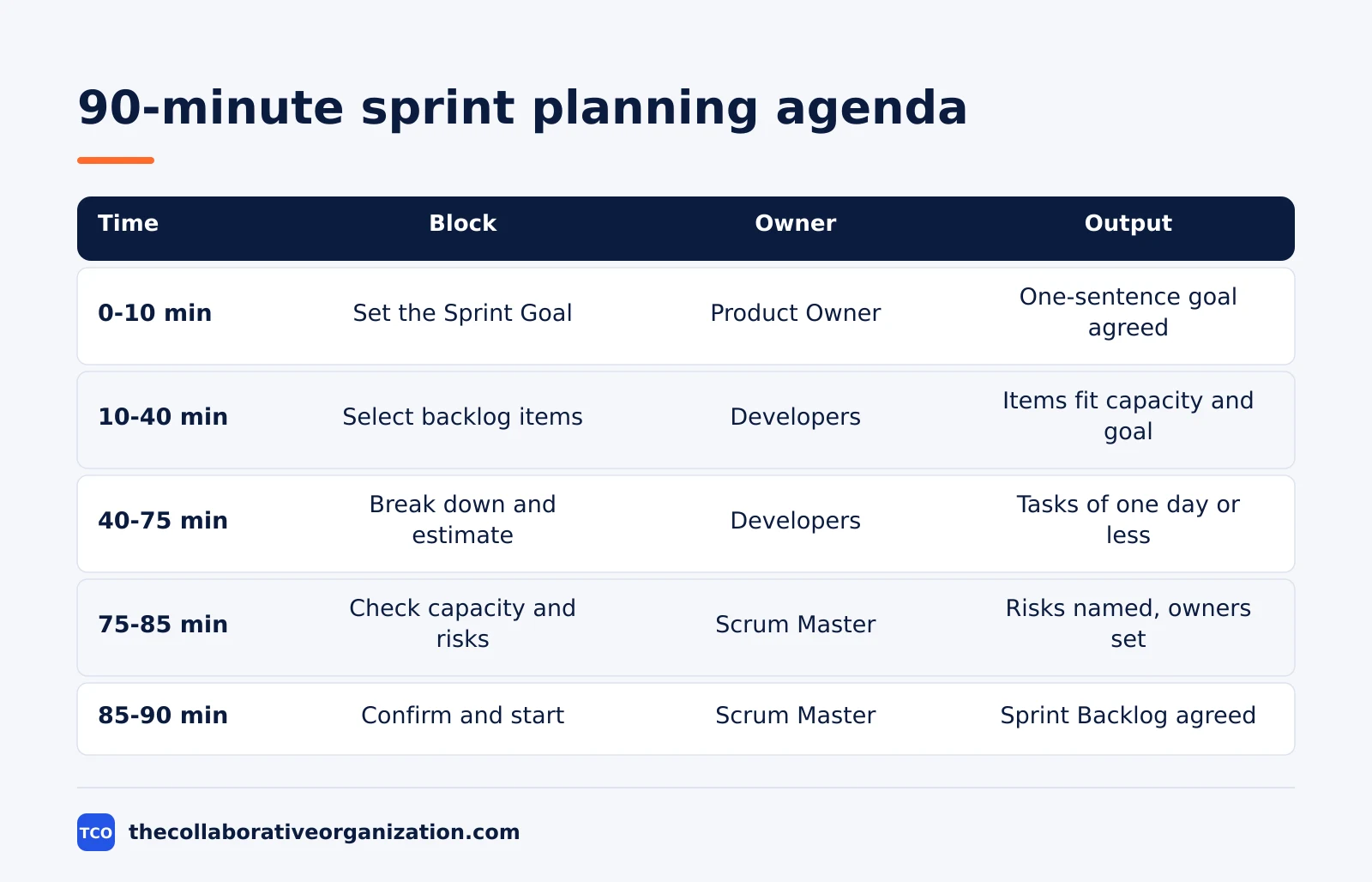
The order matters more than the minutes. Teams that start by picking items before they agree on a goal end up with a sprint full of unrelated work. A goal-first meeting lets the team say no to items that do not serve the goal, even when those items sit at the top of the backlog.
If the meeting runs long, cut the breakdown, not the goal. A team can break down the last item after planning, but it cannot build a sprint around a goal it never set. The Scrum Master should call time at 90 minutes and move unfinished breakdowns to the first Daily Scrum.
Worked example: planning a booking feature sprint
A team of 6 people plans a two-week sprint to let patients book a clinic visit online, and the meeting takes 85 minutes. The example is an illustration, not a real team. The Product Owner opens with the goal: patients book a visit online without phoning the clinic.
In the first 10 minutes, the team shapes the goal into one sentence and agrees it is the right aim for the sprint. The Product Owner then shows the top 8 backlog items, ordered by value. The Developers pick 5: the booking form, the confirmation email, the calendar view, the cancel link, and the reminder text.
The next 35 minutes go to breakdown. The Developers split the booking form into 4 tasks: form fields, date picker, validation, and save.
They size each task in hours and check it against capacity: one Developer is away for 2 days, so the team drops the reminder text to the next sprint. The Scrum Master notes one risk: the clinic calendar needs access rights, and the Product Owner owns getting them.
In the last 5 minutes, the Scrum Master reads the goal aloud and each Developer names a first task. The Sprint Backlog is set: one goal, 4 items, and a plan the team owns. The sprint starts the next morning with the first Daily Scrum.
How to measure a good sprint planning meeting
A good planning meeting shows up in the sprint that follows it, and four signs tell you it worked. First, every team member can state the Sprint Goal without looking at the board. Second, the team finishes most of what it picked, with few items returning to the backlog.
Third, the Daily Scrums stay short, because the plan was clear enough that the team rarely needs to re-plan from scratch. Fourth, the meeting itself ends on time. A planning meeting that runs past its timebox every sprint is a sign the backlog needs more refinement, not a longer meeting.
Track two numbers over 4 sprints: the share of picked items finished, and the minutes planning takes. If the finish rate rises while the minutes fall, the team’s planning is getting better. If both rise, the team is planning more work than it can do, and the next planning session should pick less.
Common sprint planning mistakes to avoid
Most planning meetings fail before they start, because the backlog was not ready or the goal was never set. Check for these mistakes in your next session.
- Planning with an unrefined backlog. Vague items produce bad estimates, and the sprint fills with surprises by day 3.
- No Sprint Goal. A sprint without a goal is a task list, and the team cannot judge trade-offs when time runs short.
- The Product Owner picks the work alone. The Developers own the plan, so items they did not choose become items they do not commit to.
- Filling every hour of capacity. A sprint with no slack cannot absorb a sick day or a bug, and the first surprise breaks the plan.
- Estimates treated as promises. An estimate is a forecast based on what the team knows now, and using it to punish the team makes future estimates bigger and slower.
Ownership also blurs when the meeting never says who decides what. A RACI chart can help there: our guide on what is a RACI matrix explains the four letters and when a chart fits a team that Scrum alone does not cover.
Tools that help sprint planning
A board that shows the ordered backlog, the Sprint Goal, and capacity keeps planning in one place. The Product Owner orders items on the board, the Developers pull work from it, and the Scrum Master sees the plan take shape. Our guide on how to choose project management software covers seat counts and free-plan caps in more detail.
If you have not picked a tool yet, compare the options on our project management software shortlist before your next planning meeting. The right tool is the one the team opens during planning, not the one with the longest feature list.
| Tool | Best for | Free plan | Starting price (as of November 2026) | Notable limit |
|---|---|---|---|---|
| Asana | Teams that track sprint goals and owners | Free for 2 people | $10.99 per user per month (Starter), billed annually | Free plan covers 2 people |
| monday.com | Teams that want a visual planning board | Free plan for up to 2 seats | $9 per seat per month (Basic), billed annually | Paid plans need at least 3 seats |
| ClickUp | Teams that want sprints and docs in one place | Free Forever plan | $9 per user per month (Core), billed annually | Yearly billing needed for that price |
The Asana price comes from Asana pricing: the Personal plan is free for 2 users, and Starter is $10.99 per user per month when billed annually. On the monday.com pricing page, Basic is $9 per seat per month billed annually, with a 3-seat minimum. The ClickUp pricing page lists Core at $9 per user per month billed yearly.
Sources
- Scrum Guides - The Scrum Guide (2020)
- Atlassian - Sprint Planning (2026)
- Scrum.org - What is a Sprint Backlog? (2026)
- Lucid - Guide to Managing Your Product Backlog (2026)
- Asana - Pricing (2026)
- monday.com - Pricing (2026)
- ClickUp - Pricing (2026)
Frequently asked questions
How long should sprint planning take for a two-week sprint?
The Scrum Guide caps it at 4 hours for a two-week sprint, and 8 hours for a one-month sprint. Most teams with a refined backlog finish in 60 to 90 minutes. If your meeting runs past 2 hours for a two-week sprint, the backlog was probably not ready, and the fix is better refinement, not a longer meeting.
Who must attend sprint planning?
The whole Scrum Team must attend: the Product Owner, the Scrum Master, and the Developers. The Product Owner brings the goal and the backlog, the Developers pick the work and plan how to build it, and the Scrum Master keeps the meeting inside its timebox. Other people may join to give advice, but they do not decide the plan.
What if the backlog is not ready when planning starts?
Stop and refine first. Send unclear items back to the Product Backlog, and plan only the items the team understands well enough to build. Planning with vague items produces bad estimates and a sprint full of surprises. A short refinement session in the middle of the previous sprint prevents this problem.
Can sprint planning be split into two sessions?
Yes, and some teams do it on purpose. The Product Owner and a few Developers can meet first to shape the goal and the top items, then the whole team meets to select items and plan the work. The split only works when the second session still ends with one agreed goal and one Sprint Backlog.
What does the team leave sprint planning with?
The team leaves with a Sprint Backlog: one Sprint Goal, the set of Product Backlog items selected for the sprint, and the plan for delivering them. Everyone should be able to state the goal in one sentence and name the first task they will pick up. If the goal is unclear, the meeting is not done.
Related articles

project management
What Is a RACI Matrix? Definition, Roles and Examples (2026)
A RACI matrix maps who is Responsible, Accountable, Consulted and Informed for each task. Learn the four roles, how to build one, and see a worked example.
November 19, 2026 · 9 min read

project management
Daily Standup Meeting Format That Works (2026)
A daily standup is a 15-minute meeting where Developers inspect progress toward the Sprint Goal and plan the next day. Use this format to run one that ends on time.
November 19, 2026 · 10 min read
project management
What Is a Product Backlog? Definition (2026)
A product backlog is an ordered list of everything that could improve a product. Learn what goes in it, who owns it, and how refinement works.
November 19, 2026 · 11 min read