What Is a RACI Matrix? Definition, Roles and Examples (2026) | The Collaborative Organization
By The Collaborative Organization Team · November 19, 2026 · Last verified November 19, 2026 · 9 min read

A RACI matrix is a table that assigns one of four roles to each person for each task in a project: Responsible, Accountable, Consulted and Informed. The rows list the work, the columns list the people, and each cell holds one letter. Each row answers who does the work, who signs it off, who gives input, and who gets told.
Key takeaways
- RACI stands for Responsible, Accountable, Consulted and Informed, and every task in a project gets one letter for each person involved.
- Exactly one person is Accountable for each task, while the Responsible, Consulted and Informed roles can be shared by several people.
- PMI describes the RACI chart as a form of responsibility assignment matrix, with one Accountable owner per task.
- A matrix takes five steps to build: list the tasks, name the people, assign the letters, review the gaps, then share the chart.
- RACI fits projects with several teams and approvers, and it is the wrong tool for a two-person task with clear ownership.
What the four RACI letters mean
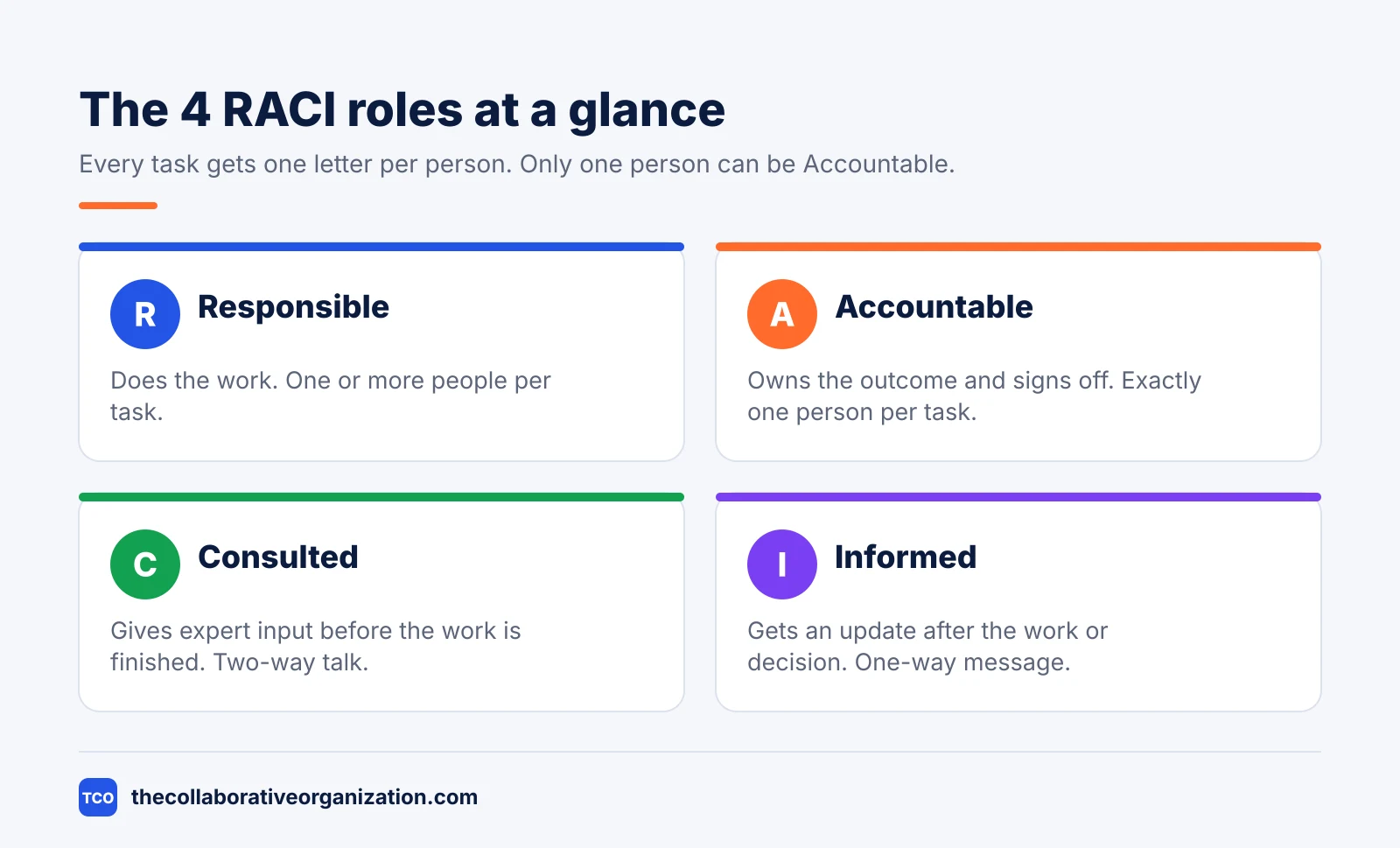
Each letter names a different kind of involvement, and no two letters mean the same thing. Responsible does the work, and Accountable owns the outcome. Consulted gives input before the work is finished, and Informed gets an update after the work or decision.
| Letter | What the role does | How many people per task |
|---|---|---|
| R - Responsible | Does the work and answers questions about progress | At least 1; more if the work is shared |
| A - Accountable | Owns the outcome and signs off the finished work | Exactly 1 |
| C - Consulted | Gives expert input before the work or decision is finished | As few as the task needs |
| I - Informed | Receives an update after the work or decision | As few as the task needs |
The mix-up to avoid is Responsible versus Accountable. PMI puts it plainly: the Responsible person performs the work, while the Accountable person is the single owner who answers for the result. A task can have several Responsible people, but it has only one Accountable owner.
Consulted and Informed differ in timing and in direction. A Consulted person gives input before the work is finished, so the conversation runs both ways. An Informed person only hears the outcome, so the message runs one way.
How a RACI matrix works
A RACI matrix works as a grid: tasks run down the left side, people run across the top, and each cell holds one letter. You read a row to see everyone who touches one task, and you read a column to see everything one person touches.
One rule carries the whole model: every task has exactly one Accountable person. PMI gives the reason in its July 2026 post: shared accountability means nobody owns the result, so each task needs one named owner. Responsibility can be shared, but ownership cannot.
Blank cells are normal: most people touch only a few tasks, and a row with no Consulted or Informed person is fine. Two gaps matter. A row with no Responsible person has no one to do the work, and a row with no Accountable person has no one to approve it.
How to build a RACI matrix in 5 steps
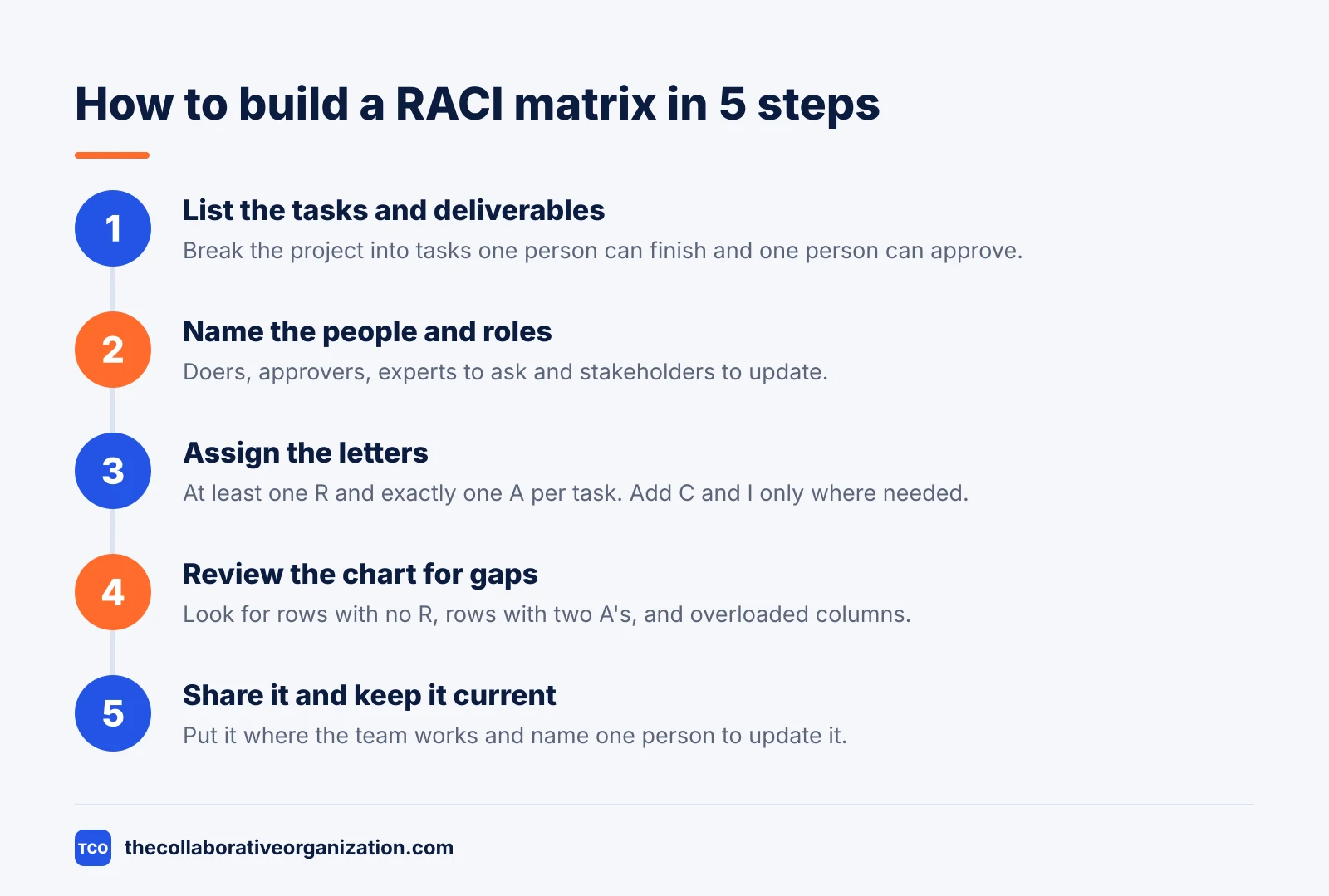
Building a RACI matrix takes five steps, and the first two use no letters at all. Asana describes the same five moves in its RACI guide: list the work, name the people, assign the letters, review the chart, then share it.
Step 1: List the tasks and deliverables
Break the project into tasks that one person can finish and one person can approve. Keep each task concrete, such as write the homepage copy or test the checkout, and leave small subtasks out of the chart.
Step 2: Name the people and roles
List everyone connected to the work: the people doing it, the person approving it, the experts to ask, and the stakeholders to update. Use roles, not only names, so the chart still works when someone is away.
Step 3: Assign the letters
Match each person to each task with one letter. Give every task at least one Responsible person and exactly one Accountable person, then add Consulted and Informed only where the task truly needs them.
Step 4: Review the chart for gaps
Read the chart with the team and look for three problems: a row with no Responsible person, a row with two Accountable people, and a column where one person carries most of the letters. Fix those rows before the work starts.
Step 5: Share the chart and keep it current
Put the chart where the team already works, such as the project board or the shared drive, and name one person to update it. Review it when the scope changes or a person leaves, so the letters match the real work.
RACI matrix example: a website relaunch
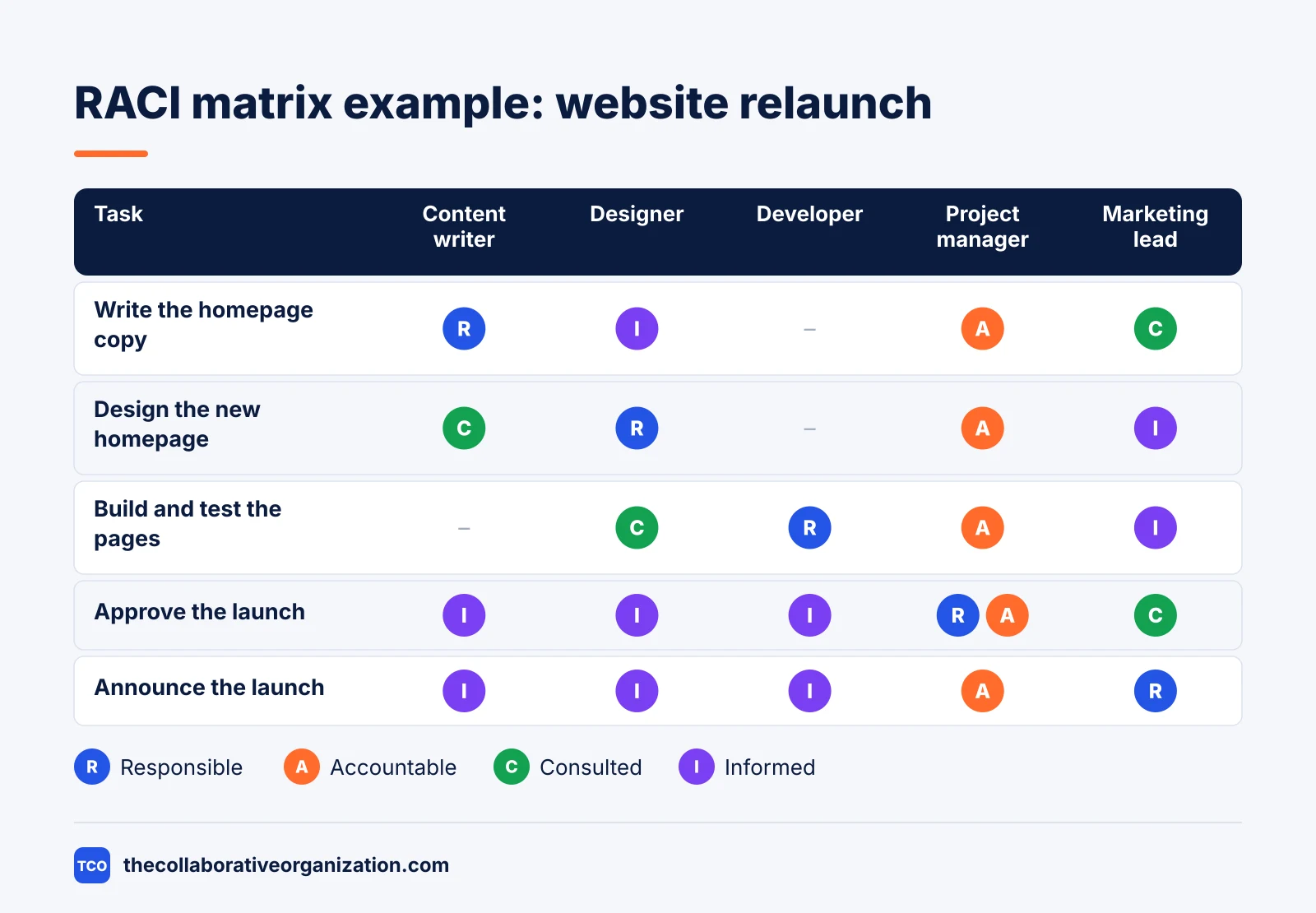
A small website relaunch shows how the letters fall on real work. Imagine a team of five people relaunching a company homepage in four weeks. The chart below covers five tasks, and monday.com uses the same shape in its own RACI examples: tasks down the side, people across the top.
| Task | Content writer | Designer | Developer | Project manager | Marketing lead |
|---|---|---|---|---|---|
| Write the homepage copy | R | I | - | A | C |
| Design the new homepage | C | R | - | A | I |
| Build and test the pages | - | C | R | A | I |
| Approve the launch | I | I | I | R, A | C |
| Announce the launch | I | I | I | A | R |
Three things stand out. The project manager is Accountable on every row, which matches the single-owner rule. The developer never approves work, and the marketing lead is Responsible only for the announcement. The launch-approval row gives the project manager both R and A, which Asana confirms is normal on a small team.
When to use a RACI matrix, and when not to
Use a RACI matrix when several people share the work and the owner of the result is unclear. It fits projects that cross teams, hand work between people, or need several approvals before anything ships.
Atlassian names four good moments: the start of a project, a complex project with many team members, an organizational change, and an agile transition. A RACI chart also helps during project reviews, when it can show bottlenecks and tasks with no owner.
Skip the matrix when the team is small and the roles are already clear. Asana advises against a RACI chart for simple tasks, because the chart adds admin work without adding clarity. A two-person task with one owner needs a due date, not a grid.
RACI vs DACI vs RASCI
RACI maps who does project work, while DACI and RASCI fix the two gaps teams hit most: unclear decisions and extra hands. RACI is the default for tasks and deliverables. The variants change the letters to fit a different problem.
| Model | Letters | Best for |
|---|---|---|
| RACI | Responsible, Accountable, Consulted, Informed | Project tasks and deliverables |
| DACI | Driver, Approver, Contributor, Informed | Decisions with one clear approver |
| RASCI | RACI plus Supportive | Tasks that need extra hands |
| RAPID | Recommend, Agree, Perform, Input, Decide | Complex decisions across teams |
Atlassian draws the same line: RACI is for project management, while DACI and RAPID are for decision making. Start with DACI when the team cannot agree who decides, then use RACI to map who does the work.
RASCI adds one letter to RACI: S for Supportive, the person who helps the Responsible person finish the task. The Supportive person does part of the work but does not own it and does not give the expert input that a Consulted person gives.
Tools that can hold your RACI chart
A spreadsheet works for a first matrix, but a project tool keeps the chart next to the work it describes. The chart stays current when the tasks, owners and dates live in the same place. Our guide on how to choose project management software covers seat counts and free-plan caps.
If you have not picked a tool yet, compare the options on our project management software shortlist before you build the chart. The right tool is the one the team will open every day, not the one with the longest feature list.
| Tool | Best for | Free plan | Starting price (as of November 2026) | Notable limit |
|---|---|---|---|---|
| Asana | Teams that want every task to have a named owner | Free for 2 people | $10.99 per user per month, billed annually | Free plan covers 2 people |
| monday.com | Teams that want a visual board with phases and status | Free plan for up to 2 seats | $9 per seat per month (Basic), billed annually | Paid plans need at least 3 seats |
| ClickUp | Teams that want custom fields for each RACI role | Free Forever plan | $9 per user per month (Core), billed annually | Yearly billing needed for that price |
The Asana price comes from Asana pricing: the Personal plan is free for 2 users, and Starter is $10.99 per user per month when billed annually. On the monday.com pricing page, Basic is $9 per seat per month billed annually, with a 3-seat minimum. The ClickUp pricing page lists Core at $9 per user per month billed yearly.
Both Asana and ClickUp publish ready-made templates. Asana offers a free RACI matrix template, and ClickUp offers a RACI planning template with custom fields for each role and status views for tracking progress.
Common RACI matrix mistakes to avoid
Most RACI charts fail in the same five ways, and all five are easy to spot in a review. Run through the list below each time the chart changes hands.
- Two Accountable people on one task. When two people own the outcome, neither does, and the decision waits for someone else to make it.
- A row with no Responsible person. Every task needs at least one person doing the work, even when the Accountable person is the same name.
- Too many Consulted people. Each extra Consulted person adds a conversation before the work can move, and too many of them stall the task.
- Informed people treated as Consulted. Asking for input after the decision is made wastes the expert’s time and slows the team for no gain.
- A chart that is never updated. Roles change when people join, leave or switch teams, so review the chart at each phase gate.
Sources
- PMI - Stakeholder Management and RACI for AI Teams (2026)
- Atlassian - RACI Chart: What is it & How to Use (2026)
- Asana - RACI Charts: The Ultimate Guide, with Examples (2025)
- monday.com - What Is the RACI Model? (2026)
- ClickUp - RACI Planning Template (2026)
- Asana - RACI Matrix Template (2026)
- Atlassian - RACI Chart Template (2026)
- Asana - Pricing (2026)
- monday.com - Pricing (2026)
- ClickUp - Pricing (2026)
Frequently asked questions
Can one task have two Accountable people?
No. Give each task exactly one Accountable person, because two owners means neither one answers for the result. Several people can share the Responsible, Consulted or Informed roles, but only one person signs off the work and owns the outcome when it fails.
Can the same person be Responsible and Accountable for one task?
Yes. On a small team, the person doing the work often approves it too, and Asana confirms this is normal. The rule still holds: one name owns the outcome, even when that name also does the work, so the team always knows who decides.
What is the difference between RACI and RASCI?
RASCI adds one role to RACI: S for Supportive, the person who helps the Responsible person finish the task. A Supportive person does part of the work but does not own the outcome, while a Consulted person gives expert input before the work is finished.
When should you not use a RACI matrix?
Skip it when the team is small, the task is simple, and everyone already knows who owns the work. A matrix adds admin work in that case without adding clarity. Use it when several teams, handoffs or approvers make ownership unclear.
How often should you update a RACI matrix?
Review it whenever the scope changes, a person joins or leaves, or a phase ends. A chart that still names people who left the project misleads the team. Name one person to keep it current, and check it at each project review.
Related articles

project management
Daily Standup Meeting Format That Works (2026)
A daily standup is a 15-minute meeting where Developers inspect progress toward the Sprint Goal and plan the next day. Use this format to run one that ends on time.
November 19, 2026 · 10 min read

project management
How to Run a Sprint Planning Meeting (2026)
Sprint planning opens every sprint with a goal, a set of backlog items and a plan. Follow these 6 steps to run the meeting in 90 minutes for a two-week sprint.
November 19, 2026 · 9 min read
project management
What Is a Product Backlog? Definition (2026)
A product backlog is an ordered list of everything that could improve a product. Learn what goes in it, who owns it, and how refinement works.
November 19, 2026 · 11 min read