What Are Story Points in Agile? (2026) | The Collaborative Organization
By The Collaborative Organization Team · November 19, 2026 · Last verified November 19, 2026 · 11 min read
Story points are a relative unit that agile teams use to size a backlog item by how much effort it takes compared with other items the team already knows. A 5-point story is roughly twice the work of a 2-point story, and smaller than an 8-point story. A point is not an hour, a day, or a promise.
Key takeaways
- Story points measure relative size, not time: a 5-point story is bigger than a 3-point story, not 5 hours of work.
- One number blends four things: the amount of work, its complexity, its risk, and its uncertainty.
- Most teams use a modified Fibonacci scale: 1, 2, 3, 5, 8, 13, 20, 40, 100.
- Points only mean something next to the same team’s own past work, so they cannot be compared across teams.
- A point estimate must cover everything to get an item to done, including testing, review and deployment.
- Story points are not part of Scrum: the Scrum Guide leaves the sizing unit up to the team.
What story points are
Story points are a unit of measure for the overall effort needed to fully implement a product backlog item, judged relative to other items. That is how Mike Cohn’s Mountain Goat Software defines them, and the key word is relative. On its own, 8 points means nothing; next to the team’s familiar 3s and 5s, it means noticeably bigger.
Points grew out of Extreme Programming in the late 1990s, and Cohn later made them the standard way Scrum teams size work. The idea was simple: people argue about hours, but they can often agree on which of two items is bigger. Relative sizing turns a hard question about time into an easier question about comparison.
A point is also abstract on purpose. Mountain Goat Software says a point does not equal an hour, a day, or a fixed amount of work across teams. That abstraction protects the team: once a point equals a day, managers treat estimates as commitments and start comparing teams by point totals.
What goes into a story point
Four things feed into one story point number: the amount of work, its complexity, its risk, and its uncertainty. The team weighs them together and agrees on one figure. It does not score them separately and add them up.
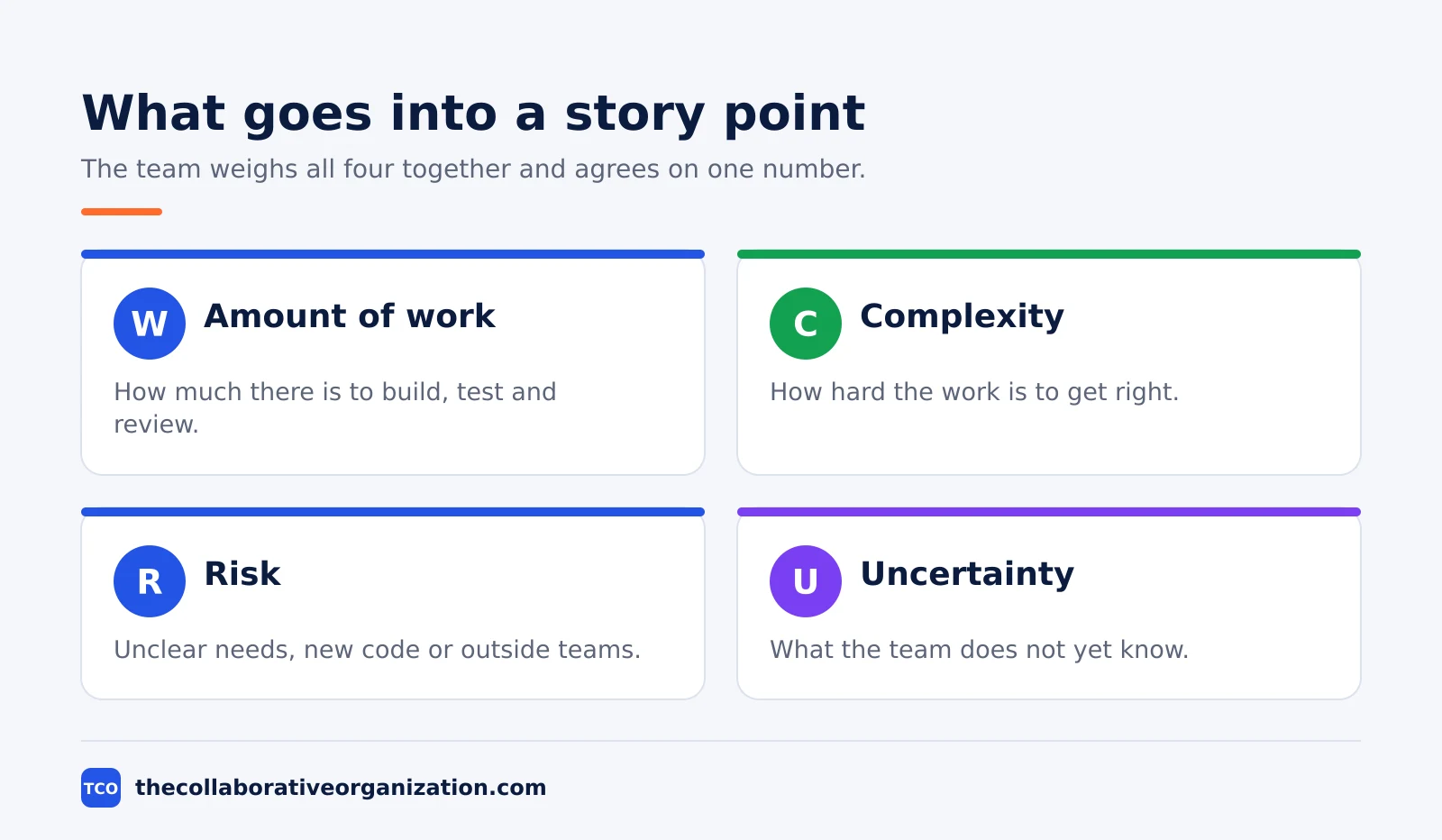
The amount of work is how much there is to build, test and review. Complexity is how hard the work is to get right: a small change in a tangled part of the system can be harder than a large change in a simple one.
Risk covers unclear requirements, unfamiliar code, or a dependency on another team. Uncertainty covers what the team does not yet know, such as a new tool or an untested integration.
A product backlog item can be simple but large, or small but risky. A useful estimate accounts for the total effort the team expects, and that is why Mountain Goat Software warns against calling story points just complexity. Complexity matters, but it is only one part of the number.
Effort means total effort, not coding time. It includes design, testing, integration, documentation, deployment work, coordination, and whatever else is needed for the item to be complete. A story that is coded but untested is not a 3-point story finished; it is a 3-point story unfinished.
The Fibonacci scale
Most teams size story points on a modified Fibonacci scale, where each value is roughly 60 percent larger than the one before it. The widening gaps are the point: telling a 2 from a 3 is realistic, while telling a 14 from a 15 is false precision. A coarse scale stops the team wasting time on debates nobody can settle.
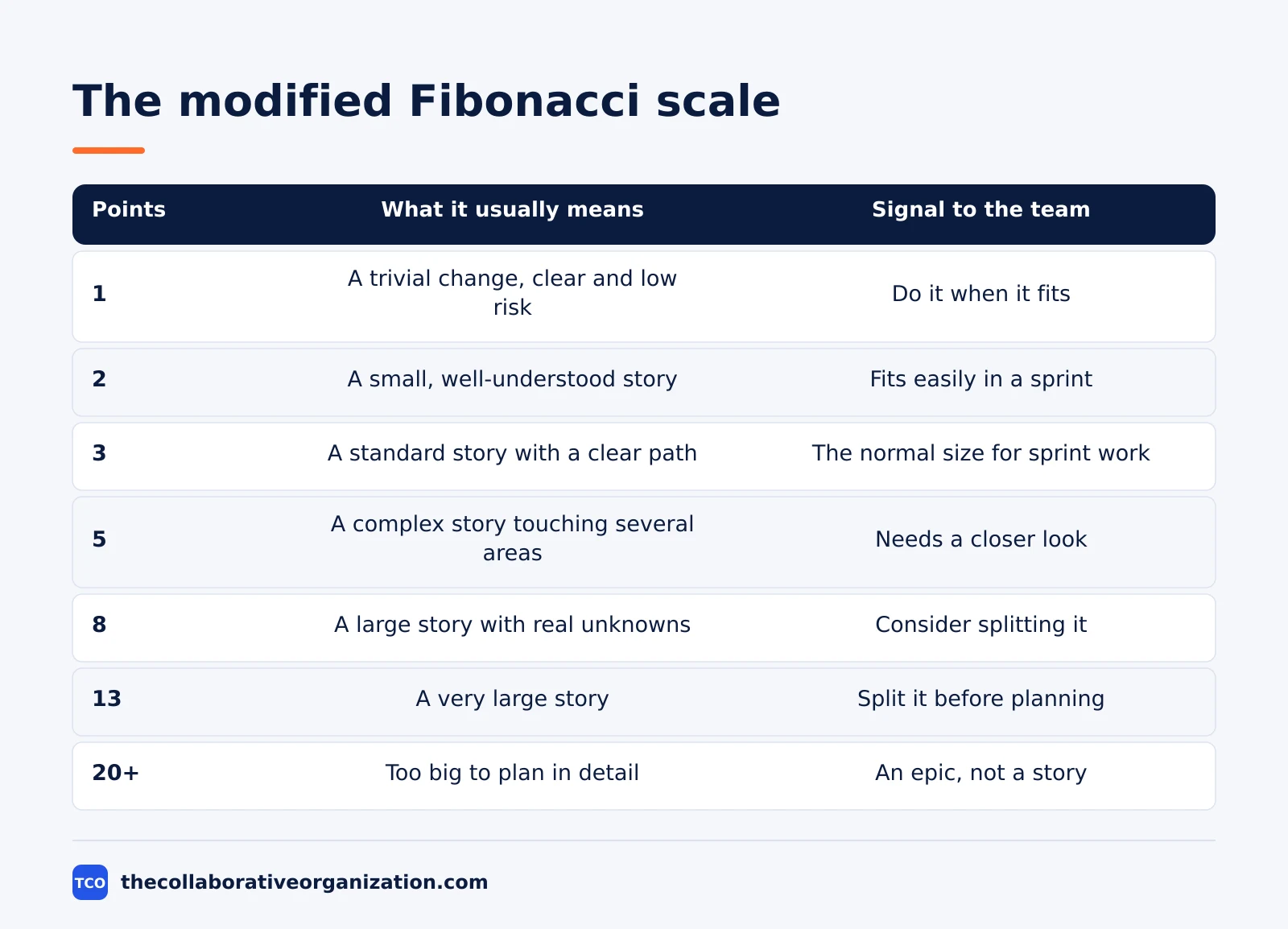
| Points | What it usually means | Signal to the team |
|---|---|---|
| 1 | A trivial change, clear and low risk | Do it when it fits |
| 2 | A small, well-understood story | Fits easily in a sprint |
| 3 | A standard story with a clear path | The normal size for sprint work |
| 5 | A complex story touching several areas | Needs a closer look in refinement |
| 8 | A large story with real unknowns | Consider splitting it |
| 13 | A very large story | Split it before sprint planning |
| 20, 40, 100 | Too big to plan in detail | An epic, not a story |
Mountain Goat Software recommends the modified scale 1, 2, 3, 5, 8, 13, 20, 40, 100. Cohn explains the change at the top: an estimate of exactly 21 implied a precision his teams could not support, so 20 replaced it, with 40 and 100 for very large items.
Some teams use pure Fibonacci up to 21 or 34, and others use t-shirt sizes (XS, S, M, L, XL) for early, rough sizing. The numbers matter less than the gaps between them.
A 13 or higher is a warning, not a size. If a story lands on 13, the team should ask what is unknown and whether the story can be split. A story that scores 20 or more is an epic and belongs back in refinement until its parts are small enough to size honestly.
How story points work in practice
Story points work through baselines: a few finished stories the team agrees on as reference sizes, used to judge every new item. Without baselines, each estimate starts from scratch, and the scale drifts from sprint to sprint.
Pick one or two completed items the team understands well and agree a point value for each. Then ask three questions about every new item: is it like the item called a 2, is it closer to the item called a 5, and what makes it larger or smaller?
Those examples become anchors, and the team stops defining every number on the scale before it starts.
Estimates happen in backlog refinement and sprint planning, and only the people who will do the work vote on the size. The product owner explains the story and answers questions, but does not choose the number.
The usual method is planning poker: each person picks a card in private, all cards are shown at once, and the high and low voters explain their reasons before a second vote.
The tool matters less than the habit, but the points need a home. A project tool keeps the estimate next to the story, the sprint and the acceptance criteria, so the team can see what it committed to and what it finished.
| Tool | Best for | Free plan | Starting price (as of November 2026) | Notable limit |
|---|---|---|---|---|
| Asana | Teams that track story points on each task | Free for 2 people | $10.99 per user per month (Starter), billed annually | Free plan covers 2 people |
| monday.com | Teams that want points on a visual board | Free plan for up to 2 seats | $9 per seat per month (Basic), billed annually | Paid plans need at least 3 seats |
| ClickUp | Teams that want custom fields for points | Free Forever plan | $9 per user per month (Core), billed annually | Yearly billing needed for that price |
The Asana price comes from Asana pricing: the Personal plan is free for 2 users, and Starter is $10.99 per user per month when billed annually. On the monday.com pricing page, Basic is $9 per seat per month billed annually, with a 3-seat minimum.
The ClickUp pricing page lists Core at $9 per user per month billed yearly. If you have not picked a tool yet, compare the options on our project management software shortlist.
Story points vs hours
Story points and hours answer different questions, and swapping one for the other is the most common way teams break their estimates. Points answer how big an item is next to other items; hours answer how long one person will take. A team needs the first question for planning, and the second only for scheduling and billing.
Time estimates fail for a simple reason: people work at different speeds. Mountain Goat Software gives the example of a senior developer who says an item takes a day, while a newer developer says the same item takes a week.
Both can be right, and a compromise of three days is useful to no one. Points skip that argument by asking how large the item is, not who will build it.
Converting points to hours destroys the benefit. If one point secretly means one day, the team starts thinking about who will do the work and how fast that person is.
Stakeholders then treat estimates as commitments, and managers start comparing teams by point totals. Mountain Goat Software is clear: keep the unit abstract and team-specific, then use completed work and velocity to forecast when needed.
Hours still have a place. Use hours for billing a client, for scheduling a release date with a fixed deadline, or for checking what the work really cost after it is done. Use points for sizing the backlog and forecasting how much of it the team can finish in a sprint.
Worked example: sizing five stories
A team of 5 people sizing a checkout feature shows how baselines make points concrete. Imagine the team finished a story last sprint, adding a password-reset email, and agreed it was a 2. That story is the baseline: small, clear, one screen, one email, no risk.
The team now sizes five new stories against it.
- “Show the order total on the cart page” is a 1: less work than the baseline, with no unknowns.
- “Let shoppers apply a discount code” is a 3: a bit bigger than the baseline, with a new rule to test.
- “Add a new payment method” is a 5: several areas touched, plus an outside service the team has not used before.
“Rebuild the checkout flow for guest shoppers” is an 8: large, with real unknowns in how guest data moves through the system. The team splits it into two stories, a 5 and a 3, before it enters a sprint.
“Migrate all payments to a new provider” is a 20: far too big to plan in detail, so it stays an epic until refinement breaks it apart.
The numbers add up to a sprint plan. If the team finished 24 points last sprint, it can take about 24 points into the next one, and the five stories above total 17 points after the split. That leaves room for a few small stories from the backlog.
When to use story points, and when not to
Use story points when the team sizes a backlog of similar work over many sprints, and skip them when the work is one-off or the team needs hours for billing. Points pay off through history: after a few sprints, the team knows how many points it finishes per sprint, and that number turns the backlog into a forecast.
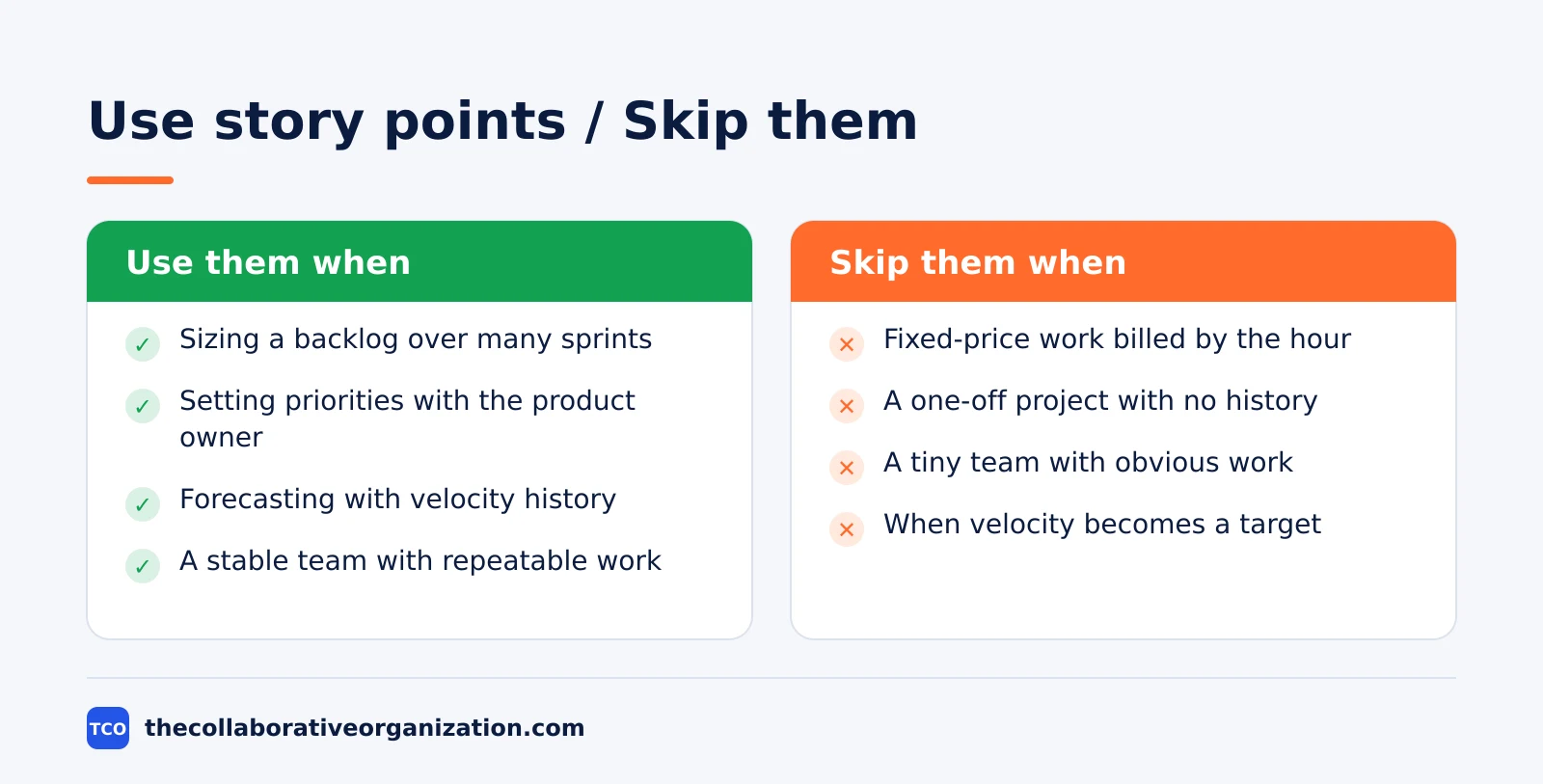
Points fit teams that build software in sprints, with a backlog that lasts months and a team that stays together. They fit when the product owner needs sizes to set priorities, and when people see different risks in the same item.
They also fit when estimates must survive staff changes, since a point describes the work, not the person.
Skip points when the team does fixed-price client work billed by the hour, since the client needs hours, not relative sizes. Skip them when the work is a single project with no repeat, because there is no history to compare against.
Skip them when the team is tiny and the work is obvious: a two-person team that ships one small change a week gains nothing from a formal scale.
Points also fail when leaders misuse them. If velocity becomes a target, teams inflate estimates to hit it. If points become days, the team stops estimating honestly. Mountain Goat Software advises leaders to ask what is preventing the team from delivering valuable work predictably, instead of asking how to increase velocity.
Common story point mistakes to avoid
Most story point problems come from treating points as time, as a target, or as a way to compare teams. The five mistakes below cause most of the damage, and all five are easy to spot in a review.
- Converting points to hours. A 5-point story is not 5 hours or 5 days. The moment the team agrees a conversion, estimates become promises and honesty drops.
- Comparing teams by points. A 5 for one team is not a 5 for another, because each team picks its own baselines. Comparing totals measures nothing real and pushes teams to inflate.
- Using velocity as a performance target. Velocity is a planning number, not a score. Treating it as a target makes the team game the number instead of improving the work.
- Estimating without baselines. Without a few finished stories as anchors, every estimate is a fresh guess and the scale drifts. Pick baselines first, then estimate.
- Counting unfinished work. A story that is 90 percent done counts as zero until it meets the “definition of done”. Partial credit inflates velocity and hides real progress.
Sources
- Mountain Goat Software - Introducing Story Points to a Team (2026)
- Atlassian - Sprint Velocity in Scrum (2026)
- Atlassian - Scrum Poker for Agile Projects (2026)
- Scrum.org - Scrum Glossary (2026)
- Asana - Pricing (2026)
- monday.com - Pricing (2026)
- ClickUp - Pricing (2026)
Frequently asked questions
How many hours is 1 story point?
There is no fixed answer, because a point is a relative size, not a unit of time. Mountain Goat Software says a point does not equal an hour, a day, or a fixed amount of work across teams. One team might finish a 3-point story in a day, while another team needs three days for the same size, and both are right.
Can you compare story points between teams?
No. Points only mean something next to the same team's own past work, because each team picks its own baselines and scale. A 5-point story for one team can be a 3-point story for another team with more experience in that area. Comparing point totals across teams measures nothing real.
Do story points include testing and review?
Yes. A point estimate must cover everything needed to get the item all the way to done, including design, testing, integration, documentation and deployment. Mountain Goat Software is clear that effort means total effort, not coding time alone. A story is not done until it meets the team's quality bar.
What scale should a new team use for story points?
A modified Fibonacci scale of 1, 2, 3, 5, 8, 13, 20, 40 and 100 works well for most teams, and Mountain Goat Software recommends it as a starting point. The widening gaps stop the team debating 6 against 7, which nobody can judge. Pick a scale, pick baselines, and stick with both for several sprints.
Are story points part of Scrum?
No. The Scrum Guide does not mention story points at all. It says only that the Developers who will do the work are responsible for sizing it, and it leaves the unit up to the team. Story points are a common habit used with Scrum, not a rule of Scrum itself.
Related articles

project management
What Is a RACI Matrix? Definition, Roles and Examples (2026)
A RACI matrix maps who is Responsible, Accountable, Consulted and Informed for each task. Learn the four roles, how to build one, and see a worked example.
November 19, 2026 · 9 min read

project management
Daily Standup Meeting Format That Works (2026)
A daily standup is a 15-minute meeting where Developers inspect progress toward the Sprint Goal and plan the next day. Use this format to run one that ends on time.
November 19, 2026 · 10 min read
project management
How to Run a Sprint Planning Meeting (2026)
Sprint planning opens every sprint with a goal, a set of backlog items and a plan. Follow these 6 steps to run the meeting in 90 minutes for a two-week sprint.
November 19, 2026 · 9 min read