Kanban vs Scrum: Key Differences and How to Choose (2026) | The Collaborative Organization
By The Collaborative Organization Team · November 19, 2026 · Last verified November 19, 2026 · 13 min read
Kanban runs work as a continuous flow with WIP limits, while Scrum runs work in fixed-length sprints with defined roles. That one difference shapes everything else: how the team plans, how it handles change, what it measures, and when it releases.
Key takeaways
- Kanban is a flow-based method: teams visualize work, pull the next item when capacity opens, and cap work in progress.
- Scrum is an iterative framework: the team picks work for a time-boxed sprint, works toward a shared sprint goal, then reviews and improves.
- Sprints last one month or less, and most teams run them for 1 to 4 weeks.
- Scrum has three accountabilities, Product Owner, Scrum Master, and Developers, while Kanban has no required roles.
- Kanban metrics are lead time, cycle time, and throughput, while Scrum metrics are velocity, burndown, and sprint goal progress.
- Many teams blend the two into Scrumban, keeping Scrum planning habits plus Kanban WIP limits.
The core difference between Kanban and Scrum
Kanban manages a continuous flow of work, while Scrum manages work in fixed time boxes called sprints. In Kanban, work enters the system when capacity opens and leaves when it is done. In Scrum, work enters at sprint planning and leaves at the end of the sprint.
Atlassian states the split in one line: Kanban is a flow-based method, where teams visualize work on a board, pull the next item only when they have capacity, and use work in progress limits to expose bottlenecks.
Scrum is an iterative framework, where the team selects work from its backlog for a time-boxed sprint and works toward a shared sprint goal.
The rhythm differs too. A Kanban board never resets: it shows the same workflow every day, and cards move across it as they finish. A Scrum board resets each sprint, because it tracks only the work selected for that sprint.
Neither framework wins by default. The right pick depends on how predictable the work is, how often priorities shift, and whether the team needs a regular planning and review cycle.
Kanban vs Scrum: side-by-side comparison
The table below compares the two frameworks on the nine points teams ask about most. Read it row by row, and note which column matches the way your team already works.
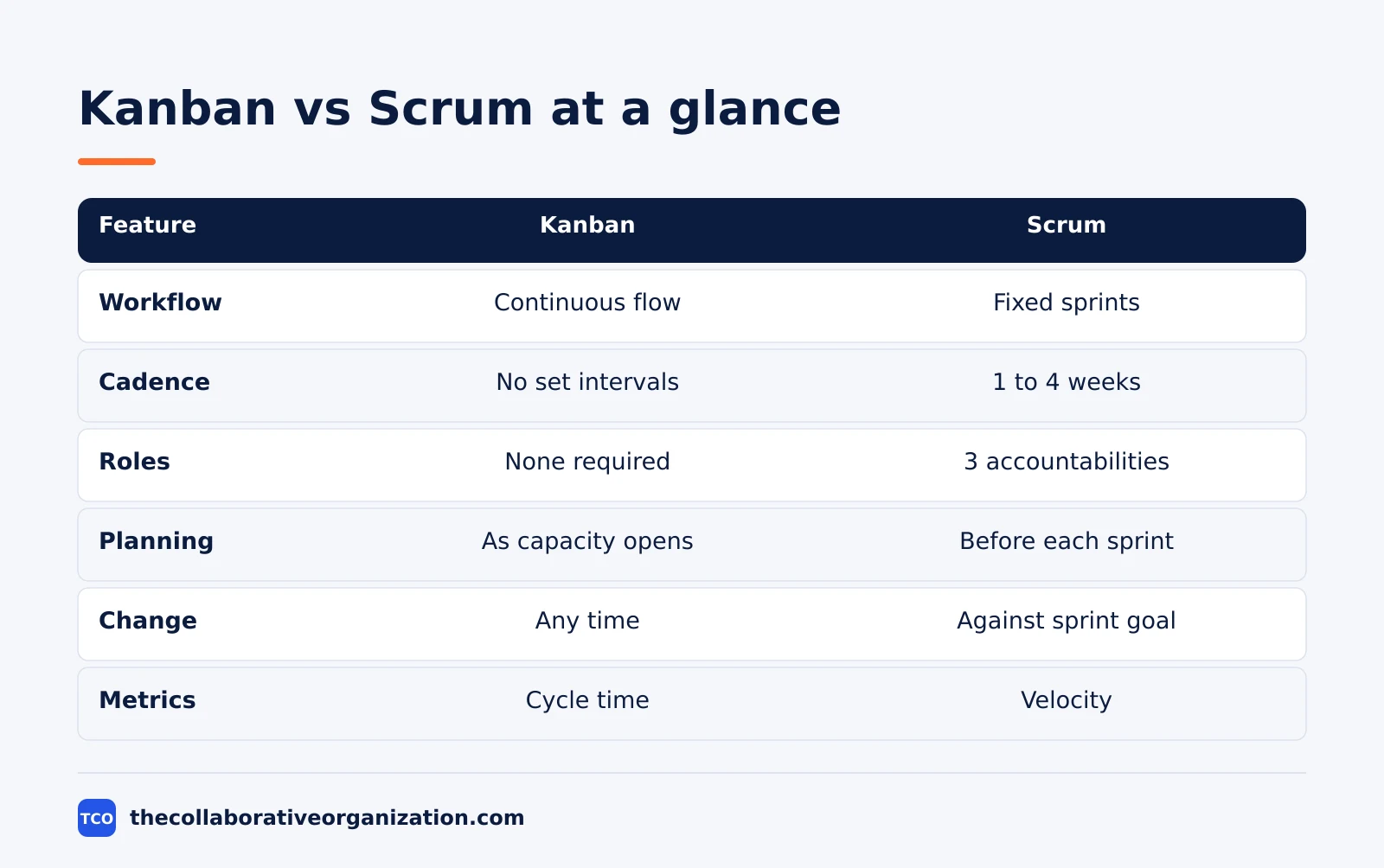
| Feature | Kanban | Scrum |
|---|---|---|
| Workflow style | Continuous flow | Fixed-length sprint cycles |
| Cadence | No set intervals | Sprints of 1 to 4 weeks |
| Best for | Ongoing requests, shifting priorities | Planned increments, product work |
| Roles | No required roles | Product Owner, Scrum Master, Developers |
| Planning | Replenishment as capacity opens | Sprint planning before each sprint |
| Capacity control | WIP limits per stage | Sprint commitment and team capacity |
| Change during work | Priorities can change any time | Changes weighed against the sprint goal |
| Release style | Work releases when ready | Often planned around sprint goals |
| Key metrics | Lead time, cycle time, throughput | Velocity, burndown, sprint goal progress |
Atlassian lists the same split in its comparison table, with one extra row worth noting: a Scrum board tracks the current sprint, while a Kanban board shows the continuous workflow.
The board view follows the cadence, not the other way round.
How Kanban works
Kanban works as a pull system on a board: cards move left to right, and new work starts only when a slot opens. The board shows columns for each workflow stage, cards for each work item, and a WIP limit above each active column.
The method has six general practices: visualize, limit work in progress, manage flow, make policies explicit, implement feedback loops, and improve collaboratively. The two that matter most day to day are visualization and WIP limits, because they make problems visible and force the team to finish work before starting more.
Kanban starts with the process the team already has. It adds no roles, no sprints, and no ceremonies. The team keeps its titles, draws its real workflow on a board, and improves it in small steps based on what the board shows.
That low start-up cost is also a risk. A team that adds a board but never sets WIP limits is not running Kanban, it is running a task list with better lighting. The limit is the part that changes behavior.
How Scrum works
Scrum works in sprints: the team plans a sprint, builds an increment toward a sprint goal, inspects it with stakeholders, and improves its process before the next sprint. The cycle then repeats, with a new sprint starting right after the previous one ends.
The 2020 Scrum Guide defines Scrum as a lightweight framework that helps people, teams, and organizations generate value through adaptive solutions for complex problems. A Scrum Team has one Scrum Master, one Product Owner, and Developers, with no sub-teams or hierarchies, and it is typically 10 or fewer people.
Sprints are fixed-length events of one month or less. During a sprint, no changes are made that would endanger the sprint goal, quality does not decrease, and scope may be clarified and renegotiated with the Product Owner as the team learns more.
Scrum holds five events, each with a timebox for a one-month sprint. The table below lists them with the maximum times from the Scrum Guide.
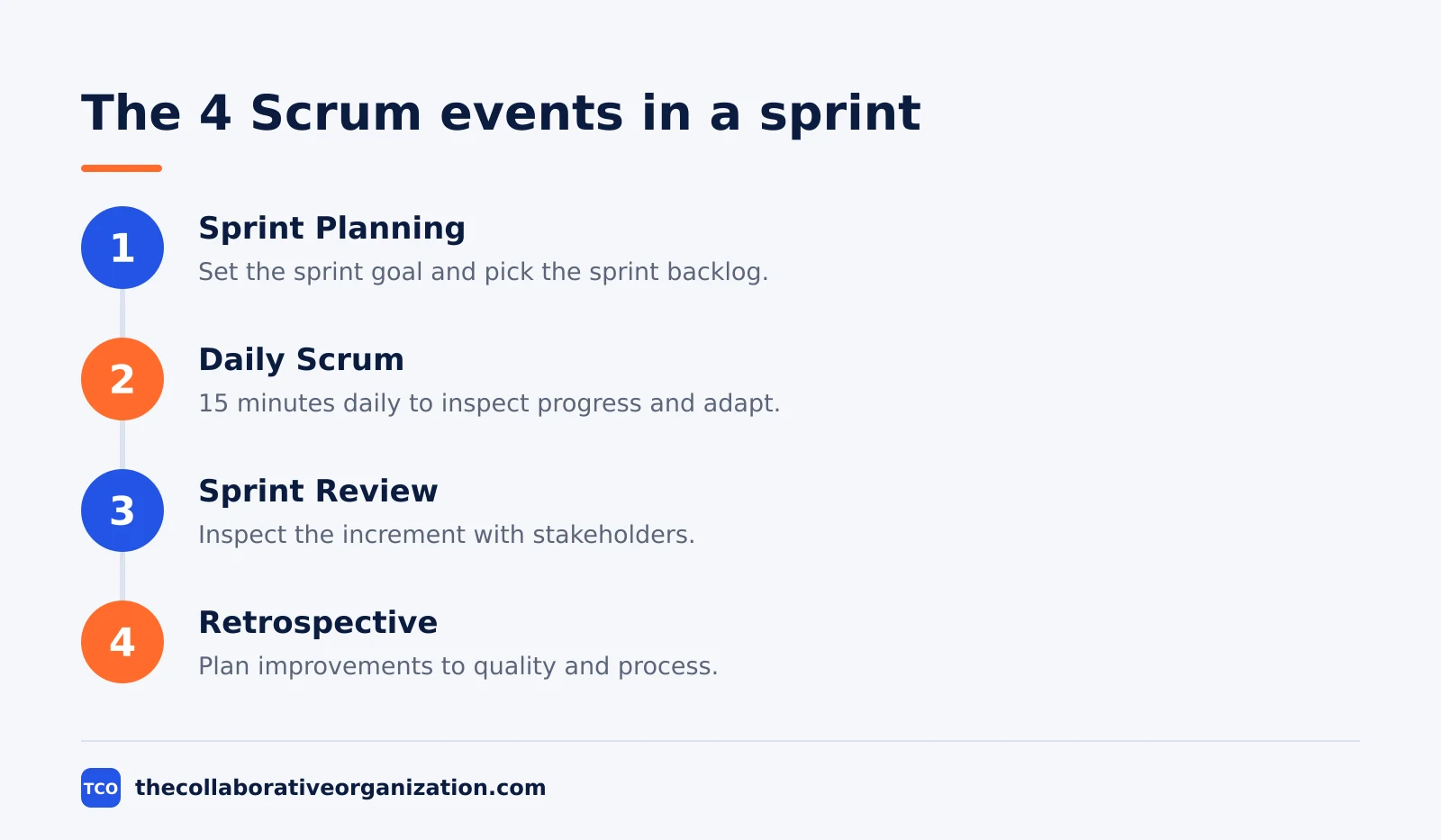
| Event | Timebox (one-month sprint) | Purpose |
|---|---|---|
| Sprint | One month or less | Container for all other events |
| Sprint Planning | Up to 8 hours | Set the sprint goal and sprint backlog |
| Daily Scrum | 15 minutes daily | Inspect progress and adapt the plan |
| Sprint Review | Up to 4 hours | Inspect the increment with stakeholders |
| Sprint Retrospective | Up to 3 hours | Plan improvements to quality and process |
The timeboxes above come from the Scrum Guide 2020, as summarized in the Scrum events guide. Shorter sprints use shorter events, and only the Product Owner can cancel a sprint, when the sprint goal becomes obsolete.
Cadence and planning
Kanban plans continuously, while Scrum plans once per sprint. That difference decides how fast a new priority can reach the team.
In Kanban, planning is replenishment: when a slot opens, the team pulls the next item from the ordered backlog. The product owner can reorder the backlog at any time without disturbing active work, because changes outside the current items do not affect the team.
In Scrum, planning happens at sprint planning, where the team sets a sprint goal and picks the work for the sprint backlog. The sprint then runs its course, and the backlog is reordered between sprints.
This gives the team a protected window to focus, but it also means a new request waits until the next sprint unless it is urgent enough to change the plan.
Teams that release daily or handle support tickets usually find the Kanban rhythm easier. Teams that build features in planned chunks usually find the Scrum rhythm easier, because it creates a clear point to inspect the increment.
Roles and ceremonies
Scrum names three accountabilities and five events, while Kanban names neither. The structure is the point of Scrum, and the lack of it is the point of Kanban.
In Scrum, the Product Owner orders the backlog around customer and business value, and the Product Owner is one person, not a committee. The Scrum Master helps the team use Scrum well and removes impediments. Developers create the increment each sprint and hold each other accountable for the sprint backlog and the “definition of done”.
In Kanban, the team keeps its existing roles and titles. There is no required Product Owner or Scrum Master, and no required meetings. Teams usually add a short daily board review and a regular replenishment meeting, but those are habits the team picks, not rules the framework sets.
The trade-off is clear. Scrum gives a new team a ready-made structure to follow, including who decides what. Kanban gives an existing team freedom to keep its structure, but it asks the team to build its own review habits, and many teams skip that part.
Change and priorities
Kanban accepts change at any time, while Scrum protects the sprint goal from change during the sprint. This is the row that decides most switches between the two.
On a Kanban board, a new urgent item can move into the queue as soon as capacity opens, as long as WIP limits are respected. The board shows the change at once, and the team can see what was delayed to make room for it.
In Scrum, mid-sprint changes are weighed against the sprint goal. The Scrum Guide states that no changes are made during a sprint that would endanger the sprint goal. If the goal becomes obsolete, only the Product Owner can cancel the sprint, and the team then plans a new one.
Atlassian notes the same trade-off: Kanban allows priorities to change whenever capacity opens, but that flexibility works only if the team protects its WIP limits and keeps a clear order for the next item.
Without that order, a Kanban board becomes a pile of urgent work with no sequence.
Metrics: what each framework watches
Kanban teams watch flow, while Scrum teams watch sprint progress. The metrics follow the cadence, so each set answers a different question.
Kanban metrics are lead time, cycle time, throughput, and cumulative flow. Lead time runs from the commitment point to delivery, cycle time runs from work start to done, and throughput counts items finished per period. A cumulative flow diagram shows how many items sit in each stage, so a widening band marks a bottleneck.
Scrum metrics are velocity, burndown, and sprint goal progress. Velocity counts how much the team completes per sprint, and it works as a planning input, not as a score to compare teams. A burndown chart shows work remaining against the days left in the sprint.
Use the wrong metric and the picture misleads. Velocity means little on a Kanban board with no sprints, and cycle time means little if the team never records when work starts. Pick the metric that matches the framework, and record the dates it needs.
Kanban vs Scrum example: two teams, one company
Two teams in one company show how the same work fits a different framework. Imagine a software company with a product team of 6 and a support team of 4, both using the same product.
The product team runs Scrum in two-week sprints. Each sprint starts with planning, where the Product Owner and Developers set a goal such as shipping a new billing page. They hold a 15-minute Daily Scrum each morning, review the increment with stakeholders at the end of the sprint, and hold a retrospective to pick one improvement for the next sprint.
The support team runs Kanban on one board. Requests arrive all day, so the team cannot plan a sprint. They use columns for Backlog, Ready, In Progress, Review, and Done, with a WIP limit of 4 on In Progress. When a request finishes, they pull the next one from Ready, in order of customer impact.
After a month, both teams report. The product team shipped 2 increments and met both sprint goals.
The support team cut its average cycle time from 5 days to 3 days, because WIP limits stopped new requests from piling up behind half-finished ones. This example is an illustration, not a real company, but it shows the split: planned increments suit Scrum, and arriving work suits Kanban.
Choose Kanban if, choose Scrum if
Choose Kanban if work arrives continuously and priorities shift, and choose Scrum if the team builds planned increments and benefits from a sprint goal. The list below turns that rule into a check.
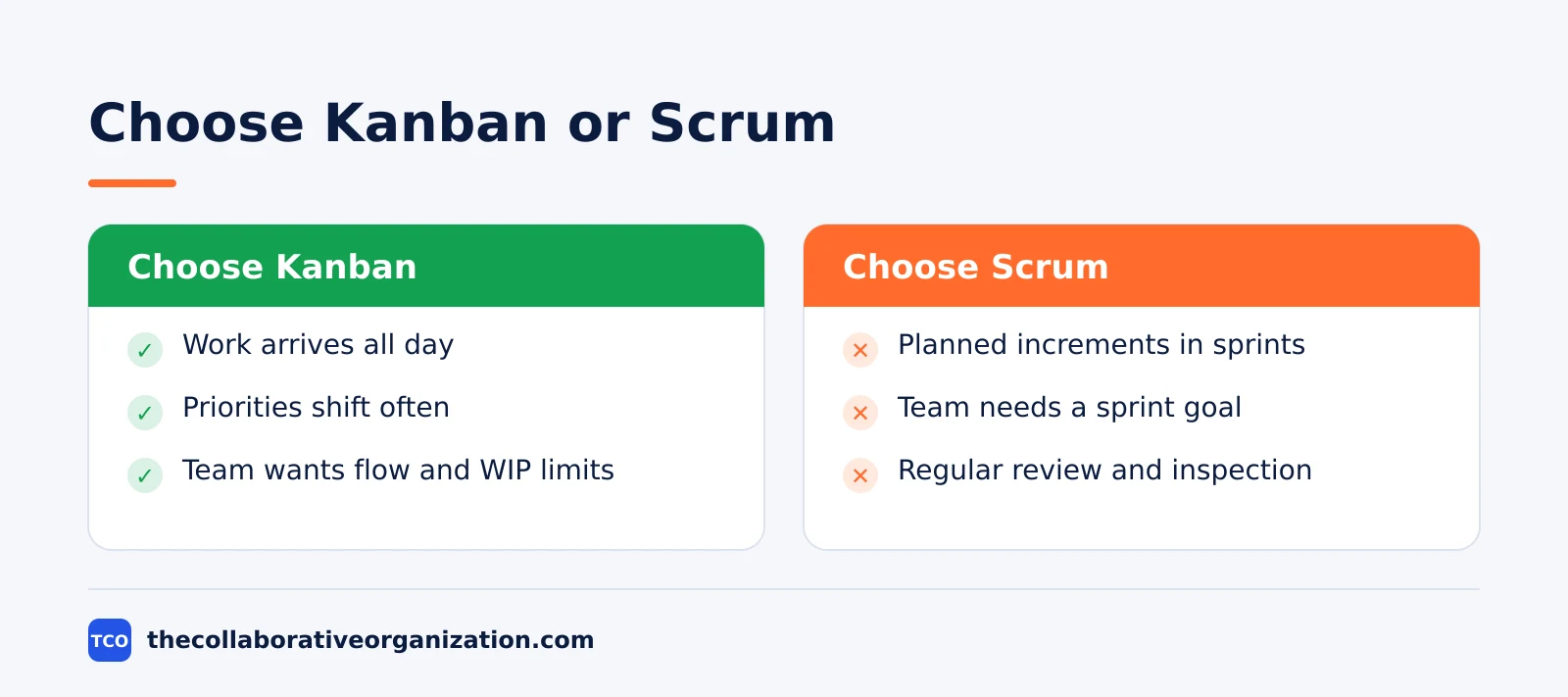
Choose Kanban if the team handles a steady flow of incoming work, needs flexibility to change priorities, wants to improve flow and cut bottlenecks, or works in support, operations, or maintenance. Choose it too if the team wants to start with its current process and change it in small steps.
Choose Scrum if the team benefits from a steady delivery rhythm, explicit sprint goals, and a regular chance to inspect its work. Choose it when the team can break a product outcome into small, usable increments and review each one at the end of a sprint.
If both lists match, start with the one that matches the work the team does most. A team that spends half its week on support tickets and half on features can run Kanban for support and Scrum for features, with separate boards for each.
Can you combine Kanban and Scrum?
Yes, the blend is called Scrumban, and it keeps Scrum planning habits plus Kanban flow rules. Teams use it when they need a regular planning rhythm but cannot protect a fixed sprint scope.
A common Scrumban setup keeps the sprint, sprint planning, and review from Scrum, then adds WIP limits and cycle time tracking from Kanban. The team plans each sprint, but it also caps work in progress inside the sprint, so the board shows bottlenecks before the sprint ends.
Atlassian describes the same blend: teams take fixed-length sprints and roles from Scrum, and focus on work-in-progress limits and cycle time from Kanban. Atlassian also advises teams new to Agile to pick one method first and run it for a while before blending.
One warning applies to any blend. A hybrid that keeps the meetings of Scrum and drops the WIP limits of Kanban gets the admin of both and the benefit of neither. If the team blends, it should name which rules it keeps from each side and write them down.
Tools that support Kanban and Scrum
Most project tools support both frameworks, so pick the tool the team will open every day, not the one with the longest feature list. Our guide on how to choose project management software covers seat counts and free-plan caps before you compare prices.
Compare the options on our project management software shortlist if you have not picked a tool yet. The table below lists starting prices as of November 2026.
| Tool | Best for | Free plan | Starting price (as of November 2026) | Notable limit |
|---|---|---|---|---|
| Jira | Teams that want Scrum and Kanban boards in one place | Free for up to 10 users | $9.70 per user per month (Standard), billed monthly for 1-100 users | Free plan covers 10 users |
| Trello | Simple Kanban boards with lists and cards | Free for up to 10 collaborators | $5 per user per month (Standard), billed annually | No native sprint reports |
| Asana | Teams that want boards plus timelines | Free for 2 people | $10.99 per user per month (Starter), billed annually | Free plan covers 2 people |
| ClickUp | Teams that want boards plus sprint views | Free Forever plan | $9 per user per month (Core), billed annually | Yearly billing needed for that price |
The Jira price comes from TaskRhino, which checked Atlassian’s Jira pricing page on 10 November 2026: Standard is $9.70 per user per month for 1 to 100 users.
The Trello price comes from Trello pricing, where Standard is $5 per user per month billed annually.
The Asana price comes from Asana pricing, where Starter is $10.99 per user per month billed annually.
The ClickUp pricing page lists Core at $9 per user per month billed yearly.
Common Kanban vs Scrum mistakes to avoid
Most teams that struggle with either framework make the same five mistakes, and all five come from copying the board without the rules. Check the list below before switching frameworks.
- Switching frameworks to fix a backlog problem. Poor refinement and oversized work follow the team into Kanban, so fix the backlog first.
- Running Kanban with no WIP limits. A board without limits is a task list, and the team will keep starting work it cannot finish.
- Treating velocity as a productivity score. Velocity is a planning input for one team, not a contest between teams.
- Changing the sprint goal mid-sprint. In Scrum, a change that endangers the goal needs a conversation with the Product Owner, not a quiet edit to the board.
- Blending both without writing the rules down. A hybrid needs named rules from each side, or the team will follow neither set when work gets busy.
Sources
- Atlassian - Kanban vs Scrum: What Is the Difference? (2026)
- Atlassian - What Is Kanban in Project Management? (2026)
- Scrum Guide - The Scrum Guide (2020)
- Scrumdemy - Scrum Events and Timeboxes Explained (2026)
- Atlassian - What Is a Kanban Board? (2026)
- TaskRhino - Jira Review 2026: Pricing, Pros and Cons (2026)
- Trello - Pricing (2026)
- Asana - Pricing (2026)
- ClickUp - Pricing (2026)
Frequently asked questions
What is the main difference between Kanban and Scrum?
Kanban runs work as a continuous flow with WIP limits and no required roles, while Scrum runs work in fixed-length sprints of one month or less with three accountabilities: Product Owner, Scrum Master, and Developers. Kanban accepts priority changes at any time, while Scrum protects the sprint goal during a sprint.
Is Kanban better than Scrum?
Neither is better in general. Kanban fits teams with continuous, unpredictable work such as support and operations, where priorities change daily. Scrum fits teams that build products in planned increments and benefit from a sprint goal and a regular review. The right pick depends on how predictable the work is.
Can a team use Kanban and Scrum together?
Yes. The blend is often called Scrumban. A team keeps Scrum planning habits, such as a regular planning meeting and a review, and adds Kanban flow rules, such as WIP limits and cycle time tracking. It fits teams that need a planning rhythm but cannot protect a fixed sprint scope.
Does Kanban have sprints or roles?
No. Kanban has no sprints and no required roles. Work flows continuously, and the team keeps its current titles and responsibilities. Scrum, by contrast, has sprints of one month or less and three accountabilities, and it holds five events: the Sprint, Sprint Planning, Daily Scrum, Sprint Review, and Sprint Retrospective.
Which metrics do Kanban and Scrum teams track?
Kanban teams track lead time, cycle time, throughput, and cumulative flow, which show how fast work moves and where it piles up. Scrum teams track sprint goal progress, velocity, and burndown trends, which show how much the team completes per sprint and whether it will meet the sprint goal.
When should a team switch from Scrum to Kanban?
Consider Kanban when urgent work repeatedly breaks sprint goals, releases happen continuously, or the team needs clearer flow data. Fix poor backlog refinement or oversized work first, because those problems follow the team into Kanban. Switch only when the work itself arrives continuously and cannot wait for the next sprint.
Related articles

project management
What Is a RACI Matrix? Definition, Roles and Examples (2026)
A RACI matrix maps who is Responsible, Accountable, Consulted and Informed for each task. Learn the four roles, how to build one, and see a worked example.
November 19, 2026 · 9 min read

project management
Daily Standup Meeting Format That Works (2026)
A daily standup is a 15-minute meeting where Developers inspect progress toward the Sprint Goal and plan the next day. Use this format to run one that ends on time.
November 19, 2026 · 10 min read
project management
How to Run a Sprint Planning Meeting (2026)
Sprint planning opens every sprint with a goal, a set of backlog items and a plan. Follow these 6 steps to run the meeting in 90 minutes for a two-week sprint.
November 19, 2026 · 9 min read