How to Write User Stories in Agile (2026) | The Collaborative Organization
By The Collaborative Organization Team · November 19, 2026 · Last verified November 19, 2026 · 12 min read
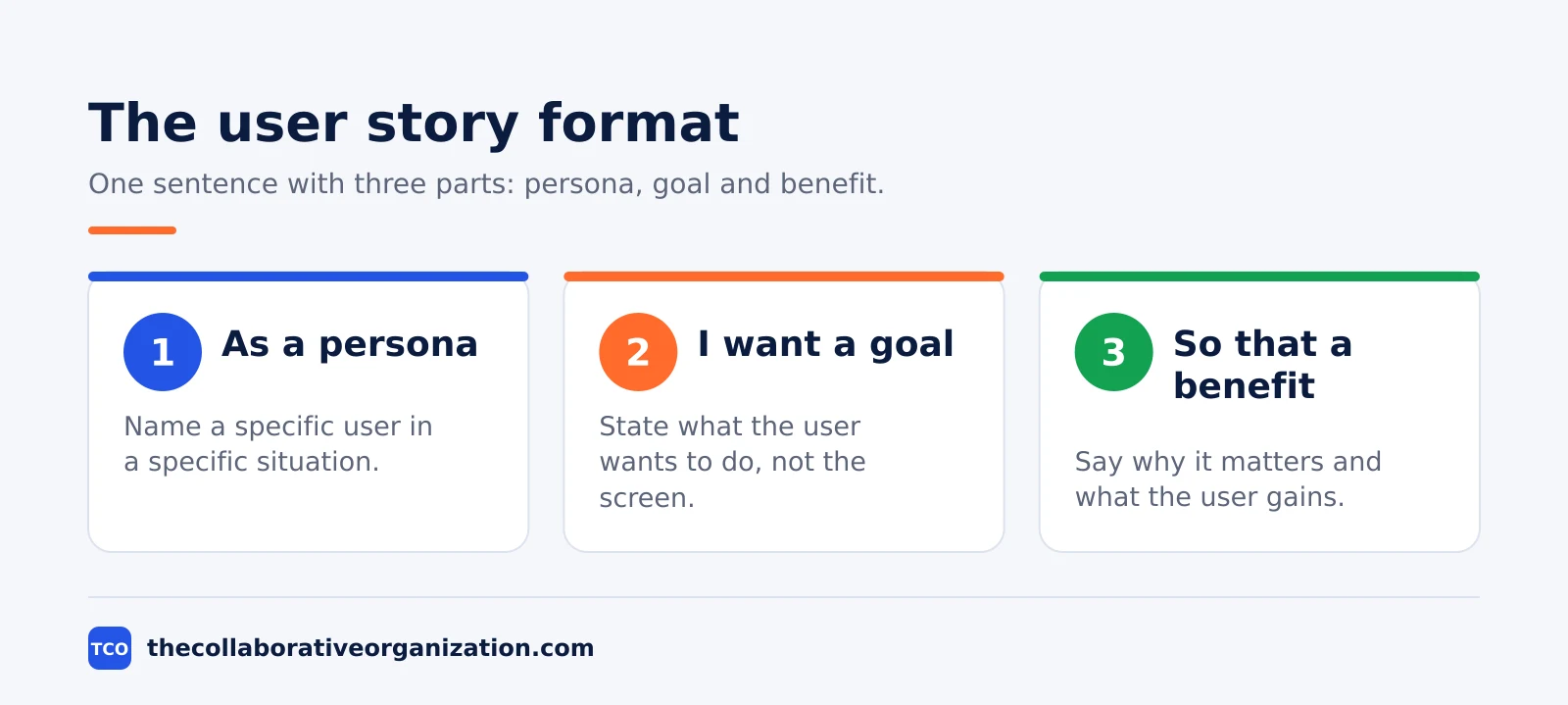
A user story is a short sentence written from a user’s point of view, in the form As a [user], I want [goal], so that [benefit]. It states who wants something, what they want, and why it matters to them. A good story fits in one sprint, and it carries acceptance criteria that show when it is done.
Key takeaways
- A user story is the smallest unit of work in an Agile framework, written as an end goal from the user’s view, not as a feature list.
- The standard format has three parts: a persona, a goal, and a benefit, written as As a [user], I want [goal], so that [benefit].
- Every story needs 2 to 5 acceptance criteria, written so a tester can check them without asking the author.
- The INVEST check from Bill Wake (2003) tests six qualities: Independent, Negotiable, Valuable, Estimable, Small and Testable.
- A story that takes weeks or months to finish is an epic, not a story, and it must be split before it enters a sprint.
What a user story is
A user story is a short, plain-language description of something a user needs, written from that user’s point of view. Atlassian calls it the smallest unit of work in an Agile framework, and an end goal rather than a feature. The story says why the work exists, and the team decides how to build it.
A story is not a specification. Atlassian notes that stories are a few sentences in simple language, and requirements are added later, once the team agrees on them. The story starts the conversation, and the discussion fills in the detail. That is why the same idea is often summed up as the 3 Cs: Card, Conversation and Confirmation.
The Card is the written sentence. The Conversation is the discussion that clarifies the detail. The Confirmation is the acceptance criteria that define when the story is complete. Skip the conversation and the card becomes a guess; skip the confirmation and nobody can tell when the work is done.
Stories also sit inside a larger shape. Epics are large work items broken into a set of stories, and several epics form an initiative. A story that cannot be finished in one sprint belongs one level up, as an epic, until the team splits it into smaller stories.
What you need before you write a user story
Before you write a story, you need a named user, a real problem, and a way to tell when the work is done. Without those three, the sentence is a wish, not a story. Gather them from user interviews, support tickets, or a short talk with the person who asked for the work.
Start with the persona. A job title is not a persona: a new shopper who has never ordered before behaves differently from a returning buyer. Atlassian advises teams to build a shared picture of who the persona is, what they do, and how they think. If two different users need the same thing for different reasons, write two stories.
Next, name the outcome the user wants, not the screen they asked for. A request for a button is a guess about the fix; the need behind it might be to find an order fast. When the story names the outcome, the team can pick a better fix than the one the requester imagined.
Finally, agree on who owns the story and who can answer questions about it. The product owner usually owns the backlog, and the team that builds the story should be able to reach the person who knows the user’s problem. If ownership is unclear across several teams, a RACI matrix can show who decides and who only needs an update.
How to write a user story in 6 steps
Writing a user story takes six steps, and the first three use no tools at all. The steps below take a raw request and turn it into a story the team can estimate, build and test in one sprint.
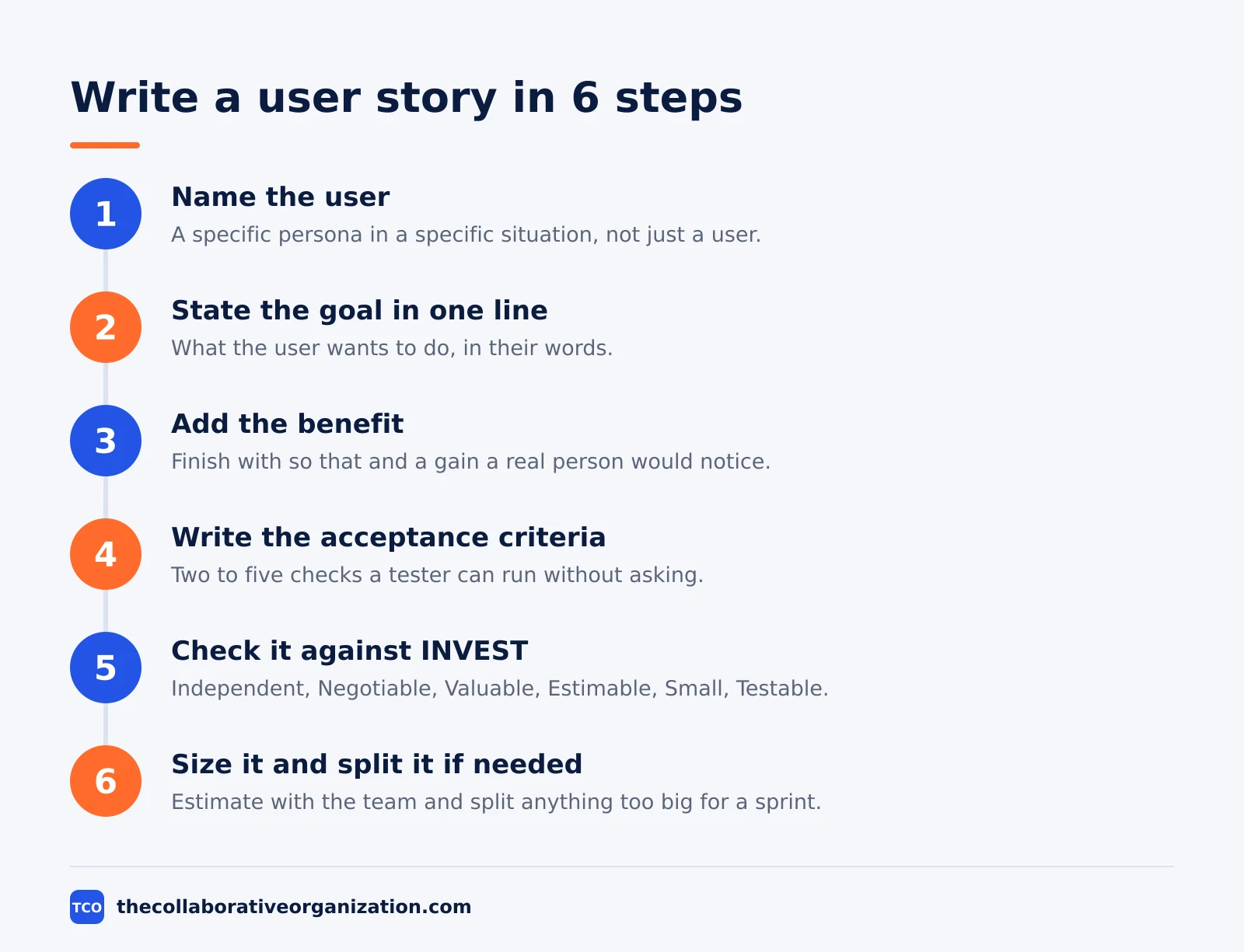
Step 1: Name the user
Write the persona as a specific person in a specific situation, such as a first-time shopper on a phone. The outcome is a persona the whole team pictures the same way. If you cannot name the user, talk to one before you write anything else.
Step 2: State the goal in one line
Write what the user wants to do, in their words, without naming screens, fields or buttons. The outcome is a single sentence that states the goal and nothing else. A goal that needs two sentences is usually two stories.
Step 3: Add the benefit
Finish the sentence with so that, then the reason the goal matters. The outcome is a benefit a real person would notice, such as saving 10 minutes on a weekly task. If no honest benefit exists, the story may not be worth building.
Step 4: Write the acceptance criteria
Add 2 to 5 criteria that state what must be true when the story is done. The outcome is a short list a tester can check without asking the author. Cover the main path, one edge case and one error case.
Step 5: Check the story against INVEST
Run the six INVEST checks from Bill Wake: Independent, Negotiable, Valuable, Estimable, Small and Testable. The outcome is a story that can be built and shipped on its own, sized by the team, and tested by anyone. Fix any letter that fails before the story enters a sprint.
Step 6: Size it and split it if needed
Ask the team to estimate the story, usually with planning poker. The outcome is a size the team agrees on and a story that fits in one sprint. If the estimate is large or the team cannot agree, split the story and return to step 1 for each part.
A full pass through these steps takes about 30 to 60 minutes for a first draft, plus a short refinement session with the team. Most of that time goes to the conversation, not the writing.
How to write acceptance criteria
Acceptance criteria are testable conditions that state what must be true for a story to count as done. They turn a wish into a checkable result. Without them, the story is finished when the loudest person in the room says it is.
Two formats cover most teams. The checklist format lists plain conditions, one per line, such as the wishlist saves an item and shows it on the next visit. The Given/When/Then format writes each condition as a small scene: Given a starting state, When the user acts, Then an observable result follows.
Given/When/Then comes from behaviour-driven development, and it maps cleanly onto automated tests. Each scenario covers one case: the main path, one edge case, and one error.
A login story might read: Given a shopper with a saved wishlist, When they sign in on a new device, Then the wishlist appears with the same items.
Keep criteria tied to the story, not to the whole product. The “definition of done” applies to every story on the team, such as code reviewed and tests passing, while acceptance criteria belong to one story only. Mixing the two makes criteria long and repeats the same lines on every story.
Aim for 3 to 6 criteria per story. More than that usually means the story should be split, because each criterion is a piece of work the team must build and test. A criterion that cannot fail is not a criterion: it is a note.
The INVEST checklist for good user stories
INVEST is a six-letter check from Bill Wake, published in 2003, that judges whether a story is ready to build. Each letter names one quality, and a story that fails one letter needs a fix before it enters a sprint. Wake notes that the check is a prompt for judgement, not a pass mark, since full independence is not always possible.
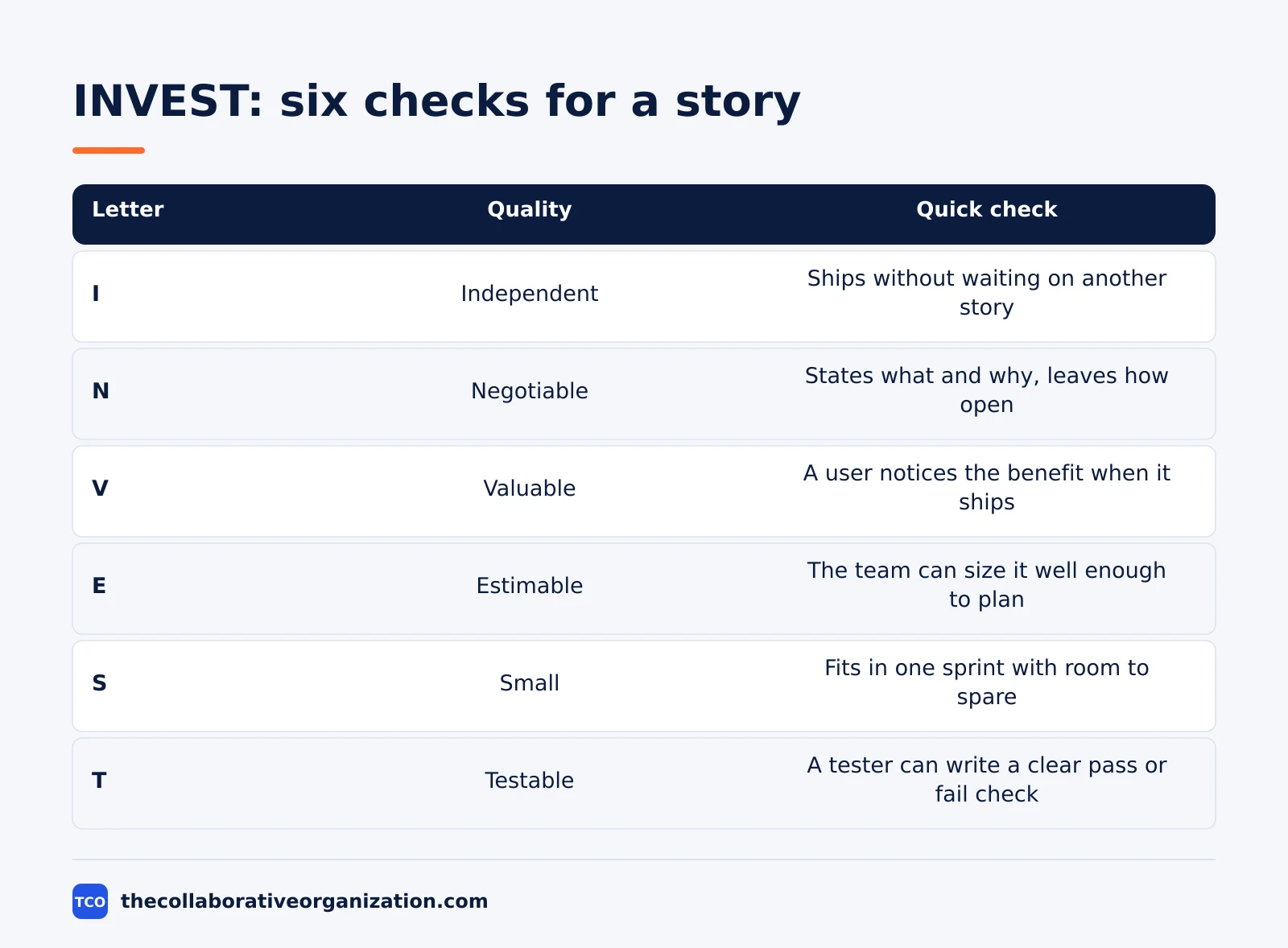
| Letter | Quality | Quick check |
|---|---|---|
| I | Independent | Can this ship without waiting for another story? |
| N | Negotiable | Does it state what and why, and leave how open? |
| V | Valuable | Will a user notice the benefit when it ships? |
| E | Estimable | Can the team size it well enough to plan? |
| S | Small | Does it fit in one sprint with room to spare? |
| T | Testable | Can a tester write a clear pass or fail check? |
Independent means the story can be built and shipped without waiting on another story. If two stories must always ship together, merge them or split them differently. Negotiable means the story is a conversation starter, not a contract: details change during planning without rewriting the whole story.
Valuable means the story delivers something a real user or customer gains. Wake puts it plainly: the value must be value to the customer, not only to the developers. Estimable means the team understands the story well enough to size it; if it cannot, the story is too vague or too large.
Small has a number behind it. Wake writes that good stories typically represent at most a few person-weeks of work, and some teams keep them to a few person-days. Testable means acceptance criteria exist and a tester can verify them without asking the author what done looks like.
Worked example: from an epic to sprint-ready stories
A small team building a wishlist feature shows how one epic becomes three stories that fit in a sprint. Imagine a team of 4 people, working in 2-week sprints, adding a wishlist to an online shop. The epic is “Shoppers can save items and buy them later”, and it is far too big to be one story.
The epic is “Shoppers can save items and buy them later”, and it is far too big to be one story.
The team splits the epic into three stories, one per need.
- Story 1: As a shopper, I want to save an item to a wishlist, so that I can find it again later.
- Story 2: As a shopper, I want to see my saved items on any device, so that I can shop from my phone after browsing on a laptop.
- Story 3: As a shopper, I want to remove an item from my wishlist, so that the list stays short and useful.
Each story gets its own acceptance criteria. Story 1 needs three: Given a shopper viewing an item, When they tap Save, Then the item appears in their wishlist.
Given a shopper who is not signed in, When they tap Save, Then they are asked to sign in first. Given an item already saved, When they tap Save again, Then the item is not added twice.
Story 2 is the risky one, because syncing across devices is where the hidden work lives. The team estimates it higher than the other two, and the product owner agrees to cut the email reminder idea out of this sprint. That is the Negotiable letter working as intended: the story keeps its goal, and the scope shrinks to fit.
How do you tell the stories worked? Count stories that pass their criteria on the first review, and count how many stories come back for rework in the same sprint. A team that writes clear stories sees few returns, because the criteria settled what done meant before the work started.
Tools that hold your user stories
A story lives where the team already works, so pick a tool the team opens every day. A shared doc works for a first backlog, but a project tool keeps stories next to estimates, sprints and acceptance criteria. Our guide on how to choose project management software covers seat counts and free-plan caps.
If you have not picked a tool yet, compare the options on our project management software shortlist before you move the backlog. The right tool is the one the team will update, not the one with the longest feature list.
| Tool | Best for | Free plan | Starting price (as of November 2026) | Notable limit |
|---|---|---|---|---|
| Asana | Teams that track stories with owners and due dates | Free for 2 people | $10.99 per user per month (Starter), billed annually | Free plan covers 2 people |
| monday.com | Teams that want stories on a visual board | Free plan for up to 2 seats | $9 per seat per month (Basic), billed annually | Paid plans need at least 3 seats |
| ClickUp | Teams that want custom fields on each story | Free Forever plan | $9 per user per month (Core), billed annually | Yearly billing needed for that price |
The Asana price comes from Asana pricing: the Personal plan is free for 2 users, and Starter is $10.99 per user per month when billed annually. On the monday.com pricing page, Basic is $9 per seat per month billed annually, with a 3-seat minimum. The ClickUp pricing page lists Core at $9 per user per month billed yearly.
Most teams also size stories in the same tool, using planning poker cards or a points field. Atlassian describes planning poker as a consensus technique where each person picks a card in private, then all cards are shown at once. The deck Cohn recommends runs 0, 1, 2, 3, 5, 8, 13, 20, 40 and 100.
Common user story mistakes to avoid
Most bad stories fail in the same five ways, and all five are easy to spot before a sprint starts. Run through the list below each time a story is drafted.
- Writing a solution, not a need. A story that names buttons, fields and screens leaves the team nothing to decide. Name the outcome and let the team choose the fix.
- A vague persona. “As a user” fits everyone and helps no one. Name the person and the situation, such as a first-time shopper on a phone.
- No benefit in the so that clause. If the benefit is “so that the feature exists”, the story has no reason to be built. Find the real gain or drop the story.
- Acceptance criteria that cannot fail. “The page should be fast” cannot be checked. Write a number and a condition, such as the wishlist loads in under 2 seconds on a phone.
- An epic dressed as a story. A story that needs a whole quarter is an epic. Split it until each part fits in one sprint and delivers value on its own.
Sources
- Atlassian - User Stories With Examples and a Template (2026)
- Bill Wake - INVEST in Good Stories, and SMART Tasks (2003)
- Atlassian - Scrum Poker for Agile Projects (2026)
- Mountain Goat Software - Introducing Story Points to a Team (2026)
- Asana - Pricing (2026)
- monday.com - Pricing (2026)
- ClickUp - Pricing (2026)
Frequently asked questions
How long should a user story be?
One to three sentences is enough for the story itself, plus two to five acceptance criteria. Atlassian describes a user story as a few sentences in simple language that outline the desired outcome. If the story needs a page of detail, it is probably an epic or several stories hiding in one sentence.
Who writes user stories?
The product owner, product manager or program manager usually writes the first draft, then the team refines it together. Atlassian notes that stories are written by the product owner, product manager or program manager and submitted for review. Anyone who talks to users can draft one, but the team that builds it should agree on the final wording.
Do user stories replace requirements documents?
No. A user story is a short note that starts a conversation, not a full specification. Atlassian says requirements are added later, once the team agrees on them. The story, the discussion and the acceptance criteria together hold the detail that a requirements document used to hold.
How many acceptance criteria should a story have?
Two to five criteria cover most stories: the main path, one edge case and one error case. More than six usually means the story is too big and should be split. Each criterion must state an outcome a tester can check without asking the author what it means.
What is the difference between a user story and a task?
A user story describes value for a user, while a task describes work for the team. A story might be that a shopper can save items to a wishlist, and its tasks might be to build the save button, add the wishlist page and write the tests. Several tasks can sit under one story.
Related articles

project management
What Is a RACI Matrix? Definition, Roles and Examples (2026)
A RACI matrix maps who is Responsible, Accountable, Consulted and Informed for each task. Learn the four roles, how to build one, and see a worked example.
November 19, 2026 · 9 min read

project management
Daily Standup Meeting Format That Works (2026)
A daily standup is a 15-minute meeting where Developers inspect progress toward the Sprint Goal and plan the next day. Use this format to run one that ends on time.
November 19, 2026 · 10 min read
project management
How to Run a Sprint Planning Meeting (2026)
Sprint planning opens every sprint with a goal, a set of backlog items and a plan. Follow these 6 steps to run the meeting in 90 minutes for a two-week sprint.
November 19, 2026 · 9 min read