What Are WIP Limits in Kanban? Definition and Examples (2026) | The Collaborative Organization
By The Collaborative Organization Team · November 19, 2026 · Last verified November 19, 2026 · 11 min read
A WIP limit is a cap on how many work items can sit in one stage of a Kanban workflow at the same time. When a column reaches its limit, nobody pulls new work into it until something moves out. The team finishes what it started before it starts anything new.
Key takeaways
- WIP stands for work in progress: items started but not finished, as defined in the Kanban Guide from May 2025.
- A WIP limit is a number shown above a board column, and a full column is a pull signal to help finish work, not start more.
- Little’s Law says average cycle time equals average WIP divided by average throughput, so fewer items in progress means faster delivery at the same pace.
- A safe first limit is about one item per person doing the work in that stage, or a little below the current average.
- Blocked items usually still count toward the limit, which forces the team to unblock work instead of working around it.
What a WIP limit is
A WIP limit is the maximum number of work items allowed in one defined part of a workflow at one time, such as a board column, a swimlane or the whole system. Once the limit is reached, nobody pulls new work into that part until an item moves on. The Kanban Guide from May 2025 defines WIP as the number of work items started but not finished, and it requires teams to control that number between their agreed start and finish points.
The limit usually appears as a number in the column header, for example “In Progress (3)”. A gap below the limit is a pull signal: someone in that stage has room and may take the next item from the column to the left. Kanban treats this as one of its core practices, next to visualising work and managing flow.
A WIP limit does not tell the team what to work on next. It tells the team when to stop starting things and start finishing the ones already in flight. That one change is the whole point of the practice.
Why WIP limits work: Little’s Law
WIP limits work because of a piece of queueing maths called Little’s Law, which links how much work is in flight to how long each item takes. The law says average cycle time equals average WIP divided by average throughput. John D. C. Little proved it in 1961, and it holds for any stable queue, from supermarket checkouts to software teams.
Take a team with 24 items in progress that finishes about 6 items a week. Its average cycle time is 24 divided by 6, which is 4 weeks.
If the team cuts WIP to 12 and still finishes 6 a week, the average cycle time falls to 2 weeks. Nobody worked faster. The queue simply got shorter.
Throughput is bounded by the team, so it cannot double in a week by wishing. WIP is the variable the team can move right away.
Halve the number of things in progress and, all else equal, cycle time roughly halves. The formula describes averages, so it holds when the system is fairly stable and items that start do finish.
Types of WIP limits
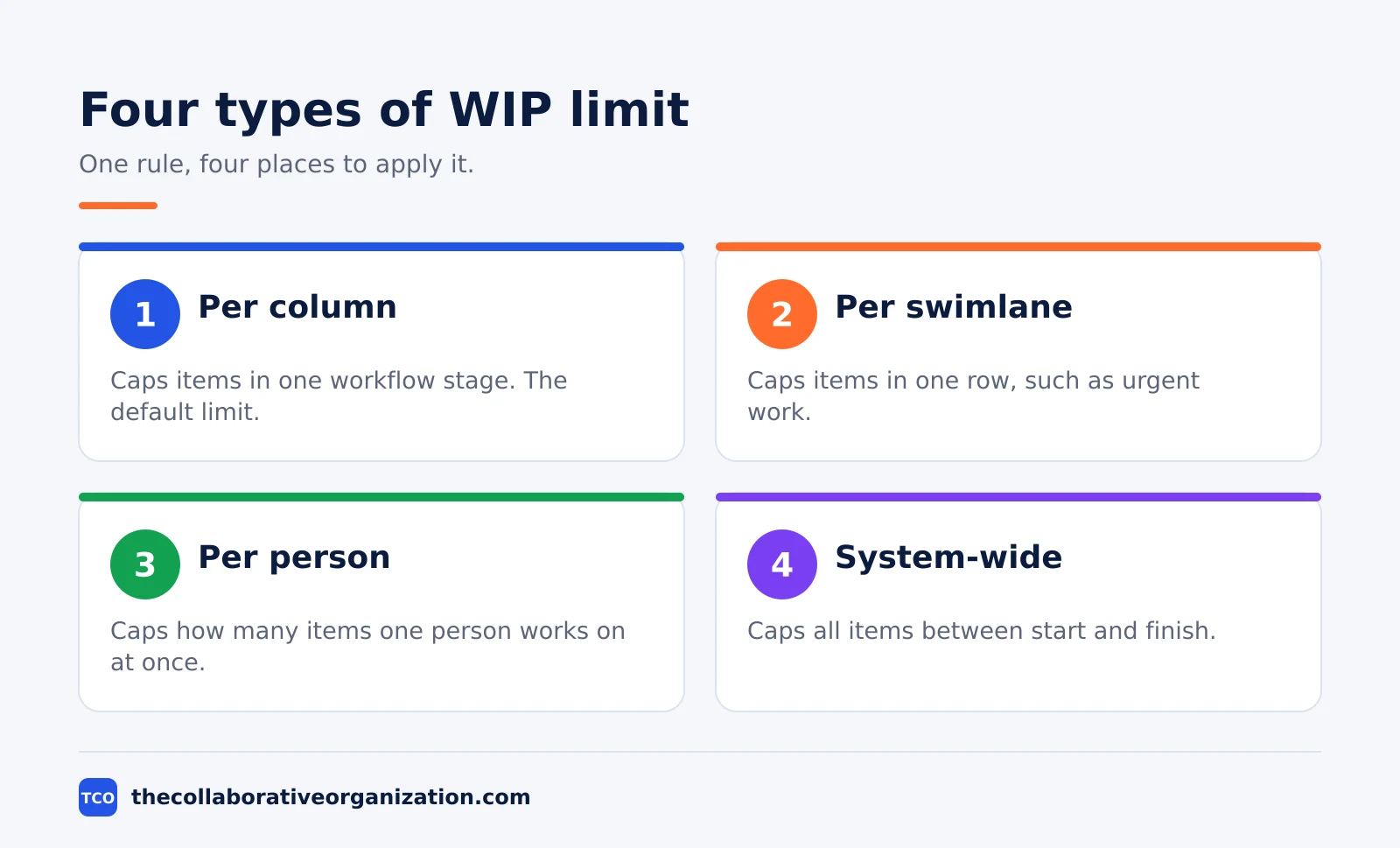
A WIP limit can sit on a column, a swimlane, a person, a type of work or the whole system, and most teams use more than one kind at once. The Kanban Method guide describes a WIP limit as a policy that constrains the amount of work allowed in a given part of the system, and the part can be any slice the team chooses.
| Limit type | What it caps | When to use it |
|---|---|---|
| Per column | Items in one workflow stage | Every board, as the default limit |
| Per swimlane | Items in one row, such as one class of work | When urgent work needs its own lane |
| Per person | Items one person works on at once | When people juggle too many cards |
| System-wide | All items between start and finish | When the whole board is overloaded |
A per-column limit is the most common kind, because the board makes it visible. A per-person limit helps when one specialist holds five cards while others hold one. A system-wide limit caps the total, which stops work piling up in the backlog columns even when no single column looks full.
How to set WIP limits in 5 steps
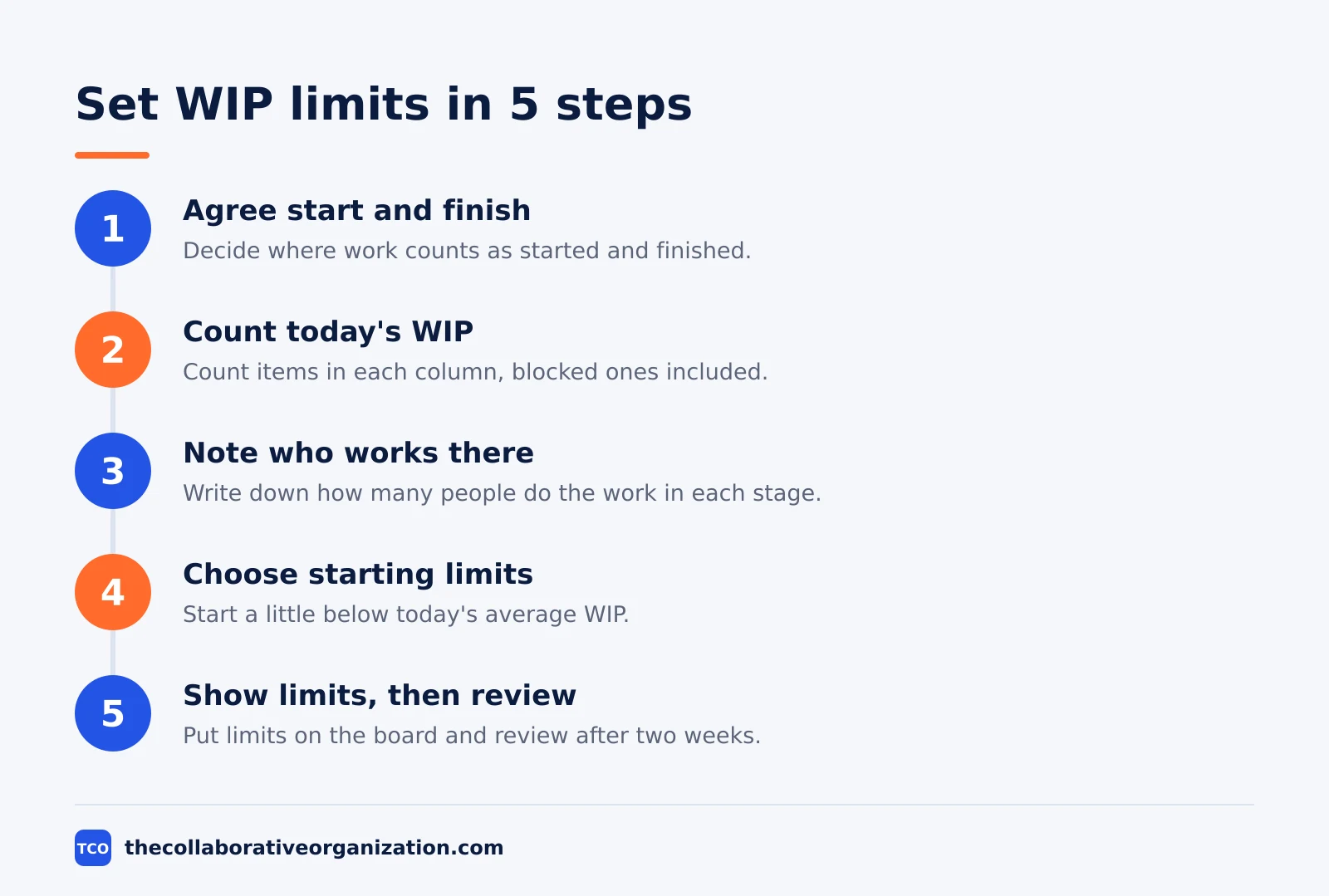
Setting a WIP limit takes five steps, and the first two use no numbers at all. There is no formula that gives the perfect number, so the aim is a sensible starting point that is low enough to change behaviour, then adjustment based on data.
Step 1: Agree the start and finish points
Decide where work counts as started, often when it leaves Ready, and where it counts as finished, often Done or Released. WIP is everything in between, so the team must agree on those two points first.
Step 2: Count today’s WIP
Count the items in each column, including blocked and waiting items. Where you can, take the average over the last two to four weeks rather than a single day, so one busy day does not set the limit.
Step 3: Note who works in each stage
Write down how many people actually do the work in each column. A column staffed by one specialist needs a much lower limit than one staffed by four people, and a review column staffed by one person is often the tightest spot on the board.
Step 4: Choose starting limits
A common starting point is a little below today’s average WIP, or roughly one to one and a half items per person in each active stage. Avoid halving WIP overnight: a cut of 20 to 30 percent is usually enough to change behaviour without stalling the team.
Step 5: Make the limits visible and review them
Put each limit in the column header, highlight columns that are at or over their limit, and write the policies on or beside the board. Run for two to four weeks, track cycle time, throughput, blocked items and every limit breach, then adjust one or two limits at the next review.
WIP limits by board column: a starting table
**A five-person team can start with the limits below, then adjust them after two weeks of real data.
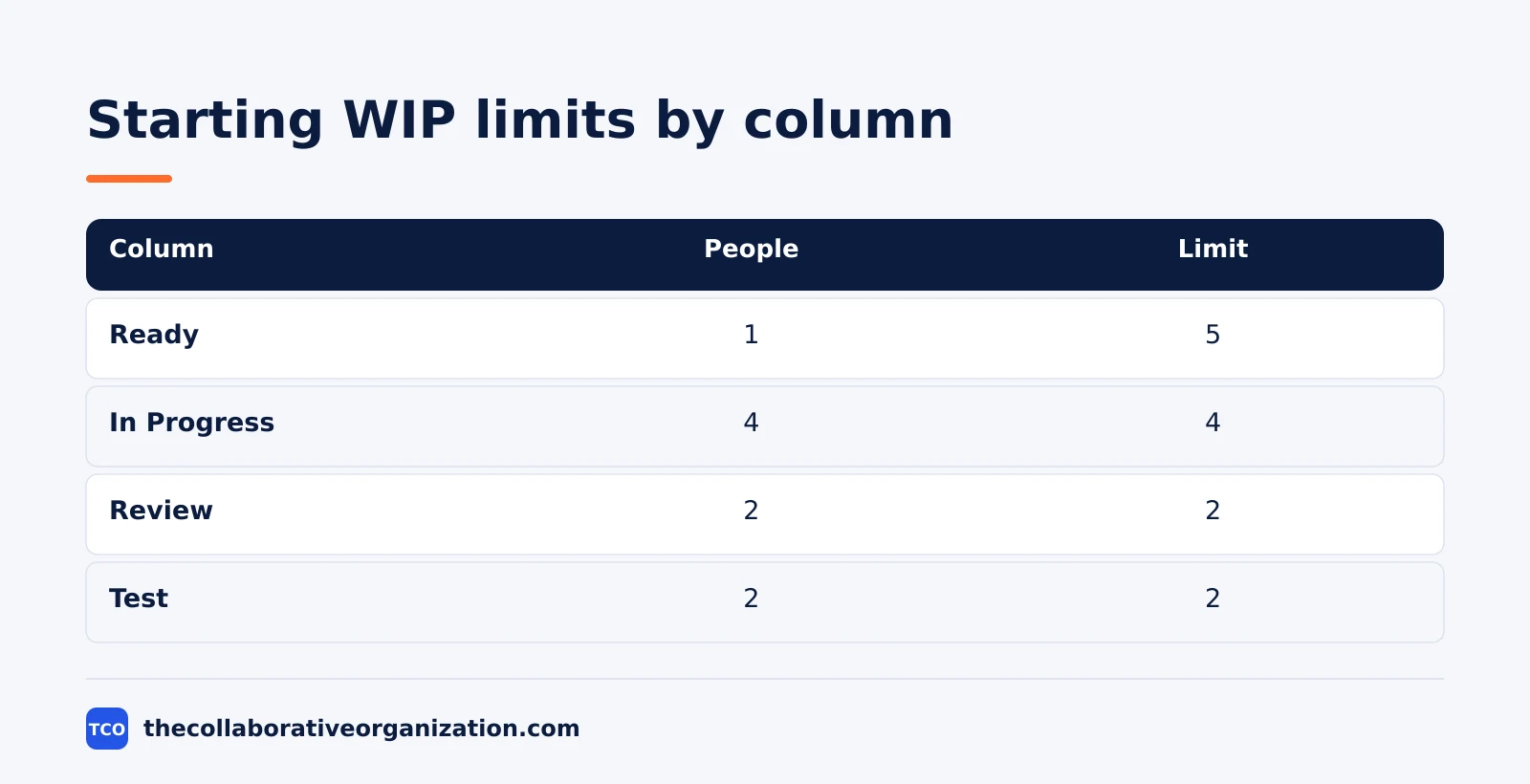
The numbers follow the one-item-per-person rule, with tighter limits on review and test, where work tends to pile up.
| Column | People in stage | Starting WIP limit | Why |
|---|---|---|---|
| Ready | 1 | 5 | A small queue keeps the next work visible |
| In Progress | 4 | 4 | One item per developer |
| Review | 2 | 2 | Review is the usual bottleneck |
| Test | 2 | 2 | Testing stalls when too many items wait |
| Done | - | No limit | Finished work needs no cap |
The Agile Alliance glossary gives the classic example behind the test column: if a testing column has a limit of two, the team may not start testing a third story while two are already being tested. Our guide on how to set up a Kanban board shows how to lay out these columns in a tool.
WIP limit example: a team of four developers
A four-person team with 20 items in progress and a throughput of 5 items a week shows what a limit changes in plain numbers. The example below is an illustration, not a real team, and the maths comes straight from Little’s Law.
Before limits, the board holds 20 cards in flight. Average cycle time is 20 divided by 5, which is 4 weeks. Cards wait in Review for days because two reviewers face eight cards, and new work keeps arriving.
The team sets limits of 4 for In Progress, 2 for Review and 2 for Test, which caps WIP at 8 plus a small Ready queue. After three weeks, throughput is still about 5 items a week, but average cycle time is now about 8 divided by 5, which is under 2 weeks.
The reviewers no longer face a pile, and a full Review column tells the developers to help review instead of starting new code.
What to do when a column is full
A full column is a signal to talk, not a reason to break the rule in silence. The team has four honest options, and it should pick one together rather than quietly pulling a new card.
- Swarm the stuck work. Developers help with reviews or tests until the column clears.
- Unblock the blocked card. Find the person or answer that is holding it up and chase that first.
- Move a card back. If the work is not ready, send it back to Ready and free the slot.
- Raise the limit on purpose. If the limit was wrong, change it in the open and note why, then review it again in two weeks.
Expedite items need a rule too. Decide in advance whether an urgent card counts toward the limit and how many expedite slots exist. One slot is normal. Three slots means the limit is fiction.
Tools that enforce WIP limits
Most Kanban tools let you set a number on a column, and some block the move when the column is full. A tool that only shows the number still helps, because the team can see the breach and act on it. Compare the options on our project management software shortlist before you pick one.
| Tool | Best for | Free plan | Starting price (as of November 2026) | Notable limit |
|---|---|---|---|---|
| Jira | Software teams that want WIP limits on Scrum and Kanban boards | Free for up to 10 users | $9.70 per user per month (Standard), billed monthly for 1-100 users | Price falls only above 100 users |
| Asana | Teams that want board limits next to timelines and goals | Free for 2 people | $10.99 per user per month (Starter), billed annually | Free plan covers 2 people |
| monday.com | Teams that want a visual board with status columns | Free plan for up to 2 seats | $9 per seat per month (Basic), billed annually | Paid plans need at least 3 seats |
| ClickUp | Teams that want custom WIP rules per list and status | Free Forever plan | $9 per user per month (Core), billed annually | Yearly billing needed for that price |
The Jira price comes from the Jira pricing page: Standard is $9.70 per user per month billed monthly for 1 to 100 users, after Atlassian raised list prices on 13 October 2026.
Asana lists Starter at $10.99 per user per month billed annually on its pricing page. The monday.com pricing page lists Basic at $9 per seat per month billed annually, and the ClickUp pricing page lists Core at $9 per user per month billed yearly.
WIP limits vs no limits: what changes
A board with no limit is a to-do list, while a board with limits is a flow system, and the difference shows up in the numbers. What is Kanban explains the board itself; limits are the practice that turns the board into Kanban.
Without limits, every new request lands in In Progress on day one, cards age quietly, and nobody knows which item matters most. With limits, the board shows the real state of work: a full column names the bottleneck, an empty column names the spare capacity, and the team moves people to the problem instead of starting more work.
A burndown chart can show the same story over a sprint, but WIP limits act every day, not at the end of a sprint. The two work well together: the limit keeps flow healthy, and the chart shows whether the sprint will land.
Common WIP limit mistakes to avoid
Most WIP limits fail in the same five ways, and all five are easy to spot in a review. Run through the list below each time the board changes.
- Setting the limit at today’s WIP. A limit that matches the current pile changes nothing. Start a little below the average.
- Counting only active cards. Blocked and waiting cards are still WIP. Leave them out and the limit hides the real queue.
- Breaking the limit in silence. Every quiet exception teaches the team that the number means nothing. Change it in the open or hold it.
- One limit for the whole board. A single number cannot fit a four-person build column and a one-person review column. Set limits per stage.
- Never reviewing the limits. A limit set in January may be wrong by March. Review it every two to four weeks with the flow data.
Sources
- Neural Project Institute - WIP Limits in Kanban: How to Set Them, With Examples (2026)
- Rework - WIP Limits: How to Set Them in Kanban (2026)
- CS Learning Portal - Kanban and Extreme Programming (2026)
- Federico Calo - Kanban Method: Continuous Flow and WIP Limits (2026)
- Anatomy IT - Kanban: WIP Limits, Flow Metrics, SLE and the 7 Cadences (2026)
- Atlassian - Jira Pricing (2026)
- Asana - Pricing (2026)
- monday.com - Pricing (2026)
- ClickUp - Pricing (2026)
Frequently asked questions
What is a good WIP limit to start with?
Start with about one item in progress per person doing the work in that stage, or a little below the current average number of items in the column. Run with that limit for two to four weeks, watch cycle time and throughput, then tighten or loosen it by one item at a time.
Do blocked items count toward a WIP limit?
Yes, in most teams they do. A blocked card still takes up a slot, and that is the point: the limit forces the team to unblock it instead of starting fresh work around it. Agree this rule in writing before you set the limit, so nobody argues about it later.
What happens when a Kanban column hits its WIP limit?
Nobody pulls new work into that column until something moves out. The team swarms the stuck work, helps finish it, or clears the blocker. The limit is a signal to talk, not a wall, so the team decides together what to do next.
Are WIP limits required in Kanban?
Yes, in some form. The Kanban Guide from May 2025 says teams must explicitly control the number of work items between their agreed start and finish points. A number on each column is the usual way, but a written rule such as one item per person also counts.
Can one person have a WIP limit?
Yes. A personal WIP limit caps how many items one person works on at once, often one or two. It works the same way as a column limit: finish one item before you start the next, so nothing sits half done for weeks.
Related articles

project management
How to Choose Project Management Software (2026)
Pick project management software in seven steps: define the work, count seats, price the real cost, and run a two-week pilot before you pay.
November 19, 2026 · 10 min read

project management
What Is a RACI Matrix? Definition, Roles and Examples (2026)
A RACI matrix maps who is Responsible, Accountable, Consulted and Informed for each task. Learn the four roles, how to build one, and see a worked example.
November 19, 2026 · 9 min read

project management
Daily Standup Meeting Format That Works (2026)
A daily standup is a 15-minute meeting where Developers inspect progress toward the Sprint Goal and plan the next day. Use this format to run one that ends on time.
November 19, 2026 · 10 min read